


Added on October 25, 2010, 8:22 pm@verdangilte, Can you check the same thing for me? Thank you.
This post has been edited by kizwan: Oct 25 2010, 08:24 PM
Asus A | U | N series combined thread V2, New model coming in.....
|
|
 Oct 25 2010, 08:21 PM Oct 25 2010, 08:21 PM
|
 
Senior Member
826 posts Joined: Jan 2009  
|
@budingyun, I need your help. Please check in Device Manager, under System Devices. Can you see SMBUS controller/device? I'm currently communicating with asus support via email on this matter. Thank you.
Added on October 25, 2010, 8:22 pm@verdangilte, Can you check the same thing for me? Thank you. This post has been edited by kizwan: Oct 25 2010, 08:24 PM |
|
|
|
|
|
Oct 25 2010, 09:12 PM
|

Senior Member
3,244 posts Joined: Aug 2008
|
what is the average boot time for a42jv? usually how long do you all stay after the Starting windows logo animation finishes (i mean after it turns and the windows logo comes out, then until it turns to the blue screen with the word "welcome"?) i suspect that my boot time is very slow. if it is only me, i will send to ASUS service centre tmr
|
|
|
Oct 25 2010, 09:56 PM
|

Junior Member
122 posts Joined: Sep 2008
|
QUOTE(RedDevils88 @ Oct 25 2010, 09:12 PM) what is the average boot time for a42jv? usually how long do you all stay after the Starting windows logo animation finishes (i mean after it turns and the windows logo comes out, then until it turns to the blue screen with the word "welcome"?) i suspect that my boot time is very slow. if it is only me, i will send to ASUS service centre tmr around 30 sec to see the welcome screen. another 20 + sec more to load everything. I disabled the GUI boot. |
|
|
Oct 25 2010, 10:01 PM
|
|
Senior Member
3,244 posts Joined: Aug 2008
|
what about the time u need to wait right after the windows logo finishes animating and before the blue screen appears?
|
|
|
Oct 25 2010, 10:11 PM
|
|
Junior Member
122 posts Joined: Sep 2008
|
QUOTE(RedDevils88 @ Oct 25 2010, 10:01 PM) what about the time u need to wait right after the windows logo finishes animating and before the blue screen appears? I disabled the GUI boot . The 1st screen appears is the welcome screen, and then it enters the window. |
|
|
Oct 25 2010, 10:30 PM
|
|
Senior Member
3,244 posts Joined: Aug 2008
|
how do u disable it?
|
|
|
|
|
|
Oct 25 2010, 10:49 PM
|
 
Elite
14,813 posts Joined: Nov 2006
|
MSConfig -> Boot -> No Gui Boot...
|
|
|
Oct 26 2010, 08:31 AM
|

Senior Member
642 posts Joined: Dec 2007 From: Kluang
|
QUOTE(kizwan @ Oct 25 2010, 08:21 PM) @budingyun, I need your help. Please check in Device Manager, under System Devices. Can you see SMBUS controller/device? I'm currently communicating with asus support via email on this matter. Thank you. no any smbus there..Added on October 25, 2010, 8:22 pm@verdangilte, Can you check the same thing for me? Thank you. |
|
|
Oct 26 2010, 08:59 AM
|
|
Senior Member
826 posts Joined: Jan 2009
|
QUOTE(budingyun @ Oct 26 2010, 08:31 AM) no any smbus there.. Thank you for checking it for me.  Added on October 26, 2010, 11:24 amFor A42JV owner, about SMBUS controller. A42JV Device Manager:-  CPU-Z Memory SPD Information:-  Check with HWiNFO32 Program:-  CPU-Z Memory SPD infromation (after launching HWiNFO32 Program):-  The SPD information will disappear again if reboot or after resuming from hibernate. This is why I contacted Asus support regarding the "disappearance" of the SMBUS controller in Device Manager. I can't RMA'd the notebook since there is no problem with it. No sudden freeze & BSOD for no reason. Since there is "Technical Inquiry" on our ASUS Member Home page, so I utilized it for asking this technical question to Asus support. Also, since at least three random people who owned A42JV already confirmed they can't see SMBUS controller in Device Manager, I guess it kinda solved this issue. However, I still find it very unusual. This post has been edited by kizwan: Oct 26 2010, 11:32 AM |
|
|
Oct 26 2010, 11:30 AM
|
|
Senior Member
826 posts Joined: Jan 2009
|
Today I have time to overclock Bus Speed with SetFSB:-
Bus Speed = 133MHz (Default) 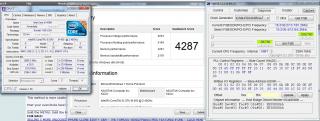
Bus Speed = 145.1MHz 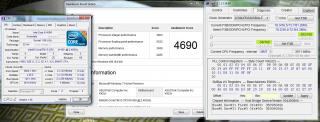
Bus Speed = 148MHz 
|
|
|
Oct 26 2010, 11:33 AM
|
|
Elite
14,813 posts Joined: Nov 2006
|
Can reach 160.4 MHz?
|
|
|
Oct 26 2010, 11:40 AM
|
|
Senior Member
826 posts Joined: Jan 2009
|
QUOTE(lee_what2004 @ Oct 26 2010, 11:33 AM) Can reach 160.4 MHz? I didn't tried yet, maybe later. Windows freezed when I tried to decrease (address 0xF) from D8 to D5. Maybe too much. I add ~3Mhz more to Bus Speed when I increase (address 0x10) from 31 to 32. I think I can increase it to 33, around 151Mhz but still too far from 160MHz. |
|
|
Oct 26 2010, 11:51 AM
|
|
Elite
14,813 posts Joined: Nov 2006
|
For me, the first time, straight change it to 160.4MHz and it works fine.
But when I change the fsb to 150MHz and try to increase the 0x10, somehow it can't go beyond 39, when I put it on 40, it straight freeze, and also can't go lower than 33 or 32, freeze as well. Making me think like there's some kind of limit range for 0x10, though it supposed to works since the BCLK still lower than 160.4MHz, which is stable.. |
|
|
|
|
|
Oct 26 2010, 01:33 PM
|
|
Senior Member
826 posts Joined: Jan 2009
|
QUOTE(lee_what2004 @ Oct 26 2010, 11:51 AM) For me, the first time, straight change it to 160.4MHz and it works fine. - I tried straight change to 160MHz but windows just freeze. But when I change the fsb to 150MHz and try to increase the 0x10, somehow it can't go beyond 39, when I put it on 40, it straight freeze, and also can't go lower than 33 or 32, freeze as well. Making me think like there's some kind of limit range for 0x10, though it supposed to works since the BCLK still lower than 160.4MHz, which is stable.. - After that I tried to set for address 0xF from D8 to D6 & set for address 0x10 from 31 to 34, windows freeze. - After that I tried to set for address 0xF from D8 to D6 & set for address 0x10 from 31 to 33, it applied for a moment, then BSOD. In Reliability Check History, it said video hardware error. I guess it make the IGP unstable. (I need to turn OFF the computer since BSOD only reboot the computer. Previous settings still applied. After cold-boot, it reset back to default.) Conclusion, the most stable overclock settings on my notebook is 148MHz (address 0xF = D6 & address 0x10 = 32). I'm satisfy with the results since it increased the processor speed from 2.66GHz to 2.96GHz.This post has been edited by kizwan: Oct 26 2010, 01:39 PM |
|
|
Oct 26 2010, 01:46 PM
|
|
Elite
14,813 posts Joined: Nov 2006
|
2.96GHz is TurboBoost though...
The base clocks raised to 2.66Ghz.. nVidia 260.99 http://www.nvidia.com/object/notebook-win7...hql-driver.html This post has been edited by lee_what2004: Oct 26 2010, 01:58 PM |
|
|
Oct 26 2010, 02:20 PM
|
|
Junior Member
148 posts Joined: Apr 2010
|
Nvidia driver update again to 260.99?
Any improvement? can feel it,again...lolx |
|
|
Oct 26 2010, 02:22 PM
|
|
Elite
14,813 posts Joined: Nov 2006
|
Didn't test it, no nVidia laptop
 |
|
|
Oct 26 2010, 02:50 PM
|
|
Senior Member
826 posts Joined: Jan 2009
|
QUOTE(lee_what2004 @ Oct 26 2010, 01:46 PM) 2.96GHz is TurboBoost though... Yeah, that is correct but it still real processor speed. The base clocks raised to 2.66Ghz..  Not something we calculate on paper & dream for it when sleeping. Not something we calculate on paper & dream for it when sleeping.  In my opinion, for budget gaming notebook, because it doesn't have fancy cooling system (fancy heatsink), i5 processor is much better than i7 in real life performance. I found i7 (mobile) processor, especially quad core processor is very lazy to achieve highest turbo boost compare to i5 because of the insufficient cooling system. In my opinion, for budget gaming notebook, because it doesn't have fancy cooling system (fancy heatsink), i5 processor is much better than i7 in real life performance. I found i7 (mobile) processor, especially quad core processor is very lazy to achieve highest turbo boost compare to i5 because of the insufficient cooling system.Nvidia released new driver very fast. Maybe a lot of complains to 260.89 driver. I also found if installed without fresh install option selected, nvidia control panel seems not stable. This post has been edited by kizwan: Oct 26 2010, 02:52 PM |
|
|
Oct 26 2010, 02:53 PM
|
|
Elite
14,813 posts Joined: Nov 2006
|
But gaming performance drop somehow when overclocking the CPU...
CPU benchmark does show improvement though... This post has been edited by lee_what2004: Oct 26 2010, 02:54 PM |
|
|
Oct 26 2010, 02:59 PM
|
|
Senior Member
826 posts Joined: Jan 2009
|
QUOTE(lee_what2004 @ Oct 26 2010, 02:53 PM) But gaming performance drop somehow when overclocking the CPU... I see. Make sense since overclocking does stressed the CPU. So, I think better stick with stock speed. i5-450M already more than enough to play any demanding games. |
|
Topic ClosedOptions
|
| Change to: |  0.0376sec 0.0376sec
 0.53 0.53
 6 queries 6 queries
 GZIP Disabled GZIP Disabled
Time is now: 5th December 2025 - 03:48 AM |
 Quote
Quote