

 Jul 29 2010, 09:41 PM, updated 16y ago


GC Overheating in SC2?
QUOTE
The following information was taken from: http://gameinformer.com/b/news/archive/201...eating-bug.aspx
"Anyone else have StarCraft II try to melt their hardware? Blizzard admits that it's a known issue and has a fix for you.
Apparently, the game's menu screens aren't framerate-limited. This means that when there's nothing else going on, your graphics hardware renders the bejeezus out of those screens, causing nasty overheating problems. The fix is easy, requiring players to add the following lines to your "Documents\StarCraft II\variables.txt" file:
frameratecapglue=30
frameratecap=60
Good to know. Personally I would have appreciated a heads-up before my video card fried, but maybe this can save someone else from the hassle I've been dealing with since yesterday afternoon."
Keep Bumped.
---
"Come get some!" -Ash
"Anyone else have StarCraft II try to melt their hardware? Blizzard admits that it's a known issue and has a fix for you.
Apparently, the game's menu screens aren't framerate-limited. This means that when there's nothing else going on, your graphics hardware renders the bejeezus out of those screens, causing nasty overheating problems. The fix is easy, requiring players to add the following lines to your "Documents\StarCraft II\variables.txt" file:
frameratecapglue=30
frameratecap=60
Good to know. Personally I would have appreciated a heads-up before my video card fried, but maybe this can save someone else from the hassle I've been dealing with since yesterday afternoon."
Keep Bumped.
---
"Come get some!" -Ash
QUOTE
Before reinstalling sc2, try doing repair.exe
via: C:\Program Files\StarCraft II\Support\repair.exe (depend on your installation directory/drive)
=edit=
forgot to add this: do note before doing repair.exe, please be connected to the internet, and make sure your connection is stable (and preferably port forwarded) for patch/files download
via: C:\Program Files\StarCraft II\Support\repair.exe (depend on your installation directory/drive)
=edit=
forgot to add this: do note before doing repair.exe, please be connected to the internet, and make sure your connection is stable (and preferably port forwarded) for patch/files download
This post has been edited by kianweic: Sep 27 2010, 10:23 AM
 Quote
Quote





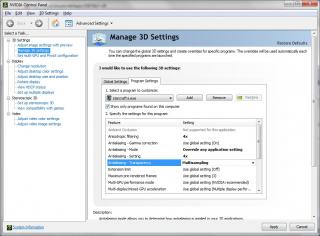















 I am also a budget gamer and i just upgraded my RAM and graphic card to play SC2. thus i know a little of this things.










 0.0782sec
 1.00
1.00
 6 queries
 GZIP Disabled