Welcome Guest ( Log In | Register )

113 Pages « < 92 93 94 95 96 > » Bottom

Outline · [ Standard ] · Linear+

Home Networking N Router By Asus RTN-66U / Asus RTN-16 / RT-N56U, Asus RT-N Series Supported Unifi

views
     
zamans98
post May 9 2014, 09:52 AM

oquıɐɹ ǝɥ ɹǝo 'ǝɹǝɥǝɯos
*******
Senior Member
8,510 posts

Joined: Dec 2004
From: KayEL


QUOTE(zamans98 @ May 7 2014, 12:40 AM)
what would be the latest and most stable FIRMWARE for RT-N16?
On UNIFI+HyppTV
Product ID  RT-N16
Current Firmware Version:3.0.0.4.276
*
wonder why there is no response on this. Can't find it anywhere.
ASUSmy
post May 9 2014, 06:44 PM

Look at all my stars!!
*******
Senior Member
2,319 posts

Joined: Mar 2010
QUOTE(zamans98 @ May 9 2014, 09:52 AM)
wonder why there is no response on this. Can't find it anywhere.
*
Hi zamans98,

The newest firmware for this model is 3.0.0.4.374.5517.

You can refer to the change log from the link below for more information.

http://www.asus.com/Networking/RTN16/HelpDesk_Download/

Thank you
ASUSmy
post May 15 2014, 04:17 PM

Look at all my stars!!
*******
Senior Member
2,319 posts

Joined: Mar 2010
Hi,

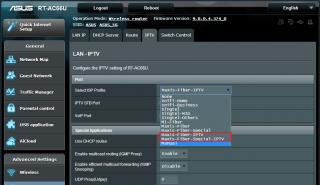
I want to ask whether any one of you can help test on this 2 firmwares for the model RT-AC66U and RT-N66U.

This firmware is to test the Maxis ASTRO IPTV function for our router.

Do let me know if anyone of you able to help.

RT-AC66U
https://www.asuswebstorage.com/navigate/s/9...1A0D99E28CBC88Y

RT-N66U
https://www.asuswebstorage.com/navigate/s/F...0D39535C072042Y

Thank you

This post has been edited by ASUSmy: May 15 2014, 04:42 PM


Attached thumbnail(s)
Attached Image
missysleepy
post May 27 2014, 09:04 PM

Enthusiast
*****
Senior Member
718 posts

Joined: Mar 2014
Asusmy,

I just got my new asus rt n14 u hp, as you know this router suppose to have 8 db antenna and it has 3 of it. Claimed that its a very strong coverage but may i asked why my ipad device sometimes are showing only 1 bar . My router was place upstairs and previously i owned dlink from unifi. And sometimes there was no connection temporarily. My previous router dont have this problem before? Are there any setting i should process other than just default? Perhaps i need to upgrade firmware for optimization? Kindly advise. Thanks

This post has been edited by missysleepy: May 27 2014, 09:05 PM
aspire2oo6
post May 28 2014, 07:06 AM

Banned
*********
All Stars
35,468 posts

Joined: Oct 2006

QUOTE(missysleepy @ May 27 2014, 09:04 PM)
Asusmy,

I just got my new asus rt n14 u hp, as you know this router suppose to have 8 db antenna and it has 3 of it. Claimed that its a very strong coverage but may i asked why my ipad device sometimes are showing only 1 bar . My router was place upstairs and previously i owned dlink from unifi. And sometimes there was no connection temporarily. My previous router dont have this problem before? Are there any setting i should process other than just default? Perhaps i need to upgrade firmware for optimization? Kindly advise. Thanks
*
change to different channel in the router setting
savien
post May 28 2014, 10:34 AM

New Member
*
Junior Member
20 posts

Joined: Nov 2006


Hi Asusmy,

I bought the RT-N56U, and I am going to use it for Unifi Biz line. I need to key in the static IP as I have 5 live IPs and I have no idea how to key in...
FYI my IP range is as follows: 219.x.x.1-6 where .1 is my Dlink modem IP and I can use .2 to .6
For example, I selected the following

Get the WAN IP Automatically ----> No
IP Address: (I put here 219.x.x.1?)
Subnet Mask: 255.255.255.248
Gateway: (Tried to put here 219.x.x.1 and I got an error saying it cannot be the same as the IP Address.)

Please help.

Thanks...
ASUSmy
post May 28 2014, 03:21 PM

Look at all my stars!!
*******
Senior Member
2,319 posts

Joined: Mar 2010
QUOTE(savien @ May 28 2014, 10:34 AM)
Hi Asusmy,

I bought the RT-N56U, and I am going to use it for Unifi Biz line. I need to key in the static IP as I have 5 live IPs and I have no idea how to key in...
FYI my IP range is as follows: 219.x.x.1-6 where .1 is my Dlink modem IP and I can use .2 to .6
For example, I selected the following

Get the WAN IP Automatically ----> No
IP Address: (I put here 219.x.x.1?)
Subnet Mask: 255.255.255.248
Gateway: (Tried to put here 219.x.x.1 and I got an error saying it cannot be the same as the IP Address.)

Please help.

Thanks...
*
Hi savien,

Our router unable to support multiple IP address.

Thank you
savien
post May 28 2014, 03:50 PM

New Member
*
Junior Member
20 posts

Joined: Nov 2006


QUOTE(ASUSmy @ May 28 2014, 03:21 PM)
Hi savien,

Our router unable to support multiple IP address.

Thank you
*
Oh man this is not good... sure kena tembak from boss now... aiyo... cham... any other router from your side that can support Unifi business?
ASUSmy
post May 28 2014, 07:40 PM

Look at all my stars!!
*******
Senior Member
2,319 posts

Joined: Mar 2010
QUOTE(savien @ May 28 2014, 03:50 PM)
Oh man this is not good... sure kena tembak from boss now... aiyo... cham... any other router from your side that can support Unifi business?
*
Hi savien,

Currently don't have a router that can support.

Thank you
#aten
post May 28 2014, 07:59 PM

Getting Started
**
Junior Member
250 posts

Joined: Dec 2013


QUOTE(savien @ May 28 2014, 10:34 AM)
Hi Asusmy,

I bought the RT-N56U, and I am going to use it for Unifi Biz line. I need to key in the static IP as I have 5 live IPs and I have no idea how to key in...
FYI my IP range is as follows: 219.x.x.1-6 where .1 is my Dlink modem IP and I can use .2 to .6
For example, I selected the following

Get the WAN IP Automatically ----> No
IP Address: (I put here 219.x.x.1?)
Subnet Mask: 255.255.255.248
Gateway: (Tried to put here 219.x.x.1 and I got an error saying it cannot be the same as the IP Address.)

Please help.

Thanks...
*
did you receive the setup instruction from TM on how to apply the static ip on router?


iinm the first IP is for the router itself, while the rest you can apply as DHCP reservation to distribute among your server/apps.
3536837
post May 29 2014, 05:19 PM

Regular
******
Senior Member
1,602 posts

Joined: Aug 2005


QUOTE(ASUSmy @ May 28 2014, 07:40 PM)
Hi savien,

Currently don't have a router that can support.

Thank you
*


hello asusmy....

i'm on-site technician support crew for maxis fibre & maxis-astro iptv

i do sold more than 50 units rtn12hp to my customer
normally i js use tat n12hp for access point/wireless router only , some customer who's not using voip i will use 12hp as replacement router

thx for the reliable product.... no complaint so far all the time , just for only 1 time hardware faulty (wifi weak signal , it's a new unit =.=".....take around 1 month to claim back new unit)

may i know
when the new firmware for maxis&astro iptv will come out ?
wat the different for the maxis fibre & maxis fibre "special" in the ISP selection ?
any idea to configure that maxis VOIP on that rtn12hp ?

thx , hope to hear from u soon

This post has been edited by 3536837: May 29 2014, 06:35 PM

yfyap69
post May 30 2014, 10:43 AM

Enthusiast
*****
Senior Member
852 posts

Joined: Mar 2005
From: Penang


I'm having problem to remote access my RT-AC168U router from outside. Already enable web access and setup AiCloud. When I key in my DDNS address, I can access AiCloud but how to access the configuration page? Do I need to put a port after the DDNS address?
ASUSmy
post May 30 2014, 11:04 AM

Look at all my stars!!
*******
Senior Member
2,319 posts

Joined: Mar 2010
QUOTE(yfyap69 @ May 30 2014, 10:43 AM)
I'm having problem to remote access my RT-AC168U router from outside. Already enable web access and setup AiCloud. When I key in my DDNS address, I can access AiCloud but how to access the configuration page? Do I need to put a port after the DDNS address?
*
Hi yfyap69,

Yes, you need to put the port number after the DDNS name.

Example: name.asuscomm.com:8080

Thank you
ASUSmy
post May 30 2014, 11:12 AM

Look at all my stars!!
*******
Senior Member
2,319 posts

Joined: Mar 2010
QUOTE(3536837 @ May 29 2014, 05:19 PM)
hello asusmy....

i'm on-site technician support crew for maxis fibre & maxis-astro iptv

i do sold more than 50 units rtn12hp to my customer
normally i js use tat n12hp for access point/wireless router only , some customer who's not using voip i will use 12hp as replacement router

thx for the reliable product.... no complaint so far all the time , just for only 1 time hardware faulty (wifi weak signal , it's a new unit =.=".....take around 1 month to claim back new unit)

may i know
when the new firmware for maxis&astro iptv will come out ?
wat the different for the maxis fibre & maxis fibre "special" in the ISP selection ?
any idea to configure that maxis VOIP on that rtn12hp ?

thx , hope to hear from u soon
*
Hi 3536837,

We are still asking people to help test the Maxis Astro IPTV. So don't have the exact date yet.

Maxis Fibre are used when the fibre line are provided by the TM, and as for the Maxis Fibre Special are for the fiber line provided by Maxis.

For VOIP, you will need to use it together with the Maxis router. The LAN port 3 is reserved for VOIP. Connect the LAN port 3 from ASUS router to the WAN port of the Maxis router.

Thank you
yfyap69
post May 30 2014, 06:15 PM

Enthusiast
*****
Senior Member
852 posts

Joined: Mar 2005
From: Penang


QUOTE(ASUSmy @ May 30 2014, 11:04 AM)
Hi yfyap69,

Yes, you need to put the port number after the DDNS name.

Example: name.asuscomm.com:8080

Thank you
*
Got it. Thank you
3536837
post May 30 2014, 07:08 PM

Regular
******
Senior Member
1,602 posts

Joined: Aug 2005


QUOTE(ASUSmy @ May 30 2014, 11:12 AM)
Hi 3536837,

We are still asking people to help test the Maxis Astro IPTV. So don't have the exact date yet.

Maxis Fibre are used when the fibre line are provided by the TM, and as for the Maxis Fibre Special are for the fiber line provided by Maxis.

For VOIP, you will need to use it together with the Maxis router. The LAN port 3 is reserved for VOIP. Connect the LAN port 3 from ASUS router to the WAN port of the Maxis router.

Thank you
*
thanks for the reply , i get it.....
acbc
post May 30 2014, 07:12 PM

Look at all my stars!!
*******
Senior Member
9,046 posts

Joined: Jan 2003
QUOTE(ASUSmy @ May 30 2014, 11:12 AM)
Hi 3536837,

We are still asking people to help test the Maxis Astro IPTV. So don't have the exact date yet.

Maxis Fibre are used when the fibre line are provided by the TM, and as for the Maxis Fibre Special are for the fiber line provided by Maxis.

For VOIP, you will need to use it together with the Maxis router. The LAN port 3 is reserved for VOIP. Connect the LAN port 3 from ASUS router to the WAN port of the Maxis router.

Thank you
*
I got mine working with RT-N66U long time ago. Firmware is 3.0.0.4.374_4561. Only set the Technicolor router to give DMZ to RT-N66U and dialing out done by new router itself. Very stable for months. Both my decoders and Internet no problems.
tHeRiDdLeR
post May 30 2014, 07:42 PM

Getting Started
**
Junior Member
247 posts

Joined: Jan 2003
From: Sri Serdang


QUOTE(ASUSmy @ May 15 2014, 04:17 PM)
Hi,

I want to ask whether any one of you can help test on this 2 firmwares for the model RT-AC66U and RT-N66U.

This firmware is to test the Maxis ASTRO IPTV function for our router.

Do let me know if anyone of you able to help.

RT-AC66U
https://www.asuswebstorage.com/navigate/s/9...1A0D99E28CBC88Y

RT-N66U
https://www.asuswebstorage.com/navigate/s/F...0D39535C072042Y

Thank you
*
For RT-N56U when will be release ?
JY.
post Jun 2 2014, 04:22 PM

Regular
******
Senior Member
1,630 posts

Joined: Oct 2006


Any router that can support huawei e372 USB modem? Looking to use it for streamyx or unifi once my area is supported.
ASUSmy
post Jun 2 2014, 06:14 PM

Look at all my stars!!
*******
Senior Member
2,319 posts

Joined: Mar 2010
QUOTE(JY. @ Jun 2 2014, 04:22 PM)
Any router that can support huawei e372 USB modem? Looking to use it for streamyx or unifi once my area is supported.
*
Hi JY.,Jun,

You can have a look at the list from the link below got the support device.

http://www.asus.com/event/networks_3G4G_support/

Thank you

113 Pages « < 92 93 94 95 96 > » Top
 

Change to:
| Lo-Fi Version
0.0348sec    0.50    6 queries    GZIP Disabled
Time is now: 9th December 2025 - 06:45 AM