Welcome Guest ( Log In | Register )

Bump Topic Topic Closed RSS Feed
125 Pages « < 92 93 94 95 96 > » Bottom

Outline · [ Standard ] · Linear+

 Nokia N900 Thread V2, Firmware FR 1.2 is FINALLY OUT

views
     
kfthoo
post May 27 2010, 11:25 PM

Casual
***
Junior Member
410 posts

Joined: Apr 2008
From: Klang Valley


QUOTE
Once the image is moved to the directory, it’s time to enter the command that will flash our N900.
For the specific version of the firmware that we downloaded, the command is
“flasher-3.5.exe  -F <Place your fiasco name>.bin -f -R”
(IMPORTANT NOTE: This command is case-sensitive).

super_evil_alien
post May 27 2010, 11:26 PM

Slumber Mode
*******
Senior Member
5,105 posts

Joined: Mar 2007
From: In front of my desktop/laptop/phone


QUOTE(suicideroach @ May 27 2010, 11:19 PM)
ok, thanks man... i changed the -f to -F, now its working... but then on the CMD, its stucks at "suitable USB device not found, waiting."

so? is it normal?
*
When you connect your phone,go to control panel ->Devices and Printers & check whether there is N900(Update Mode)
You can only update if it's under update mode.
firstknight
post May 27 2010, 11:26 PM

Look at all my stars!!
*******
Senior Member
2,681 posts

Joined: Oct 2005
that is why you need to follow the instruction to the full.... when is big F you put big F and if small f you put small f.... hehe.. even R and r makes the difference....
Borneo928
post May 27 2010, 11:30 PM

Casual
***
Junior Member
417 posts

Joined: May 2008


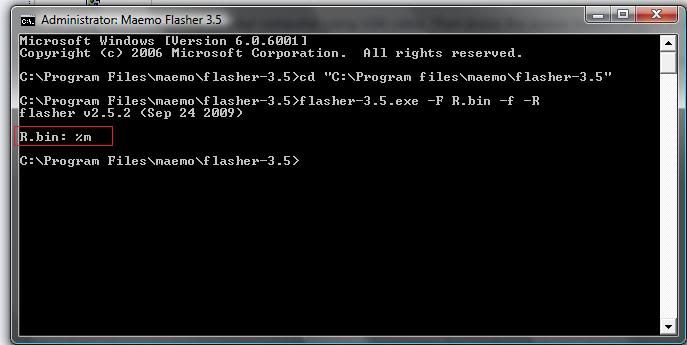
ok the one in the red box that i have highlighted is not suppose to be there right?

user posted image

calvinz
post May 27 2010, 11:30 PM

Getting Started
**
Junior Member
143 posts

Joined: Jan 2003
From: Star Park @ sEtApAk


PR1.2 still without handwritting features ?
Btw is the restoring feature in backup will be able to help to salvage back those installed apps previously ?

This post has been edited by calvinz: May 27 2010, 11:38 PM
suicideroach
post May 27 2010, 11:35 PM

kiss mah a^^
******
Senior Member
1,494 posts

Joined: Dec 2005
From: Wangsa Maju


QUOTE(super_evil_alien @ May 27 2010, 11:26 PM)
When you connect your phone,go to control panel ->Devices and Printers & check whether there is N900(Update Mode)
You can only update if it's under update mode.
*
yup, it showed Update Mode.

but, its been 15minutes now... still not found any USB device and still waiting. sad.gif
TSaspire2oo6
post May 27 2010, 11:55 PM

Banned
*********
All Stars
35,468 posts

Joined: Oct 2006

QUOTE(calvinz @ May 27 2010, 11:30 PM)
PR1.2 still without handwritting features ?
Btw is the restoring feature in backup will be able to help to salvage back those installed apps previously ?
*
yes but if there are corrupted files or mess it will be restore as well
kfthoo
post May 28 2010, 12:07 AM

Casual
***
Junior Member
410 posts

Joined: Apr 2008
From: Klang Valley


take some shot on my desktops...

user posted image

user posted image

user posted image

user posted image

not much modification, almost stock look.....show yours biggrin.gif
eluna
post May 28 2010, 12:08 AM

On my way
****
Senior Member
645 posts

Joined: Mar 2007
From: Kuching, Sarawak


QUOTE(calvinz @ May 27 2010, 11:30 PM)
PR1.2 still without handwritting features ?
Btw is the restoring feature in backup will be able to help to salvage back those installed apps previously ?
*
yes, it got... but only for hongkong, china and taiwan... it detect using imei before install. there is a way to pass though using that software. my advice, just forget about it, not user friendly and you still lost vkb after installation
liamlain
post May 28 2010, 12:11 AM

Getting Started
**
Junior Member
83 posts

Joined: Dec 2008
yes~~~~finally success re-flash my device~~~~
nw my virtual keyboard is coming back~~~
thanks for the tutorial

but the command for format device code,stil cannot is show "suitable USB device not found, waiting." any1 facing this problem?
TSaspire2oo6
post May 28 2010, 12:24 AM

Banned
*********
All Stars
35,468 posts

Joined: Oct 2006

Can u try this let the phone boot up inside then only turn off and press the U key
suicideroach
post May 28 2010, 12:37 AM

kiss mah a^^
******
Senior Member
1,494 posts

Joined: Dec 2005
From: Wangsa Maju


haiz... still can't update my phone sad.gif NSU fail, OTA also fail, and i've been waiting for more than 30minutes, still can't successfully update using the manual way. Stuck at the "searching for USB device.waiting" sad.gif
nicholas_oh
post May 28 2010, 01:03 AM

Getting Started
**
Junior Member
180 posts

Joined: Mar 2010
aspire... if i downloaded the firmware frm http://tablets-dev.nokia.com/nokia_N900.php...

then the file would be in BIN format ???

btw, i tried download ur file frm ur uploaded website... yet i couldnt download it successfully...

can u assisst me ?
TSaspire2oo6
post May 28 2010, 01:06 AM

Banned
*********
All Stars
35,468 posts

Joined: Oct 2006

QUOTE(nicholas_oh @ May 28 2010, 01:03 AM)
aspire... if i downloaded the firmware frm http://tablets-dev.nokia.com/nokia_N900.php...

then the file would be in BIN format ???

btw, i tried download ur file frm ur uploaded website... yet i couldnt download it successfully...

can u assisst me ?
*
Yes after u download the two files pm me ill guide u thru no problem.
dkliew
post May 28 2010, 02:27 AM

Getting Started
**
Junior Member
156 posts

Joined: Sep 2005
From: Melaka


thanx for the tablets-dev.nokia.com download links.

there is many to download there. and which should i get?
the Vanila? Vanilla version of the eMMC content for Nokia N900 246mb

or Maemo 5 Global release for Nokia N900 ? 161mb


one1002
post May 28 2010, 03:11 AM

On my way
****
Senior Member
617 posts

Joined: Jun 2009


the vanilla is only useful if u want to start EMPTY in your internal memory..so,every pictures,musics,documents,blablabla u saved in myDocs,will be wiped off clean..then you will need to install every apps one by one (not including apps that you have forgotten)

the global release is the firmware itself..it will not wipe your internal storage..but pls backup using the "BACKUP" application in the phone..after flashing,just press "RESTORE"..

mind that if you flash both firmware and EMMC,there will be no backup files unless you transfer it to external drive (pc,pendrive,laptop etc)

hope this helps

dkliew
post May 28 2010, 03:24 AM

Getting Started
**
Junior Member
156 posts

Joined: Sep 2005
From: Melaka


thanx smile.gif i will get the global release then .

so late havent sleep yet? Lol.
happy wesak day~
Eiraku
post May 28 2010, 03:34 AM

Geeking since 1985!
*******
Senior Member
7,037 posts

Joined: Apr 2006


Here's the much promised Titan Kernel Tut:

STEP 1: GET TITAN'S KERNEL

1) Enable Extras-Devel repos
2) Search for Enhanced Kernel (currently at version 38)
3) Install the Enhanced Kernel Settings package (it will automatically install the kernel)
4) Say yes to the "are you sure you want to risk borking your N900" question.
5) Restart after installation.

STEP 2: SET OVERCLOCKING

1) Go into xterminal
2) Make sure you have installed the rootsh package
3) As usual, start with "sudo gainroot"

Next:

CODE
kernel-config show


To show the current config, which should be 250-600mhz, normal stock config. You would wanna save this to stock by typing the below.

CODE
kernel-config save Stock


You now have the "Stock" profile to return to if everything goes wrong. Now to load profile type:

CODE
kernel-config load ulv

For a battery saving ULV profile

CODE
kernel-config load ideal

For a faster, overclocked 500-850mhz profile

Profiles to choose between:
a) ulv - Normal battery saving, normal clock.
b) ideal - Balanced, overclock
c) xlv - More battery saving, underclock.
d) starving - Most battery saving, normal clock.

Also, you can set your OWN clock speeds after choosing a profile by typing:

CODE
kernel-config limits <lower CPU limit> <upper CPU limit>


For instance "kernel-config limits 500 900". This will clock whatever profile you have loaded before to 500mhz lower limit and 900mhz upper limit. IDEAL ONLY IS OPTIMISED FOR A 500MHZ LOWER LIMIT, all the other profiles accept 250mhz.

After setting the clock speed limits, type:

CODE
kernel-config save <whatever name you want>


And load your OWN config as default by typing:

CODE
kernel-config default <whatever name you want>


If ever you need to set it back to normal, type:

CODE
kernel-config default Stock


STEP 3: ON THE FLY OVERCLOCKING

1) Get the files in the zip below, unzip somewhere on your computer.

Attached File  CPUControl.zip ( 690bytes ) Number of downloads: 25


MIRROR: http://hotfile.com/dl/45149192/1a55994/CPUControl.zip.html

2) In each file (overclock, underclock, default) as per your needs, edit the part below with notepad in your computer:

CODE
Exec=sudo kernel-config load <insert profile name you want here>


3) Copy the files (using MC, xterm or WinSCP) to:

CODE
/usr/share/applications/hildon/


4) Place the shortcuts on your desktop.

5) <OPTIONAL> Create 3 48x48 PNG icons named uc.png, oc.png and def.png and put them in /usr/share/icons/scalable/hildon/ if you want icons for the shortcuts.

I'll be back tomorrow for the QBW widgets, which is actually the least hard part next to installing the kernel.

EDIT: Added mirror.

This post has been edited by Eiraku: May 28 2010, 11:25 AM

one1002
post May 28 2010, 03:35 AM

On my way
****
Senior Member
617 posts

Joined: Jun 2009


yeah..tomorow cuti meh..ahaha..

download the latest version k..

something 10.2010.19.-1
wcshin
post May 28 2010, 03:53 AM

Getting Started
**
Junior Member
243 posts

Joined: Sep 2009


eiraku, cant download ur CPUControl.zip
shows index.php...???
thanks alot...b4 i could try out the previous instruction given by u, u come up wit a better 1...many many thank u...

125 Pages « < 92 93 94 95 96 > » Top
Topic ClosedOptions
 

Change to:
| Lo-Fi Version
0.0257sec    0.55    6 queries    GZIP Disabled
Time is now: 5th December 2025 - 11:59 AM