

whats the difference if u update it manually or automatically??
Nokia N900 Thread V2, Firmware FR 1.2 is FINALLY OUT
Nokia N900 Thread V2, Firmware FR 1.2 is FINALLY OUT
|
|
 May 26 2010, 11:26 PM May 26 2010, 11:26 PM
Return to original view | Post
#1
|
 
Junior Member
417 posts Joined: May 2008  
|
whats the difference if u update it manually or automatically??
|
|
|
|
|
|
May 26 2010, 11:32 PM
Return to original view | Post
#2
|
|
Junior Member
417 posts Joined: May 2008
|
QUOTE(aspire2oo6 @ May 26 2010, 11:29 PM) automatic 2 or 3click it automatic does the rest i see, but why is everyone trying to do it manually? making me confuse Manual u need click and press yourself every step   |
|
|
May 26 2010, 11:38 PM
Return to original view | Post
#3
|
|
Junior Member
417 posts Joined: May 2008
|
QUOTE(aspire2oo6 @ May 26 2010, 11:34 PM) because the firmware is already out since yesterday but only able to get thru the manual way ahh i see. aight gonna update mine thru FOTA now, thanks! The automatic way thru NSU and FOTA only available today at 4 to 5pm. Then another thing to reformat the phone memory aka clean installation you need to flash the eMMC so only manual way able to format it  |
|
|
May 27 2010, 12:46 AM
Return to original view | Post
#4
|
|
Junior Member
417 posts Joined: May 2008
|
ok.. fed up of this automatic update issues. i'm doing it using aspire's method, manually
|
|
|
May 27 2010, 10:54 AM
Return to original view | Post
#5
|
|
Junior Member
417 posts Joined: May 2008
|
guys, how do i extract the PR1.2 file that i've downloaded from the link given at front page by aspire http://www.megaupload.com/?d=VJ214G5V
|
|
|
May 27 2010, 11:30 PM
Return to original view | Post
#6
|
|
Junior Member
417 posts Joined: May 2008
|
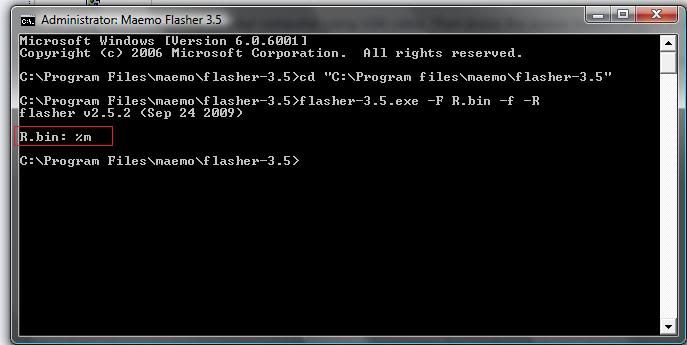
ok the one in the red box that i have highlighted is not suppose to be there right?
 |
|
|
|
|
|
May 28 2010, 11:30 AM
Return to original view | Post
#7
|
|
Junior Member
417 posts Joined: May 2008
|
help needed guys, i did everything on the front page and it went all ok. but then when it reformatted, the phone said "missing image" n now i phone is showing all square box!
 any idea what i can do to fix this? any idea what i can do to fix this? |
|
|
May 28 2010, 11:57 AM
Return to original view | Post
#8
|
|
Junior Member
417 posts Joined: May 2008
|
this is what i get after i followed Step 9 to Step 14
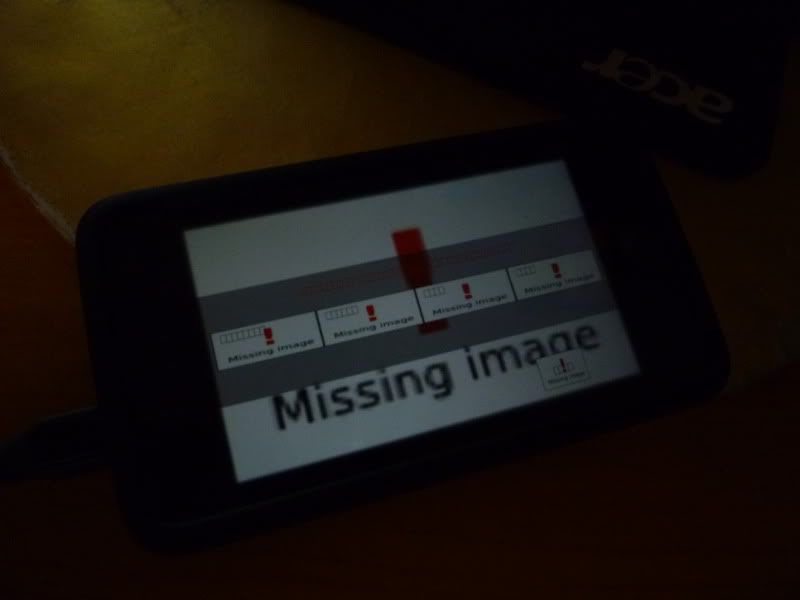 any idea how to fix this??? |
|
|
May 28 2010, 12:14 PM
Return to original view | Post
#9
|
|
Junior Member
417 posts Joined: May 2008
|
QUOTE(dasonyeoh @ May 28 2010, 12:12 PM) actually i have the same prob as well when emmc. So what i do is, I reflash everything again but don flash emmc.. So everything will go fine. N when u go to ur setting find memory. U will see u have a clean installation already yes yes...did it already thanks buddy  |
|
|
May 28 2010, 06:17 PM
Return to original view | Post
#10
|
|
Junior Member
417 posts Joined: May 2008
|
hmm after the pr1.2 update, my phone suddenly cannot connect to my home WIFI..so when i tried to connect to it, the phone gave me this "push a button on wireless station to initiate easy setup process and tap done" what button is it talking about? then got another option, PIN Method : "Enter the following digits on the wireless station" .... what in the world??
 its a WPA protection btw. its a WPA protection btw.but i tried my friends router (WEP) connection no problem, it will directly ask for the password tried the settings>internet connections>connections>new method entered the password n all but then the phone gave me the "authentication failed" error This post has been edited by Borneo928: May 28 2010, 06:21 PM |
|
|
May 28 2010, 06:40 PM
Return to original view | Post
#11
|
|
Junior Member
417 posts Joined: May 2008
|
QUOTE(aspire2oo6 @ May 28 2010, 06:32 PM) i am using WPA2 its working for me. i see..i try to do it manually now. thanks!Last time some place i go i have this problem by manually entering the connection solve the problem |
|
|
May 28 2010, 07:04 PM
Return to original view | Post
#12
|
|
Junior Member
417 posts Joined: May 2008
|
QUOTE(aspire2oo6 @ May 28 2010, 06:46 PM) if still fail try change it to WPA-PSK see? because i tested WEP and WPA-PSK its work fine hey thanks man i did the manually way, entered every single ip number in the advance setting and all n it wooorrrrk!  |
|
|
May 29 2010, 10:46 AM
Return to original view | Post
#13
|
|
Junior Member
417 posts Joined: May 2008
|
QUOTE(aspire2oo6 @ May 29 2010, 09:23 AM) Thanks noted and fixed yup i tried it for digi but it didnt work.Added on May 29, 2010, 9:29 amBtw everyone been keep asking about FMMS but i hardly see it works for anyone. Doesnt work for me too Can i know its working for who and share the settings? |
|
Topic ClosedOptions
|
| Change to: |  0.0585sec 0.0585sec
 0.58 0.58
 7 queries 7 queries
 GZIP Disabled GZIP Disabled
Time is now: 10th December 2025 - 07:49 AM |
 Quote
Quote