Welcome Guest ( Log In | Register )

3 Pages  1 2 3 >Bottom

Outline · [ Standard ] · Linear+

 Toshiba xxZV600E Model LCD TV, Owners pls come in and share

views
     
TSdarenlks
post Jan 9 2010, 11:45 PM, updated 8y ago

On my way
****
Senior Member
639 posts

Joined: Feb 2009


I got my 55" of this model delivered to me today and spent couple of hours adjusting the setting menu as it has so many settings especially the advanced picture settings where it allows the adjustment for each color band to make the colors as accurate as possible or to your liking but I've not explored it yet since I'm not that expert in balancing the colors.

After the tweaking in the settings menu, the end result is very satisfying where the PQ is awesome when watching HD movies and Astro HD channels, it is really popping at my eyes. The TV speakers sound is good as it comes with the woofer for better stereo output.

There is one issue though, I noticed that there are some backlight leagkage at the bottom left of my tv screen whenever the screen turns black. I've contacted the SA I bought this unit from and he will send someone over to fix it in which I don't think they could fix on the spot. Not sure whether I could ask for 1 to 1 exchange since the issue is spotted on the same day they delivered ?

Any owner of this model have similar issue or it's just that I'm the unlucky one ?


========================================================================================
Upon request, adding info on TV specs and owners list in the first post smile.gif

Features & Specs for ZV600E series

http://www.toshiba.com.my/product/product_...ductid=42ZV600E

ZV series owner list
» Click to show Spoiler - click again to hide... «


How to check your ZV usage hours :

» Click to show Spoiler - click again to hide... «


This post has been edited by darenlks: Nov 1 2010, 12:22 PM
lightning69
post Jan 10 2010, 12:56 AM

Look at all my stars!!
*******
Senior Member
2,298 posts

Joined: Jan 2003
From: Miri, Sarawak


I don't think you can fix backlight bleeding wihtout changing the panel.

Btw, how much is it?
TSdarenlks
post Jan 10 2010, 12:37 PM

On my way
****
Senior Member
639 posts

Joined: Feb 2009


QUOTE(lightning69 @ Jan 10 2010, 12:56 AM)
I don't think you can fix backlight bleeding wihtout changing the panel.

Btw, how much is it?
*
Then hope they could exchange 1 to 1. Got mine at 8.6K
valtai30
post Jan 10 2010, 01:00 PM

Casual
***
Junior Member
329 posts

Joined: Feb 2008
From: sHiRe


QUOTE(darenlks @ Jan 9 2010, 11:45 PM)
I got my 55" of this model delivered to me today and spent couple of hours adjusting the setting menu as it has so many settings especially the advanced picture settings where it allows the adjustment for each color band to make the colors as accurate as possible or to your liking but I've not explored it yet since I'm not that expert in balancing the colors.

After the tweaking in the settings menu, the end result is very satisfying where the PQ is awesome when watching HD movies and Astro HD channels, it is really popping at  my eyes. The TV speakers sound is good as it comes with the woofer for better stereo output.

There is one issue though, I noticed that there are some backlight leagkage at the bottom left of my tv screen whenever the screen turns black. I've contacted the SA I bought this unit from and he will send someone over to fix it in which I don't think they could fix on the spot. Not sure whether I could ask for 1 to 1 exchange since the issue is spotted on the same day they delivered ?

Any owner of this model have similar issue or it's just that I'm the unlucky one ?
*
quickly send back fro 1 to 1 exchange!!!! anyway, did the delivery personnel tested the LCD after installation?
TSdarenlks
post Jan 10 2010, 10:10 PM

On my way
****
Senior Member
639 posts

Joined: Feb 2009


Met the SA this afternoon and he told me they will send someone to come over to check and if couldn't fix it he will arrange for 1 to 1 exchange.

Strange thing that now the backlight leakage seems to be not so noticable now when watching the TV just now blink.gif . I'm not sure whether it was because of my speakers too near to the LCD TV yesterday resulting its magnetic field affecting the TV backlight. What I've done yesterday night was to keep the speakers further away from the TV screen as advised by my friend and it seems to have improved a lot just now when I checked on it.


karheng
post Jan 11 2010, 12:14 AM

Enthusiast
*****
Senior Member
934 posts

Joined: Jan 2007


I'm thinking to buy this ZV600E for 42" also.
One of the shop selling RM3800 cash or RM3900 @ 12 months installment. Good price itsn't?
TSdarenlks
post Jan 11 2010, 02:47 PM

On my way
****
Senior Member
639 posts

Joined: Feb 2009


QUOTE(karheng @ Jan 11 2010, 12:14 AM)
I'm thinking to buy this ZV600E for 42" also.
One of the shop selling RM3800 cash or RM3900 @ 12 months installment. Good price itsn't?
*
The online store jintexelectronics.com is selling RM3599 so for a retail shop selling at RM3800 considerd good price I would say. Retail shop will normally sell higher price compared to a online store because of their higher overhead cost and operations cost to run their retail shop smile.gif


Added on January 11, 2010, 2:53 pm
QUOTE(darenlks @ Jan 10 2010, 10:10 PM)
Met the SA this afternoon and he told me they will send someone to come over to check and if couldn't fix it he will arrange for 1 to 1 exchange.

Strange thing that now the backlight leakage seems to be not so noticable now when watching the TV just now  blink.gif . I'm not sure whether it was because of my speakers too near to the LCD TV yesterday resulting its magnetic field affecting the TV backlight. What I've done yesterday night was to keep the speakers further away from the TV screen as advised by my friend and it seems to have improved a lot just now when I checked on it.
*
I have monitored the backlight leaking issue on my tv screen since yesterday and I could confirm that the issue have gone disappeared by itself now rclxms.gif The main culprit was my speakers were too close to the tv screen resulted the backlight being pulled unevenly by the magnetic field of the speakers, so now kept them with 1 feet away from the screen does solve the problem.

This post has been edited by darenlks: Jan 11 2010, 02:53 PM
pgkia
post Jan 11 2010, 03:47 PM

Getting Started
**
Junior Member
72 posts

Joined: Dec 2006
i am looking at this model as well, on 47". Heard that Toshiba and Philips are using panels from LG.Not sure how good are they?

I have seen Panasonic Plasma 42PY800H, the PQ is really good and i feel the 3D effects on most Full HD animation, like Ratatouille, Kung Fu Panda, Wall-E, etc. Can u feel the same on this model? Too bad this model has been discontinued and i could not find the same feeling from the replacement models from Panasonic.
gocitygo
post Jan 11 2010, 05:50 PM

Casual
***
Junior Member
397 posts

Joined: Mar 2008
Bro pgkia, look for Pioneer Kuro. You will get the 3D effect.
TSdarenlks
post Jan 11 2010, 08:23 PM

On my way
****
Senior Member
639 posts

Joined: Feb 2009


QUOTE(pgkia @ Jan 11 2010, 03:47 PM)
i am looking at this model as well, on 47". Heard that Toshiba and Philips are using panels from LG.Not sure how good are they?

I have seen Panasonic Plasma 42PY800H, the PQ is really good and i feel the 3D effects on most Full HD animation, like Ratatouille, Kung Fu Panda, Wall-E, etc. Can u feel the same on this model? Too bad this model has been discontinued and i could not find the same feeling from the replacement models from Panasonic.
*
I believe Toshiba LCD panel are produced by the JV between Toshiba and Matsushita.

To me, the PQ is awesome on HD movies and animations I tested so far, definitely got 3D effects


Added on January 11, 2010, 8:25 pm
QUOTE(gocitygo @ Jan 11 2010, 05:50 PM)
Bro pgkia, look for Pioneer Kuro.  You will get the 3D effect.
*
Pioneer Kuro definitely is very nice if you have the budget for it. sweat.gif

This post has been edited by darenlks: Jan 11 2010, 08:25 PM
junks6767
post Jan 11 2010, 09:41 PM

Getting Started
**
Junior Member
128 posts

Joined: Nov 2006
From: PeeJay


toshiba all also quite nice
Subsix
post Jan 12 2010, 04:24 PM

New Member
*
Junior Member
25 posts

Joined: Mar 2005


Got mine 42' last night... This series even the Sharp LCD also cannot fight with it...=) now am hunting for DVD HDMI Player... any good recommendation from the floor here ?? Thanks =)
gocitygo
post Jan 12 2010, 04:41 PM

Casual
***
Junior Member
397 posts

Joined: Mar 2008
What a waste to play DVD on Full HD TV. Should go for Blu Ray or HD files like MKV.

Anyone know which Penang shop provide competitive pricing on 47ZV600? SEC Bukit Jambul quotes me RM6.2k. shocking.gif
Subsix
post Jan 12 2010, 04:51 PM

New Member
*
Junior Member
25 posts

Joined: Mar 2005


Yea le...i too newbie on this...dunno anything...so wanna learn slowly from all tai kor here =) thus i tot first entry point should be pioneer HDMI DV420 player....=P

i'm lost......=(
lexonline
post Jan 12 2010, 11:42 PM

Getting Started
**
Junior Member
66 posts

Joined: Feb 2009


QUOTE(Subsix @ Jan 12 2010, 04:24 PM)
Got mine 42' last night... This series even the Sharp LCD also cannot fight with it...=) now am hunting for DVD HDMI Player... any good recommendation from the floor here ?? Thanks =)
*
Agree.. I had a chance to view almost side by side with Sammy LED (can't remember which series though), Sharp and LG.. The only compatitor among these three is Sammy, the rest can put aside laugh.gif I noticed the black level is very close with the Sammy LED! rclxms.gif


TSdarenlks
post Jan 13 2010, 01:16 AM

On my way
****
Senior Member
639 posts

Joined: Feb 2009


The PQ of this model is definitely superb as compared to my previous LCD TV. Vivid colors, good black level and high contrast level make it capable of producing awesome picture thumbup.gif

There is a US Consumer Report rated this model as #2 ranked, ahead of Sammy's B750 and Sony's XBR series. With its price tag, it's really a big bang for your bucks.


Added on January 13, 2010, 1:22 am
QUOTE(Subsix @ Jan 12 2010, 04:51 PM)
Yea le...i too newbie on this...dunno anything...so wanna learn slowly from all tai kor here =) thus i tot first entry point should be pioneer HDMI DV420 player....=P

i'm lost......=(
*
Agreed with gocitygo, u should either go for BD player or media player which could play mkv files, no point getting the HDMI DVD player unless you still plan to watch DVD movies for sometimes but it would make ur nice LCD TV under utilised for its capability wink.gif

This post has been edited by darenlks: Jan 13 2010, 01:22 AM
Subsix
post Jan 13 2010, 09:55 AM

New Member
*
Junior Member
25 posts

Joined: Mar 2005


QUOTE(darenlks @ Jan 13 2010, 01:16 AM)
The PQ of this model is definitely superb as compared to my previous LCD TV. Vivid colors, good black level and high contrast level make it capable of producing awesome picture  thumbup.gif


Yea...Agree with you thumbup.gif
When they put side by side with SHARP model (brand new from the box), Sharp obviously lose to Toshiba's ZV series' strong vivid colour, high contrast level  (maybe this is y ppl always said Sharp produce more natural colors ?) and sharper picture !! icon_rolleyes.gif  rclxms.gif


Added on January 13, 2010, 1:22 am

Agreed with gocitygo, u should either go for BD player or media player which could play mkv files, no point getting the HDMI DVD player unless you still plan to watch DVD movies for sometimes but it would make ur nice LCD TV under utilised for its capability  wink.gif
*
Yea...just browsed thru few thread last night... thinking of getting one WDTV...but only managed to read 15 pages out of 84 pages ! More to learn, and now my problem is where to get the MKV movie source from the net.... shakehead.gif ....BD player...step by step first...slowly upgrade...(not enough money in a way... blink.gif ) hehehe...thanks for your advice anyway !!! Cheers ! rclxm9.gif rclxms.gif thumbup.gif
gocitygo
post Jan 17 2010, 07:24 PM

Casual
***
Junior Member
397 posts

Joined: Mar 2008
darenlks & subsix, on the spec, the LCD panel response speed is 7ms, not the best in the LCD market, but they incorporated the so called Clearscan 200Hz. Would this feature really help to eliminate the blurring effect or ghosting on fast moving movie scene?
TSdarenlks
post Jan 18 2010, 02:21 AM

On my way
****
Senior Member
639 posts

Joined: Feb 2009


QUOTE(gocitygo @ Jan 17 2010, 07:24 PM)
darenlks & subsix, on the spec, the LCD panel response speed is 7ms, not the best in the LCD market, but they incorporated the so called Clearscan 200Hz.  Would this feature really help to eliminate the blurring effect or ghosting on fast moving movie scene?
*
Don't be fooled by these response times advertised by these TV manufacturers as there is no standard measurement on this. Some of these TVs with so called very low response time like 4ms or 2ms might be measured with their own measurement. Some of the TV models which have indicated their measurement based on GtG or TrTf but still these 2 types of measurements are far from accurate in quantifying the motion blur of the moving picture because they just measure on each pixel's transition time from gray to gray or from active to inactive. Even a LCD TV with 0ms response time will still have motion blur because of the LCD TV technology

The more accurate way in measuring motion blur now is using MPRT (Moving Picture Response Time) measurement. Toshiba's response time of 7ms is indicated in this measurement. Below is an extraction from an article summarying how MPRT is measured

Another metric to measure the response time performance of LCD TVs that is becoming more popular is the Motion Picture Response Time (MPRT) measurement. The MPRT measurement method takes into account three basic LCD panel characteristics: hold-type brightness variation, brightness level dependent transition times and liquid crystal response time. MPRT measurements are also impacted by how the backlight is controlled and the way video signals are processed."

So 7ms of MPRT is not bad though and it doesn't disappoint me as I've been watching sports and action movies smile.gif . Again, motion blur level is also subjective to each individual's eyes so the best way to ensure it has least motion blur to you is to see it with you own eyes rather than relying too much on the number wink.gif


csng
post Jan 19 2010, 01:23 AM

Getting Started
**
Junior Member
106 posts

Joined: Nov 2008
Bro, I saw in a review that it has a feature called 'Upscalling Capability to 1080p with Resolution+' which does a very good job in dealing with SD source compared to others.

Mind if you can give us a comment on how SD Astro PQ looks like with the feature enabled?

Thanks smile.gif
TSdarenlks
post Jan 19 2010, 01:45 PM

On my way
****
Senior Member
639 posts

Joined: Feb 2009


QUOTE(csng @ Jan 19 2010, 01:23 AM)
Bro, I saw in a review that it has a feature called 'Upscalling Capability to 1080p with Resolution+' which does a very good job in dealing with SD source compared to others.

Mind if you can give us a comment on how SD Astro PQ looks like with the feature enabled?

Thanks  smile.gif
*
As you know the SD video source from Astro is totally crap and I didn't really see a big improvement using this Resolution+ feature from my obervation. Well I didn't expect too much when it comes to Astro SD source before buying this tv because my main viewing will be in HD tongue.gif . The Astro SD channel PQ looks ok to me but the feature allows you to adjust its processing level from the scale of 1 to 5 to either smoothen or sharpen the picture quality. If you upscale a DVD source movie using this feature will be a different story smile.gif
gocitygo
post Jan 19 2010, 05:27 PM

Casual
***
Junior Member
397 posts

Joined: Mar 2008
Just checking out with 2 sellers, 47ZV600E is running out of stock, not sure when the new stock coming in. Seems like the new model is selling like a hot cake...
TSdarenlks
post Jan 19 2010, 06:11 PM

On my way
****
Senior Member
639 posts

Joined: Feb 2009


QUOTE(gocitygo @ Jan 19 2010, 05:27 PM)
Just checking out with 2 sellers, 47ZV600E is running out of stock, not sure when the new stock coming in.  Seems like the new model is selling like a hot cake...
*
ya...2 weeks ago the SA told me that they have ordered 5 units of 55" and they all sold out before the TVs arrived sweat.gif . Seems like this new line up from Toshiba come in very strong and coupled with its competitive price tag, it could well be in position to give a strong challenge to sammy and sony with its value for money strategy hmm.gif


csng
post Jan 19 2010, 09:09 PM

Getting Started
**
Junior Member
106 posts

Joined: Nov 2008
QUOTE(darenlks @ Jan 19 2010, 01:45 PM)
As you know the SD video source from Astro is totally crap and I didn't really see a big improvement using this Resolution+ feature from my obervation. Well I didn't expect too much when it comes to Astro SD source before buying this tv because my main viewing will be in HD  tongue.gif . The Astro SD channel PQ looks ok to me but the feature allows you to adjust its processing level from the scale of 1 to 5 to either smoothen or sharpen the picture quality. If you upscale a DVD source movie using this feature will be a different story  smile.gif
*
For the size of your TV, and from like 12 feet away, does Astro PQ looked blocky and pixelized? If it is, then how far away do you need to stand from the TV in order to have an acceptable PQ which is not blocky and pixelized?

I might consider a smaller unit if it doesn't looked ok from 12 feet distance.....And of cos, HD doesnt have those problems. smile.gif
TSdarenlks
post Jan 20 2010, 01:17 AM

On my way
****
Senior Member
639 posts

Joined: Feb 2009


QUOTE(csng @ Jan 19 2010, 09:09 PM)
For the size of your TV, and from like 12 feet away, does Astro PQ looked blocky and pixelized? If it is, then how far away do you need to stand from the TV in order to have an acceptable PQ which is not blocky and pixelized?

I might consider a smaller unit if it doesn't looked ok from 12 feet distance.....And of cos, HD doesnt have those problems. smile.gif
*
Definitely the PQ won't look blocky and pixelized with Resolution+ feature, just that I might be expecting more to be a good PQ as get used to HD viewing tongue.gif . Actually I've just done the tweaking again just now on the Resolution+ level (lowering it abit) and now the Astro PQ looks better to me, at least the image looks smoother now. I'm still tweaking around the settings to find my ideal configuration rolleyes.gif

The ideal viewing distance for a 52" LCD TV is 12 feets and 10 feets for 46". My current viewing distance of 13-14 feets is just nice for my tv size nod.gif
csng
post Jan 20 2010, 09:38 PM

Getting Started
**
Junior Member
106 posts

Joined: Nov 2008
QUOTE(darenlks @ Jan 20 2010, 01:17 AM)
Definitely the PQ won't look blocky and pixelized with Resolution+ feature, just that I might be expecting more to be a good PQ as get used to HD viewing  tongue.gif . Actually I've just done the tweaking again just now on the Resolution+ level (lowering it abit) and now the Astro PQ looks better to me, at least the image looks smoother now. I'm still tweaking around the settings to find my ideal configuration  rolleyes.gif

The ideal viewing distance for a 52" LCD TV is 12 feets and 10 feets for 46". My current viewing distance of 13-14 feets is just nice for my tv size  nod.gif
*
What do you think about watching Astro SD using this compared to the other lcds(not plasma). Is it better than what you've seen so far?


Thanks again. smile.gif
TSdarenlks
post Jan 20 2010, 11:17 PM

On my way
****
Senior Member
639 posts

Joined: Feb 2009


QUOTE(csng @ Jan 20 2010, 09:38 PM)
What do you think about watching Astro SD using this compared to the other lcds(not plasma). Is it better than what you've seen so far?
Thanks again.  smile.gif
*
Of course we don't talk about crisp and clear image as it is off the topic for Astro SD channel but I do found the image on this tv does give a smoother image overall based on the comparison between my current and prevoius LCD TVs I have and also had a chance previously to compare with other LCDs which are displayed next to this model in the electrical shop smile.gif


Have taken few photos from some of the Astro SD channels on this tv cool2.gif

» Click to show Spoiler - click again to hide... «


This post has been edited by darenlks: Jun 7 2010, 01:06 PM
DeZeque
post Jan 21 2010, 08:52 AM

Getting Started
**
Junior Member
218 posts

Joined: Jan 2003
QUOTE(darenlks @ Jan 20 2010, 11:17 PM)
Of course we don't talk about crisp and clear image as it is off the topic for Astro SD channel but I do found the image on this tv does give a smoother image overall based on the comparison between my current and prevoius LCD TVs I have and also had a chance previously to compare with other LCDs which are displayed next to this model in the electrical shop  smile.gif
Have taken few photos from some of the Astro SD channels on this tv  cool2.gif

user posted image user posted image user posted image user posted image
*
the above is from your 55"? nice... looks ok to me given it's SD ... thumbup.gif
csng
post Jan 21 2010, 10:58 AM

Getting Started
**
Junior Member
106 posts

Joined: Nov 2008
QUOTE(darenlks @ Jan 20 2010, 11:17 PM)
Of course we don't talk about crisp and clear image as it is off the topic for Astro SD channel but I do found the image on this tv does give a smoother image overall based on the comparison between my current and prevoius LCD TVs I have and also had a chance previously to compare with other LCDs which are displayed next to this model in the electrical shop  smile.gif
Have taken few photos from some of the Astro SD channels on this tv  cool2.gif

user posted image user posted image user posted image user posted image
*
This looks much better than i expect bro. rclxm9.gif rclxms.gif rclxm9.gif

Thanks!
TSdarenlks
post Jan 21 2010, 12:24 PM

On my way
****
Senior Member
639 posts

Joined: Feb 2009


QUOTE(DeZeque @ Jan 21 2010, 08:52 AM)
the above is from your 55"? nice... looks ok to me given it's SD ...  thumbup.gif
*
Yes, it's from my 55". As I said the Astro PQ looks OK to me also as the Resolution+ feature is also subject to the quality of the input SD source where it will improve the PQ to the certain extend. wink.gif
FastCoder
post Jan 21 2010, 05:47 PM

Enthusiast
*****
Senior Member
757 posts

Joined: Jan 2010
QUOTE(darenlks @ Jan 21 2010, 12:24 PM)
Yes, it's from my 55". As I said the Astro PQ looks OK to me also as the Resolution+ feature is also subject to the quality of the input SD source where it will improve the PQ to the certain extend.  wink.gif
*
A SA managed to demonstrate to me some screen uniformity problems at the edges. In your opinion, since you own a 55" unit, is the non-uniformity very obvious?
TSdarenlks
post Jan 21 2010, 06:43 PM

On my way
****
Senior Member
639 posts

Joined: Feb 2009


QUOTE(FastCoder @ Jan 21 2010, 05:47 PM)
A SA managed to demonstrate to me some screen uniformity problems at the edges. In your opinion, since you own a 55" unit, is the non-uniformity very obvious?
*
Honestly I didn't really notice any scren uniformity from my set. Do you mean when the screen is in black when no signal received or when there is a image displayed on the screen ?
FastCoder
post Jan 21 2010, 07:30 PM

Enthusiast
*****
Senior Member
757 posts

Joined: Jan 2010
QUOTE(darenlks @ Jan 21 2010, 06:43 PM)
Honestly I didn't really notice any scren uniformity from my set. Do you mean when the screen is in black when no signal received or when there is a image displayed on the screen ?
*
The SA asked to me focus on the running text at the bottom of the screen, and I noticed the characters grew bigger as they got nearer to the left edge. So, the screen must be not perfectly uniform because of the different in sizes of the characters.


TSdarenlks
post Jan 21 2010, 08:52 PM

On my way
****
Senior Member
639 posts

Joined: Feb 2009


QUOTE(FastCoder @ Jan 21 2010, 07:30 PM)
The SA asked to me focus on the running text at the bottom of the screen, and I noticed the characters grew bigger as they got nearer to the left edge. So, the screen must be not perfectly uniform because of the different in sizes of the characters.
*
Wah...your SA so honest with you laugh.gif . Hard to find now with such a honest SA thumbup.gif

Never had a chance to see those running text at the bottom of the screen....hhmmm..where can I find such Astro channel or movies with running text at the bottom so that I could monitor it myself ? hmm.gif

Most of the time my focus is on center of the screen and didn't really pay a particular attention to the screen edges...hey who the hell will keep looking at the edges when watching a TV, right ? tongue.gif I will check it out tonite to see if I could spot it on my set or not hmm.gif
FastCoder
post Jan 21 2010, 09:17 PM

Enthusiast
*****
Senior Member
757 posts

Joined: Jan 2010
QUOTE(darenlks @ Jan 21 2010, 08:52 PM)
Wah...your SA so honest with you  laugh.gif . Hard to find now with such a honest SA  thumbup.gif

Never had a chance to see those running text at the bottom of the screen....hhmmm..where can I find such Astro channel or movies with running text at the bottom so that I could monitor it myself ?  hmm.gif

Most of the time my focus is on center of the screen and didn't really pay a particular attention to the screen edges...hey who the hell will keep looking at the edges when watching a TV, right ?  tongue.gif  I will check it out tonite to see if I could spot it on my set or not  hmm.gif
*
The SA was pushing some other brand, when I'm more interested in this model. So, he showed me all the weaknesses of this model, such as cannot play video with its built-in media player and bluriness when playing SD souces with motion.

Many news channels have scrolling right to left text - TV1, TV2, TV3, NTV7, 8TV, CNN, Bloomberg etc.

Even though I didn't spend too much time watching it, I think it's probably not easy to detect screen non-uniformity when viewing movies.

Since you own a unit, it's probably easier for you to detect it.


gocitygo
post Jan 21 2010, 09:23 PM

Casual
***
Junior Member
397 posts

Joined: Mar 2008
The taukeh-soh of the shop that I went the other day keep asking me why Toshiba, choose Samsung la... Later I found out they actually got Toshiba LCD on display but located at the secluded corner. I think Samsung must be very aggressive in pushing their product.

So far I'm keeping my eyes on ZV series unless the Pana latest model in Mar is better.

This post has been edited by gocitygo: Jan 21 2010, 09:24 PM
TSdarenlks
post Jan 21 2010, 11:38 PM

On my way
****
Senior Member
639 posts

Joined: Feb 2009


QUOTE(FastCoder @ Jan 21 2010, 09:17 PM)
The SA was pushing some other brand, when I'm more interested in this model. So, he showed me all the weaknesses of this model, such as cannot play video with its built-in media player and bluriness when playing SD souces with motion.

Many news channels have scrolling right to left text - TV1, TV2, TV3, NTV7, 8TV, CNN, Bloomberg etc.

Even though I didn't spend too much time watching it, I think it's probably not easy to detect screen non-uniformity when viewing movies.

Since you own a unit, it's probably easier for you to detect it.
*
No wonder lah doh.gif Where on earth got so honest SA to tell you all the fault of the product

I've just checked on my tv no the channel BRTV as well as ESPN where they show the scrolling at the bottom and seriously I didn't notice any change in the text size scrolling right to left even stand close to the tv. I've even asked my wife and she also said didn't see any changes at all on the text size, so I guess my tv got no such issue rclxms.gif


Added on January 21, 2010, 11:40 pm
QUOTE(gocitygo @ Jan 21 2010, 09:23 PM)
The taukeh-soh of the shop that I went the other day keep asking me why Toshiba, choose Samsung la...  Later I found out they actually got Toshiba LCD on display but located at the secluded corner.  I think Samsung must be very aggressive in pushing their product. 

So far I'm keeping my eyes on ZV series unless the Pana latest model in Mar is better.
*
Maybe they got better commission in selling Sammy lor tongue.gif

This post has been edited by darenlks: Jan 21 2010, 11:40 PM
FastCoder
post Jan 22 2010, 12:32 AM

Enthusiast
*****
Senior Member
757 posts

Joined: Jan 2010
QUOTE(darenlks @ Jan 21 2010, 11:38 PM)
No wonder lah  doh.gif Where on earth got so honest SA to tell you all the fault of the product

I've just checked on my tv no the channel BRTV as well as ESPN where they show the scrolling at the bottom and seriously I didn't notice any change in the text size scrolling right to left even stand close to the tv. I've even asked my wife and she also said didn't see any changes at all on the text size, so I guess my tv got no such issue  rclxms.gif
The model that I was shown was the 47ZV600E, and I did saw the change in size in the text, which was not very obvious in the first place. That's why I asked you about your set, since yours is 55".


TSdarenlks
post Jan 22 2010, 01:25 AM

On my way
****
Senior Member
639 posts

Joined: Feb 2009


QUOTE(FastCoder @ Jan 22 2010, 12:32 AM)
The model that I was shown was the 47ZV600E, and I did saw the change in size in the text, which was not very obvious in the first place. That's why I asked you about your set, since yours is 55".
*
I couldn't spot any changes in text size after focusing no the scrolling text for few mintues hmm.gif . If it does has such issue where I could not see it with my eye, no fuss with it whistling.gif . I would mind about those defects which I could it on the screen
DeZeque
post Jan 22 2010, 09:33 AM

Getting Started
**
Junior Member
218 posts

Joined: Jan 2003
QUOTE(FastCoder @ Jan 22 2010, 12:32 AM)
The model that I was shown was the 47ZV600E, and I did saw the change in size in the text, which was not very obvious in the first place. That's why I asked you about your set, since yours is 55".
*
i think it's not the tv issue... it's how the tv stretch the 4:3 screen to fit the 16:9 display... there are few ways of doing this...

1. simply stretch the 4:3 input to 16:9 with same ratio through out... so the picture will look a little bit like 'kembang'... ppl will look like short and fat... but u'll still get full screen...

2. stretch the 4:3 input to fit the left and right... but the top is also stretch a bit so that the picture won;t look so 'kembang'... picture looks ok but then u'll lose a little bit of top and bottom picture...

3. stretch the 4:3 input to left and right same as no. 1... but... stretch the left and right more than the middle... so that the picture in the middle of the screen is not so kembang.. but the left and right will be a little bit extra kembang than no 1 above...

so.. when used no. 3... the scrolling text at the left and right will look bigger than middle... nothing to do with the tv itslef... but the option to fit the 4:3 to 16:9... ask the salesman to change to 4:3 with black bars on left and right... sure ok wan..

err... if u can;t understand what i;m trying to say.. later i'll find a picture to show how it's done.. normally it's it the tv user manual... rite now need to go for meeting..

FastCoder
post Jan 22 2010, 12:53 PM

Enthusiast
*****
Senior Member
757 posts

Joined: Jan 2010
QUOTE(DeZeque @ Jan 22 2010, 09:33 AM)
i think it's not the tv issue... it's how the tv stretch the 4:3 screen to fit the 16:9 display... there are few ways of doing this...

1. simply stretch the 4:3 input to 16:9 with same ratio through out... so the picture will look a little bit like 'kembang'... ppl will look like short and fat... but u'll still get full screen...

2. stretch the 4:3 input to fit the left and right... but the top is also stretch a bit so that the picture won;t look so 'kembang'... picture looks ok but then u'll lose a little bit of top and bottom picture...

3. stretch the 4:3 input to left and right same as no. 1... but... stretch the left and right more than the middle... so that the picture in the middle of the screen is not so kembang.. but the left and right will be a little bit extra kembang than no 1 above...

so.. when used no. 3... the scrolling text at the left and right will look bigger than middle... nothing to do with the tv itslef... but the option to fit the 4:3 to 16:9... ask the salesman to change to 4:3 with black bars on left and right... sure ok wan..

err... if u can;t understand what i;m trying to say.. later i'll find a picture to show how it's done.. normally it's it the tv user manual... rite now need to go for meeting..
*
Your reasoning is very good. But there's a problem - if there are black bars on the sides, there's no way to find out if the screen is totally uniform, isn't it?


TSdarenlks
post Jan 22 2010, 01:14 PM

On my way
****
Senior Member
639 posts

Joined: Feb 2009


QUOTE(DeZeque @ Jan 22 2010, 09:33 AM)
i think it's not the tv issue... it's how the tv stretch the 4:3 screen to fit the 16:9 display... there are few ways of doing this...

1. simply stretch the 4:3 input to 16:9 with same ratio through out... so the picture will look a little bit like 'kembang'... ppl will look like short and fat... but u'll still get full screen...

2. stretch the 4:3 input to fit the left and right... but the top is also stretch a bit so that the picture won;t look so 'kembang'... picture looks ok but then u'll lose a little bit of top and bottom picture...

3. stretch the 4:3 input to left and right same as no. 1... but... stretch the left and right more than the middle... so that the picture in the middle of the screen is not so kembang.. but the left and right will be a little bit extra kembang than no 1 above...

so.. when used no. 3... the scrolling text at the left and right will look bigger than middle... nothing to do with the tv itslef... but the option to fit the 4:3 to 16:9... ask the salesman to change to 4:3 with black bars on left and right... sure ok wan..

err... if u can;t understand what i;m trying to say.. later i'll find a picture to show how it's done.. normally it's it the tv user manual... rite now need to go for meeting..
*
With you saying this, now I recalled I read a comment in a forum says that the tv will not stretch from the center of the image but start with outer side of the center to keep it less "fat" as possible. This sounds more like a root cause of it.

This tv has few option of viewing mode to choose like 16:9, 4:3, Super Live, Cinema and Native (not sure I missed anything). I noticed using the Super Live will stretch too much on the image so this one might be the culprit for the changing of scrolling text size hmm.gif

Moral of the story, don't trust your SA as they might know much about the tv they are selling than you do (like my SA tongue.gif ) or they just want to push for certain brand of tv with the reason only kept within themselves whistling.gif


Added on January 22, 2010, 1:20 pm
QUOTE(FastCoder @ Jan 22 2010, 12:53 PM)
Your reasoning is very good. But there's a problem - if there are black bars on the sides, there's no way to find out if the screen is totally uniform, isn't it?
*
Only the 4:3 mode will have black bars on both sides, the rest will stretch the image to filll up the screen

This post has been edited by darenlks: Jan 22 2010, 01:21 PM
DeZeque
post Jan 22 2010, 02:43 PM

Getting Started
**
Junior Member
218 posts

Joined: Jan 2003
QUOTE(FastCoder @ Jan 22 2010, 12:53 PM)
Your reasoning is very good. But there's a problem - if there are black bars on the sides, there's no way to find out if the screen is totally uniform, isn't it?
*
if u want to see whether it's totally uniform or not... then need to use 16:9 source or the type 1 stretch option (should the particular tv has it)...
ufo91919
post Jan 25 2010, 05:01 PM

Getting Started
**
Junior Member
136 posts

Joined: Sep 2009


Hi All

Am considering to purchase 47ZV600E.

However, went to an outlet recently to view the PQ. The salesman played a disk with fast motion / action. Notice the bluriness of the scene. I thought since the said LCD has 200Hz (as per specification outlined in website), it should eliminate motion blur.

Before making final decision on whether to buy this LCD, would like to have inputs from existing owners of ....ZV600E. Any motion blur when you watch SD shows from Astro? Can the 200Hz be switch off / adjusted??


Thanks & Regards
icon_rolleyes.gif notworthy.gif icon_rolleyes.gif
TSdarenlks
post Jan 25 2010, 05:40 PM

On my way
****
Senior Member
639 posts

Joined: Feb 2009


QUOTE(ufo91919 @ Jan 25 2010, 05:01 PM)
Hi All

Am considering to purchase 47ZV600E.

However, went to an outlet recently to view the PQ. The salesman played a disk with fast motion / action. Notice  the bluriness of the scene. I thought since the said LCD has 200Hz (as per specification outlined in website), it should eliminate motion blur.

Before making final decision on whether to buy this LCD, would like to have inputs from existing owners of ....ZV600E. Any motion blur when you watch SD shows from Astro? Can the 200Hz be switch off / adjusted??
Thanks & Regards
  icon_rolleyes.gif  notworthy.gif  icon_rolleyes.gif
*
This model is true 100Hz and it creates the 200Hz effect (indicated in website) by using its backlight control technology. You got to pay a premium price for a true 200Hz tv. Motion blur could not be fully eliminated but minimised on LCD TV due to its technology unlike plasma tv but both of these 2 technologies have their pros and cons respectively.

I don't have any problem watching Astro's SD show, especially the football game and in fact it looks much better than my previous 50/60Hz LCD tv. Yes, you could switch off the Clear Scan feature in the user menu.
desachan
post Jan 31 2010, 12:10 AM

New Member
*
Junior Member
15 posts

Joined: May 2009
The PQ from this toshiba looks acceptable for it's price. I think I'll be getting the 47' model. Thanks for sharing all your great information.
TSdarenlks
post Jan 31 2010, 12:21 AM

On my way
****
Senior Member
639 posts

Joined: Feb 2009


QUOTE(desachan @ Jan 31 2010, 12:10 AM)
The PQ from this toshiba looks acceptable for it's price. I think I'll be getting the 47' model. Thanks for sharing all your great information.
*
Definitely this model is value for money icon_rolleyes.gif
marky
post Feb 2 2010, 01:45 PM

xoxo
*****
Senior Member
893 posts

Joined: Nov 2004


havent check this tv out before... isit better than sharp a77m?
TSdarenlks
post Feb 2 2010, 03:07 PM

On my way
****
Senior Member
639 posts

Joined: Feb 2009


QUOTE(marky @ Feb 2 2010, 01:45 PM)
havent check this tv out before... isit better than sharp a77m?
*
For me, features wise and PQ are better with this tv.
valtai30
post Feb 2 2010, 03:59 PM

Casual
***
Junior Member
329 posts

Joined: Feb 2008
From: sHiRe


me agreed too..... and it's only a hundred bucks more than a77m.... worth to buy..... i'm pretty satisfied with it right now...... icon_rolleyes.gif icon_idea.gif
nck_ck
post Feb 3 2010, 02:00 AM

Look at all my stars!!
*******
Senior Member
2,583 posts

Joined: Jan 2003


Does anyone here know how much the 47" model is selling for?
aneip
post Feb 3 2010, 10:15 AM

Look at all my stars!!
*******
Senior Member
2,466 posts

Joined: Nov 2004


5300-+ from jintex.
TSdarenlks
post Feb 3 2010, 12:04 PM

On my way
****
Senior Member
639 posts

Joined: Feb 2009


QUOTE(aneip @ Feb 3 2010, 10:15 AM)
5300-+ from jintex.
*
That is damn cheap. I understand that some shop like SenQ is still selling almost 6K
aneip
post Feb 3 2010, 01:03 PM

Look at all my stars!!
*******
Senior Member
2,466 posts

Joined: Nov 2004


Yup.. look for the offer in Lyn Street Mart.. some seller offer 5200.. My brother bought this model and now waiting for delivery.. hopefully by today.
cyanide
post Feb 3 2010, 01:19 PM

Getting Started
**
Junior Member
193 posts

Joined: Jan 2003
Dont know if buying this LCD will be affected by this news or not?

http://techon.nikkeibp.co.jp/english/NEWS_...0100129/179793/

Toshiba Mulls Withdrawal From LCD Display Business
TSdarenlks
post Feb 3 2010, 01:58 PM

On my way
****
Senior Member
639 posts

Joined: Feb 2009


QUOTE(cyanide @ Feb 3 2010, 01:19 PM)
Dont know if buying this LCD will be affected by this news or not?

http://techon.nikkeibp.co.jp/english/NEWS_...0100129/179793/

Toshiba Mulls Withdrawal From LCD Display Business
*
Not consumer TV business but commercial tv business

http://smarthouse.com.au/TVs_And_Large_Display/LCD/J6L8R3E2
cyanide
post Feb 3 2010, 02:35 PM

Getting Started
**
Junior Member
193 posts

Joined: Jan 2003
OH i see....

good. then i can have more choice if i'm going to purchase one.

Else, only panny on my list niah.

Toshiba is always a trusted brand for me. Their Bomba series TV. Washing machine
pgkia
post Feb 6 2010, 11:20 PM

Getting Started
**
Junior Member
72 posts

Joined: Dec 2006
QUOTE(gocitygo @ Jan 21 2010, 09:23 PM)
The taukeh-soh of the shop that I went the other day keep asking me why Toshiba, choose Samsung la...  Later I found out they actually got Toshiba LCD on display but located at the secluded corner.  I think Samsung must be very aggressive in pushing their product. 

So far I'm keeping my eyes on ZV series unless the Pana latest model in Mar is better.
*
wow...i hv been offline for weeks, and now this tjread becomes 3 pages liao....

anyhow, from where u got the news that Pana has new models in Mar? I am hoping that they have PY800 equal quality. I really like this model in my sis house.

Kain_Sicilian
post Feb 7 2010, 11:58 PM

Not So Friendly
*****
Senior Member
844 posts

Joined: Sep 2005
From: Mars, where else?


Just ordered a 42zv500 for my gf's dad from hlk at 3450. Saw a display unit at best denki, so far it seems to be the best LCD of it's price range out there. The toopid SA at hlk was trying to convince me that the toshiba's black levels is better than any plasma out there. Got screwed by me lol. Will report back when I get the tv tmr
TSdarenlks
post Feb 8 2010, 12:14 AM

On my way
****
Senior Member
639 posts

Joined: Feb 2009


QUOTE(Kain_Sicilian @ Feb 7 2010, 11:58 PM)
Just ordered a 42zv500 for my gf's dad from hlk at 3450. Saw a display unit at best denki, so far it seems to be the best LCD of it's price range out there. The toopid SA at hlk was trying to convince me that the toshiba's black levels is better than any plasma out there. Got screwed by me lol. Will report back when I get the tv tmr
*
Good choic bro rclxms.gif . Its black level is not as good as those in plasma tv but good enough for normal consumers like us. You won't regret with its features and awesome PQ, along with its reasonable pricing, big bang for your bucks thumbup.gif
karheng
post Feb 8 2010, 11:51 AM

Enthusiast
*****
Senior Member
934 posts

Joined: Jan 2007


QUOTE(Kain_Sicilian @ Feb 7 2010, 11:58 PM)
Just ordered a 42zv500 for my gf's dad from hlk at 3450. Saw a display unit at best denki, so far it seems to be the best LCD of it's price range out there. The toopid SA at hlk was trying to convince me that the toshiba's black levels is better than any plasma out there. Got screwed by me lol. Will report back when I get the tv tmr
*
Are you sure the model that you select is latest or your typing error? ( you type 42zv500)
It should 42ZV600E. I hope you got the correct model.
I just bought it at HLK yesterday also. RM3450 cash, but i go for easy payment, more higher price.
It can fit to my car ( Kenari ) and bring back by myself. No need to wait delivery...hehe...
TSdarenlks
post Feb 8 2010, 12:19 PM

On my way
****
Senior Member
639 posts

Joined: Feb 2009


QUOTE(karheng @ Feb 8 2010, 11:51 AM)
Are you sure the model that you select is latest or your typing error? ( you type 42zv500)
It should 42ZV600E. I hope you got the correct model.
I just bought it at HLK yesterday also. RM3450 cash, but i go for easy payment, more higher price.
It can fit to my car ( Kenari ) and bring back by myself. No need to wait delivery...hehe...
*
Spot on bro. ZV series all end with 600E while RV series all end with 500E. Hope he didn't get the wrong set with the same price sweat.gif

This post has been edited by darenlks: Feb 8 2010, 12:19 PM
karheng
post Feb 8 2010, 12:31 PM

Enthusiast
*****
Senior Member
934 posts

Joined: Jan 2007


QUOTE(darenlks @ Feb 8 2010, 12:19 PM)
Spot on bro. ZV series all end with 600E while RV series all end with 500E. Hope he didn't get the wrong set with the same price sweat.gif
*
YES ZV is new series. ZV600E only.

so he type wrongly?
1. 42ZV600E same with me

2. 42RV500E ( old model )

3. 42RV600E
khyron
post Feb 9 2010, 05:30 PM

Casual
***
Junior Member
410 posts

Joined: Jan 2003
QUOTE(karheng @ Feb 8 2010, 12:31 PM)
YES ZV is new series. ZV600E only.

so he type wrongly?
1. 42ZV600E same with me

2. 42RV500E ( old model )

3. 42RV600E
*
Bro how much did you get the 42ZV600E?
Interested on getting one.
karheng
post Feb 9 2010, 09:18 PM

Enthusiast
*****
Senior Member
934 posts

Joined: Jan 2007


QUOTE(khyron @ Feb 9 2010, 05:30 PM)
Bro how much did you get the 42ZV600E?
Interested on getting one.
*
i pay by installment, RM36++
if you got cash, RM3450. But the shop that i bought now out of stock ( i got the last unit ), after CNY then only got new stock come in. Maybe you can try other place. But this place just nice with very friendly salesman.
http://forum.lowyat.net/index.php?showtopic=1082455&hl=
kaolen
post Feb 10 2010, 04:41 PM

Getting Started
**
Junior Member
164 posts

Joined: Aug 2006


mine got dead pixel can get warranty for it?
Kain_Sicilian
post Feb 10 2010, 04:47 PM

Not So Friendly
*****
Senior Member
844 posts

Joined: Sep 2005
From: Mars, where else?


Sorry for reporting back late. Was really busy the past couple of days. Yes it was my typo mistake. I bought the 42ZV600E instead of the "500" version. Sorry for the silly mistake. I only managed to test the TV for a short while, but overall I was impressed with it's performance.

To start, I must let u guys know that I personally own a plasma tv, and I've always been spoilt by its blacks performance.

When I was testing the toshiba LCD out in my gf's home with astro SD, I had to turn on both the noise reduction mechanism and increase the sharpness by a little. The result was impressive to say the least. The PQ is at least on par with a plasma TV if not better.

I tried to test full HD but there we no devices that is able to output to HDMI at her place, so I used a VGA cable and outputted a full HD trailer from my lappy. the PQ was good and the blacks performance was quite amAzing considering it was outputted only as HD through a VGA cable.

Sound was ok, no fuzz, but nothing special az well. I wasn't expecting much from tv built in speakers anyway.

The colour was a bit too warm for my taste but then the tv has not been calibrated. I might do some calibration later when I'm free.

So that's all from me. Cheers folks.
TSdarenlks
post Feb 10 2010, 08:11 PM

On my way
****
Senior Member
639 posts

Joined: Feb 2009


QUOTE(kaolen @ Feb 10 2010, 04:41 PM)
mine got dead pixel can get warranty for it?
*
If still under warranty, definitely can get it. How long have you been using the tv ? If still brand new (less than a month), go and request for 1 to 1 replacement.


Added on February 10, 2010, 8:15 pm
QUOTE(Kain_Sicilian @ Feb 10 2010, 04:47 PM)
Sorry for reporting back late. Was really busy the past couple of days. Yes it was my typo mistake. I bought the 42ZV600E instead of the "500" version. Sorry for the silly mistake. I only managed to test the TV for a short while, but overall I was impressed with it's performance.

To start, I must let u guys know that I personally own a plasma tv, and I've always been spoilt by its blacks performance.

When I was testing the toshiba LCD out in my gf's home with astro SD, I had to turn on both the noise reduction mechanism and increase the sharpness by a little. The result was impressive to say the least. The PQ is at least on par with a plasma TV if not better.

I tried to test full HD but there we no devices that is able to output to HDMI at her place, so I used a VGA cable and outputted a full HD trailer from my lappy. the PQ was good and the blacks performance was quite amAzing considering it was outputted only as HD through a VGA cable.

Sound was ok, no fuzz, but nothing special az well. I wasn't expecting much from tv built in speakers anyway.

The colour was a bit too warm for my taste but then the tv has not been calibrated. I might do some calibration later when I'm free.

So that's all from me. Cheers folks.
*
Congrats bro on your new tv rclxms.gif Be prepared to spend hours for calibration as this tv offers lots of settings for you to tweak around

This post has been edited by darenlks: Feb 10 2010, 08:15 PM
gocitygo
post Feb 10 2010, 09:14 PM

Casual
***
Junior Member
397 posts

Joined: Mar 2008
QUOTE(kaolen @ Feb 10 2010, 04:41 PM)
mine got dead pixel can get warranty for it?
*
can you really see the dead pixel at yr normal viewing distance?
kaolen
post Feb 10 2010, 09:19 PM

Getting Started
**
Junior Member
164 posts

Joined: Aug 2006


if got white or very bright background on movie can be seen clearly on normal distance.


This post has been edited by kaolen: Feb 10 2010, 09:21 PM
TSdarenlks
post Feb 10 2010, 11:07 PM

On my way
****
Senior Member
639 posts

Joined: Feb 2009


QUOTE(kaolen @ Feb 10 2010, 09:19 PM)
if got white or very bright  background on movie can be seen clearly on normal distance.
*
Is it dead on one single pixel or small stretch of them ?
kaolen
post Feb 11 2010, 12:12 AM

Getting Started
**
Junior Member
164 posts

Joined: Aug 2006


dead on one single pixel
TSdarenlks
post Feb 11 2010, 11:52 AM

On my way
****
Senior Member
639 posts

Joined: Feb 2009


QUOTE(kaolen @ Feb 11 2010, 12:12 AM)
dead on one single pixel
*
hhmm...not sure whether they will entertain this or not hmm.gif . I had a small stretch of dead pixels in my previous LCD TV and managed to get the 1 to 1 replacement. You may try to contact your SA to see if tihs is something you could pursue for warranty fix

This post has been edited by darenlks: Feb 11 2010, 11:53 AM
anfieldude
post Feb 11 2010, 11:53 AM

Look at all my stars!!
*******
Senior Member
3,858 posts

Joined: Jan 2008
QUOTE(kaolen @ Feb 11 2010, 12:12 AM)
dead on one single pixel
*
I doubt it. However, its worth trying, u might get a symphatetic CS rep.
bond
post Feb 11 2010, 03:55 PM

Getting Started
**
Junior Member
83 posts

Joined: Jul 2006
Hi,
Just received my 47zv and so far so good; nothing to shout about the resolution+ and clear scan 200 features, overall value for $$$,

btw, is the ZV series using LG/Philips IPS panel?

Cheers and Happy CNY
TSdarenlks
post Feb 11 2010, 04:03 PM

On my way
****
Senior Member
639 posts

Joined: Feb 2009


QUOTE(bond @ Feb 11 2010, 03:55 PM)
Hi,
Just received my 47zv and so far so good; nothing to shout about the resolution+ and clear scan 200 features, overall value for $$$,

btw, is the ZV series using LG/Philips IPS panel?

Cheers and Happy CNY
*
Congrats bro rclxms.gif

According to the AVS forum, ZV is using S-IPS panel. One of the main characteristic of S-IPS panel is its good viewing angle horizontally without color shift. It's proven with my set.
bond
post Feb 12 2010, 10:06 AM

Getting Started
**
Junior Member
83 posts

Joined: Jul 2006
Thanks darenlks,


Added on February 12, 2010, 10:32 amDid some test and comparison with existing sharp lc42bx series (720p)

1, No dead pixel so far, as per Toshiba support, you need at least 5 pixels in a row in order to claim warranty.
2. PQ for HD source is good
3. PQ for SD or Astro is way too soft and color is warmer if compare with sharp, need some calibration and any sifu can
share some tips and tricks in this area.
4. Clearscan 200 is not as good as motion flow 200 by sony, still notice some motion blur, again ex5 is way more
expensive.
5. Slight delay in power up, about 2-3 second after the power on button is pressed. not sure this only happen to my unit
or can be fixed by new firmware. current version is 3c,
6. AQ is clear but dont expect much from the regza sub.
7. Rear connector design can be improved, unlike the sharp where cable is hidden and no issue when wall mounted.
This is something Toshiba can look into and hope the HDMI connector will not break as it touches the wall.
8. Power consumption is the same like sharp 225w except zv is 47", the zv is also lighter than sharp.
9. Reflective panel, feel better contrast but don;t watch from side when place next to window... wink.gif

That's all for now....

cheers=

This post has been edited by bond: Feb 12 2010, 10:35 AM
mengga
post Feb 12 2010, 10:43 AM

Getting Started
**
Junior Member
99 posts

Joined: Mar 2006
From: Cheras
QUOTE(bond @ Feb 12 2010, 10:06 AM)
Thanks darenlks,


Added on February 12, 2010, 10:32 amDid some test and comparison with existing sharp lc42bx series (720p)

1, No dead pixel so far, as per Toshiba support, you need at least 5 pixels in a row in order to claim warranty.
2. PQ for HD source is good
3. PQ for SD or Astro is way too soft and color is warmer if compare with sharp, need some calibration and any sifu can
    share some tips and tricks in this area.
4. Clearscan 200 is not as good as motion flow 200 by sony, still notice some motion blur, again ex5 is way more
    expensive.
5. Slight delay in power up, about 2-3 second after the power on button is pressed. not sure this only happen to my unit
    or can be fixed by new firmware.  current version is 3c,
6. AQ is clear but dont expect much from the regza sub.
7. Rear connector design can be improved, unlike the sharp where cable is hidden and no issue when wall mounted.
    This is something Toshiba can look into and hope the HDMI connector will not break as it touches the wall.
8. Power consumption is the same like sharp 225w except zv is 47", the zv is also lighter than sharp.
9. Reflective panel, feel better contrast but don;t watch from side when place next to window... wink.gif

That's all for now....

cheers=
*
On the other hand, I found out that the built-in Regza Woofer is quite a substantial plus to this TV. Although it does not comparatively sounds like good HTS, its still punchy and solid compared to normal LCD speaker.
kaolen
post Feb 12 2010, 02:32 PM

Getting Started
**
Junior Member
164 posts

Joined: Aug 2006


sony ex5 also 100 motion flow. only z series got 200 motion flow
TSdarenlks
post Feb 12 2010, 03:42 PM

On my way
****
Senior Member
639 posts

Joined: Feb 2009


1, No dead pixel so far, as per Toshiba support, you need at least 5 pixels in a row in order to claim warranty.
Thanks for the info, now I know must have at least 5 dead pixels

2. PQ for HD source is good
Agreed

3. PQ for SD or Astro is way too soft and color is warmer if compare with sharp, need some calibration and any sifu can
share some tips and tricks in this area.
There is always a challenge to balance between SD and HD sources for Astro but some SD channel have quite good PQ like WLT, so it is very subjective to the source quality supplied. Try to tune your Black/White level, Contrast and Resolution+ to higher, mine is at 9, 93 and 4 respectively. I do have the Auto Brightness set to "ON" so that it will auto bring up the Brigthness in very bright environment and reduce it when the environment is dimmer for better energy saving.

4. Clearscan 200 is not as good as motion flow 200 by sony, still notice some motion blur, again ex5 is way more
expensive.
The Clearscan 200 from Toshiba is actually true 100Hz + backlight scanning to create 200Hz effect, so it is not true 200Hz like sony or samsung which comes with premium price. Agreed that it is not as good as those true 200Hz

5. Slight delay in power up, about 2-3 second after the power on button is pressed. not sure this only happen to my unit
or can be fixed by new firmware. current version is 3c,
Same with my set. I read somewhere that saying about it is designed to conserve more energy when the tv is in standby, so not 100% sure. Not a big concern to me

6. AQ is clear but dont expect much from the regza sub.
For me it is much better than many LCD TVs in the market now especially coupled with Audessey EQ, to me it really deliver a clearer and crisper sound but of course still far from HTS standard. The 47" and 55" have extrat 2 tweeters to make the sound nicer

7. Rear connector design can be improved, unlike the sharp where cable is hidden and no issue when wall mounted.
This is something Toshiba can look into and hope the HDMI connector will not break as it touches the wall.
I'm using those universal mount bracket where it could tilt up and down so that it will have few inches gap left between the wall and the back of the tv, so try to avoid those bracket which will tightly mount to the wall

8. Power consumption is the same like sharp 225w except zv is 47", the zv is also lighter than sharp.
Ya, mine is 55" and only weight at 35kg without stand

9. Reflective panel, feel better contrast but don;t watch from side when place next to window... wink.gif
Mine placed next to the sliding doors, not too bad as viewing angle still good horizontally. Try to avoid looking at it off the center vertically as it will have color shift, so ensure your vision is parallel to the center of the tv as much as possible for best PQ when placing or mounting your TV.
Bart-man
post Feb 12 2010, 05:10 PM

Getting Started
**
Junior Member
73 posts

Joined: Feb 2010
QUOTE(darenlks @ Feb 12 2010, 03:42 PM)
7. Rear connector design can be improved, unlike the sharp where cable is hidden and no issue when wall mounted.
    This is something Toshiba can look into and hope the HDMI connector will not break as it touches the wall.
I'm using those universal mount bracket where it could tilt up and down so that it will have few inches gap left between the wall and the back of the tv, so try to avoid those bracket which will tightly mount to the wall
*
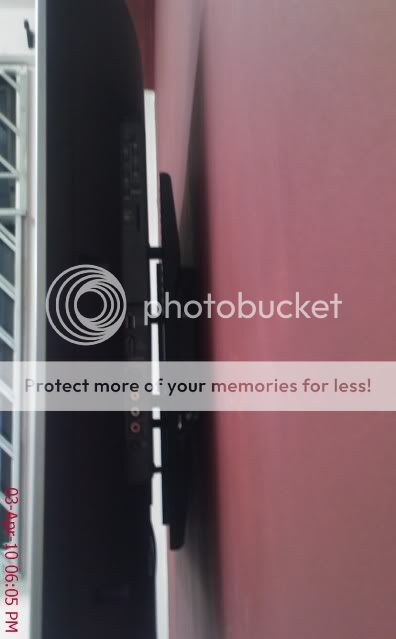
I'm using one of those fixed-angle mount bracket that holds the TV tightly to the wall. The gap between the TV and the wall is only 5cm, but I still managed to plug in all the connectors (HDMI, component and RCA) without problems. I think the VGA port might be a little difficult to fit but I'm not using it anyway due to the low resolution it can support (1366x768) as opposed to 1080p using HDMI (or DVI with convertor into HDMI).

Attached Image

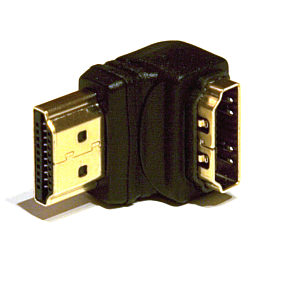
Anyway I just saw something like this selling at computer shop yesterday, might be useful for some people laugh.gif

user posted image
TSdarenlks
post Feb 12 2010, 05:23 PM

On my way
****
Senior Member
639 posts

Joined: Feb 2009


QUOTE(Bart-man @ Feb 12 2010, 05:10 PM)

Anyway I just saw something like this selling at computer shop yesterday, might be useful for some people  laugh.gif

user posted image
*
Yes, this is very useful for side HDMI connection so that your cable won't be easily get loose because of the angle
bond
post Feb 15 2010, 10:41 AM

Getting Started
**
Junior Member
83 posts

Joined: Jul 2006
Thanks darenlks and Bart-man, your infor is like ang pow for chinese new year,,,, smile.gif


prominen
post Feb 15 2010, 11:44 AM

Getting Started
**
Junior Member
290 posts

Joined: Sep 2006
From: Kepong + KL
bro bart, do u mean that vga only support resolution 1366x768 only? so how to archive higher resolution like 1920x1080? must use HDMI is it?...

btw, how much do u bought that wall mount and where?

This post has been edited by prominen: Feb 15 2010, 11:47 AM
Skylinestar
post Feb 15 2010, 04:13 PM

Mega Duck
********
All Stars
10,479 posts

Joined: Jan 2003
From: Sarawak
QUOTE(prominen @ Feb 15 2010, 11:44 AM)
bro bart, do u mean that vga only support resolution 1366x768 only? so how to archive higher resolution like 1920x1080? must use HDMI is it?...
*
for 1080p, you must use HDMI.
xtremestorm
post Feb 16 2010, 12:50 AM

New Member
*
Junior Member
26 posts

Joined: Feb 2010


Hi there. Yesterday I just went to Harvey Norman Ikano/Ikea. They were selling this model for RM4499 until at the end of this month from normal price RM4699. Their PQ n features are nice. I was almost wanted to buy it yesterday. But I hold back and thanks that I could find it cheaper online.. icon_rolleyes.gif .

Just want to ask, normally people connect normal Astro to LCD TV using S-Video rite? but according to spec of this Toshiba LCD TV in their website, it stated that no S-Video port. I am wondering how did you all connect your normal Astro to this TV? (except those using Astro Beyond)
TSdarenlks
post Feb 16 2010, 01:04 AM

On my way
****
Senior Member
639 posts

Joined: Feb 2009


QUOTE(xtremestorm @ Feb 16 2010, 12:50 AM)
Hi there. Yesterday I just went to Harvey Norman Ikano/Ikea. They were selling this model for RM4499 until at the end of this month from normal price RM4699. Their PQ n features are nice. I was almost wanted to buy it yesterday. But I hold back and thanks that I could find it cheaper online.. icon_rolleyes.gif .

Just want to ask, normally people connect normal Astro to LCD TV using S-Video rite? but according to spec of this Toshiba LCD TV in their website, it stated that no S-Video port. I am wondering how did you all connect your normal Astro to this TV? (except those using Astro Beyond)
*
You meant RM4499 for 47" ? This is damn cheap as 1 or 2 months ago they are still selling at 5-6K shocking.gif

This tv has the S-Video connection at its EXT 2

http://www.toshiba.com.my/product/product_...ductid=47ZV600E
karheng
post Feb 16 2010, 09:28 AM

Enthusiast
*****
Senior Member
934 posts

Joined: Jan 2007


QUOTE(xtremestorm @ Feb 16 2010, 12:50 AM)
Hi there. Yesterday I just went to Harvey Norman Ikano/Ikea. They were selling this model for RM4499 until at the end of this month from normal price RM4699. Their PQ n features are nice. I was almost wanted to buy it yesterday. But I hold back and thanks that I could find it cheaper online.. icon_rolleyes.gif .

Just want to ask, normally people connect normal Astro to LCD TV using S-Video rite? but according to spec of this Toshiba LCD TV in their website, it stated that no S-Video port. I am wondering how did you all connect your normal Astro to this TV? (except those using Astro Beyond)
*
42" can get RM3450 at HLK.

This post has been edited by karheng: Feb 16 2010, 10:30 AM
Boy96
post Feb 16 2010, 01:33 PM

That's a tripod.
*******
Senior Member
3,848 posts

Joined: Dec 2009
From: Ampang


QUOTE(karheng @ Feb 16 2010, 09:28 AM)
42" can get RM3450 at HLK.
*
I checked at HLK website, there is no 42ZV600E, only got 42RV600E which cost RM3999

http://www.hlk2u.com/42-Toshiba-LCD-TV-42R...=961&doit=order


Added on February 16, 2010, 1:35 pm
QUOTE(xtremestorm @ Feb 16 2010, 12:50 AM)

Just want to ask, normally people connect normal Astro to LCD TV using S-Video rite? but according to spec of this Toshiba LCD TV in their website, it stated that no S-Video port. I am wondering how did you all connect your normal Astro to this TV? (except those using Astro Beyond)
*
Toshiba TV got S-Video port... see this on the website

EXT 2 Input: S-Video + Composite Video + RCA Audio

http://www.toshiba.com.my/product/product_...ductid=47ZV600E

This post has been edited by Boy96: Feb 16 2010, 01:35 PM
karheng
post Feb 16 2010, 02:19 PM

Enthusiast
*****
Senior Member
934 posts

Joined: Jan 2007


QUOTE(Boy96 @ Feb 16 2010, 01:33 PM)
I checked at HLK website, there is no 42ZV600E, only got 42RV600E which cost RM3999

http://www.hlk2u.com/42-Toshiba-LCD-TV-42R...=961&doit=order


Added on February 16, 2010, 1:35 pm

Toshiba TV got S-Video port... see this on the website

  EXT 2    Input: S-Video + Composite Video + RCA Audio

http://www.toshiba.com.my/product/product_...ductid=47ZV600E
*
RM3450 offer by the saleman at Kajang branch, so not stated in thier official website.
I bought 42ZV600E from him. RM36++ by installment.
aneip
post Feb 16 2010, 06:05 PM

Look at all my stars!!
*******
Senior Member
2,466 posts

Joined: Nov 2004


47" around 5200, 2 weeks ago.. Need confirmation those 4499 at HN is whats size..
xtremestorm
post Feb 16 2010, 09:59 PM

New Member
*
Junior Member
26 posts

Joined: Feb 2010


QUOTE(aneip @ Feb 16 2010, 06:05 PM)
47" around 5200, 2 weeks ago.. Need confirmation those 4499 at HN is whats size..
*
No darren, the price RM4499 is for 42" model. HLK and jintexelectronics.com offer cheaper price.


QUOTE(Boy96 @ Feb 16 2010, 01:33 PM)
I checked at HLK website, there is no 42ZV600E, only got 42RV600E which cost RM3999

http://www.hlk2u.com/42-Toshiba-LCD-TV-42R...=961&doit=order


Added on February 16, 2010, 1:35 pm

Toshiba TV got S-Video port... see this on the website

  EXT 2    Input: S-Video + Composite Video + RCA Audio

http://www.toshiba.com.my/product/product_...ductid=47ZV600E
*
Thank you for this info...I thought it didn't has the S-Video port. thanks again... rclxms.gif
bond
post Feb 18 2010, 08:35 AM

Getting Started
**
Junior Member
83 posts

Joined: Jul 2006
QUOTE(aneip @ Feb 16 2010, 06:05 PM)
47" around 5200, 2 weeks ago.. Need confirmation those 4499 at HN is whats size..
*
47" for RM5200? that's is real bargain... btw, i was told there is a shortage for zv model in the market and stock will be available after cny...
TSdarenlks
post Feb 18 2010, 05:02 PM

On my way
****
Senior Member
639 posts

Joined: Feb 2009


QUOTE(bond @ Feb 18 2010, 08:35 AM)
47" for RM5200? that's is real bargain... btw, i was told there is a shortage for zv model in the market and stock will be available after cny...
*
Ya, 5.2K for 47" is indeed a very good price. My SA told me that this is a hot selling model for their shop, they sold it out even before the arrival of the TVs they ordered from Toshiba and they have already gone through few batches of delivery.

This post has been edited by darenlks: Feb 18 2010, 05:02 PM
Bart-man
post Feb 18 2010, 11:02 PM

Getting Started
**
Junior Member
73 posts

Joined: Feb 2010
QUOTE(prominen @ Feb 15 2010, 11:44 AM)
bro bart, do u mean that vga only support resolution 1366x768 only? so how to archive higher resolution like 1920x1080? must use HDMI is it?...

btw, how much do u bought that wall mount and where?
*
Actually, VGA can support up to 2048x1536 during those CRT days, so 1920x1080 is sure no problem. But...

Not all LCD TV can support 1920x1080 from VGA input doh.gif

As far as I know, Toshiba can only accept up to 1366x768 from VGA input. To achieve 1920x1080, must use HDMI (or DVI to HDMI adapter/cable)

Other brand LCD TV could be different, for example, my father's 2-year-old LG 42LG53 can support 1920x1080 with VGA sweat.gif

Oh, my wall mount is bought together with my TV from SEC, normal price is RM199 including installation, but I got discount since I bundle with TV brows.gif
kaolen
post Feb 22 2010, 04:24 PM

Getting Started
**
Junior Member
164 posts

Joined: Aug 2006


Toshiba will order a new panel and replace it for me.
didnt manage to get a new 1 to 1 replacement
TSdarenlks
post Feb 22 2010, 05:12 PM

On my way
****
Senior Member
639 posts

Joined: Feb 2009


QUOTE(kaolen @ Feb 22 2010, 04:24 PM)
Toshiba will order a new panel and replace it for me.
didnt manage to get a new 1 to 1 replacement
*
Good to hear that bro rclxms.gif
nitrox
post Feb 22 2010, 06:07 PM

Getting Started
**
Junior Member
64 posts

Joined: Dec 2009
Nice info on the Toshiba ZV600E, I'm almost convinced in getting one. I'm looking at this one along with 2 other models - Sharp A77 and LG50. As for the Toshiba's features, what does it have that the Sharp & LG doesn't?
kaolen
post Feb 22 2010, 06:19 PM

Getting Started
**
Junior Member
164 posts

Joined: Aug 2006


any1 how to enter the toshiba test screen? or bios screen?
TSdarenlks
post Feb 22 2010, 10:54 PM

On my way
****
Senior Member
639 posts

Joined: Feb 2009


QUOTE(nitrox @ Feb 22 2010, 06:07 PM)
Nice info on the Toshiba ZV600E, I'm almost convinced in getting one. I'm looking at this one along with 2 other models - Sharp A77 and LG50. As for the Toshiba's features, what does it have that the Sharp & LG doesn't?
*
14 bit video processing
Resolution+
Audessey EQ
Dolby Volume
HDMI Instaport


Added on February 22, 2010, 10:59 pm
QUOTE(kaolen @ Feb 22 2010, 06:19 PM)
any1 how to enter the toshiba test screen? or bios screen?
*
I also want to know how to go to the service menu, so far no luck finding such info

This post has been edited by darenlks: Feb 22 2010, 10:59 PM
zero07
post Feb 23 2010, 10:11 AM

New Member
*
Junior Member
32 posts

Joined: Dec 2008
From: Kuala Lumpur


how the black level in this toshiba zv actually hmm.gif do we must make the picture very dark so that the true black level can be achieved hmm.gif
TSdarenlks
post Feb 23 2010, 02:39 PM

On my way
****
Senior Member
639 posts

Joined: Feb 2009


QUOTE(zero07 @ Feb 23 2010, 10:11 AM)
how the black level in this toshiba zv actually  hmm.gif do we must make the picture very dark so that the true black level can be achieved  hmm.gif
*
Not really. The black level is good when viewing during daylight and under bright environment but become slightly lighter at night under dim environment but still ok for a casual viewer like me. If you are very particular about the true black level, maybe you should go for plasma which normally has very good black level. If $$$ not an issue, then go for Pioneer Kuro brows.gif
zero07
post Feb 24 2010, 11:30 AM

New Member
*
Junior Member
32 posts

Joined: Dec 2008
From: Kuala Lumpur


QUOTE(darenlks @ Feb 23 2010, 02:39 PM)
Not really. The black level is good when viewing during daylight and under bright environment but become slightly lighter at night under dim environment but still ok for a casual viewer like me. If you are very particular about the true black level, maybe you should go for plasma which normally has very good black level. If $$$ not an issue, then go for Pioneer Kuro  brows.gif
*
I think i will take this tv next month rclxms.gif just watch it in the store and compare with different tv. this black color are more black and make watching movie more enjoyable in the night time futhermore the screen are glossy like plasma already with different electric comsumption thumbup.gif
kalkamel
post Feb 24 2010, 01:53 PM

Getting Started
**
Junior Member
133 posts

Joined: May 2006
I intend to get the 42" model myself and have been checking reviews from everywhere on the set and the equivalent US model, the ZV650U. I read that there is an audio problem, where the sound becomes garbled after the TV's been on for a few hours. Turning it on and off again seems to solve the problem temporarily. Anyone here experience that problem?
TSdarenlks
post Feb 24 2010, 03:29 PM

On my way
****
Senior Member
639 posts

Joined: Feb 2009


QUOTE(kalkamel @ Feb 24 2010, 01:53 PM)
I intend to get the 42" model myself and have been checking reviews from everywhere on the set and the equivalent US model, the ZV650U. I read that there is an audio problem, where the sound becomes garbled after the TV's been on for a few hours. Turning it on and off again seems to solve the problem temporarily. Anyone here experience that problem?
*
Nope, so far no one reported such issue with their sets here, including mine smile.gif . This could be isolated to thoese sets in North America region as their manual does not cover ZV600E which is only meant for Asia-Pac region and manufactured in Indonesia.

This post has been edited by darenlks: Feb 24 2010, 03:50 PM
karheng
post Feb 24 2010, 04:07 PM

Enthusiast
*****
Senior Member
934 posts

Joined: Jan 2007


QUOTE(kalkamel @ Feb 24 2010, 01:53 PM)
I intend to get the 42" model myself and have been checking reviews from everywhere on the set and the equivalent US model, the ZV650U. I read that there is an audio problem, where the sound becomes garbled after the TV's been on for a few hours. Turning it on and off again seems to solve the problem temporarily. Anyone here experience that problem?
*
my TV On for at least 12 hours non stop. ( Still ) nothing happen.
kalkamel
post Feb 24 2010, 04:48 PM

Getting Started
**
Junior Member
133 posts

Joined: May 2006
That's good to know! Definitely can't wait to get mine!
bond
post Feb 25 2010, 09:27 AM

Getting Started
**
Junior Member
83 posts

Joined: Jul 2006
QUOTE(zero07 @ Feb 23 2010, 10:11 AM)
how the black level in this toshiba zv actually  hmm.gif do we must make the picture very dark so that the true black level can be achieved  hmm.gif
*
i use the autoview mode and the overall pq looks good to my eyes, if lower the brightness and increase the contrast to boost the black level, it tend to loose detail.

This post has been edited by bond: Feb 25 2010, 09:28 AM
TSdarenlks
post Feb 25 2010, 11:20 AM

On my way
****
Senior Member
639 posts

Joined: Feb 2009


QUOTE(bond @ Feb 25 2010, 09:27 AM)
i use the autoview mode and the overall pq looks good to my eyes, if  lower the brightness and increase the contrast to boost the black level, it tend to loose detail.
*
Can play around with the 3D Management Color settings where each base color has its hue, saturation and brightness setting so that you won't loose detail by doing so, also could tune the colors to be more natural and accurate. Btw, I'm using the Dynamic picture mode and then fine tune it to my liking. wink.gif
gocitygo
post Feb 25 2010, 05:35 PM

Casual
***
Junior Member
397 posts

Joined: Mar 2008
darenlks, do you calibrate or just tune the color to your liking. i would suggest to use colorimeter to calibrate the TV. u should fully maximize your investment.
TSdarenlks
post Feb 25 2010, 06:09 PM

On my way
****
Senior Member
639 posts

Joined: Feb 2009


QUOTE(gocitygo @ Feb 25 2010, 05:35 PM)
darenlks, do you calibrate or just tune the color to your liking.  i would suggest to use colorimeter to calibrate the TV.  u should fully maximize your investment.
*
Just tune the colors to my liking and has been tweaking around settings for weeks until I'm satisfied with it, especially on the color of the sky, human skin tone, green leaf and red color where now they all look natural for me.

Any recommendation where could I get this colorimeter ? Definitely would love to try it out nod.gif

This post has been edited by darenlks: Feb 25 2010, 06:41 PM
bond
post Feb 25 2010, 06:12 PM

Getting Started
**
Junior Member
83 posts

Joined: Jul 2006
QUOTE(darenlks @ Feb 25 2010, 06:09 PM)
Any recommendation where could I get this colorimeter ? Definitely would love to try it out  nod.gif
*
I am interested too, btw, i was told there are pro out there doing this for a fee... cool2.gif
anfieldude
post Feb 25 2010, 07:58 PM

Look at all my stars!!
*******
Senior Member
3,858 posts

Joined: Jan 2008
QUOTE(darenlks @ Feb 25 2010, 06:09 PM)
Just tune the colors to my liking and has been tweaking around settings for weeks until I'm satisfied with it, especially on the color of the sky, human skin tone, green leaf and red color where now they all look natural for me.

Any recommendation where could I get this colorimeter ? Definitely would love to try it out  nod.gif
*
U can buy a colorimeter plus the software for ~ USD200. Spectracal is having good sale on their Home Basic Edition. I believe their shipping charges to Malaysia shd be reasonable (USD50 or so) and u shd be prepared to pay tax about 20% on it as it is taxable.

Spectracal Store Page

Or u can buy it from Chromapure.

Chromapure Display2

U then can follow the instructions and after practise u shd be able to get it done.

Of course the alternative is to pay someone to do it.

Enjoy.
gocitygo
post Feb 25 2010, 08:59 PM

Casual
***
Junior Member
397 posts

Joined: Mar 2008
QUOTE(darenlks @ Feb 25 2010, 06:09 PM)
Just tune the colors to my liking and has been tweaking around settings for weeks until I'm satisfied with it, especially on the color of the sky, human skin tone, green leaf and red color where now they all look natural for me.

Any recommendation where could I get this colorimeter ? Definitely would love to try it out  nod.gif
*
i'm using Xrite. bought from Amazon.

Xrite

here more info about calibration.

Calibration


anfieldude
post Feb 25 2010, 09:07 PM

Look at all my stars!!
*******
Senior Member
3,858 posts

Joined: Jan 2008
QUOTE(gocitygo @ Feb 25 2010, 08:59 PM)
i'm using Xrite.  bought from Amazon.

Xrite

here more info about calibration.

Calibration
*
I think for USD41 more u get the software bundle from Calman. Else u need to use HCFR with the EyeOne Display meter. IMHO, Calman is better for beginners.

Gocitygo,

How r ur results using The EyeOne Display? Do u use it with HCFR?
gocitygo
post Feb 25 2010, 09:39 PM

Casual
***
Junior Member
397 posts

Joined: Mar 2008
Yup. I'm using HCFR software. I paid US$120 for the Xrite smile.gif

Only managed to do greyscale calibration on HD65. Better dark scene details.

This post has been edited by gocitygo: Feb 25 2010, 09:42 PM
anfieldude
post Feb 25 2010, 09:50 PM

Look at all my stars!!
*******
Senior Member
3,858 posts

Joined: Jan 2008
QUOTE(gocitygo @ Feb 25 2010, 09:39 PM)
Yup.  I'm using HCFR software.  I paid US$120 for the Xrite smile.gif

Only managed to do greyscale calibration on HD65.  Better dark scene details.
*
Greyscale itself is a big step up.
TSdarenlks
post Feb 25 2010, 11:12 PM

On my way
****
Senior Member
639 posts

Joined: Feb 2009


Thanks all for the recommendation, appreciate it rclxms.gif

First time get to see all these calibration stuff but didn't expect that it's quite pricey also sweat.gif . I'm wondering whether it's worth it to get one if I'm only using once to calibrate my tv or do I need to calibrate it from time to time ?
anfieldude
post Feb 26 2010, 11:07 AM

Look at all my stars!!
*******
Senior Member
3,858 posts

Joined: Jan 2008
QUOTE(darenlks @ Feb 25 2010, 11:12 PM)
Thanks all for the recommendation, appreciate it  rclxms.gif

First time get to see all these calibration stuff but didn't expect that it's quite pricey also  sweat.gif . I'm wondering whether it's worth it to get one if I'm only using once to calibrate my tv or do I need to calibrate it from time to time ?
*
It is recommended that u revisit ur calibration settings every 1000hrs. I do it every 200hr or so. I have not see any major drifts on my set past 700hrs.

Anyway, it also depends on the kind of person u r. It is pricey especially if u only want to do it once. Thats why there is an option to pay someone to do it. Although, in Malaysia there are too few calibrators out there who give a hoot.
Kain_Sicilian
post Feb 26 2010, 11:35 AM

Not So Friendly
*****
Senior Member
844 posts

Joined: Sep 2005
From: Mars, where else?


QUOTE(anfieldude @ Feb 25 2010, 07:58 PM)
U can buy a colorimeter plus the software for ~ USD200. Spectracal is having good sale on their Home Basic Edition. I believe their shipping charges to Malaysia shd be reasonable (USD50 or so) and u shd be prepared to pay tax about 20% on it as it is taxable.

Spectracal Store Page

Or u can buy it from Chromapure.

Chromapure Display2

U then can follow the instructions and after practise u shd be able to get it done.

Of course the alternative is to pay someone to do it.

Enjoy.
*
Alternatively, if you are on a tight budget, you can purchase a SPYDER 3 Express @ RM395 from Shashinki (http://shashinki.com/shop/datacolor-colorvision-spyder-express-color-calibration-system-p-3742.html). I believe you might be able to get better prices if you purchase from forumers here, and then download an *ahem* copy of Spyder 3 TV software and calibrate with the software using the Spyder 3 Express hardware.
TSdarenlks
post Feb 26 2010, 12:50 PM

On my way
****
Senior Member
639 posts

Joined: Feb 2009


QUOTE(anfieldude @ Feb 26 2010, 11:07 AM)
It is recommended that u revisit ur calibration settings every 1000hrs. I do it every 200hr or so. I have not see any major drifts on my set past 700hrs.

Anyway, it also depends on the kind of person u r. It is pricey especially if u only want to do it once. Thats why there is an option to pay someone to do it. Although, in Malaysia there are too few calibrators out there who give a hoot.
*
Are you one fo these few ? brows.gif

Can advise how much they will charge for such service ? With Toshiba ZV series provides the settings for Greyscale, Primary Base Colors and Gamma adjustment, kind of interesting to see how much different when the set is perfectly calibrated rolleyes.gif


Added on February 26, 2010, 12:53 pm
QUOTE(Kain_Sicilian @ Feb 26 2010, 11:35 AM)
Alternatively, if you are on a tight budget, you can purchase a SPYDER 3 Express @ RM395 from Shashinki (http://shashinki.com/shop/datacolor-colorvision-spyder-express-color-calibration-system-p-3742.html). I believe you might be able to get better prices if you purchase from forumers here, and then download an *ahem* copy of Spyder 3 TV software and calibrate with the software using the Spyder 3 Express hardware.
*
Thanks, RM395 sounds good. Do you know who is selling this sensor in the forum here ?

This post has been edited by darenlks: Feb 26 2010, 01:00 PM
bond
post Feb 26 2010, 06:31 PM

Getting Started
**
Junior Member
83 posts

Joined: Jul 2006
all sifus... assuming the player also provide some tuning capability, such as media player and some DVD player, do we calibrate TV base on the the player setting?

Should we also calibrate the TV from all the sources, i.e. DVD, BD player and media player, If yes, how do we calibrate the astro feed?

I saw some articles advise to turn off those noise reduction features during calibration, does this mean we should not use it at all?

thanks in advance.
prominen
post Feb 27 2010, 12:27 PM

Getting Started
**
Junior Member
290 posts

Joined: Sep 2006
From: Kepong + KL
anyone know how much is Legend SS2 is selling this model? I search all forumner that selling this model and all don't have stock right now...

another thing, can u guys tell me other shop that sell around RM3600 or less around KL...I really need this by this weekend or early next week...

This post has been edited by prominen: Feb 27 2010, 12:31 PM
gocitygo
post Feb 27 2010, 12:50 PM

Casual
***
Junior Member
397 posts

Joined: Mar 2008
just checking whether Toshiba ZV series CMS allow to save the setting for each individual input or one setting apply for all.
anfieldude
post Feb 27 2010, 01:04 PM

Look at all my stars!!
*******
Senior Member
3,858 posts

Joined: Jan 2008
QUOTE(bond @ Feb 26 2010, 06:31 PM)
all sifus... assuming the player also provide some tuning capability, such as media player and some DVD player, do we calibrate TV base on the the player setting?

Should we also calibrate the TV from all the sources, i.e. DVD, BD player and media player, If yes, how do we calibrate the astro feed?

I saw some articles advise to turn off those noise reduction features during calibration, does this mean we should not use it at all?

thanks in advance.
*
Each source shd be calibrated and preferably at the display.

Astro feed is touch and go. My advise would be to use a pattern generator (ie 576i if u use the old box, 1080i if u use the B.Yond box) calibrate and hope that the programming adheres to the correct standards.

Noise reduction for HD sources shd essentially be turned off. For SD sources, depending on the source, it might be beneficial to have some NR.

Again, it is ur wish. If u r a purist and want to preserve the signal then, my suggestion woudl be to turn it off.
eMKs
post Feb 27 2010, 06:22 PM

On my way
****
Senior Member
647 posts

Joined: Jan 2010
From: Klang
QUOTE(anfieldude @ Feb 27 2010, 01:04 PM)
Astro feed is touch and go. My advise would be to use a pattern generator (ie 576i if u use the old box, 1080i if u use the B.Yond box) calibrate and hope that the programming adheres to the correct standards.
*

Where to get the pattern generator?
TSdarenlks
post Feb 27 2010, 06:30 PM

On my way
****
Senior Member
639 posts

Joined: Feb 2009


QUOTE(gocitygo @ Feb 27 2010, 12:50 PM)
just checking whether Toshiba ZV series CMS allow to save the setting for each individual input or one setting apply for all.
*
It allows settings to be saved to for each individual input, even for the settings for each individual picutre mode within the same input


Added on February 27, 2010, 6:37 pm
QUOTE(prominen @ Feb 27 2010, 12:27 PM)
anyone know how much is Legend SS2 is selling this model? I search all forumner that selling this model and all don't have stock right now...

another thing, can u guys tell me other shop that sell around RM3600 or less around KL...I really need this by this weekend or early next week...
*
You can try TBM shop opposite Cheras Leisure Mall as I got mine from there. They are selling quite many units of this ZV series and if they have no stocks, they will order it from Toshiba. For price wise, not sure how much they are selling for 42" now but can negotiate the price with them, just like what I did with my set. Look for Jack as he gives very good service and helpful. smile.gif

This post has been edited by darenlks: Feb 27 2010, 06:37 PM
gocitygo
post Feb 27 2010, 09:37 PM

Casual
***
Junior Member
397 posts

Joined: Mar 2008
QUOTE(darenlks @ Feb 27 2010, 06:30 PM)
It allows settings to be saved to for each individual input, even for the settings for each individual picutre mode within the same input
Wow, Toshiba ZV series really loaded with features... thumbup.gif
Boy96
post Feb 27 2010, 10:51 PM

That's a tripod.
*******
Senior Member
3,848 posts

Joined: Dec 2009
From: Ampang


<WTA> the 42ZV600E got how many HDMI port? Why when I compare this to the 42RV600 on the Toshiba website, it says the RV is better?
TSdarenlks
post Feb 27 2010, 11:47 PM

On my way
****
Senior Member
639 posts

Joined: Feb 2009


QUOTE(Boy96 @ Feb 27 2010, 10:51 PM)
<WTA> the 42ZV600E got how many HDMI port? Why when I compare this to the 42RV600 on the Toshiba website, it says the RV is better?
*
ZV series has 4 HDMI ports and is their flagship model in Malaysia.
lexonline
post Feb 28 2010, 02:23 AM

Getting Started
**
Junior Member
66 posts

Joined: Feb 2009


47ZV600E owner here. Just a quick check, is there anyway that I can label all my input source? example: HDMI1 - HTPC?? Thanks
karheng
post Feb 28 2010, 09:50 AM

Enthusiast
*****
Senior Member
934 posts

Joined: Jan 2007


QUOTE(lexonline @ Feb 28 2010, 02:23 AM)
47ZV600E owner here. Just a quick check, is there anyway that I can label all my input source? example: HDMI1 - HTPC?? Thanks
*
i'm also looking for this feature, look like no luck to change this.
TSdarenlks
post Feb 28 2010, 11:29 AM

On my way
****
Senior Member
639 posts

Joined: Feb 2009


QUOTE(lexonline @ Feb 28 2010, 02:23 AM)
47ZV600E owner here. Just a quick check, is there anyway that I can label all my input source? example: HDMI1 - HTPC?? Thanks
*
First, you must set the REGZA-LINK Setup under Preferences to Off, then go to Manual Setting under Setup page to label the input sources.

The length of the label is limited to 7 characters, please leave the first character with an arrow go through the dot there (if you choose another one, your tv your skip the signal reception in this input source). Start selecting your characters from 2nd block onwards by pressing up or down button on your remote to label your input source. Repeat the same steps in other input source wink.gif


karheng
post Feb 28 2010, 12:00 PM

Enthusiast
*****
Senior Member
934 posts

Joined: Jan 2007


QUOTE(darenlks @ Feb 28 2010, 11:29 AM)
First, you must set the REGZA-LINK Setup under Preferences to Off, then go to Manual Setting under Setup page to label the input sources.

The length of the label is limited to 7 characters, please leave the first character with an arrow go through the dot there (if you choose another one, your tv your skip the signal reception in this input source). Start selecting your characters from 2nd block onwards by pressing up or down button on your remote to label your input source. Repeat the same steps in other input source  wink.gif
*
thks darenlks, i'm now able to change it.
lexonline
post Feb 28 2010, 09:42 PM

Getting Started
**
Junior Member
66 posts

Joined: Feb 2009


QUOTE(darenlks @ Feb 28 2010, 11:29 AM)
First, you must set the REGZA-LINK Setup under Preferences to Off, then go to Manual Setting under Setup page to label the input sources.

The length of the label is limited to 7 characters, please leave the first character with an arrow go through the dot there (if you choose another one, your tv your skip the signal reception in this input source). Start selecting your characters from 2nd block onwards by pressing up or down button on your remote to label your input source. Repeat the same steps in other input source  wink.gif
*
Thanks darenlks! smile.gif
pgkia
post Mar 1 2010, 12:50 PM

Getting Started
**
Junior Member
72 posts

Joined: Dec 2006
QUOTE(darenlks @ Feb 22 2010, 10:54 PM)
14 bit video processing
Resolution+
Audessey EQ
Dolby Volume
HDMI Instaport


Added on February 22, 2010, 10:59 pm

I also want to know how to go to the service menu, so far no luck finding such info
*
I heard 14-bit internal processing and panel bit are 2 different thing. For eg, my friend told me that Samsung LED has 18-bit internal video processing, but 10-bit panel. Internal processing means the bit width the TV CPU is working on the data. Usually the more the better. Panel bit width determine how many colors it can produce.

Anyone has any other understanding?
TSdarenlks
post Mar 1 2010, 05:18 PM

On my way
****
Senior Member
639 posts

Joined: Feb 2009


QUOTE(pgkia @ Mar 1 2010, 12:50 PM)
I heard 14-bit internal processing and panel bit are 2 different thing. For eg, my friend told me that Samsung LED has 18-bit internal video processing, but 10-bit panel. Internal processing means the bit width the TV CPU is working on the data. Usually the more the better. Panel bit width determine how many colors it can produce.

Anyone has any other understanding?
*
My understanding on the panel bit is that the number of reproducible colors the panel is capable of displaying. 10 bit panel can reprodcue over 1 billion of colors while 8 bit panel can only produce 16.7 millions of colors.

For internal digital video processing, I think it is important in terms of creating higher level of color gradations (a gradual shading of one tint, tone, or color into another) for smoother and natural picture without image banding. 14 bit video processing has 4096 of shades for a single color, which is 16x more than the 8 bit video processing (256 shades).
Kain_Sicilian
post Mar 3 2010, 10:48 PM

Not So Friendly
*****
Senior Member
844 posts

Joined: Sep 2005
From: Mars, where else?


QUOTE(darenlks @ Feb 26 2010, 12:50 PM)
Are you one fo these few ?  brows.gif

Can advise how much they will charge for such service ? With Toshiba ZV series provides the settings for Greyscale, Primary Base Colors and Gamma adjustment, kind of interesting to see how much different when the set is perfectly calibrated  rolleyes.gif


Added on February 26, 2010, 12:53 pm

Thanks, RM395 sounds good. Do you know who is selling this sensor in the forum here ?
*
Bro dadarouch seems to be selling it here:

http://forum.lowyat.net/index.php?showtopic=870695&hl=spyder

Dunno if he's still selling it or not.
prominen
post Mar 4 2010, 12:05 AM

Getting Started
**
Junior Member
290 posts

Joined: Sep 2006
From: Kepong + KL
all stock for zv series is currently out of stock...have to wait until next week... cry.gif

no LCD for 2 week since I just sold my 32" LCD last week... cry.gif

This post has been edited by prominen: Mar 4 2010, 12:07 AM
TSdarenlks
post Mar 4 2010, 02:22 AM

On my way
****
Senior Member
639 posts

Joined: Feb 2009


QUOTE(Kain_Sicilian @ Mar 3 2010, 10:48 PM)
Bro dadarouch seems to be selling it here:

http://forum.lowyat.net/index.php?showtopic=870695&hl=spyder

Dunno if he's still selling it or not.
*
Tx for the link bro, will check it out smile.gif


Added on March 4, 2010, 2:26 am
QUOTE(prominen @ Mar 4 2010, 12:05 AM)
all stock for zv series is currently out of stock...have to wait until next week... cry.gif

no LCD for 2 week since I just sold my 32" LCD last week... cry.gif
*
All shops out of stock ? sweat.gif

This post has been edited by darenlks: Mar 4 2010, 02:26 AM
prominen
post Mar 4 2010, 07:45 AM

Getting Started
**
Junior Member
290 posts

Joined: Sep 2006
From: Kepong + KL
only shop open here at lowyat forum...all no stock until next week....outside sell for much2 higher than lowyat sell so why waste money....
karheng
post Mar 4 2010, 09:23 AM

Enthusiast
*****
Senior Member
934 posts

Joined: Jan 2007


QUOTE(prominen @ Mar 4 2010, 12:05 AM)
all stock for zv series is currently out of stock...have to wait until next week... cry.gif

no LCD for 2 week since I just sold my 32" LCD last week... cry.gif
*
I bought from HLK Kajang, i think they also out of stock.
Price increase a bit.

Or you can try this RM3599
http://www.jintexelectronics.com


prominen
post Mar 4 2010, 03:53 PM

Getting Started
**
Junior Member
290 posts

Joined: Sep 2006
From: Kepong + KL
I already asked Kevin from jintex...also no stock...
karheng
post Mar 4 2010, 04:40 PM

Enthusiast
*****
Senior Member
934 posts

Joined: Jan 2007


QUOTE(prominen @ Mar 4 2010, 03:53 PM)
I already asked Kevin from jintex...also no stock...
*
wow, top selling... last time i asked some branch at Puchong, RM3800,
If you really need fast, try to search Bandar Puteri Puchong, next few shop to Citibank.
See they got stock or not.

Pandan Jaya RM36++. Got few shop there also.

Just don't buy at Harvey Norman, SenQ, Onking they are selling RM4699.

After that found that HLK kajang only selling RM3450. ( I bought it )
Funny, the price for this model increased a bit now.

This post has been edited by karheng: Mar 4 2010, 04:48 PM
TSdarenlks
post Mar 4 2010, 04:57 PM

On my way
****
Senior Member
639 posts

Joined: Feb 2009


QUOTE(karheng @ Mar 4 2010, 04:40 PM)
wow, top selling... last time i asked some branch at Puchong, RM3800,
If you really need fast, try to search Bandar Puteri Puchong, next few shop to Citibank.
See they got stock or not.

Pandan Jaya RM36++. Got few shop there also.

Just don't buy at Harvey Norman, SenQ, Onking they are selling RM4699.

After that found that HLK kajang only selling RM3450. ( I bought it )
Funny, the price for this model increased a bit now.
*
Maybe price back to normal after the festive season is over


prominen
post Mar 6 2010, 02:27 AM

Getting Started
**
Junior Member
290 posts

Joined: Sep 2006
From: Kepong + KL
yea, just bought 42zv600e from kevin today...deliver to my house...
currently still testing it with my pc...too bad using vga cable only support up to 1024x768...still haven't have hdmi-dvi cable...
TSdarenlks
post Mar 6 2010, 02:48 AM

On my way
****
Senior Member
639 posts

Joined: Feb 2009


Congrats bro on the arrival of your new tv rclxms.gif
karheng
post Mar 6 2010, 06:52 AM

Enthusiast
*****
Senior Member
934 posts

Joined: Jan 2007


QUOTE(prominen @ Mar 6 2010, 02:27 AM)
yea, just bought 42zv600e from kevin today...deliver to my house...
currently still testing it with my pc...too bad using vga cable only support up to 1024x768...still haven't have hdmi-dvi cable...
*
glad to hear another ZV user.
VSX-AX2as
post Mar 6 2010, 12:15 PM

Getting Started
**
Junior Member
214 posts

Joined: Feb 2010
Where is the shop hmm.gif ..Can using 0% interest installment ?ha..ha..
TSdarenlks
post Mar 8 2010, 07:33 PM

On my way
****
Senior Member
639 posts

Joined: Feb 2009


Just to share the CNET Asia review on the ZV series. smile.gif

http://asia.cnet.com/reviews/home_av/tvs/0...5072673p,00.htm
nitrox
post Mar 9 2010, 03:33 PM

Getting Started
**
Junior Member
64 posts

Joined: Dec 2009
Daren, I read this review the other day and was impressed with its features. Do you agree with the reviewer's cons vs the ZV (especially milky blacks)? The black level wont certainly be that of the plasma's black level isn't it?
benjaminn78
post Mar 9 2010, 04:16 PM

Getting Started
**
Junior Member
57 posts

Joined: May 2009
Hi,

i going to buy 42ZV, currently the price i ask is around RM3799, have anyone asking cheaper than that?..

may i know how is the contrast on this TV? im normally watch blu-ray in dark environment. just affrair watch those grey white background.

This post has been edited by benjaminn78: Mar 9 2010, 04:19 PM
Bart-man
post Mar 9 2010, 05:21 PM

Getting Started
**
Junior Member
73 posts

Joined: Feb 2010
QUOTE(benjaminn78 @ Mar 9 2010, 04:16 PM)
may i know how is the contrast on this TV? im normally watch blu-ray in dark environment. just affrair watch those grey white background.
*
As long as it is still LCD technology, there will always be a little visible light on black background in dark environment, although new LCD TV nowadays are a lot better than just a few years back. For now, one way to improve this situation is to use ambient lighting like this http://forum.lowyat.net/topic/1342592

Pure black is only possible on:
1) VERY good Plasma TV
2) LCD TV with zone LED backlighting (ideally zone backlight resolution = panel resolution)
3) OLED TV drool.gif
TSdarenlks
post Mar 9 2010, 07:53 PM

On my way
****
Senior Member
639 posts

Joined: Feb 2009


QUOTE(nitrox @ Mar 9 2010, 03:33 PM)
Daren, I read this review the other day and was impressed with its features. Do you agree with the reviewer's cons vs the ZV (especially milky blacks)? The black level wont certainly be that of the plasma's black level isn't it?
*
Milky black or light black could be seen on the top and bottom horizontal bars but not noticeable in the movie scenes so PQ is awesome to me for my taste. Of course if you crank up the brightness alone in the settings, the whole screen will become greyish black. The good thing about this ZV is that it is loaded with advanced settings which allow you to adjust the greyscale, six base colors, gamma which combine all these settings with suitable Brightness and Contrast levels, it could still maintain a satisfactory black level in the movie scenes without sacrifying detail in the dark smile.gif


Added on March 9, 2010, 8:11 pm
QUOTE(benjaminn78 @ Mar 9 2010, 04:16 PM)
may i know how is the contrast on this TV? im normally watch blu-ray in dark environment. just affrair watch those grey white background.
*
No such grey white background when watching blu-ray, so it's all about how you adjust the necessary settings.

This post has been edited by darenlks: Mar 9 2010, 08:11 PM
prominen
post Mar 9 2010, 08:51 PM

Getting Started
**
Junior Member
290 posts

Joined: Sep 2006
From: Kepong + KL
guys, is there anyone of u use full hd resolution for ur pc? how the quality of the wording...? mine is kinda blur with a bit of artifact around the font if u look closely la...I'm using just cheapo dvi-hdmi bought for RM35 at lowyat...

so is it possible to get a nice sharp looking font...?

This post has been edited by prominen: Mar 9 2010, 08:53 PM
Bart-man
post Mar 10 2010, 12:53 AM

Getting Started
**
Junior Member
73 posts

Joined: Feb 2010
QUOTE(prominen @ Mar 9 2010, 08:51 PM)
guys, is there anyone of u use full hd resolution for ur pc? how the quality of the wording...? mine is kinda blur with a bit of artifact around the font if u look closely la...I'm using just cheapo dvi-hdmi bought for RM35 at lowyat...

so is it possible to get a nice sharp looking font...?
*
Yeah, I'm using full hd resolution for my pc, also using the same dvi-hdmi to connect to TV. To get sharp looking font (just like a normal LCD monitor), all I need to do is set the picture mode to "PC-user" at the quick menu. But mine is 42RV600E lar... I guess ZV should be the same too? sweat.gif

Other picture modes I choose (Autoview, Dynamic, Standard, Game) will cause the text to "shadow" a bit or sometimes oversharpen too much, like what you said. Mild and Movie is slightly better but looks too dim for my taste, so sticking with PC-user is still the best laugh.gif

Back at my hometown, my dad's LG 42LG53FR has no such "PC mode", so I had to manually tune the sharpness setting to zero in order to get the same PC-like effect. Might be useful to know for those people using other brand TVs brows.gif

Hey, haven't seen you post any photo since you changed to your new TV? How is your new setup now? Ambilight still there? tongue.gif Share share lah... drool.gif
prominen
post Mar 10 2010, 01:07 AM

Getting Started
**
Junior Member
290 posts

Joined: Sep 2006
From: Kepong + KL
still in setup mode...quiet messy right now...later I show the picture... thumbup.gif

This post has been edited by prominen: Mar 10 2010, 01:07 AM
eMKs
post Mar 10 2010, 10:12 AM

On my way
****
Senior Member
647 posts

Joined: Jan 2010
From: Klang
QUOTE(Bart-man @ Mar 10 2010, 12:53 AM)
Back at my hometown, my dad's LG 42LG53FR has no such "PC mode", so I had to manually tune the sharpness setting to zero in order to get the same PC-like effect. Might be useful to know for those people using other brand TVs  brows.gif
*

I use sony klv-32v550a with my laptop. Font is very clear even with just 1m away, can browse file without any problem. I just use default setting, haven't try other setting or maybe it just 32". I also use cheap 3m HDMI cable RM27 at Tesco, but now it just RM15.
helob
post Mar 10 2010, 11:22 AM

Getting Started
**
Junior Member
265 posts

Joined: Jan 2003
I am also interested in the Toshiba xxZV600E Model LCD TV.
Where is the best shop/place to get this in PENANG for best price & service?
TQ

prominen
post Mar 10 2010, 02:15 PM

Getting Started
**
Junior Member
290 posts

Joined: Sep 2006
From: Kepong + KL
at last, I already posted my new setup picture here...come come and see...
TSdarenlks
post Mar 10 2010, 05:48 PM

On my way
****
Senior Member
639 posts

Joined: Feb 2009


QUOTE(prominen @ Mar 10 2010, 02:15 PM)
at last, I already posted my new setup picture here...come come and see...
*
wow.... wat a serious gamer, all 3 game consoles also sapu notworthy.gif

If you could hang your tv lower a bit where the center of the tv closer to your eye level, the PQ would be better and shoul be more comfortable as don't have to lift your head looking at the screen.

Just my 2 cents smile.gif

This post has been edited by darenlks: Mar 10 2010, 05:56 PM
Bart-man
post Mar 11 2010, 12:08 AM

Getting Started
**
Junior Member
73 posts

Joined: Feb 2010
I think the TV already hang quite low. My TV hang even higher, 3 ft from the ground, but I sit on couch so the TV screen just nice at my eye level tongue.gif

But looks like he is sitting on the floor to play games, so u r right he need to lift his head a bit to look at the screen sweat.gif

Anyhow if he hang his TV any lower, it will be even more weird when he stand up or sit on chair while looking at the TV hmm.gif

The best is get a couch and solve everything rclxms.gif

BTW, nice room! So many gadgets and collections thumbup.gif
prominen
post Mar 11 2010, 12:11 AM

Getting Started
**
Junior Member
290 posts

Joined: Sep 2006
From: Kepong + KL
thanks guys for ur comment...currently still looking for a nice tv cabinet that can fit well in my room...
benjaminn78
post Mar 12 2010, 10:01 AM

Getting Started
**
Junior Member
57 posts

Joined: May 2009
may i know does clearscan 200, is it really 200Hz? i saw sony 200Hz motion flow scan was very clear and not "real", how about zv?
TSdarenlks
post Mar 12 2010, 12:03 PM

On my way
****
Senior Member
639 posts

Joined: Feb 2009


QUOTE(benjaminn78 @ Mar 12 2010, 10:01 AM)
may i know does clearscan 200, is it really 200Hz? i saw sony 200Hz motion flow scan was very clear and not "real", how about zv?
*
It is not true 200Hz motion. It combines both true 100Hz and backlight scanning technology to create 200Hz effect, that's why it is called "scan".
pgkia
post Mar 12 2010, 02:46 PM

Getting Started
**
Junior Member
72 posts

Joined: Dec 2006
gocitygo,
looks like u have got your ZV, mind to share where you got it? How much? I also from Penang. So far, i can't find any shop which has demo unit to check how good this unit really is.
gocitygo
post Mar 12 2010, 03:16 PM

Casual
***
Junior Member
397 posts

Joined: Mar 2008
QUOTE(pgkia @ Mar 12 2010, 02:46 PM)
gocitygo,
looks like u have got your ZV, mind to share where you got it? How much? I also from Penang. So far, i can't find any shop which has demo unit to check how good this unit really is.
*
No, I didn't get mine yet. Still survey around and waiting for HM approval cry.gif

Last time I saw ZV on display @ SEC Bkt Jambul.
pgkia
post Mar 12 2010, 03:33 PM

Getting Started
**
Junior Member
72 posts

Joined: Dec 2006
QUOTE(gocitygo @ Mar 12 2010, 03:16 PM)
No, I didn't get mine yet.  Still survey around and waiting for HM approval  cry.gif

Last time I saw ZV on display @ SEC Bkt Jambul.
*
wow...i miss BJ bracnhes...been ages i have not been there unless i need computer parts.... tongue.gif

Anyhow, i have been asking around, SenQ, SEC...as of last week, price remains RM6.2 for 47"


Added on March 12, 2010, 4:59 pmJust came back from SEC BJ, the sales person claimed that they have never sold ZV unit and they have not display any ZV units..... sad.gif

Visited SENQ BJ in the same trip, they do not have ZV on display as well. Both quoted me RM6199. This might be the RCP. I don't think we can get RM5.5 like what the KL people can get... cry.gif

This post has been edited by pgkia: Mar 12 2010, 04:59 PM
Bart-man
post Mar 13 2010, 03:55 PM

Getting Started
**
Junior Member
73 posts

Joined: Feb 2010
Last time I bought my TV (a few days before CNY), I went to SEC Queensbay to ask about 42ZV600E. Retail price was RM4699 but can actually negotiate till RM39xx brows.gif

I also asked about 42RV600E at the same time, retail price was RM3999, member price was RM3399. but I managed to negotiate till RM3000 (cash price) inclusive of wall mount bracket and delivery+installation.

So I ended up getting 42RV600E since I save almost RM1000 and the price is close enough to KL price rclxm9.gif

According to their CNY catalog here (Toshiba TV is at page 3, top row 32AV600E, 37AV600E, 42RV600E, 42ZV600E, bottom row 46RV600E, 47ZV600E), the listed price is RM5699 for 47ZV600E, you may want to try your luck there laugh.gif

If you "too free" please also help me ask the current price of my TV, I wanna know LCD TV price go up or go down after CNY tongue.gif
pgkia
post Mar 13 2010, 11:43 PM

Getting Started
**
Junior Member
72 posts

Joined: Dec 2006
wow, maybe my negotiation skills bad. i hv never negotiate until that much difference from the first quoted price.... blush.gif

i will try again tmr. Anyhow, i really wish to look at the unit before i make the decision. Today i nearly become the owner of Samsung 46B650. Last night was in Gurney and they have road show, quote me RM6k for it and with 5% discount with pay by Citibank (no installment). I was thinking get more info today and when i called back just now, they said out of stock liao....sad.gif ai~

Actually, i feel that Samsung Series 6 is also good. Anyone try to compare side by side with ZV?
VSX-AX2as
post Mar 14 2010, 08:04 AM

Getting Started
**
Junior Member
214 posts

Joined: Feb 2010
QUOTE(pgkia @ Mar 13 2010, 11:43 PM)
wow, maybe my negotiation skills bad. i hv never negotiate until that much difference from the first quoted price.... blush.gif

i will try again tmr. Anyhow, i really wish to look at the unit before i make the decision. Today i nearly become the owner of Samsung 46B650. Last night was in Gurney and they have road show, quote me RM6k for it and with 5% discount with pay by Citibank (no installment). I was thinking get more info today and when i called back just now, they said out of stock liao....sad.gif ai~

Actually, i feel that Samsung Series 6 is also good. Anyone try to compare side by side with ZV?
*
I have compared both model side by side.My eyes told me ZV PQ better than samsung series6.
karheng
post Mar 14 2010, 08:16 AM

Enthusiast
*****
Senior Member
934 posts

Joined: Jan 2007


QUOTE(pgkia @ Mar 13 2010, 11:43 PM)
wow, maybe my negotiation skills bad. i hv never negotiate until that much difference from the first quoted price.... blush.gif

i will try again tmr. Anyhow, i really wish to look at the unit before i make the decision. Today i nearly become the owner of Samsung 46B650. Last night was in Gurney and they have road show, quote me RM6k for it and with 5% discount with pay by Citibank (no installment). I was thinking get more info today and when i called back just now, they said out of stock liao....sad.gif ai~

Actually, i feel that Samsung Series 6 is also good. Anyone try to compare side by side with ZV?
*
i heard the Samsung B series discontinued. So some place already out of stock. C series is coming soon.
http://forum.lowyat.net/topic/1082455/+760#entry32424121
idoblu
post Mar 14 2010, 08:19 AM

stars for sale
********
All Stars
11,308 posts

Joined: Feb 2008
how about if compare with its adik - RV series? any comments?
i noticed the difference between ZV and RV series is that ZV series have a gloss surface and therefore more reflections than the RV which is matt. but the gloss surface really enhance the picture quality - I like!
dc28yk
post Mar 14 2010, 04:45 PM

Getting Started
**
Junior Member
269 posts

Joined: Feb 2005


I have just buy the ZV model...
What i can tell is... why i put analog TV.. it shows crap images..

My sony CRT CUBE looks way... better..

Does this means i need to get astro???

Btw why i pick this model is.. I compare the image with a samsung LED.. dunno what model but cost 4k.

The Compare withe R and the V... what i notice is.. when it is in Astro HD.. the V model really wins by a lot..

The image quality is like.. LED...

but it is really quite smooth..

The colour now i see is quite cold.. and sife can help me setup??

Now i am running on all default setup..
JOR23N
post Mar 14 2010, 04:59 PM

Getting Started
**
Junior Member
147 posts

Joined: Dec 2009
QUOTE(dc28yk @ Mar 14 2010, 04:45 PM)
I have just buy the ZV model...
What i can tell is... why i put analog TV.. it shows crap images..

My sony CRT CUBE looks way... better..

Does this means i need to get astro???

Btw why i pick this model is.. I compare the image with a samsung LED.. dunno what model but cost 4k.

The Compare withe R and the V... what i notice is.. when it is in Astro HD.. the V model really wins by a lot..

The image quality is like.. LED...

but it is really quite smooth..

The colour now i see is quite cold.. and sife can help me setup??

Now i am running on all default setup..
*
Got V model?

This post has been edited by JOR23N: Mar 14 2010, 05:00 PM
karheng
post Mar 14 2010, 07:02 PM

Enthusiast
*****
Senior Member
934 posts

Joined: Jan 2007


QUOTE(JOR23N @ Mar 14 2010, 04:59 PM)
Got V model?
*
i think he meant for ZV vs RV
Boy96
post Mar 14 2010, 07:21 PM

That's a tripod.
*******
Senior Member
3,848 posts

Joined: Dec 2009
From: Ampang


The shop near Spectrum mall in Ampang, the place where I got the Toshiba Regza 32CV500E last year, just now I visit this shop to buy aircond, ask'ed them what is the price for Toshiba Regza 42ZV600E, and they say, RM2700 NEW. I was like WTF SO CHEAP! But that guy non stop recommend this Samsung 40" TV for RM2600 (but it says RM3700 on the shelf)
VSX-AX2as
post Mar 14 2010, 08:28 PM

Getting Started
**
Junior Member
214 posts

Joined: Feb 2010
QUOTE(Boy96 @ Mar 14 2010, 07:21 PM)
The shop near Spectrum mall in Ampang, the place where I got the Toshiba Regza 32CV500E last year, just now I visit this shop to buy aircond, ask'ed them what is the price for Toshiba Regza 42ZV600E, and they say, RM2700 NEW. I was like WTF SO CHEAP! But that guy non stop recommend this Samsung 40" TV for RM2600 (but it says RM3700 on the shelf)
*
I'm live in ampang area also.Very good price deal for ZV series.I'll go for that shop tomorrow blink.gif
Boy96
post Mar 14 2010, 09:29 PM

That's a tripod.
*******
Senior Member
3,848 posts

Joined: Dec 2009
From: Ampang


QUOTE(VSX-AX2as @ Mar 14 2010, 08:28 PM)
I'm live in ampang area also.Very good price deal for ZV series.I'll go for that shop tomorrow blink.gif
*
Its the shop beside the Pizza Hut express, Secret Recipe and clothes store, really tempting the deal! But they never stop recommending Samsung, donno why
karheng
post Mar 14 2010, 09:32 PM

Enthusiast
*****
Senior Member
934 posts

Joined: Jan 2007


QUOTE(Boy96 @ Mar 14 2010, 09:29 PM)
Its the shop beside the Pizza Hut express, Secret Recipe and clothes store, really tempting the deal! But they never stop recommending Samsung, donno why
*
i think the saleman need to sell off all old stock of samsung, new model coming soon.
42ZV600E @ RM2700 really good price, fast fast go there. Mine was RM3450 consider very good price before CNY.
SUSgogo2
post Mar 14 2010, 09:35 PM

gogo2
********
All Stars
18,672 posts

Joined: Jan 2003
From: Penang


I wonder this model and the samsung model, which one better? coz samsung is smaller and price is almost same...
jimlim007
post Mar 14 2010, 09:36 PM

Enoch
*******
Senior Member
4,073 posts

Joined: Aug 2006


what is black level?

just now pass thru SEC, seeing the sharp LCD TV so super clear and hard to see the motion blur compare the other model series and brand there, because other i think is not LCD type.

thinking what u guy say sharp cant perform that toshiba, then will be fuuyoo PQ then. may be one day will grab it but not soon soon.
SUSgogo2
post Mar 14 2010, 09:36 PM

gogo2
********
All Stars
18,672 posts

Joined: Jan 2003
From: Penang


QUOTE(jimlim007 @ Mar 14 2010, 09:36 PM)
what is black level?

just now pass thru SEC, seeing the sharp LCD TV so super clear and hard to see the motion blur compare the other model series and brand there, because other i think is not LCD type.

thinking what u guy say sharp cant perform that toshiba, then will be fuuyoo PQ then. may be one day will grab it but not soon soon.
*
sharp better than toshiba ar?
jimlim007
post Mar 14 2010, 09:40 PM

Enoch
*******
Senior Member
4,073 posts

Joined: Aug 2006


QUOTE(gogo2 @ Mar 14 2010, 09:36 PM)
sharp better than toshiba ar?
*
aiyo, i mean there only display 1 LCD TV look nice oledi, plus the comment at toshiba territory so hiong. should believe lor.
wira1979
post Mar 14 2010, 11:21 PM

Regular
******
Senior Member
1,059 posts

Joined: Oct 2006
From: Petaling Jaya


QUOTE(VSX-AX2as @ Mar 14 2010, 08:28 PM)
I'm live in ampang area also.Very good price deal for ZV series.I'll go for that shop tomorrow blink.gif
*
Very interested in this model. Let us know if it is indeed RM2,700. If it is ... then I will also go and sapu.
Bart-man
post Mar 14 2010, 11:24 PM

Getting Started
**
Junior Member
73 posts

Joined: Feb 2010
QUOTE(idoblu @ Mar 14 2010, 08:19 AM)
how about if compare with its adik - RV series? any comments?
i noticed the difference between ZV and RV series is that ZV series have a gloss surface and therefore more reflections than the RV which is matt. but the gloss surface really enhance the picture quality - I like!
*
Yes, the biggest difference between ZV and RV is the glossy vs matte screen, and also the Clearscan 200Hz on the ZV.

Glossy makes the panel appear blacker, but is prone to reflection hmm.gif

I took these with my phone camera at Harvey Norman Sunway Pyramid this afternoon:

Attached Image
42ZV on the left, 47ZV on the right.

Attached Image
Can you see the reflection on the 42ZV at this angle?

Attached Image
From the front however, the reflection is not noticable.

Attached Image
Over at SenQ, they actually have ZV and RV at the same spot for you to compare. ZV appears a lot blacker than RV, but also more reflections.

Attached Image
Another view.

For me, I have chosen RV because I don't need 200Hz (I mostly watch 24p movies), I prefer matte over glossy, I prefer a thinner frame, and of course because it is cheaper tongue.gif
och721229
post Mar 15 2010, 12:40 AM

Getting Started
**
Junior Member
191 posts

Joined: Aug 2009
QUOTE(Boy96 @ Mar 14 2010, 07:21 PM)
The shop near Spectrum mall in Ampang, the place where I got the Toshiba Regza 32CV500E last year, just now I visit this shop to buy aircond, ask'ed them what is the price for Toshiba Regza 42ZV600E, and they say, RM2700 NEW. I was like WTF SO CHEAP! But that guy non stop recommend this Samsung 40" TV for RM2600 (but it says RM3700 on the shelf)
*
hi, brother, r u sure it is 42ZV600e for RM 2700, if sure i will go there to grab it eventhough Rm 2900.Lastly , can u piease give me more detail about the shop ?
dc28yk
post Mar 15 2010, 01:32 AM

Getting Started
**
Junior Member
269 posts

Joined: Feb 2005


Ahahaha..

I mean ZV.

I pick the ZV coz it comes with a sub and Audyssey EQ .. Poor man try to get everything in 1 LCD.

ZV looks nicer coz it is using the Meta Brain Premium, other then the... 200Mhz thing..

Btw.. anybody know what this panel is from i mean the ZV? from samsung or sharp?

This post has been edited by dc28yk: Mar 15 2010, 01:33 AM
VSX-AX2as
post Mar 15 2010, 05:07 AM

Getting Started
**
Junior Member
214 posts

Joined: Feb 2010
QUOTE(Bart-man @ Mar 14 2010, 11:24 PM)
Yes, the biggest difference between ZV and RV is the glossy vs matte screen, and also the Clearscan 200Hz on the ZV.

Glossy makes the panel appear blacker, but is prone to reflection  hmm.gif

I took these with my phone camera at Harvey Norman Sunway Pyramid this afternoon:

Attached Image
42ZV on the left, 47ZV on the right.

Attached Image
Can you see the reflection on the 42ZV at this angle?

Attached Image
From the front however, the reflection is not noticable.

Attached Image
Over at SenQ, they actually have ZV and RV at the same spot for you to compare. ZV appears a lot blacker than RV, but also more reflections.

Attached Image
Another view.

For me, I have chosen RV because I don't need 200Hz (I mostly watch 24p movies), I prefer matte over glossy, I prefer a thinner frame, and of course because it is cheaper  tongue.gif
*
For me,I will go for ZV.Come with 200hz instead of 50hz/60hz for most of plasma/LCD in the market now.About the reflection,I not to take serious about this due to when watching movies you only sit in front of it not at the side view unsure.gif Other feature is ZV series include Audyssey EQ..

This post has been edited by VSX-AX2as: Mar 15 2010, 05:08 AM
marky
post Mar 15 2010, 09:53 AM

xoxo
*****
Senior Member
893 posts

Joined: Nov 2004


torn between this, aquos LED and samsung LED series 6...sigh decisions decisions >< ofcoz those extra 500 bux lol
TSdarenlks
post Mar 15 2010, 12:15 PM

On my way
****
Senior Member
639 posts

Joined: Feb 2009


» Click to show Spoiler - click again to hide... «


If you have all black background picture, then the reflection is obvious. For normal picture viewing, it is minimal or none smile.gif

You chosen RV because you know exactly what you want for the LCD TV within your budget and this is the best way to enjoy your new buy with no regret thumbup.gif


Added on March 15, 2010, 12:19 pm
QUOTE(dc28yk @ Mar 15 2010, 01:32 AM)
Ahahaha..

I mean ZV.

I pick the ZV coz it comes with a sub and Audyssey EQ .. Poor man try to get everything in 1 LCD.

ZV looks nicer coz it is using the Meta Brain Premium, other then the... 200Mhz thing..

Btw.. anybody know what this panel is from i mean the ZV? from samsung or sharp?
*
This tv is definitely a good deal which comes with decent features wink.gif

I believe the panel is S-IPS panel from LG/Philips which offers good viewing angle horizontally.


Added on March 15, 2010, 12:25 pm
QUOTE(jimlim007 @ Mar 14 2010, 09:40 PM)
aiyo, i mean there only display 1 LCD TV look nice oledi, plus the comment at toshiba territory so hiong. should believe lor.
*
If compare their features, Toshiba wins hand down. I recommend you compare them with your own eyes and get the one you like the most because you are the one goin to watch it everyday and not us smile.gif


Added on March 15, 2010, 12:29 pm
QUOTE(marky @ Mar 15 2010, 09:53 AM)
torn between this, aquos LED and samsung LED series 6...sigh decisions decisions >< ofcoz those extra 500 bux lol
*
Samung LED looks more impressive to me in terms of PQ, just my observation blush.gif

This post has been edited by darenlks: Mar 15 2010, 12:29 PM
marky
post Mar 15 2010, 04:37 PM

xoxo
*****
Senior Member
893 posts

Joined: Nov 2004


RV600E is 1k cheaper too.... so RV dont use meta brain premium?
nitrox
post Mar 15 2010, 04:44 PM

Getting Started
**
Junior Member
64 posts

Joined: Dec 2009
QUOTE(marky @ Mar 15 2010, 04:37 PM)
RV600E is 1k cheaper too.... so RV dont use meta brain premium?
*
Apparently not, based on the RV's specs, it only has meta brain (power). Only the ZV's got the meta brain premium.
och721229
post Mar 15 2010, 07:01 PM

Getting Started
**
Junior Member
191 posts

Joined: Aug 2009
QUOTE(Boy96 @ Mar 14 2010, 07:21 PM)
The shop near Spectrum mall in Ampang, the place where I got the Toshiba Regza 32CV500E last year, just now I visit this shop to buy aircond, ask'ed them what is the price for Toshiba Regza 42ZV600E, and they say, RM2700 NEW. I was like WTF SO CHEAP! But that guy non stop recommend this Samsung 40" TV for RM2600 (but it says RM3700 on the shelf)
*
Does any one here know it is still available for this price,Toshiba Regza 42zv600e RM2700
prominen
post Mar 15 2010, 07:18 PM

Getting Started
**
Junior Member
290 posts

Joined: Sep 2006
From: Kepong + KL
QUOTE(och721229 @ Mar 15 2010, 07:01 PM)
Does any one here know it is still available  for this price,Toshiba Regza 42zv600e RM2700
*
nobody respond...I think its a misspeak model...no way a ZV model drop almost 1k so fast...might be RV model the seller mean...just 2 week ago I bought ZV at RM3580...
och721229
post Mar 15 2010, 07:27 PM

Getting Started
**
Junior Member
191 posts

Joined: Aug 2009
QUOTE(prominen @ Mar 15 2010, 07:18 PM)
nobody respond...I think its a misspeak model...no way a ZV model drop almost 1k so fast...might be RV model the seller mean...just 2 week ago I bought ZV at RM3580...
*
I also think like u, i already searching around n most their price r 3.6k to 4k
Boy96
post Mar 15 2010, 08:12 PM

That's a tripod.
*******
Senior Member
3,848 posts

Joined: Dec 2009
From: Ampang


QUOTE(prominen @ Mar 15 2010, 07:18 PM)
nobody respond...I think its a misspeak model...no way a ZV model drop almost 1k so fast...might be RV model the seller mean...just 2 week ago I bought ZV at RM3580...
*
Triple checked with the guy already, he even show me the list.

Toshiba 42ZV600E RM2700
dc28yk
post Mar 15 2010, 09:19 PM

Getting Started
**
Junior Member
269 posts

Joined: Feb 2005


Dont post liau go BUY!

I buy at 3.6k.

Harvey Norman Sell at 4.2k.

Got contact or not? I buy a 2nd LCD to put in my room.

2.6k SO cheap.. RV more expensive that 2.6k.. LOL...
Bart-man
post Mar 16 2010, 12:25 AM

Getting Started
**
Junior Member
73 posts

Joined: Feb 2010
Everyone else has bought 42ZV600E at >RM3.5k so far and right before CNY I also bought 42RV600E at RM3k (inclusive of wall mount bracket and installation which usually cost RM199)

Which shop so desperate to sell so cheap? Display set? Or shop gonna close down? hmm.gif

I refuse to believe ZV selling lower than RV price until somebody go buy it and show us the receipt+photo! shakehead.gif

Even if the list show ZV, it could be a typo and when the stock arrive is RV doh.gif

Somebody... prove it! brows.gif
GuyzNexDoor
post Mar 16 2010, 07:20 AM

Casual
***
Junior Member
486 posts

Joined: Jul 2006
From: Above the Sky


Bro TS,

How's the performance of this LCD if i use it mainly for astro (not astro beyond)... Still thinking whether to stay put with CRT, or someone told me for astro, plasma is the better choice. But dunno why i prefer lcd than plasma. But wanna know 1st, b4 make the decision.

Thanks
och721229
post Mar 16 2010, 08:28 AM

Getting Started
**
Junior Member
191 posts

Joined: Aug 2009
QUOTE(GuyzNexDoor @ Mar 16 2010, 07:20 AM)
Bro TS,

How's the performance of this LCD if i use it mainly for astro (not astro beyond)...  Still thinking whether to stay put with CRT, or someone told me for astro, plasma is the better choice. But dunno why i prefer lcd than plasma. But wanna know 1st, b4 make the decision.

Thanks
*
Buy Toshiba **zv600e.Just bought my 42zv600e at RM3700 free hdmi cable at Butterworth, Penang. Iknow it was a bit expensive cox no choice ,i already check almost all the electrical shop in Penang no stock, need to order n wait for a while .I also using normal Astro Decoder n the PQ of my Toshiba 42zv600e was superb
khyron
post Mar 16 2010, 11:40 AM

Casual
***
Junior Member
410 posts

Joined: Jan 2003
QUOTE(Boy96 @ Mar 15 2010, 08:12 PM)
Triple checked with the guy already, he even show me the list.

Toshiba 42ZV600E RM2700
*
Where is this shop selling RM2700? hmm.gif
Sure boh!!! shocking.gif
If really RM2700 i go buy already. laugh.gif


TSdarenlks
post Mar 16 2010, 12:03 PM

On my way
****
Senior Member
639 posts

Joined: Feb 2009


QUOTE(och721229 @ Mar 16 2010, 08:28 AM)
Buy Toshiba **zv600e.Just bought my 42zv600e at RM3700 free hdmi cable at Butterworth, Penang. Iknow it was a bit expensive cox no choice ,i already check almost all the electrical shop in Penang no stock, need to order n wait for a while .I also using normal Astro Decoder n the PQ of my Toshiba 42zv600e was superb
*
Congrats bro with your new ZV rclxms.gif


Added on March 16, 2010, 12:05 pm
QUOTE(khyron @ Mar 16 2010, 11:40 AM)
Where is this shop selling RM2700?  hmm.gif
Sure boh!!!  shocking.gif
If really RM2700 i go buy already. laugh.gif
*
He mentioned in his earlier post that the shop near Spectrum mall in Ampang. Go now and check it out, let us know if you got this super deal brows.gif

This post has been edited by darenlks: Mar 16 2010, 12:05 PM
khyron
post Mar 16 2010, 01:20 PM

Casual
***
Junior Member
410 posts

Joined: Jan 2003
QUOTE(darenlks @ Mar 16 2010, 12:03 PM)
Congrats bro with your new ZV rclxms.gif


Added on March 16, 2010, 12:05 pm

He mentioned in his earlier post that the shop near Spectrum mall in Ampang. Go now and check it out, let us know if you got this super deal  brows.gif
*
errr...where exactly? hmm.gif
Maybe end of the week can go search for it.
Boy96
post Mar 16 2010, 03:12 PM

That's a tripod.
*******
Senior Member
3,848 posts

Joined: Dec 2009
From: Ampang


QUOTE(darenlks @ Mar 16 2010, 12:03 PM)
Congrats bro with your new ZV rclxms.gif


Added on March 16, 2010, 12:05 pm

He mentioned in his earlier post that the shop near Spectrum mall in Ampang. Go now and check it out, let us know if you got this super deal  brows.gif
*
Cant remember the shop name, but the shop is quite big, there is 1 section just for Samsung

Ground Floor, Jalan Wawasan,
Ampang 2/12 Bandar Baru Ampang,
68000 Ampang,Selangor Darul Ehsan
khyron
post Mar 16 2010, 05:15 PM

Casual
***
Junior Member
410 posts

Joined: Jan 2003
QUOTE(Boy96 @ Mar 16 2010, 03:12 PM)
Cant remember the shop name, but the shop is quite big, there is 1 section just for Samsung

Ground Floor, Jalan Wawasan,
Ampang 2/12 Bandar Baru Ampang,
68000 Ampang,Selangor Darul Ehsan
*
hmm... should go check it out.
och721229
post Mar 17 2010, 02:26 AM

Getting Started
**
Junior Member
191 posts

Joined: Aug 2009
It seem that Toshiba Regza Lcd Tv got problem with it like when switch on but notting just blank only.When talking about warranty,it is possible to buy 3rd year extend warranty,cox some forumer here facing this issue too n also my friend,after 2 years warranty expired the LCD TV came out that problem.I already ask Toshiba Customer Service n there told me they didnot offer 3rd year warranty,what should we do ?
khyron
post Mar 17 2010, 09:34 AM

Casual
***
Junior Member
410 posts

Joined: Jan 2003
QUOTE(och721229 @ Mar 17 2010, 02:26 AM)
It seem that Toshiba Regza Lcd Tv got problem with it like when  switch on but notting just blank only.When talking about warranty,it is possible to buy 3rd year extend warranty,cox some forumer here facing this issue too n also my friend,after 2 years warranty expired the LCD TV came out that problem.I already ask Toshiba Customer Service n there told me they didnot offer 3rd year warranty,what should we do ?
*
Care to clarify more?
What do you mean by blank screen as in no display?


Added on March 17, 2010, 9:37 am
QUOTE(darenlks @ Mar 16 2010, 12:03 PM)
Congrats bro with your new ZV rclxms.gif


Added on March 16, 2010, 12:05 pm

He mentioned in his earlier post that the shop near Spectrum mall in Ampang. Go now and check it out, let us know if you got this super deal  brows.gif
*
Anybody nearby the area can go check it out. I doubt its the ZV series. Very likely to be be RV. hmm.gif

This post has been edited by khyron: Mar 17 2010, 09:37 AM
kelvintiew
post Mar 17 2010, 09:55 AM

New Member
*
Junior Member
23 posts

Joined: Sep 2009
hi

anybody can recommend 46"~47" LCD TV? is the toshiba 47" nice?
cheapest will be ...

thks
marky
post Mar 17 2010, 12:12 PM

xoxo
*****
Senior Member
893 posts

Joined: Nov 2004


RV600E will be cheapest and ZV600E will be pricier... all users giving positive feedback here...
cyanide
post Mar 17 2010, 05:09 PM

Getting Started
**
Junior Member
193 posts

Joined: Jan 2003
saw a 42RV500E at tesco selling at RM2057 niah...

reduce to stock smile.gif
marky
post Mar 17 2010, 05:10 PM

xoxo
*****
Senior Member
893 posts

Joined: Nov 2004


SOO CHEap!?!? only 1 or wat? how much is the ZV?

This post has been edited by marky: Mar 17 2010, 05:12 PM
cyanide
post Mar 17 2010, 05:12 PM

Getting Started
**
Junior Member
193 posts

Joined: Jan 2003
RV500 is old model.

not sure whether RV500 is HD ready or Full HD
JOR23N
post Mar 17 2010, 05:12 PM

Getting Started
**
Junior Member
147 posts

Joined: Dec 2009
QUOTE(marky @ Mar 17 2010, 05:10 PM)
SOO CHEap!?!? only 1 or wat? how much is the ZV?
*
42RV500E
TSdarenlks
post Mar 17 2010, 05:32 PM

On my way
****
Senior Member
639 posts

Joined: Feb 2009


QUOTE(och721229 @ Mar 17 2010, 02:26 AM)
It seem that Toshiba Regza Lcd Tv got problem with it like when  switch on but notting just blank only.When talking about warranty,it is possible to buy 3rd year extend warranty,cox some forumer here facing this issue too n also my friend,after 2 years warranty expired the LCD TV came out that problem.I already ask Toshiba Customer Service n there told me they didnot offer 3rd year warranty,what should we do ?
*
The current ZV series has the design that when you switch it on, there will be a click sound followed by the green indicator light up. Only after few seconds, you will hear a second click sound before the display comes up. So, I presume you are not talking about this ? Which model they are using which have this problem ?

Some of the shop do offer additional years of warranty like the shop I bought this tv from, some sort like insurance where you need to pay for certain amount of premium depends on the number of additioal years you wish to insure your tv.


Added on March 17, 2010, 5:37 pm
QUOTE(cyanide @ Mar 17 2010, 05:12 PM)
RV500 is old model.

not sure whether RV500 is HD ready or Full HD
*
It is Full HD

This post has been edited by darenlks: Mar 17 2010, 05:37 PM
och721229
post Mar 17 2010, 05:54 PM

Getting Started
**
Junior Member
191 posts

Joined: Aug 2009
[quote=darenlks,Mar 17 2010, 05:32 PM]
The current ZV series has the design that when you switch it on, there will be a click sound followed by the green indicator light up. Only after few seconds, you will hear a second click sound before the display comes up. So, I presume you are not talking about this ? Which model they are using which have this problem ?

Some of the shop do offer additional years of warranty like the shop I bought this tv from, some sort like insurance where you need to pay for certain amount of premium depends on the number of additioal years you wish to insure your tv.


Added on March 17, 2010, 5:37 pm

i don't know what series it is , when my friend turn it on ,the display was blank after waiting for a long time, he rapidly do the same action still same,it was happen after the warranty expired .
TSdarenlks
post Mar 17 2010, 06:53 PM

On my way
****
Senior Member
639 posts

Joined: Feb 2009


QUOTE
QUOTE(och721229,Mar 17 2010, 05:54 PM)
i don't know what series it is , when my friend turn it on ,the display was blank after waiting for a long time, he rapidly do the same action still same,it was happen after the warranty expired .
*
Did your friend send it for repair and how much it costs ?

This post has been edited by darenlks: Mar 17 2010, 06:56 PM
och721229
post Mar 17 2010, 06:57 PM

Getting Started
**
Junior Member
191 posts

Joined: Aug 2009
QUOTE(darenlks @ Mar 17 2010, 06:53 PM)
Did your friend send it for repair and how much it costs ?
*
he sent it to the shop he perchase from,luckly the shop claimt for repair FOC to my friend although warranty has expired


Added on March 17, 2010, 11:42 pm
QUOTE(och721229 @ Mar 17 2010, 06:57 PM)
he sent it to the shop he perchase from,luckly the shop claimt for repair FOC to my friend although warranty has expired
*
it is necessary to register online warranty for my new bought lcd , any benefit if i register online ? i just worry if i register online then after warranty expired , i got no change to get foc charge like my friend get cox maybe the shopper of my friend cheat Toshiba that my friend lcd still under warranty althouh it was expired

This post has been edited by och721229: Mar 17 2010, 11:42 PM
karheng
post Mar 18 2010, 09:29 AM

Enthusiast
*****
Senior Member
934 posts

Joined: Jan 2007


QUOTE(och721229 @ Mar 17 2010, 06:57 PM)
he sent it to the shop he perchase from,luckly the shop claimt for repair FOC to my friend although warranty has expired


Added on March 17, 2010, 11:42 pm
it is necessary to register online warranty for my new bought lcd , any benefit if i register online ? i just worry if i register online then after warranty expired , i got no change to get foc charge like my friend get cox maybe the shopper of my friend cheat Toshiba that my friend lcd still under warranty althouh it was expired
*
After 2 years, we may have another new technology TV like LED will become popular, and 3D TV, so now the HDTV will out date very fast like handphone or computer item. Hope our Toshiba can last at least 7-9 years. My old big TV use more than 10-15 years...

yeah, i register online for the warranty. I asked them do i need to send the card to them?
This is thier reply.


Dear Lee Kar Heng,

Good afternoon and greetings from Toshiba Sales & Services Sdn. Bhd.(TSS). We would like to take this opportunity to thank you personally for choosing and supporting Toshiba’s range of products.

No, you do not have to send in the physical warranty card after the online warranty registration is done. However, it is better for you to keep the physical copy of the warranty card, invoice/receipt and along with the printed copy of the online warranty registration for future reference.

If you have any further enquiries please do not hesitate to contact us directly or just drop me an email anytime. Thank you.

Regards,
Alexis Ng
Toshiba Sales & Services Sdn Bhd
Marketing- Home Appliances
Tel : 03-5567 3052


helob
post Mar 18 2010, 10:46 AM

Getting Started
**
Junior Member
265 posts

Joined: Jan 2003
QUOTE(karheng @ Mar 18 2010, 09:29 AM)
After 2 years, we may have another new technology TV like LED will become popular, and 3D TV, so now the HDTV will out date very fast like handphone or computer item. Hope our Toshiba can last at least 7-9 years. My old big TV use more than 10-15 years...

yeah, i register online for the warranty. I asked them do i need to send the card to them?
This is thier reply.
Dear Lee Kar Heng,

Good afternoon and greetings from Toshiba Sales & Services Sdn. Bhd.(TSS). We would like to take this opportunity to thank you personally for choosing and supporting Toshiba’s range of products.

No, you do not have to send in the physical warranty card after the online warranty registration is done. However, it is better for you to keep the physical copy of the warranty card, invoice/receipt and along with the printed copy of the online warranty registration for future reference.

If you have any further enquiries please do not hesitate to contact us directly or just drop me an email anytime. Thank you.

Regards,
Alexis Ng
Toshiba Sales & Services Sdn Bhd
Marketing- Home Appliances
Tel : 03-5567 3052
*
Hello Alex,
Trying looking for Toshiba 42ZV600V all over Penang but couldn't find any.
Would appreciate if you can provide list of shops in Penang that has stock of 42ZV600E.
TQ
och721229
post Mar 18 2010, 11:04 AM

Getting Started
**
Junior Member
191 posts

Joined: Aug 2009
QUOTE(helob @ Mar 18 2010, 10:46 AM)
Hello Alex,
Trying looking for Toshiba 42ZV600V all over Penang but couldn't find any.
Would appreciate if you can provide list of shops in Penang that has stock of 42ZV600E.
TQ
*
U can try call Engly Electrical at Butterworth 04-3319312 , just bought from them this Monday.
karheng
post Mar 18 2010, 11:21 AM

Enthusiast
*****
Senior Member
934 posts

Joined: Jan 2007


QUOTE(helob @ Mar 18 2010, 10:46 AM)
Hello Alex,
Trying looking for Toshiba 42ZV600V all over Penang but couldn't find any.
Would appreciate if you can provide list of shops in Penang that has stock of 42ZV600E.
TQ
*
yeah, you should call him instead of leave message here.
helob
post Mar 18 2010, 11:30 AM

Getting Started
**
Junior Member
265 posts

Joined: Jan 2003
QUOTE(och721229 @ Mar 18 2010, 11:04 AM)
U can try call Engly Electrical at Butterworth 04-3319312 , just bought from them this Monday.
*
TQ for your help.
How much did you pay for it?
I just called NS Electrical Falim and they quote RM3,999. Rather expensive.

TQ for you time & have a nice day

karheng
post Mar 18 2010, 11:42 AM

Enthusiast
*****
Senior Member
934 posts

Joined: Jan 2007


QUOTE(helob @ Mar 18 2010, 11:30 AM)
TQ for your help.
How much did you pay for it?
I just called NS Electrical Falim and they quote RM3,999. Rather expensive.

TQ for you time & have a nice day
*
aiya, come to KL and buy la. Take bus and carry it back. Bus fare RM60 return.
If drive car maybe expensive a bit la with tol and petrol. biggrin.gif
helob
post Mar 18 2010, 12:02 PM

Getting Started
**
Junior Member
265 posts

Joined: Jan 2003
QUOTE(karheng @ Mar 18 2010, 11:42 AM)
aiya, come to KL and buy la. Take bus and carry it back. Bus fare RM60 return.
If drive car maybe expensive a bit la with tol and petrol.  biggrin.gif
*
Brilliant suggestion. icon_idea.gif
I might just do that.
JOR23N
post Mar 18 2010, 01:04 PM

Getting Started
**
Junior Member
147 posts

Joined: Dec 2009
QUOTE(karheng @ Mar 18 2010, 11:42 AM)
aiya, come to KL and buy la. Take bus and carry it back. Bus fare RM60 return.
If drive car maybe expensive a bit la with tol and petrol.  biggrin.gif
*
Got problem, carry back to KL and claim ah? STUPID. rclxms.gif

karheng
post Mar 18 2010, 01:28 PM

Enthusiast
*****
Senior Member
934 posts

Joined: Jan 2007


QUOTE(JOR23N @ Mar 18 2010, 01:04 PM)
Got problem, carry back to KL and claim ah? STUPID. rclxms.gif
*
i think no need la, you can send to Toshiba office ma.
They should cover whole malaysia warranty for 1+1 years ( 1+2 years ? ).

http://www.toshiba.com.my/contact.jsp

but if you buy from SENQ, Harvey Norman, if you top up the warranty period, then you have to go back to them.

sky heart
post Mar 18 2010, 01:48 PM

Getting Started
**
Junior Member
71 posts

Joined: Jul 2009
any brand of lcd tv with 32" above , the manufacturer provide outdoor servise ....
they will send some authorised technician to ur house for repairing/take back the faulty lcd tv to their service centre.
no worry
Boy96
post Mar 18 2010, 02:18 PM

That's a tripod.
*******
Senior Member
3,848 posts

Joined: Dec 2009
From: Ampang


Just wondering, does the Toshiba 42ZV600E got this feature like samsung have?

1080 24P Real Movie ??
TSdarenlks
post Mar 18 2010, 02:35 PM

On my way
****
Senior Member
639 posts

Joined: Feb 2009


QUOTE(Boy96 @ Mar 18 2010, 02:18 PM)
Just wondering, does the Toshiba 42ZV600E got this feature like samsung have?

1080 24P Real Movie ??
*
This feature means the tv is capable to accept 1080p 24Hz signal and play it back according to its original frame rate (24 frames per second). Yes, ZV has this and in fact it could also accept 1080p (24/25/30/50/60Hz) signals via HDMI connection. 24p playback is quite a common feature in most of the LCD TVs in the market now.


Added on March 18, 2010, 2:40 pm
QUOTE(helob @ Mar 18 2010, 11:30 AM)
TQ for your help.
How much did you pay for it?
I just called NS Electrical Falim and they quote RM3,999. Rather expensive.

TQ for you time & have a nice day
*
Ya, it is quite expensive with this price. I've checked with one of the TBM shop in KL and they are selling this 42ZV600E at 3.6k+, if pay cash then can discount further on the price. I was told they still have 1 unit in hand but selling fast.

This post has been edited by darenlks: Mar 18 2010, 02:40 PM
JOR23N
post Mar 18 2010, 03:49 PM

Getting Started
**
Junior Member
147 posts

Joined: Dec 2009
QUOTE(karheng @ Mar 18 2010, 01:28 PM)
i think no need la, you can send to Toshiba office ma.
They should cover whole malaysia warranty for 1+1 years ( 1+2 years ? ).

http://www.toshiba.com.my/contact.jsp

but if you buy from SENQ, Harvey Norman, if you top up the warranty period, then you have to go back to them.
*
that's good. thanks for the info.
pgkia
post Mar 18 2010, 05:10 PM

Getting Started
**
Junior Member
72 posts

Joined: Dec 2006
QUOTE(darenlks @ Mar 18 2010, 02:35 PM)
This feature means the tv is capable to accept 1080p 24Hz signal and play it back according to its original frame rate (24 frames per second). Yes, ZV has this and in fact it could also accept 1080p (24/25/30/50/60Hz) signals via HDMI connection. 24p playback is quite a common feature in most of the LCD TVs in the market now.


Added on March 18, 2010, 2:40 pm

Ya, it is quite expensive with this price. I've checked with one of the TBM shop in KL and they are selling this 42ZV600E at 3.6k+, if pay cash then can discount further on the price. I was told they still have 1 unit in hand but selling fast.
*
that means the TV will play back at 24fps, without any "intelligent" frame creation like what mentioned in the clearscan feature?

it is norm that in Penang, this TV is quoted at this price. So far, the best price for 47" is RM6099. I could not find a shop to carry ready stock, or best to have demo unit to let us look at the PQ ourselves... sad.gif

TSdarenlks
post Mar 18 2010, 06:17 PM

On my way
****
Senior Member
639 posts

Joined: Feb 2009


QUOTE(pgkia @ Mar 18 2010, 05:10 PM)
that means the TV will play back at 24fps, without any "intelligent" frame creation like what mentioned in the clearscan feature?
*
Normally you just have to enable the 24Hz signal from your player or device and output to the tv. Currently I have both ClearScan (for anti motion blur) and Film Stabilization Mode (for motion dejuddering) set to OFF to ensure the movie is played back in its original frame rate without any frame creation or unnecessary processing.
Bart-man
post Mar 18 2010, 06:48 PM

Getting Started
**
Junior Member
73 posts

Joined: Feb 2010
QUOTE(pgkia @ Mar 18 2010, 05:10 PM)
that means the TV will play back at 24fps, without any "intelligent" frame creation like what mentioned in the clearscan feature?

it is norm that in Penang, this TV is quoted at this price. So far, the best price for 47" is RM6099. I could not find a shop to carry ready stock, or best to have demo unit to let us look at the PQ ourselves... sad.gif
*
SEC was selling 47" at RM5699 during CNY. Not sure about now. And you are right there is no display set to see in Penang doh.gif

QUOTE(Bart-man @ Mar 13 2010, 03:55 PM)
Last time I bought my TV (a few days before CNY), I went to SEC Queensbay to ask about 42ZV600E. Retail price was RM4699 but can actually negotiate till RM39xx  brows.gif

I also asked about 42RV600E at the same time, retail price was RM3999, member price was RM3399. but I managed to negotiate till RM3000 (cash price) inclusive of wall mount bracket and delivery+installation.

So I ended up getting 42RV600E since I save almost RM1000 and the price is close enough to KL price  rclxm9.gif

According to their CNY catalog here (Toshiba TV is at page 3, top row 32AV600E, 37AV600E, 42RV600E, 42ZV600E, bottom row 46RV600E, 47ZV600E), the listed price is RM5699 for 47ZV600E, you may want to try your luck there  laugh.gif

If you "too free" please also help me ask the current price of my TV, I wanna know LCD TV price go up or go down after CNY  tongue.gif
*
Glau
post Mar 20 2010, 03:28 PM

Casual
***
Junior Member
418 posts

Joined: Jan 2003
From: Tmn Desa K.L
just got my 42rv600..for my apartment it looks very big...at the shop looks small...aiyoh...


aneip
post Mar 20 2010, 03:45 PM

Look at all my stars!!
*******
Senior Member
2,466 posts

Joined: Nov 2004


Big is okay.. in few days time it's will look normal..

if small then need to buy bigger..
helob
post Mar 20 2010, 05:06 PM

Getting Started
**
Junior Member
265 posts

Joined: Jan 2003
New owner of 42ZV600E.
Playing around with the settings now to get best PQ for Astro Beyond using HDMI.
So far so good except the long bootup time.
It takes average 14sec from pressing power on button on remote to PQ appearance sad.gif .
This is rather long. Is this normal? Any tweaking to speed it up tongue.gif ?
Any pointer where to get 'Best' setting for this TV viewing Astro Beyong HD channels?
TQ


Added on March 20, 2010, 5:25 pm
QUOTE(darenlks @ Mar 17 2010, 05:32 PM)
The current ZV series has the design that when you switch it on, there will be a click sound followed by the green indicator light up. Only after few seconds, you will hear a second click sound before the display comes up. So, I presume you are not talking about this ? Which model they are using which have this problem ?

My new 42ZV600E took about 14 sec from pressing power on button (remote) to PQ showing with Astro Beyond HDMI input blush.gif .
How long did yours take?
TQ


This post has been edited by helob: Mar 20 2010, 05:25 PM
karheng
post Mar 20 2010, 05:39 PM

Enthusiast
*****
Senior Member
934 posts

Joined: Jan 2007


QUOTE(helob @ Mar 20 2010, 05:06 PM)
New owner of 42ZV600E.
Playing around with the settings now to get best PQ for Astro Beyond using HDMI.
So far so good except the long bootup time.
It takes average 14sec from pressing power on button on remote to PQ appearance sad.gif .
This is rather long. Is this normal? Any tweaking  to speed it up tongue.gif ?
Any pointer where to get 'Best' setting for this TV viewing Astro Beyong HD channels?
TQ


Added on March 20, 2010, 5:25 pm

My new 42ZV600E took about 14 sec from pressing power on button (remote) to PQ showing with Astro Beyond HDMI input blush.gif .
How long did yours take?
TQ
*
Mine ZV only take 7-8 sec, i think other also like that, should be not more than 10 sec...


Added on March 20, 2010, 5:47 pm
QUOTE(aneip @ Mar 20 2010, 03:45 PM)
Big is okay.. in few days time it's will look normal..

if small then need to buy bigger..
*
yes, agree with you also.
Previous i got 32", look OK when start, after few months, look small.
Then bought this 42", after put at the TV rack, look very big. But after few days, look perfect.
My house also small. Sofa to TV about 7-8 feets, i think that is just okay for me. Unless i seat in front near, then it will be too close to the TV.
Hang to wall if you think too near. My TV to wall still got 8-10 inch space.

This post has been edited by karheng: Mar 20 2010, 05:47 PM
Boy96
post Mar 20 2010, 07:52 PM

That's a tripod.
*******
Senior Member
3,848 posts

Joined: Dec 2009
From: Ampang


How good is this TV's Resolution+ feature to upscale Astro Byond SD channel?
TSdarenlks
post Mar 21 2010, 01:27 AM

On my way
****
Senior Member
639 posts

Joined: Feb 2009


QUOTE(helob @ Mar 20 2010, 05:06 PM)
My new 42ZV600E took about 14 sec from pressing power on button (remote) to PQ showing with Astro Beyond HDMI input blush.gif .
How long did yours take?
TQ
*
I think it is around 6-7 secs, didn't exactly time it and definitely won't go beyond 10 secs. How could yours take so long hmm.gif . From the first click sound until the blank display comes up right after the second click sound heard should not take that long


Added on March 21, 2010, 1:38 am
QUOTE(Boy96 @ Mar 20 2010, 07:52 PM)
How good is this TV's Resolution+ feature to upscale Astro Byond SD channel?
*
So far I'm happy with the Astro Byond SD channel using this Resolution+, the PQ is clean and smooth and the HD channel is awesome thumbup.gif

This post has been edited by darenlks: Mar 21 2010, 01:52 AM
bond
post Mar 21 2010, 01:48 AM

Getting Started
**
Junior Member
83 posts

Joined: Jul 2006
Hi, does anyone know the astro byond remote control code for toshiba zv series? the 1508/0508 work fine except I need to press the tv power button twice before it turn off or on the tv, the initial press lead me to the tv program channel 1.

Thanks

This post has been edited by bond: Mar 21 2010, 07:23 AM
Boy96
post Mar 21 2010, 02:12 PM

That's a tripod.
*******
Senior Member
3,848 posts

Joined: Dec 2009
From: Ampang


QUOTE(darenlks @ Mar 21 2010, 01:27 AM)
So far I'm happy with the Astro Byond SD channel using this Resolution+, the PQ is clean and smooth and the HD channel is awesome  thumbup.gif
*
Even on stretch mode? tongue.gif
Glau
post Mar 21 2010, 02:43 PM

Casual
***
Junior Member
418 posts

Joined: Jan 2003
From: Tmn Desa K.L
yup.. me too looking for the solution to this (on the astro beyond remote issue)..

This post has been edited by Glau: Mar 21 2010, 02:44 PM
TSdarenlks
post Mar 21 2010, 03:52 PM

On my way
****
Senior Member
639 posts

Joined: Feb 2009


QUOTE(Boy96 @ Mar 21 2010, 02:12 PM)
Even on stretch mode?  tongue.gif
*
yes, i'm currently watching it in Stretch mode. If set to 4:3 aspect, the PQ is even better but I just hate the pillar box tongue.gif
basj
post Mar 22 2010, 12:35 AM

New Member
*
Junior Member
28 posts

Joined: Jan 2007


Hello all,
Just want to check, is it possible to check the usage hour for the ZV600E?? I read somewhere in the panasonic tread there is such thing to check... ..

Thanks. biggrin.gif
Bart-man
post Mar 22 2010, 01:29 PM

Getting Started
**
Junior Member
73 posts

Joined: Feb 2010
QUOTE(darenlks @ Mar 21 2010, 03:52 PM)
yes, i'm currently watching it in Stretch mode. If set to 4:3 aspect, the PQ is even better but I just hate the pillar box  tongue.gif
*
As far as I know one of the unique feature of Toshiba LCD is the Super Live mode which streches 4:3 content to 16:9 without making things look "fat". Basically it stretches the side edges more than the center, so things in the center maintains the correct aspect ratio, the top and bottom does not get cropped, and you don't get the pillar box rclxms.gif

Are you using that mode?
marky
post Mar 22 2010, 01:49 PM

xoxo
*****
Senior Member
893 posts

Joined: Nov 2004


thats what the SA told one of the forumers that the TV got problem coz the text looks bigger on the side lol >< all the sales tactics!
Boy96
post Mar 22 2010, 06:52 PM

That's a tripod.
*******
Senior Member
3,848 posts

Joined: Dec 2009
From: Ampang


May be getting this TV soon, any chance that Toshiba will launch a new TV line this year? Cause I will be so dissapointed if they did it so quickly
art6969
post Mar 22 2010, 07:18 PM

Regular
******
Senior Member
1,520 posts

Joined: Jul 2009
From: Are Lock Stuck, France
is it possible ZV model price can be lower 3k in 5-6 month forward?
TSdarenlks
post Mar 22 2010, 07:58 PM

On my way
****
Senior Member
639 posts

Joined: Feb 2009


QUOTE(Bart-man @ Mar 22 2010, 01:29 PM)
As far as I know one of the unique feature of Toshiba LCD is the Super Live mode which streches 4:3 content to 16:9 without making things look "fat". Basically it stretches the side edges more than the center, so things in the center maintains the correct aspect ratio, the top and bottom does not get cropped, and you don't get the pillar box  rclxms.gif

Are you using that mode?
*
I have used it before Astro restored the stretch option last Thursday because I cannot bear with the over zoomed mode. Even though I could continue using this Super Live mode now but I found it is troublesome to switch it back and forth between wide and super live mode when switching from SD to HD channel or vice versa because if I don't switch it back to wide mode when in HD channel, some portion of the picture will be chopped off. So end up stick with Wide mode for all channels with no fuss since already get used to those "fat people" for many years tongue.gif
kaolen
post Mar 22 2010, 08:00 PM

Getting Started
**
Junior Member
164 posts

Joined: Aug 2006


QUOTE(Boy96 @ Mar 22 2010, 06:52 PM)
May be getting this TV soon, any chance that Toshiba will launch a new TV line this year? Cause I will be so dissapointed if they did it so quickly
*
new line will be launch at euro market on 3rd quarter. not so sure about malaysia

but de z series is a reli nice lcd.

This post has been edited by kaolen: Mar 22 2010, 08:02 PM
TSdarenlks
post Mar 22 2010, 08:02 PM

On my way
****
Senior Member
639 posts

Joined: Feb 2009


QUOTE(Boy96 @ Mar 22 2010, 06:52 PM)
May be getting this TV soon, any chance that Toshiba will launch a new TV line this year? Cause I will be so dissapointed if they did it so quickly
*
The only latest model I heard of is SV series which is LED TV with local dimming. They have just launched this ZV series second half of last year so don't think there will be any new model soon in Malaysia I guess.


Added on March 22, 2010, 8:04 pm
QUOTE(kaolen @ Mar 22 2010, 08:00 PM)
new line will be launch at euro market on 3rd quarter. not so sure about malaysia

but de z series is a reli nice lcd.
*
Is it the one comes with cell processor ? brows.gif


Added on March 22, 2010, 8:07 pm
QUOTE(marky @ Mar 22 2010, 01:49 PM)
thats what the SA told one of the forumers that the TV got problem coz the  text looks bigger on the side lol >< all the sales tactics!
*
Exactly this is the mode causing the scrolling text looks out of shape towards the edge of the tv as I've tested it nod.gif

This post has been edited by darenlks: Mar 22 2010, 08:07 PM
kaolen
post Mar 23 2010, 09:05 AM

Getting Started
**
Junior Member
164 posts

Joined: Aug 2006


ya with cell processor. daren buying it?
TSdarenlks
post Mar 23 2010, 02:26 PM

On my way
****
Senior Member
639 posts

Joined: Feb 2009


QUOTE(kaolen @ Mar 23 2010, 09:05 AM)
ya with cell processor. daren buying it?
*
I'm broke already after I've bought this tv, now makan roti at home tongue.gif

Talking about this cell tv (ZX series), it is so impressive as it acts like a advanced PC or gaming console. It is first of its kind and I bet it is very pricey.

http://tacp.toshiba.com/mediahub/BlogEngin...st/CELL-TV.aspx

-LED with local dimming (512 controllable zones)
-Dynamic Contrast 9 millions : 1
-ClearScan 480Hz
-3D capability
-Built in 1TB HDD and BD Player
-Wi-Fi funtion
-Internet Connection and streaming
-Video Conferencing over IP

wow... drool.gif
marky
post Mar 23 2010, 03:05 PM

xoxo
*****
Senior Member
893 posts

Joined: Nov 2004


480Hz? wow haha
kaolen
post Mar 23 2010, 03:38 PM

Getting Started
**
Junior Member
164 posts

Joined: Aug 2006


480hz is for euro market. When it reach Malaysia it will become 240hz.

But if reach malaysia still 480hz that will be nice
TSdarenlks
post Mar 23 2010, 06:36 PM

On my way
****
Senior Member
639 posts

Joined: Feb 2009


QUOTE(kaolen @ Mar 23 2010, 03:38 PM)
480hz is for euro market. When it reach Malaysia it will become 240hz.

But if reach malaysia still 480hz that will be nice
*
480Hz is for US market (NTSC with 60Hz), I believe europe is using PAL system (50Hz) like in Asia-Pac region, so should be 400Hz instead.
Glau
post Mar 23 2010, 08:45 PM

Casual
***
Junior Member
418 posts

Joined: Jan 2003
From: Tmn Desa K.L
QUOTE(bond @ Mar 21 2010, 01:48 AM)
Hi, does anyone know the astro byond remote control code for toshiba zv series? the 1508/0508 work fine except I need to press the tv power button twice before it turn off or on the tv, the initial press lead me to the tv program channel 1.

Thanks
*
hi all...any solution for this yet???
TSdarenlks
post Mar 24 2010, 12:17 PM

On my way
****
Senior Member
639 posts

Joined: Feb 2009


QUOTE(Glau @ Mar 23 2010, 08:45 PM)
hi all...any solution for this yet???
*
Didn't try it as last time my Philips LCD tv also having similar symptom, so already gave up. Also only limited control functions could be used via Astro remote, so I prefer to use back my Toshiba remote control where I always play around with the user menu settings. rolleyes.gif


dc28yk
post Mar 26 2010, 12:40 AM

Getting Started
**
Junior Member
269 posts

Joined: Feb 2005


I am using the Astro Beyond. Wow.. it looks Very Nice.

I dont have SD mode. It auto show full screen.. It Looks very Nice la...

The beyond remote can close the TV on it.
sonixmedia
post Mar 26 2010, 03:40 PM

Getting Started
**
Junior Member
248 posts

Joined: Mar 2010


I've just received my 42ZV600E yesterday. From the PQ... Wow smile.gif

I pick this TV coz I been a Toshiba TV user for more than 15 years. Not much problems. My previous TV only broke down once in those 15 years. I hope my new TV will last as long thumbup.gif

And I pick up this model cause you guys really poison me into it drool.gif

Just thought would like to say thank you for all your inputs rclxms.gif rclxms.gif rclxms.gif

Best Regards

This post has been edited by sonixmedia: Mar 26 2010, 03:42 PM
TSdarenlks
post Mar 26 2010, 03:48 PM

On my way
****
Senior Member
639 posts

Joined: Feb 2009


Congrats on your new ZV and enjoy rclxms.gif
pgkia
post Mar 26 2010, 04:11 PM

Getting Started
**
Junior Member
72 posts

Joined: Dec 2006
QUOTE(sonixmedia @ Mar 26 2010, 03:40 PM)
I've just received my 42ZV600E yesterday. From the PQ... Wow  smile.gif

I pick this TV coz I been a Toshiba TV user for more than 15 years. Not much problems. My previous TV only broke down once in those 15 years. I hope my new TV will last as long  thumbup.gif

And I pick up this model cause you guys really poison me into it  drool.gif

Just thought would like to say thank you for all your inputs  rclxms.gif  rclxms.gif  rclxms.gif

Best Regards
*
Congrats....btw, how much u bought it? and where? Do u have any idea for 47"?
art6969
post Mar 26 2010, 06:48 PM

Regular
******
Senior Member
1,520 posts

Joined: Jul 2009
From: Are Lock Stuck, France
any comment on toshiba 42RV600E
Glau
post Mar 26 2010, 07:07 PM

Casual
***
Junior Member
418 posts

Joined: Jan 2003
From: Tmn Desa K.L
QUOTE(art6969 @ Mar 26 2010, 06:48 PM)
any comment on toshiba 42RV600E
*
i have been using this model for nearly a week now and so far so good.. it is a nice model with a good price. 4 hdmi..really good....ps3..bluray..astro..xbox 360..the works!!
art6969
post Mar 26 2010, 07:17 PM

Regular
******
Senior Member
1,520 posts

Joined: Jul 2009
From: Are Lock Stuck, France
im now thinking to take RV model... is there any diffrent on PQ for thsi 2 model RV and ZV
Glau
post Mar 26 2010, 07:48 PM

Casual
***
Junior Member
418 posts

Joined: Jan 2003
From: Tmn Desa K.L
QUOTE(art6969 @ Mar 26 2010, 07:17 PM)
im now thinking to take RV model... is there any diffrent on PQ for thsi 2 model RV and ZV
*
there should be...with the price difference and all.
Boy96
post Mar 26 2010, 08:44 PM

That's a tripod.
*******
Senior Member
3,848 posts

Joined: Dec 2009
From: Ampang


RV and ZV makes alot of different when watching SD Channels on Astro, or DVD player. because the ZV got this feature called Resolution+

http://www.home-entertainment.toshiba.co.u...esolution-Plus/


Added on March 27, 2010, 12:31 pmjust found this,

http://www.toshiba.com.my/product/product_...ductid=52Z3500E

is it better than the ZV series? price also more expensive

This post has been edited by Boy96: Mar 27 2010, 12:31 PM
sonixmedia
post Mar 27 2010, 03:57 PM

Getting Started
**
Junior Member
248 posts

Joined: Mar 2010


Guys just wondering since the ZV600E is a full HDTV does it have a digital tuner build in? I can't seem to find any info on the specification list.
Paste from About.com on Digital TV
"
* July 1, 2005: All TVs with screen sizes over 36" must include built-in ATSC tuner
* July 1, 2006: All of 25-35" TVs must include ATSC DTV tuner (right now only 50 required)
* July 1, 2007: All of 13-24" TVs must include ATSC DTV tuner
* July 1, 2007: All interface devices must have ATSC DTV tuner (VCR, DVD player/recorder, DVR, etc)

Keep in mind though that this FCC requirement only applies to new units. Products made before the deadline are exempt from compliance. However, manufacturers are required to put a sticker on TVs that aren't ready for digital TV.
"
End of paste

I know this is FCC ruling and not applied here, but shouldn't we have similar ruling?

Some might ask why I need a digital tuner, no digital off the air transmission in Malaysia yet. But since I am in JB and Singapore's TV signal do Transmit some of its channel in HD. And I believe Malaysia will also be transmitting Digital HDTV in a couple years. unsure.gif sweat.gif

This post has been edited by sonixmedia: Mar 27 2010, 04:12 PM
TSdarenlks
post Mar 27 2010, 09:56 PM

On my way
****
Senior Member
639 posts

Joined: Feb 2009


QUOTE(Boy96 @ Mar 26 2010, 08:44 PM)

Added on March 27, 2010, 12:31 pmjust found this,

http://www.toshiba.com.my/product/product_...ductid=52Z3500E

is it better than the ZV series? price also more expensive
*
This is the old model before ZV series. It has less and inferior features compared to ZV


Added on March 27, 2010, 10:00 pm
QUOTE(sonixmedia @ Mar 27 2010, 03:57 PM)
Guys just wondering since the ZV600E is a full HDTV does it have a digital tuner build in? I can't seem to find any info on the specification list.
Paste from About.com on Digital TV
"
    * July 1, 2005: All TVs with screen sizes over 36" must include built-in ATSC tuner
    * July 1, 2006: All of 25-35" TVs must include ATSC DTV tuner (right now only 50 required)
    * July 1, 2007: All of 13-24" TVs must include ATSC DTV tuner
    * July 1, 2007: All interface devices must have ATSC DTV tuner (VCR, DVD player/recorder, DVR, etc)

Keep in mind though that this FCC requirement only applies to new units. Products made before the deadline are exempt from compliance. However, manufacturers are required to put a sticker on TVs that aren't ready for digital TV.
"
End of paste

I know this is FCC ruling and not applied here, but shouldn't we have similar ruling?

Some might ask why I need a digital tuner, no digital off the air transmission in Malaysia yet. But since I am in JB and Singapore's TV signal do Transmit some of its channel in HD. And I believe Malaysia will also be transmitting Digital HDTV in a couple years.  unsure.gif  sweat.gif
*
Nope, it does not come with digitial tuner. I believe most of the TVs sold in Malaysia do not come with the digital tuner.

This post has been edited by darenlks: Mar 27 2010, 10:00 PM
sonixmedia
post Mar 28 2010, 12:08 AM

Getting Started
**
Junior Member
248 posts

Joined: Mar 2010


Hmm well I guess not...
looking at its US counterpart the ZV650U do have a digital tuner build in sad.gif

http://www.tacp.toshiba.com/televisions/lc...?model=42zv650u

hmm guess we all are somehow force whistling.gif to go for the astro byond to enjoy HD transmission. Or maybe an external hybrid tuner box .. hmm.gif

This post has been edited by sonixmedia: Mar 28 2010, 12:10 AM
shareal
post Mar 30 2010, 10:57 AM

Getting Started
**
Junior Member
179 posts

Joined: Jan 2003
From: on earth


bought yesterday at price tag RM3690...it's ok with the price?
pgkia
post Mar 30 2010, 02:36 PM

Getting Started
**
Junior Member
72 posts

Joined: Dec 2006
i am at the final decision stage. Managed to visit a shop which has ZV demo unit on Penang Island...so difficult to find here....sad.gif

after looking at the 42" unit, the PQ is good, but i dun feel much on the 3D effects like what i feel on Pana Plasma TV. on Wall E FullHD mkv. The branch told me the best is 42", the larger the screen, the larger the pixel and there are some quality loss, if we watch the movie closer. I intend to buy 47", but after what he said, i am thinking 42" now.


darenlks, u using 55" right? do u feel that your unit PQ a bit "rough"? have u ever compare among 42", 47" and 55"? what do you feel?
marky
post Mar 30 2010, 03:08 PM

xoxo
*****
Senior Member
893 posts

Joined: Nov 2004


what do u mean by 3D effect?
pgkia
post Mar 30 2010, 03:24 PM

Getting Started
**
Junior Member
72 posts

Joined: Dec 2006
especially when watching fullHD cartoons, like WallE, i can feel the depth of the pictures, like the main cartoon appears closer, and the back scene is further away. The layering, if i use the right words...
karheng
post Mar 30 2010, 04:17 PM

Enthusiast
*****
Senior Member
934 posts

Joined: Jan 2007


QUOTE(pgkia @ Mar 30 2010, 03:24 PM)
especially when watching fullHD cartoons, like WallE, i can feel the depth of the pictures, like the main cartoon appears closer, and the back scene is further away. The layering, if i use the right words...
*
if 3D effect TV, you need a 3D spectacles, like you watching 3D movie in the cinema. If not wear, you will see shadow on the TV.
Pana just got 3D TV road show at Sunway Piramid last week, but i got no time to sit down and watch.
Samsung also will launch 3D TV tomorrow if not wrong.

TSdarenlks
post Mar 30 2010, 04:53 PM

On my way
****
Senior Member
639 posts

Joined: Feb 2009


QUOTE(pgkia @ Mar 30 2010, 02:36 PM)
i am at the final decision stage. Managed to visit a shop which has ZV demo unit on Penang Island...so difficult to find here....sad.gif

after looking at the 42" unit, the PQ is good, but i dun feel much on the 3D effects like what i feel on Pana Plasma TV. on Wall E FullHD mkv. The branch told me the best is 42", the larger the screen, the larger the pixel and there are some quality loss, if we watch the movie closer. I intend to buy 47", but after what he said, i am thinking 42" now.
darenlks, u using 55" right? do u feel that your unit PQ a bit "rough"? have u ever compare among 42", 47" and 55"? what do you feel?
*
I'm current sitting about 12 feets from my tv cabinet and PQ looks good. The size is subject to your viewing distance and not because you merely want a bigger tv. The ideal viewing distance should be like below

52" - 12 feets
46" - 10 feets
42" - 8 feet
32" - 5-6 feets

Just check your existing viewing distance from your tv cabinet before you decide which size to go. As getting a too small size of tv with long viewing distance will make your tv looks small whereas getting a too big size of tv with short viewing distance will not do any good to the PQ.

I think the so called "3D effect" on animation, which normally is the end result of higher Contrast and Sharpness settings of a tv. You could try play around with these settings to see whether it could create the effect you are looking for smile.gif

This post has been edited by darenlks: Mar 30 2010, 06:24 PM
pgkia
post Mar 30 2010, 05:46 PM

Getting Started
**
Junior Member
72 posts

Joined: Dec 2006
QUOTE(darenlks @ Mar 30 2010, 04:53 PM)
I'm current sitting about 12 feets from my tv cabinet and PQ looks good. The size is subject to your viewing distance and not because you merely want a bigger tv. The ideal viewing distance should be like below

55" - 12 feets
47" - 10 feets
42" - 8 feet
32" - 5-6 feets

Just check your existing viewing distance from your tv cabinet before you decide which size to go. As getting a too small size of tv with long viewing distance will make your tv looks small whereas getting a too big size of tv with short viewing distance will not do any good to the PQ.

I think the so called "3D effect" on animation, which normally is the end result of higher Contrast and Sharpness settings of a tv. You could try play around with these settings to see whether it could create the effect you are looking for  smile.gif
*
ya...like u told me before, u can feel the "3D Effects"...but to me...i can feel it, but not as much as the panasonic PY800.

decision...decision...decision...decision... rclxub.gif
nilocz
post Mar 30 2010, 05:50 PM

New Member
*
Junior Member
32 posts

Joined: Mar 2008
From: utopia


hi darenlks,

the SD signal from astro is display in what res after the scaling of the zv ?
480p or 1080p or 480i

thanks in advance
TSdarenlks
post Mar 30 2010, 06:09 PM

On my way
****
Senior Member
639 posts

Joined: Feb 2009


QUOTE(pgkia @ Mar 30 2010, 05:46 PM)
ya...like u told me before, u can feel the "3D Effects"...but to me...i can feel it, but not as much as the panasonic PY800.

decision...decision...decision...decision... rclxub.gif
*
My main settings is primarily based on movies and astro for 2 different input source. The ZV series PQ is more on clean, smooth, accurate and good color gradation picture. If your main priority and viewing is 3D effect on animation, then you should look for a tv which could satisfy you in this area so that you won't feel regret after your purchase.


Added on March 30, 2010, 6:11 pm
QUOTE(nilocz @ Mar 30 2010, 05:50 PM)
hi darenlks,

the SD signal from astro is display in what res after the scaling of the zv ?
480p or 1080p or 480i

thanks in advance
*
It is in 1080p as the Resolution+ is meant to upscale the SD source to this resolution smile.gif


Added on March 30, 2010, 6:21 pm
QUOTE(sonixmedia @ Mar 28 2010, 12:08 AM)
Hmm well I guess not...
looking at its US counterpart the ZV650U do have a digital tuner build in sad.gif

http://www.tacp.toshiba.com/televisions/lc...?model=42zv650u

hmm guess we all are somehow force  whistling.gif  to go for the astro byond to enjoy HD transmission. Or maybe an external hybrid tuner box ..  hmm.gif
*
What I meant in my earlier post is that most of TV models for Malaysian market do not come with digital tuner because there is currently no public digital transmission in Malaysia (exclude Astro as it is a private transmission with their own decoder). For those models in other countries which have the public digital transmission, the tv manufacturers would include this feature because there is a general demand for it.

If RTM launch their digital transmission in 2015, then most likely we will start seeing this feature to be included in the TVs to be sold in Malaysian market.

This post has been edited by darenlks: Mar 30 2010, 06:21 PM
pgkia
post Mar 30 2010, 07:06 PM

Getting Started
**
Junior Member
72 posts

Joined: Dec 2006
QUOTE(darenlks @ Mar 30 2010, 06:09 PM)
My main settings is primarily based on movies and astro for 2 different input source. The ZV series PQ is more on clean, smooth, accurate and good color gradation picture. If your main priority and viewing is 3D effect on animation, then you should look for a tv which could satisfy you in this area so that you won't feel regret after your purchase.
ya...but that panny model has been discontinued, and i dun like to buy a demo unit. The replacement model (yr 2009) does not give me the comparable feel as well, unless higher end series, which only offer >50", and sky high prices.

apart from the "3D effects" on animation, the panny unit i mentioned also gives very good "3D effects" on FullHD movies, like casino royale, Batman, etc. as long as it is FullHD.

I know panny launched new models lately, but not much info available, not even the pricing. For this ZV series, it takes so long and yet the qty is so limited in the northern region. The new panny might only available to us end of the yr. Been thinking to get a x'mas present for myself since Dec last yr, still....... blush.gif

gocitygo
post Mar 30 2010, 07:09 PM

Casual
***
Junior Member
397 posts

Joined: Mar 2008
pgkia, try Pioneer 508XG or KRP500 and I'm sure yr heart will melt...
TSdarenlks
post Mar 30 2010, 07:39 PM

On my way
****
Senior Member
639 posts

Joined: Feb 2009


QUOTE(gocitygo @ Mar 30 2010, 07:09 PM)
pgkia, try Pioneer 508XG or KRP500 and I'm sure yr heart will melt...
*
That will melt his pocket as well tongue.gif
gocitygo
post Mar 30 2010, 07:54 PM

Casual
***
Junior Member
397 posts

Joined: Mar 2008
biggrin.gif No problemo as long as he is siok tongue.gif
TSdarenlks
post Mar 30 2010, 08:00 PM

On my way
****
Senior Member
639 posts

Joined: Feb 2009


QUOTE(pgkia @ Mar 30 2010, 07:06 PM)
ya...but that panny model has been discontinued, and i dun like to buy a demo unit. The replacement model (yr 2009) does not give me the comparable feel as well, unless higher end series, which only offer >50", and sky high prices.

apart from the "3D effects" on animation, the panny unit i mentioned also gives very good "3D effects" on FullHD movies, like casino royale, Batman, etc. as long as it is FullHD.

I know panny launched new models lately, but not much info available, not even the pricing. For this ZV series, it takes so long and yet the qty is so limited in the northern region. The new panny might only available to us end of the yr. Been thinking to get a x'mas present for myself since Dec last yr, still....... blush.gif
*
Based on what you said, you look like more into the plasma type of PQ, so surveying around LCD TVs may not bring you there as both technologies have different PQ output, so why don't you just take your time and save more money for high end plasma like suggested by gocitygo, the Pioneer Kuro brows.gif


kumario9
post Mar 30 2010, 09:51 PM

Getting Started
**
Junior Member
136 posts

Joined: Feb 2010
Guys,

Planning to purchase 42ZV600E. My questions:

1) Is it worth to upgrade from current SD Astro to Astro Byond now? Seem having negative feedback (checkout:
http://forum.lowyat.net/topic/1307161/+720). Should I just stick to old SD Astro until all the Byond problem has
been rectified?

2) Currently using Sony 20" CRT TV. Is the PQ differ compare with 42ZV600E in SD Signal? Got any major impact
using Resolution+? some user mentioned here the impact just minimal.


Thanks for replying!
shareal
post Mar 31 2010, 09:12 AM

Getting Started
**
Junior Member
179 posts

Joined: Jan 2003
From: on earth


just tested my ZV...my first impression is the sound is very2 good lah...freaking syiok...and can't believe this tv can output a very nice bass/sound
pgkia
post Mar 31 2010, 10:28 AM

Getting Started
**
Junior Member
72 posts

Joined: Dec 2006
QUOTE(darenlks @ Mar 30 2010, 08:00 PM)
Based on what you said, you look like more into the plasma type of PQ, so surveying around LCD TVs  may not bring you there as both technologies have different PQ output, so why don't you just take your time and save more money for high end plasma like suggested by gocitygo, the Pioneer Kuro  brows.gif
*
no...Kuro will not melt me.....'cos i can't afford at all.... sad.gif

Actually, i like plasma color, but Toshiba is always my 1st runner up. Been using toshiba products and no complaints. All of them last longer than other brands that i have used before. My toshiba fridge, inherited from my parent failed after close to 18 years. The same toshiba 20" CRT TV was given away 'cos of upgrading to 29" CRT after 20 years. That toshiba 29" CRT still in my living room, after 8 years, and now i am looking for flat panel. I admit that Toshiba TV does not offer the best PQ, but undoubtly its build quality is the best. My friend's Sony Triniton failed after 4 yrs. The only regret point is that....Toshiba has no plasma TV offerings...

Boy96
post Mar 31 2010, 12:56 PM

That's a tripod.
*******
Senior Member
3,848 posts

Joined: Dec 2009
From: Ampang


QUOTE(shareal @ Mar 31 2010, 09:12 AM)
just tested my ZV...my first impression is the sound is very2 good lah...freaking syiok...and can't believe this tv can output a very nice bass/sound
*
haha, say thanks to Audyssey EQ and Regza Woofer
TSdarenlks
post Mar 31 2010, 02:20 PM

On my way
****
Senior Member
639 posts

Joined: Feb 2009


QUOTE(kumario9 @ Mar 30 2010, 09:51 PM)
Guys,

Planning to purchase 42ZV600E. My questions:

1) Is it worth to upgrade from current SD Astro to Astro Byond now? Seem having negative feedback (checkout:
    http://forum.lowyat.net/topic/1307161/+720). Should I just stick to old SD Astro until all the Byond problem has
    been rectified?

2) Currently using Sony 20" CRT TV. Is the PQ differ compare with 42ZV600E in SD Signal? Got any major impact
    using Resolution+? some user mentioned here the impact just minimal.
Thanks for replying!
*
1. It depends whether you really keen on those HD channels or not. If you current package has Nat Geo, History, HBO and Sports channels, then you will get all their current 5 HD channels available, more to come by end of this year. It's true there are some problems with the decoder but not a major problem. Mine have so far encountered the decoder just suddened turned off twice for the past 3 months but after switch off and on the main power, problem solved, other than this, everything is fine.

2. It does has impact on the image quality. The higher the level you set (in 1-5 scale), the sharper and better contrast the image it is. If you turn off this feature, you will found the image lesser in sharpness and contrast.
eMKs
post Mar 31 2010, 02:30 PM

On my way
****
Senior Member
647 posts

Joined: Jan 2010
From: Klang
If you're used with Astro PQ on CRT, even more 20" only, you'll cry.gif once you watch it on 42" LCD
Viewing from distance will help
pgkia
post Mar 31 2010, 03:14 PM

Getting Started
**
Junior Member
72 posts

Joined: Dec 2006
QUOTE(shareal @ Mar 30 2010, 10:57 AM)
bought yesterday at price tag RM3690...it's ok with the price?
*
That is the best in northern region, i bvelieve. So far, i have asked around, 42" for RM3999 and 47" for RM6099.... rclxub.gif

Anyone can give any other info on the pricing for northern region?


Added on March 31, 2010, 3:29 pmBtw, anybody knows how to go into the service menu and check for the amount of time the TV has been turn on? Usually there is some service code we can use to check this.

This post has been edited by pgkia: Mar 31 2010, 03:29 PM
sonixmedia
post Mar 31 2010, 03:35 PM

Getting Started
**
Junior Member
248 posts

Joined: Mar 2010


Hello all
Just wondering if you guys facing difficulties to install this TV close to the wall with those wall mount bracket.

My problem is the HDMI cable . The space between the TV and the wall too small that the HDMI cable need to ban poorly , making my WDTV cannot deliver its signal. Currently I need to use the TV right side HDMI input.

I saw somewhere in here there is something like those 90 degrees L shape male - female adapter. Anybody currently using those? Any idea if its can be easily found in local electrical shop or in lowyat garage sales area?

any help is much appreciated.. thanks smile.gif thumbup.gif


Added on March 31, 2010, 3:39 pm
QUOTE(pgkia @ Mar 31 2010, 03:14 PM)
Btw, anybody knows how to go into the service menu and check for the amount of time the TV has been turn on? Usually there is some service code we can use to check this.
*
Been asking the same thing few pages back can't seem to get any answer yet sweat.gif

This post has been edited by sonixmedia: Mar 31 2010, 03:39 PM
TSdarenlks
post Mar 31 2010, 03:51 PM

On my way
****
Senior Member
639 posts

Joined: Feb 2009


QUOTE(sonixmedia @ Mar 31 2010, 03:35 PM)
Hello all
Just wondering if you guys facing difficulties to install this TV close to the wall with those wall mount bracket.

My problem is the HDMI cable . The space between the TV and the wall too small that the HDMI cable need to ban poorly , making my WDTV cannot deliver its signal. Currently I need to use the TV right side HDMI input.

I saw somewhere in here there is something like those 90 degrees L shape male - female adapter. Anybody currently using those? Any idea if its can be easily found in local electrical shop or in lowyat garage sales area?

any help is much appreciated.. thanks smile.gif  thumbup.gif


Added on March 31, 2010, 3:39 pm
Been asking the same thing few pages back can't seem to get any answer yet  sweat.gif
*
I don't have such problem as my wallmount bracket is universal type and tiltable, so there are enough gap between back of the tv and the wall. Bart-man might be able to help he has similar problem like you. In his Post #81 (link below), he mentioned that he saw the L shape HDMI connector it in a computer shop.

http://forum.lowyat.net/topic/1288600/+80

I've tried to google around to find out how to get into the Service Menu but no luck so far sad.gif
shareal
post Mar 31 2010, 04:02 PM

Getting Started
**
Junior Member
179 posts

Joined: Jan 2003
From: on earth


user posted image

where did you find it bart-man? prangin mall?

darenlks: got tips n tricks for a newbie like me? e.g calibration setup etc...just surveying the remote but not many setting to do...
khyron
post Mar 31 2010, 04:19 PM

Casual
***
Junior Member
410 posts

Joined: Jan 2003
Every where i see for the 42" ZV all selling at RM3999. sweat.gif
Any where else selling cheaper around klang valley? hmm.gif
TSdarenlks
post Mar 31 2010, 04:35 PM

On my way
****
Senior Member
639 posts

Joined: Feb 2009


QUOTE(khyron @ Mar 31 2010, 04:19 PM)
Every where i see for the 42" ZV all selling at RM3999.  sweat.gif
Any where else selling cheaper around klang valley?  hmm.gif
*
Can try TBM Cheras, opposite Cheras Leisure Mall. Look for Jack. Last time checked with him the price is about 3.6k but if pay cash, can further negotiate discount smile.gif
sonixmedia
post Mar 31 2010, 04:51 PM

Getting Started
**
Junior Member
248 posts

Joined: Mar 2010


thanks darenlks for that info smile.gif thumbup.gif
TSdarenlks
post Mar 31 2010, 05:26 PM

On my way
****
Senior Member
639 posts

Joined: Feb 2009


QUOTE(shareal @ Mar 31 2010, 04:02 PM)
where did you find it bart-man? prangin mall?

darenlks: got tips n tricks for a newbie like me? e.g calibration setup etc...just surveying the remote but not many setting to do...
*
Mine is not calibrated but settings are adjusted to my liking. I just share the advanced settings from my current setup for Astro input source (Settings are slightly different for my movie input source). The settings below is subject to individual preference and your viewing environment but at least you could start from here
» Click to show Spoiler - click again to hide... «


For normal Picture settings, you could adjust them accordingly until you found it ideal for your viewing. Let me know whether this setting works for you or not smile.gif


Added on March 31, 2010, 5:39 pm
QUOTE(sonixmedia @ Mar 31 2010, 04:51 PM)
thanks darenlks for that info smile.gif thumbup.gif
*
Just saw this link, one of the forum member selling it online for 3.6K

http://forum.lowyat.net/index.php?showtopi...=imsobloodysick

This post has been edited by darenlks: Jun 7 2010, 01:08 PM
Bart-man
post Mar 31 2010, 06:14 PM

Getting Started
**
Junior Member
73 posts

Joined: Feb 2010
QUOTE(shareal @ Mar 31 2010, 04:02 PM)
user posted image

where did you find it bart-man? prangin mall?

darenlks: got tips n tricks for a newbie like me? e.g calibration setup etc...just surveying the remote but not many setting to do...
*
I saw it at a computer shop at bukit jambul, forgot the shop name but is same row as car park autopay machine 1 blush.gif
pgkia
post Apr 1 2010, 06:27 AM

Getting Started
**
Junior Member
72 posts

Joined: Dec 2006
Those on Penang Island and wish to have an ectual PQ check, you can visit SEC Queensbay. The branch manager managed to transfer a unit to his branch yesterday. I just had another PQ check yesterday.

Honestly, this is what called "Customer service". Other shop, even the same chain but other branches not even care to take the extra mile to do this. And "sia sui"(shame) that the branch manager told me there are only 2 units in northern region, 1 in tanjong bungah(42"), 1 in Taiping(47").

This post has been edited by pgkia: Apr 1 2010, 06:29 AM
prominen
post Apr 1 2010, 09:03 AM

Getting Started
**
Junior Member
290 posts

Joined: Sep 2006
From: Kepong + KL
hello guys, how to change the picture size default setting from wide to native? I can't seem to find it...

it annoy me whenever I want to play console game...the default would be wide and it zooming a bit of the screen...fyi, I use dynamic setting rather than game setting (which it default setting is native) coz its look more nicer...
shareal
post Apr 1 2010, 09:29 AM

Getting Started
**
Junior Member
179 posts

Joined: Jan 2003
From: on earth


QUOTE(darenlks @ Mar 31 2010, 05:26 PM)
Mine is not calibrated but settings are adjusted to my liking. I just share the advanced settings from my current setup for Astro input source (Settings are slightly different for my movie input source). The settings below is subject to individual preference and your viewing environment but at least you could start from here
» Click to show Spoiler - click again to hide... «


For normal Picture settings, you could adjust them accordingly until you found it ideal for your viewing. Let me know whether this setting works for you or not  smile.gif


Added on March 31, 2010, 5:39 pm

Just saw this link, one of the forum member selling it online for 3.6K

http://forum.lowyat.net/index.php?showtopi...=imsobloodysick
*
where to find the button on remote? or the button is on the tv? (did not look at tv button yet) sweat.gif
kaolen
post Apr 1 2010, 12:46 PM

Getting Started
**
Junior Member
164 posts

Joined: Aug 2006


QUOTE(prominen @ Apr 1 2010, 09:03 AM)
hello guys, how to change the picture size default setting from wide to native? I can't seem to find it...

it annoy me whenever I want to play console game...the default would be wide and it zooming a bit of the screen...fyi, I use dynamic setting rather than game setting (which it default setting is native) coz its look more nicer...
*
press the quick button on ur remote , it will pop up a small menu and select frm thr
TSdarenlks
post Apr 1 2010, 01:33 PM

On my way
****
Senior Member
639 posts

Joined: Feb 2009


QUOTE(shareal @ Apr 1 2010, 09:29 AM)
where to find the button on remote? or the button is on the tv? (did not look at tv button yet) sweat.gif
*
At the bottom of the remote, there are 3 rows of button, the menu button is the first left button of the 2nd row (there is a word "MENU" on top of the button)


Added on April 1, 2010, 1:42 pm
QUOTE(prominen @ Apr 1 2010, 09:03 AM)
hello guys, how to change the picture size default setting from wide to native? I can't seem to find it...

it annoy me whenever I want to play console game...the default would be wide and it zooming a bit of the screen...fyi, I use dynamic setting rather than game setting (which it default setting is native) coz its look more nicer...
*
I think you have to switch off the Auto format function under Preferences menu before selecting the display format to Native via the quick button on your remote because when Auto Format is set to ON, it will always display the signal received in 16:9 format regardless of your previous settings.

This post has been edited by darenlks: Apr 1 2010, 01:42 PM
shareal
post Apr 2 2010, 03:07 PM

Getting Started
**
Junior Member
179 posts

Joined: Jan 2003
From: on earth


test my S video cable that comes with lcd on astro...but it went black and white...anyone experience same problem? also tested on my dvd player it's also went black n white... cry.gif
TSdarenlks
post Apr 2 2010, 03:21 PM

On my way
****
Senior Member
639 posts

Joined: Feb 2009


QUOTE(shareal @ Apr 2 2010, 03:07 PM)
test my S video cable that comes with lcd on astro...but it went black and white...anyone experience same problem? also tested on my dvd player it's also went black n white... cry.gif
*
Maybe you could try another S video cable or use RCA or Component cable to test first
shareal
post Apr 2 2010, 03:35 PM

Getting Started
**
Junior Member
179 posts

Joined: Jan 2003
From: on earth


if normal yellow, red, white it's ok...but when insert S cable the colour went black n white...ok i'll try to test another S cable
karheng
post Apr 3 2010, 01:55 PM

Enthusiast
*****
Senior Member
934 posts

Joined: Jan 2007


QUOTE(khyron @ Mar 31 2010, 04:19 PM)
Every where i see for the 42" ZV all selling at RM3999.  sweat.gif
Any where else selling cheaper around klang valley?  hmm.gif
*
the shop that i bought the ZV also stock available now.
RM3600.
http://forum.lowyat.net/topic/1082455
audiozombie
post Apr 3 2010, 03:35 PM

New Member
*
Junior Member
6 posts

Joined: Sep 2008


HI! Want to check, anyone knows if the ZV series can play MKV files via USB?

sonixmedia
post Apr 3 2010, 03:52 PM

Getting Started
**
Junior Member
248 posts

Joined: Mar 2010


QUOTE(audiozombie @ Apr 3 2010, 03:35 PM)
HI! Want to check, anyone knows if the ZV series can play MKV files via USB?
*
Nope just jpeg
audiozombie
post Apr 3 2010, 08:34 PM

New Member
*
Junior Member
6 posts

Joined: Sep 2008


QUOTE(sonixmedia @ Apr 3 2010, 03:52 PM)
Nope just jpeg
*
Tx. I had an SA from HSL @ The Curve claim that it can vmad.gif
Bart-man
post Apr 3 2010, 10:58 PM

Getting Started
**
Junior Member
73 posts

Joined: Feb 2010
QUOTE(audiozombie @ Apr 3 2010, 08:34 PM)
Tx. I had an SA from HSL @ The Curve claim that it can  vmad.gif
*
Ask him to prove it... hahaha tongue.gif

For some reason Toshiba USB port is only useful to connect digital camera to view JPEG. Can't even play mp3 music or avi/mpg video, so no need to even think about mkv or other HD video formats. So Toshiba TV is more for people who already have a HTPC or HD media player etc. sweat.gif

Normally korean brands like Samsung and LG are the ones who are expert in handling media from USB port. I have a 4-year-old Samsung Mini Hi-fi that comes with USB port that can read JPEG, mp3 and avi/mpg files up to DVD resolution. Today, most LG TVs (with USB port) are Divx certified, while some newer Samsung can even handle 720p and 1080p mkvs as long as bitrate is reasonable. drool.gif
smileguy
post Apr 4 2010, 07:01 AM

Look at all my stars!!
*******
Senior Member
3,147 posts

Joined: Dec 2009
QUOTE(karheng @ Apr 3 2010, 01:55 PM)
the shop that i bought the ZV also stock available now.
RM3600.
http://forum.lowyat.net/topic/1082455
*
#^)) 3600 is the right price dont pay more drool.gif
opjust
post Apr 5 2010, 02:30 PM

Enthusiast
*****
Senior Member
721 posts

Joined: Sep 2009


ordered my 42zv yesterday.. today should get a hand on it. can't wait to go back home. smile.gif

This post has been edited by opjust: Apr 5 2010, 02:33 PM
h11g
post Apr 5 2010, 04:49 PM

Look at all my stars!!
*******
Senior Member
2,114 posts

Joined: Nov 2004


are you guys happy with the zv series? I'm looking for a hd tv now and so far i think toshiba 42zv is at the top of my list. My final choice is either down to the 42 zv or the samsung 40" led tv series 6. Im gonna use this tv to play ps3 and watch bd movie. Any opinion guys?
sonixmedia
post Apr 5 2010, 05:27 PM

Getting Started
**
Junior Member
248 posts

Joined: Mar 2010


QUOTE(h11g @ Apr 5 2010, 04:49 PM)
are you guys happy with the zv series? I'm looking for a hd tv now and so far i think toshiba 42zv is at the top of my list. My final choice is either down to the 42 zv or the samsung 40" led tv series 6. Im gonna use this tv to play ps3 and watch bd movie. Any opinion guys?
*
I am happy with mine.. smile.gif thumbup.gif
Boy96
post Apr 5 2010, 06:04 PM

That's a tripod.
*******
Senior Member
3,848 posts

Joined: Dec 2009
From: Ampang


QUOTE(h11g @ Apr 5 2010, 04:49 PM)
are you guys happy with the zv series? I'm looking for a hd tv now and so far i think toshiba 42zv is at the top of my list. My final choice is either down to the 42 zv or the samsung 40" led tv series 6. Im gonna use this tv to play ps3 and watch bd movie. Any opinion guys?
*
For me just choose this ZV series only cause of its Resolution+ feature. If not choose other TV
nilocz
post Apr 6 2010, 08:29 AM

New Member
*
Junior Member
32 posts

Joined: Mar 2008
From: utopia


QUOTE(Boy96 @ Apr 5 2010, 06:04 PM)
For me just choose this ZV series only cause of its Resolution+ feature. If not choose other TV
*
i oso choose ZV series becos of the Resolution+ feature . i'm going to use for my wii game so can play at 1080p and SDastro aswell.

shareal
post Apr 6 2010, 08:48 AM

Getting Started
**
Junior Member
179 posts

Joined: Jan 2003
From: on earth


wii resolution is only 480p...if higher it will not be different...if you said PS3 it's other story...
khyron
post Apr 6 2010, 10:22 AM

Casual
***
Junior Member
410 posts

Joined: Jan 2003
I wonder will the ZV series drop price especially on the month of May and June for world cup?? hmm.gif Planning to get one. thumbup.gif
pgkia
post Apr 6 2010, 03:39 PM

Getting Started
**
Junior Member
72 posts

Joined: Dec 2006
QUOTE(darenlks @ Feb 22 2010, 10:54 PM)
14 bit video processing
Resolution+
Audessey EQ
Dolby Volume
HDMI Instaport


Added on February 22, 2010, 10:59 pm

I also want to know how to go to the service menu, so far no luck finding such info
*
anyone tried this?....
http://www.riddledtv.com/forums/toshiba-tv...t-lcd-t297.html
shareal
post Apr 6 2010, 03:53 PM

Getting Started
**
Junior Member
179 posts

Joined: Jan 2003
From: on earth


QUOTE(darenlks @ Mar 31 2010, 03:51 PM)
I don't have such problem as my wallmount bracket is universal type and tiltable, so there are enough gap between back of the tv and the wall. Bart-man might be able to help he has similar problem like you.  In his Post #81 (link below), he mentioned that he saw the L shape HDMI connector it in a computer shop.

http://forum.lowyat.net/topic/1288600/+80

I've tried to google around to find out how to get into the Service Menu but no luck so far  sad.gif
*
found out another solution...im using something like a rubber bracket which a technician dont put behind my tv, so i take back my tv and put it by myself...is it safe? coz it come with wall bracket box...also read on manual says this thing is a must if your tv dont have a gap behind to put a cable...

user posted image

user posted image

user posted image

user posted image

i can put another component cable behind but its really fill up the space...
nilocz
post Apr 6 2010, 04:12 PM

New Member
*
Junior Member
32 posts

Joined: Mar 2008
From: utopia


QUOTE(shareal @ Apr 6 2010, 08:48 AM)
wii resolution is only 480p...if higher it will not be different...if you said PS3 it's other story...
*
u mean if i upscale the wii resolution to 1920x1080 oso no different ?

TSdarenlks
post Apr 6 2010, 04:12 PM

On my way
****
Senior Member
639 posts

Joined: Feb 2009


QUOTE(pgkia @ Apr 6 2010, 03:39 PM)
Tried it but didn't work for me blush.gif


Added on April 6, 2010, 4:16 pm
QUOTE(shareal @ Apr 6 2010, 03:53 PM)
found out another solution...im using something like a rubber bracket which a technician dont put behind my tv, so i take back my tv and put it by myself...is it safe? coz it come with wall bracket box...also read on manual says this thing is a must if your tv dont have a gap behind to put a cable...

» Click to show Spoiler - click again to hide... «

i can put another component cable behind but its really fill up the space...
*
hhmm..couldn't remember whether I've seen these before with my set hmm.gif . If it is meant for such purpose according to the manual, then it should be safe. Besides, 42" should not be that heavey for these rubber bracket to hold it.

This post has been edited by darenlks: Apr 6 2010, 04:16 PM
prominen
post Apr 6 2010, 04:44 PM

Getting Started
**
Junior Member
290 posts

Joined: Sep 2006
From: Kepong + KL
QUOTE(darenlks @ Apr 6 2010, 04:12 PM)
Tried it but didn't work for me  blush.gif


Added on April 6, 2010, 4:16 pm

hhmm..couldn't remember whether I've seen these before with my set  hmm.gif . If it is meant for such purpose according to the manual, then it should be safe. Besides, 42" should not be that heavey for these rubber bracket to hold it.
*
I put the rubber for my TV since I DIY it myself...it can give a little more space between the wall and tv for cable when put this... thumbup.gif
pgkia
post Apr 6 2010, 05:17 PM

Getting Started
**
Junior Member
72 posts

Joined: Dec 2006
QUOTE(darenlks @ Apr 6 2010, 04:12 PM)
Tried it but didn't work for me  blush.gif
too bad, i am about to buy from a seller, which is not so well known here....worry they give me demo set at the price they quoted me....
TSdarenlks
post Apr 6 2010, 05:49 PM

On my way
****
Senior Member
639 posts

Joined: Feb 2009


QUOTE(pgkia @ Apr 6 2010, 05:17 PM)
too bad, i am about to buy from a seller, which is not so well known here....worry they give me demo set at the price they quoted me....
*
If they have new stock available, why don't pay and take it on the spot so that you'll know that it is brand new set or at least ask for the serial no. for the new set they are going to deliver to you. Or if possible jot down the serial no. of the demo set so that you could validate whether the set they send to your house is the one being displayed in their shop.


Added on April 6, 2010, 6:55 pmFound another thread on steps to access Toshiba TV's service menu. Seems like same steps as in the steps posted by pgkia. Will try again tonight as not sure I did it correctly or not last time.

http://www.keohi.com/keohihdtv/brandspecif...ervicemenu.html

Please be warned that not to change anything in the service menu if you managed to get in as it may create a mess to your tv PQ.

This post has been edited by darenlks: Apr 6 2010, 06:55 PM
karheng
post Apr 6 2010, 08:31 PM

Enthusiast
*****
Senior Member
934 posts

Joined: Jan 2007


QUOTE(pgkia @ Apr 6 2010, 05:17 PM)
too bad, i am about to buy from a seller, which is not so well known here....worry they give me demo set at the price they quoted me....
*
if you worry about the demo set, just go there and pick up yourself.
My case is go there, he do not display the unit. The salesman go the behind and take the TV out, open the box in front of me.
Test the picture and sound on the spot, settle the payment, help me to take the TV ( with box ) to my car ( Kenari ).
So if you car seat at the back can fold up, i think many car bigger than mine should be no problem.

Normally if home delivery, i think they will open the box first, at least check the power, picture, cop the warranty card at thier place before delivery to you.

pgkia
post Apr 6 2010, 08:46 PM

Getting Started
**
Junior Member
72 posts

Joined: Dec 2006
QUOTE(karheng @ Apr 6 2010, 08:31 PM)
if you worry about the demo set, just go there and pick up yourself.
My case is go there, he do not display the unit.  The salesman go the behind and take the TV out, open the box in front of me.
Test the picture and sound on the spot, settle the payment, help me to take the TV ( with box ) to my car ( Kenari ).
So if you car seat at the back can fold up, i think many car bigger than mine should be no problem.

Normally if home delivery, i think they will open the box first, at least check the power, picture, cop the warranty card at thier place before delivery to you.
*
but, they told me they have no stock at the branch. They have a warehouse at some other place. Unless i pick up from the warehouse directly.....maybe that works also....let me discuss the options with them,,,,
karheng
post Apr 6 2010, 10:21 PM

Enthusiast
*****
Senior Member
934 posts

Joined: Jan 2007


QUOTE(pgkia @ Apr 6 2010, 08:46 PM)
but, they told me they have no stock at the branch. They have a warehouse at some other place. Unless i pick up from the warehouse directly.....maybe that works also....let me discuss the options with them,,,,
*
so how much you deal with the salesman? 42" or 47"
I know Penang will be higher price than KL.

the shop that i bought got new stock:
TOSHIBA-42ZV600 - RM 3600
TOSHIBA-47ZV600 - RM 5300
pgkia
post Apr 6 2010, 10:41 PM

Getting Started
**
Junior Member
72 posts

Joined: Dec 2006
QUOTE(karheng @ Apr 6 2010, 10:21 PM)
so how much you deal with the salesman? 42" or 47"
I know Penang will be higher price than KL.

the shop that i bought got new stock:
TOSHIBA-42ZV600 - RM 3600
TOSHIBA-47ZV600 - RM 5300
*
another forumer got a quotation of RM3700. I hv not really negotiate with them. The prices u quoted above, are they Penang prices> Where> Cash price got further discount?
TSdarenlks
post Apr 7 2010, 02:22 AM

On my way
****
Senior Member
639 posts

Joined: Feb 2009


Managed to go into the Service Mode but could only see all those hexadecimal addresses (000h-FFFh) and hex data values at the top left corner of the tv.

Managed to find some useful info from AVS Forum link below where someone shared the definition of each code name in the service mode.

http://www.avsforum.com/avs-vb/showthread.php?t=1006689

Look like there is no info available on TV usage hour in Service Mode sad.gif

This post has been edited by darenlks: Apr 7 2010, 02:37 AM
pgkia
post Apr 7 2010, 06:33 AM

Getting Started
**
Junior Member
72 posts

Joined: Dec 2006
QUOTE(darenlks @ Apr 7 2010, 02:22 AM)
Managed to go into the Service Mode but could only see all those hexadecimal addresses (000h-FFFh) and hex data values at the top left corner of the tv.

Managed to find some useful info from AVS Forum link below where someone shared the definition of each code name in the service mode.

http://www.avsforum.com/avs-vb/showthread.php?t=1006689

Look like there is no info available on TV usage hour in Service Mode sad.gif
*
Kudos!!....

one of the paragrahs....
:
Also, when in the service menu you can press the {9} button on the remote and get a series of elaborate menus showing a great variety of dynamic system parameters and self-check codes. One of the parameters is the number of hours the set has been used. You can press the {EXIT} button on the remote to return to the "S" only (the red letter S in the upper left of the screen) level of the Service Menu...that is, you then have to press {MENU} to get back to the regular Service Menu parameter screen.
:
:
Let's try to find it out.... tongue.gif

This post has been edited by pgkia: Apr 7 2010, 06:36 AM
karheng
post Apr 7 2010, 08:09 AM

Enthusiast
*****
Senior Member
934 posts

Joined: Jan 2007


QUOTE(pgkia @ Apr 6 2010, 10:41 PM)
another forumer got a quotation of RM3700. I hv not really negotiate with them. The prices u quoted above, are they Penang prices> Where> Cash price got further discount?
*
cash price, at KL
http://forum.lowyat.net/index.php?showtopic=1082455&hl=
shareal
post Apr 7 2010, 08:49 AM

Getting Started
**
Junior Member
179 posts

Joined: Jan 2003
From: on earth


QUOTE(nilocz @ Apr 6 2010, 04:12 PM)
u mean if i upscale the wii  resolution to 1920x1080 oso no different ?
*
yup, no different...how to upscale if wii only limit it's res. to 480p, you can setting this n that but the graphic remain same...but between av and component cable there is many difference you can see...more nicer on component, correct me if im wrong biggrin.gif
Dannyoski
post Apr 7 2010, 11:17 AM

Getting Started
**
Junior Member
226 posts

Joined: Oct 2008


very tempted to get this 47ZV600 LCD after saw it at SEC penang yesterday
nilocz
post Apr 7 2010, 12:23 PM

New Member
*
Junior Member
32 posts

Joined: Mar 2008
From: utopia


Added on April 7, 2010, 12:34 pm
QUOTE(shareal @ Apr 7 2010, 08:49 AM)
yup, no different...how to upscale if wii only limit it's res. to 480p, you can setting this n that but the graphic remain same...but between av and component cable there is many difference you can see...more nicer on component, correct me if im wrong biggrin.gif
*
tks to clarify
my purpose for ZV is the upscale ability for my wii, dvd playback and astro SD, at first i thought i can get better PQ by upscale and watch them on 1080p rather than 480i,p , so in my case no point getting ZV better get sammy led 40" , price is very close. any suggestion are welcome
i do play some mkv file but for HD playback i see abit to no different on all brand FHD HDTV . is the different only on sport channel ? action movie look same on all FHD hdtv

This post has been edited by nilocz: Apr 7 2010, 12:36 PM
khyron
post Apr 7 2010, 12:34 PM

Casual
***
Junior Member
410 posts

Joined: Jan 2003
Can anybody comment on viewing astro on the ZV series. With the upscale feature do you all still see the pictures pixelated? hmm.gif
TSdarenlks
post Apr 7 2010, 02:30 PM

On my way
****
Senior Member
639 posts

Joined: Feb 2009


QUOTE(pgkia @ Apr 7 2010, 06:33 AM)
Kudos!!....

one of the paragrahs....
:
Also, when in the service menu you can press the {9} button on the remote and get a series of elaborate menus showing a great variety of dynamic system parameters and self-check codes. One of the parameters is the number of hours the set has been used. You can press the {EXIT} button on the remote to return to the "S" only (the red letter S in the upper left of the screen) level of the Service Menu...that is, you then have to press {MENU} to get back to the regular Service Menu parameter screen.
:
:
Let's try to find it out.... tongue.gif
*
Ok bro, will try it to see I could get to the screen you mentioned smile.gif


Added on April 7, 2010, 2:40 pm
QUOTE(khyron @ Apr 7 2010, 12:34 PM)
Can anybody comment on viewing astro on the ZV series. With the upscale feature do you all still see the pictures pixelated?  hmm.gif
*
I didn't see any pixelation on the picture from my set, only some noise is noticeable on some very poor SD source channel but this could be addressed by MPEG Noise Reduction or Digital Noise Reduction but it makes picture slightly less sharper smile.gif


Added on April 7, 2010, 3:01 pm
QUOTE(nilocz @ Apr 7 2010, 12:23 PM)

Added on April 7, 2010, 12:34 pm

tks to clarify
my purpose for ZV is the upscale ability for my wii, dvd playback and astro SD, at first i thought i can get better PQ by upscale and watch them on 1080p rather than 480i,p , so in my case no point getting ZV better get sammy led 40" , price is very close. any suggestion are welcome
i do play some mkv file but for HD playback i see abit to no different on all brand FHD HDTV . is the different only on sport channel ? action movie look same on all FHD hdtv
*
You have to be specific what you expect to see with the upscale. The resolution+ feature does help in sharpening the image and improve clarity of the SD source picture. So if you expect that the upscaled picture from wii 480p source to the level close to HD material quality, don't think it is possible as it is not a magic wand to turn stone into gold. I've never tried it myself to upscale the wii picture but just comment on how this feature works on SD source being thrown at it smile.gif

This post has been edited by darenlks: Apr 7 2010, 03:01 PM
opjust
post Apr 7 2010, 11:43 PM

Enthusiast
*****
Senior Member
721 posts

Joined: Sep 2009


QUOTE(nilocz @ Apr 6 2010, 08:29 AM)
i oso choose ZV series becos of the Resolution+ feature . i'm going to use for my wii game so can play at 1080p and SDastro aswell.
*
I choose because of clearscan 200 tech rclxms.gif
TSdarenlks
post Apr 8 2010, 12:26 AM

On my way
****
Senior Member
639 posts

Joined: Feb 2009


Managed to find out my tv usage hours from my set using below steps rclxms.gif

1. Press and hold Mute button on my remote and then press on the Menu button at the side of the tv, the red character "S" will appear at top right corner of the tv screen while those hex data value at top left corner
2. Release both buttons. Press "9" on my remote and it will go into the "Production - Self Check" page where there are many parameters in the page
3. The tv usage hours is the one called "Power On Time"
4. Press the Exit button on my remote to return to Service Mode
5. Off the tv to quit the service mode

Didn't realise I've been watching my tv for almost 450 hours tongue.gif


Bart-man
post Apr 8 2010, 01:03 AM

Getting Started
**
Junior Member
73 posts

Joined: Feb 2010
QUOTE(darenlks @ Apr 8 2010, 12:26 AM)
Managed to find out my tv usage hours from my set using below steps  rclxms.gif
 
1. Press and hold Mute button on my remote and then press on the Menu button at the side of the tv, the red character "S" will appear at top right corner of the tv screen while those hex data value at top left corner
2. Release both buttons. Press "9" on my remote and it will go into the "Production - Self Check" page where there are many parameters in the page
3. The tv usage hours is the one called "Power On Time"
4. Press the Exit button on my remote to return to Service Mode
5. Off the tv to quit the service mode

Didn't realise I've been watching my tv for almost 450 hours  tongue.gif
*
Woo... I just checked too, hard to believe my 2-month-old 42RV600E has been used for almost 200 hours! sweat.gif

Thanks for the tip! rclxms.gif thumbup.gif
pgkia
post Apr 8 2010, 06:25 AM

Getting Started
**
Junior Member
72 posts

Joined: Dec 2006
QUOTE(darenlks @ Apr 8 2010, 12:26 AM)
Managed to find out my tv usage hours from my set using below steps  rclxms.gif
 
1. Press and hold Mute button on my remote and then press on the Menu button at the side of the tv, the red character "S" will appear at top right corner of the tv screen while those hex data value at top left corner
2. Release both buttons. Press "9" on my remote and it will go into the "Production - Self Check" page where there are many parameters in the page
3. The tv usage hours is the one called "Power On Time"
4. Press the Exit button on my remote to return to Service Mode
5. Off the tv to quit the service mode

Didn't realise I've been watching my tv for almost 450 hours  tongue.gif
*
Yo`.daren, thanks a lot....this will help me and other potential ZV buyers to check their units.... rclxms.gif
TSdarenlks
post Apr 8 2010, 01:44 PM

On my way
****
Senior Member
639 posts

Joined: Feb 2009


QUOTE(pgkia @ Apr 8 2010, 06:25 AM)
Yo`.daren, thanks a lot....this will help me and other potential ZV buyers to check their units.... rclxms.gif
*
You're welcome, bro. This is the main objective of this thread is to share info and thanks for your tips also biggrin.gif

This post has been edited by darenlks: Apr 8 2010, 01:57 PM
mcchin
post Apr 8 2010, 02:29 PM

SLAVA UKRAINI !
*******
Senior Member
3,902 posts

Joined: Jul 2005
From: Sin Lor, B'worth,Pg.
QUOTE(darenlks @ Apr 8 2010, 12:26 AM)
Managed to find out my tv usage hours from my set using below steps  rclxms.gif
 
1. Press and hold Mute button on my remote and then press on the Menu button at the side of the tv, the red character "S" will appear at top right corner of the tv screen while those hex data value at top left corner
2. Release both buttons. Press "9" on my remote and it will go into the "Production - Self Check" page where there are many parameters in the page
3. The tv usage hours is the one called "Power On Time"
4. Press the Exit button on my remote to return to Service Mode
5. Off the tv to quit the service mode

Didn't realise I've been watching my tv for almost 450 hours  tongue.gif
*
i dunno how old is ur unit

but taking account of average 6hrs daily usage
that will comes up to 70+ days
~ 2.5-3 months

QUOTE(Bart-man @ Apr 8 2010, 01:03 AM)
Woo... I just checked too, hard to believe my 2-month-old 42RV600E has been used for almost 200 hours!  sweat.gif

Thanks for the tip!  rclxms.gif  thumbup.gif
*
yours one
if calculate on an average
daily usage is 3hrs...
that is quite low dee

how much lower you want... sweat.gif
hosiery2u
post Apr 8 2010, 05:08 PM

Getting Started
**
Junior Member
78 posts

Joined: Jul 2009
From: Puchong, Selangor
Right now all the electronic giants, including Toshiba, Panasonic, Sony, Samsung... all coming out 3D LCD/LED TV, and would like to know what is the different between our ZV600E and the so call 3D TV? Isn't it we need to wear special glasses to able to see the 3D effect, don't tell me we can see the 3D effect without wearing any special galsses. If still need to wear the special glasses to get the 3D efrfect, then I believe that our ZV600E also able to do this.
TSdarenlks
post Apr 8 2010, 05:13 PM

On my way
****
Senior Member
639 posts

Joined: Feb 2009


QUOTE(mcchin @ Apr 8 2010, 02:29 PM)
i dunno how old is ur unit

but taking account of average 6hrs daily usage
that will comes up to 70+ days
~ 2.5-3 months
*
Mine is 3 months old. Average should be 5 hours daily usage


Added on April 8, 2010, 5:18 pm
QUOTE(hosiery2u @ Apr 8 2010, 05:08 PM)
Right now all the electronic giants, including Toshiba, Panasonic, Sony, Samsung... all coming out 3D LCD/LED TV, and would like to know what is the different between our ZV600E and the so call 3D TV? Isn't it we need to wear special glasses to able to see the 3D effect, don't tell me we can see the 3D effect without wearing any special galsses. If still need to wear the special glasses to get the 3D efrfect, then I believe that our ZV600E also able to do this.
*
You will still need to wear 3D shutter glasses for all current 3D tv. Still long way to go for a set don't need the glasses. Not too sure whether ZV could do this but I think if all current LCD/LED tv could do it then what's the point they are launching new 3D tv, must be some discrepancy in terms of technical capability of the tv set or much higher refresh rates required to produce 3D image on the tv.

This post has been edited by darenlks: Apr 8 2010, 05:18 PM
Riggo
post Apr 8 2010, 06:01 PM

Enthusiast
*****
Senior Member
772 posts

Joined: Dec 2008
Is the wall mounting bracket included when u guys bought ur lcd tv? Or i have to buy it?

I just bought a 42 ZV600E with a wall mounting bracket which cost me RM3800 for both items. Is it expensive?
TSdarenlks
post Apr 8 2010, 06:56 PM

On my way
****
Senior Member
639 posts

Joined: Feb 2009


Assuming your tv costs RM3600, so the bracket costs RM200. I bought mine RM120 few years back at emart in Pudu, so should be around that price.

This post has been edited by darenlks: Apr 8 2010, 06:56 PM
pgkia
post Apr 9 2010, 06:34 AM

Getting Started
**
Junior Member
72 posts

Joined: Dec 2006
QUOTE(hosiery2u @ Apr 8 2010, 05:08 PM)
Right now all the electronic giants, including Toshiba, Panasonic, Sony, Samsung... all coming out 3D LCD/LED TV, and would like to know what is the different between our ZV600E and the so call 3D TV? Isn't it we need to wear special glasses to able to see the 3D effect, don't tell me we can see the 3D effect without wearing any special galsses. If still need to wear the special glasses to get the 3D efrfect, then I believe that our ZV600E also able to do this.
*
might not...just my opinion..
in order to play 3D, the framerate needs at least 120Hz, as it will be split into left and right frames. Means 60Hz. pansonic is implementing 120Hz, if i am not wrong, the min. Sony and Samsung are implementing 200Hz, and i heard they are to go 400Hz when the LCD tech matures.
One of the features get impacted is the frame creation, as it cannot predict the new frame by looking at, say frame 0 and 1, it now need to create frames between frame 0 and 2(left), and frame 1 and 3(right). We can turn off this feature in most TVs, but i think this might be only one of the impacted capability. There might be others which will make the manufacturers charge more $$$ to label their TV "3D Ready"... cool2.gif
gocitygo
post Apr 9 2010, 06:55 AM

Casual
***
Junior Member
397 posts

Joined: Mar 2008
Sorry, off topic a bit. Currently there are 3D movie with those red/blue glass. What is so different with the new 3D LCD TV? Better 3D effect?

Recently I bought the Coraline 3D Blu Ray and I'm was amazed with the 3D effect.

This post has been edited by gocitygo: Apr 9 2010, 06:57 AM
Riggo
post Apr 9 2010, 03:57 PM

Enthusiast
*****
Senior Member
772 posts

Joined: Dec 2008
ok..i just got my tv delivered and mounted on wall today. The PQ is outstandingly awesome !!! It even works well with my laptop on surfing LYN rclxm9.gif !! All the words are crystal clear with good quality of sound, thanks to regza woofer !! Having absolutely no regrets in buying this model !!

This post has been edited by Riggo: Apr 9 2010, 04:00 PM
kaolen
post Apr 9 2010, 04:29 PM

Getting Started
**
Junior Member
164 posts

Joined: Aug 2006


congrats bro
karheng
post Apr 9 2010, 04:46 PM

Enthusiast
*****
Senior Member
934 posts

Joined: Jan 2007


so how many user here bought the ZV series? Maybe darenlks can add all the users & list at the first page....

Riggo
post Apr 9 2010, 05:05 PM

Enthusiast
*****
Senior Member
772 posts

Joined: Dec 2008
QUOTE(karheng @ Apr 9 2010, 04:46 PM)
so how many user here bought the ZV series? Maybe darenlks can add all the users & list at the first page....
*
Yeah..i suggest our brother daren to modify the first post to be filled with info ,specs , user list and feedback from the current users as well.
TSdarenlks
post Apr 9 2010, 07:41 PM

On my way
****
Senior Member
639 posts

Joined: Feb 2009


Upon your request, I've compiled and added the owner list and tv specs info link in my first post wink.gif

Some of the names with "?" behind are the ones I could not confirm whether they have become a ZV owner as based on their posts in this thread, only know that they are going to get the tv.

Let me know if any owner's name is missing from the list, I'll add in the list

This post has been edited by darenlks: Apr 9 2010, 07:47 PM
karheng
post Apr 9 2010, 08:03 PM

Enthusiast
*****
Senior Member
934 posts

Joined: Jan 2007


QUOTE(darenlks @ Apr 9 2010, 07:41 PM)
Upon your request, I've compiled and added the owner list and tv specs info link in my first post  wink.gif

Some of the names with "?" behind are the ones I could not confirm whether they have become a ZV owner as based on their posts in this thread, only know that they are going to get the tv.

Let me know if any owner's name is missing from the list, I'll add in the list
*
thanks darenlks, good job. I was thinking if you can put how many inches we bought, but look like a bit difficult browse 1 by 1, and maybe you don't know.
Someone own 42", 47" 55".
Nevermind if make you trouble.

eg. karheng ( 42" )

sonixmedia
post Apr 9 2010, 08:14 PM

Getting Started
**
Junior Member
248 posts

Joined: Mar 2010


rclxms.gif rclxms.gif

sonixmedia (42") icon_idea.gif rclxm9.gif
och721229
post Apr 10 2010, 12:13 AM

Getting Started
**
Junior Member
191 posts

Joined: Aug 2009
QUOTE(darenlks @ Apr 8 2010, 12:26 AM)
Managed to find out my tv usage hours from my set using below steps  rclxms.gif
 
1. Press and hold Mute button on my remote and then press on the Menu button at the side of the tv, the red character "S" will appear at top right corner of the tv screen while those hex data value at top left corner
2. Release both buttons. Press "9" on my remote and it will go into the "Production - Self Check" page where there are many parameters in the page
3. The tv usage hours is the one called "Power On Time"
4. Press the Exit button on my remote to return to Service Mode
5. Off the tv to quit the service mode

Didn't realise I've been watching my tv for almost 450 hours   tongue.gif
*
wonder why I can't enter service menu ,i follow ur instruction but it didn't work , r urs was ZV series ?


Added on April 10, 2010, 12:23 am
QUOTE(och721229 @ Apr 10 2010, 12:13 AM)
wonder why I can't enter service menu ,i follow ur instruction but it didn't work , r urs was ZV series ?
*
Success to enter the services menu , don't press mute button and menu button at the same time ,press mute button for about 5 sec then press menu button.

This post has been edited by och721229: Apr 10 2010, 12:23 AM
TSdarenlks
post Apr 10 2010, 02:35 AM

On my way
****
Senior Member
639 posts

Joined: Feb 2009


QUOTE(karheng @ Apr 9 2010, 08:03 PM)
thanks darenlks, good job. I was thinking if you can put how many inches we bought, but look like a bit difficult browse 1 by 1, and maybe you don't know.
Someone own 42", 47" 55".
Nevermind if make you trouble.

eg. karheng ( 42" )
*
No problem bro, managed to update the size of the tv to the owner list except few where no size were mentioned in their posts wink.gif
Kain_Sicilian
post Apr 10 2010, 06:31 PM

Not So Friendly
*****
Senior Member
844 posts

Joined: Sep 2005
From: Mars, where else?


QUOTE(darenlks @ Jan 9 2010, 11:45 PM)

ZV series owner list

1.  darenlks (55")
2.  valtai30 (42")
3.  karheng (42")
4.  kaolen
5.  Kain_Scilian (for his gf's father) (42")
6.  bond (47")
7.  mengga
8.  lexonline (47")
9.  prominen (42")
10. helob (42")
11. dc28yk
12. och721229 (42")
13. sonixmedia (42")
14. shareal (42")
15. opjust (42")
16. Riggo (42")
17. izwan810
18. subsix (42")
19. hosiery2u 42
Other series owners
1. Bart-man (42RV600E)
2. Glau (42RV600E)
3. Boy96 (32CV500E)
*
Lol. Was surprised I'm in the list. I haven't seen the TV in a while. Will be seeing it soon this May, and hopefully re-calibrate it for him then hehe.
bond
post Apr 10 2010, 07:04 PM

Getting Started
**
Junior Member
83 posts

Joined: Jul 2006
QUOTE(darenlks @ Apr 8 2010, 12:26 AM)
Managed to find out my tv usage hours from my set using below steps  rclxms.gif
 
1. Press and hold Mute button on my remote and then press on the Menu button at the side of the tv, the red character "S" will appear at top right corner of the tv screen while those hex data value at top left corner
2. Release both buttons. Press "9" on my remote and it will go into the "Production - Self Check" page where there are many parameters in the page
3. The tv usage hours is the one called "Power On Time"
4. Press the Exit button on my remote to return to Service Mode
5. Off the tv to quit the service mode

Didn't realise I've been watching my tv for almost 450 hours  tongue.gif
*
Thanks Daren for sharing the info; looking forward if we could get the new firmware upgrade.... smile.gif
mengga
post Apr 10 2010, 07:34 PM

Getting Started
**
Junior Member
99 posts

Joined: Mar 2006
From: Cheras
ZV series owner list

1. darenlks (55")
2. valtai30 (42")
3. karheng (42")
4. kaolen
5. Kain_Scilian (for his gf's father) (42")
6. bond (47")
7. mengga (42")
8. lexonline (47")
9. prominen (42")
10. helob (42")
11. dc28yk
12. och721229 (42")
13. sonixmedia (42")
14. shareal (42")
15. opjust (42")
16. Riggo (42")
17. izwan810
18. subsix (42")
19. hosiery2u 42
Other series owners
1. Bart-man (42RV600E)
2. Glau (42RV600E)
3. Boy96 (32CV500E)


Added on April 10, 2010, 7:39 pm
QUOTE(darenlks @ Apr 8 2010, 12:26 AM)
Managed to find out my tv usage hours from my set using below steps  rclxms.gif
 
1. Press and hold Mute button on my remote and then press on the Menu button at the side of the tv, the red character "S" will appear at top right corner of the tv screen while those hex data value at top left corner
2. Release both buttons. Press "9" on my remote and it will go into the "Production - Self Check" page where there are many parameters in the page
3. The tv usage hours is the one called "Power On Time"
4. Press the Exit button on my remote to return to Service Mode
5. Off the tv to quit the service mode

Didn't realise I've been watching my tv for almost 450 hours  tongue.gif
*
327 Hours, bought 2 days before CNY. Boy, that's a lot of B.Yond, XBOX, Playstation Home and US ABC broadcasting.

This post has been edited by mengga: Apr 10 2010, 07:39 PM
dc28yk
post Apr 10 2010, 08:51 PM

Getting Started
**
Junior Member
269 posts

Joined: Feb 2005


Wow.. my name is also in the list.

Mine is the 42ZV

AHahaha..
anfieldude
post Apr 10 2010, 09:12 PM

Look at all my stars!!
*******
Senior Member
3,858 posts

Joined: Jan 2008
QUOTE(darenlks @ Jan 9 2010, 11:45 PM)
I got my 55" of this model delivered to me today and spent couple of hours adjusting the setting menu as it has so many settings especially the advanced picture settings where it allows the adjustment for each color band to make the colors as accurate as possible or to your liking but I've not explored it yet since I'm not that expert in balancing the colors.

After the tweaking in the settings menu, the end result is very satisfying where the PQ is awesome when watching HD movies and Astro HD channels, it is really popping at  my eyes. The TV speakers sound is good as it comes with the woofer for better stereo output.

There is one issue though, I noticed that there are some backlight leagkage at the bottom left of my tv screen whenever the screen turns black. I've contacted the SA I bought this unit from and he will send someone over to fix it in which I don't think they could fix on the spot. Not sure whether I could ask for 1 to 1 exchange since the issue is spotted on the same day they delivered ?

Any owner of this model have similar issue or it's just that I'm the unlucky one ?
========================================================================================
Upon request, adding info on TV specs and owners list in the first post  smile.gif

Features & Specs for ZV600E series

http://www.toshiba.com.my/product/product_...ductid=42ZV600E

ZV series owner list

1.  darenlks (55")
2.  valtai30 (42")
3.  karheng (42")
4.  kaolen
5.  Kain_Scilian (for his gf's father) (42")
6.  bond (47")
7.  mengga
8.  lexonline (47")
9.  prominen (42")
10. helob (42")
11. dc28yk
12. och721229 (42")
13. sonixmedia (42")
14. shareal (42")
15. opjust (42")
16. Riggo (42")
17. izwan810
18. subsix (42")
19. hosiery2u 42
Other series owners
1. Bart-man (42RV600E)
2. Glau (42RV600E)
3. Boy96 (32CV500E)
*
Anyone in Penang interested in calibrating let me know. I want to see how well they calibrate and take a look at the black levels.

kalido
post Apr 10 2010, 09:48 PM

Getting Started
**
Junior Member
80 posts

Joined: Mar 2009
guys , can i know the general consensus of the 42" ZV in regards to the PQ pls ?

I had a look at the RV today at the local dealers but the PQ was certainly not very appealing. Am I rite to guess the ZV would be much better with deeper black levels and better perceived contrast ?

Has anyone compared this to the PQ of the Philips 5000 series 42" ? They seem to be in nearly the same price category.
TSdarenlks
post Apr 11 2010, 02:15 AM

On my way
****
Senior Member
639 posts

Joined: Feb 2009


QUOTE(bond @ Apr 10 2010, 07:04 PM)
Thanks Daren for sharing the info; looking forward if we could get the new firmware upgrade.... smile.gif
*
eh...I think new firmware will only be available when there is a problem with the tv. If no problem then no new firmware upgrade

This post has been edited by darenlks: Apr 11 2010, 02:17 AM
-kytz-
post Apr 11 2010, 02:19 AM

10k Club
********
All Stars
12,573 posts

Joined: Nov 2008
Guys, mind sharing the price for this TV?Else, are there smaller sizes llke 50"+ smile.gif

This post has been edited by -kytz-: Apr 11 2010, 02:20 AM
TSdarenlks
post Apr 11 2010, 02:43 AM

On my way
****
Senior Member
639 posts

Joined: Feb 2009


QUOTE(kalido @ Apr 10 2010, 09:48 PM)
guys , can i know the general consensus of the 42" ZV in regards to the PQ pls ?

I had a look at the RV today at the local dealers but the PQ was certainly not very appealing. Am I rite to guess the ZV would be much better with deeper black levels and better perceived contrast ?

Has anyone compared this to the PQ of the Philips 5000 series 42" ? They seem to be in nearly the same price category.
*
I've seen it once with ZV placed next to LG and Philips (not sure which model) last weekend in Desa HT at Lowyat and I still found the PQ on ZV more natural, smooth and colors are accurate.


Added on April 11, 2010, 2:47 am
QUOTE(-kytz- @ Apr 11 2010, 02:19 AM)
Guys, mind sharing the price for this TV?Else, are there smaller sizes llke 50"+ smile.gif
*
They only have 3 sizes (55", 47" & 42"). 42" should be around 3.6k, 47" should be within 5-6k range while 55" around 8k I guess

This post has been edited by darenlks: Apr 11 2010, 02:47 AM
opjust
post Apr 11 2010, 06:13 AM

Enthusiast
*****
Senior Member
721 posts

Joined: Sep 2009


this gem is awsome! just cant stop my finger to press everything at the remote.. smile.gif need to learn callibrating later on..
kalido
post Apr 11 2010, 10:45 AM

Getting Started
**
Junior Member
80 posts

Joined: Mar 2009
how do the regular upscaled Astro channels look on this panel ? Are they decent enough or do they have a lotta noticeable upscaled " nasties " ?
prominen
post Apr 11 2010, 11:18 AM

Getting Started
**
Junior Member
290 posts

Joined: Sep 2006
From: Kepong + KL
wah so long time not open this thread...finally get a chance to check my tpower on time usage...after 1 month ++ use, I already use up to 238 hour...mainly use at night...
karheng
post Apr 11 2010, 11:50 AM

Enthusiast
*****
Senior Member
934 posts

Joined: Jan 2007


Bought beginning of Feb 2010 ( 1 week before CNY ), now used up 887hrs, most on Astro B.yond.

How many life hours for ZV?
opjust
post Apr 13 2010, 01:14 PM

Enthusiast
*****
Senior Member
721 posts

Joined: Sep 2009


hello guys, can u share with me what is the best setting for astro SD viewing?
TSdarenlks
post Apr 13 2010, 02:10 PM

On my way
****
Senior Member
639 posts

Joined: Feb 2009


QUOTE(opjust @ Apr 13 2010, 01:14 PM)
hello guys, can u share with me what is the best setting for astro SD viewing?
*
There is no standar best setting for all but subject to your viewing environment, preference and judgement. First to tweak around the settings in in Advanced Picture menu, once set then return back to normal Picture menu to touch up the picture on screen.

If you have no idea where to start first with Advanced Picture settings, you may refer to my advanced settings shared in Post #299 and then adjust it accordingly.
anfieldude
post Apr 13 2010, 02:58 PM

Look at all my stars!!
*******
Senior Member
3,858 posts

Joined: Jan 2008
QUOTE(darenlks @ Mar 31 2010, 05:26 PM)
Mine is not calibrated but settings are adjusted to my liking. I just share the advanced settings from my current setup for Astro input source (Settings are slightly different for my movie input source). The settings below is subject to individual preference and your viewing environment but at least you could start from here
» Click to show Spoiler - click again to hide... «


For normal Picture settings, you could adjust them accordingly until you found it ideal for your viewing. Let me know whether this setting works for you or not  smile.gif


Added on March 31, 2010, 5:39 pm

Just saw this link, one of the forum member selling it online for 3.6K

http://forum.lowyat.net/index.php?showtopi...=imsobloodysick
*
darenlks,

Just saw ur settings. The greyscale adjustments that you made are pretty extreme.

On the high side (gains), to adjust all 3 channels down is not normal. How was the bright whites before u adjusted?

For the low side, were u seeing greenish blacks, greys?

On another note, I finally saw the ZV in action last weekend. Have to say the levels of control for calibration are really exemplary. I would love to see how well it calibrates. Showroom PQ looks pretty impressive. Decent black levels.

This post has been edited by anfieldude: Apr 13 2010, 03:01 PM
TSdarenlks
post Apr 13 2010, 03:59 PM

On my way
****
Senior Member
639 posts

Joined: Feb 2009


QUOTE(anfieldude @ Apr 13 2010, 02:58 PM)
darenlks,

Just saw ur settings. The greyscale adjustments that you made are pretty extreme.

On the high side (gains), to adjust all 3 channels down is not normal. How was the bright whites before u adjusted?

For the low side, were u seeing greenish blacks, greys?

On another note, I finally saw the ZV in action last weekend. Have to say the levels of control for calibration are really exemplary. I would love to see how well it calibrates. Showroom PQ looks pretty impressive. Decent black levels.
*
I suspect because of the Dynamic picture I'm selecting where I could see some dominant colors especially Red and Blue, so I adjust all these 3 channels to down to make them less dominant compared to other colors. Sometimes the tv programme displays a white screen, it looks ok to me (no bluish, yellowish or greenish but I think very slightly greyish).

I didn't see any greenish blacks or greys for the low side (I could be wrong as I understand using my eyes to judge it will never be accurate but they all just looks fine for me as black)

The black level on this tv is very good during day time viewing but it decrease to lighter black under dimmed environment. I believe this is due to its full glare type panel which boasts good contrast level when there are sufficient ambient lights penetrate the tv glass and yet maintain minimum reflection.
anfieldude
post Apr 13 2010, 04:05 PM

Look at all my stars!!
*******
Senior Member
3,858 posts

Joined: Jan 2008
QUOTE(darenlks @ Apr 13 2010, 03:59 PM)
I suspect because of the Dynamic picture I'm selecting where I could see some dominant colors especially Red and Blue, so I adjust all these 3 channels to down to make them less dominant compared to other colors. Sometimes the tv programme displays a white screen, it looks ok to me (no bluish, yellowish or greenish but I think very slightly greyish). 

I didn't see any greenish blacks or greys for the low side (I could be wrong as I understand using my eyes to judge it will never be accurate but they all just looks fine for me as black)

The black level on this tv is very good during day time viewing but it decrease to lighter black under dimmed environment. I believe this is due to its full glare type panel which boasts good contrast level when there are sufficient ambient lights penetrate the tv glass and yet maintain minimum reflection.
*
U need to understand that the RGB offset/bias actually have no control over how the individual colours (Red, Blue, Green) look like. These are white balance adjustments for shades of grey. The reason I ask this, is becoz on ur offsets, u increase Red/Blue which is normally an indication that it was greenish to start with.

If I understand correctly, what u r saying is the luminance (brightness) of the Red and Blue is very high on Dynamic Settings. I would suggest then to adjust the corresponding brightness knob on the CMS.

Of course the best way to get this done is to use a meter.


TSdarenlks
post Apr 13 2010, 05:40 PM

On my way
****
Senior Member
639 posts

Joined: Feb 2009


QUOTE(anfieldude @ Apr 13 2010, 04:05 PM)
U need to understand that the RGB offset/bias actually have no control over how the individual colours (Red, Blue, Green) look like. These are white balance adjustments for shades of grey. The reason I ask this, is becoz on ur offsets, u increase Red/Blue which is normally an indication that it was greenish to start with.

If I understand correctly, what u r saying is the luminance (brightness) of the Red and Blue is very high on Dynamic Settings. I would suggest then to adjust the corresponding brightness knob on the CMS.

Of course the best way to get this done is to use a meter.
*
ok sifu, will continue to play around with the CMS settings as advised smile.gif .

Previously I've also tried a calibrated setting value shared in AVS forum and it turn out to be so dark and have green cast on the entire picture (sometimes I just wonder whether such calibrated settings will be more suitable for a plasma tv rather than lcd tv hmm.gif ), so that's why still not sure whether I should get a good meter myself afraid that the end result will be no different than the calibrated setting values I tried previously blush.gif
anfieldude
post Apr 13 2010, 06:00 PM

Look at all my stars!!
*******
Senior Member
3,858 posts

Joined: Jan 2008
QUOTE(darenlks @ Apr 13 2010, 05:40 PM)
ok sifu, will continue to play around with the CMS settings as advised  smile.gif .

Previously I've also tried a calibrated setting value shared in AVS forum and it turn out to be so dark and have green cast on the entire picture (sometimes I just wonder whether such calibrated settings will be more suitable for a plasma tv rather than lcd tv  hmm.gif  ), so that's why still not sure whether I should get a good meter myself afraid that the end result will be no different than the calibrated setting values I tried previously  blush.gif
*
It is not advisable to use other people's settings as set to set variation depending on the model, production time and others can be different. Was this setting u used from AVS specifically for the ZV?

However, some sets are manufactured to tigher specs and using a previously calibrated setting will get u closer.

Still, it is ur set, if u r happy with it no need to go further.
TSdarenlks
post Apr 13 2010, 06:50 PM

On my way
****
Senior Member
639 posts

Joined: Feb 2009


QUOTE(anfieldude @ Apr 13 2010, 06:00 PM)
It is not advisable to use other people's settings as set to set variation depending on the model, production time and others can be different. Was this setting u used from AVS specifically for the ZV?

However, some sets are manufactured to tigher specs and using a previously calibrated setting will get u closer.

Still, it is ur set, if u r happy with it no need to go further.
*
Yes, it is the calibrated settings for a ZV owner. It was just out of curiosity to try it out to get some idea the difference between pre and post calibration settings but didn't expect that it was totally out of my visualisation sweat.gif . Hopefully you will have the chance to calibrate one for ZV and share with us (if you don't mind) how's the PQ improvement after calibration and it will be very much appreciated notworthy.gif
Kain_Sicilian
post Apr 13 2010, 08:51 PM

Not So Friendly
*****
Senior Member
844 posts

Joined: Sep 2005
From: Mars, where else?


QUOTE(darenlks @ Apr 13 2010, 06:50 PM)
Yes, it is the calibrated settings for a ZV owner. It was just out of curiosity to try it out to get some idea the difference between pre and post calibration settings but didn't expect that it was totally out of my visualisation sweat.gif . Hopefully you will have the chance to calibrate one for ZV and share with us (if you don't mind) how's the PQ improvement after calibration and it will be very much appreciated  notworthy.gif
*
When I return to KL end of May, I'll try to calibrate my gf's Dad's ZV if I have the time. Will post the results once it's done biggrin.gif
opjust
post Apr 13 2010, 09:06 PM

Enthusiast
*****
Senior Member
721 posts

Joined: Sep 2009


wow! u guys are fantastic! I learn a loooooot here.... tks darenlks.. I know whre to find the advance menu.. call for beyond upgrade last friday.. till now no news yet sad.gif
TSdarenlks
post Apr 14 2010, 12:42 AM

On my way
****
Senior Member
639 posts

Joined: Feb 2009


QUOTE(Kain_Sicilian @ Apr 13 2010, 08:51 PM)
When I return to KL end of May, I'll try to calibrate my gf's Dad's ZV if I have the time. Will post the results once it's done biggrin.gif
*
Thansk bro, looking forward to your review on ZV calibration smile.gif


Added on April 14, 2010, 12:43 am
QUOTE(opjust @ Apr 13 2010, 09:06 PM)
wow! u guys are fantastic! I learn a loooooot here.... tks darenlks.. I know whre to find the advance menu.. call for beyond upgrade last friday.. till now no news yet sad.gif
*
You gotta keep bugging them as they have too many upgrade applications to handle wink.gif

This post has been edited by darenlks: Apr 14 2010, 12:43 AM
anfieldude
post Apr 14 2010, 06:39 PM

Look at all my stars!!
*******
Senior Member
3,858 posts

Joined: Jan 2008
QUOTE(darenlks @ Apr 13 2010, 06:50 PM)
Yes, it is the calibrated settings for a ZV owner. It was just out of curiosity to try it out to get some idea the difference between pre and post calibration settings but didn't expect that it was totally out of my visualisation sweat.gif . Hopefully you will have the chance to calibrate one for ZV and share with us (if you don't mind) how's the PQ improvement after calibration and it will be very much appreciated  notworthy.gif
*
darenlks,

Could u pls PM me the link to the settings and his report? I am curious to see how his results look like compared to what u saw. Was it from the same region.

There are manufacturers that use different firmware by regions so the base might be different.
Boy96
post Apr 14 2010, 06:42 PM

That's a tripod.
*******
Senior Member
3,848 posts

Joined: Dec 2009
From: Ampang


really need to get this TV before world cup.. or else this TV will be an outdated item... fast fast before my taste change~.

gonna try to look other TV shop around my area see got under 3.5k or not
TSdarenlks
post Apr 15 2010, 02:56 PM

On my way
****
Senior Member
639 posts

Joined: Feb 2009


QUOTE(anfieldude @ Apr 14 2010, 06:39 PM)
darenlks,

Could u pls PM me the link to the settings and his report? I am curious to see how his results look like compared to what u saw. Was it from the same region.

There are manufacturers that use different firmware by regions so the base might be different.
*
Here's the link at post #1155. It's the set for NA region.

http://www.avsforum.com/avs-vb/showthread....1137494&page=39
marky
post Apr 15 2010, 04:12 PM

xoxo
*****
Senior Member
893 posts

Joined: Nov 2004


hmm the model name also diff.. maybe tats y the result of calibration is diff?
TSdarenlks
post Apr 15 2010, 05:12 PM

On my way
****
Senior Member
639 posts

Joined: Feb 2009


Check at the Color Temp settings recommended from CNET which is exactly the same as the one shared in AVS Forum and some owners did comment that it has the greenish cast on their pictures smile.gif

http://forums.cnet.com/5208-19410_102-0.ht...l;lst;1#3047832


mcchin
post Apr 16 2010, 10:01 PM

SLAVA UKRAINI !
*******
Senior Member
3,902 posts

Joined: Jul 2005
From: Sin Lor, B'worth,Pg.
sorry for my non-participant in the past

but finally took the plunge and bought the zv600e 42"
will arrive on saturday (tomorrow!!!)

any hints/tips for first timer...lol...
Boy96
post Apr 16 2010, 11:26 PM

That's a tripod.
*******
Senior Member
3,848 posts

Joined: Dec 2009
From: Ampang


QUOTE(mcchin @ Apr 16 2010, 10:01 PM)
sorry for my non-participant in the past

but finally took the plunge and bought the zv600e 42"
will arrive on saturday (tomorrow!!!)

any hints/tips for first timer...lol...
*
u bought it for how much?
mcchin
post Apr 17 2010, 12:03 PM

SLAVA UKRAINI !
*******
Senior Member
3,902 posts

Joined: Jul 2005
From: Sin Lor, B'worth,Pg.
Just arrive today
setup and such

the cost is rm3670

no wall bracket

bought it from raja uda shop
opjust
post Apr 19 2010, 12:44 AM

Enthusiast
*****
Senior Member
721 posts

Joined: Sep 2009


QUOTE(mcchin @ Apr 17 2010, 12:03 PM)
Just arrive today
setup and such

the cost is rm3670

no wall bracket

bought it from raja uda shop
*
welcome to the club!!! any comments?
amn
post Apr 19 2010, 09:12 AM

New Member
*
Newbie
1 posts

Joined: Jul 2009
Hi..just bought one..proud zv series owner now.. biggrin.gif
TSdarenlks
post Apr 19 2010, 01:18 PM

On my way
****
Senior Member
639 posts

Joined: Feb 2009


QUOTE(mcchin @ Apr 17 2010, 12:03 PM)
Just arrive today
setup and such

the cost is rm3670

no wall bracket

bought it from raja uda shop
*
QUOTE(amn @ Apr 19 2010, 12:03 PM)
Hi..just bought one..proud zv series owner now..
*
Congrats bros, enjoy your new tv rclxms.gif

amn, which size you got ?

This post has been edited by darenlks: Apr 19 2010, 01:19 PM
williamxd
post Apr 20 2010, 04:03 PM

Getting Started
**
Junior Member
217 posts

Joined: Nov 2007


Hey im gonna buy this tv this weekend !! isit worth for gaming n beyond ?..The Best in its Price?
kalkamel
post Apr 20 2010, 05:24 PM

Getting Started
**
Junior Member
133 posts

Joined: May 2006
I've been using this TV for more than a month now, so far very happy with it. But is it just me or is the black level not black enough, but rather somewhat murky?
TSdarenlks
post Apr 20 2010, 06:39 PM

On my way
****
Senior Member
639 posts

Joined: Feb 2009


QUOTE(williamxd @ Apr 20 2010, 04:03 PM)
Hey im gonna buy this tv this weekend !! isit worth for gaming n beyond ?..The Best in its Price?
*
It's big bang for your bucks and it has been working great for my gaming n beyond wink.gif .


Added on April 20, 2010, 6:44 pm
QUOTE(kalkamel @ Apr 20 2010, 05:24 PM)
I've been using this TV for more than a month now, so far very happy with it. But is it just me or is the black level not black enough, but rather somewhat murky?
*
Try adjusting your Black/White Level higher as it would help to improve the black level.

This post has been edited by darenlks: Apr 20 2010, 06:44 PM
williamxd
post Apr 20 2010, 07:51 PM

Getting Started
**
Junior Member
217 posts

Joined: Nov 2007


Hw bout LED n the new sharp 40'' ...should i buy the zv600 ? i need ur recommendation ...
Boy96
post Apr 20 2010, 07:57 PM

That's a tripod.
*******
Senior Member
3,848 posts

Joined: Dec 2009
From: Ampang


QUOTE(williamxd @ Apr 20 2010, 07:51 PM)
Hw bout LED n the new sharp 40'' ...should i buy the zv600 ? i need ur recommendation ...
*
price bout the same... but the 42zv600 can get for Rm3.6k, the sharp can or not? and the toshiba 2" bigger.. and got resolution+ which is good for Astro
williamxd
post Apr 20 2010, 08:01 PM

Getting Started
**
Junior Member
217 posts

Joined: Nov 2007


yea ...the 2 inch makes alot of difference ...i think ill go for the toshiba... the last i check was 3800 in puchong ..
mcchin
post Apr 21 2010, 10:07 AM

SLAVA UKRAINI !
*******
Senior Member
3,902 posts

Joined: Jul 2005
From: Sin Lor, B'worth,Pg.
been using the set for more than a week now,

the problem i facing now

with a totally white background the tv would would buzz and sort of detuned
till the degree where the soud got cut off momentary

like the airasia ad (i think) the plane pic on top would distorted/smeared
while adverts like Brands, would cut in and out of the sound when there is a speck of white shown

even shows like battlestar galactica have problems when there is too much white on screen

since i adjusted to darenlks setting, the problem has minimised
and not so evident now

but it is still there sometimes

anyone have the same problem


btw, i am using terrestrial TV, no astro
TSdarenlks
post Apr 21 2010, 03:46 PM

On my way
****
Senior Member
639 posts

Joined: Feb 2009


QUOTE(mcchin @ Apr 21 2010, 10:07 AM)
been using the set for more than a week now,

the problem i facing now

with a totally white background the tv would would buzz and sort of detuned
till the degree where the soud got cut off momentary

like the airasia ad (i think) the plane pic on top would distorted/smeared
while adverts like Brands, would cut in and out of the sound when there is a speck of white shown

even shows like battlestar galactica have problems when there is too much white on screen

since i adjusted to darenlks setting, the problem has minimised
and not so evident now

but it is still there sometimes

anyone have the same problem
btw, i am using terrestrial TV, no astro
*
If I understand you correctly, you have issues with sound buzzing and pic distortion whenever there is white background ?

Do you have similar problem when playing movie from a player ?
karheng
post Apr 21 2010, 04:54 PM

Enthusiast
*****
Senior Member
934 posts

Joined: Jan 2007


QUOTE(darenlks @ Apr 21 2010, 03:46 PM)
If I understand you correctly, you have issues with sound buzzing and pic distortion whenever there is white background ?

Do you have similar problem when playing movie from a player ?
*
maybe it comes from the electromagnetic interference like speaker, wifi modem ? Try to place these things away from TV.
gocitygo
post Apr 21 2010, 05:10 PM

Casual
***
Junior Member
397 posts

Joined: Mar 2008
QUOTE(mcchin @ Apr 21 2010, 10:07 AM)
been using the set for more than a week now,

the problem i facing now

with a totally white background the tv would would buzz and sort of detuned
till the degree where the soud got cut off momentary

like the airasia ad (i think) the plane pic on top would distorted/smeared
while adverts like Brands, would cut in and out of the sound when there is a speck of white shown

even shows like battlestar galactica have problems when there is too much white on screen

since i adjusted to darenlks setting, the problem has minimised
and not so evident now

but it is still there sometimes

anyone have the same problem
btw, i am using terrestrial TV, no astro
*
i also facing the same problem. but my problem is limited to 8TV, other TV channels are OK.

still not sure the problem. rclxub.gif
williamxd
post Apr 21 2010, 05:20 PM

Getting Started
**
Junior Member
217 posts

Joined: Nov 2007


found a shop selling 3650 ...hopefully its good as they say ..


Added on April 21, 2010, 5:25 pmfound a shop selling 3650 ...hopefully its good as they say ..

This post has been edited by williamxd: Apr 21 2010, 05:25 PM
anfieldude
post Apr 21 2010, 06:43 PM

Look at all my stars!!
*******
Senior Member
3,858 posts

Joined: Jan 2008
QUOTE(gocitygo @ Apr 21 2010, 05:10 PM)
i also facing the same problem. but my problem is limited to 8TV, other TV channels are OK.

still not sure the problem.  rclxub.gif
*
On the ZV or the Kuro?
gocitygo
post Apr 21 2010, 08:00 PM

Casual
***
Junior Member
397 posts

Joined: Mar 2008
Bro Anfield, my old CRT got the problem, likewise the new TV.

Not sure if the TV antenna position is out or need booster.

This post has been edited by gocitygo: Apr 21 2010, 08:12 PM
mcchin
post Apr 22 2010, 10:26 AM

SLAVA UKRAINI !
*******
Senior Member
3,902 posts

Joined: Jul 2005
From: Sin Lor, B'worth,Pg.
okay,

sort off found out whats causing the problem,

i have a ps2, with hdconnect, which requires external power source (i use a shorted pc power supply)

and afaik, after some isolation test, no more of the said problem

will keep an eye out for the problem
williamxd
post Apr 22 2010, 01:35 PM

Getting Started
**
Junior Member
217 posts

Joined: Nov 2007


how come it looks so glary in the show room ?....wa im gona buy it d....hopefully it dun fail me .....btw it looks great in gaming right ?
TSdarenlks
post Apr 22 2010, 02:21 PM

On my way
****
Senior Member
639 posts

Joined: Feb 2009


QUOTE(williamxd @ Apr 22 2010, 01:35 PM)
how come it looks so glary in the show room ?....wa im gona buy it d....hopefully it dun fail me .....btw it looks great in gaming right ?
*
Because it is using full glare type panel. Best is for you to compared yourself with few other models and come to your own conclusion to decide. Full HD tv always looks great in gaming, what else do you expect ?
mcchin
post Apr 22 2010, 02:57 PM

SLAVA UKRAINI !
*******
Senior Member
3,902 posts

Joined: Jul 2005
From: Sin Lor, B'worth,Pg.
based on the manual
http://www.regza-asia.com/pdf/LCDTV/ZV600/ZV600_OM.pdf
in the "Setting the Location", page 17

there is a setting for Store and Home
tested both, Store is much higher brightness compared to Home
which is typical, since display set in the shops, you have to be overtly brighter to capture the attention
williamxd
post Apr 22 2010, 05:33 PM

Getting Started
**
Junior Member
217 posts

Joined: Nov 2007


Oh...okey ...now i understand ....kk confirm want buy d ......soon i will be in the proud owners list ....
shindenv
post Apr 25 2010, 12:32 AM

Getting Started
**
Junior Member
135 posts

Joined: Jan 2008
New 42ZV600E owner reporting in rclxms.gif
max79
post Apr 25 2010, 02:12 AM

New Member
*
Junior Member
44 posts

Joined: Sep 2009


i just saw this thread... i'm also an owner of Toshi 42". Been having it for the past 4 months... and i would say its damn good to own it.

the price in Puchong is RM 3900 when i purchased it.
Boy96
post Apr 25 2010, 02:39 AM

That's a tripod.
*******
Senior Member
3,848 posts

Joined: Dec 2009
From: Ampang


dad keep insisting buying the RV for me... coz its Rm2.7k, damn hard to explain to him the features of the ZV compared to the RV.. he says got Full HD ok already.. haiyah...
sKyWiR3pT3lTd
post Apr 25 2010, 03:16 AM

Spirits Of Shankly
*******
Senior Member
6,059 posts

Joined: Feb 2010
From: Cheras, Kuala Lumpur


QUOTE(Boy96 @ Apr 25 2010, 02:39 AM)
dad keep insisting buying the RV for me... coz its Rm2.7k, damn hard to explain to him the features of the ZV compared to the RV.. he says got Full HD ok already.. haiyah...
*
Listen to your parents.
gocitygo
post Apr 25 2010, 05:01 AM

Casual
***
Junior Member
397 posts

Joined: Mar 2008
QUOTE(Boy96 @ Apr 25 2010, 02:39 AM)
dad keep insisting buying the RV for me... coz its Rm2.7k, damn hard to explain to him the features of the ZV compared to the RV.. he says got Full HD ok already.. haiyah...
*
Just bring yr dad to see ZV in action, sure he will agree with you laugh.gif


piumiu
post Apr 25 2010, 10:58 AM

I see you.
*******
Senior Member
3,174 posts

Joined: Oct 2008
From: Wonderland


To toshi zv owners. If you are running htpc. What is the desktop resolution that you are setting to get a clear icon and lcd setting. Is 1920x1080 clear in desktop. I put my recliner chair 2-3 meters away from the lcd. Or you are resolution setting are lower like 1366x768?
Boy96
post Apr 25 2010, 11:15 AM

That's a tripod.
*******
Senior Member
3,848 posts

Joined: Dec 2009
From: Ampang


QUOTE(gocitygo @ Apr 25 2010, 05:01 AM)
Just bring yr dad to see ZV in action, sure he will agree with you  laugh.gif
*
saw already... he said no difference than RV... maybe because the shop play full HD, i wanna see RV and ZV side by side displaying Astro SD channels.
TSdarenlks
post Apr 25 2010, 11:22 AM

On my way
****
Senior Member
639 posts

Joined: Feb 2009


QUOTE(shindenv @ Apr 25 2010, 12:32 AM)
New 42ZV600E owner reporting in  rclxms.gif
*
Congrats rclxms.gif So how much you got it ? I read from another thread that you guys plan to organise a bulk purchase for cheaper price ?


Added on April 25, 2010, 11:26 am
QUOTE(max79 @ Apr 25 2010, 02:12 AM)
i just saw this thread... i'm also an owner of Toshi 42".  Been having it for the past 4 months... and i would say its damn good to own it.

the price in Puchong is RM 3900 when i purchased it.
*
Welcome max79. Ya, price has already dropped to 3.5-3.6k now because when a tv is still new in the market, expect it at higher price but you get to enjoy it first hand laugh.gif


Added on April 25, 2010, 11:35 am
QUOTE(Boy96 @ Apr 25 2010, 11:15 AM)
saw already... he said no difference than RV... maybe because the shop play full HD, i wanna see RV and ZV side by side displaying Astro SD channels.
*
Maybe your dad's priority is to save as much as possible because the difference in pricing between RV and ZV is quite a gap there but RV series is a good set also at its price.


Added on April 25, 2010, 11:41 am
QUOTE(piumiu @ Apr 25 2010, 10:58 AM)
To toshi zv  owners. If you are running htpc. What is the desktop resolution that you are setting to get a clear icon and lcd setting. Is 1920x1080 clear in desktop. I put my recliner chair 2-3 meters away from the lcd. Or you are resolution setting are lower like 1366x768?
*
Personally I didn't hook it up with my PC so can't comment. Calling those owners who has the pc connected to the ZV laugh.gif

This post has been edited by darenlks: Apr 25 2010, 11:41 AM
prominen
post Apr 25 2010, 12:05 PM

Getting Started
**
Junior Member
290 posts

Joined: Sep 2006
From: Kepong + KL
QUOTE(piumiu @ Apr 25 2010, 10:58 AM)
To toshi zv  owners. If you are running htpc. What is the desktop resolution that you are setting to get a clear icon and lcd setting. Is 1920x1080 clear in desktop. I put my recliner chair 2-3 meters away from the lcd. Or you are resolution setting are lower like 1366x768?
*
u can get full resolution 1920x1080 if only using hdmi...if u use vga cable, then the max resolution is 1366x768....

I've tried both reso on both cable...turns out hdmi cable give much sharper font than blurry font if using vga...

btw, why do I feel my 42" zv look bigger than the one I saw in the shop? it seem like 47 and not 42...maybe its involve eye trick bcoz my room is small unlike showroom that much bigger...
Boy96
post Apr 25 2010, 12:30 PM

That's a tripod.
*******
Senior Member
3,848 posts

Joined: Dec 2009
From: Ampang


QUOTE(darenlks @ Apr 25 2010, 11:22 AM)

Maybe your dad's priority is to save as much as possible because the difference in pricing between RV and ZV is quite a gap there but RV series is a good set also at its price.
haish if like this I go buy with my own money lah

my duit raya will go like this moneyflies.gif moneyflies.gif

I am so desperate for this TV.. help me....
piumiu
post Apr 25 2010, 12:47 PM

I see you.
*******
Senior Member
3,174 posts

Joined: Oct 2008
From: Wonderland


QUOTE(prominen @ Apr 25 2010, 01:05 PM)
u can get full resolution 1920x1080 if only using hdmi...if u use vga cable, then the max resolution is 1366x768....

I've tried both reso on both cable...turns out hdmi cable give much sharper font than blurry font if using vga...

btw, why do I feel my 42" zv look bigger than the one I saw in the shop? it seem like 47 and not 42...maybe its involve eye trick bcoz my room is small unlike showroom that much bigger...
*
One last question. If running 1920x1080 on hdmi. Does the sharpness of the font and icon is equivalent to pc lcd?
My plan is to have a 3 meter distance with my chair running with wireless keyboard. for my current lg is good with 1366x768 for that resolution and font.
Very keen into buying this model but need advise from all the users here.
shindenv
post Apr 25 2010, 02:04 PM

Getting Started
**
Junior Member
135 posts

Joined: Jan 2008
[quote=darenlks,Apr 25 2010, 11:22 AM]
Congrats rclxms.gif So how much you got it ? I read from another thread that you guys plan to organise a bulk purchase for cheaper price ?


Added on April 25, 2010, 11:26 am

Its RM 3550 smile.gif Bought it from MG Electrical at Pandan Jaya. Told him that there is lots of forumer who are interested in this TV.

Just call 03-9287-2722 and look for Sam Yong smile.gif
Riggo
post Apr 25 2010, 03:14 PM

Enthusiast
*****
Senior Member
772 posts

Joined: Dec 2008
Im confused in choosing between a htpc or a standalone bluray player.
Could anyone give me some comments?
piumiu
post Apr 25 2010, 03:42 PM

I see you.
*******
Senior Member
3,174 posts

Joined: Oct 2008
From: Wonderland


[quote=shindenv,Apr 25 2010, 03:04 PM]
[quote=darenlks,Apr 25 2010, 11:22 AM]
Congrats rclxms.gif So how much you got it ? I read from another thread that you guys plan to organise a bulk purchase for cheaper price ?


Added on April 25, 2010, 11:26 am

Its RM 3550 smile.gif Bought it from MG Electrical at Pandan Jaya. Told him that there is lots of forumer who are interested in this TV.

Just call 03-9287-2722 and look for Sam Yong smile.gif
*

[/quote]

Just look at the lcd just now. Fall in love with it right away. Getting this soon.
3550 is the cheapest? Anybody can get lesser than that? Buying cash.
shindenv
post Apr 25 2010, 03:56 PM

Getting Started
**
Junior Member
135 posts

Joined: Jan 2008
QUOTE(piumiu @ Apr 25 2010, 03:42 PM)
Just look at the lcd just now. Fall in love with it right away. Getting this soon.
3550 is the cheapest? Anybody can get lesser than that? Buying cash.
*
I believe that its the cheapest so far... have scouted about 15 electrical shop before buying mostly its 3600++
Boy96
post Apr 25 2010, 03:59 PM

That's a tripod.
*******
Senior Member
3,848 posts

Joined: Dec 2009
From: Ampang


http://superpages.com.my/home-appliances/e...-bhd-75362.html

this one is it? that sell 42ZV for rm3550?
shindenv
post Apr 25 2010, 05:35 PM

Getting Started
**
Junior Member
135 posts

Joined: Jan 2008
QUOTE(Boy96 @ Apr 25 2010, 03:59 PM)
http://superpages.com.my/home-appliances/e...-bhd-75362.html

this one is it? that sell 42ZV for rm3550?
*
Yup smile.gif
I just bought it around noon yesterday icon_rolleyes.gif
mcchin
post Apr 25 2010, 05:52 PM

SLAVA UKRAINI !
*******
Senior Member
3,902 posts

Joined: Jul 2005
From: Sin Lor, B'worth,Pg.
QUOTE(piumiu @ Apr 25 2010, 12:47 PM)
One last question. If running 1920x1080 on hdmi. Does the sharpness of the font and icon is equivalent to pc lcd?
My plan is to have a 3 meter distance with my chair running with wireless keyboard. for my current lg is good with 1366x768 for that resolution and font.
Very keen into buying this model but need advise from all the users here.
*
as per every lcd
there is something caled native rez

this is the best resolution to be used with the panel

of course 1920x1080 is much clearer, since its the native rez
any other rez means the signal is upscaled or downscaled to fit the whole monitor area

if you find the fonts/icon too small for the liking, you can always increase its size

but for sho' the hdmi-1080 signal will be much clearer/finer than the vga signal
max79
post Apr 26 2010, 12:59 AM

New Member
*
Junior Member
44 posts

Joined: Sep 2009


For those guys who wants to get the RV, just get it and you won't regret it. if you are going to think so much, you will end up not buying, as the technology keep on changing, you will still debating which one to buy again and again. go, grab it and enjoy the experience.

This post has been edited by max79: Apr 26 2010, 01:02 AM
TSdarenlks
post Apr 26 2010, 01:41 AM

On my way
****
Senior Member
639 posts

Joined: Feb 2009


QUOTE(prominen @ Apr 25 2010, 12:05 PM)
btw, why do I feel my 42" zv look bigger than the one I saw in the shop? it seem like 47 and not 42...maybe its involve eye trick bcoz my room is small unlike showroom that much bigger...
*
That's good for you as most ppl will feel it getting smaller after sometimes watching the tv biggrin.gif

I think the thick bezel play a trick also in contrast with your small room size
shindenv
post Apr 26 2010, 01:39 PM

Getting Started
**
Junior Member
135 posts

Joined: Jan 2008
Just tried to calibrate using DVE calibration BD... surprisingly nothing much to calibrate from the default setting except for its color thumbup.gif
TSdarenlks
post Apr 26 2010, 02:30 PM

On my way
****
Senior Member
639 posts

Joined: Feb 2009


QUOTE(shindenv @ Apr 26 2010, 01:39 PM)
Just tried to calibrate using DVE calibration BD... surprisingly nothing much to calibrate from the default setting except for its color  thumbup.gif
*
are you using any colorimeter tool to calibrate ? I'm waiting for my X-rite Dispay LT colorimeter and DVE to arrive for my first ever calibration on my set brows.gif
shindenv
post Apr 26 2010, 02:50 PM

Getting Started
**
Junior Member
135 posts

Joined: Jan 2008
QUOTE(darenlks @ Apr 26 2010, 02:30 PM)
are you using any colorimeter tool to calibrate ? I'm waiting for my X-rite Dispay LT colorimeter and DVE to arrive for my first ever calibration on my set  brows.gif
*
ermm I'm just n00b man smile.gif
I'm using the DVE blu-ray with its instruction only smile.gif

user posted image

http://www.amazon.com/Digital-Video-Essent...y/dp/B000V6LST0
ronnt88
post Apr 26 2010, 03:06 PM

Look at all my stars!!
*******
Senior Member
2,353 posts

Joined: Jun 2008
From: D'Pearl of d'Orient


QUOTE(shindenv @ Apr 25 2010, 05:35 PM)
Yup smile.gif
I just bought it around noon yesterday  icon_rolleyes.gif
*
congrats rclxms.gif

how is MW2 with ur new baby ? brows.gif
TSdarenlks
post Apr 26 2010, 03:13 PM

On my way
****
Senior Member
639 posts

Joined: Feb 2009


yup me too order the same disc from amazon. Decided to invest a bit on the colorimeter tool as I want to learn more about the calibration and also could help my friend and relatives to calibrate theirs for practice tongue.gif
shindenv
post Apr 26 2010, 04:39 PM

Getting Started
**
Junior Member
135 posts

Joined: Jan 2008
QUOTE(ronnt88 @ Apr 26 2010, 03:06 PM)
congrats rclxms.gif

how is MW2 with ur new baby ? brows.gif
*
Ermm... can't really comment now cause these days the line sucks! big time can get a proper 3bar connection in every game doh.gif. I think I should be able to snipe further with my assault rifle (+silencer) whistling.gif

QUOTE(darenlks @ Apr 26 2010, 03:13 PM)
yup me too order the same disc from amazon. Decided to invest a bit on the colorimeter tool as I want to learn more about the calibration and also could help my friend and relatives to calibrate theirs for practice  tongue.gif
*
colorimeter tool smile.gif I think it would be an overkill investment for me. But so far I'm really satisfied with the TV can't wait to get home and watch more movie thumbup.gif
jimlim007
post Apr 26 2010, 09:11 PM

Enoch
*******
Senior Member
4,073 posts

Joined: Aug 2006


hey guy, would like to ask LED TV just 4.3K for 40" samsung 6 series, why still a lot ppl buying LCD especially toshiba brand is the higher price?
shindenv
post Apr 26 2010, 09:20 PM

Getting Started
**
Junior Member
135 posts

Joined: Jan 2008
QUOTE(jimlim007 @ Apr 26 2010, 09:11 PM)
hey guy, would like to ask LED TV just 4.3K for 40" samsung 6 series, why still a lot ppl buying LCD especially toshiba brand is the higher price?
*
I prefer a stable matured technology rather than a newly adapted semi develop LED Back Light sweat.gif
At the end of the day its not OLED but still just another LCD TV with LED Back Light

4.3k vs 3.6k got about RM 700 difference man icon_rolleyes.gif
Boy96
post Apr 26 2010, 09:34 PM

That's a tripod.
*******
Senior Member
3,848 posts

Joined: Dec 2009
From: Ampang


QUOTE(jimlim007 @ Apr 26 2010, 09:11 PM)
hey guy, would like to ask LED TV just 4.3K for 40" samsung 6 series, why still a lot ppl buying LCD especially toshiba brand is the higher price?
*
The advantage of this LCD for me compared to LED is because

1. it is 3.6k at normal shop. which is way cheaper
2. it is 42".. 2" for me makes difference.
3. Resolution+ feature. No other TV brand have this.. good for upscaling Astro's SD channel PQ
cyanide
post Apr 27 2010, 09:06 AM

Getting Started
**
Junior Member
193 posts

Joined: Jan 2003
RV600 series got resolution+ or not?
mcchin
post Apr 27 2010, 09:11 AM

SLAVA UKRAINI !
*******
Senior Member
3,902 posts

Joined: Jul 2005
From: Sin Lor, B'worth,Pg.
QUOTE(cyanide @ Apr 27 2010, 09:06 AM)
RV600 series got resolution+ or not?
*
no
only zv have that function

for me
the only comparison i saw was one shop- engly

and there, they show astro sd signals

colour compared to ZV, the RV seems a bit wash out
and to be honest, now using ZV, doesnt feel much about rez+

maybe its terrestrial TV punay pasai...
but hey! its a Full HD, and its enuff for me


rolandhoo
post Apr 27 2010, 10:33 AM

Getting Started
**
Junior Member
224 posts

Joined: Mar 2005


sorry. a bit off topic. i went to senq that day and there were RV 42" and CV 40" LCD on display at the same time with the same source (both via component input). i found that the color and contrast on the entry level CV model looked better than the RV. I even double checked all the picture setting and ensured they were the same setting. Still CV model looked better in terms of overall color and contrast performance, whereas the RV model looked a bit "wash out"... strange. doh.gif RV is higher level than CV by right the performance should be better than CV model right?

the guy also told me they did some comparison before and suggested if really want to buy, better buy the CV model, which is few hundred ringgit cheaper with better picture.

you guys think anything behind this? wonder did they do something and purposely want to clear the CV model or what. hmm.gif

This post has been edited by rolandhoo: Apr 27 2010, 10:36 AM
marky
post Apr 27 2010, 11:00 AM

xoxo
*****
Senior Member
893 posts

Joined: Nov 2004


the same setting cannot be used for 2 diff tv
TSdarenlks
post Apr 27 2010, 11:59 AM

On my way
****
Senior Member
639 posts

Joined: Feb 2009


QUOTE(mcchin @ Apr 27 2010, 09:11 AM)
no
only zv have that function

for me
the only comparison i saw was one shop- engly

and there, they show astro sd signals

colour compared to ZV, the RV seems a bit wash out
and to be honest, now using ZV, doesnt feel much about rez+

maybe its terrestrial TV punay pasai...
but hey! its a Full HD, and its enuff for me
*
If the SD source is of very poor quality like in some of the astro channels, you won't see much the difference but at least this upscaling feature is capable of reducing those artifacts and producing a smoother picture. I found this feature performing very well at those good quality of SD source like Astro Wah Lai Toi and some other astro channels, it really upscale the source to DVD PQ like if not close to HD level.
rolandhoo
post Apr 27 2010, 11:59 AM

Getting Started
**
Junior Member
224 posts

Joined: Mar 2005


marky, don't really get what you meant. mind to elaborate?

This post has been edited by rolandhoo: Apr 27 2010, 11:59 AM
TSdarenlks
post Apr 27 2010, 12:05 PM

On my way
****
Senior Member
639 posts

Joined: Feb 2009


QUOTE(marky @ Apr 27 2010, 11:00 AM)
the same setting cannot be used for 2 diff tv
*
Agreed that different model got to have different settings for their best output performance. They might have different grade of video processing, panel, contrast level and etc being used.

Also have to ensure the same type of cable being used to connect to both the TVs.
rolandhoo
post Apr 27 2010, 12:14 PM

Getting Started
**
Junior Member
224 posts

Joined: Mar 2005


so CV model "could be" better than RV in terms of picture and contrast... from my eyes. haha...
TSdarenlks
post Apr 27 2010, 12:16 PM

On my way
****
Senior Member
639 posts

Joined: Feb 2009


QUOTE(rolandhoo @ Apr 27 2010, 12:14 PM)
so CV model "could be" better than RV in terms of picture and contrast... from my eyes. haha...
*
Too early to judge it with your bare eyes but if you are happy with it and it fits your budget range, there is nothing wrong to go with it wink.gif
shindenv
post Apr 27 2010, 01:34 PM

Getting Started
**
Junior Member
135 posts

Joined: Jan 2008
QUOTE(rolandhoo @ Apr 27 2010, 12:14 PM)
so CV model "could be" better than RV in terms of picture and contrast... from my eyes. haha...
*
Beauty is at the eye of beholder smile.gif
+ you should not judge a TV without proper HD source and calibration icon_rolleyes.gif
rolandhoo
post Apr 27 2010, 04:38 PM

Getting Started
**
Junior Member
224 posts

Joined: Mar 2005


it was a HD source. for proper calibration, i guess may be not...yet. but by default picture setting on both LCDs showed that the CV model looked better. Maybe the RV model just need some tuning. brows.gif

This post has been edited by rolandhoo: Apr 27 2010, 04:41 PM
budakhops
post Apr 27 2010, 04:47 PM

Regular
******
Senior Member
1,519 posts

Joined: Aug 2007
From: Somewhere in the distant galaxy....


Toshiba 46X3500E user reporting in...
TSdarenlks
post Apr 27 2010, 04:54 PM

On my way
****
Senior Member
639 posts

Joined: Feb 2009


QUOTE(budakhops @ Apr 27 2010, 04:47 PM)
Toshiba 46X3500E user reporting in...
*
Welcome smile.gif . How long do you own this tv ? This is the model before the current series, right ?
mcchin
post Apr 27 2010, 04:59 PM

SLAVA UKRAINI !
*******
Senior Member
3,902 posts

Joined: Jul 2005
From: Sin Lor, B'worth,Pg.
QUOTE(darenlks @ Apr 27 2010, 12:16 PM)
Too early to judge it with your bare eyes but if you are happy with it and it fits your budget range, there is nothing wrong to go with it  wink.gif
*
QUOTE(shindenv @ Apr 27 2010, 01:34 PM)
Beauty is at the eye of beholder smile.gif
+ you should not judge a TV without proper HD source and calibration  icon_rolleyes.gif
*
both of you
dont judge roland without looking by your own eyes....laugh.gif

jz jk....

still as i experience earlier
the shop have a comparison between ZV and RV
and there clearly is ZV much more vibrant
but i havent change anything, maybe the shop is pushing more on ZV perhaps?

and the pricing,
the shop owner seems to able to discount the ZV model (from 3.8 down to 3.7)
while holding fast to the RV price (@2.8)

and i seem to see that alot of adverts pushing the CV model instead
while RV and ZV is no where to be found
mancy
post Apr 27 2010, 05:08 PM

B A M B A
****
Senior Member
644 posts

Joined: Nov 2007
From: Key Ell
i'm using 42RV500E.
so far so good. RM3.1k only when i bought it last year. it's kinda bargain for full HD & 42'.
but i don't have any idea to tune the PQ for astro & gaming...

TSdarenlks
post Apr 27 2010, 05:46 PM

On my way
****
Senior Member
639 posts

Joined: Feb 2009


QUOTE(mcchin @ Apr 27 2010, 04:59 PM)
both of you
dont judge roland without looking by your own eyes....laugh.gif

jz jk....

still as i experience earlier
the shop have a comparison between ZV and RV
and there clearly is ZV much more vibrant
but i havent change anything, maybe the shop is pushing more on ZV perhaps?

and the pricing,
the shop owner seems to able to discount the ZV model (from 3.8 down to 3.7)
while holding fast to the RV price (@2.8)

and i seem to see that alot of adverts pushing the CV model instead
while RV and ZV is no where to be found
*
Not judgement but help him to be more informed before pulling his trigger wink.gif

If buyers get to know more about the tv and its performance, who cares whetehr they want to push for ZV, RV or CV model smile.gif


Boy96
post Apr 27 2010, 06:08 PM

That's a tripod.
*******
Senior Member
3,848 posts

Joined: Dec 2009
From: Ampang


THis thread should be renamed to just Toshiba users thread...

off topic: How do I see how long my 32CV500E have been operating?
TSdarenlks
post Apr 27 2010, 06:19 PM

On my way
****
Senior Member
639 posts

Joined: Feb 2009


QUOTE(mancy @ Apr 27 2010, 05:08 PM)
i'm using 42RV500E.
so far so good. RM3.1k only when i bought it last year. it's kinda bargain for full HD & 42'.
but i don't have any idea to tune the PQ for astro & gaming...
*
without the calibration disc or tool, the only way is to adjust it according to your liking. If you know the function of each feature in your tv, this might help to tune your own setting. Another alternative is to pay someone to calibrate your set rolleyes.gif


Added on April 27, 2010, 6:31 pm


QUOTE(Boy96 @ Apr 27 2010, 06:08 PM)
THis thread should be renamed to just Toshiba users thread...

off topic: How do I see how long my 32CV500E have been operating?
*
Not sure it will be the same step as ZV but you could try it at pg 18 (post #342)

This post has been edited by darenlks: Apr 27 2010, 06:34 PM
Boy96
post Apr 27 2010, 06:48 PM

That's a tripod.
*******
Senior Member
3,848 posts

Joined: Dec 2009
From: Ampang


QUOTE(darenlks @ Apr 27 2010, 06:19 PM)
Not sure it will be the same step as ZV but you could try it at pg 18 (post #342)
*
Firmware :CV500_ASIA_0536_12
Time : 003444
BL_STATUS: 00 00

Bus line : OK
Bus Cont: OK
Block : UV V1 V2 V3 V4 V5
V6 V7 PC

32cv500e

so how long have i use my tv?

This post has been edited by Boy96: Apr 27 2010, 06:50 PM
mcchin
post Apr 28 2010, 09:08 AM

SLAVA UKRAINI !
*******
Senior Member
3,902 posts

Joined: Jul 2005
From: Sin Lor, B'worth,Pg.
QUOTE(Boy96 @ Apr 27 2010, 06:48 PM)
Firmware :CV500_ASIA_0536_12
Time : 003444
BL_STATUS: 00 00

Bus line : OK
Bus Cont: OK
Block : UV V1 V2 V3 V4 V5
          V6  V7                                              PC

32cv500e

so how long have i use my tv?
*
its either 3444/60 (as in mins) = 57hrs
or its just 3444 hrs

which is which depends how long you use the TV already

lets say an average of 16hrs per day usage
that would comes up to 200+ days or a 6-7 months since you started using the TV set


my bet is on the time value being the hours


karheng
post Apr 28 2010, 09:48 AM

Enthusiast
*****
Senior Member
934 posts

Joined: Jan 2007


QUOTE(Boy96 @ Apr 27 2010, 06:48 PM)
Firmware :CV500_ASIA_0536_12
Time : 003444
BL_STATUS: 00 00

Bus line : OK
Bus Cont: OK
Block : UV V1 V2 V3 V4 V5
          V6  V7                                              PC

32cv500e

so how long have i use my tv?
*
according to daren post, you have to go to the one called "Power On Time" after the first page.
mancy
post Apr 28 2010, 11:22 AM

B A M B A
****
Senior Member
644 posts

Joined: Nov 2007
From: Key Ell
QUOTE(darenlks @ Apr 27 2010, 06:19 PM)
without the calibration disc or tool, the only way is to adjust it according to your liking. If you know the function of each feature in your tv, this might help to tune your own setting. Another alternative is to pay someone to calibrate your set  rolleyes.gif
*
whoa... calibrate the display setting also need to hire someone ar?
where do i get this calibration tool?
budakhops
post Apr 28 2010, 11:24 AM

Regular
******
Senior Member
1,519 posts

Joined: Aug 2007
From: Somewhere in the distant galaxy....


QUOTE(darenlks @ Apr 27 2010, 04:54 PM)
Welcome  smile.gif . How long do you own this tv ? This is the model before the current series, right ?
*
adi more than 3 years... buy it when it just comes out...
onli 2 HDMI, PS3,astro Byond,HTPC n XBOX360 need to be shared... haha
TSdarenlks
post Apr 28 2010, 02:51 PM

On my way
****
Senior Member
639 posts

Joined: Feb 2009


QUOTE(Boy96 @ Apr 27 2010, 06:48 PM)
Firmware :CV500_ASIA_0536_12
Time : 003444
BL_STATUS: 00 00

Bus line : OK
Bus Cont: OK
Block : UV V1 V2 V3 V4 V5
           V6  V7                                               PC

32cv500e

so how long have i use my tv?
*
eh...doesn't look like the tv usage time for me hmm.gif . You may try to check again tonite to see whether this number increases after you have watched the tv today at least for an hour, otherwise this may not be the usage time.

Is there any instruction on this screen guiding how to flip through next page of the parameters ?


Added on April 28, 2010, 2:52 pm
QUOTE(mancy @ Apr 28 2010, 11:22 AM)
whoa... calibrate the display setting also need to hire someone ar?
where do i get this calibration tool?
*
You can check in page 6 in this thread as some members did recommend some calibration tools but they are not cheap either


Added on April 28, 2010, 2:57 pm
QUOTE(budakhops @ Apr 28 2010, 11:24 AM)
adi more than 3 years... buy it when it just comes out...
onli 2 HDMI, PS3,astro Byond,HTPC n XBOX360 need to be shared... haha
*
As usual, more features added year after year but good to hear that the tv serve you well all this while rclxms.gif

This post has been edited by darenlks: Apr 28 2010, 02:57 PM
mcchin
post Apr 28 2010, 02:59 PM

SLAVA UKRAINI !
*******
Senior Member
3,902 posts

Joined: Jul 2005
From: Sin Lor, B'worth,Pg.
now it goes down to Boy96 and budakhops comparison

see if there is a difference in the "Time" value
Boy96
post Apr 28 2010, 05:44 PM

That's a tripod.
*******
Senior Member
3,848 posts

Joined: Dec 2009
From: Ampang


it went from 3444 to 3449
TSdarenlks
post Apr 28 2010, 05:59 PM

On my way
****
Senior Member
639 posts

Joined: Feb 2009


QUOTE(Boy96 @ Apr 28 2010, 05:44 PM)
it went from 3444 to 3449
*
Then it looks like usage hours now. How long have you been owning this tv ? with this usage hours must be already few years ?
Boy96
post Apr 28 2010, 06:19 PM

That's a tripod.
*******
Senior Member
3,848 posts

Joined: Dec 2009
From: Ampang


QUOTE(darenlks @ Apr 28 2010, 05:59 PM)
Then it looks like usage hours now. How long have you been owning this tv ? with this usage hours must be already few years ?
*
bought in jan/feb 2009
shindenv
post Apr 28 2010, 06:20 PM

Getting Started
**
Junior Member
135 posts

Joined: Jan 2008
Just to add I think most Sony BD have some basic color calibration pattern that they you guys can try it out.

TSdarenlks
post Apr 28 2010, 06:42 PM

On my way
****
Senior Member
639 posts

Joined: Feb 2009


QUOTE(Boy96 @ Apr 28 2010, 06:19 PM)
bought in jan/feb 2009
*
So average is about 8 hours a day assuming 14 month's ownership.
khyron
post Apr 28 2010, 09:22 PM

Casual
***
Junior Member
410 posts

Joined: Jan 2003
I'm having a dilemma now whether to get the 42ZV600 or Sharp LC40LE700E. sad.gif icon_question.gif
Boy96
post Apr 28 2010, 09:50 PM

That's a tripod.
*******
Senior Member
3,848 posts

Joined: Dec 2009
From: Ampang


QUOTE(shindenv @ Apr 28 2010, 06:20 PM)
Just to add I think most Sony BD have some basic color calibration pattern that they you guys can try it out.
*
such as which BD?
budakhops
post Apr 28 2010, 10:22 PM

Regular
******
Senior Member
1,519 posts

Joined: Aug 2007
From: Somewhere in the distant galaxy....


QUOTE(darenlks @ Apr 28 2010, 05:59 PM)
Then it looks like usage hours now. How long have you been owning this tv ? with this usage hours must be already few years ?
*
bro.. how to check the usage hours?
shindenv
post Apr 28 2010, 10:49 PM

Getting Started
**
Junior Member
135 posts

Joined: Jan 2008
QUOTE(Boy96 @ Apr 28 2010, 09:50 PM)
such as which BD?
*
Quite a number of them example spiderman 3
You just beed to enter the code for the "Picture Calibration Easter Egg" i.e. (7669)

Some games have it as well e.g. NFS Underground just go to video settings.

However do take note that all these is not as good, simple and direct as the DVE calibration pattern and instruction icon_rolleyes.gif
TSdarenlks
post Apr 29 2010, 12:23 AM

On my way
****
Senior Member
639 posts

Joined: Feb 2009


QUOTE(budakhops @ Apr 28 2010, 10:22 PM)
bro.. how to check the usage hours?
*
could try the steps at pg 18 (post #342)


Added on April 29, 2010, 12:30 am
QUOTE(shindenv @ Apr 28 2010, 10:49 PM)
Quite a number of them example spiderman 3
You just beed to enter the code for the "Picture Calibration Easter Egg" i.e. (7669)

Some games have it as well e.g. NFS Underground just go to video settings.

However do take note that all these is not as good, simple and direct as the DVE calibration pattern and instruction  icon_rolleyes.gif
*
This sounds to me that the picture calibration feature is more for that particular movie or game but not necessary accurate for other movies and games because different movie or game might have different color level applied hmm.gif

This post has been edited by darenlks: Apr 29 2010, 12:30 AM
rasha
post Apr 29 2010, 02:43 AM

Getting Started
**
Junior Member
175 posts

Joined: Jan 2003


QUOTE(khyron @ Apr 28 2010, 09:22 PM)
I'm having a dilemma now whether to get the 42ZV600 or Sharp LC40LE700E.  sad.gif  icon_question.gif
*
Simple actually....The ZV picture is just phenomenol..

Just got me a set yesterday and all I can say is that I am FULLY satisfied with the performance. Anyone want a unit with zero interest 12 monthly payment for just RM35XX. Contact me.

The Astro pic is comparable to my previous Plasma TV.
cyanide
post Apr 29 2010, 09:28 AM

Getting Started
**
Junior Member
193 posts

Joined: Jan 2003
QUOTE(khyron @ Apr 28 2010, 09:22 PM)
I'm having a dilemma now whether to get the 42ZV600 or Sharp LC40LE700E.  sad.gif  icon_question.gif
*
if its me, (only me), it will be very very easy liao
I will directly go for 42ZV600.

coz .... .... i got bad experiences with Sharp in 1990-ies biggrin.gif

and so far, my experience with Toshiba is thumbup.gif


but my current difficulties is the budget for RM3.5K + sad.gif
khyron
post Apr 29 2010, 10:03 AM

Casual
***
Junior Member
410 posts

Joined: Jan 2003
QUOTE(cyanide @ Apr 29 2010, 09:28 AM)
if its me, (only me), it will be very very easy liao
I will directly go for 42ZV600.

coz .... .... i got bad experiences with Sharp in 1990-ies biggrin.gif

and so far, my experience with Toshiba is  thumbup.gif
but my current difficulties is the budget for RM3.5K +  sad.gif
*
But the picture quality I see the Sharp is better for HD sources. Its bright and sharp. Unable to try SD sources though since most shop does not have astro. doh.gif
Btw do all you think having a 2 year warranty is enough and can anyone recommend me a shop that I can test HD and SD sources before buying it?
Planning to get either today or tomorrow.


Boy96
post Apr 30 2010, 05:29 PM

That's a tripod.
*******
Senior Member
3,848 posts

Joined: Dec 2009
From: Ampang


hey owners of ZV series,

can u go to Menu, turn on 3D Color Management..

go to Base Color Adjustment... anyone adjusted this? can u post what u adjusted? wanna try your adjustion on my 32CV500E
khyron
post Apr 30 2010, 06:22 PM

Casual
***
Junior Member
410 posts

Joined: Jan 2003
Finally make up my mind and got the 42ZV600E. laugh.gif
opjust
post Apr 30 2010, 06:23 PM

Enthusiast
*****
Senior Member
721 posts

Joined: Sep 2009


QUOTE(khyron @ Apr 30 2010, 06:22 PM)
Finally make up my mind and got the 42ZV600E.  laugh.gif
*
congrats!! its worth it!
khyron
post Apr 30 2010, 06:26 PM

Casual
***
Junior Member
410 posts

Joined: Jan 2003
QUOTE(opjust @ Apr 30 2010, 06:23 PM)
congrats!! its worth it!
*
Here waiting anxiously for it. doh.gif
Hope that the shop keep its promise by delivering it tonight. sweat.gif
TSdarenlks
post Apr 30 2010, 06:58 PM

On my way
****
Senior Member
639 posts

Joined: Feb 2009


QUOTE(khyron @ Apr 30 2010, 06:22 PM)
Finally make up my mind and got the 42ZV600E.  laugh.gif
*
So what makes you choose ZV over Sharp one since you prefer the PQ from the latter ?
khyron
post Apr 30 2010, 07:18 PM

Casual
***
Junior Member
410 posts

Joined: Jan 2003
QUOTE(darenlks @ Apr 30 2010, 06:58 PM)
So what makes you choose ZV over Sharp one since you prefer the PQ from the latter ?
*
When playing HD source I still prefer the Sharp. But the Sharp has less feature than the ZV. No resolution+ which is important for astro. Also speakers on the ZV is louder. 42" and its cheaper. laugh.gif

This post has been edited by khyron: Apr 30 2010, 07:19 PM
TSdarenlks
post Apr 30 2010, 11:53 PM

On my way
****
Senior Member
639 posts

Joined: Feb 2009


QUOTE(khyron @ Apr 30 2010, 07:18 PM)
When playing HD source I still prefer the Sharp. But the Sharp has less feature than the ZV. No resolution+ which is important for astro. Also speakers on the ZV is louder. 42" and its cheaper.  laugh.gif
*
ic...ya features wise still very flat for Sharp tv. Anyway, congrats for finally getting your new tv. You can now put to rest your dilema and start enjoy your new babe rclxms.gif
shindenv
post May 3 2010, 04:20 PM

Getting Started
**
Junior Member
135 posts

Joined: Jan 2008
Anyone using HTFS 2300 together with this TV?

Got some minor problem playing Rock Band with "Dolby Digital" option on there is no sound coming from my HT. Once I turn off the "Dolby Digital" option its up again. Do you guys think this has anything to do with the TV settings?

previously I don't have an issue with my Sharp LCD TV sweat.gif
vnair
post May 3 2010, 05:15 PM

Getting Started
**
Junior Member
53 posts

Joined: Apr 2010


I have been very skeptical of LCD TVs because in my opinion the colors were inaccurate but that changed when I saw the Toshiba ZV series. The colors were really fantastic and the PQ was great. So, I placed an order for the 55ZV600E and should be getting it in about 2 weeks time. I was actually looking around for a 50+ inch Panasonic plasma before I saw the ZV. I am currently using a 42" Panasonic SD plasma. smile.gif

This post has been edited by vnair: May 4 2010, 04:04 PM
TSdarenlks
post May 3 2010, 05:40 PM

On my way
****
Senior Member
639 posts

Joined: Feb 2009


QUOTE(shindenv @ May 3 2010, 04:20 PM)
Anyone using HTFS 2300 together with this TV?

Got some minor problem playing Rock Band with "Dolby Digital" option on there is no sound coming from my HT. Once I turn off the "Dolby Digital" option its up again. Do you guys think this has anything to do with the TV settings?

previously I don't have an issue with my Sharp LCD TV  sweat.gif
*
If the audio is going thru tv first before going into your HTFS, then it is likely that the tv could not decode or downmix the DD and channel out the sound to your HT because the tv could only take Stereo signal directly. Try connecting the audio from your game console directly to HT and video to tv using HDMI cable, that should solve the problem


Added on May 3, 2010, 5:43 pm
QUOTE(vnair @ May 3 2010, 05:15 PM)
I have been very skeptical of LCD TVs because in my opinion the colors were inaccurate but that changed when I say the Toshiba ZV series. The colors were really fantastic and the PQ was great. So, I placed an order for the 55ZV600E and should be getting it in about 2 weeks time. I was actually looking around for a 50+ inch Panasonic plasma before I saw the ZV. I am currently using a 42" Panasonic SD plasma.  smile.gif
*
Thanks to its 14 bit video processing. Congrats bro and finally a 2nd 55" user coming on-board rclxms.gif

This post has been edited by darenlks: May 3 2010, 05:43 PM
vnair
post May 4 2010, 08:50 AM

Getting Started
**
Junior Member
53 posts

Joined: Apr 2010


Hi Darenlks, Is your 55ZV wall mounted? Would you happen to know the recommended height if I would like to wall mount my unit? Have to go hunting ( with the wife of course ) for a suitable cabinet to house the AVR, DVD, DVDR, CD player, PS3 and Astro unit.
cyanide
post May 4 2010, 09:10 AM

Getting Started
**
Junior Member
193 posts

Joined: Jan 2003
fuiyoh... 55ZV600 :tb:
mind to share how much you got it?

Cheers!!
vnair
post May 4 2010, 09:20 AM

Getting Started
**
Junior Member
53 posts

Joined: Apr 2010


QUOTE(cyanide @ May 4 2010, 09:10 AM)
fuiyoh... 55ZV600 :tb:
mind to share how much you got it?

Cheers!!
*
I compared prices in a few places when I was up in KL last week. TBM's final offer ( in Homedec ) was RM8599. I finally got it from Mediaplex in Midvalley for RM8400. Price includes HDMI cable and free delivery to Johor.
TSdarenlks
post May 4 2010, 02:27 PM

On my way
****
Senior Member
639 posts

Joined: Feb 2009


QUOTE(vnair @ May 4 2010, 08:50 AM)
Hi Darenlks, Is your 55ZV wall mounted? Would you happen to know the recommended height if I would like to wall mount my unit? Have to go hunting ( with the wife of course ) for a suitable cabinet to house the AVR, DVD, DVDR, CD player, PS3 and Astro unit.
*
Yes, my unit is wall mounted. I don't have the exact measurement but I just make sure my eyes are levelled to the the center or at least bottom half of the tv screen when in sitting position on my sofa. The height of your sofa may not be the same as mine so best is to measure it yourself by sitting on your own sofa and looking at the wall to spot where should be the center point for the tv smile.gif


Added on May 4, 2010, 2:29 pm
QUOTE(vnair @ May 4 2010, 09:20 AM)
I compared prices in a few places when I was up in KL last week. TBM's final offer ( in Homedec ) was RM8599. I finally got it from Mediaplex in Midvalley for RM8400. Price includes HDMI cable and free delivery to Johor.
*
seems that the price still didn't drop much as I got mine at 8.6k 4 months ago.

This post has been edited by darenlks: May 4 2010, 02:29 PM
dizfire
post May 4 2010, 02:49 PM

New Member
*
Junior Member
20 posts

Joined: Apr 2010
after reading all the posts on this thread and checking out the 42ZV600E's specs etc, i decided to send back my hitachi 42 inch for this one instead

the guy at the shop (legend in ss2) wasnt too happy about it, but he had little choice because he told me the hitachi contrast ratio was 1:50000 when it was actually only 1:20000

not that it was a big difference, but it provided my excuse for wanting a swap (or in this case, an upgrade)

the regza cost me RM 3550, the only downside is the guy said (or lied as a discouraging tactic) that the tv was out of stock and would only be in stock May 12th, so now i have no tv (returned the hitachi already) and have to wait blush.gif

tbh, there was nothing really wrong with the hitachi, it seemed a little low end, but was cheaper

but compared to the specs / functions on the regza, like wow. big difference. worth paying RM 800 more i think

but thanks to the all the contributers here, you guys really make me feel certain i've made a correct choice!
TSdarenlks
post May 4 2010, 03:25 PM

On my way
****
Senior Member
639 posts

Joined: Feb 2009


why the SA not happy since he could sell off more expesive set, more commission ? tongue.gif Always don't trust the SA when come to specs or performance of the tv as most of them only know nuts about the tv but merely selling products for their commission, best still do our own study and survey and be an informed buyer.

Your SA might be true as there has always been shortage of stock for ZV all over the place. Paying RM800 extra for those high end features in ZV is worth your bucks with its performance and PQ.
dizfire
post May 4 2010, 03:33 PM

New Member
*
Junior Member
20 posts

Joined: Apr 2010
QUOTE(darenlks @ May 4 2010, 03:25 PM)
why the SA not happy since he could sell off more expesive set, more commission ?  tongue.gif  Always don't trust the SA when come to specs or performance of the tv as most of them only know nuts about the tv but merely selling products for their commission, best still do our own study and survey and be an informed buyer.

Your SA might be true as there has always been shortage of stock for ZV all over the place. Paying RM800 extra for those high end features in ZV is worth your bucks with its performance and PQ.
*
the SA wasnt happy because the previous tv was out of box, already delivered and installed in my living room haha

sometimes, really wish we were like USA haha, no questions asked return policy

i have a friend who (no joke), tried 3 tv sets and 3 HTiB before he finally made his choice

buy. if dont like, just return. heh

vnair
post May 4 2010, 03:50 PM

Getting Started
**
Junior Member
53 posts

Joined: Apr 2010


[quote=darenlks,May 4 2010, 02:27 PM]
Yes, my unit is wall mounted. I don't have the exact measurement but I just make sure my eyes are levelled to the the center or at least bottom half of the tv screen when in sitting position on my sofa. The height of your sofa may not be the same as mine so best is to measure it yourself by sitting on your own sofa and looking at the wall to spot where should be the center point for the tv smile.gif

Thanks for the reply. Will have to do some measuring before the set arrives. biggrin.gif
TSdarenlks
post May 4 2010, 03:50 PM

On my way
****
Senior Member
639 posts

Joined: Feb 2009


Jus to share my feedback after watching Avatar with my tv, in fact twice tongue.gif . The PQ is really amazing and the picture is quite pop and colorful, clean and smooth with no grain, truly a reference material thumbup.gif. I found that ZV handles 24p movie quite well as I see no motion blur or juddering throughout the show by setting my PS3 to output 24Hz to the tv directly and off the Film Stabilisation mode. I could feel the pace of the movie become slower than when turning off the 24Hz output , so I guess the ZV is playing the movie in its original intended frame rates since it is capable of accepting 24Hz signal from the source but too bad unable to confirm this as ZV has no such info display to tell which refresh rate it is displaying

So far this is my best ever movie experience on tv rclxm9.gif


3 Pages  1 2 3 >Top
 

Change to:
| Lo-Fi Version
0.1937sec    0.48    6 queries    GZIP Disabled
Time is now: 21st December 2025 - 01:48 AM