


Sony Ericsson XPERIA™ X10, SE 1st Andriod Phone!!!
Sony Ericsson XPERIA™ X10, SE 1st Andriod Phone!!!
|
|
 Nov 4 2010, 02:43 AM Nov 4 2010, 02:43 AM
|
 
Junior Member
31 posts Joined: May 2005 From: Damansara 
|
Hi .. Anyone know how much PDA expert selling this phone ? Planning to get one ...
|
|
|
|
|
|
Nov 4 2010, 04:12 AM
|

Senior Member
6,077 posts Joined: Mar 2010 From: Anywhere But Here  
|
QUOTE(ckshieh @ Nov 3 2010, 01:30 AM) Ai... maybe bad luck for me. When it restore, it is very slow, which mean it does have records in the backup set. But just don't know why the phone doesn't display. Anyhow, let me play with it further and see if I manage to find out why or not. If I can, then I will post the reason here. Thanks again for your help. i think mayb i hav found ur source of problem in ur contact page the uppermost is a search bar on the left is a pic wit 3 ppl or somethin like tat click on it there is an online contacts function is it click or not if u click it those contacts u hav sync wit fb or twitter wont appear if they r offline QUOTE(sheiberlee @ Nov 3 2010, 09:48 AM) will try to disable the data traffic. thanks for the tip. and i cant root through superoneclick. it got stuck at "running rageagainstthecage". try to wait around 10 minsmine took 15 mins QUOTE(Spetre @ Nov 3 2010, 10:47 AM) Same as me , any1can help us ? same as aboveQUOTE(tot31 @ Nov 3 2010, 02:26 PM) wow...suddenly this thread becomes more merrier... its a good sign  |
|
|
Nov 4 2010, 09:27 AM
|

Senior Member
3,373 posts Joined: Jan 2003 From: My House 
|
Another bug - update notifications from Market not showing
 |
|
|
Nov 4 2010, 09:36 AM
|

Junior Member
59 posts Joined: Feb 2006
|
this morning, i found a interesting fact.. my (LED light) for handcent msg do blink in magenta as i set it for my beloved one setting. weird, when installed, it wont event work perfectly.. now the ringtone and the LED has word accordingly to my setting.. that great.. wohoo~
is this means this new firmware need times to get use to 3rd party apps?? |
|
|
Nov 4 2010, 10:21 AM
|

Junior Member
155 posts Joined: Feb 2008
|
QUOTE(bjmin @ Nov 4 2010, 09:36 AM) this morning, i found a interesting fact.. my (LED light) for handcent msg do blink in magenta as i set it for my beloved one setting. weird, when installed, it wont event work perfectly.. now the ringtone and the LED has word accordingly to my setting.. that great.. wohoo~ that is possible as i also have the same problem. installed chompSMS and it seems fine now. installed papago x5 in my x10 for the 1st time and it seems that it positioned me at Jalan Sultan Ismail but im at hartamas. and got the satellite with "?" on the top right. anybody can resolve this? is this means this new firmware need times to get use to 3rd party apps??  |
|
|
Nov 4 2010, 01:13 PM
|

Senior Member
5,040 posts Joined: Nov 2005 
|
QUOTE(bjmin @ Nov 4 2010, 09:36 AM) this morning, i found a interesting fact.. my (LED light) for handcent msg do blink in magenta as i set it for my beloved one setting. weird, when installed, it wont event work perfectly.. now the ringtone and the LED has word accordingly to my setting.. that great.. wohoo~ i tried to do that too.is this means this new firmware need times to get use to 3rd party apps?? i like the handcent led colors but want to use the default sms, doesnt work. bcos dont want 2 notifications, so turn off the handcent one and thus the led color no more... but still.. happy family...  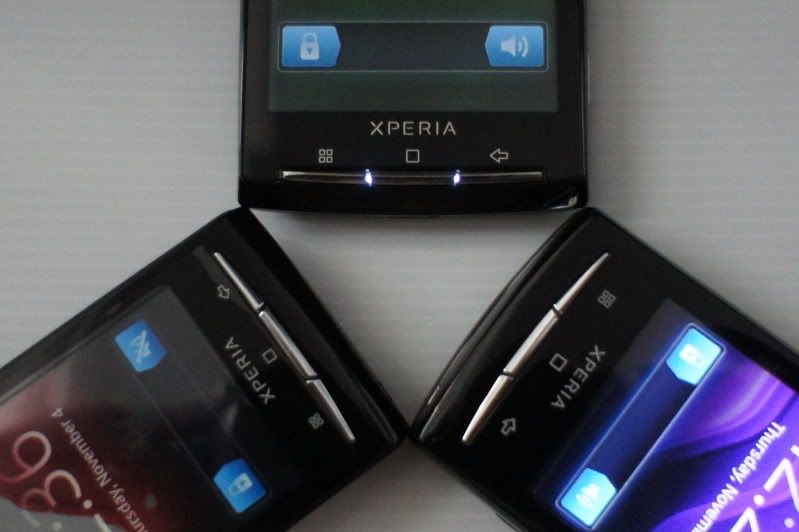 |
|
|
|
|
|
Nov 4 2010, 02:12 PM
|

Senior Member
1,446 posts Joined: Jan 2003
|
wat is handcent LED? an app?
|
|
|
Nov 4 2010, 02:37 PM
|
|
Junior Member
59 posts Joined: Feb 2006
|
handcent is an SMS app which it have the Skin n Theme like iphone n HERO, n the LED thing is actually a feature which allow u to change to several types of colour blinking when got incoming sms , also able for you to set a personal ringtone ,style, colour .
it also allow for u to change ur incoming call ringtone too.. QUOTE(sunnyboy @ Nov 4 2010, 02:12 PM) wat is handcent LED? an app? Added on November 4, 2010, 2:45 pmy cant the brightness goes automatic ? always stick to the highest setting? This post has been edited by bjmin: Nov 4 2010, 02:45 PM |
|
|
Nov 4 2010, 04:07 PM
|

Senior Member
4,553 posts Joined: Jan 2003 From: Shah Alam
|
have u guys tested the continuous auto focus in hd video recording?
|
|
|
Nov 4 2010, 10:17 PM
|
|
Senior Member
6,077 posts Joined: Mar 2010 From: Anywhere But Here
|
QUOTE(nerd @ Nov 4 2010, 09:27 AM) Another bug - update notifications from Market not showing its workin for meQUOTE(bjmin @ Nov 4 2010, 09:36 AM) this morning, i found a interesting fact.. my (LED light) for handcent msg do blink in magenta as i set it for my beloved one setting. weird, when installed, it wont event work perfectly.. now the ringtone and the LED has word accordingly to my setting.. that great.. wohoo~ i got no problem wit tisis this means this new firmware need times to get use to 3rd party apps?? bt i got another problem wit handcent when we send out msgs next to our msg on the left will hav a correct mark if its send out rite now it doesnt appear QUOTE(sheiberlee @ Nov 4 2010, 10:21 AM) that is possible as i also have the same problem. installed chompSMS and it seems fine now. installed papago x5 in my x10 for the 1st time and it seems that it positioned me at Jalan Sultan Ismail but im at hartamas. and got the satellite with "?" on the top right. anybody can resolve this? srynvr use papago |
|
|
Nov 4 2010, 11:24 PM
|

Junior Member
403 posts Joined: Oct 2006 From: Kepong
|
QUOTE(FallenOut @ Nov 4 2010, 04:12 AM) i think That particular checkbox isn't checked, which mean I don't depend on the contact in the FB or Twitter for my contact. Anyhow, guess what? yesterday I decided to remove all the contact which I have sync from sony ericsson portal, just to test again on the backup and restore function in the phone. What I did is delete all the phone contact, then restore only the contact via the backup and restore function, TATA, all the contacts now restored and display correctly.mayb i hav found ur source of problem in ur contact page the uppermost is a search bar on the left is a pic wit 3 ppl or somethin like tat click on it there is an online contacts function is it click or not if u click it those contacts u hav sync wit fb or twitter wont appear if they r offline try to wait around 10 mins mine took 15 mins same as above its a good sign I guess la, maybe I need to setup the FB account, then only restore will work?? If really this is the case, then die la, people without FB account, then contact all gone for sure. |
|
|
Nov 4 2010, 11:42 PM
|

Senior Member
2,451 posts Joined: Jan 2003 From: GOD's Land
|
QUOTE(ckshieh @ Nov 4 2010, 11:24 PM) That particular checkbox isn't checked, which mean I don't depend on the contact in the FB or Twitter for my contact. Anyhow, guess what? yesterday I decided to remove all the contact which I have sync from sony ericsson portal, just to test again on the backup and restore function in the phone. What I did is delete all the phone contact, then restore only the contact via the backup and restore function, TATA, all the contacts now restored and display correctly. I'm using contact2sim to synchronize contacts between my phone and my sim card. I never rely on gmail or fb or other sync method. So whenever I formatted my phone I'll copy back all my contacts from my sim to my phone, it's very easy and convenient.I guess la, maybe I need to setup the FB account, then only restore will work?? If really this is the case, then die la, people without FB account, then contact all gone for sure. |
|
|
Nov 5 2010, 01:35 AM
|

Senior Member
5,197 posts Joined: Jan 2003 From: Muor....
|
Guys, wht widget do u use for ur pic gallery?
|
|
|
|
|
|
Nov 5 2010, 01:44 AM
|
|
Senior Member
6,077 posts Joined: Mar 2010 From: Anywhere But Here
|
QUOTE(ckshieh @ Nov 4 2010, 11:24 PM) That particular checkbox isn't checked, which mean I don't depend on the contact in the FB or Twitter for my contact. Anyhow, guess what? yesterday I decided to remove all the contact which I have sync from sony ericsson portal, just to test again on the backup and restore function in the phone. What I did is delete all the phone contact, then restore only the contact via the backup and restore function, TATA, all the contacts now restored and display correctly. nopeI guess la, maybe I need to setup the FB account, then only restore will work?? If really this is the case, then die la, people without FB account, then contact all gone for sure. can confirm it doesnt need fb account for it to work i restore from the backup n restore witout settin the fb account must b somethin is abit off bt i can confirm wit live wallpaper n mostly 7 pages of almost widgets runnin on a 24/7 connection as always the battery drain is more than 1.6 witout live wallpaper QUOTE(Ultima @ Nov 5 2010, 01:35 AM) Guys, wht widget do u use for ur pic gallery? dun quite understand the questionwat do u mean |
|
|
Nov 5 2010, 08:19 AM
|

Senior Member
8,407 posts Joined: Jun 2005
|
WTF guys.. SE are actually playing TAI JI with the consumer....
it turn out X10 are actually SUPPORT MULTITOUCH!!! XDA developer are on the way doing the patch to enable it.. Added on November 5, 2010, 8:22 am QUOTE(nerd @ Nov 4 2010, 12:05 AM) H for HSPA/HSDPA. like this... Added on November 4, 2010, 12:37 amEh guys, how to zoom in/out in Angry Birds??  This post has been edited by BuFung: Nov 5 2010, 08:22 AM |
|
|
Nov 5 2010, 09:12 AM
|
|
Junior Member
23 posts Joined: Nov 2009
|
i found something weird. when i charge my hp at around 50% around 11pm then 2nd day 6am i off the charger but my hp shows only charged 88%-95%. is it the charger will off after battery charged 100%? and recharge back after it drop to certain %? thanks
This post has been edited by kamoan87: Nov 5 2010, 09:12 AM |
|
|
Nov 5 2010, 01:25 PM
|
|
Junior Member
23 posts Joined: Apr 2010
|
QUOTE(kamoan87 @ Nov 5 2010, 09:12 AM) i found something weird. when i charge my hp at around 50% around 11pm then 2nd day 6am i off the charger but my hp shows only charged 88%-95%. is it the charger will off after battery charged 100%? and recharge back after it drop to certain %? thanks I got problem with battery too. I charge my phone using com and it stuck at 87% for a few hours without moving. After that I charge my phone via power supply and using my phone at the same time and battery % still dropping while charging ._. And after like 40min of using my phone while charing, battery percent then start increasing after dropping for about 7%. |
|
|
Nov 5 2010, 03:39 PM
|
|
Senior Member
2,649 posts Joined: Nov 2010
|
QUOTE(gohwh1 @ Nov 5 2010, 01:25 PM) I got problem with battery too. I charge my phone using com and it stuck at 87% for a few hours without moving. After that I charge my phone via power supply and using my phone at the same time and battery % still dropping while charging ._. And after like 40min of using my phone while charing, battery percent then start increasing after dropping for about 7%. try to download and install battery indicator. it has notification tat gt state the battery health, Celsius and how many volts its using. |
|
|
Nov 5 2010, 05:55 PM
|
|||||||||||||||||
|
Senior Member
2,451 posts Joined: Jan 2003 From: GOD's Land
|
How To : App2sd on Xperia X10i
Pre Installation. I'm assuming that you have just fresh install 2.1 firmware and root your phone before you start the procedure. This is how I did with my phone. 1. Reinstall 2.1 firmware by using Sony Ericsson Update Service. 2. Root the phone by using SuperOneClick ( http://d01.megashares.com/dl/1xcuTic/Super...4-ShortFuse.zip ). More info on SuperOneClick, go here -> http://forum.xda-developers.com/showthread.php?t=803682 Note : Please disable any anti virus especially Kaspersky as it will give false virus alarm and will delete one of the file. 3. Install busybox ( http://d01.megashares.com/dl/pe5Hj9N/steri...ybox.1.17.1.apk ). Step 1 : Preparing your micro SD Card. Please refer to this link ( http://forum.xda-developers.com/wiki/index...rd_partitioning ) on how to prepare your micro sd card. For better performance I would advise that you use a Class 10 card instead of the original card that comes with the phone because the card is only Class 2 card. For more infomation on speed class rating of sd card please go here -> http://en.wikipedia.org/wiki/Secure_Digital An excerpt taken from wikipedia :- The following are the ratings of some currently available cards: * Class 0 - These cards do not specify performance, which includes all legacy cards prior to class specifications. * Class 2 - Minimum of 2 MB/s performance. Lowest speed for SDHC cards. * Class 4 - Minimum of 4 MB/s performance. * Class 6 - Minimum of 6 MB/s performance. * Class 10 - Minimum of 10 MB/s performance. Note : The recommended maximum size of ext2 partition is 1.4GB. I've tried 3GB before and ended up with unstable system and eventually crash the phone. So if you're really greedy since you've bought a 16GB or 32GB card to partition the ext2 more than the recommended size and if your phone is unstable, you've been warn. Step 2 : Download the related files. 1. App2sd : http://d01.megashares.com/dl/lKxNsky/app2sd2.1.zip 2. adb shell : http://d01.megashares.com/dl/s9Iyqte/adb.zip Step 3 : Enabling USB Debugging mode on you phone. Go to Settings -> Applications -> Development -> USB Debugging (check this option). Step 4 : Installing App2sd. Create a folder name adb in your pc and extract all the files from adb.zip into this folder. Connect your phone to your pc and mount the sd card. Extract all the file from app2sd2.1.zip to the root of your sd card. Make sure to unmount the sd card before continue the next step. In your pc open up a dox terminal box by typing cmd in the Search programs and files box. Type cd /adb then type adb shell then type sh /sdcard/app2sd.sh you'll be presented by this screen... +________________________________+
~this version should be go on any device ~ +___________________+
[0] now just press the enter key & wait. Important : Make sure to set your phone screen timeout to the max because Superuser will ask for your permission to allow this script to run. If your screen goes blank, you can't see this prompt and the installation will fail. after a while you'll get this.. busybox is /system/bin/busybox rm failed for /etc/mount_sd.sh, No such file or directory +________________________________+
Don't worry, actually it does not fail. I also got the same message and I also thought it failed but when install all the apps and check using Minitool Partition Wizard and Linux Reader for windows, all my applications are installed into my card (see my previous post with screenshot). The Explanation If you look through the app2sd.sh script, command rm /etc/mount_sd.sh means remove/delete the mount_sd.sh file from /etc folder, since that file does not exist in the fresh install phone, it gives this error message but continue with other commands.. rm /etc/mount_sd.sh mv /system/bin/sh /system/bin/sh_bak cat /sdcard/sh.sh > /system/bin/sh chmod 777 /system/bin/sh busybox cp /sdcard/mount_sd.sh /etc/mount_sd.sh echo " +________________________________+
" sleep 1 reboot Finally after a reboot, your phone is ready with app2sd. From now on when you install any applications it will save into your sd card. Disclaimer : Do this at your own risk. I will not responsible if any injuries or damage occur to you or your phone This post has been edited by tot31: Nov 5 2010, 06:29 PM |
|||||||||||||||||
|
|
Nov 5 2010, 07:18 PM
|
|
Junior Member
23 posts Joined: Apr 2010
|
QUOTE(xcxa23 @ Nov 5 2010, 03:39 PM) try to download and install battery indicator. it has notification tat gt state the battery health, Celsius and how many volts its using. Yes battery indicator is already installed since I update to 2.1. But still sometime while charging and using my battery can drop from 70% to 60% before rising. |
|
Topic ClosedOptions
|
| Change to: |  0.0339sec 0.0339sec
 0.60 0.60
 6 queries 6 queries
 GZIP Disabled GZIP Disabled
Time is now: 14th December 2025 - 12:30 AM |
 Quote
Quote