

should i wait the release of 2.1 then only get the phone or get it now?
Sony Ericsson XPERIA™ X10, SE 1st Andriod Phone!!!
Sony Ericsson XPERIA™ X10, SE 1st Andriod Phone!!!
|
|
 Oct 1 2010, 12:13 AM Oct 1 2010, 12:13 AM
Return to original view | Post
#1
|
 
Senior Member
1,446 posts Joined: Jan 2003  
|
should i wait the release of 2.1 then only get the phone or get it now?
|
|
|
|
|
|
Oct 1 2010, 12:21 AM
Return to original view | Post
#2
|
|
Senior Member
1,446 posts Joined: Jan 2003
|
QUOTE(keagan @ Oct 1 2010, 12:19 AM) just wait for 2.1...u will be kicking urself if SE delays their release again...and i have a feeling it will happen again...although the hardware is powerful for its class, but i think ur better off reconsidering ur options for this price bracket...i'm not trying to diss the x10 but den, for a company like SE to delay again and again, i'm not buying anymore SE's after this.. that's wat worry me....u hav a powerful machine, but no software support, no use oso.... |
|
|
Oct 1 2010, 10:57 AM
Return to original view | Post
#3
|
|
Senior Member
1,446 posts Joined: Jan 2003
|
wanna ask:
x10 and HTC HD2...both having same specification? only difference is OS? |
|
|
Oct 2 2010, 09:23 AM
Return to original view | Post
#4
|
|
Senior Member
1,446 posts Joined: Jan 2003
|
decided to get a x10, while "wish" for a update on the OS.
any nice solid looking case to introduce? casing like this kindof interest me... 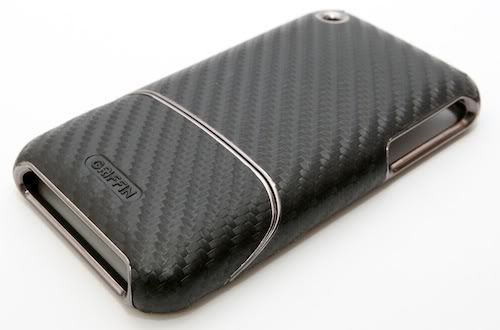 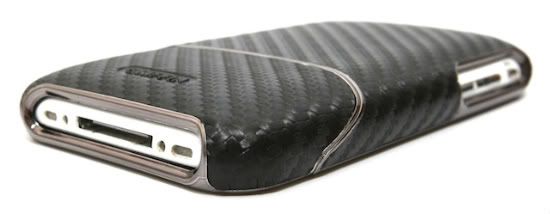 This post has been edited by sunnyboy: Oct 2 2010, 09:24 AM |
|
|
Oct 5 2010, 11:34 PM
Return to original view | Post
#5
|
|
Senior Member
1,446 posts Joined: Jan 2003
|
any secret to install papago x5?
i installed the programe, n put mfm map inside the maps folder, it still mention map not found. please help. |
|
|
Oct 6 2010, 07:44 AM
Return to original view | Post
#6
|
|
Senior Member
1,446 posts Joined: Jan 2003
|
QUOTE(mode893 @ Oct 6 2010, 12:32 AM) Just put the NaviSEA folder (which contains the map folder) in the root directory, should be able to detect the map got it running, it show trial version. any difference with registered version? This post has been edited by sunnyboy: Oct 6 2010, 12:52 PM |
|
|
|
|
|
Oct 6 2010, 10:56 PM
Return to original view | Post
#7
|
|
Senior Member
1,446 posts Joined: Jan 2003
|
QUOTE(tot31 @ Oct 6 2010, 10:34 PM) unfortunately the X10 doesn't support video calls.... mine is a white, but easy get dirty ler...how to protect it? @razyzrblade, I got black and my wife got white...seems that the white is much more cun....I know why you want the white..anyway just browsing through decalgirl.com...a lot of nice skins for X10....  these are what I like....     got wat nice nice software for x10? |
|
|
Oct 7 2010, 08:10 PM
Return to original view | Post
#8
|
|
Senior Member
1,446 posts Joined: Jan 2003
|
wanna ask, i tried to DL some games, but they cant install, is it becoz of the android version that we used or the hardware limitation?
|
|
|
Oct 7 2010, 08:28 PM
Return to original view | Post
#9
|
|
Senior Member
1,446 posts Joined: Jan 2003
|
QUOTE(Atsutane-Shirane @ Oct 7 2010, 08:22 PM) If you dl from the market... usually it can be play... i think it because of android version not the hardware... not from market, like the assasin creep HD...cant install to my x10 |
|
|
Oct 7 2010, 11:42 PM
Return to original view | Post
#10
|
|
Senior Member
1,446 posts Joined: Jan 2003
|
ya correct, the HD version......y cant my x10 play it.....
 |
|
|
Oct 8 2010, 02:15 PM
Return to original view | Post
#11
|
|
Senior Member
1,446 posts Joined: Jan 2003
|
just now i DL 1 apk named "universal androot"...
and root my x10, so wat happen next? wat can i do with a rooted x10? |
|
|
Oct 11 2010, 07:43 AM
Return to original view | Post
#12
|
|
Senior Member
1,446 posts Joined: Jan 2003
|
QUOTE(Sof_600 @ Oct 11 2010, 04:18 AM) yeah... still new to ANDROID. i have checked my set is france set with generic firmware.. lol... and its AP. bought it from a trusted AP shop. howhow to check?mine oso AP set..... |
|
|
Oct 11 2010, 08:21 PM
Return to original view | Post
#13
|
|
Senior Member
1,446 posts Joined: Jan 2003
|
QUOTE(Sof_600 @ Oct 11 2010, 03:58 PM) On the "LOCKED" Screen (when your display is on) cant get anything 1?Press LEFT (HOME BUTTON), RIGHT (BACK BUTTON), RIGHT, LEFT, RIGHT, LEFT, LEFT, RIGHT u can see this: "Service info" "Model info" "Service Tests" u mean on the key lock page, then press those button? |
|
|
|
|
|
Oct 11 2010, 10:22 PM
Return to original view | Post
#14
|
|
Senior Member
1,446 posts Joined: Jan 2003
|
QUOTE(mode893 @ Oct 11 2010, 09:09 PM) Actually the 'home button' he referred to is the 'options button' which the one with 4 small squares. You should get it. Yes at unlock screen when you see the swipe unlock button. thanks!!!got it...mine is indonesia copy, software: r2ba020 |
|
|
Oct 12 2010, 07:46 AM
Return to original view | Post
#15
|
|
Senior Member
1,446 posts Joined: Jan 2003
|
mine only 020, how to update to 023 or 026?
i use pc companion, it said it's the latest oredi.... |
|
|
Oct 12 2010, 01:49 PM
Return to original view | Post
#16
|
|
Senior Member
1,446 posts Joined: Jan 2003
|
QUOTE(tot31 @ Oct 12 2010, 03:30 AM) so far my french set using 026 is working very well no lag or what so ever even with wifi, the only one thing that I don't like is the battery will drain so fast when I'm using GPS navigation. thanks for the SE link.....now updating..the best thing with dxTop Pro Home Launcher is, it comes with task killer and it's very handy... Just installed Hero Of Sparta HD...so damn cool lah this game... http://www.gameloft.com/smartphone-games/hero-of-sparta/ how come i cant even install the HOS? Added on October 12, 2010, 2:11 pm QUOTE(sunnyboy @ Oct 12 2010, 01:49 PM) thanks for the SE link.....now updating..result: it said i oredi got the latest firmware.... how come i cant even install the HOS? Added on October 12, 2010, 2:33 pmit still said my 020 is the latest firmware... This post has been edited by sunnyboy: Oct 12 2010, 02:33 PM |
|
|
Oct 12 2010, 07:20 PM
Return to original view | Post
#17
|
|
Senior Member
1,446 posts Joined: Jan 2003
|
QUOTE(tot31 @ Oct 12 2010, 05:41 PM) There are 2 versions of HOA installation file, one is for X10 (firmware 1.6) and the other is for firmware 2.0 +.... u are really x10 king la.....thanks to u, i got alot of games in my x10.....  wonder how many mb left in all u guys x10? mine left 230+mb only.... if go below wat figure, our phoe will lag arrr? now with dxtop pro, i can feel abit lag when sliding the interface.... |
|
|
Oct 12 2010, 11:05 PM
Return to original view | Post
#18
|
|
Senior Member
1,446 posts Joined: Jan 2003
|
QUOTE(FallenOut @ Oct 12 2010, 09:42 PM) mine left very lil memory mine is indonesia set..... mine will lag abit when underclock it if stock speed still fast urs is french set? sometimes updates depend on the phone original location diff country diff upgrade time Added on October 12, 2010, 11:19 pm QUOTE(tot31 @ Oct 12 2010, 10:50 PM) @sunny boy, I don't know why your X10 can't be updated using the method I mentioned... I'm no king lar..just an enthusiast only trying to fully utilize my gadget, I don't want later when ppl see me with this phone and ask questions then can't answer sure kena tembak... the task manager is wat i like abt dxtop..... Try to use Squish for Screen Transition on dxTop Settings instead of Cube... I found this better than Cube.. For dxTop tutorials you can go here --> http://www.accesslane.com/index.php/what-i.../dxtop-tutorial Like I said dxTop has a built in task manager so that you can kill any unused apps running in the background, to free up some memory.. now my x10 really serve as my mobile gaming console edi... This post has been edited by sunnyboy: Oct 12 2010, 11:19 PM |
|
|
Oct 12 2010, 11:40 PM
Return to original view | Post
#19
|
|
Senior Member
1,446 posts Joined: Jan 2003
|
QUOTE(tot31 @ Oct 12 2010, 11:29 PM)  Indon set, no wonder lar... Indon set, no wonder lar...that's why I said dxTop Pro is better than ADW Launcher...the built in task manager is really useful and the screen transition is really cool btw, i cant create categories in Categories View. teach me pls... read the link u show me, keep on long press on the apps, but it just let me drag to put it outside... |
|
|
Oct 13 2010, 12:21 AM
Return to original view | Post
#20
|
|
Senior Member
1,446 posts Joined: Jan 2003
|
QUOTE(tot31 @ Oct 12 2010, 11:49 PM) ok like this, done!!!1. you open up the apps drawer, then press the Menu button, choose "Change View". choose Category. 2. Now pick an icon let say a game, tap & hold the icon and release (when you feel the vibration), a pop up menu will come out. 3. Choose "Set Category" and choose "New Category". 4. In the Category Name field, type Game and tap the OK button. The icon will be placed under the Game section. Repeat the steps for creating other categories. Just drag the rest of the icons to their respective categories... Hope this will help you. thanks again....  |
|
Topic ClosedOptions
|
| Change to: |  0.0478sec 0.0478sec
 0.47 0.47
 7 queries 7 queries
 GZIP Disabled GZIP Disabled
Time is now: 8th December 2025 - 12:06 AM |
 Quote
Quote