Outline ·
[ Standard ] ·
Linear+
Cable Management Thread V2, Share your cabling tricks here
|
satinblack
|
 Sep 10 2011, 11:12 PM Sep 10 2011, 11:12 PM
|
New Member


|
QUOTE(amirudin920927 @ Sep 10 2011, 07:13 PM) my camera got problem,i use webcam.   better than before.. but still messy.. i think need to drill the case like satin said.. but,dun have the eqpmnt.  You can get some decent tools from a few forumers her for a cheap price. I am working on mine now. |
|
|
|
|
|
amirudin920927
|
Sep 11 2011, 12:31 AM
|
|
|
QUOTE(satinblack @ Sep 10 2011, 11:12 PM) You can get some decent tools from a few forumers her for a cheap price. I am working on mine now. i know,but no monehh maa.. if got i buy d.. already bookmarked~  |
|
|
|
|
|
HSLimMic
|
Sep 15 2011, 03:37 PM
|
Getting Started
|
QUOTE(amirudin920927 @ Sep 9 2011, 10:40 PM) After Cable Management..~
» Click to show Spoiler - click again to hide... « just suka2..  2 of your graphic card's power cable shouldn't go from there. try to put them in the same hole as your 24 pins? |
|
|
|
|
|
iaknesnah
|
Sep 16 2011, 12:51 AM
|
|
|
|
|
|
|
|
|
isyraq ariff
|
Sep 16 2011, 11:12 AM
|
New Member
|
QUOTE(iaknesnah @ Sep 16 2011, 12:51 AM) nice weyh...bpe modal??? |
|
|
|
|
|
iaknesnah
|
Sep 16 2011, 02:52 PM
|
|
|
QUOTE(isyraq ariff @ Sep 16 2011, 11:12 AM) pergh modal tak ingat nye.. skrg kena ikat perut makan megi 1/2 paket sehari.. 4k for w/c alone huhuuhu... |
|
|
|
|
|
isyraq ariff
|
Sep 16 2011, 02:58 PM
|
New Member
|
tp smart gile...tlg aq buat cable management..
|
|
|
|
|
|
iaknesnah
|
Sep 16 2011, 03:01 PM
|
|
|
aku buat custom cable bro.. ukur cukup2 panjang yg perlu jer.. itu pun modal jugak lorr yg tuh aku pun dah tak ingat brp dah abis duit kat situ jer.. |
|
|
|
|
|
amirudin920927
|
Sep 18 2011, 09:35 PM
|
|
|
QUOTE(HSLimMic @ Sep 15 2011, 03:37 PM) 2 of your graphic card's power cable shouldn't go from there. try to put them in the same hole as your 24 pins? orait.. i will update here after make it..  |
|
|
|
|
|
fridel
|
Sep 27 2011, 09:25 PM
|
|
|
QUOTE(noname_lah86 @ Sep 26 2011, 04:23 AM) Boleh tahan bro..i think thats better than mine |
|
|
|
|
|
johnyblaze87
|
Oct 4 2011, 12:56 PM
|
Getting Started
|
Hi guys. Im looking for this particular 2 in 1 sata power cable for my desktop. Lowyat plaza, digital mall, HP center all dont have. This is what i use now : Normal sata cable [attachmentid=2467592] Original is like this. Got 90 degree connector [attachmentid=2467594][attachmentid=2467614] And at the other end, Wat i use now : 2 in 1 sata power cable [attachmentid=2467596] Original : [attachmentid=2467597][attachmentid=2467623][attachmentid=2467624] For more info Brand: HP Touchsmart 300-1028d Product code: 533379-001 Model name: SATA hard disk drive power cable (AIO) http://www.ebay.com/itm/HP-TS300-SATA-HDD-...1-/110735456943If anyone can custom made this cable, pls PM me asap. Thanks in advance  |
|
|
|
|
|
isyraq ariff
|
Oct 6 2011, 10:44 PM
|
New Member
|
please help my cable management... Attached thumbnail(s)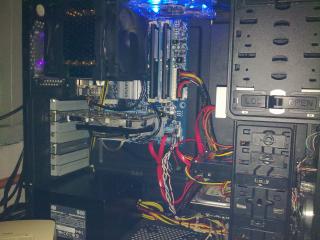
|
|
|
|
|
|
em0ti0n
|
Oct 9 2011, 11:13 PM
|
|
|
QUOTE(johnyblaze87 @ Oct 4 2011, 12:56 PM) » Click to show Spoiler - click again to hide... « Hi guys. Im looking for this particular 2 in 1 sata power cable for my desktop. Lowyat plaza, digital mall, HP center all dont have. This is what i use now : Normal sata cable [attachmentid=2467592] Original is like this. Got 90 degree connector [attachmentid=2467594][attachmentid=2467614] And at the other end, Wat i use now : 2 in 1 sata power cable [attachmentid=2467596] Original : [attachmentid=2467597][attachmentid=2467623][attachmentid=2467624] For more info Brand: HP Touchsmart 300-1028d Product code: 533379-001 Model name: SATA hard disk drive power cable (AIO) http://www.ebay.com/itm/HP-TS300-SATA-HDD-...1-/110735456943If anyone can custom made this cable, pls PM me asap. Thanks in advance  Maybe here can help u. |
|
|
|
|
|
isyraq ariff
|
Oct 11 2011, 10:47 AM
|
New Member
|
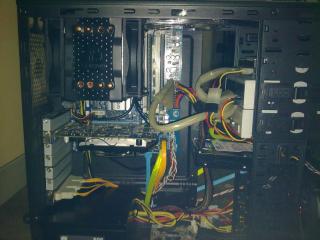
after do cable management...proper than before...
This post has been edited by isyraq ariff: Oct 11 2011, 10:52 AM
|
|
|
|
|
|
amduser
|
Oct 11 2011, 11:01 AM
|
|
|
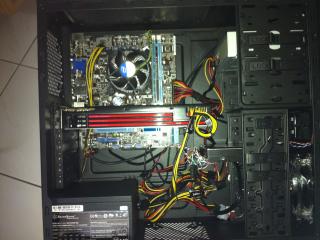
here is mine, just assemble it yesterday   the 24pin cables has been moved to the front, the 2nd pic is taken earlier on the north bridge power connector is a pain, the cable is too far at the connector is too far away |
|
|
|
|
|
em0ti0n
|
Oct 11 2011, 11:11 AM
|
|
|
QUOTE(amduser @ Oct 11 2011, 11:01 AM) here is mine, just assemble it yesterday » Click to show Spoiler - click again to hide... « the 24pin cables has been moved to the front, the 2nd pic is taken earlier on the north bridge power connector is a pain, the cable is too far at the connector is too far away the 8-pin motherboard connector can't route to the back? if it is not long enough, maybe u should buy sleeved extension cable  |
|
|
|
|
|
ZaRnX
|
Oct 11 2011, 12:08 PM
|
|
|
QUOTE(amduser @ Oct 11 2011, 11:01 AM) here is mine, just assemble it yesterday the 24pin cables has been moved to the front, the 2nd pic is taken earlier on the north bridge power connector is a pain, the cable is too far at the connector is too far away Just helping out. Try to route all the cables from PSU into the hole nearest to the PSU. Then, Reroute the 24, sata to mobo and power to GC thru the same hole parallel to your graphic card as stated by em0ti0n, reroute the 8pin from the back of the mobo. Try to hide those unused cable behind the mobo. |
|
|
|
|
|
amduser
|
Oct 11 2011, 01:48 PM
|
|
|
all the unused cable is already behind mobo, at the other side of the casing to be exact the PSU cable i already route to the small hole between the mobo and psu, but still a lot is showing, the 24 is too thick and too short to put behind and the 8 pin is way too short, or my casing is too big |
|
|
|
|



 Quote
Quote







 0.0226sec
 0.29
0.29
 6 queries
 GZIP Disabled