Welcome Guest ( Log In | Register )

Outline · [ Standard ] · Linear+

 HTC Hero

views
     
stringfellow
post Sep 21 2009, 07:35 PM

Ultrawide | 4K | VR
********
Senior Member
11,305 posts

Joined: Jan 2003
Got this before Raya. It was an easy choice between WM and Android, and I'm not subjecting myself to the misery of WM anymore. ROM flashed to the MoDaCo version 2.2 "enhanced", and together with the "Market Enabler" I'm able to purchase "Jewellust" and "Advanced Task Manager" as well as download tons of free apps from the Android Market. I was half-expecting the stuttery crappiness of the Touch Pro, but was pleasantly surprised to see how smooth the swipe, flick and other multitouch interface aspect of it. The app selections are pretty much subdued and paltry compared to the iTunes AppStore, but I'm sure it will grow.

This is definitely a keeper. Will use it alongside my 32GB iPhone 3G[S], now just need to wait for normal working days to start after this holiday to subscribe to service provider for wireless broadband. The device is dead without it. Probably will choose Maxis Prepaid Broadband.
stringfellow
post Sep 22 2009, 11:37 AM

Ultrawide | 4K | VR
********
Senior Member
11,305 posts

Joined: Jan 2003
My last WM device was years back with the Atom XDA. Never going back to that pile of feces ever again. My contacts were transferred from my Mac, sync into the cloud to MobileMe and Google Contacts, and synced back to Hero wirelessly through the Google single sign-in login.


stringfellow
post Sep 22 2009, 12:05 PM

Ultrawide | 4K | VR
********
Senior Member
11,305 posts

Joined: Jan 2003
Thanks you. It is easy actually. Single click, and everything's wirelessly synced in.
stringfellow
post Sep 25 2009, 12:16 PM

Ultrawide | 4K | VR
********
Senior Member
11,305 posts

Joined: Jan 2003
QUOTE(ps360 @ Sep 25 2009, 07:23 AM)
For those interested in getting the Original Asian ROM mentioned by Levi, click
http://forum.xda-developers.com/showthread.php?t=561703

File:
(RUU_Hero_HTC_Asia_SEA_WWE_2.73.728.5_release_signed_NoDriver.exe)

Size: 105.3 MB

Downloaded, but any tips on how to UNROOT the unit?
I searched XDA but only found people asking that question and kena shot asking him to SEARCH before asking.
But can't find an actual thread with steps to Un-root.
Any help will be appreciated.
*
Thank you for this. Safe-keeping it in case of the warranty call. I'm not ever going back to the stock ROM again, enjoying too much of the Android Market to let go of it.
stringfellow
post Sep 26 2009, 12:16 AM

Ultrawide | 4K | VR
********
Senior Member
11,305 posts

Joined: Jan 2003
I generally dont need to sync anything using my Mac. All the details needed to sync resides in the coud, and with the integrations between Address Book--Google Contact and iCal--Google Calendar, they exchange information between themselves and the Hero syncs back the data to itself from the cloud.

The only other usage of the HTC Sync program is application installation, but once you've rooted the Hero and enabled Android Market, you can easily install and file manager app, and run the .apk installation file from there. I'm using Linda File Manager myself.

In the age where Google handles pretty much all my data synchronization need, the HTC Sync program is pretty much redundant. Furthermore, on my Windoze laptop, it memory-hogs the system to the point that the laptop crawls.
stringfellow
post Sep 26 2009, 11:41 AM

Ultrawide | 4K | VR
********
Senior Member
11,305 posts

Joined: Jan 2003
QUOTE(ps360 @ Sep 26 2009, 10:00 AM)
I asked if anyone having problems controlling the in-call volume during a call. I finally found the solution and what was causing it.

It wasn’t the ROM’s fault that I couldn’t control the call volume during a call. It was my own doing. Under Menu, Settings, Ringer Volume – if you select Use Incoming Call Volume For Notifications, you’ll be able to control the in-call volume by pressing the Volume Rocker on the phone.

So now, apart from Peep "force quit" problem - which HTC is working with Twitter for a solution, I've only got one more issue left to resolve on my Hero. The weather widget which doesn't update (on the homescreen, clock). Day time showing moon, night time showing sun. Sometimes it updates, most of the time it doesn't. Anyone else having this problem?

user posted image

Note: Mac user here too. Don't use HTC Sync either. Google all the way.
*
Probably due to its location. Go to Settings and under the "Location" drop down, make sure both entries("Use wireless network" and "Use GPS satellite") are checked. I also have the "Date & Time" setting, and under "Automatic" not checked, which in itself says it uses the network-provided values. To me ,this is network specific, and seeing how the massive problem with our telcos these days, I'd rather have the phone internals figure it out. I never had any problems from Day 1. In fact, I was pleasantly surprised that that weather widget changes even according to the specific area I am in. For example, it is now showing "Ampang" as "Intermittent Cloud" and while I was at work in KLIA 3 days back, it changes to "KLIA" by itself.

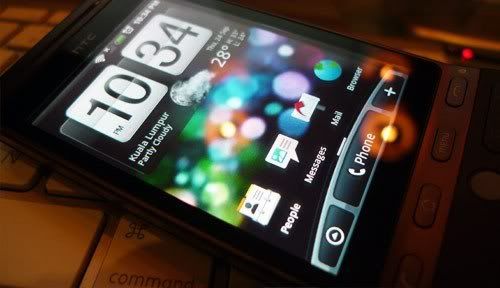
By the way, on that picture, that representation is correct. It shows "10:34pm" so it should be showing the moon.

This post has been edited by stringfellow: Sep 26 2009, 11:44 AM
stringfellow
post Sep 27 2009, 02:47 PM

Ultrawide | 4K | VR
********
Senior Member
11,305 posts

Joined: Jan 2003
That's just a Hero against the Mac OS X iTunes artwork screensaver.
stringfellow
post Sep 27 2009, 09:09 PM

Ultrawide | 4K | VR
********
Senior Member
11,305 posts

Joined: Jan 2003
If you do care about your Hero, DO NOT put any Micro SDHC card Class 2 in it. I suspect that 16GB card given with the package is Class 2, because that is the only available card when I went looking in Lowyat Plaza. Access and read/write speed is horrible, and this will affect the experience and your applications running later. Some may even run erratic or simply refuse to run.

stringfellow
post Sep 28 2009, 01:16 PM

Ultrawide | 4K | VR
********
Senior Member
11,305 posts

Joined: Jan 2003
Bought lots of apps through Android Market already. Ultimate Doom, Linda File Manager and Jewellust are most recommended. I am especially impressed with the built-in A-GPS on this, it is even better than my iPhone 3G[S], picking up signal even while I'm inside the house. Not possible previously with the iPhone. Using this together with NDrive and CoPilot Live 8 is a joy, but map accuracies are way off since maps for both apps are supplied by TeleAtlas, and last updated in 2007 IIANM.

However, I'm still sticking with the iPhone because of the unavailability of certain apps that I use for work. Particularly the app called ForeFlight. I need that for work, and Foreflight on the iPhone is an indispensible tool for me to get prepared for flight duties.

I hardly use the entertainment side of Hero, all my MP3s are tagged to work proper on the iPhone, transferring them over to the Hero results in me having to retag and embed album artwork back into them, and tagging thousands of songs is not my idea of fun. Ditto for video as well. However, I am excited to utilise the Footprint app, as its ease of use, complete with tags on Google Maps is a great feature. This will rekindle my love of exploring the places I visit during work, and probably will entice me to revisit the places I've been before.


Change to:
| Lo-Fi Version
0.0181sec    0.66    7 queries    GZIP Disabled
Time is now: 7th December 2025 - 10:40 AM