

QUOTE(Aura @ Jun 24 2009, 11:26 AM)
That's why my X6 is still in the box.... 

So wanna sell it cheap cheap to me.... 


Official Microsoft Sidewinder Thread, Every Sidewinder - Framed and Reviewed
|
|
 Jun 24 2009, 12:28 PM Jun 24 2009, 12:28 PM
|
 
Junior Member
199 posts Joined: Jan 2008 From: Klang, Selangor  
|
QUOTE(Aura @ Jun 24 2009, 11:26 AM) That's why my X6 is still in the box.... So wanna sell it cheap cheap to me.... |
|
|
|
|
|
Jun 24 2009, 02:08 PM
|

Senior Member
1,357 posts Joined: Mar 2008 From: ☐ Earth ☐ Sky ☐ Heaven ☑ Hell 
|
QUOTE(TomatomanzSeedlezz @ Jun 23 2009, 12:48 PM) lol.. first say.. "whats the point".. then later say "i got the money to buy x8".. lol ..doesn't make sense at all what i'm tyring to say is it looks exactly like x5...i tried before two mouse...i noe all of the features that both mouse provided...just that i don't agree on spending much on x8....do you get what i mean? For your information, rather than looking at the pictures, if u don't chance to check the X8, at least read the reviews especially user reviews abt it before blindly post reply. Especially the obvious differences its the wired/wireless feature, and the mouse physical shape are more ergonomics too, more suitable for human... lol Even the first Sidewinder X its looks and feel different compared to X5. Lol.. what a bold word to use.. nothing its impossible, if not theres would be no Warranty (or even better Lifetime Warranty, if they are so sure their QC its out of this world.. heh) or RMA department.. lol... Cheers  |
|
|
Jun 24 2009, 02:08 PM
|

Senior Member
1,937 posts Joined: Jun 2006 From: Petaling Jaya
|
QUOTE(boon.fong @ Jun 24 2009, 12:28 PM) So wanna sell it cheap cheap to me.... For now is not for sale coz I like the RA3 Decals.... |
|
|
Jun 27 2009, 12:35 PM
|

Senior Member
1,418 posts Joined: May 2008 From: somewhere somewhere
|
Well since many people still figure it out what the main features, where's the highlight about the Sidewinder X8
so here I make some my complete review and verdict about this X8 mouse Microsoft Sidewinder X8 Review 
Ok right now I made a complete review about Microsoft Sidewinder X8 Bluetrack Optical Gaming Mouse. Here's the features about this lovely X8: - 4000 dpi with Bluetrack Optical Sensor - Comfortable plastic matte coated - 3 instant button on-the-fly dpi change - Top and bottom thumbside button design - Spare mousefeet - All in 1 Puck which supplies wired USB charger port and wireless dongle - Macro Record button - Game File Shortcut Button 
Design The design of the Sidewinder X8 is mostly target for larger palm user as you can see the shape of this mouse is rather big but slightly smaller than the Razer Lachesis gaming mouse. The shape are rarely ergonomic and nice plastic feel compare to the Microsoft Explorer Mouse which is the same price range as the Sidewinder X8. The design, indeed most of the people highly prefer that rubber coating brings comfort however rubberized coat is easy for get scratch and not comfortable while your palm sweating. Sidewinder X8 is greatly design with the plastic coating, is rather smooth and soft feel however there's a small con that because the smooth coating I did realised this mouse will get slipped sometimes. (in some way) Buttons are place great as the previous Sidewinder's X5 and non-X version, in X8 the metallic coating and lean inside thumbnail button (top and bottom) is absolutely fit nicely on your finger. Even some people has claimed that this kind of design will cause accidently pressing the button but for me is rather fine. There's some question why Sidewinder X8 mouse thumbnail buttons are places at Top and Bottom? well too see through, it gives you more faster acting to press on the button without moving your finger so much. Likewise, X8 Top and Buttom thumbnail buttons has more nicely fitting and easy to press than previous predecessor however it may costs of more easy to press through the button in accident but still is not a big issue either if you have take attention on it. For me 100 times, I did press 1 times accidently..... XD Performance Performance well, from the minimum 200 dpi to 4000 dpi is work the same as the Razer Lachesis who also own the 4000 dpi performance, while Razer Mamba has overpawn the first as always of the highest dpi sensor mouse in the gaming mouse industry. BUT high sensor means everything? Well not so.... Majority of people are satisfy onwards 1600~2000 dpi performance is fast for them.... even for those users who own the gaming mouse with more than 2000 dpi sensor are still remain to use between 1XXX ~ 2000++ dpi sensor. So the super dpi might be useful or useless for certain of users depends thier comfort of usage. As you can see Sidewinder X8 is selling thier new Bluetrack Optical Sensor technology instead of highest dpi sensitivity Mamba. About the main features of Bluetrack Optical Sensor, to talk generally it is a new sensor which has fast reaction and tracking sensitivity than the lasers mouse. Same goes to the Razer Death Adder (Running Infrared Engine) which also a powerful tracking sensor mouse as Bluetrack mousie. In addition tested by many X8 users on many surface, X8 can work almost any surface even in fully transparent glasses. And ..Yup there's one benifits on this mouse it is running wireless and can charge while you play (we called as the 'Hybrid'). While the charging wire has made by magnet so is rather fast and easy to charge your mouse. Which means, if the dongle (puck) has malfunction on wireless, which means your whole mouse is also malfunction unlike Razer Mamba. In addition LED Display is able for you to read the actual dpi settings and provides clear information especially while you using the Intellpoint and Macro Record features Total buttons are slightly dissapoint for the macro user however if you want to compare with the previous Sidewinder it has 2 additional buttons. (Total up buttons are (excluding non-custom buttons) Left & Right Click, Top & Bottom Button, Left & Right Scroll, Scroll Button) Lastly talk about the non-function buttons which is the : Sidewinder Icon (Game Shortcut Button) 3 Dpi On-the-fly buttons Macro Record buttons Well they are two useful un-custom here which is the on-the-fly dpi and the macro record buttons. Sidewinder series dpi on-the-fly function are so called "unique" compare the others, first as you can see they have 3 dpi change buttons instead of 2 dpi change buttons however as the main con for all the Sidewinder series, you CANT custom more than 3 dpi preset buttons. Likewise about DPI Option is also a 'quite' disappointment, because it has more limited dpi option than the Logitech G9 which has every 200 DPI increment and while Razer Mamba has every 100 DPI increment. Here's the DPI Increment for the Sidewinder X8 from 250 DPI pump through 4000 DPI (Min) 250 < > 500 < > 750 < > 1000 < > 1500 < > 2000 < > 3000 < > 4000 (Max) As for heavy dpi change user (especially for FPS gamer), this mouse might not suitable but if you not take serious about it, it may be very handy. Talk about 3 buttons versus 2 buttons, Sidewinders mouse is much easy and faster to operate the actual dpi at the centre of the mouse you sets rather than press for increasing/decreasing buttons. In terms of handling, 3 buttons does takes thier advantages. Move on the Macro Record buttons well same goes with Razer Mamba, X8 has also include the Macro Recording while you need to record something urgently into your mouse. Lastly as and always the Microsoft Intellpoint Software, a classical software that supports most of the Microsoft Mouse with the macro record and special features and the other custom feature within the software. It has bringing some good advantages on gaming and macro managing especially for the FPS gaming purpose. 
Verdict Microsoft Sidewinder X8 is a quite comfortable, ergonomically palm type gaming mouse. Besides the freedom of gaming, it's also offer a best and cheap hybrid performance mouse in the market. Well here some comparison against the others brand : - Compare X8 to Logitech G9, G9x Logitech G9,G9x is an excellent mouse which has multi profile, onboard memory and interchangable grip, X8 may even lose against the 5000dpi on G9x but X8 wins their tracking performance and the sizes are rarely more ergonomic and also the Intellpoint Features are more advantages than the SetPoints. Hardly to compare this two mouse, since they are targeting with different features user. Compare X8 to Razer Lachesis Well same style and dpi sensor, to compare the price, X8 are slightly (or more) expensive than Lachesis but overall X8 still pawns the hybrid features and the bluetrack technology. No doubt that Lachesis still do it's advantages for the On Board Memory and more custom buttons and also comfortable grip coating. Another thing consider, Lachesis is very huge in size than X8 so it might not serve very well in FPS games. Compare X8 to Razer Mamba No need to match for the 5600dpi, greater comfortable and the same hybrid feature together with the extras macro record + onboard memory. But only one thing you may feel the huge difference against the IMBA MAMBA, first Mamba is much more expensive mouse against any others while X8 is almost nearly half price of the Mamba, plus X8 is also pawns a better tracking ability and also longer durability battery life. Likewise, the wire port for charge and play in Mamba is slightly annoying because u need to plug off the charger port which also the wireless dongle and also is rather hard to pull, in addition Mamba USB port is unique type so once you lost ur port .... might be quite problem. Compare X8 to Ikari Optical and Laser Need someone feedback =3 Overall : Pro's -High dpi settings (up to 4000 dpi) -Rather cheaper the price compare the others new 4000++ dpi mouses -Super tracking performance thanks to the Bluetrack Optical -Unique 3 buttons dpi on-the-fly -Most custom action button if compare the others Sidewinder Mouses -Macro Record buttons -Top and Bottom thumnail buttons -Intellpoint Software works in good feature on gaming -Hybrid Features -Strong Battery Lasting and Fast Battery Charge compare the others competitors gaming mouse. -LED Display Con's -Main price are still expensive round for high dpi mouse but you can found cheaper at Enigmare sales =3 -Non-rubberized coating -Bulky 'All in One' Puck compare through the Razer Mamba and Logitech G7 (which has seperated dongle and charger) -Still consider a bulky mouse =3 -No onboard memory -Thumbnail buttons may cause accident pressing sometimes -Mouse may easily slip on your hand while your hand is very sweaty -Slightly less customable buttons compare the others new series gaming mouse -Bluetrack cannot track very smooth on smooth white surface -Not-so-smooth mouse feet if you are using on through the very hard surface and the mousefeet may suffer grinded if u keep using on hard surface table -Less option for the dpi changes compare to the Logitech and Razer mouse -Only 3 DPI Option presets 
This post has been edited by wingster: Jun 27 2009, 02:40 PM |
|
|
Jun 27 2009, 01:07 PM
|

Senior Member
2,270 posts Joined: Nov 2004
|
wow, great job, thanks for your detailed review, how about pin this on the first page?
|
|
|
Jun 27 2009, 02:26 PM
|
|
Senior Member
1,357 posts Joined: Mar 2008 From: ☐ Earth ☐ Sky ☐ Heaven ☑ Hell
|
WOW!superb review!yeah,this should pin on the first page
|
|
|
|
|
|
Jun 27 2009, 05:09 PM
|
|
Senior Member
1,418 posts Joined: May 2008 From: somewhere somewhere
|
Continue the review about other's sidewinder mousie
Sidewinder X5 Gaming Mouse 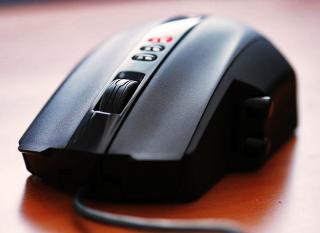
Ok for those keep argue about the differences about X5 and X8 please look carefully THEY ARE DIFFERENCES in features and usage!!! Right now here is the features about the Sidewinder X5 -2000 dpi with so-called HD Laser Tracking Technology -Rubberized scroll and side panel -2nd lightest around the Sidewinder Mouse series (according to Microsoft, X5 is 20g lighter than the original Sidewinder mouse without additional weight inside =/) -3 instant button dpi on-the-fly -Top and Bottom Thumb button design -5 Wider Mousefeet as Sidewinder below the X5 -Vista Game File Shortcut button (press at the icon of Sidewinder in X5 =3) -2.0 Wired USB Port Design Ok well Sidewinder X5 I can strictly said that it is most comfortable class mouse between the Sidewinder and Sidewinder X8, side panel and the scrolling was rubberized coated (well comfortable rubberized scrolling grip BUT chunky =_= ....), also it's more suite to anyone for using X5. Ergonomically, well not good as the big bro X8, however Sidewinder X5 is second lighter gaming mouse in the Sidewinder series. For side buttons as the same as the Original, X5 side thumb button are rounded cylinder shaped but the difference between his old bro, X5 side button is made by plastic.... Also to compare the old bro and this smaller bro X5, they have many negative feedback against the side panel Buttons. Because the design is in top and bottom label, the old bro and smaller bro are suffering an accident pressing through the button, the main reason is because the buttons are to close through the finger thumb rest and because the rounded and lean out shape, you can't avoid to hit in accident sometimes if you are making fast action on gaming, this is why they redesign the side panel button on X8 to reduce this kind of problem effectively. Performance Well for those who look down the Sidewinders mouse are phobia against Microsoft product.... Actually Sidewinder's mouse are as good performance as the others brand like Razer and Logitech, it actually has their unique point compare the others. X5 has 2000 dpi as his old bro just lack out the LCD Display. Starting 400dpi step through 2000dpi is standard as the others 2000 dpi average competitors but lack in X and Y DPI axis sensitivity choice (same goes to any Sidewinder mousie) Top and Bottom side button might disappoint for some person who suffering the problem I said but if you have no problem with that actually it can be works in superb handling. For myself it goes well fine performance as my Logitech G9 .... nothing much difference between them just 3200dpi & 2000dpi differences. Also X5 well same goes his old bro Sidewinder they are very limited 5 customable button (while 7 custom buttons goes for big bro X8), total up you will have 11 (5 customable - Left&Right click, Top&Bottom Panel Button, Center Scroll Button, 6 non-customable button - right & left scroll button, 3 preset dpi buttons and sidewinder icon button) Verdict Microsoft Sidewinder X5 is a much comfortable medium-big sized gaming mouse compared to X8, but still majority of people hates Sidewinder is because it looks .... some sort Ugly (no curvy and stylish looks) and claimed as the classic play mouse, same goes to Old Bro Sidewinder which also claimed as the ugly mouse for most of the people, but in terms of comfortable and performance, well X5 never loses against his competitors and yet Intellpoint is still a strong software which works with any Sidewinder Mouse include this lovely X5 in gaming features and also it has better macro record software (since they united the Intellpoint at once, this works with any Microsoft mouses which support the Intellipoint) than the Razer Copperhead,Diamondback and Logitech Setpoints. Here's the comparison against the others brand: Logitech G5 Well how can they say Sidewinder is Ugly? Logitech G5 is also huge in it's curve shape as MX518 and G7 and quite uncomfortable to hold long on this mouse because it's make my hand cramp, Sidewinder X5 still well done of it's wide and comfortable shape which makes me no problem on long period on-holding of this mouse. But to consider, G5 has 5 DPI Preset which pawns 3 FIXED DPI Preset, a weight adjustments and G5 has better tracking sensor than X5. Razer Diamondback Well nice to say Intellipoint has overall better software and configuration than the Razer Diamondback Software (Diamondback upgrading firmware cause much better improvement =P) software .... 2000dpi with same level tracking performance as 1800dpi 3G just somehow Diamondback looks sexier than X5 ..... =X Razer Copperhead Need some feedback. Here's the comparison against it's brother Sidewinder non-X Of course 20g lighter than his old-bro in 'naked', smaller sized than his old-bro and costs more cheaper also While Old-Bro has spare mouse feet and also weight adjustment and also LCD Display Sidewinder X8 1 times price of the X5, X8 Big Bro has featured in 4000 dpi settings, Bluetrack Technology, Spare Mouse feet and LCD Display and also the improved thumb side buttons. But Big Bro are built in plastically .... although the size is slightly smaller than it's old bro, X8 doesn't have a better and wider mouse feet as his smaller bro and X8 mousefeet can be damaged so easily in hard surface. Overall Pro's : -Cheaper in price -Great tracking performance in laser -Rubberized coated in scrolling wheel and side panel -Sexy LED in Red -3 Unique DPI On-The-Fly -Intellpoint works in good feature in gaming -2nd Smaller and lighter Sized compared to it's 2 big bro Con's: -Thumbside button issue is very seriously than X8, highly unsuitable for certain of people -5 (included left and right click) Custom Button only!? -Still in Bulky (well all Sidewinder's are bulky expect baby bro X3) -Side panel fitting is not suite for some people through -3 DPI Preset Option ONLY! This post has been edited by wingster: Jun 27 2009, 07:59 PM |
|
|
Jun 27 2009, 07:07 PM
|

Junior Member
13 posts Joined: Mar 2009 From: Im where i am...
|
thanks wingster for clearing all thoughts....hehe
nice reviews... |
|
|
Jun 27 2009, 07:21 PM
|

Senior Member
767 posts Joined: Mar 2006 From: Wanga Maju , KL
|
wow...sure really good gaming mouse..nice review here
|
|
|
Jun 27 2009, 08:07 PM
|
|
Senior Member
2,270 posts Joined: Nov 2004
|
yes, it is, but it's all up to consumer preferences, whether which one suits them best!
|
|
|
Jun 28 2009, 01:52 AM
|
|
Senior Member
1,357 posts Joined: Mar 2008 From: ☐ Earth ☐ Sky ☐ Heaven ☑ Hell
|
wow,thx again for wingster reviews....thumb up for great reviews
|
|
|
Jun 29 2009, 04:40 PM
|

Senior Member
550 posts Joined: Jan 2009 From: The North Pole Status: Watching Blu-Ray
|
Nice review dude - gonna pin it up on first page no worries...
|
|
|
Jun 30 2009, 05:30 PM
|
|
Senior Member
1,418 posts Joined: May 2008 From: somewhere somewhere
|
Thanks man =3
|
|
|
|
|
|
Jul 1 2009, 09:12 AM
|

Senior Member
3,304 posts Joined: Mar 2006 From: Chicago(Port25)
|
Star InTech reviewed the Sidewinder X8 as well.
 |
|
|
Jul 2 2009, 08:51 PM
|
|
Senior Member
1,418 posts Joined: May 2008 From: somewhere somewhere
|
huhu pending for more sidewinders owners =3
|
|
|
Jul 5 2009, 12:29 AM
|

Junior Member
70 posts Joined: Jan 2007
|
QUOTE(wingster @ Jun 30 2009, 05:30 PM) Thanks man =3 Mind to let us know how you judge the tracking performance in your review?Testbed, settings and any relevant info One more, is bluetrack a technology used as enhancement to the laser sensor or a totally new independent laser sensor? If it's the second, does it mean: Razer - infrared laser sensor MS - bluetrack laser sensor Logitech/SS - conventional laser sensor |
|
|
Jul 5 2009, 07:11 PM
|
|
Senior Member
1,418 posts Joined: May 2008 From: somewhere somewhere
|
QUOTE(shelke @ Jul 5 2009, 12:29 AM) Mind to let us know how you judge the tracking performance in your review? From many tester and others people review also self experiment Testbed, settings and any relevant info One more, is bluetrack a technology used as enhancement to the laser sensor or a totally new independent laser sensor? If it's the second, does it mean: Razer - infrared laser sensor MS - bluetrack laser sensor Logitech/SS - conventional laser sensor Mind I did say Bluetrack actually is a blue optical sensor (which is same name and running as optical but comes in blue color) To known that, Bluetrack has larger optical lights which has wider sensor while touch the surface and they claim to said that blue colors light has more greater tracking .... well for more information you can check the Microsoft retail website Razer has also another unique which Infrared Sensor(not infrared laser) which also has wider sensor but the details I'm not sure yet =_= This post has been edited by wingster: Jul 5 2009, 07:16 PM |
|
|
Aug 19 2009, 12:40 AM
|

Newbie
1 posts Joined: Aug 2009
|
Okay, i've just registered to get an idea on how to obtain this mouse for a good price... Any advice??? Cuz in the earlier post there was discussion on the x8 at a price of Rm270? Isit still at that price???
What shops actually sells this mouse? So i can actually have a look and all? Thanks for the advice.. |
|
|
Aug 19 2009, 01:56 PM
|

Senior Member
1,256 posts Joined: Aug 2007 From: Ampang TO Sibu
|
Mircosoft is getting better with gaming devices like mouse and k/b. Nice review between.
|
|
|
Aug 20 2009, 04:33 PM
|
|
Junior Member
279 posts Joined: Dec 2007
|
QUOTE(need.a.mouse @ Aug 19 2009, 12:40 AM) Okay, i've just registered to get an idea on how to obtain this mouse for a good price... Any advice??? Cuz in the earlier post there was discussion on the x8 at a price of Rm270? Isit still at that price??? Some people in LYN selling for RM260. Enigmare is one of them, look for this thread.What shops actually sells this mouse? So i can actually have a look and all? Thanks for the advice.. I'm getting my MS Sidewinder X6 Keyboard tomorrow ! I can't wait to get my hands on it !  |
| Change to: |  0.0293sec 0.0293sec
 0.41 0.41
 6 queries 6 queries
 GZIP Disabled GZIP Disabled
Time is now: 14th December 2025 - 09:43 PM |
 Quote
Quote