

my lappie's battery cant be detected.
i wonder if the battery died
VAIO Club V2, Video Audio Intelligence Organizer
VAIO Club V2, Video Audio Intelligence Organizer
|
|
 May 2 2009, 08:06 PM May 2 2009, 08:06 PM
|
 
Senior Member
2,021 posts Joined: Dec 2006 From: Malaysia   
|
my lappie's battery cant be detected.
i wonder if the battery died |
|
|
|
|
|
May 2 2009, 09:21 PM
|

Junior Member
469 posts Joined: Mar 2005 From: Earth
|
Hi all..
Im using FW 35 and standard it comes with 3GB ram but i cant fid the max size of ram in the website. Possible to fit 8GB Ram (dual 2 4GB ddr 2 ram)? If i upgrade from 3gb to 4gb will there be big different? When i play game, the side of the laptop where the hot air goes out will be darn hot and the air is darn hot as well. is this normal?? Hope u all can assist me since i had it less than a month.  |
|
|
May 3 2009, 02:02 PM
|

Senior Member
1,592 posts Joined: Jul 2005 From: Poland
|
QUOTE(EmperorMeng @ May 2 2009, 08:06 PM) my lappie's battery cant be detected. possibility to have battery dead is high. when the problem occured? i have the same experienced, charged the batt few days, and cant turn on it anymore. the charging take few mins to get full from zero before the batt cant be detected anymore. sign of dead battery.i wonder if the battery died  new one cost around rm400. but if you rarely use the batt, just live with it. QUOTE(paikut @ May 2 2009, 09:21 PM) Hi all.. 4gb max (64bit OS). depend on how many programs run simultaneously, you may notice the smoothness of the running program. also it add maximum memory for dynamic allocated shared memory space for ati hd3470 beside having it own discrete memory.Im using FW 35 and standard it comes with 3GB ram but i cant fid the max size of ram in the website. Possible to fit 8GB Ram (dual 2 4GB ddr 2 ram)? If i upgrade from 3gb to 4gb will there be big different? When i play game, the side of the laptop where the hot air goes out will be darn hot and the air is darn hot as well. is this normal?? Hope u all can assist me since i had it less than a month. its normal to have that kind behavior when running intensive graphic program as the gpu is working real hard while the fan dissipate the hot air. though, i suggest you check on the vent if there might be dust, and use the notebook cooler as well. Added on May 3, 2009, 2:03 pmif possible, post up the temperature of gpu when running game. Added on May 3, 2009, 2:07 pm QUOTE(Arapan @ May 2 2009, 03:22 PM) I am also interested in knowing the expected upgrade for the P series. Anybody? none. this is the best currently.# Intel® AtomTM Processor Z530 (1.60 GHz) # SSD 64GB # 2 GB DDR2 SDRAM (on board*4) # 8" wide (UWXGA: 1600 x 768) TFT colour display # 64 GB*5 (Serial ATA) with SSD, 1.6ghz, and soon Windows 7, this machine will run hell smooth. check the video of it running Windows 7 with SSD on Engadget, iinm. QUOTE(Gilthoniel @ May 2 2009, 07:49 PM) any help guys? sorry cant help. any sr user generous enough to help this guy?This post has been edited by Miyabi: May 3 2009, 02:07 PM |
|
|
May 3 2009, 03:40 PM
|
|
Junior Member
469 posts Joined: Mar 2005 From: Earth
|
4gb max (64bit OS). depend on how many programs run simultaneously, you may notice the smoothness of the running program. also it add maximum memory for dynamic allocated shared memory space for ati hd3470 beside having it own discrete memory. its normal to have that kind behavior when running intensive graphic program as the gpu is working real hard while the fan dissipate the hot air. though, i suggest you check on the vent if there might be dust, and use the notebook cooler as well. Added on May 3, 2009, 2:03 pmif possible, post up the temperature of gpu when running game. So if i add up to 4gb ram if i play game will i feel it?? Possible to fit ddr3 rams in my laptop? because i saw online some mobo can use ddr2 and ddr3. How do i check the tempreture for gpu? Is DDR 2 RAM and DDR 2 SD RAM the same?? Sorry for all the stupid questions, im not good at this kinda things.  |
|
|
May 3 2009, 03:43 PM
|

Senior Member
939 posts Joined: Jan 2003 From: Penang
|
QUOTE(Gilthoniel @ May 1 2009, 11:22 PM) guys, serious problem here. Sorry to hear that.after transferring photos from my SD card via the SD card reader on my SR35, some photos appear corrupted on windows picture viewer. a quick search on google revealed this to be a common vista problem but some managed to fix it with some updates. anyone here having this problem? this is annoying and I just transferred a whole load of photos from my XP machine and i've deleted the originals on the XP machine... So far going through some of them and no corrupted ones yet. This is really bad. I haven't tried transferring files using the card reader, don't know where I placed my micro-SD to SD card adapter. Anyway I transferred some jpeg pictures (like 200MBs) before using external HDD (USB) without any issues. I did a quick search on this issue, and this seems to be related to Vista or a combination of Vista plus some hardware issues. So far 2 kinds of errors are reported, 1. Image files being randomly corrupted when transferred from XP to Vista machine through the use of card reader or USB. 2. Reports of image files already on Vista machine being randomly corrupted over time. <-- this would be really bad if it's true So far, haven't found anything that can recover those corrupted image files. Anyway have you updated your Vista and Vaio? Maybe there's a fix already. Sorry can't help much. Added on May 3, 2009, 3:58 pm QUOTE(paikut @ May 3 2009, 03:40 PM) 4gb max (64bit OS). depend on how many programs run simultaneously, you may notice the smoothness of the running program. also it add maximum memory for dynamic allocated shared memory space for ati hd3470 beside having it own discrete memory. FW35 comes with 32bit Vista Home Premium which cannot fully utilized the 4GB. Vista 32bit can probably just used up to ~3.5GB only. I'm not sure about the dynamic shared memory space use by the ATI3470. But ATI3470 already has 256 of dedicated ram and it is not a powerful GPU. It would be wise to research if there'll be significant performance increase by adding more ram to it first before committing to the upgrade.its normal to have that kind behavior when running intensive graphic program as the gpu is working real hard while the fan dissipate the hot air. though, i suggest you check on the vent if there might be dust, and use the notebook cooler as well. Added on May 3, 2009, 2:03 pmif possible, post up the temperature of gpu when running game. So if i add up to 4gb ram if i play game will i feel it?? Possible to fit ddr3 rams in my laptop? because i saw online some mobo can use ddr2 and ddr3. How do i check the tempreture for gpu? Is DDR 2 RAM and DDR 2 SD RAM the same?? Sorry for all the stupid questions, im not good at this kinda things. You cannot use ddr3 on ddr2 mobo. They are different. ddr2 ram and ddr2 sdram means the same thing, just a short form. SDRAM means Synchronous Dynamic Random Access Memory. This post has been edited by tgrrr: May 3 2009, 03:58 PM |
|
|
May 3 2009, 04:48 PM
|
|
Junior Member
469 posts Joined: Mar 2005 From: Earth
|
QUOTE(tgrrr @ May 3 2009, 03:43 PM) Sorry to hear that. Hi thanks for your info,but there are some who says DDR2 SDRAM and SDRAM are not same.(no hard feelings) some says the DDR2 and DDR3 rams is depending on the chipset but i did seen some mobo can fit either of the ram so im a little confuse and through my understanding and logicaly its not possible.I haven't tried transferring files using the card reader, don't know where I placed my micro-SD to SD card adapter. Anyway I transferred some jpeg pictures (like 200MBs) before using external HDD (USB) without any issues. I did a quick search on this issue, and this seems to be related to Vista or a combination of Vista plus some hardware issues. So far 2 kinds of errors are reported, 1. Image files being randomly corrupted when transferred from XP to Vista machine through the use of card reader or USB. 2. Reports of image files already on Vista machine being randomly corrupted over time. <-- this would be really bad if it's true So far, haven't found anything that can recover those corrupted image files. Anyway have you updated your Vista and Vaio? Maybe there's a fix already. Sorry can't help much. Added on May 3, 2009, 3:58 pm FW35 comes with 32bit Vista Home Premium which cannot fully utilized the 4GB. Vista 32bit can probably just used up to ~3.5GB only. I'm not sure about the dynamic shared memory space use by the ATI3470. But ATI3470 already has 256 of dedicated ram and it is not a powerful GPU. It would be wise to research if there'll be significant performance increase by adding more ram to it first before committing to the upgrade. You cannot use ddr3 on ddr2 mobo. They are different. ddr2 ram and ddr2 sdram means the same thing, just a short form. SDRAM means Synchronous Dynamic Random Access Memory. Please share your knowledge with me. thanks  |
|
|
|
|
|
May 3 2009, 05:08 PM
|
|
Senior Member
939 posts Joined: Jan 2003 From: Penang
|
Dude i said "ddr2 ram" and "ddr2 sdram" means the same thing.
Not "ddr2 sdram" and "sdram". Put it this way, sdram covers ddr1, ddr2, drr3 and so on. That's why we generally omit the sdram part, as mentioning ddr2 is sufficient already. As I know for desktop, each ddr type has different "notch" to prevent accidental slotting into incompatible slots. Notebook ddr slots are different and I'm not familiar with it. But wikipedia says ddr3 uses 1.5v whereas ddr2 uses 1.8v. This means earlier mobo supporting ddr2 only won't be able to support ddr3, but the opposite may be possible depending on mobo support. |
|
|
May 3 2009, 06:04 PM
|

Senior Member
1,718 posts Joined: Jan 2003
|
i think it might be the card reader on my SR. when I transferred from my old XP laptop via wifi, the photos turned out fine.
when i pop in my SD card into the SR, it even looks distorted in the thumbnails while browsing through the SD card. Tried updating with the latest driver from Ricoh (downloaded from Sony's website) but somehow when I check device manager, the driver version is still the old microsoft one. No idea why. Will be bringing it to Northpoint tomorrow and hopefully they can come up with some explanation. Been trying to update the Vaio via online update, but nothing ever happens when I click on Update Now. |
|
|
May 3 2009, 08:22 PM
|
|
Junior Member
469 posts Joined: Mar 2005 From: Earth
|
QUOTE(tgrrr @ May 3 2009, 05:08 PM) Dude i said "ddr2 ram" and "ddr2 sdram" means the same thing. ok thanks bro, i think i understand already. no wonder because i saw some website says can support ddr2 and ddr3 but did not mention that ddr2 cant fit ddr3 but ddr3 may be possible to fit ddr2.Not "ddr2 sdram" and "sdram". Put it this way, sdram covers ddr1, ddr2, drr3 and so on. That's why we generally omit the sdram part, as mentioning ddr2 is sufficient already. As I know for desktop, each ddr type has different "notch" to prevent accidental slotting into incompatible slots. Notebook ddr slots are different and I'm not familiar with it. But wikipedia says ddr3 uses 1.5v whereas ddr2 uses 1.8v. This means earlier mobo supporting ddr2 only won't be able to support ddr3, but the opposite may be possible depending on mobo support. Cheers  |
|
|
May 3 2009, 08:52 PM
|

Senior Member
2,158 posts Joined: Jan 2003 From: Why Am I Here?? Status: ---
|
QUOTE(paikut @ May 3 2009, 08:22 PM) ok thanks bro, i think i understand already. no wonder because i saw some website says can support ddr2 and ddr3 but did not mention that ddr2 cant fit ddr3 but ddr3 may be possible to fit ddr2. ddr2 and ddr3 have 2 different type of slot, if a laptop use ddr2 means it uses ddr2 only, and if it used ddr3 means ddr3 only, no backward compatiblityCheers |
|
|
May 3 2009, 09:16 PM
|
|
Junior Member
469 posts Joined: Mar 2005 From: Earth
|
QUOTE(hangy2k @ May 3 2009, 08:52 PM) ddr2 and ddr3 have 2 different type of slot, if a laptop use ddr2 means it uses ddr2 only, and if it used ddr3 means ddr3 only, no backward compatiblity But for Desktop can use both rite??i mean either ddr2 or ddr3 rite??because i saw online its for desktop so was wondering if laptop serve the same function or not.  u know la human are normal ma pay already sure expect the best and can do everthing u know la human are normal ma pay already sure expect the best and can do everthing |
|
|
May 3 2009, 09:29 PM
|
|
Senior Member
2,158 posts Joined: Jan 2003 From: Why Am I Here?? Status: ---
|
QUOTE(paikut @ May 3 2009, 09:16 PM) But for Desktop can use both rite??i mean either ddr2 or ddr3 rite??because i saw online its for desktop so was wondering if laptop serve the same function or not. well, that is because the motherboard itself has both ddr2 and ddr3 slot u know la human are normal ma pay already sure expect the best and can do everthing you can look at this gigabyte P35C-DS3R motherbord, 2 green DIMM slots for DDR3 and 4 dimm slots (Red+yellow) are meant for the traditional DDR2 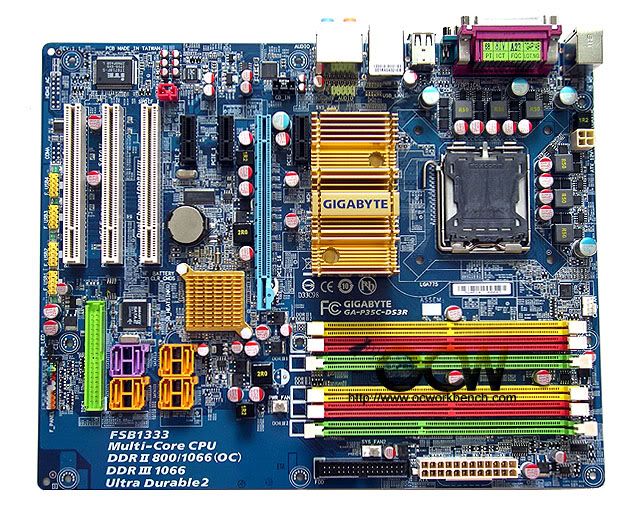 |
|
|
May 3 2009, 10:23 PM
|
|
Junior Member
469 posts Joined: Mar 2005 From: Earth
|
QUOTE(hangy2k @ May 3 2009, 09:29 PM) well, that is because the motherboard itself has both ddr2 and ddr3 slot Ok very good understanding on that thanks alot for the picture and explanation. you can look at this gigabyte P35C-DS3R motherbord, 2 green DIMM slots for DDR3 and 4 dimm slots (Red+yellow) are meant for the traditional DDR2 |
|
|
|
|
|
May 4 2009, 12:22 AM
|
|
Senior Member
5,909 posts Joined: Jan 2006 From: 06.02.58.44.23.08.03
|
QUOTE(Gilthoniel @ May 3 2009, 06:04 PM) i think it might be the card reader on my SR. when I transferred from my old XP laptop via wifi, the photos turned out fine. Sorry to hear. I've never seen someone who has the same problem as yours but i've seen someone's pics corrupted when viewing in his Digicam but they were all fine when transferred to his VAIO.when i pop in my SD card into the SR, it even looks distorted in the thumbnails while browsing through the SD card. Tried updating with the latest driver from Ricoh (downloaded from Sony's website) but somehow when I check device manager, the driver version is still the old microsoft one. No idea why. Will be bringing it to Northpoint tomorrow and hopefully they can come up with some explanation. Been trying to update the Vaio via online update, but nothing ever happens when I click on Update Now. have you tried with other laptop/PC? |
|
|
May 4 2009, 02:27 AM
|

Junior Member
153 posts Joined: Jan 2005 From: Bukit Beruang
|
Guyz...i think something happend to my fw23.when watching video,sometimes it stuck for second then resume....is it happened becoz of codec?
Added on May 4, 2009, 2:30 amAnd to bro who ask about RAM... You need to study on Computer Architecture subject if you want to understand more...hope it will help... This post has been edited by Cool_Knights: May 4 2009, 02:30 AM |
|
|
May 4 2009, 10:14 AM
|
|
Senior Member
1,718 posts Joined: Jan 2003
|
QUOTE(maxizanc @ May 4 2009, 12:22 AM) Sorry to hear. I've never seen someone who has the same problem as yours but i've seen someone's pics corrupted when viewing in his Digicam but they were all fine when transferred to his VAIO. yup, I put the SD card into my old laptop, transferred to it, and then wirelessly transferred to my Vaio and the pics were all fine.have you tried with other laptop/PC? Not sure if it's the driver (which I can't seem to update) or is it a faulty SD card reader. |
|
|
May 4 2009, 03:16 PM
|

Senior Member
1,018 posts Joined: Jul 2007
|
Hey guys, whats the latest price on SONY Vaio CS26 series. thanks
|
|
|
May 4 2009, 03:54 PM
|
|
Senior Member
5,909 posts Joined: Jan 2006 From: 06.02.58.44.23.08.03
|
QUOTE(Cool_Knights @ May 4 2009, 02:27 AM) Guyz...i think something happend to my fw23.when watching video,sometimes it stuck for second then resume....is it happened becoz of codec? Codec gave me some problems last time. Try to get the latest version of codec, uninstall the old one and reinstall he new one.Added on May 4, 2009, 2:30 amAnd to bro who ask about RAM... You need to study on Computer Architecture subject if you want to understand more...hope it will help... QUOTE(Gilthoniel @ May 4 2009, 10:14 AM) yup, I put the SD card into my old laptop, transferred to it, and then wirelessly transferred to my Vaio and the pics were all fine. Yeah, i think better send to Service Center at North Point. Nobody here knows how to solve the issue including you. So just leave it to the technical teams there.Not sure if it's the driver (which I can't seem to update) or is it a faulty SD card reader. QUOTE(rickysay @ May 4 2009, 03:16 PM) Hey guys, whats the latest price on SONY Vaio CS26 series. thanks RM3988 |
|
|
May 4 2009, 03:58 PM
|
|
Junior Member
469 posts Joined: Mar 2005 From: Earth
|
Hey guys,
How to set my laptop brigthness??It seems like it would not save and stay on the settings. Like evertime i adjust it already than when ever i shut down my laptop than i switch on again the next time i wanna use than the brightness is not as wat i set the previous time. Does you all encounter such things?or is there a way to set it?because like for other laptop it would stay on the brightness you adjusted when ever u switch it on again. |
|
|
May 4 2009, 04:02 PM
|
|
Junior Member
60 posts Joined: Sep 2006
|
QUOTE(maxizanc @ Apr 18 2009, 01:07 PM) VAIO Users have been a vaio user for almost one year VGN SZ75GN. into the second mth fan was out, overheated and killed the power supply. changed in no time at midvalley and was fine. never really faced any major problems. *Please PM or leave message in this thread to have your name in the list. State your model as well. recently after some updates form microsoft, i had to recover form previous saved mode. then few weeks ago, charger went dead. changed to new charger now power supply wnet dead.cant charge sigh will be sending in for repairs. went browsing and looked up the TP series.. its now on discount. ordered online and waiting for confirmation. |
|
Topic ClosedOptions
|
| Change to: |  0.0192sec 0.0192sec
 0.44 0.44
 6 queries 6 queries
 GZIP Disabled GZIP Disabled
Time is now: 10th December 2025 - 08:02 PM |
 Quote
Quote