Outline ·
[ Standard ] ·
Linear+
Your One Stop iTunes Troubleshooting Centre, How-to-do guides, backup, tips & tricks!
|
bluehyppo
|
 Mar 31 2010, 01:58 PM Mar 31 2010, 01:58 PM
|
Getting Started


|
You can.
In short, using iTunes (make sure you are not signed in) and then 'purchase' a free app. It will prompt you to create a new account with an option for no credit/debit card. Google for more details.
If you did Google it using the right keywords there should be dozens of hits...
|
|
|
|
|
|
davidgary73
|
Mar 31 2010, 03:47 PM
|
Music Producer

|
QUOTE(mois @ Mar 31 2010, 12:12 PM) i asked one of my friend. she said the first time she wants to register also cant since need credit card. After a few days then she tries again and got "None" option along with visa, paypal and eth. I ask her how, she said she doesnt know.  Read this post: http://forum.lowyat.net/topic/868281/+12. Set Up An iTunes Account. How? Do as bluehyppo mentioned. Should be easy. |
|
|
|
|
|
xanavi
|
Mar 31 2010, 07:12 PM
|
Getting Started
|
hi any1 knows how to purchase at US Store, when i tried to purchase it says something was omiss with my security code, which is not, any1 can help?or any alternatives ..?
|
|
|
|
|
|
TSnokia2003
|
Mar 31 2010, 07:24 PM
|
|
|
QUOTE(xanavi @ Mar 31 2010, 07:12 PM) hi any1 knows how to purchase at US Store, when i tried to purchase it says something was omiss with my security code, which is not, any1 can help?or any alternatives ..?
Added on March 31, 2010, 7:27 pmQ: Can I use my Malaysian credit card to purchase another country's iTunes gift certificates, iTunes gift card, redemption code? A: No. As each credit card is being issued uniquely to its provider (kindly refer to SECTION D: TOPPING UP YOUR ITUNES ACCOUNT for more information) This post has been edited by nokia2003: Mar 31 2010, 07:27 PM |
|
|
|
|
|
pandabamboo
|
Apr 2 2010, 04:21 PM
|
New Member
|
help pls....
i try to load the games from the application store but need to put in credit card number de....
is there another way to load games without insert credit card number?
|
|
|
|
|
|
bumper2bumper
|
Apr 2 2010, 04:25 PM
|
Getting Started
|
iTunes got free apps. Look under Free section.
|
|
|
|
|
|
jenN
|
Apr 2 2010, 04:27 PM
|
Getting Started
|
QUOTE(pandabamboo @ Apr 2 2010, 04:21 PM) help pls.... i try to load the games from the application store but need to put in credit card number de.... is there another way to load games without insert credit card number? In the Itunes Store, click on a free game, then you click Sign In and Create New Account. This way, you do not need to key in the credit card number. Choose da none option. It will verify with your email address instead. Have fun  |
|
|
|
|
|
pandabamboo
|
Apr 2 2010, 04:30 PM
|
New Member
|
QUOTE(jenN @ Apr 2 2010, 04:27 PM) In the Itunes Store, click on a free game, then you click Sign In and Create New Account. This way, you do not need to key in the credit card number. Choose da none option. It will verify with your email address instead. Have fun i click itunes de... but there mention "cannot connect to the itunes store. the itunes store is not supported in thi country" how????? |
|
|
|
|
|
jenN
|
Apr 2 2010, 04:36 PM
|
Getting Started
|
QUOTE(pandabamboo @ Apr 2 2010, 04:30 PM) i click itunes de... but there mention "cannot connect to the itunes store. the itunes store is not supported in thi country" how????? Connect your phone to your laptop/pc, then on your iTunes in the pc and Sign in from there. Once you done Creating an account, try to sync a game to your phone. |
|
|
|
|
|
pandabamboo
|
Apr 2 2010, 04:48 PM
|
New Member
|
i know how jor i know how jor....
i love u guys so much!!!!
muacks^^
|
|
|
|
|
|
Superman7
|
Apr 3 2010, 03:59 PM
|
|
|
Ever get tired of waiting for the phone to backup each time you sync your iPhone? There is a solution now... |
|
|
|
|
|
hihihehe
|
Apr 4 2010, 11:50 PM
|
|
|
i found out my apple software update's language is in chinese but itunes is in english..how to change the language from chinese to english?
|
|
|
|
|
|
skysblue
|
Apr 5 2010, 06:04 AM
|
Getting Started
|
hi there,
i tried to synchronize the song to my iphone.. but i cant get my song to transfer to my iphone =[ anyone know why?
@tinkerbel
Thx.. I can get all the songs into my iphone di =]
This post has been edited by skysblue: Apr 5 2010, 06:59 PM
|
|
|
|
|
|
tinkerbel
|
Apr 5 2010, 07:58 AM
|
Fanaddict!
|
@skysblue,
Haf U authorised ur iPhone with the same iTunes account?
|
|
|
|
|
|
sanosizo
|
Apr 5 2010, 09:08 AM
|
|
|
QUOTE(Superman7 @ Apr 3 2010, 03:59 PM) Ever get tired of waiting for the phone to backup each time you sync your iPhone? There is a solution now...or you can just click the 'x' button when itunes is trying to do the backup. |
|
|
|
|
|
mmmbop
|
Apr 5 2010, 09:32 AM
|
|
|
Just would like to know has anyone encountered the same problem.
Last time, I was syncing the phone to a PC which is connected to Internet. At the same time, I forgot to off Wifi on the phone. Syncing with iTunes works well at the start and suddenly it stopped and said that an error occured.
Not bothered with the problem, thinking that probably it's a normal connection issue, I was surprised to know that it seems that the syncing was only halfway with 90% of my apps and games gone! The remaining apps still there on the same springboard but all other apps has already gone.
When I open each of the remaining apps, all works fine and game data still intact. Thank God, all apps still in the iTunes, it's just the apps has been uninstalled from the phone. In the end, I have to install remaining apps and tediously put every app one by one on the correct springboard that I want.
Apps gone still ok, problem is game data is gone. Means I have to start all over again to play long gameplay like Assassin's, DH etc..Most annoyingly important confidential data in 1Password has gone as well.
Can somebody care to explain what could be the culprit? Is it really because of the wifi turned on?
|
|
|
|
|
|
derik87
|
Apr 5 2010, 04:45 PM
|
Getting Started
|
Hi all.... I'm sing iTunes 9(64bit), i noticed that there are no 'video' tap for me to sync video. Can anyone advice? another thing is, if i only want to sync Music only, should I untick others, e.g. Apps? Once I untick Apps, this (below) massage occur, so if i untick Apps, all my Apps in iPhone will gone? what should i do? p/s: i've tried to untick music while sync apps, after sync complete, my musics are still in my iphone. 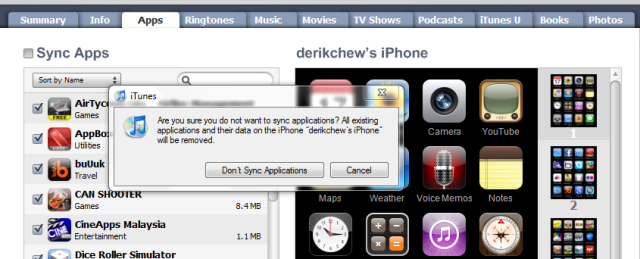 thanksss |
|
|
|
|
|
aleluya
|
Apr 5 2010, 05:05 PM
|
|
|
It's easy, untick all that you don't want to sync.
Then file > add a file.
Select your video. It will be placed under movie.
In movie, select all unwatched to be synced.
When you sync, it will appear in video in your ipod
|
|
|
|
|
|
derik87
|
Apr 5 2010, 05:16 PM
|
Getting Started
|
QUOTE(aleluya @ Apr 5 2010, 05:05 PM) It's easy, untick all that you don't want to sync. Then file > add a file. Select your video. It will be placed under movie. In movie, select all unwatched to be synced. When you sync, it will appear in video in your ipod if i untick apps, will the apps in my iphone gone? like the warning tht i showed... |
|
|
|
|
|
yuvanesh
|
Apr 5 2010, 07:10 PM
|
|
|
QUOTE(derik87 @ Apr 5 2010, 05:16 PM) if i untick apps, will the apps in my iphone gone? like the warning tht i showed... yes definately...only the tick once will be sync and install... |
|
|
|
|



 Quote
Quote








 0.0306sec
 0.48
0.48
 6 queries
 GZIP Disabled