

some problems with my left speaker on my mis 2014 mbp retina 13. any idea how to fix it and also the damage ? thks
Hardware Mac servicing, emergency tips, General knowledge on Mac issues
Hardware Mac servicing, emergency tips, General knowledge on Mac issues
|
|
 Jan 29 2018, 01:04 PM Jan 29 2018, 01:04 PM
|
 
Junior Member
516 posts Joined: Sep 2005 
|
some problems with my left speaker on my mis 2014 mbp retina 13. any idea how to fix it and also the damage ? thks
|
|
|
|
|
|
Feb 6 2018, 04:18 PM
|

Junior Member
10 posts Joined: Dec 2010
|
My Macbook currently very slow. Was trying reboot times for few times but the performance still remain the same.
Hope to get someone to service on the macbook, please advise if you have any reliable contact. |
|
|
Feb 6 2018, 07:20 PM
Show posts by this member only | IPv6 | Post
#1723
|
|
Junior Member
118 posts Joined: Nov 2006 
|
Any idea how I can clean my keyboard? Using the Macbook 12 and I think some of the keys don't really go all the way down... thanks...
|
|
|
Feb 6 2018, 08:46 PM
|

Senior Member
6,496 posts Joined: Jan 2003 From: Kota Damansara  
|
QUOTE(blissd @ Feb 6 2018, 07:20 PM) Any idea how I can clean my keyboard? Using the Macbook 12 and I think some of the keys don't really go all the way down... thanks... You’ll have to be very very careful. You can try a hand blower. Those they use to clean camera equipment. Avoid can-air or strong electric blower. |
|
|
Mar 6 2018, 11:00 PM
|
|
Junior Member
8 posts Joined: Mar 2011
|
Hi all.
I need help to upgrade my MacBook pro retina late 2013 ram from 4gb to 16gb. Is there any where or anybody be able to do it. Pls advise. |
|
|
Mar 7 2018, 09:45 AM
|
|
Senior Member
6,496 posts Joined: Jan 2003 From: Kota Damansara
|
QUOTE(singkong @ Mar 6 2018, 11:00 PM) Hi all. https://www.facebook.com/maccores/photos/a....?type=3&theaterI need help to upgrade my MacBook pro retina late 2013 ram from 4gb to 16gb. Is there any where or anybody be able to do it. Pls advise. You'll need to swap the board out. 16GB board is very rare. |
|
|
|
|
|
Mar 12 2018, 03:22 PM
|

Senior Member
1,804 posts Joined: Jun 2009
|
anyone know where can help change mac mini 2014 hard disk in kl? saw yuotube..not easy to open
|
|
|
Mar 23 2018, 03:10 PM
|
|
Newbie
4 posts Joined: Mar 2018
|
I've got some problem with store who fixed my Mac.
To cut it short; My iMac is a vintage unit. Middle year 2016: Give to this store to fix my GPU (busted due to overheat). End of year 2017: GPU got broke again. Give to another store to fix, and that store told me that GPU is not clean may the cause of the broke (refer to attachment, the yellowish thing). Masking tape bersepah. Condition of GPU might be came from the previous repair one. Is it standard thing to repair GPU ended with this condition as a final product? Attached thumbnail(s) 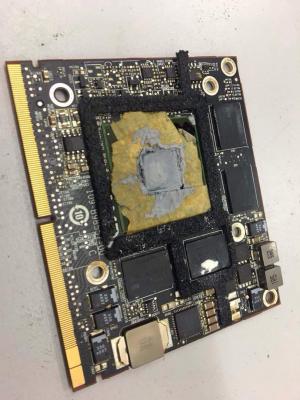
|
|
|
Mar 23 2018, 04:40 PM
|
|
Senior Member
6,496 posts Joined: Jan 2003 From: Kota Damansara
|
QUOTE(Akayaka @ Mar 23 2018, 03:10 PM) I've got some problem with store who fixed my Mac. This is the problem we faced nowadays. People just want "cheap" repair or not knowingly what the repair personnel is doing to their Mac. Malaysian should start appreciating proper professional works. Surely many could claim they can do it. Claim their parts are "original". But are you really sure?To cut it short; My iMac is a vintage unit. Middle year 2016: Give to this store to fix my GPU (busted due to overheat). End of year 2017: GPU got broke again. Give to another store to fix, and that store told me that GPU is not clean may the cause of the broke (refer to attachment, the yellowish thing). Masking tape bersepah. Condition of GPU might be came from the previous repair one. Is it standard thing to repair GPU ended with this condition as a final product? To your question, no, those tapes are not supposed to be there. What you have are an unprofessional "repair" work. Even those thermal compound shouldn't smear around as such. Masking tape on a chip, this made my Friday.  Oh, BTW, whatever repair you trying on the same card, it won't last. It will fail again, matter of time. |
|
|
Mar 23 2018, 05:06 PM
|
|
Newbie
4 posts Joined: Mar 2018
|
QUOTE(wei @ Mar 23 2018, 04:40 PM) This is the problem we faced nowadays. People just want "cheap" repair or not knowingly what the repair personnel is doing to their Mac. Malaysian should start appreciating proper professional works. Surely many could claim they can do it. Claim their parts are "original". But are you really sure? I try to ask their responsible to get compensate. Do you know what kind of reply I get:To your question, no, those tapes are not supposed to be there. What you have are an unprofessional "repair" work. Even those thermal compound shouldn't smear around as such. Masking tape on a chip, this made my Friday. Oh, BTW, whatever repair you trying on the same card, it won't last. It will fail again, matter of time. QUOTE Setelah kami menyelidik dan memerhati semuanya daripada dokumen yang diterima tuan AA, tiada pembaikian yang tidak kemas yang dinyatakan oleh pihak tuan. Disini kami ingin mengeluarkan kenyataan atas segala kenyataan yang dikeluarkan sebelum ini) 1. Tamat tempoh jaminan (Disclaimer / Penafian ) 2. Penggunaan pita pada sesetengah chip ( insulator thermal prevent from short smd chip on carrier) 3. Sebab Lain ( Rujuk pada technician pihak ketiga yang tidak bertauliah dalam bidang Logicboard Macbook terlebih dahulu tanpa memastikannya 'isu tidak kemas') Segalanya penjelasan telah saya berikan agar pihak tuan faham dan jelas keadaan sebenar yang mana boleh serba sedikit menjejaskan reputasi dan imej pihak kami selaku dalam industri servis dan baikpulih. I went to their store as per recommendation (2016). If I reveal the name of store, you can see all of so-called testimony they gather as a 'good' reputation Mac/Apple repair store. Next, I should take a legal move (TTP) but have to gather enough info about them in misconduct activities to fight them. * The new store replace with new card. That old card is totally busted. This post has been edited by Akayaka: Mar 23 2018, 05:40 PM |
|
|
Mar 23 2018, 06:00 PM
|
|
Senior Member
6,496 posts Joined: Jan 2003 From: Kota Damansara
|
You have all our support to fight for your rights.
We've seen many misconduct involving Mac repairs throughout the years. Some that involved well-advertised or 'appeared' to be established 'store'. They just got away. Surprisingly. |
|
|
Mar 23 2018, 06:57 PM
|
|
Newbie
4 posts Joined: Mar 2018
|
The store name before this: OK Computer Solutions, branch at UIA, Gombak.
On 2017, that branch change their name, Mecnote Studio (or in some document state Macnote Studio, they themselves have conflict identity). You can look them at FB or blog. I heard that lot of UIA's students had complaint against them but I have difficulty to reach them to support my case. Report to KPDNKK, but they past the spotcheck. But you can see how they handle/fix things from photos they posted. I don't know which photo can support with 'bad practice' case. Thanks for all of supports.  |
|
|
Apr 4 2018, 11:03 PM
|

Senior Member
7,916 posts Joined: Jul 2005 From: Kuala Lumpur
|
Hi all. May I know what's the price range for battery replacement of a 13" MBA Mid 2012?
|
|
|
|
|
|
Apr 16 2018, 09:52 AM
|
|
Newbie
4 posts Joined: Jul 2013
|
Hi, wanna ask if macbook pro we change the thermal paste our self, will the apple warranty or apple care be void?
|
|
|
Apr 16 2018, 12:49 PM
|
|
Senior Member
6,496 posts Joined: Jan 2003 From: Kota Damansara
|
QUOTE(Zongwei22 @ Apr 16 2018, 09:52 AM) Hi, wanna ask if macbook pro we change the thermal paste our self, will the apple warranty or apple care be void? yes |
|
|
Jun 4 2018, 02:37 PM
|

Junior Member
495 posts Joined: Nov 2007 From: Sarawak (Now in PJ)
|
Hi there, i have an old Macboook Unibody Alu 13' 2008 version.
Running on SSD and 8GB ram. CD ROM slot changed to second HDD. Problem with my Macbook 1. Both speaker already pecah kind of sound. 2. The monitor have many line and flickering issue. It is still able to find spare part to repair my old macbook. Any recommendation of shop in Penang or Sarawak that can repair these problems? Still love my old macbook. |
|
|
Jun 11 2018, 02:36 PM
|

Senior Member
1,114 posts Joined: Feb 2009 From: Island closest to Hell
|
Guys I'm new here
Probably new to macworld too I bought a MacBook Pro 15" mid 2012 Core i7 2.3ghz 4gb and 500gb HDD Planning to upgrade to 16gb sodimm ddr3 and Samsung Evo 850 500gb Since I don't have any personal data in that MacBook . I read that I need to make a bootable USB drive with OS inside prior to installing Question is 1. If I load the new ssd inside , then boot from usb and install OS on that, how do u install drivers (like windows need to install drivers) Or I don't need to install drivers and all will be fine to use like WiFi, Bluetooth, GPU etc 2. Another option is cloning but I'm not that familiar with the way Thanks |
|
|
Jun 11 2018, 09:28 PM
Show posts by this member only | IPv6 | Post
#1738
|
|
Junior Member
495 posts Joined: Nov 2007 From: Sarawak (Now in PJ)
|
» Click to show Spoiler - click again to hide... « My advice is choose option one. Fresh install using USB drive. All the so called driver and necessary software are inside it. Everything is so easy with MacBook. But u need a internet connection during the setup. And during setup the USB stick. This post has been edited by Zelmel: Jun 11 2018, 09:29 PM |
|
|
Jun 13 2018, 02:35 PM
|
|
Senior Member
6,496 posts Joined: Jan 2003 From: Kota Damansara
|
QUOTE(zedstat @ Jun 11 2018, 02:36 PM) Guys I'm new here There's no need for the USB drive if you just need to clean install the MacOS. Just boot to internet recovery mode. Ensure you have stable and fast enough internet connection. The download is around 4-5GB.Probably new to macworld too I bought a MacBook Pro 15" mid 2012 Core i7 2.3ghz 4gb and 500gb HDD Planning to upgrade to 16gb sodimm ddr3 and Samsung Evo 850 500gb Since I don't have any personal data in that MacBook . I read that I need to make a bootable USB drive with OS inside prior to installing Question is 1. If I load the new ssd inside , then boot from usb and install OS on that, how do u install drivers (like windows need to install drivers) Or I don't need to install drivers and all will be fine to use like WiFi, Bluetooth, GPU etc 2. Another option is cloning but I'm not that familiar with the way Thanks |
|
|
Jun 13 2018, 06:51 PM
|
|
Senior Member
1,114 posts Joined: Feb 2009 From: Island closest to Hell
|
What button to press upon reboot for that to happen?
|
| Change to: |  0.0272sec 0.0272sec
 0.38 0.38
 6 queries 6 queries
 GZIP Disabled GZIP Disabled
Time is now: 1st December 2025 - 11:48 AM |
 Quote
Quote