Welcome Guest ( Log In | Register )

Bump Topic Topic Closed RSS Feed
125 Pages « < 37 38 39 40 41 > » Bottom

Outline · [ Standard ] · Linear+

Nokia Nokia E71 Thread V2, Messenger of Steel!

views
     
zaxxshoxx
post Jan 24 2009, 11:55 AM

put up or shut up
******
Senior Member
1,331 posts

Joined: Jan 2006
From: Cyberjaya / Keramat AU


QUOTE(scofield @ Jan 24 2009, 09:55 AM)
guys, already update the first post with tips before updating your phone and the software needed to be use to update your phone..for newbies, download pc suite to backup your data and then download the nokia software updater..connect your phone to your pc using USB cable..run the nokia software updater and follow the instruction on screen..its that simple..
*
aiite.. i want to start try now tongue.gif

TSscofield
post Jan 24 2009, 12:19 PM

Regular
******
Senior Member
1,252 posts

Joined: Feb 2006
From: Planet Earth


QUOTE(zaxxshoxx @ Jan 24 2009, 11:55 AM)
aiite.. i want to start try now tongue.gif
*
remember to backup your data using the pc suite..and pray your comp doesnt hang or internet dont get dc during the process..but i think you should be ok.. smile.gif oh ya, dont get panic if your phone screen turns blank or the pc suite icon shows your phone is not connected..its normal..just let the nokia software updater do the job..

This post has been edited by scofield: Jan 24 2009, 12:21 PM
zaxxshoxx
post Jan 24 2009, 02:06 PM

put up or shut up
******
Senior Member
1,331 posts

Joined: Jan 2006
From: Cyberjaya / Keramat AU


QUOTE(scofield @ Jan 24 2009, 12:19 PM)
remember to backup your data using the pc suite..and pray your comp doesnt hang or internet dont get dc during the process..but i think you should be ok.. smile.gif oh ya, dont get panic if your phone screen turns blank or the pc suite icon shows your phone is not connected..its normal..just let the nokia software updater do the job..
*
done... thx bro.. biggrin.gif thats was easy...
aspire2oo6
post Jan 24 2009, 02:06 PM

Banned
*********
All Stars
35,468 posts

Joined: Oct 2006

no one said it was hard in the first place.
zaxxshoxx
post Jan 24 2009, 02:09 PM

put up or shut up
******
Senior Member
1,331 posts

Joined: Jan 2006
From: Cyberjaya / Keramat AU


QUOTE(aspire2oo6 @ Jan 24 2009, 02:06 PM)
no one said it was hard in the first place.
*
hahaha.. i know blush.gif anway did you manage to install Garmin XT? i still cant do it sad.gif
aspire2oo6
post Jan 24 2009, 02:53 PM

Banned
*********
All Stars
35,468 posts

Joined: Oct 2006

yea i install it in many phones already the procedure is as easy as u update your firmware.
julnoel
post Jan 24 2009, 03:19 PM

Enthusiast
*****
Senior Member
739 posts

Joined: Nov 2006


QUOTE(pukarix @ Jan 24 2009, 08:26 AM)
guys...

is there any way to disable d EVER annoying button between the volume buttons..d voice 'something' button..

i hate it when i 'accidently' hit it...in meetings..although d phone is in my pocket..eventhough in silent mode..any tips?

btw i ve been using d phone for around 4-5 month..NO problems of paint peeling off..with daily usage of messaging n emailing smile.gif

thanks in advance.
*
lock ur keypad? :/


pukarix
post Jan 24 2009, 04:29 PM

Regular
******
Senior Member
1,053 posts

Joined: Nov 2004
QUOTE(julnoel @ Jan 24 2009, 03:19 PM)
lock ur keypad? :/
*
yeah .. n i forgot...something besides that..

any ideas?
puresoju
post Jan 24 2009, 04:47 PM

Getting Started
**
Junior Member
93 posts

Joined: May 2008


I succeed installed the new firmwire but i found a bug (maybe)
When you go to screen menu and then i push option, and it appears the menu words in that options are not supposed to be.. it appears seomthing like:

&qtn_menu_open;
&qtn_menu_change-skin;
&qtn_fldr_move_item;
etc etc

anyone here who already updated new firmwire having same problem?
_________________________________________________________________________________________________________________________

Humm i did restart my phone and the phone's back to normal.. smile.gif

This post has been edited by puresoju: Jan 24 2009, 04:54 PM
aspire2oo6
post Jan 24 2009, 05:17 PM

Banned
*********
All Stars
35,468 posts

Joined: Oct 2006

no such thing for me here.
sonyclie77
post Jan 24 2009, 06:23 PM

Stressed Personnel
Group Icon
Staff
10,928 posts

Joined: Jan 2003
From: United Kingdom


QUOTE(MrLarner82 @ Jan 24 2009, 07:51 AM)
to update my firmware, is it as simple as downloading nokia software updater, connect the usb, back up my files, update software then restore my files, is it as easy as that, or will i come across some problems?
I have also been on the nokia software updater and its telling me phone is up to date and the software i am using is... 100.07.76
is this correct or is there a newer 1?
i only got my phone 3 weeks ago.
*
I've just updated my Avaxx set, and the firmware is now:

200.21.118
27-11-2008
RM-346

Love the contacts search from the Home screen! rclxm9.gif


zad78
post Jan 24 2009, 07:23 PM

Remember... Remember
******
Senior Member
1,237 posts

Joined: Nov 2006
From: 3rd Rock From The Sun


OMG! Got the homescreen contacts search already! Must update now....but would i be able to install back all my ahem software such as garmin, coreplayer, dictionary etc. Heard that the latest firmware is hard to install ahem software in it. By the way got my e71 avaxx 7 months ago hoho...bought it the second day it was launch in malaysia. The only thing that retract me from updating to the new firmware is the inaccessability to ahem software like i mentioned above.
aspire2oo6
post Jan 24 2009, 07:26 PM

Banned
*********
All Stars
35,468 posts

Joined: Oct 2006

i update to latest version dont have problem u are having


Added on January 24, 2009, 7:27 pmuser posted image

This post has been edited by aspire2oo6: Jan 24 2009, 07:27 PM
julnoel
post Jan 24 2009, 09:06 PM

Enthusiast
*****
Senior Member
739 posts

Joined: Nov 2006


QUOTE(pukarix @ Jan 24 2009, 04:29 PM)
yeah .. n i forgot...something besides that..

any ideas?
*
set ur keypad to autolock ? tongue.gif


ejoe
post Jan 24 2009, 09:08 PM

New Member
*
Junior Member
26 posts

Joined: Jan 2003
From: kota bharu


QUOTE(zad78 @ Jan 24 2009, 07:23 PM)
OMG! Got the homescreen contacts search already! Must update now....but would i be able to install back all my ahem software such as garmin, coreplayer, dictionary etc. Heard that the latest firmware is hard to install ahem software in it. By the way got my e71 avaxx 7 months ago hoho...bought it the second day it was launch in malaysia. The only thing that retract me from updating to the new firmware is the inaccessability to ahem software like i mentioned above.
*
i install ehem garmin v5 on new firmware 200.21.118 so far no problem
btw add me to white e71 list.tq
n20nine
post Jan 24 2009, 09:23 PM

Enthusiast
*****
Senior Member
909 posts

Joined: Jan 2003
From: London


QUOTE(pukarix @ Jan 24 2009, 04:29 PM)
yeah .. n i forgot...something besides that..

any ideas?
*
hmm..there is a software, its called device lock if i am not mistaken, i think i got it last time from the nokia beta labs site. it locks your phone after x no of seconds you set it to. the difference between this and the standard autolock in your phone is that this software will lock your keypad in any screen, autolock only works when you are in home screen.

QUOTE(zad78 @ Jan 24 2009, 07:23 PM)
OMG! Got the homescreen contacts search already! Must update now....but would i be able to install back all my ahem software such as garmin, coreplayer, dictionary etc. Heard that the latest firmware is hard to install ahem software in it. By the way got my e71 avaxx 7 months ago hoho...bought it the second day it was launch in malaysia. The only thing that retract me from updating to the new firmware is the inaccessability to ahem software like i mentioned above.
*
you can install cracked software, but not unsigned software. i thought the homescreen contacts search was already there since firmware 100.06.67? i have had this feature in this firmware.
alpha_company
post Jan 24 2009, 10:28 PM

One Hand Punch Mega
*******
Senior Member
4,016 posts

Joined: Mar 2005
From: ★MALAYSIA★ Status: Photographing


look at this... e71 got nominated for best mobile handset or device category.

http://symbian-freak.com/news/009/01/e71_n...bile_awards.htm
jacc
post Jan 24 2009, 11:16 PM

Getting Started
**
Junior Member
224 posts

Joined: Jan 2003
CALLING ALL E71 USERS. Those who has updated the firmware with 200.21.118! Urgent!

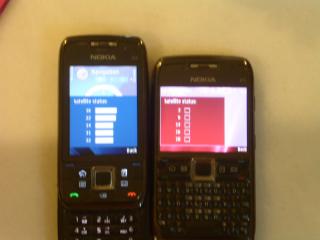
I just updated mine today. Guess what, the new firmware crapped out my GPS!!! Used to be really sensitive an all, with A-GPS it locks to the satellite in 10 secs. Now, zilch!!

I have done two firmware updates before using Nokia Software update. from the first release..to the november 08 release to the latest 200.21.118. Now the GPS is totally useless. See the screenshot below. Compare to my brother's E66 on the Nov08 firmware at the same spot.

Here's the test:
Both phones enable A-GPS. Restart phone. Enter GPS--> Satellite Signal Status at the same time. Wait 1 minute.

Results:
E66--> locked in less than 1 minute.
E71--> 5 minutes down...still no signal!!!

All E71 users with the new firmware, can you please confirm that the GPS is working as good as it was before upgrade? Mine used to be performing the same as the E66 shown in the pic! Please help!!!!!!

My number is 0163310183. Pls pm/sms/call me. Thanks sad.gif

This post has been edited by jacc: Jan 24 2009, 11:37 PM


Attached thumbnail(s)

Attached Image
Sauce
post Jan 25 2009, 12:43 AM

New Member
*
Junior Member
14 posts

Joined: Sep 2007
QUOTE(jacc @ Jan 24 2009, 11:16 PM)
CALLING ALL E71 USERS. Those who has updated the firmware with 200.21.118! Urgent!

I just updated mine today. Guess what, the new firmware crapped out my GPS!!! Used to be really sensitive an all, with A-GPS it locks to the satellite in 10 secs. Now, zilch!!

I have done two firmware updates before using Nokia Software update. from the first release..to the november 08 release to the latest 200.21.118. Now the GPS is totally useless. See the screenshot below. Compare to my brother's E66 on the Nov08 firmware at the same spot.

Here's the test:
Both phones enable A-GPS. Restart phone. Enter GPS--> Satellite Signal Status at the same time. Wait 1 minute.

Results:
E66--> locked in less than 1 minute.
E71--> 5 minutes down...still no signal!!!

All E71 users with the new firmware, can you please confirm that the GPS is working as good as it was before upgrade? Mine used to be performing the same as the E66 shown in the pic! Please help!!!!!!

My number is 0163310183. Pls pm/sms/call me. Thanks sad.gif
*
Go to Menu -> Tools -> Settings -> Genaral -> Positioning -> Positioning Server

Check if your access point is still defined. I updated mine and the access point is gone. I redefine it and it works again
sonyclie77
post Jan 25 2009, 02:00 AM

Stressed Personnel
Group Icon
Staff
10,928 posts

Joined: Jan 2003
From: United Kingdom


QUOTE(n20nine @ Jan 24 2009, 09:23 PM)
hmm..there is a software, its called device lock if i am not mistaken, i think i got it last time from the nokia beta labs site. it locks your phone after x no of seconds you set it to. the difference between this and the standard autolock in your phone is that this software will lock your keypad in any screen, autolock only works when you are in home screen.
you can install cracked software, but not unsigned software. i thought the homescreen contacts search was already there since firmware 100.06.67? i have had this feature in this firmware.
*
Mate, local sets have this feature disabled until the latest firmware. smile.gif

125 Pages « < 37 38 39 40 41 > » Top
Topic ClosedOptions
 

Change to:
| Lo-Fi Version
0.0308sec    0.28    6 queries    GZIP Disabled
Time is now: 2nd December 2025 - 07:54 AM
