Welcome Guest ( Log In | Register )

36 Pages « < 5 6 7 8 9 > » Bottom

Outline · [ Standard ] · Linear+

 [FAQ] Which Distro?, Fedora, Mandrake, Gentoo, SUSE, etc.

views
     
vandetta
post Dec 15 2006, 10:32 AM

On my way
****
Senior Member
658 posts

Joined: Jan 2003


If want to learn about server in linux, which distro is suitable? I am used to Win Server and Mac OS Server, but only know little about linux server, I ask some expert some said Fedora some said SuSe.. What s your suggestion?
kons
post Dec 15 2006, 11:45 AM

Конс
Group Icon
Moderator
6,181 posts

Joined: Oct 2004


QUOTE(vandetta @ Dec 15 2006, 10:32 AM)
If want to learn about server in linux, which distro is suitable? I am used to Win Server and Mac OS Server, but only know little about linux server, I ask some expert some said Fedora some said SuSe.. What s your suggestion?
*
Well, actually, the best way is to try it out yourself.
If you do not like that, can always reinstall other distro.
Until you have find the one which you like.
It's not that difficult, ya know.
vandetta
post Dec 15 2006, 08:33 PM

On my way
****
Senior Member
658 posts

Joined: Jan 2003


Yah, not difficult but to download, and to install.. will take long time.. haih.. doh.gif
Or is there any live CD for server? hmm.gif

This post has been edited by vandetta: Dec 15 2006, 08:34 PM
r0xarena
post Dec 15 2006, 10:08 PM

New Member
*
Junior Member
24 posts

Joined: Dec 2006


QUOTE(vandetta @ Dec 15 2006, 10:32 AM)
If want to learn about server in linux, which distro is suitable? I am used to Win Server and Mac OS Server, but only know little about linux server, I ask some expert some said Fedora some said SuSe.. What s your suggestion?
*
very hard to suggest ... you really got to try it out yourself ... previously i used a lot of Red Hat 9 and now Red Hat has Red Hat Enterprise Linux .. but this got some licensing issue ...

So I am using CentOS which uses the same source code as Red Hat Enterprise Linux.
All of distro have different command and different style to install applications ...


havuk
post Dec 16 2006, 12:52 AM

Getting Started
**
Junior Member
181 posts

Joined: Nov 2006


CentOS is great because we get to use RHEL without the licensing crap.

It depends on what you're gonna do with your server if you want to pick a distro, but IMHO stick with the big 2, SUSE and Red Hat if you want to learn.
It might pay off in the long run because most companies use it and you might get a job having this knowledge.
br8
post Dec 18 2006, 11:40 AM

New Member
*
Newbie
1 posts

Joined: Dec 2006
how bout try this..
Linux Distribution Chooser
http://www.zegeniestudios.net/ldc/
vandetta
post Dec 18 2006, 11:21 PM

On my way
****
Senior Member
658 posts

Joined: Jan 2003


QUOTE(br8 @ Dec 18 2006, 11:40 AM)
how bout try this..
Linux Distribution Chooser
http://www.zegeniestudios.net/ldc/
*
Very nice tools.. after go through the test, it recommend me 4 distro; uBuntu, Mandrive, Mepis and Fedora.. I might try Fedora since I've used to it than the others biggrin.gif

But Mepis also attract me..

QUOTE
MEPIS Linux is a desktop Linux system that is also easy to configure as a dedicated server. It is designed for both personal and business purposes. It includes cutting-edge features such as a live/installation/recovery CD, automatic hardware configuration, NTFS partition resizing, ACPI power management, WiFi support, anti-aliased TrueType fonts, a personal firewall, KDE, and much more.
Does the Fedora Server support Wifi and Bluetooth?

This post has been edited by vandetta: Dec 18 2006, 11:24 PM
bobtiang
post Dec 20 2006, 10:41 PM

I live in a 6 STARS Hotel
******
Senior Member
1,788 posts

Joined: Jan 2003
From: 冰城

QUOTE(stealer @ Sep 25 2006, 07:34 PM)
my fav distro is debian.

for surfing i use damn small linux run on virtual pc ....  thumbup.gif
*
hi dude, total open source OS, Linu/Unix super noob here.
all the while with MS, even development also all MS (.NET, SQL) blush.gif

so, i heard you talking about Virtual PC, I just installed that and the intention is to try some other OS on my virtual PC.

so far after reading the post here and there, here's the rank I got.

1. Ubuntu, SuSE, PCLinuxOS (Windows like, can install apps without much hasle)
2. Knoppix (runs off the CD)
3. DSL Linux (can run on P1, 32MB)

please advice which distro I should start with which I can get on with my life like those days when I have Windows smile.gif

I dont want to get my hand dirty under the hood yet.. appreciate your advice!

This post has been edited by bobtiang: Dec 20 2006, 11:39 PM
bobtiang
post Dec 21 2006, 02:01 AM

I live in a 6 STARS Hotel
******
Senior Member
1,788 posts

Joined: Jan 2003
From: 冰城

hi guys, so I decided to go with Ubuntu..
i downloaded the ISO Ubuntu 6.06.1 LTS and installed it in Virtual PC.

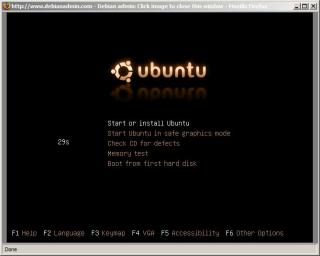
the ISO loaded successfully, 1st screen is looking good with the choices menu
user posted image

but after this, the image just get distorted.. nothing can be seen.
any idea why?

This post has been edited by bobtiang: Dec 21 2006, 02:06 AM
kons
post Dec 21 2006, 07:40 AM

Конс
Group Icon
Moderator
6,181 posts

Joined: Oct 2004


QUOTE(bobtiang @ Dec 21 2006, 02:01 AM)
hi guys, so I decided to go with Ubuntu..
i downloaded the ISO Ubuntu 6.06.1 LTS and installed it in Virtual PC.

but after this, the image just get distorted.. nothing can be seen.
any idea why?
*
The resolution settings is wrong?
kons
post Dec 21 2006, 07:41 AM

Конс
Group Icon
Moderator
6,181 posts

Joined: Oct 2004


QUOTE(bobtiang @ Dec 20 2006, 10:41 PM)
hi dude, total open source OS, Linu/Unix super noob here.
all the while with MS, even development also all MS (.NET, SQL)  blush.gif

so, i heard you talking about Virtual PC, I just installed that and the intention is to try some other OS on my virtual PC.

so far after reading the post here and there, here's the rank I got.

1. Ubuntu, SuSE, PCLinuxOS (Windows like, can install apps without much hasle)
2. Knoppix (runs off the CD)
3. DSL Linux (can run on P1, 32MB)

please advice which distro I should start with which I can get on with my life like those days when I have Windows smile.gif

I dont want to get my hand dirty under the hood yet.. appreciate your advice!
*
Which Virtual PC are you using?
For linux installation, I would suggest going with VMWare.

bobtiang
post Dec 21 2006, 10:07 AM

I live in a 6 STARS Hotel
******
Senior Member
1,788 posts

Joined: Jan 2003
From: 冰城

QUOTE(kons @ Dec 21 2006, 07:40 AM)
The resolution settings is wrong?
*
I manage to get the graphic right after select
- Install in safe graphic mode

Attached Image

I am using Virtual PC 2004, coz MS make it free now smile.gif
i might want to try VMWare if its something better than virtual PC.

i felt asleep last night, this morning when i woke up. the installation is done, and need a reboot. during the reboot i saw that it failed to STOP the RAID driver.
but later on it manage to boot into the OS, and I leave it to run 63 latest update.

so excited to play it around after work, err...where can i found application like MSN for Ubuntu? is there something like this? or i am asking something silly? smile.gif

This post has been edited by bobtiang: Dec 21 2006, 10:14 AM
kons
post Dec 21 2006, 11:04 AM

Конс
Group Icon
Moderator
6,181 posts

Joined: Oct 2004


QUOTE(bobtiang @ Dec 21 2006, 10:07 AM)
I manage to get the graphic right after select
- Install in safe graphic mode

Attached Image

I am using Virtual PC 2004, coz MS make it free now smile.gif
i might want to try VMWare if its something better than virtual PC.

i felt asleep last night, this morning when i woke up. the installation is done, and need a reboot. during the reboot i saw that it failed to STOP the RAID driver.
but later on it manage to boot into the OS, and I leave it to run 63 latest update.

so excited to play it around after work, err...where can i found application like MSN for Ubuntu? is there something like this? or i am asking something silly? smile.gif
*
Glad you made it working.
Last time I tried Virtual PC 2004 with RHEL3 R7, it doesn't work.
Sheeesh.

Failing to RAID driver is not really an issue unless you are really utilizing raid in your drive.

MSN for Ubuntu.. Hmm.. GAIM?

bobtiang
post Dec 22 2006, 12:41 AM

I live in a 6 STARS Hotel
******
Senior Member
1,788 posts

Joined: Jan 2003
From: 冰城

QUOTE(kons @ Dec 21 2006, 11:04 AM)
Glad you made it working.
Last time I tried Virtual PC 2004 with RHEL3 R7, it doesn't work.
Sheeesh.

Failing to RAID driver is not really an issue unless you are really utilizing raid in your drive.

MSN for Ubuntu.. Hmm.. GAIM?
*
great! GAIM is cool.. AOL, Yahoo, MSN.. all in one rclxm9.gif

hi sifu out there, got a couple of question on my new installed Ubuntu Dapper Drake smile.gif
I installed it on MS Virtual Machine 2004

1. my sound device is not working, my sound card is Creative Sound Blaster ZS 2
Attached Image

2. I share a folder from Ubuntu, in my host machine (WinXP), i can see ubuntu in the network place. but when i try to click on that, it prompt the login box. I enter the Ubuntu login and password. but it wont work.
Attached Image

please advice, thanks a ton! newbie here.. smile.gif

This post has been edited by bobtiang: Dec 22 2006, 02:11 AM
stealer
post Dec 23 2006, 10:13 PM

Getting Started
**
Junior Member
88 posts

Joined: Sep 2006


to enable file sharing with windows u need to install samba on ur ubuntu. >>Installing Samba On Ubuntu Guide
but if u already install samba u need to add user to samba and use that user name & password in order to connect to samba server, not the one that u user to login into ur ubuntu box . .
kons
post Dec 23 2006, 11:06 PM

Конс
Group Icon
Moderator
6,181 posts

Joined: Oct 2004


How about using scp?
I always do that when transferring files between linux and windows.
Setting up samba is just taking too much time and it isn't worth the effort if we are just using it for file sharing, samba is meant for task like pdc or something equivalent to that.
tejvenim
post Dec 24 2006, 11:22 AM

New Member
*
Junior Member
17 posts

Joined: Dec 2006
I don't want to mess with my harddisk which is installed with WinXP so I use a LiveUSB linux. I use PCLinuxOS 0.93a junior LiveUSB and I like it because it comes with development tools.

My onboard ethernet chip cannot be detected by SLAX/Knoppix. These distros also do not include compilers, therefore I cannot compile network driver and cannot access the internet.

PCLinuxOS also cannot detect my onboard ethernet, but PCLinuxOS 0.93a comes with compilers, I am able to compile + load the driver and now I am connected to the internet browsing with Konquerer.

The problem with PCLinuxOS 0.93a junior is bad sound and unable to shutdown/reboot. I am using a headphone to listen to mp3 song and the right part produce bad sound (left part ok). I don't have this problem when I use the mp3 player of SLAX or Knoppix.

This post has been edited by tejvenim: Dec 25 2006, 09:15 AM
bobtiang
post Dec 27 2006, 01:25 AM

I live in a 6 STARS Hotel
******
Senior Member
1,788 posts

Joined: Jan 2003
From: 冰城

hi guys, thanks for the info. I will try out the long Samba installation later.
now, I want to install BT Downloader, I had downloaded the installer in something .tar.bz2

here's the simple instruction I got from the site:
1. Extract the archive.
2. Check README to ensure you have all of the required dependencies installed. Unfortunately, the configure script is not too intelligent at the moment.
3. ./configure
4. make
5. make install (as whatever user you need to be)

please advice on how this work? where is ./configure?
what is make?
sorry if this is too noob. thanks...
kons
post Dec 27 2006, 07:28 AM

Конс
Group Icon
Moderator
6,181 posts

Joined: Oct 2004


QUOTE(bobtiang @ Dec 27 2006, 01:25 AM)
hi guys, thanks for the info. I will try out the long Samba installation later.
now, I want to install BT Downloader, I had downloaded the installer in something .tar.bz2

here's the simple instruction I got from the site:
1.  Extract the archive. 
2. Check README to ensure you have all of the required dependencies installed. Unfortunately, the configure script is not too intelligent at the moment.
3. ./configure
4. make 
5. make install (as whatever user you need to be)

please advice on how this work? where is ./configure?
what is make?
sorry if this is too noob. thanks...
*
You just need to bunzip and untar it. (means extract it)
Check and readme file in the directory where you have extracted the contents and see if all the .so files or other dependencies has been installed.
Type ./configure in the same directory.
Type make and then make install.

This is a common compilation procedure for most Linux program..
Usually further parameters can be passed into it using ./configure command.
bobtiang
post Dec 28 2006, 03:14 AM

I live in a 6 STARS Hotel
******
Senior Member
1,788 posts

Joined: Jan 2003
From: 冰城

QUOTE(kons @ Dec 27 2006, 07:28 AM)
You just need to bunzip and untar it. (means extract it)
Check and readme file in the directory where you have extracted the contents and see if all the .so files or other dependencies has been installed.
Type ./configure in the same directory.
Type make and then make install.

This is a common compilation procedure for most Linux program..
Usually further parameters can be passed into it using ./configure command.
*
hi kons, thanks for the help. unfortunately, it failed at steps 3 (Type ./configure in the same directory).
this is what I got:

admin@bob-Ubuntu:~/Desktop/BTDownload/gnome-btdownload-0.0.27$ ./configure
checking for a BSD-compatible install... /usr/bin/install -c
checking whether build environment is sane... yes
checking for gawk... no
checking for mawk... mawk
checking whether make sets $(MAKE)... no
checking whether to enable maintainer-specific portions of Makefiles... no
checking for style of include used by make... none
checking for gcc... no
checking for cc... no
checking for cl.exe... no
configure: error: no acceptable C compiler found in $PATH
See `config.log' for more details.

and attached is the config.log

thanks smile.gif

This post has been edited by bobtiang: Dec 28 2006, 03:17 AM

36 Pages « < 5 6 7 8 9 > » Top
 

Change to:
| Lo-Fi Version
0.0286sec    0.78    6 queries    GZIP Disabled
Time is now: 17th December 2025 - 09:01 PM