Welcome Guest ( Log In | Register )

Outline · [ Standard ] · Linear+

 [FAQ] Which Distro?, Fedora, Mandrake, Gentoo, SUSE, etc.

views
     
bobtiang
post Dec 20 2006, 10:41 PM

I live in a 6 STARS Hotel
******
Senior Member
1,788 posts

Joined: Jan 2003
From: 冰城

QUOTE(stealer @ Sep 25 2006, 07:34 PM)
my fav distro is debian.

for surfing i use damn small linux run on virtual pc ....  thumbup.gif
*
hi dude, total open source OS, Linu/Unix super noob here.
all the while with MS, even development also all MS (.NET, SQL) blush.gif

so, i heard you talking about Virtual PC, I just installed that and the intention is to try some other OS on my virtual PC.

so far after reading the post here and there, here's the rank I got.

1. Ubuntu, SuSE, PCLinuxOS (Windows like, can install apps without much hasle)
2. Knoppix (runs off the CD)
3. DSL Linux (can run on P1, 32MB)

please advice which distro I should start with which I can get on with my life like those days when I have Windows smile.gif

I dont want to get my hand dirty under the hood yet.. appreciate your advice!

This post has been edited by bobtiang: Dec 20 2006, 11:39 PM
bobtiang
post Dec 21 2006, 02:01 AM

I live in a 6 STARS Hotel
******
Senior Member
1,788 posts

Joined: Jan 2003
From: 冰城

hi guys, so I decided to go with Ubuntu..
i downloaded the ISO Ubuntu 6.06.1 LTS and installed it in Virtual PC.

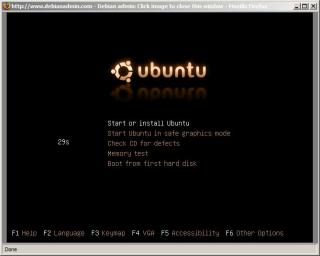
the ISO loaded successfully, 1st screen is looking good with the choices menu
user posted image

but after this, the image just get distorted.. nothing can be seen.
any idea why?

This post has been edited by bobtiang: Dec 21 2006, 02:06 AM
bobtiang
post Dec 21 2006, 10:07 AM

I live in a 6 STARS Hotel
******
Senior Member
1,788 posts

Joined: Jan 2003
From: 冰城

QUOTE(kons @ Dec 21 2006, 07:40 AM)
The resolution settings is wrong?
*
I manage to get the graphic right after select
- Install in safe graphic mode

Attached Image

I am using Virtual PC 2004, coz MS make it free now smile.gif
i might want to try VMWare if its something better than virtual PC.

i felt asleep last night, this morning when i woke up. the installation is done, and need a reboot. during the reboot i saw that it failed to STOP the RAID driver.
but later on it manage to boot into the OS, and I leave it to run 63 latest update.

so excited to play it around after work, err...where can i found application like MSN for Ubuntu? is there something like this? or i am asking something silly? smile.gif

This post has been edited by bobtiang: Dec 21 2006, 10:14 AM
bobtiang
post Dec 22 2006, 12:41 AM

I live in a 6 STARS Hotel
******
Senior Member
1,788 posts

Joined: Jan 2003
From: 冰城

QUOTE(kons @ Dec 21 2006, 11:04 AM)
Glad you made it working.
Last time I tried Virtual PC 2004 with RHEL3 R7, it doesn't work.
Sheeesh.

Failing to RAID driver is not really an issue unless you are really utilizing raid in your drive.

MSN for Ubuntu.. Hmm.. GAIM?
*
great! GAIM is cool.. AOL, Yahoo, MSN.. all in one rclxm9.gif

hi sifu out there, got a couple of question on my new installed Ubuntu Dapper Drake smile.gif
I installed it on MS Virtual Machine 2004

1. my sound device is not working, my sound card is Creative Sound Blaster ZS 2
Attached Image

2. I share a folder from Ubuntu, in my host machine (WinXP), i can see ubuntu in the network place. but when i try to click on that, it prompt the login box. I enter the Ubuntu login and password. but it wont work.
Attached Image

please advice, thanks a ton! newbie here.. smile.gif

This post has been edited by bobtiang: Dec 22 2006, 02:11 AM
bobtiang
post Dec 27 2006, 01:25 AM

I live in a 6 STARS Hotel
******
Senior Member
1,788 posts

Joined: Jan 2003
From: 冰城

hi guys, thanks for the info. I will try out the long Samba installation later.
now, I want to install BT Downloader, I had downloaded the installer in something .tar.bz2

here's the simple instruction I got from the site:
1. Extract the archive.
2. Check README to ensure you have all of the required dependencies installed. Unfortunately, the configure script is not too intelligent at the moment.
3. ./configure
4. make
5. make install (as whatever user you need to be)

please advice on how this work? where is ./configure?
what is make?
sorry if this is too noob. thanks...
bobtiang
post Dec 28 2006, 03:14 AM

I live in a 6 STARS Hotel
******
Senior Member
1,788 posts

Joined: Jan 2003
From: 冰城

QUOTE(kons @ Dec 27 2006, 07:28 AM)
You just need to bunzip and untar it. (means extract it)
Check and readme file in the directory where you have extracted the contents and see if all the .so files or other dependencies has been installed.
Type ./configure in the same directory.
Type make and then make install.

This is a common compilation procedure for most Linux program..
Usually further parameters can be passed into it using ./configure command.
*
hi kons, thanks for the help. unfortunately, it failed at steps 3 (Type ./configure in the same directory).
this is what I got:

admin@bob-Ubuntu:~/Desktop/BTDownload/gnome-btdownload-0.0.27$ ./configure
checking for a BSD-compatible install... /usr/bin/install -c
checking whether build environment is sane... yes
checking for gawk... no
checking for mawk... mawk
checking whether make sets $(MAKE)... no
checking whether to enable maintainer-specific portions of Makefiles... no
checking for style of include used by make... none
checking for gcc... no
checking for cc... no
checking for cl.exe... no
configure: error: no acceptable C compiler found in $PATH
See `config.log' for more details.

and attached is the config.log

thanks smile.gif

This post has been edited by bobtiang: Dec 28 2006, 03:17 AM
bobtiang
post Dec 28 2006, 11:31 PM

I live in a 6 STARS Hotel
******
Senior Member
1,788 posts

Joined: Jan 2003
From: 冰城

hi Kons, i had installed the C compiler from the Synaptic packager manager. i installed the build-essential.
but still I got this... please advice:

admin@bob-Ubuntu:~/Desktop/BTDownload/gnome-btdownload-0.0.27$ ./configure
checking for a BSD-compatible install... /usr/bin/install -c
checking whether build environment is sane... yes
checking for gawk... no
checking for mawk... mawk
checking whether make sets $(MAKE)... yes
checking whether to enable maintainer-specific portions of Makefiles... no
checking for style of include used by make... GNU
checking for gcc... no
checking for cc... no
checking for cl.exe... no
configure: error: no acceptable C compiler found in $PATH

bobtiang
post Dec 29 2006, 08:43 PM

I live in a 6 STARS Hotel
******
Senior Member
1,788 posts

Joined: Jan 2003
From: 冰城

QUOTE(kons @ Dec 29 2006, 06:20 AM)
Phew.
Managed to dig up the README for 0.0.27

» Click to show Spoiler - click again to hide... «


Did you get all that installed?
*
Hi Kons, thanks a lot for helping out.
intltool was not install, so I had just installed it.
and the command ./configure so powerful, done damn lots of stuff..

but at the next step where I am request to type MAKE
I got this..


admin@bob-Ubuntu:~/Desktop/BTDownload/gnome-btdownload-0.0.27$ make
Making all in man
make[1]: Entering directory `/home/admin/Desktop/BTDownload/gnome-btdownload-0.0.27/man'
make[1]: Nothing to be done for `all'.
make[1]: Leaving directory `/home/admin/Desktop/BTDownload/gnome-btdownload-0.0.27/man'
Making all in po
make[1]: Entering directory `/home/admin/Desktop/BTDownload/gnome-btdownload-0.0.27/po'
make[1]: Nothing to be done for `all'.
make[1]: Leaving directory `/home/admin/Desktop/BTDownload/gnome-btdownload-0.0.27/po'
Making all in share
make[1]: Entering directory `/home/admin/Desktop/BTDownload/gnome-btdownload-0.0.27/share'
Making all in desktop
make[2]: Entering directory `/home/admin/Desktop/BTDownload/gnome-btdownload-0.0.27/share/desktop'
make[2]: Nothing to be done for `all'.
make[2]: Leaving directory `/home/admin/Desktop/BTDownload/gnome-btdownload-0.0.27/share/desktop'
Making all in schemas
make[2]: Entering directory `/home/admin/Desktop/BTDownload/gnome-btdownload-0.0.27/share/schemas'
make[2]: Nothing to be done for `all'.
make[2]: Leaving directory `/home/admin/Desktop/BTDownload/gnome-btdownload-0.0.27/share/schemas'
make[2]: Entering directory `/home/admin/Desktop/BTDownload/gnome-btdownload-0.0.27/share'
make[2]: Nothing to be done for `all-am'.
make[2]: Leaving directory `/home/admin/Desktop/BTDownload/gnome-btdownload-0.0.27/share'
make[1]: Leaving directory `/home/admin/Desktop/BTDownload/gnome-btdownload-0.0.27/share'
Making all in src
make[1]: Entering directory `/home/admin/Desktop/BTDownload/gnome-btdownload-0.0.27/src'
make[1]: Nothing to be done for `all'.
make[1]: Leaving directory `/home/admin/Desktop/BTDownload/gnome-btdownload-0.0.27/src'
make[1]: Entering directory `/home/admin/Desktop/BTDownload/gnome-btdownload-0.0.27'
make[1]: Nothing to be done for `all-am'.
make[1]: Leaving directory `/home/admin/Desktop/BTDownload/gnome-btdownload-0.0.27'


the other thing, in Ubuntu rite? is there something like the address bar in Windows?
coz in Terminal windows rite, sometime I wanna go deep into some folder. i need to type in all by hand only? smile.gif

thanks in advanced again!


Change to:
| Lo-Fi Version
0.0214sec    0.79    7 queries    GZIP Disabled
Time is now: 17th December 2025 - 02:48 PM