

Why are you being so stubborn? The solution is already presented to your face. Do you want us to bring the silver spoon adjacent to your mouth?
Pwnagetool/Quickpwn & "yellowsn0w" 3G Unlock, »2G/3G Fw 2.2.1 Unlocking&Jailbreaking«
Pwnagetool/Quickpwn & "yellowsn0w" 3G Unlock, »2G/3G Fw 2.2.1 Unlocking&Jailbreaking«
|
|
 Apr 10 2009, 01:36 PM Apr 10 2009, 01:36 PM
|
 
Senior Member
5,786 posts Joined: Nov 2007 From: VIC - The Place To Be  
|
Why are you being so stubborn? The solution is already presented to your face. Do you want us to bring the silver spoon adjacent to your mouth?
|
|
|
|
|
|
Apr 10 2009, 01:52 PM
|

Junior Member
8 posts Joined: Apr 2009
|
hi, if there is no any wi-fi connection then iphone will automatically change it to operator data usage n it charge me lot.
anybody can help me to turn off using the operator data usage if there is not wi-fi area. thanks lot |
|
|
Apr 10 2009, 01:59 PM
|
 
VIP
4,903 posts Joined: Jul 2008
|
QUOTE(alex_yeou @ Apr 10 2009, 01:52 PM) hi, if there is no any wi-fi connection then iphone will automatically change it to operator data usage n it charge me lot. Please read this thread below. There's solution provided.anybody can help me to turn off using the operator data usage if there is not wi-fi area. thanks lot  http://forum.lowyat.net/topic/868281 Also, take sometime to read the rest of the info. Cheers |
|
|
Apr 10 2009, 02:13 PM
|
|
Junior Member
8 posts Joined: Apr 2009
|
thanks..
i install the sbsetting dy but there dun hav any icon about that de.. how to do the setting? |
|
|
Apr 10 2009, 02:25 PM
|
|
Senior Member
1,754 posts Joined: Jan 2003 From: Puchong
|
QUOTE(alex_yeou @ Apr 10 2009, 02:13 PM) thanks.. slice/touch on the status bar there... the sbsetting menu will drop down...i install the sbsetting dy but there dun hav any icon about that de.. how to do the setting? |
|
|
Apr 10 2009, 02:25 PM
|
|
VIP
4,903 posts Joined: Jul 2008
|
QUOTE(alex_yeou @ Apr 10 2009, 02:13 PM) thanks.. SBSettings has no icons. To launch SBSettings, slide your finger at the statusbar where your time/carrier is located. This will launch the program. i install the sbsetting dy but there dun hav any icon about that de.. how to do the setting? Btw, just for your info, there is also a short description on SBSettings via Cydia on how to launch the program. |
|
|
|
|
|
Apr 10 2009, 05:08 PM
|

Junior Member
62 posts Joined: Jul 2006 From: Ipoh 
|
new photo which show the modem baseband at 04.22.01 and unlocked with maxis now
The pic will answer all doubts. 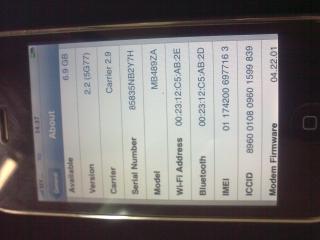
|
|
|
Apr 10 2009, 05:30 PM
|
|
VIP
4,903 posts Joined: Jul 2008
|
QUOTE(ckmcsk @ Apr 10 2009, 05:08 PM) new photo which show the modem baseband at 04.22.01 and unlocked with maxis now Correct. This is the 3.0 BETA 2 with basband 04.22.01. My stand point is still a NO to upgrading to a BETA firmaware. Again, it's a beta firmware with bugs and not a final release. The pic will answer all doubts.
Here are some info if you have not read it yet. (by BigBoss). iPhone 3.0 beta is out for developers. You may find that the feature list sounds great, and it does! However, this is an early beta that is for developers only. Do not download and install this version on a live, iPhone. Doing so will result in: 1) The iPhone OS will probably expire every couple of weeks. If you are out and need a phone the day it expires you are screwed. You will not be able to use the iPhone until you restore to the “upgraded” version. If the current version is “leaked” (meaning you are not a developer and got it through unofficial means), there is no guarantee you will have access to the next beta to keep the iPhone running. 2) The iPhone v3.0 OS is due out for this summer. That puts the release date to be about 3 months away still. That is a long time! The OS is not done. Why would you want to run a buggy incomplete OS on your iPhone? 3) The beta will have compatibility issues with some apps. 4) Your 3G baseband will be updated, and you cannot go back. Yellowsn0w on 3g will also stop working. There will be no fix for this. It is permanent! 5) The 3.0 beta is likely very battery hungry and has a lot of debug symbols in use. It is likely also to use more memory than expected causing some apps to outright crash. Such is often the case with beta operating systems. 6) The 3.0 beta baseband is likely to not be very efficient and tested. Cheers This post has been edited by davidgary73: Apr 10 2009, 05:32 PM |
|
|
Apr 10 2009, 06:58 PM
|

Senior Member
3,657 posts Joined: May 2005
|
@ckmcsk
Of course it is unlock. Looking from the model/part number (MB489ZA) refers to Singapore/Malaysia set which is OFFICIALLY UNLOCK SET. U can upgrade or downgrade the phone to any baseband and it will remain unlock no matter if the baseband is from a beta version. Nothing to shout or be happy about unless the model/part no show its from a locked country. |
|
|
Apr 11 2009, 03:48 PM
|
|
Junior Member
7 posts Joined: Sep 2008 
|
i manage to do the Quickwpn but now my iphone no service on top left... i mean theres suppose to say CELCOM ... hehe.. anybody can help me.... my head is sssooooo dizzy reading until page 57 and i decided to ask... i'm soorrryyy if theres already question similar to mine....... pleasse help me... or anybody can PM me....
thank u in advance.... |
|
|
Apr 11 2009, 04:12 PM
|
|
Senior Member
5,786 posts Joined: Nov 2007 From: VIC - The Place To Be
|
QUOTE(xaierin @ Apr 11 2009, 03:48 PM) i manage to do the Quickwpn but now my iphone no service on top left... i mean theres suppose to say CELCOM ... hehe.. anybody can help me.... my head is sssooooo dizzy reading until page 57 and i decided to ask... i'm soorrryyy if theres already question similar to mine....... pleasse help me... or anybody can PM me.... iPhone Generation :thank u in advance.... Locked/Unlocked (or Part Number) Current Firmware : iTunes Version : Computer Platform : Jailbreaking software : Problem Encountered : Steps Had Taken (list down) : Problem Screenshot (if any) : Other Info / Remark : |
|
|
Apr 11 2009, 04:18 PM
|
|
Junior Member
7 posts Joined: Sep 2008
|
QUOTE(nokia2003 @ Apr 11 2009, 04:12 PM) iPhone Generation : hi nokia2003 ....Locked/Unlocked (or Part Number) Current Firmware : iTunes Version : Computer Platform : Jailbreaking software : Problem Encountered : Steps Had Taken (list down) : Problem Screenshot (if any) : Other Info / Remark : i'm sorry to bother u ... firstly i'm using the 1.1.4 iphone , my itunes is 8.1 my macbook is mac os x 10.5.6 ... i gatal tgn and upgrade to 2.2.1 then kna locked my iphone....first i tried the quickpwn failed then i read in quickpwn.com kena reboot my computer using the IOUSBFamily Log release for Mac OS X 10.5.5 Build 9F33.... then baru jadi , my iphone now is unlocked tapi skang takde carrier plak.... can u help me? |
|
|
Apr 13 2009, 03:42 AM
|

Junior Member
153 posts Joined: Aug 2008 From: Kuala Lumpur
|
sorry guys, if this has been posted before i tried searching the forums and could not find the solution, here it goes, i followed the JB guide posted on lyn. it all went well and the JB was successful but after the reboot, it stucked at the boot logo for 30 minutes or so, it keep vibrating and restarting each after a few minutes. i then prompted to hold power+home button and turned it off, i connected it to itunes to restore but each time i restore, half way through downloading it gives me the error-3259 any help?  p.s my iphone is 3G officially singtel unlocked. and im freaking out problem solved!  This post has been edited by iLemonx: Apr 13 2009, 11:05 AM |
|
|
|
|
|
Apr 13 2009, 06:13 PM
|

Senior Member
3,310 posts Joined: Apr 2005
|
Jus read this new from iclarified.
GeoHot Finds Exploit in the 5.8 iPhone Bootloader http://www.iclarified.com/entry/index.php?enid=3527 Will this help my fren who accidentally upgrade his iPhone 3G to baseband 2.30.03 ? |
|
|
Apr 13 2009, 06:31 PM
|
|
VIP
4,903 posts Joined: Jul 2008
|
QUOTE(feizaiII @ Apr 13 2009, 06:13 PM) Jus read this new from iclarified. Unless your friend don't mind allowing his iPhone to be a test unit, you can try. I would not recommend it as there's no solid prove that it works. Also, you need to know whether the current 3G iPhone is 5.8 or 5.9 bootloader.GeoHot Finds Exploit in the 5.8 iPhone Bootloader http://www.iclarified.com/entry/index.php?enid=3527 Will this help my fren who accidentally upgrade his iPhone 3G to baseband 2.30.03 ? Just wait till it's proven then only proceed. Cheers This post has been edited by davidgary73: Apr 13 2009, 06:33 PM |
|
|
Apr 13 2009, 06:34 PM
|
|
Senior Member
3,310 posts Joined: Apr 2005
|
QUOTE(davidgary73 @ Apr 13 2009, 06:31 PM) Unless your friend don't mind allowing his iPhone to be a test unit, you can try. I would not recommend it as there's no solid prove that it works. Also, you need to know whether the current 3G iPhone is 5.8 or 5.9 bootloader. Noted with thanks .. Just wait till it's proven then only proceed. Cheers  |
|
|
Apr 14 2009, 02:20 PM
|

Junior Member
161 posts Joined: Jul 2005 
|
cool.. juz jb my iphone(maxis) last9..went smoothly.
 |
|
|
Apr 14 2009, 08:21 PM
|

Junior Member
42 posts Joined: Mar 2008
|
Bought from maxis we need to jailbreak it? if not,any funtion we cant use?
|
|
|
Apr 14 2009, 08:26 PM
|
|
Senior Member
5,786 posts Joined: Nov 2007 From: VIC - The Place To Be
|
QUOTE(Yuiko001 @ Apr 14 2009, 08:21 PM) Bought from maxis we need to jailbreak it? if not,any funtion we cant use? seriously, you really have to rephrase your questions again. aku guna altavista pun tak faham, sepatah haram. |
|
|
Apr 14 2009, 09:39 PM
|

Newbie
1 posts Joined: Jan 2009 From: Section 7 Shah Alam
|
hey guys,
could anybody help me with this yellowsnow thing? I followed the instructions in iClarified and http://www.thewwwblog.com/unlock-apple-iph...g-tutorial.html as precisely as I could such as : After this, you need to install Cydia through the installer, and Cydia would then appear in the list of apps in the iPhone. In Cydia, you need to add the source for yellowsn0w, to download the latest version of the tool. * Go to Cydia app. * On the home screen of Cydia, go to “Manage” in the bottom bar, and go the “Sources” section. * Click Edit. * Click on Add in the top left corner. * A small address box opens. Enter the Cydia/APT URL = http://apt9.yellowsn0w.com However, i got a message that told it Did not Find Repository. However, in the sources area there is already a source indicating yellow snow is in my system and when i check it, truly enough its there. But then when i wanted to install it, its version is incorrect (version 0-1) and stated its already installed. Now, according to the pictures in http://www.thewwwblog.com/unlock-apple-iph...g-tutorial.html, the version should be 0.9.1 or something like that. How do i go about this? I'm a bit desperate trying to use my Iphone without the turbo sim since i had some bad experience with using turbo sim and that i had already have this iphone for a very long time and its only being used as a mp3 player.... lol any help... im not too good at this.... sorry and thanx in advance |
|
Topic ClosedOptions
|
| Change to: |  0.0273sec 0.0273sec
 0.63 0.63
 6 queries 6 queries
 GZIP Disabled GZIP Disabled
Time is now: 4th December 2025 - 01:09 PM |
 Quote
Quote