Welcome Guest ( Log In | Register )

Bump Topic Topic Closed RSS Feed
93 Pages « < 43 44 45 46 47 > » Bottom

Outline · [ Standard ] · Linear+

 Themes for iPhone 2G-3G-3GS-4, »»» Share Your Themes (Non JB & JB) «««

views
     
rhendy87
post Jan 13 2009, 10:06 PM

Getting Started
**
Junior Member
125 posts

Joined: Mar 2008
[quote=setoyo,Nov 11 2008, 12:44 AM]
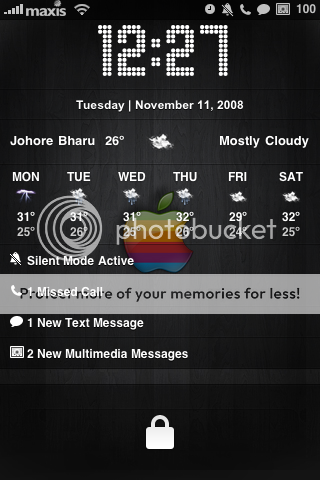
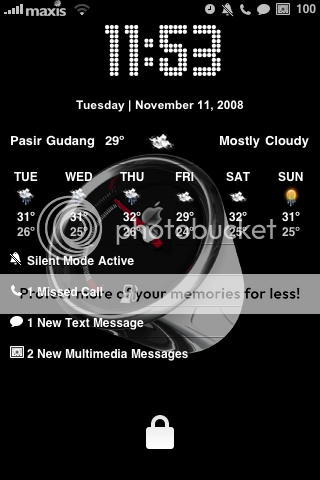
My lockscreen atm..
user posted image user posted image
Got Weather, calendar and Status Notifier: includes the number of messages, missed calls, email, etc


im using that theme rite now.

user posted image

and dis its another error im having.Called name wouldnt appear properly

"Yay!!! I finally got it fixed. This fix the ipod problem i stated above and the phone call problem when the time is semi block. In line 10 of the lockbackground.html, change line 8 to "padding: 40px 0 0 0;". Replace the original UILCDBackground.png with the one that Coimbra provided. I dont think I changed anything in the css. I dont remember everything because I was messing around with it for a long time."

The UILCDBackground file is here:
http://h4xr.org/o9d4

That file goes in the UIImages folder in the theme.


its a quote from another website


how do i change the slider text bcome no text?cuse its very annoying when the text appear on the right handside of the screen,showing only half of it

This post has been edited by rhendy87: Jan 13 2009, 10:26 PM
adri4n
post Jan 14 2009, 12:21 AM

Running in Circles... Going No Where
******
Senior Member
1,850 posts

Joined: Jan 2003


QUOTE(davidgary73 @ Jan 12 2009, 11:47 AM)
Delete these files below to revert back to the default slide to unlock. 

(Your Theme)/Folders/TelephonyUI.framework/
bottombarknobgray.png (main slider).
bottombarbkgndlock.png
Thanks a lot... it's worked. rclxms.gif

Btw, I wanna know that "weather" we need to use wifi only available?

As i only put 1 weather for example "Puchong,Malaysia" then when i go some where else other than my house, i went to KL the weather only shown there "city". Is it we have to put multiple weather in there?

like"Puchong,Malaysia" "Kuala Lumpur,Malaysia" "Petaling Jaya,Malaysia" ?

All in a row or have to put in another row? For example;

"Puchong,Malaysia"
"Kuala Lumpur,Malaysia"
"Petaling Jaya,Malaysia"

sweat.gif
goldieboy
post Jan 14 2009, 09:14 AM

Getting Started
**
Junior Member
160 posts

Joined: Jul 2005
From: Penang


Phew, Finally done my Picnic Theme with 24 hours wallpaper...

user posted image user posted image
user posted image

This post has been edited by goldieboy: Jan 14 2009, 02:53 PM
z3al
post Jan 14 2009, 04:03 PM

Getting Started
**
Junior Member
94 posts

Joined: Feb 2006
From: .::PC::.


mine

Attached Image
neoadv
post Jan 14 2009, 04:15 PM

Getting Started
**
Junior Member
165 posts

Joined: Nov 2006
From: Subang


QUOTE(z3al @ Jan 14 2009, 05:03 PM)
mine

Attached Image
*
What's d name?
z3al
post Jan 14 2009, 05:33 PM

Getting Started
**
Junior Member
94 posts

Joined: Feb 2006
From: .::PC::.


AMANA 08 - but its much nicer if u mix it with gaia wallpaper
rhendy87
post Jan 14 2009, 07:00 PM

Getting Started
**
Junior Member
125 posts

Joined: Mar 2008
Help need here...i try to modify the Slider text.Bt now it has gone haywire..all the text are screwd up.All the Text on the slider now hav a "_"in it..how to fix dis??help rclxub.gif rclxub.gif rclxub.gif
neoadv
post Jan 14 2009, 07:29 PM

Getting Started
**
Junior Member
165 posts

Joined: Nov 2006
From: Subang


QUOTE(z3al @ Jan 14 2009, 06:33 PM)
AMANA 08 - but its much nicer if u mix it with gaia wallpaper
*
Thanks a bunch!
milky
post Jan 14 2009, 07:30 PM

- King -
*******
Senior Member
4,743 posts

Joined: Jan 2003
From: u noe EARTH ? wher all human being is there


QUOTE(goldieboy @ Jan 14 2009, 09:14 AM)
Phew, Finally done my Picnic Theme with 24 hours wallpaper...

user posted image user posted image
user posted image
*
thumbup.gif ur lockscreen & the sms thingy is nice.. mind to share ?? notworthy.gif
goldieboy
post Jan 15 2009, 08:54 AM

Getting Started
**
Junior Member
160 posts

Joined: Jul 2005
From: Penang


QUOTE(milky @ Jan 14 2009, 07:30 PM)
thumbup.gif ur lockscreen & the sms thingy is nice.. mind to share ??  notworthy.gif
*
Here you go..
the slide tongue :
http://odisseus80.free.fr/Picnic/SlideTongue.zip

milky
post Jan 16 2009, 12:42 PM

- King -
*******
Senior Member
4,743 posts

Joined: Jan 2003
From: u noe EARTH ? wher all human being is there


thanks man... i just copied & dump into theme's folder?
goldieboy
post Jan 16 2009, 02:53 PM

Getting Started
**
Junior Member
160 posts

Joined: Jul 2005
From: Penang


QUOTE(milky @ Jan 16 2009, 12:42 PM)
thanks man... i just copied & dump into theme's folder?
*
yes...then apply under winter board..
smile.gif

blugear
post Jan 30 2009, 04:10 PM

I am more that meets the eye...
******
Senior Member
1,053 posts

Joined: Feb 2005
From: Nilai


Saurik's new string to add text to AWAY_LOCK_LABEL
in your theme under Bundles/com.apple.springBoard/. Inside your SpringBoard.strings you will want to map just that one string to a different value. The simplest format you can use is the string table format, which looks like this:
CODE
"AWAY_LOCK_LABEL" = "your name";
or AWAY_LOCK_LABEL" = "";


Question: How do I do this? I couldn't find Bundles/com.apple.springBoard/ in my Iphonebrowser.. Please help
frozzbyte
post Jan 30 2009, 04:17 PM

Feeling butthurt lately? Like I care
*******
Senior Member
3,657 posts

Joined: May 2005
Because there's no such folders in iPhone. Those folders should be in YOUR THEME folder.

1. Create a THEME FOLDER i.e bluegear.theme
2. In that folder create another folder name Bundles
3. And in that folder create another folder name com.apple.SpringBoard
4. Then in that folder you create a file name SpringBoard.strings and put the code.
blugear
post Jan 30 2009, 05:15 PM

I am more that meets the eye...
******
Senior Member
1,053 posts

Joined: Feb 2005
From: Nilai


Thanks bro.. So long process biggrin.gif


Added on January 30, 2009, 5:23 pmBro Frozzy, Where do i put this theme folder (blugear.theme)?


Added on January 30, 2009, 5:24 pmIs it here bro: /private/var/mobile/Library/SummerBoard/

This post has been edited by blugear: Jan 30 2009, 05:24 PM
TSdavidgary73
post Jan 30 2009, 05:31 PM

Music Producer
Group Icon
VIP
4,903 posts

Joined: Jul 2008
QUOTE(blugear @ Jan 30 2009, 05:15 PM)
Thanks bro.. So long process biggrin.gif


Added on January 30, 2009, 5:23 pmBro Frozzy, Where do i put this theme folder (blugear.theme)?


Added on January 30, 2009, 5:24 pmIs it here bro: /private/var/mobile/Library/SummerBoard/
*
http://forum.lowyat.net/topic/779930

Where to place my theme and how to upload the themes?
- Use iPhone Mac/Windows File Manager to upload your themes:
Windows - DiskAid, WinSCP, iFunBox, iPhone Tunnel Suite
Mac - Cyberduck, DiskAid, Fugu
*All Themes location at /Library/Themes.
frozzbyte
post Jan 30 2009, 06:34 PM

Feeling butthurt lately? Like I care
*******
Senior Member
3,657 posts

Joined: May 2005
Winterboard themes located at:

/private/var/stash/themes.XXXXX

The location /Library/Themes is only the symlink for the link above.
blugear
post Feb 2 2009, 11:48 AM

I am more that meets the eye...
******
Senior Member
1,053 posts

Joined: Feb 2005
From: Nilai


Hi Guys,

Need some help..

1. How to get the LockScreen Time and Calender up?

2. I tried to change to "Courier New" font and reboot the phone but doesn't work. Any idea?

i use the script like below:

key>UndockedIconLabelStyle</key>
<string>font-Courier New: monospace; font-size: 12px; color: white</string>
<key>DockedIconLabelStyle</key>
<string>font-Courier New: monospace; font-size: 12px; color: white</string>

3. How do i change the clock at the top to my name like David did before?


TSdavidgary73
post Feb 2 2009, 01:50 PM

Music Producer
Group Icon
VIP
4,903 posts

Joined: Jul 2008
QUOTE(blugear @ Feb 2 2009, 11:48 AM)
Hi Guys,

Need some help..

1. How to get the LockScreen Time and Calender up?

2. I tried to change to "Courier New" font and reboot the phone but doesn't work. Any idea?

i use the script like below:

key>UndockedIconLabelStyle</key>
<string>font-Courier New: monospace; font-size: 12px; color: white</string>
<key>DockedIconLabelStyle</key>
<string>font-Courier New: monospace; font-size: 12px; color: white</string>

3. How do i change the clock at the top to my name like David did before?
*
1. LockScreen (One Week Weather Widget and Calender) download and installation instructions- post 649.

2. You gotta manually overide the fonts but do backup of the ori fonts(Helvetica.ttf and HelveticaBold.ttf).

Navigate to the following folder on your iPhone using iPhonebrowser or any iPhone file Manager.

Clock Fonts: /System/Library/Fonts/Cache/LockClock.ttf

System Fonts: /System/Library/Fonts/Cache/Helvetica.ttf

/System/Library/Fonts/Cache/HelveticaBold.ttf

and reboot iPhone.

3. Download Extended Preferences from Cydia. Go to Settings/Springboard/Fake Time - ON
Under Time String, put your name.

Cheers


This post has been edited by davidgary73: Feb 2 2009, 03:18 PM
TSdavidgary73
post Feb 2 2009, 03:20 PM

Music Producer
Group Icon
VIP
4,903 posts

Joined: Jul 2008
Preview: New keyboard with T9 arriving on our iPhone / iPod Touch

The developer has already put in work and is now able to re-take the layout of the numeric keypad(new type of keyboard additional alphanumeric, like that of classic phones) to Apple, but with the ability to type letters with several clicks. Should be implemented soon also T9 in such a way as to create a viable alternative to the default qwerty keyboard that is not always so immediately in writing when you have one hand available. Here's a guide to install the current version:

Requirements and Download:
iPhone / iPod Touch Jailbroken
Download: ispmultitap.deb
Install MobileSubstrate from Cydia
Install MobileTerminal from Cydia
Guide:

1st, connect via SSH to your iPhone / iPod Touch and copy the files ispmultitap.deb in var/mobile

2nd, run Mobile Terminal and type:

su root
alpine
dpkg -i ispmultitap.deb


3rd, goto Settings> General> Keyboard> International Keyboards> and on "MultiTap."

Note: If you do not find this keyboard, install hClipboard from Cydia, and you will see both appear. To uninstall just open Cydia, check the package and remove it.

---

user posted image

*Only works with small letters. Caps are not available yet. Works with SMS, Safari, Notes etc.

This post has been edited by davidgary73: Feb 2 2009, 03:23 PM

93 Pages « < 43 44 45 46 47 > » Top
Topic ClosedOptions
 

Change to:
| Lo-Fi Version
0.0159sec    0.29    6 queries    GZIP Disabled
Time is now: 2nd December 2025 - 12:38 AM