

hi... got some problem. i follow all the steps... but my itune 9 always show 'Update" instead of "check for update" ?
any1 can help? tks.
(Update)iPhone 3.1 OS MALAYSIA Telco Carrier Logos, ipcc file
(Update)iPhone 3.1 OS MALAYSIA Telco Carrier Logos, ipcc file
|
|
 Sep 20 2009, 04:39 PM Sep 20 2009, 04:39 PM
|
 
Senior Member
854 posts Joined: Jan 2007 
|
hi... got some problem. i follow all the steps... but my itune 9 always show 'Update" instead of "check for update" ?
any1 can help? tks. |
|
|
|
|
|
Sep 20 2009, 05:52 PM
|

Newbie
2 posts Joined: Feb 2005
|
slightly unrelated, but I had updated to OS3.1 but I don't seem to see a separate meter for tethering data. I had previously installed the IPCC file which allowed me to disable EDGE...is this what messed it up?
THanks! |
|
|
Sep 20 2009, 06:30 PM
|

Senior Member
1,291 posts Joined: Jan 2003 From: -= Earth =-
|
QUOTE(ynchan @ Sep 20 2009, 05:52 PM) slightly unrelated, but I had updated to OS3.1 but I don't seem to see a separate meter for tethering data. I had previously installed the IPCC file which allowed me to disable EDGE...is this what messed it up? I'm using Internet Tethering right now, but all the data accumulated is not actually on that Tethering Data meter, but it is still on Cellular Network Data. I'm not sure why. But I think your previous settings maybe the cause it does not show out.THanks!  |
|
|
Sep 20 2009, 07:42 PM
|
|
Junior Member
84 posts Joined: Mar 2009
|
QUOTE(hoohs @ Sep 15 2009, 01:34 PM) I reinstall the digi ipcc file on my unlocked NZ phone. Tethering still missing and funny thing is the APN settings can't be reset following ur suggestions! From Dev Team home page:Update 3: As of 3.1, the *.ipcc carrier bundles are signed, and you can no longer force tethering capability simply by crafting your own bundle. The good news is this obstacle can probably be overcome by virtue of the jailbreak. But so far that extra hack is not part of the PwnageTool custom IPSW creation. The reason you can't tethering is stated above. Wait for Dev Team to update the PwnageTool. |
|
|
Sep 23 2009, 11:02 AM
|

Junior Member
459 posts Joined: Mar 2006 
|
any bro can help on my iphone orig OS 3.0.
set APN n MMS oso both not working, help~ (called maxis actv services d) any steps missed out? |
|
|
Sep 23 2009, 07:02 PM
|

Junior Member
91 posts Joined: Dec 2007
|
so is this applicable to iTune 9?
Added on September 23, 2009, 7:06 pmwow i really worked thx! This post has been edited by ansonliew: Sep 23 2009, 07:06 PM |
|
|
|
|
|
Sep 24 2009, 01:15 AM
|
|
Junior Member
122 posts Joined: Sep 2009
|
can someone help me on this.
i downloaded the OS3.1 ipcc file already. i extracted the file and it got two files inside.. _MACOSX and Payload but it doesnt have .ipcc file.. so how? plss help me.. anything went wrong here. mine is maxis.. VISTA.. extract using WinRaR |
|
|
Sep 24 2009, 03:15 AM
|

Junior Member
292 posts Joined: Oct 2007
|
QUOTE(iphoneiphone @ Sep 24 2009, 01:15 AM) can someone help me on this. read the first page again bro, it wasnt suppose to be extracted, just remove the '.zip'i downloaded the OS3.1 ipcc file already. i extracted the file and it got two files inside.. _MACOSX and Payload but it doesnt have .ipcc file.. so how? plss help me.. anything went wrong here. mine is maxis.. VISTA.. extract using WinRaR |
|
|
Sep 24 2009, 08:46 AM
|

Junior Member
186 posts Joined: Sep 2008 From: JB, Johor
|
i m a digi prepaid user, can i use mms and tethering? do i need to ugrade to 3.1 os ? i m currently at 3.0.
Can i undo it after installing the ipcc? This post has been edited by serpent1990: Sep 24 2009, 08:52 AM |
|
|
Sep 25 2009, 04:12 PM
|

Junior Member
496 posts Joined: Apr 2006 From: Pee Jay MY
|
QUOTE(avars @ Sep 24 2009, 03:15 AM) read the first page again bro, it wasnt suppose to be extracted, just remove the '.zip' I removed the .zip and the file is now .ipcc. But when I shift+Check for Update on iTunes, the file cannot be found because it only recognises .ipsw (or something like that). Please advise. |
|
|
Sep 26 2009, 04:10 PM
|
 
Trade Dispute
3,379 posts Joined: Apr 2006 From: KL 
|
QUOTE(horray @ Sep 25 2009, 04:12 PM) I removed the .zip and the file is now .ipcc. But when I shift+Check for Update on iTunes, the file cannot be found because it only recognises .ipsw (or something like that). Please advise. most of the time the file downloaded from lyn is corrupted.I had the same problem. |
|
|
Sep 27 2009, 12:15 AM
|
|
Junior Member
292 posts Joined: Oct 2007
|
QUOTE(horray @ Sep 25 2009, 04:12 PM) I removed the .zip and the file is now .ipcc. But when I shift+Check for Update on iTunes, the file cannot be found because it only recognises .ipsw (or something like that). Please advise. done the command prompt steps? |
|
|
Sep 28 2009, 03:44 PM
|

Senior Member
1,432 posts Joined: Jul 2007 From: Kuala Lumpur 
|
QUOTE(rattan @ Sep 26 2009, 04:10 PM) most of the time the file downloaded from lyn is corrupted. I think its always better to download with IE rather than using download managersI had the same problem. |
|
|
|
|
|
Sep 29 2009, 11:37 AM
|

Junior Member
39 posts Joined: Mar 2009 From: Kuala Lumpur
|
i got this error message. Is the file corrupted ?
Attached thumbnail(s) 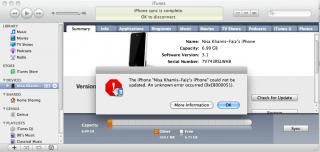
|
|
|
Sep 29 2009, 09:39 PM
|

Junior Member
247 posts Joined: Jul 2009
|
currently using itune 9
on pc i had download the ipcc file but when i presss shift i didnt see "check for update" it only show "update" for fw 3.1 but i dont wish to how? anyone can help! This post has been edited by 12321: Sep 29 2009, 09:53 PM |
|
|
Oct 2 2009, 05:07 AM
|

Junior Member
32 posts Joined: Feb 2009
|
QUOTE(12321 @ Sep 29 2009, 09:39 PM) currently using itune 9 step:on pc i had download the ipcc file but when i presss shift i didnt see "check for update" it only show "update" for fw 3.1 but i dont wish to how? anyone can help! 1. connect iphone to pc thru usb 2. launch itunes 3. click shift + update button and scrolldown the file of types option,to choose carrier logos(PICC file) ** 4. Done in 2 second |
|
|
Oct 2 2009, 06:07 PM
|

Senior Member
784 posts Joined: Apr 2006 From: Gombak | Taiping @ Looking Through
|
hi,currently i'm using itunes 9.0.1 i already remove the zip extension,downloaded using ie but when i press the check for updates, itunes only allow to click the ipsw file only. ipcc file cant click.pls help.thanks.
|
|
|
Oct 3 2009, 03:47 AM
|

Junior Member
144 posts Joined: Oct 2008 From: Golden Sand
|
QUOTE(aizad02 @ Oct 2 2009, 06:07 PM) hi,currently i'm using itunes 9.0.1 i already remove the zip extension,downloaded using ie but when i press the check for updates, itunes only allow to click the ipsw file only. ipcc file cant click.pls help.thanks. If you are on mac, you need to remove .zip from Terminalex: CODE bizkut@bizkuts-MacBook-Pro /Volumes/Data/downloads/iPhone $ mv iPhone_3.1_Maxis_my.ipcc.zip iPhone_3.1_Maxis_my.ipcc  |
|
|
Oct 4 2009, 02:01 AM
|

Junior Member
31 posts Joined: Aug 2008
|
QUOTE(pisang @ Sep 20 2009, 04:39 PM) hi... got some problem. i follow all the steps... but my itune 9 always show 'Update" instead of "check for update" ? Im assuming this happens because it is already identified by iTunes that there is in fact an update...any1 can help? tks. This post has been edited by drunkenmaster: Oct 4 2009, 02:15 AM |
|
|
Oct 4 2009, 12:11 PM
|

Senior Member
807 posts Joined: May 2005 
|
I have search the whole forum, only solutions are for firmware 2.1 and below. When ppl call me or SMS me , the numbers appear 60-12-5435930 but i saved my numbers without the dash...how to remove the dash in settings??
also installed the caller ID fix for 3.0 and rebooted no use also...need more help!! |
|
Topic ClosedOptions
|
| Change to: |  0.0238sec 0.0238sec
 0.34 0.34
 6 queries 6 queries
 GZIP Disabled GZIP Disabled
Time is now: 8th December 2025 - 10:37 AM |
 Quote
Quote