Welcome Guest ( Log In | Register )

Bump Topic Topic Closed RSS Feed
85 Pages « < 60 61 62 63 64 > » Bottom

Outline · [ Standard ] · Linear+

 NETWORK ATTACHED STORAGE (NAS), old thread closed. please open a new one

views
     
wwkkww
post Sep 9 2012, 09:19 AM

Getting Started
**
Junior Member
61 posts

Joined: Jan 2008
QUOTE(puterabemi @ Sep 9 2012, 06:37 AM)
i see... but i concern about the power consumption. how do you use your htpc? do you leave it on almost 24/7 (+ sleep/hibernate) or you turn it on only when you want to watch something? im afraid that my eletricity bill will skyrocket. i believe if i build using intel atom or amd apu i might get lower power consumption.
*
Power consumption
1. HTPC with i3 2100 processor will consume around 80W-120W.

2. N36L(NAS) around 50W-60W max + Media Player 8W-10W

This post has been edited by wwkkww: Sep 9 2012, 09:19 AM
DarkNite
post Sep 9 2012, 11:18 AM

ФĻĐ ИΞШB!Ξ
********
All Stars
11,058 posts

Joined: Jun 2008
QUOTE(wwkkww @ Sep 9 2012, 09:19 AM)
Power consumption
1. HTPC with i3 2100 processor will consume around 80W-120W.

2. N36L(NAS) around 50W-60W max + Media Player 8W-10W
*
In addition..
N36L has a 35W TDP and Passmark of 798.
Under heavy load a maximum of 45-50W.
puterabemi
post Sep 9 2012, 08:13 PM

Getting Started
**
Junior Member
275 posts

Joined: Dec 2008
From: Kajang


QUOTE(wwkkww @ Sep 9 2012, 09:19 AM)
Power consumption
1. HTPC with i3 2100 processor will consume around 80W-120W.

2. N36L(NAS) around 50W-60W max + Media Player 8W-10W
*
oh interesting. thanks!
jchue73
post Sep 10 2012, 01:10 AM

Look at all my stars!!
*******
Senior Member
2,496 posts

Joined: Nov 2006
QUOTE(wildwestgoh @ Sep 9 2012, 06:33 AM)
Thanks for the suggestion, looks like new Atom board would be the best choice, gonna take sometimes to scrape this old board (very tough but very slow lol).
I do have my own chassis, bought the board separately, take some old PSU, buy 4-in-3 module and bam it goes NAS.
Which Atom and mobo are you planning to get?

QUOTE(puterabemi @ Sep 9 2012, 06:37 AM)
i see... but i concern about the power consumption. how do you use your htpc? do you leave it on almost 24/7 (+ sleep/hibernate) or you turn it on only when you want to watch something? im afraid that my eletricity bill will skyrocket. i believe if i build using intel atom or amd apu i might get lower power consumption.
I'm a little old school. I prefer to run the hardisk in the NAS without power down. It's better and less stressful for the hardisk.

QUOTE(DarkNite @ Sep 9 2012, 07:25 AM)
Better you buy a dedicated media player, after all these days they only cost around RM350 and are quite powerful. Able to produce 5.1 sound, 3D and wat not.
For more info on which media player try researching in this section >> Lowyat.NET -> Special Interest -> Home Entertainment wink.gif
That's true but even then, you'd still find some problems playing certain files. Best, most powerful and most configurable is to run a HTPC connected to the TV. The trick is to get a low powered, small but powerful enough to play your files. The N36L or N40L (if you're willing to fork out extra) fits that bill nicely. Put in a HD 6450 graphics card and it can double up as a NAS and a HTPC.

QUOTE(wildwestgoh @ Sep 9 2012, 07:28 AM)
What's the PC specs that you aim to use as HTPC? If it's normal consumer desktop, definitely will have higher consumption, but if you're using Intel Atom or equivalent then it's low, I'm using 1 right now, less than 30 watts overall, couple with 2 HDDs and several 5v silent fans to help cool it all down.
If you want serious power on the HTPC (gaming), then probably you need a higher-end unit that you turn on when needed, otherwise current Intel Atom (D2700) should be sufficient to watch Full HD movie, not too sure about higher bit-rate one though (>18GB size).
Nowadays, raw CPU power is mostly not required to decode files. Perhaps only the older types might rely on brute CPU power but the trick to smooth playback of newer files is in the graphic card.

QUOTE(DarkNite @ Sep 9 2012, 07:32 AM)
RM699 cry.gif I bought for RM999!
Bought my first N36L for RM 999 also. That time they give HP mouse, HP keyboard and HP DVDROM (not that I needed all of these). For the RM 699 price, they only give you the HP DVDROM but they upgrade from 1GB to 2GB memory.

QUOTE(DarkNite @ Sep 9 2012, 07:32 AM)
Bro, which shop is having this promo and by any change they have the N40L?
You can find them at those nicely decorated HP reseller shops in Mid Valley, Low Yat Plaza or Digital Mall. At the moment, it looks like HP is clearing old stock of the N36L. Newspaper say that the N40L is around RM 1.4k thereabouts but to me, just a modest upgrade in the CPU and bus speed does not warrant double the price. Strange thing is I tried to look up for the N40L in those shops but everyone says no stock.

QUOTE(DarkNite @ Sep 9 2012, 11:18 AM)
In addition..
N36L has a 35W TDP and Passmark of 798.
Under heavy load a maximum of 45-50W.
Not that it makes a lot of difference but the official Passmark scores are 803.

http://www.cpubenchmark.net/cpu_lookup.php...+N36L+Dual-Core

This post has been edited by jchue73: Sep 10 2012, 01:11 AM

wildwestgoh
post Sep 10 2012, 07:22 AM

Look at all my stars!!
*******
Senior Member
2,215 posts

Joined: Jul 2005


QUOTE(jchue73 @ Sep 10 2012, 01:10 AM)
Which Atom and mobo are you planning to get?

http://www.cpubenchmark.net/cpu_lookup.php...+N36L+Dual-Core
*
Planned on the latest D2500HN or DN2800MT, but I won't be getting it so soon, probably another few more months.
I feels the old N230 (Intel D945GCLF) still can serve me well, just very slow. sweat.gif
And, it's pretty hard to sell off this junk, no one gonna use a slow old hag, and this also coupled with a PCI gigabit network card for one hell of transfer speed brows.gif
Next upgrade probably will be coupled the board with PCI(-E) SATA card, since the new Intel Atom now has gigabit network port ready wink.gif

Just notice the DN2800MT is uses different power input approach hmm.gif
Demon_Eyes_Kyo
post Sep 10 2012, 11:07 AM

On my way
****
Senior Member
682 posts

Joined: Nov 2004


You may need an expansion card for more sata ports on an atom platform. I seen some atom platfroms with 6 sata ports, but is sold on amazon/newegg. Cant seem to find them locally.
loonsave
post Sep 10 2012, 12:53 PM

Regular
******
Senior Member
1,635 posts

Joined: May 2005


QUOTE(jchue73 @ Sep 7 2012, 07:35 PM)
You need a HDMI receiver to decode the sound on the HDMI.
Which one are you looking at that is 8xx? Those Hotway Probox?  shakehead.gif

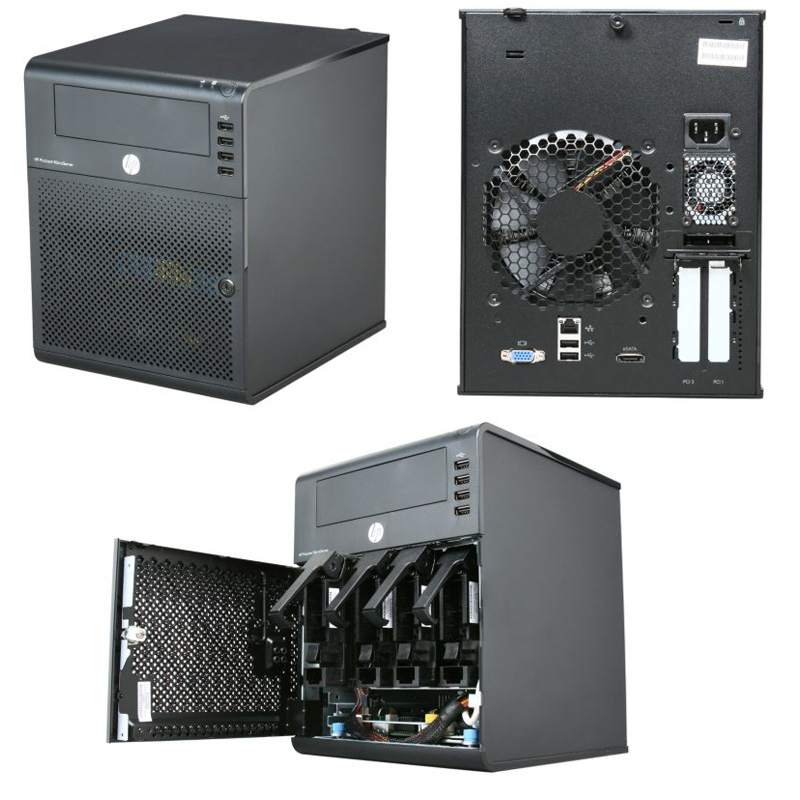
The one we are talking about can only be bought in those nicely decorated HP reseller shops. Looks like this;

user posted image

RM 699 gives you the N36L cube with the AMD Athlon II Neo N36L 2x 1.30GHz cpu (much faster than most Intel Atom cpus) on a AMD RS785E/SB820M chipset, one empty 160GB Seagate 7200rpm drive, 2GB ECC memory (originally comes with 1GB but in this promo, they upgrade to 2GB memory for free), RAID 0 and RAID 1 support from BIOS, loads of USB 2 connectors (2 rear, 4 front, 1 internal), 1x eSATA, 1x gigabit network connection and a DVDROM bundled. It comes with a built-in graphic card (ATI HD 4200, not HDMI though). So you don't need to buy a graphics card to purposely make it work.

The N36L will originally come with the 160GB hardisk in slot 1 of 4. To get 4 pieces of 2TB or 3TB drives to fit in, you need to shift the 160GB drive up where the DVDROM should be located (who needs DVDROm when you have USB thumbdrives...) with the help of a 5.25" to 3.5" bracket. Use the extra SATA cable for the DVDROM and connect the 160GB hardisk to the SATA connector meant for optical drive on motherboard. The 4 slots in the N36L are RAID / AHCI suported. In order to enjoy AHCI support on that SATA connector meant for optical drive so your 160GB would run faster, you can flash a BIOS mod.

This 6xx NAS does not come with OS. It's like a mini PC that you need to install an OS for it to work. Unlike other types of NAS, there is one x16 PCIe slot and one x1 PCIe slot for expansion. It also has 2x DDR3 memory slots for you to upgrade your memory up to 16GB memory. So the possibilities are endless. The x1 PCIe slot you can add USB 3 card or even additional GB network card. The x16 PCIe slot gives you the possibility to add in a low powered HD 6450 card or you can opt for an even more powerful RAID card.

If you look around, there is no other 4 bay NAS as powerful, as configurable and as cheap that has the capacity to fit in 5 drives.
*
Hi,

From the specification sheet, the N36L only support maximum 8TB and 8GB memory. Can we really go beyond 8TB and 8GB memory?

jchue73
post Sep 10 2012, 01:58 PM

Look at all my stars!!
*******
Senior Member
2,496 posts

Joined: Nov 2006
QUOTE(wildwestgoh @ Sep 10 2012, 07:22 AM)
Planned on the latest D2500HN or DN2800MT, but I won't be getting it so soon, probably another few more months.
The D2500HN and the DN2800MT looks to be decently priced. I'm curious how many hardisk are you planning to run? These boards look to be more suited for HTPC use than for NAS since it only has 2 SATA ports. Paying that
much just for 2 SATA ports is not worth it.

QUOTE(wildwestgoh @ Sep 10 2012, 07:22 AM)
I feels the old N230 (Intel D945GCLF) still can serve me well, just very slow. sweat.gif
And, it's pretty hard to sell off this junk, no one gonna use a slow old hag, and this also coupled with a PCI gigabit network card for one hell of transfer speed brows.gif
Next upgrade probably will be coupled the board with PCI(-E) SATA card, since the new Intel Atom now has gigabit network port ready wink.gif

Just notice the DN2800MT is uses different power input approach hmm.gif
I too am fond of using old hardware. Too much sentimental values. laugh.gif Anyway, I find that trying to maintain old hardwares to work better by updating them sometimes end up costing more than just getting a new platform. Some more their performance will not be as good as a new platform after being updated.

Anyway, interested to know what throughput you're getting from your network card. PCI theretical max is 133MB/s.

QUOTE(Demon_Eyes_Kyo @ Sep 10 2012, 11:07 AM)
You may need an expansion card for more sata ports on an atom platform. I seen some atom platfroms with 6 sata ports, but is sold on amazon/newegg. Cant seem to find them locally.
This one?

http://www.newegg.com/Product/Product.aspx...N82E16813153212

Nice find but Newegg sells them for USD 205. That's RM 640 without shipping, without casing and without memory and without boot drive ! Furthermore, the Atom D525 is way lower in terms of CPU power compared to N36L (PassMark 714 vs 803).

If you're willing to go for the Atom D525, might as well get Acer's Revo RC111 that gives you 2GB memory, 1TB hardisk, 4 bays (albeit one bay taken up by the 1TB hardisk), 1 x gigabit port etc for RM 1159. The cube chassis is slightly smaller than the N36L / N40L.

QUOTE(loonsave @ Sep 10 2012, 12:53 PM)
Hi,

From the specification sheet, the N36L only support maximum 8TB and 8GB memory. Can we really go beyond 8TB and 8GB memory?
Yes they do on both. I'm currently running 4 x 3TB = 12TB hardisk space and 2 x 8GB = 16GB memory in one of my N36L. I believe if you can find 4TB hardisk, the N36L can even support 16TB.

When the N36L came out, that was back in 2010. Largest hardisk were 2TB. So therefore officially, the largest supported was 4 x 2TB = 8TB.

On memory, if I'm not wrong, there were no 8GB DDR3 memory module DIMMs back in 2010. Largest was 4GB and therefore officially, max is 2 x 4GB = 8GB. Anyway, you'll find reports that some 8GB DDR3 memory modules from some manufacturers are not compatible with the N36L or N40L for that matter. I can safely say that the 2 x 8GB Kingston DDR3 memory modules work in the N36L. I've read reports that while some memories work in the N36L, the N40L is a little more picky and that detection of 2 pieces of 8GB DIMMs were a hit or a miss. After several reboots, only 1 can be detected and sometimes if you're lucky, both can be detected.
wildwestgoh
post Sep 10 2012, 03:32 PM

Look at all my stars!!
*******
Senior Member
2,215 posts

Joined: Jul 2005


QUOTE(jchue73 @ Sep 10 2012, 01:58 PM)
The D2500HN and the DN2800MT looks to be decently priced. I'm curious how many hardisk are you planning to run? These boards look to be more suited for HTPC use than for NAS since it only has 2 SATA ports. Paying that
much just for 2 SATA ports is not worth it.
I too am fond of using old hardware. Too much sentimental values.  laugh.gif  Anyway, I find that trying to maintain old hardwares to work better by updating them sometimes end up costing more than just getting a new platform. Some more their performance will not be as good as a new platform after being updated.

Anyway, interested to know what throughput you're getting from your network card. PCI theretical max is 133MB/s.
I plan on 4 SATA hard disk, that's as much as my chassis with 4-in-3 module can hold, I don't think the expansion card is expensive (PCI SATA). I may go for the lowest D2500HN, does not really needs DN2800MT extra features.

My current setup able to transfer up to 60MB/s from my Intel Atom to my main PC, back is quite slow, only about 30MB/s, which does not really bother me much, only transfer from it most of it time.
The speed is pretty much depends on the hard disk speed, my previous one is WDC 1TB Green, slowest that I got is 20MB/s on average, that was when it's about to die, I haven test on the current hard disk which is Samsung HD203WI, should be plentiful faster.

And my setup is Seagate 500GB used as system, programs and some other misc downloads, the huge movie, music will always goes to the larger hard disk (now is 2TB). Currently only 2 hard disk, the PCI slot is for DLink Gigabit network card.

QUOTE(jchue73 @ Sep 10 2012, 01:58 PM)
This one?

http://www.newegg.com/Product/Product.aspx...N82E16813153212

Nice find but Newegg sells them for USD 205. That's RM 640 without shipping, without casing and without memory and without boot drive ! Furthermore, the Atom D525 is way lower in terms of CPU power compared to N36L (PassMark 714 vs 803).
*
Was researching for this type of Atom board as well, but found it's really hard to bring in to Malaysia, includes the tax and custom, might as well just buy the branded NAS system.

breonwei
post Sep 10 2012, 03:39 PM

Casual
***
Junior Member
427 posts

Joined: Jun 2005
QUOTE(jchue73 @ Sep 7 2012, 07:35 PM)
You need a HDMI receiver to decode the sound on the HDMI.
Which one are you looking at that is 8xx? Those Hotway Probox?  shakehead.gif

The one we are talking about can only be bought in those nicely decorated HP reseller shops. Looks like this;

user posted image

RM 699 gives you the N36L cube with the AMD Athlon II Neo N36L 2x 1.30GHz cpu (much faster than most Intel Atom cpus) on a AMD RS785E/SB820M chipset, one empty 160GB Seagate 7200rpm drive, 2GB ECC memory (originally comes with 1GB but in this promo, they upgrade to 2GB memory for free), RAID 0 and RAID 1 support from BIOS, loads of USB 2 connectors (2 rear, 4 front, 1 internal), 1x eSATA, 1x gigabit network connection and a DVDROM bundled. It comes with a built-in graphic card (ATI HD 4200, not HDMI though). So you don't need to buy a graphics card to purposely make it work.

The N36L will originally come with the 160GB hardisk in slot 1 of 4. To get 4 pieces of 2TB or 3TB drives to fit in, you need to shift the 160GB drive up where the DVDROM should be located (who needs DVDROm when you have USB thumbdrives...) with the help of a 5.25" to 3.5" bracket. Use the extra SATA cable for the DVDROM and connect the 160GB hardisk to the SATA connector meant for optical drive on motherboard. The 4 slots in the N36L are RAID / AHCI suported. In order to enjoy AHCI support on that SATA connector meant for optical drive so your 160GB would run faster, you can flash a BIOS mod.

This 6xx NAS does not come with OS. It's like a mini PC that you need to install an OS for it to work. Unlike other types of NAS, there is one x16 PCIe slot and one x1 PCIe slot for expansion. It also has 2x DDR3 memory slots for you to upgrade your memory up to 16GB memory. So the possibilities are endless. The x1 PCIe slot you can add USB 3 card or even additional GB network card. The x16 PCIe slot gives you the possibility to add in a low powered HD 6450 card or you can opt for an even more powerful RAID card.

If you look around, there is no other 4 bay NAS as powerful, as configurable and as cheap that has the capacity to fit in 5 drives.
*
Possible to buy N36L online? I'm from Penang, is there any HP reseller shop in Penang selling this? Thx.
loonsave
post Sep 10 2012, 06:02 PM

Regular
******
Senior Member
1,635 posts

Joined: May 2005


QUOTE(jchue73 @ Sep 10 2012, 01:58 PM)
Yes they do on both. I'm currently running 4 x 3TB =  12TB hardisk space and 2 x 8GB = 16GB memory in one of my N36L. I believe if you can find 4TB hardisk, the N36L can even support 16TB.

When the N36L came out, that was back in 2010. Largest hardisk were 2TB. So therefore officially, the largest supported was 4 x 2TB = 8TB.

On memory, if I'm not wrong, there were no 8GB DDR3 memory module DIMMs back in 2010. Largest was 4GB and therefore officially, max is 2 x 4GB = 8GB. Anyway, you'll find reports that some 8GB DDR3 memory modules from some manufacturers are not compatible with the N36L or N40L for that matter. I can safely say that the 2 x 8GB Kingston DDR3 memory modules work in the N36L. I've read reports that while some memories work in the N36L, the N40L is a little more picky and that detection of 2 pieces of 8GB DIMMs were a hit or a miss. After several reboots, only 1 can be detected and sometimes if you're lucky, both can be detected.
*
Thanks for your clarification. Guess I will go and hunt the N36L during weekend at LYP while stock at last.
CocoMonGo
post Sep 10 2012, 09:35 PM

Ooo Finally
****
Senior Member
551 posts

Joined: Dec 2006


QUOTE(jchue73 @ Sep 9 2012, 03:07 AM)
I took a look again at the AMD E-350 processor and found it to be much lower in terms of CPU processing power compared to the AMD N36L. So if I were given the choice, I would take the N36L of the HP Microserver instead of going the DIY route which is more expensive and still fall short in terms of performance.
Lucky you. My movies are typically 40GB sizes.  biggrin.gif
*
according to cpubenchmark.net the E350 is ~75 points less then the N36L, however I am quite sure it can easily saturate a gigabit LAN anyway. Depends on what other background processes you are running I guess.

QUOTE(jchue73 @ Sep 10 2012, 01:10 AM)
Bought my first N36L for RM 999 also. That time they give HP mouse, HP keyboard and HP DVDROM (not that I needed all of these). For the RM 699 price, they only give you the HP DVDROM but they upgrade from 1GB to 2GB memory.
*
If anybody out there looking for a NAS and can get the RM699 price I can tell you that is a real bargain. Slap in a free OS like FreeNAS or Ubuntu and presto! Enterprise grade server.

QUOTE(loonsave @ Sep 10 2012, 12:53 PM)
Hi,

From the specification sheet, the N36L only support maximum 8TB and 8GB memory. Can we really go beyond 8TB and 8GB memory?
*
I am using 3TB hard drives in my N40L right now with no issue what so ever (the N36L and N40L is exactly the same except for the lightly faster processor in the N40L). The 16GB memory is a hit or miss thing. Some users manage to get them working some didnt. But unless you are running very special NAS environments, I hardly think you will hit a RAM performance bottleneck in the either model. Most likely it will be the CPU bottleneck before the RAM. As comparison Qnap highest end model have a maximum of 4GB.

This post has been edited by CocoMonGo: Sep 10 2012, 09:45 PM
jchue73
post Sep 10 2012, 10:03 PM

Look at all my stars!!
*******
Senior Member
2,496 posts

Joined: Nov 2006
QUOTE(jchue73 @ Sep 10 2012, 01:58 PM)
QUOTE(loonsave @ Sep 10 2012, 12:53 PM)

Hi,

From the specification sheet, the N36L only support maximum 8TB and 8GB memory. Can we really go beyond 8TB and 8GB memory?
When the N36L came out, that was back in 2010. Largest hardisk were 2TB. So therefore officially, the largest supported was 4 x 2TB = 8TB.

On memory, if I'm not wrong, there were no 8GB DDR3 memory module DIMMs back in 2010. Largest was 4GB and therefore officially, max is 2 x 4GB = 8GB. Anyway, you'll find reports that some 8GB DDR3 memory modules from some manufacturers are not compatible with the N36L or N40L for that matter. I can safely say that the 2 x 8GB Kingston DDR3 memory modules work in the N36L. I've read reports that while some memories work in the N36L, the N40L is a little more picky and that detection of 2 pieces of 8GB DIMMs were a hit or a miss. After several reboots, only 1 can be detected and sometimes if you're lucky, both can be detected.
I must qualify myself and explain a little more in detail. For support over 4GB memory, you would require x64 OS (64 bit).

QUOTE(wildwestgoh @ Sep 10 2012, 03:32 PM)
I plan on 4 SATA hard disk, that's as much as my chassis with 4-in-3 module can hold, I don't think the expansion card is expensive (PCI SATA). I may go for the lowest D2500HN, does not really needs DN2800MT extra features.
Sorry, I missed that info you given earlier. Yeah PCI SATA cards are cheap and it's just at the limit to saturate gigabit speeds. You need to check compatibility with the PCI SATA card because they are usually much older and would probably not support the newer hardisk.

QUOTE(wildwestgoh @ Sep 10 2012, 03:32 PM)
Was researching for this type of Atom board as well, but found it's really hard to bring in to Malaysia, includes the tax and custom, might as well just buy the branded NAS system.
That's true. But, computer got tax?

QUOTE(breonwei @ Sep 10 2012, 03:39 PM)
Possible to buy N36L online? I'm from Penang, is there any HP reseller shop in Penang selling this? Thx.
Can you try the numbers below?

http://h20426.www2.hp.com/campaign/kungfup...rs_p_pinang.pdf

I'm not familiar with Penang but the shop facade must look decorated like this;

user posted image

QUOTE(CocoMonGo @ Sep 10 2012, 09:35 PM)
according to cpubenchmark.net the E350 is ~75 points less then the N36L, however I am quite sure it can easily saturate a gigabit LAN anyway. Depends on what other background processes you are running I guess.
I think if you're just running it as a storage server, should be fine. The E-350 is actually quite famous for HTPC usage though because of the built-in HD 6310 GPU.

QUOTE(CocoMonGo @ Sep 10 2012, 09:35 PM)
If anybody out there looking for a NAS and can get the RM699 price I can tell you that is a real bargain. Slap in a free OS like FreeNAS or Ubuntu and presto! Enterprise grade server.
Oh, if anybody wants to have enterprise support from HP, one can opt for the HP Care Packs for the Microserver. biggrin.gif

This post has been edited by jchue73: Sep 10 2012, 10:04 PM
loonsave
post Sep 10 2012, 10:15 PM

Regular
******
Senior Member
1,635 posts

Joined: May 2005


QUOTE(jchue73 @ Sep 10 2012, 10:03 PM)

I must qualify myself and explain a little more in detail. For support over 4GB memory, you would require x64 OS (64 bit).
Thanks for your reminder. Most probably I will opt for Win 2008 Data Center 64bit and run Hyper-V. But I doubt the processor can support 3 Hyper-V.
jchue73
post Sep 10 2012, 10:24 PM

Look at all my stars!!
*******
Senior Member
2,496 posts

Joined: Nov 2006
QUOTE(loonsave @ Sep 10 2012, 10:15 PM)
Thanks for your reminder. Most probably I will opt for Win 2008 Data Center 64bit and run Hyper-V. But I doubt the processor can support 3 Hyper-V.
Yes they can. The N36L / N40L are x64 processors are come with Virtualization technology built-in which are critical for Hyper-V. Just don't expect enterprise grade performance. Home usage is fine.
loonsave
post Sep 10 2012, 10:38 PM

Regular
******
Senior Member
1,635 posts

Joined: May 2005


QUOTE(jchue73 @ Sep 10 2012, 10:24 PM)
Yes they can. The N36L / N40L are x64 processors are come with Virtualization technology built-in which are critical for Hyper-V. Just don't expect enterprise grade performance. Home usage is fine.
*
Well, I think should be fine since I just plan to run a 2 debian continuously and another win 7 for testing purpose.
breonwei
post Sep 11 2012, 10:20 AM

Casual
***
Junior Member
427 posts

Joined: Jun 2005
[quote=jchue73,Sep 10 2012, 10:03 PM]
When the N36L came out, that was back in 2010. Largest hardisk were 2TB. So therefore officially, the largest supported was 4 x 2TB = 8TB.

On memory, if I'm not wrong, there were no 8GB DDR3 memory module DIMMs back in 2010. Largest was 4GB and therefore officially, max is 2 x 4GB = 8GB. Anyway, you'll find reports that some 8GB DDR3 memory modules from some manufacturers are not compatible with the N36L or N40L for that matter. I can safely say that the 2 x 8GB Kingston DDR3 memory modules work in the N36L. I've read reports that while some memories work in the N36L, the N40L is a little more picky and that detection of 2 pieces of 8GB DIMMs were a hit or a miss. After several reboots, only 1 can be detected and sometimes if you're lucky, both can be detected.
[/quote]

I must qualify myself and explain a little more in detail. For support over 4GB memory, you would require x64 OS (64 bit).
Sorry, I missed that info you given earlier. Yeah PCI SATA cards are cheap and it's just at the limit to saturate gigabit speeds. You need to check compatibility with the PCI SATA card because they are usually much older and would probably not support the newer hardisk.
That's true. But, computer got tax?
Can you try the numbers below?

http://h20426.www2.hp.com/campaign/kungfup...rs_p_pinang.pdf

I'm not familiar with Penang but the shop facade must look decorated like this;

user posted image
I think if you're just running it as a storage server, should be fine. The E-350 is actually quite famous for HTPC usage though because of the built-in HD 6310 GPU.
Oh, if anybody wants to have enterprise support from HP, one can opt for the HP Care Packs for the Microserver. biggrin.gif
*

[/quote]

TQ so much for the info, appreciate it.

DarkNite
post Sep 11 2012, 12:47 PM

ФĻĐ ИΞШB!Ξ
********
All Stars
11,058 posts

Joined: Jun 2008
QUOTE(jchue73 @ Sep 10 2012, 10:03 PM)
Bro, this list is out dated liao. Many no more selling HP products.
jchue73
post Sep 11 2012, 02:04 PM

Look at all my stars!!
*******
Senior Member
2,496 posts

Joined: Nov 2006
QUOTE(DarkNite @ Sep 11 2012, 12:47 PM)
Bro, this list is out dated liao. Many no more selling HP products.
Sorry lah. That's all I can find. I do not work for HP and neither am I a Penang lang.

Anyway, you can always walk into the big shopping malls and I'm sure you'll come across those dedicated HP shops that sells HP notebooks and desktops. Chances they have the Microserver is very high.
DarkNite
post Sep 11 2012, 02:26 PM

ФĻĐ ИΞШB!Ξ
********
All Stars
11,058 posts

Joined: Jun 2008
QUOTE(jchue73 @ Sep 11 2012, 02:04 PM)
Sorry lah. That's all I can find. I do not work for HP and neither am I a Penang lang.

Anyway, you can always walk into the big shopping malls and I'm sure you'll come across those dedicated HP shops that sells HP notebooks and desktops. Chances they have the Microserver is very high.
*
Last time my HP microserver also bought from lowyat Plaza in KL.
In Pg the HP sales person dun even know what you are talking about also.

85 Pages « < 60 61 62 63 64 > » Top
Topic ClosedOptions
 

Change to:
| Lo-Fi Version
0.0301sec    0.17    6 queries    GZIP Disabled
Time is now: 6th December 2025 - 04:31 AM