

Anyone purchased DLink DNS-325? Can you share your user experience? How is the read & write speed (via gigabits LAN)? Thx.
NETWORK ATTACHED STORAGE (NAS), old thread closed. please open a new one
NETWORK ATTACHED STORAGE (NAS), old thread closed. please open a new one
|
|
 Jul 7 2011, 09:33 AM Jul 7 2011, 09:33 AM
Return to original view | Post
#1
|
 
Junior Member
427 posts Joined: Jun 2005 
|
Anyone purchased DLink DNS-325? Can you share your user experience? How is the read & write speed (via gigabits LAN)? Thx.
|
|
|
|
|
|
Sep 10 2012, 03:39 PM
Return to original view | Post
#2
|
|
Junior Member
427 posts Joined: Jun 2005
|
QUOTE(jchue73 @ Sep 7 2012, 07:35 PM) You need a HDMI receiver to decode the sound on the HDMI. Possible to buy N36L online? I'm from Penang, is there any HP reseller shop in Penang selling this? Thx.Which one are you looking at that is 8xx? Those Hotway Probox?  The one we are talking about can only be bought in those nicely decorated HP reseller shops. Looks like this; 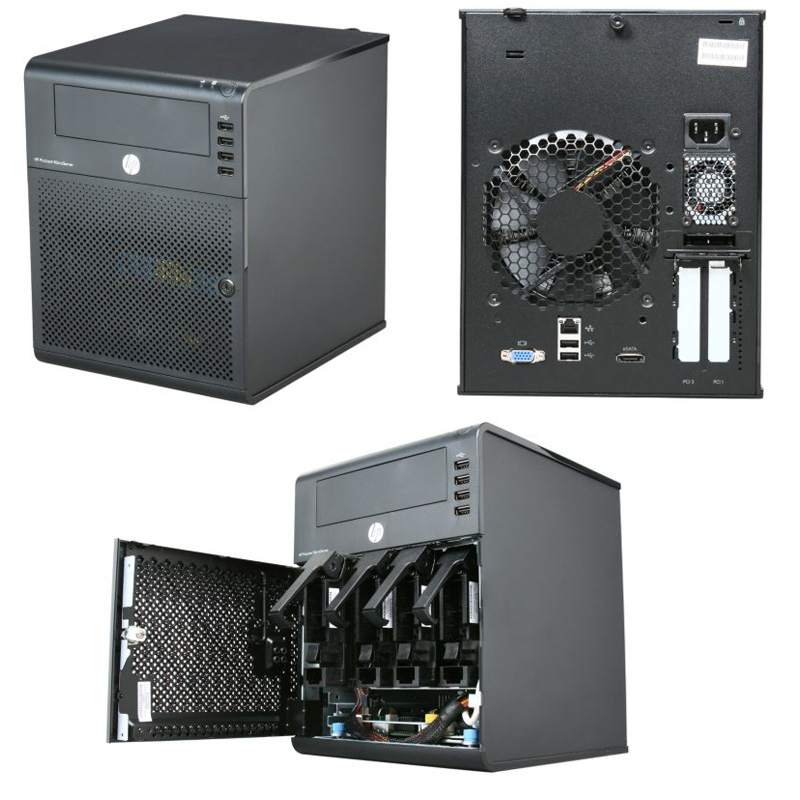 RM 699 gives you the N36L cube with the AMD Athlon II Neo N36L 2x 1.30GHz cpu (much faster than most Intel Atom cpus) on a AMD RS785E/SB820M chipset, one empty 160GB Seagate 7200rpm drive, 2GB ECC memory (originally comes with 1GB but in this promo, they upgrade to 2GB memory for free), RAID 0 and RAID 1 support from BIOS, loads of USB 2 connectors (2 rear, 4 front, 1 internal), 1x eSATA, 1x gigabit network connection and a DVDROM bundled. It comes with a built-in graphic card (ATI HD 4200, not HDMI though). So you don't need to buy a graphics card to purposely make it work. The N36L will originally come with the 160GB hardisk in slot 1 of 4. To get 4 pieces of 2TB or 3TB drives to fit in, you need to shift the 160GB drive up where the DVDROM should be located (who needs DVDROm when you have USB thumbdrives...) with the help of a 5.25" to 3.5" bracket. Use the extra SATA cable for the DVDROM and connect the 160GB hardisk to the SATA connector meant for optical drive on motherboard. The 4 slots in the N36L are RAID / AHCI suported. In order to enjoy AHCI support on that SATA connector meant for optical drive so your 160GB would run faster, you can flash a BIOS mod. This 6xx NAS does not come with OS. It's like a mini PC that you need to install an OS for it to work. Unlike other types of NAS, there is one x16 PCIe slot and one x1 PCIe slot for expansion. It also has 2x DDR3 memory slots for you to upgrade your memory up to 16GB memory. So the possibilities are endless. The x1 PCIe slot you can add USB 3 card or even additional GB network card. The x16 PCIe slot gives you the possibility to add in a low powered HD 6450 card or you can opt for an even more powerful RAID card. If you look around, there is no other 4 bay NAS as powerful, as configurable and as cheap that has the capacity to fit in 5 drives.  |
|
|
Sep 11 2012, 10:20 AM
Return to original view | Post
#3
|
|
Junior Member
427 posts Joined: Jun 2005
|
[quote=jchue73,Sep 10 2012, 10:03 PM]
When the N36L came out, that was back in 2010. Largest hardisk were 2TB. So therefore officially, the largest supported was 4 x 2TB = 8TB. On memory, if I'm not wrong, there were no 8GB DDR3 memory module DIMMs back in 2010. Largest was 4GB and therefore officially, max is 2 x 4GB = 8GB. Anyway, you'll find reports that some 8GB DDR3 memory modules from some manufacturers are not compatible with the N36L or N40L for that matter. I can safely say that the 2 x 8GB Kingston DDR3 memory modules work in the N36L. I've read reports that while some memories work in the N36L, the N40L is a little more picky and that detection of 2 pieces of 8GB DIMMs were a hit or a miss. After several reboots, only 1 can be detected and sometimes if you're lucky, both can be detected. [/quote] I must qualify myself and explain a little more in detail. For support over 4GB memory, you would require x64 OS (64 bit). Sorry, I missed that info you given earlier. Yeah PCI SATA cards are cheap and it's just at the limit to saturate gigabit speeds. You need to check compatibility with the PCI SATA card because they are usually much older and would probably not support the newer hardisk. That's true. But, computer got tax? Can you try the numbers below? http://h20426.www2.hp.com/campaign/kungfup...rs_p_pinang.pdf I'm not familiar with Penang but the shop facade must look decorated like this;  I think if you're just running it as a storage server, should be fine. The E-350 is actually quite famous for HTPC usage though because of the built-in HD 6310 GPU. Oh, if anybody wants to have enterprise support from HP, one can opt for the HP Care Packs for the Microserver.  [/quote] TQ so much for the info, appreciate it. |
|
|
Sep 11 2012, 02:28 PM
Return to original view | Post
#4
|
|
Junior Member
427 posts Joined: Jun 2005
|
QUOTE(DarkNite @ Sep 11 2012, 02:26 PM) Last time my HP microserver also bought from lowyat Plaza in KL. Absolutely agree. Which store in Lowyat plaza did you purchase your microserver?In Pg the HP sales person dun even know what you are talking about also. |
|
|
Sep 11 2012, 02:32 PM
Return to original view | Post
#5
|
|
Junior Member
427 posts Joined: Jun 2005
|
QUOTE(DarkNite @ Sep 11 2012, 02:30 PM) The one THAT was on the ground floor, but it not there anymore!  I'm having hard time to find a reseller that carries N36L... I'm having hard time to find a reseller that carries N36L... |
|
|
Sep 11 2012, 03:03 PM
Return to original view | Post
#6
|
|
Junior Member
427 posts Joined: Jun 2005
|
How about Acer's Aspire RevoCenter RC111? SRP is RM1159. Will it be a good home NAS?
|
|
|
|
|
|
Sep 12 2012, 07:56 AM
Return to original view | Post
#7
|
|
Junior Member
427 posts Joined: Jun 2005
|
Just told by a reseller that Aspire RevoCenter RC111 is EOL...
All microserver are EOL in Malaysia. What's going on? |
|
|
Sep 18 2012, 04:33 PM
Return to original view | Post
#8
|
|
Junior Member
427 posts Joined: Jun 2005
|
Thinking of building a NAS using mini itx casing. Anyone has done that before? Care to share your experience?
|
|
|
Sep 22 2012, 10:02 PM
Return to original view | Post
#9
|
|
Junior Member
427 posts Joined: Jun 2005
|
Going to build a Z77 micro itx NAS
 |
|
|
Sep 24 2012, 03:07 PM
Return to original view | Post
#10
|
|
Junior Member
427 posts Joined: Jun 2005
|
My plan;
Casing Lian Li PC-Q08 CPU Intel I3 3220 Mobo Intel DH77DF RAM 4GB x 2 HDD 2TB x 4 mSata Atlas Deluxe 60GB Yet to decide on PSU & heatsink. Any recommendation on PSU & heatsink? |
|
Topic ClosedOptions
|
| Change to: |  0.0432sec 0.0432sec
 0.38 0.38
 7 queries 7 queries
 GZIP Disabled GZIP Disabled
Time is now: 6th December 2025 - 05:56 PM |
 Quote
Quote