Welcome Guest ( Log In | Register )

Bump Topic Topic Closed RSS Feed

Outline · [ Standard ] · Linear+

 NETWORK ATTACHED STORAGE (NAS), old thread closed. please open a new one

views
     
loonsave
post Sep 10 2012, 12:53 PM

Regular
******
Senior Member
1,635 posts

Joined: May 2005


QUOTE(jchue73 @ Sep 7 2012, 07:35 PM)
You need a HDMI receiver to decode the sound on the HDMI.
Which one are you looking at that is 8xx? Those Hotway Probox?  shakehead.gif

The one we are talking about can only be bought in those nicely decorated HP reseller shops. Looks like this;
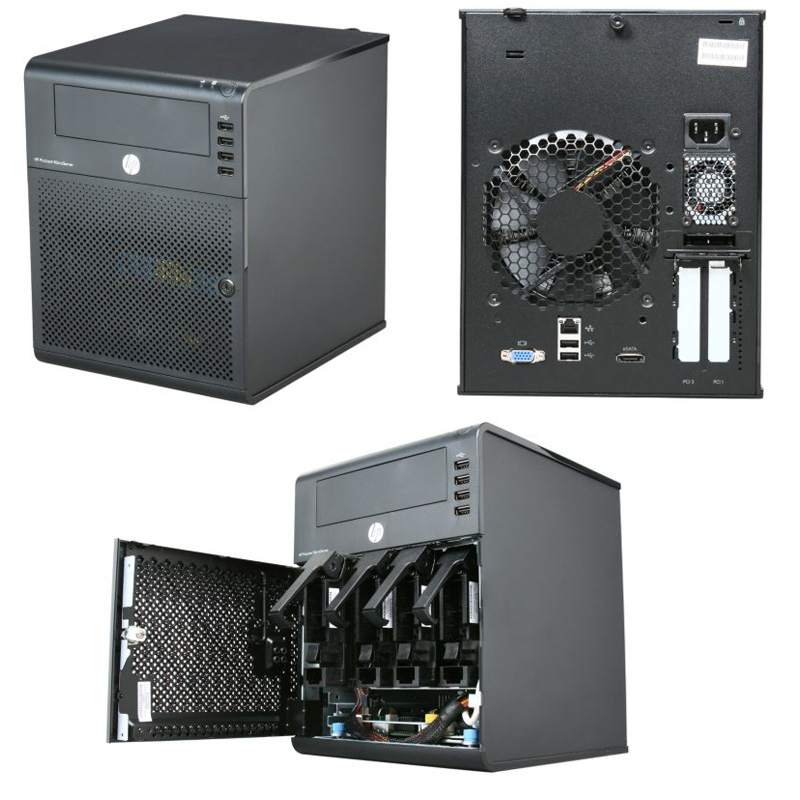
user posted image

RM 699 gives you the N36L cube with the AMD Athlon II Neo N36L 2x 1.30GHz cpu (much faster than most Intel Atom cpus) on a AMD RS785E/SB820M chipset, one empty 160GB Seagate 7200rpm drive, 2GB ECC memory (originally comes with 1GB but in this promo, they upgrade to 2GB memory for free), RAID 0 and RAID 1 support from BIOS, loads of USB 2 connectors (2 rear, 4 front, 1 internal), 1x eSATA, 1x gigabit network connection and a DVDROM bundled. It comes with a built-in graphic card (ATI HD 4200, not HDMI though). So you don't need to buy a graphics card to purposely make it work.

The N36L will originally come with the 160GB hardisk in slot 1 of 4. To get 4 pieces of 2TB or 3TB drives to fit in, you need to shift the 160GB drive up where the DVDROM should be located (who needs DVDROm when you have USB thumbdrives...) with the help of a 5.25" to 3.5" bracket. Use the extra SATA cable for the DVDROM and connect the 160GB hardisk to the SATA connector meant for optical drive on motherboard. The 4 slots in the N36L are RAID / AHCI suported. In order to enjoy AHCI support on that SATA connector meant for optical drive so your 160GB would run faster, you can flash a BIOS mod.

This 6xx NAS does not come with OS. It's like a mini PC that you need to install an OS for it to work. Unlike other types of NAS, there is one x16 PCIe slot and one x1 PCIe slot for expansion. It also has 2x DDR3 memory slots for you to upgrade your memory up to 16GB memory. So the possibilities are endless. The x1 PCIe slot you can add USB 3 card or even additional GB network card. The x16 PCIe slot gives you the possibility to add in a low powered HD 6450 card or you can opt for an even more powerful RAID card.

If you look around, there is no other 4 bay NAS as powerful, as configurable and as cheap that has the capacity to fit in 5 drives.
*
Hi,

From the specification sheet, the N36L only support maximum 8TB and 8GB memory. Can we really go beyond 8TB and 8GB memory?

loonsave
post Sep 10 2012, 06:02 PM

Regular
******
Senior Member
1,635 posts

Joined: May 2005


QUOTE(jchue73 @ Sep 10 2012, 01:58 PM)
Yes they do on both. I'm currently running 4 x 3TB =  12TB hardisk space and 2 x 8GB = 16GB memory in one of my N36L. I believe if you can find 4TB hardisk, the N36L can even support 16TB.

When the N36L came out, that was back in 2010. Largest hardisk were 2TB. So therefore officially, the largest supported was 4 x 2TB = 8TB.

On memory, if I'm not wrong, there were no 8GB DDR3 memory module DIMMs back in 2010. Largest was 4GB and therefore officially, max is 2 x 4GB = 8GB. Anyway, you'll find reports that some 8GB DDR3 memory modules from some manufacturers are not compatible with the N36L or N40L for that matter. I can safely say that the 2 x 8GB Kingston DDR3 memory modules work in the N36L. I've read reports that while some memories work in the N36L, the N40L is a little more picky and that detection of 2 pieces of 8GB DIMMs were a hit or a miss. After several reboots, only 1 can be detected and sometimes if you're lucky, both can be detected.
*
Thanks for your clarification. Guess I will go and hunt the N36L during weekend at LYP while stock at last.
loonsave
post Sep 10 2012, 10:15 PM

Regular
******
Senior Member
1,635 posts

Joined: May 2005


QUOTE(jchue73 @ Sep 10 2012, 10:03 PM)

I must qualify myself and explain a little more in detail. For support over 4GB memory, you would require x64 OS (64 bit).
Thanks for your reminder. Most probably I will opt for Win 2008 Data Center 64bit and run Hyper-V. But I doubt the processor can support 3 Hyper-V.
loonsave
post Sep 10 2012, 10:38 PM

Regular
******
Senior Member
1,635 posts

Joined: May 2005


QUOTE(jchue73 @ Sep 10 2012, 10:24 PM)
Yes they can. The N36L / N40L are x64 processors are come with Virtualization technology built-in which are critical for Hyper-V. Just don't expect enterprise grade performance. Home usage is fine.
*
Well, I think should be fine since I just plan to run a 2 debian continuously and another win 7 for testing purpose.
loonsave
post Sep 11 2012, 03:19 PM

Regular
******
Senior Member
1,635 posts

Joined: May 2005


I guess the N36L quite hard to find in the market. It not even listed in HP Malaysia website.
loonsave
post Sep 11 2012, 09:30 PM

Regular
******
Senior Member
1,635 posts

Joined: May 2005


QUOTE(jchue73 @ Sep 11 2012, 05:36 PM)

Anyway, it's very strange that the newspaper says HP Malaysia has it but the shops do not carry them. They even publish the RM 1.4k + price. I think they are just waiting for the N36L stock to clear before they start to sell the N40L.

*
This is strange too if they try to clear stock while we can't really find in the market. I email my company HP account manager to check whether do they have stock in Malaysia.

Hopefully they can reply me with good answer.
loonsave
post Sep 12 2012, 09:06 AM

Regular
******
Senior Member
1,635 posts

Joined: May 2005


QUOTE(jchue73 @ Sep 12 2012, 03:51 AM)
I actually came across the RM 699 promo by accident when I enquired about the N40L. Then I saw they list the N36L as having promo. I thought it was just one shop but it turned out that other HP reseller shops in KL / PJ are having the same promo / offer. Perhaos not sanctioned by HP themselves but something the reseller does to clear their old stock.
*
When you saw the promo? HP quote me N40L with RM1438.
loonsave
post Sep 12 2012, 01:16 PM

Regular
******
Senior Member
1,635 posts

Joined: May 2005


QUOTE(numbertwo @ Sep 12 2012, 09:19 AM)
is that via reseller or distributor, I got mine on Mar this year for RM1328..
*
The price direct from HP. Not reseller nor distributor.
loonsave
post Sep 13 2012, 09:12 PM

Regular
******
Senior Member
1,635 posts

Joined: May 2005


Today is my luck day. Went to HP Store in LYP. They have the last unit of N36L. Grab it without second thought.

Guess I am the lucky one. I told him the box come with 2GB RAM. He gave me a 2GB RAM, so I have 3GB RAM now. Although it might useless once I upgrade to 16GB RAM.

This post has been edited by loonsave: Sep 13 2012, 10:02 PM
loonsave
post Sep 13 2012, 10:57 PM

Regular
******
Senior Member
1,635 posts

Joined: May 2005


QUOTE(CocoMonGo @ Sep 13 2012, 10:50 PM)
ah bugger figured it out. in my router i limited the allowable number of IP clients to 10, but didnt take into account that it started from  xxx.xxx.x.0 to xxx.xxx.x.9 for 10 clients. my server was the 11th client so technically it didnt exist in the system. Not too sure why Wifi I can access but not through cable though. Anyway problem solved!  rclxms.gif
*
Maybe your wifi is in the DHCP lease pool. So you can't get the new IP from LAN after the pool depleted.
loonsave
post Sep 14 2012, 11:23 AM

Regular
******
Senior Member
1,635 posts

Joined: May 2005


QUOTE(mikeymic @ Sep 14 2012, 10:36 AM)
Ohh.. so lucky... how much you got it?
*
I get it at RM699. Last piece. tongue.gif

QUOTE(numbertwo @ Sep 14 2012, 10:38 AM)
YES To my surprise this little gems is still available in the market !!  Congrats loonsave!  Can't remember whether the customs firmware is available for N36L or just N40L, but worth the upgrade to bring the max value out of this N36L!  have fun.
*
Yeah. I swipe my card without 2nd thought. Just installed Win2008 DC into it. Haven't get any HDD yet since the price still high. sad.gif
loonsave
post Sep 14 2012, 05:20 PM

Regular
******
Senior Member
1,635 posts

Joined: May 2005


@jchue73, do you run RAID for your N36L? I do know that the box itself only support RAID 0 and 1. Possible that we have a tweak to run RAID 5? Preferably hardware RAID without additional cost.
loonsave
post Sep 14 2012, 06:40 PM

Regular
******
Senior Member
1,635 posts

Joined: May 2005


QUOTE(aneip @ Sep 14 2012, 05:59 PM)
yup.. need to find esata-to-sata I believe.. suppose  got.. But I use another raid card from IBM  server..
The raid is software based.. It's not the real raid. I just sold out M5015, IBM raid card.. selling between 250-280. Support raid 5 with battery backup. It's coz 1k new.
*
But software raid compromise the reading speed, and what if the OS corrupted? The software raid gone as well?
loonsave
post Sep 15 2012, 11:27 AM

Regular
******
Senior Member
1,635 posts

Joined: May 2005


QUOTE(jchue73 @ Sep 14 2012, 11:40 PM)
Congrats.  rclxms.gif He gave you an additional 2GB memory stick? Wah, lucky you.

Where got such thing as hardware RAID without additional cost? If no cost, try the built-in software RAID in the Windows Server 2008 R2 under Dynamic Disc.

Anyway, this is what I get using RAID 0 from the N36L BIOS (aka Fake RAID) under RAIDXPert with 4 x 3TB WD Red drives;
Yeah, I think the guy is a new staff. tongue.gif

Wow, RAID 0 mean 1 disk failed and you will lost all data. So dare devil.

I just notice the N36L HDD bracket don't come with screw. Screw it. sad.gif

-----------------------------------------------------------------------------------

Either I go for a software RAID 5 or I just leave it 4 disks run separately... Definitely not hardware raid as I can't afford for a hardware raid controller.

This post has been edited by loonsave: Sep 15 2012, 01:11 PM
loonsave
post Sep 16 2012, 09:52 PM

Regular
******
Senior Member
1,635 posts

Joined: May 2005


QUOTE(CocoMonGo @ Sep 16 2012, 09:06 PM)
all the screws you ever need is located on the inner side of the door. go read the manual.
*
Thanks bro. I am a typical guy who didn't read the manual. tongue.gif
loonsave
post Sep 17 2012, 11:11 AM

Regular
******
Senior Member
1,635 posts

Joined: May 2005


QUOTE(DarkNite @ Sep 17 2012, 08:56 AM)
HP N36 does have a raid card but last time I enquire it's too expensive to ship in from UK.
I wonder if the price have drop?
Or any alternative hardware raid that is a cheaper?
*
Well, i think any hardware raid card come with a cost. Usually >RM1k. That's why I am looking into other solution now.
loonsave
post Sep 17 2012, 11:48 PM

Regular
******
Senior Member
1,635 posts

Joined: May 2005


QUOTE(CocoMonGo @ Sep 17 2012, 09:17 PM)
is there really a reason to actually use a RAID card? the card is expensive and if it fails you need to get the same card to get your RAID system running again.
*
It depends on how important your data is. If your data > price of raid card, why not.
loonsave
post Sep 18 2012, 12:42 PM

Regular
******
Senior Member
1,635 posts

Joined: May 2005


QUOTE(CocoMonGo @ Sep 18 2012, 11:42 AM)
The problem is it is usually years before the card spoils, which by then they are usually no longer in production making the retrieval of data much harder. this is the part which I dont understand the logic behind, maybe you could enlighten me on?
It was on that reason I am currently running a mirrored ZFS (I plan to run a 5 disk RAIDZ2 when I run out of space on the current 2x 3TB setup - all using software RAID) coz I can easily transplant zpools/HDDs as required in the future. On the matter of a battery powered RAID, I opted instead for a 600VA UPS with USB communication port. yet to program the USB but with the microserver my calculations show that it should last nearly an hour on a full charge. I specifically chose a UPS with power socket connectors versus IEC 60320 only type connectors so that I can also plug my router in. Since all the computers in my place are all laptops there should be no issue having all the systems running and transferring still until all the laptops and UPS batteries dies.
*
You are the expert compare to myself. What kind of software raid you going to use for the RAIDZ2? I might go and try out RAID5 on freeNAS. And test it out whether can I tolerate on the writing speed.
loonsave
post Sep 19 2012, 09:13 AM

Regular
******
Senior Member
1,635 posts

Joined: May 2005


QUOTE(jchue73 @ Sep 18 2012, 11:37 PM)
RAID is not backup. So you still need backup.
RAID is for redundancy, so it's like sort of backup for me, at least I won't lost my data if 1 of the HDD failed with RAID5.

QUOTE(jchue73 @ Sep 18 2012, 11:37 PM)
Software RAID under Windows is plenty fast.
I am setting up 3x1TB HDD with RAID5 in Win2008. In resyncing state 51% this morning. Should be able to check the performance tonight.
loonsave
post Sep 19 2012, 09:35 PM

Regular
******
Senior Member
1,635 posts

Joined: May 2005


QUOTE(jchue73 @ Sep 19 2012, 01:44 PM)
Yes. But if during rebuild and resynching, another drive fails, then you loose data.
Yeah. You are right. But I think won't be that bad luck. tongue.gif

QUOTE(jchue73 @ Sep 19 2012, 01:44 PM)
Looking forward to the results.
*
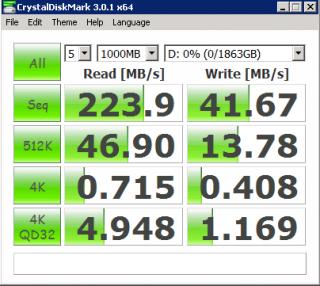
Attached Image

The result not that good. But I can tolerate with the writing speed. Average 50MB/second copy from my desktop to the storage.

2 Pages  1 2 >Top
Topic ClosedOptions
 

Change to:
| Lo-Fi Version
0.0383sec    0.47    7 queries    GZIP Disabled
Time is now: 6th December 2025 - 07:54 PM