

Getting the fractal array and a simple mini itx to do the job. The case it expensive but it works
 . The rest of the parts are not really expensive.
NETWORK ATTACHED STORAGE (NAS), old thread closed. please open a new one
|
|
 Sep 7 2012, 08:42 AM Sep 7 2012, 08:42 AM
|
 
Senior Member
682 posts Joined: Nov 2004   
|
For the ps3, I will need the PS3 media server package for freenas so that the nas processor will do the job before streaming to the ps3.
Getting the fractal array and a simple mini itx to do the job. The case it expensive but it works . The rest of the parts are not really expensive. |
|
|
|
|
|
Sep 7 2012, 09:28 AM
|

Senior Member
2,496 posts Joined: Nov 2006
|
QUOTE(Demon_Eyes_Kyo @ Sep 7 2012, 08:42 AM) For the ps3, I will need the PS3 media server package for freenas so that the nas processor will do the job before streaming to the ps3. Ok, thanks for the confirmation. If that being the case, a decent dual core is a must. I don't have any experience because I don't have any PS3 to test but from other N36L / N40L forums, I gather that it's a little hit and a miss thing. Mostly a miss that you get choppy performance when running the Microserver as a PS3 media server. You need a lot of CPU power to decode the MKVs especially 1080p and this is talking about the more powerful N40L.Getting the fractal array and a simple mini itx to do the job. The case it expensive but it works . The rest of the parts are not really expensive.Anyway, as a suggestion you can slap in a HD 6450 card, install Windows 7 and use it as a HTPC. If you don't have a HDMI receiver to decode audio from the HDMI output from the graphics card, you can use USB audio stick instead for analog audio out. |
|
|
Sep 7 2012, 11:55 AM
|

Junior Member
61 posts Joined: Jan 2008
|
i use the usb Sound Blaster X-Fi Surround 5.1 Pro + HD5450 on N36L with WinServer 2k8 R2. So far so good
|
|
|
Sep 7 2012, 06:33 PM
|

Senior Member
551 posts Joined: Dec 2006
|
QUOTE(Demon_Eyes_Kyo @ Sep 7 2012, 08:42 AM) For the ps3, I will need the PS3 media server package for freenas so that the nas processor will do the job before streaming to the ps3. Dont mind me as I dont have a PS3, but what would be the benefit of streaming through the PS3 if so much decoding needs to be done before it being sent to the PS3? Like jchue73 mentioned just stick a graphics card with HDMI output and you get a better, slimmer system. If you dont want to pay for a new Windows license, you could also try Ubuntu which is free and install XBMC.Getting the fractal array and a simple mini itx to do the job. The case it expensive but it works . The rest of the parts are not really expensive. FYI I am in the mist of getting my hands on a Raspberry Pi board which only cost RM111 now and is able to output 1080p video + DTS so that I can keep the HTPC functions out of the NAS. Moreover it will run a XBMC port called RaspBMC and yet not require pre-processing like the PS3. QUOTE(wwkkww @ Sep 7 2012, 11:55 AM) i use the usb Sound Blaster X-Fi Surround 5.1 Pro + HD5450 on N36L with WinServer 2k8 R2. So far so good is it not possible to get audio through the 5450 HDMI?This post has been edited by CocoMonGo: Sep 7 2012, 06:36 PM |
|
|
Sep 7 2012, 06:40 PM
|

Senior Member
1,561 posts Joined: Feb 2006 From: Penang island
|
hmm question, why is that i saw everyone here is talking abt those NAS with prices around 6xx where else i tried to find lyn seller who selling those NAS at least 8xx?
|
|
|
Sep 7 2012, 07:35 PM
|
|
Senior Member
2,496 posts Joined: Nov 2006
|
QUOTE(CocoMonGo @ Sep 7 2012, 06:33 PM) is it not possible to get audio through the 5450 HDMI? You need a HDMI receiver to decode the sound on the HDMI.QUOTE(intothefantasy @ Sep 7 2012, 06:40 PM) hmm question, why is that i saw everyone here is talking abt those NAS with prices around 6xx where else i tried to find lyn seller who selling those NAS at least 8xx? Which one are you looking at that is 8xx? Those Hotway Probox?  The one we are talking about can only be bought in those nicely decorated HP reseller shops. Looks like this; 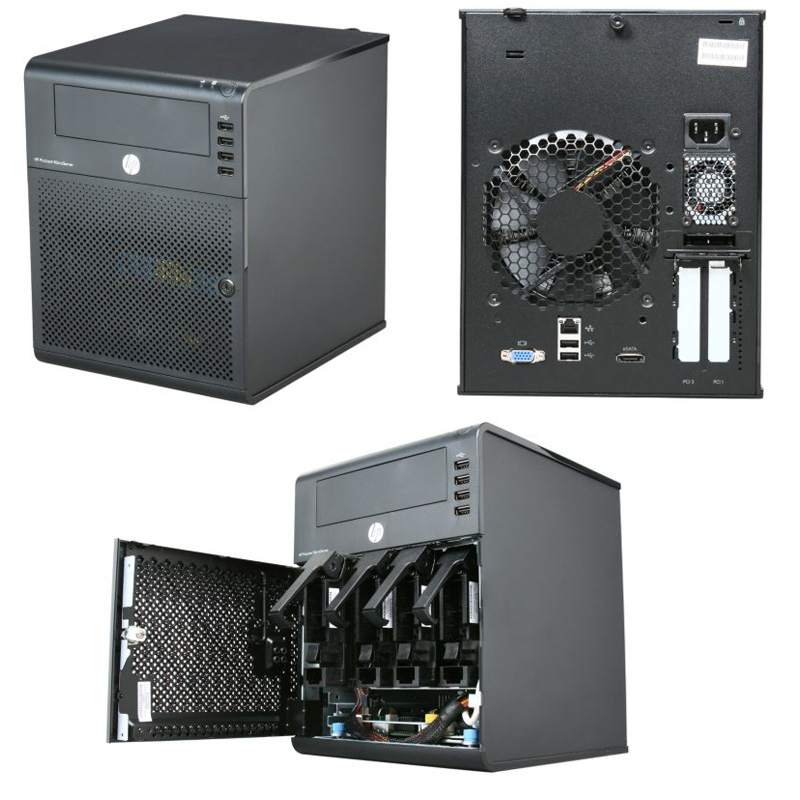 RM 699 gives you the N36L cube with the AMD Athlon II Neo N36L 2x 1.30GHz cpu (much faster than most Intel Atom cpus) on a AMD RS785E/SB820M chipset, one empty 160GB Seagate 7200rpm drive, 2GB ECC memory (originally comes with 1GB but in this promo, they upgrade to 2GB memory for free), RAID 0 and RAID 1 support from BIOS, loads of USB 2 connectors (2 rear, 4 front, 1 internal), 1x eSATA, 1x gigabit network connection and a DVDROM bundled. It comes with a built-in graphic card (ATI HD 4200, not HDMI though). So you don't need to buy a graphics card to purposely make it work. The N36L will originally come with the 160GB hardisk in slot 1 of 4. To get 4 pieces of 2TB or 3TB drives to fit in, you need to shift the 160GB drive up where the DVDROM should be located (who needs DVDROm when you have USB thumbdrives...) with the help of a 5.25" to 3.5" bracket. Use the extra SATA cable for the DVDROM and connect the 160GB hardisk to the SATA connector meant for optical drive on motherboard. The 4 slots in the N36L are RAID / AHCI suported. In order to enjoy AHCI support on that SATA connector meant for optical drive so your 160GB would run faster, you can flash a BIOS mod. This 6xx NAS does not come with OS. It's like a mini PC that you need to install an OS for it to work. Unlike other types of NAS, there is one x16 PCIe slot and one x1 PCIe slot for expansion. It also has 2x DDR3 memory slots for you to upgrade your memory up to 16GB memory. So the possibilities are endless. The x1 PCIe slot you can add USB 3 card or even additional GB network card. The x16 PCIe slot gives you the possibility to add in a low powered HD 6450 card or you can opt for an even more powerful RAID card. If you look around, there is no other 4 bay NAS as powerful, as configurable and as cheap that has the capacity to fit in 5 drives. |
|
|
|
|
|
Sep 7 2012, 07:40 PM
|
|
Senior Member
1,788 posts Joined: Mar 2009 From: PJ lamansara... :D
|
QUOTE(jchue73 @ Sep 7 2012, 07:35 PM) If you look around, there is no other 4 bay NAS as powerful, as configurable and as cheap that has the capacity to fit in 5 drives. This post has been edited by numbertwo: Sep 7 2012, 07:41 PM |
|
|
Sep 8 2012, 04:04 AM
|
|
Senior Member
1,561 posts Joined: Feb 2006 From: Penang island
|
QUOTE(jchue73 @ Sep 7 2012, 07:35 PM) You need a HDMI receiver to decode the sound on the HDMI. thanks for the information...now i have some question regarding NAS basic thing i guess..Which one are you looking at that is 8xx? Those Hotway Probox? The one we are talking about can only be bought in those nicely decorated HP reseller shops. Looks like this; RM 699 gives you the N36L cube with the AMD Athlon II Neo N36L 2x 1.30GHz cpu (much faster than most Intel Atom cpus) on a AMD RS785E/SB820M chipset, one empty 160GB Seagate 7200rpm drive, 2GB ECC memory (originally comes with 1GB but in this promo, they upgrade to 2GB memory for free), RAID 0 and RAID 1 support from BIOS, loads of USB 2 connectors (2 rear, 4 front, 1 internal), 1x eSATA, 1x gigabit network connection and a DVDROM bundled. It comes with a built-in graphic card (ATI HD 4200, not HDMI though). So you don't need to buy a graphics card to purposely make it work. The N36L will originally come with the 160GB hardisk in slot 1 of 4. To get 4 pieces of 2TB or 3TB drives to fit in, you need to shift the 160GB drive up where the DVDROM should be located (who needs DVDROm when you have USB thumbdrives...) with the help of a 5.25" to 3.5" bracket. Use the extra SATA cable for the DVDROM and connect the 160GB hardisk to the SATA connector meant for optical drive on motherboard. The 4 slots in the N36L are RAID / AHCI suported. In order to enjoy AHCI support on that SATA connector meant for optical drive so your 160GB would run faster, you can flash a BIOS mod. This 6xx NAS does not come with OS. It's like a mini PC that you need to install an OS for it to work. Unlike other types of NAS, there is one x16 PCIe slot and one x1 PCIe slot for expansion. It also has 2x DDR3 memory slots for you to upgrade your memory up to 16GB memory. So the possibilities are endless. The x1 PCIe slot you can add USB 3 card or even additional GB network card. The x16 PCIe slot gives you the possibility to add in a low powered HD 6450 card or you can opt for an even more powerful RAID card. If you look around, there is no other 4 bay NAS as powerful, as configurable and as cheap that has the capacity to fit in 5 drives. first of all i wanted to ask...if lets say all my movies are stored in this NAS and connected to my router....if my samsung tv from my living room is connected to my router as well...will my tv be able to access those video from the NAS? and another question in this same topic...lets say if my tv can access them...will it be able to play all kinds of video files like rmvb etc? i believe that my samsung lcd does not support much codec for movie...is it those codec processing happens in the NAS itself? as for the OS...i think it will be able to install windows 7? since it acts like a small pc? This post has been edited by intothefantasy: Sep 8 2012, 04:05 AM |
|
|
Sep 8 2012, 05:33 AM
|
|
Senior Member
2,496 posts Joined: Nov 2006
|
QUOTE(intothefantasy @ Sep 8 2012, 04:04 AM) thanks for the information...now i have some question regarding NAS basic thing i guess.. Sorry, don't have a Samsung Smart TV either. first of all i wanted to ask...if lets say all my movies are stored in this NAS and connected to my router....if my samsung tv from my living room is connected to my router as well...will my tv be able to access those video from the NAS? and another question in this same topic...lets say if my tv can access them...will it be able to play all kinds of video files like rmvb etc? i believe that my samsung lcd does not support much codec for movie...is it those codec processing happens in the NAS itself?  I have a dedicated HTPC connected to my TV and all my files are stored in the Microservers. Since the Samsung TV is DLNA certified, just make sure you can access the HP via DNLA or shares. I believe there are softwares out there to run the DLNA service on the Microserver. I believe the Samsung TV has it's own software that you can install in the Microserver to make it discoverable by the Samsung TV. There are also other software out there that you can try (Serviio, Mezzmo, Twonky etc) instead of the built-in Windows Media Centre. I have a dedicated HTPC connected to my TV and all my files are stored in the Microservers. Since the Samsung TV is DLNA certified, just make sure you can access the HP via DNLA or shares. I believe there are softwares out there to run the DLNA service on the Microserver. I believe the Samsung TV has it's own software that you can install in the Microserver to make it discoverable by the Samsung TV. There are also other software out there that you can try (Serviio, Mezzmo, Twonky etc) instead of the built-in Windows Media Centre.Anyway, I've not had the situation where the Microserver needs to run a DLNA service that decodes the codec for the player on the fly but if you find it too much for the Microserver's CPU to handle, perhaps you can use a more powerful PC as a DLNA server instead and just use the Microserver a a place for storage. The more powerful PC will do the codec processing for you while the Microserver just acts as a place to stores your files. QUOTE(intothefantasy @ Sep 8 2012, 04:04 AM) as for the OS...i think it will be able to install windows 7? since it acts like a small pc? Yes, you can install Windows 7 on it. I have one of mine on Windows Server 2008 R2 and the other one on Windows Home Server 2011.Added on September 8, 2012, 5:36 am QUOTE(numbertwo @ Sep 7 2012, 07:40 PM) very well said... but yet i'm finding it hard to understand why HP is not bringing in N40L into the local market... And I found it unbelievable u guys are still able to find the N36L in the local market now! bravo! At the moment, the processing power of the N36L is fine for me as I use it just for storage space. More so for the price it's going for now...This post has been edited by jchue73: Sep 8 2012, 05:36 AM |
|
|
Sep 8 2012, 07:52 AM
|

Senior Member
1,907 posts Joined: Jan 2005 From: Pahang
|
QUOTE(intothefantasy @ Sep 8 2012, 04:04 AM) thanks for the information...now i have some question regarding NAS basic thing i guess.. I recylce my old pc to be my mini server and connected to my tv wirelessly. My tv which is not a smart tv can access the movies file in my server when I enable DLNA funtion in window 7. I don't know if a smart tv can detect shared folder or not but it will most probably can detect DLNA device like mine. As the processing, the video processing is done by the tv so although my mini server can play all kind of movie format, but the tv can't. Mostly when involving larger than 2Gb movie file. But it all the depend on the codec used.first of all i wanted to ask...if lets say all my movies are stored in this NAS and connected to my router....if my samsung tv from my living room is connected to my router as well...will my tv be able to access those video from the NAS? and another question in this same topic...lets say if my tv can access them...will it be able to play all kinds of video files like rmvb etc? i believe that my samsung lcd does not support much codec for movie...is it those codec processing happens in the NAS itself? as for the OS...i think it will be able to install windows 7? since it acts like a small pc? |
|
|
Sep 8 2012, 09:19 AM
|

Senior Member
2,215 posts Joined: Jul 2005
|
QUOTE(jchue73 @ Sep 8 2012, 05:33 AM) Yes, you can install Windows 7 on it. I have one of mine on Windows Server 2008 R2 and the other one on Windows Home Server 2011. I got an Intel N230 (hey I know it's old  ) and I still want some performance out from it, only has 1GB of RAM due to budget last time. ) and I still want some performance out from it, only has 1GB of RAM due to budget last time.Now I want to increase just a bit out from it, the RAM usage of the Windows 7 is increased by the day, can Windows 2008 R2 improve the performance? Mainly used for 24/7 torrent-ing, gigabit file server, and sometimes a little web browsing. How about the Home Server 2011? I never used Home Server before, any difference? Thanks for your time.  |
|
|
Sep 8 2012, 02:00 PM
|
|
Junior Member
61 posts Joined: Jan 2008
|
QUOTE(wildwestgoh @ Sep 8 2012, 09:19 AM) I got an Intel N230 (hey I know it's old I assume the N230 is more or less same with the N36L processor. On the N36L my CPU usage is average 70% while downloading with utorrent & jdownloader. Still manage to surf the web smoothly. ) and I still want some performance out from it, only has 1GB of RAM due to budget last time.Now I want to increase just a bit out from it, the RAM usage of the Windows 7 is increased by the day, can Windows 2008 R2 improve the performance? Mainly used for 24/7 torrent-ing, gigabit file server, and sometimes a little web browsing. How about the Home Server 2011? I never used Home Server before, any difference? Thanks for your time. But while extracting some LARGE files (>5Gb) the usage is 100% and everything is lag. I have 4GB on it and i think you should add more ram to run Win Server 2008 R2. The 1GB is sure not enough. Added on September 8, 2012, 2:26 pm QUOTE(intothefantasy @ Sep 8 2012, 04:04 AM) thanks for the information...now i have some question regarding NAS basic thing i guess.. The codec processing happens on your TV. If all your files are dvix or rmvb i think the TV should be no problem handle it. But with MKV, TS, ISO, BDMV, with some trueHD audio then you will need a dedicated htpc/media player to process all the codecs.first of all i wanted to ask...if lets say all my movies are stored in this NAS and connected to my router....if my samsung tv from my living room is connected to my router as well...will my tv be able to access those video from the NAS? and another question in this same topic...lets say if my tv can access them...will it be able to play all kinds of video files like rmvb etc? i believe that my samsung lcd does not support much codec for movie...is it those codec processing happens in the NAS itself? as for the OS...i think it will be able to install windows 7? since it acts like a small pc? I have 1 HiMedia player in my parents bedroom and it works awesome as a media player with modded firmware. Create a nice catalogue with all my NAS media files and able to handle all kinds of format. Stream China shows perfectly and sometimes can watch EPL live  (work few months in China that time and this model sell like hotcakes at the mainland) (work few months in China that time and this model sell like hotcakes at the mainland)If you looking to get the best picture quality then i would suggest the ultimate solution: HTPC + XBMC + MPC-HC +madVR + LAV  I think you will eventually come to this solution if you enjoy the HD experiece  This post has been edited by wwkkww: Sep 8 2012, 02:30 PM |
|
|
Sep 8 2012, 11:42 PM
|

Junior Member
275 posts Joined: Dec 2008 From: Kajang
|
QUOTE(wwkkww @ Sep 8 2012, 02:00 PM) I assume the N230 is more or less same with the N36L processor. On the N36L my CPU usage is average 70% while downloading with utorrent & jdownloader. Still manage to surf the web smoothly. since you mention about htpc, can i ask something?But while extracting some LARGE files (>5Gb) the usage is 100% and everything is lag. I have 4GB on it and i think you should add more ram to run Win Server 2008 R2. The 1GB is sure not enough. Added on September 8, 2012, 2:26 pm The codec processing happens on your TV. If all your files are dvix or rmvb i think the TV should be no problem handle it. But with MKV, TS, ISO, BDMV, with some trueHD audio then you will need a dedicated htpc/media player to process all the codecs. I have 1 HiMedia player in my parents bedroom and it works awesome as a media player with modded firmware. Create a nice catalogue with all my NAS media files and able to handle all kinds of format. Stream China shows perfectly and sometimes can watch EPL live (work few months in China that time and this model sell like hotcakes at the mainland)If you looking to get the best picture quality then i would suggest the ultimate solution: HTPC + XBMC + MPC-HC +madVR + LAV I think you will eventually come to this solution if you enjoy the HD experiece can htpc work as NAS too? i mean, i build a htpc, then i connect to my home network so that my other family member can access files in the htpc too. can i? |
|
|
|
|
|
Sep 8 2012, 11:54 PM
|
|
Junior Member
61 posts Joined: Jan 2008
|
QUOTE(puterabemi @ Sep 8 2012, 11:42 PM) since you mention about htpc, can i ask something? Yes you can. but make sure your HTPC is on gigabit LAN and got enough sata port to become a NAS.can htpc work as NAS too? i mean, i build a htpc, then i connect to my home network so that my other family member can access files in the htpc too. can i? Just like my signature the asus H67-I mb got 6 sata port and my Q25 casing can fit up to 8 hdd and the size just fit nicely next to my 50" plasma |
|
|
Sep 9 2012, 03:07 AM
|
|
Senior Member
2,496 posts Joined: Nov 2006
|
QUOTE(CocoMonGo @ Sep 4 2012, 10:49 AM) Like I said another option is the E350 APu boards from Asus like the E35M1-I DELUXE It comes with 5 SATA connections and a x16 PCIe connector so you can actually put a RAID card to further expand the HDD capacity. I would have gotten this board and not the N40L if only it came out at the time i was looking for it. I took a look again at the AMD E-350 processor and found it to be much lower in terms of CPU processing power compared to the AMD N36L. So if I were given the choice, I would take the N36L of the HP Microserver instead of going the DIY route which is more expensive and still fall short in terms of performance. If you have not committed yourself to any hardware purchases, I think a lot of the people here would say get the N36L/N40L. Otherwise if you want to pick and choose your hardware I would say it is tied with the ASUS E35M1-I Deluxe. QUOTE(qwerty79 @ Sep 8 2012, 07:52 AM) I recylce my old pc to be my mini server and connected to my tv wirelessly. My tv which is not a smart tv can access the movies file in my server when I enable DLNA funtion in window 7. I don't know if a smart tv can detect shared folder or not but it will most probably can detect DLNA device like mine. As the processing, the video processing is done by the tv so although my mini server can play all kind of movie format, but the tv can't. Mostly when involving larger than 2Gb movie file. But it all the depend on the codec used. Lucky you. My movies are typically 40GB sizes. QUOTE(wildwestgoh @ Sep 8 2012, 09:19 AM) I got an Intel N230 (hey I know it's old Windows Home Server 2011, Windows Small Business Server 2011 and Windows Storage Server 2008 R2 are all based from Windows Server 2008 R2 which closely resembles Windows 7 in interface. If you're very familiar with Windows 7, the above server softwares are not too much difficult to get used to. As the name suggest, WHS 2011 is more for home usage. For exact differences between the server OSes, just google it. ) and I still want some performance out from it, only has 1GB of RAM due to budget last time.Now I want to increase just a bit out from it, the RAM usage of the Windows 7 is increased by the day, can Windows 2008 R2 improve the performance? Mainly used for 24/7 torrent-ing, gigabit file server, and sometimes a little web browsing. How about the Home Server 2011? I never used Home Server before, any difference? Thanks for your time. Anyway NAS like the Acer Revo Center RC-111 (similar to the size and shape of the N36/N40L in the way that they have 4 bays) comes pre-bundled with Windows Home Server 2011 and you run it headless because it does not come with a graphic card. Price is not too bad at RM 1159 but the N36L is way cheaper and many more times powerful than the Atom D525 in the RC-111. The other headless NAS that looks very good and has some nice server oriented features but still terribly slow in my eyes that comes pre-bundled with Windows Storage Server 2008 R2 Essentials is WD Sentinel DX4000. Nice but expensive and it only accepts expensive WD RE4-GP drives if I'm not wrong. Ok, back to your real question...Usually if you have limited hardware resources, you could try to run only the Server Core of the Windows Server 2008 R2. The Server Core will install with basic function but without the heavy GUI. So meaning it's command line interface only. It's lighter on hardware requirements. Anyway, looking at what you want to use, the Intel N230 is a single core processor and way way lower in terms of CPU power when compared to the AMD N36L. Just like Windows 7, the more memory you feed it, the better it becomes. But then again, you need DDR2 memory for this. So basically, I don't know if it's going to be worth the effort reusing the old hardware. |
|
|
Sep 9 2012, 06:33 AM
|
|
Senior Member
2,215 posts Joined: Jul 2005
|
QUOTE(jchue73 @ Sep 9 2012, 03:07 AM) » Click to show Spoiler - click again to hide... « I do have my own chassis, bought the board separately, take some old PSU, buy 4-in-3 module and bam it goes NAS. |
|
|
Sep 9 2012, 06:37 AM
|
|
Junior Member
275 posts Joined: Dec 2008 From: Kajang
|
QUOTE(wwkkww @ Sep 8 2012, 11:54 PM) Yes you can. but make sure your HTPC is on gigabit LAN and got enough sata port to become a NAS. i see... but i concern about the power consumption. how do you use your htpc? do you leave it on almost 24/7 (+ sleep/hibernate) or you turn it on only when you want to watch something? im afraid that my eletricity bill will skyrocket. i believe if i build using intel atom or amd apu i might get lower power consumption.Just like my signature the asus H67-I mb got 6 sata port and my Q25 casing can fit up to 8 hdd and the size just fit nicely next to my 50" plasma |
|
|
Sep 9 2012, 07:25 AM
|

All Stars
11,058 posts Joined: Jun 2008
|
QUOTE(intothefantasy @ Sep 8 2012, 04:04 AM) ...if lets say all my movies are stored in this NAS and connected to my router....if my samsung tv from my living room is connected to my router as well...will my tv be able to access those video from the NAS? Whether your samsung TV can access the videos from the NAS, depends on your samsung TV model. Old generations (ABC) and basic series model may have problems.QUOTE(intothefantasy @ Sep 8 2012, 04:04 AM) ...will it be able to play all kinds of video files like rmvb etc? Only new generation (D onwards) can play rmvb files. But do remember samsung built-in media player is very limited and not upgradable. They hardly ever improve on their firmware unless have really major issue.Better you buy a dedicated media player, after all these days they only cost around RM350 and are quite powerful. Able to produce 5.1 sound, 3D and wat not. For more info on which media player try researching in this section >> Lowyat.NET -> Special Interest -> Home Entertainment  |
|
|
Sep 9 2012, 07:28 AM
|
|
Senior Member
2,215 posts Joined: Jul 2005
|
QUOTE(puterabemi @ Sep 9 2012, 06:37 AM) i see... but i concern about the power consumption. how do you use your htpc? do you leave it on almost 24/7 (+ sleep/hibernate) or you turn it on only when you want to watch something? im afraid that my eletricity bill will skyrocket. i believe if i build using intel atom or amd apu i might get lower power consumption. What's the PC specs that you aim to use as HTPC? If it's normal consumer desktop, definitely will have higher consumption, but if you're using Intel Atom or equivalent then it's low, I'm using 1 right now, less than 30 watts overall, couple with 2 HDDs and several 5v silent fans to help cool it all down.If you want serious power on the HTPC (gaming), then probably you need a higher-end unit that you turn on when needed, otherwise current Intel Atom (D2700) should be sufficient to watch Full HD movie, not too sure about higher bit-rate one though (>18GB size). |
|
|
Sep 9 2012, 07:32 AM
|
|
All Stars
11,058 posts Joined: Jun 2008
|
QUOTE(jchue73 @ Sep 7 2012, 07:35 PM) RM 699 gives you the N36L cube with the AMD Athlon II Neo N36L 2x 1.30GHz cpu (much faster than most Intel Atom cpus) on a AMD RS785E/SB820M chipset, one empty 160GB Seagate 7200rpm drive, 2GB ECC memory (originally comes with 1GB but in this promo, they upgrade to 2GB memory for free), RAID 0 and RAID 1 support from BIOS, loads of USB 2 connectors (2 rear, 4 front, 1 internal), 1x eSATA, 1x gigabit network connection and a DVDROM bundled. It comes with a built-in graphic card (ATI HD 4200, not HDMI though). So you don't need to buy a graphics card to purposely make it work.  I bought for RM999! I bought for RM999!Bro, which shop is having this promo and by any change they have the N40L? |
|
Topic ClosedOptions
|
| Change to: |  0.0274sec 0.0274sec
 0.52 0.52
 6 queries 6 queries
 GZIP Disabled GZIP Disabled
Time is now: 7th December 2025 - 10:49 PM |
 Quote
Quote