

Something for us to cheer about!!!
Dev Team Blog
iPhone Club Version 7
iPhone Club Version 7
|
|
 Jul 10 2008, 07:18 PM Jul 10 2008, 07:18 PM
|
 
Senior Member
3,657 posts Joined: May 2005 
|
|
|
|
|
|
|
Jul 10 2008, 09:58 PM
|

Senior Member
1,061 posts Joined: Feb 2006 From: Petaling Jaya 
|
the game of cat and mouse is about to turn again....
|
|
|
Jul 11 2008, 12:26 AM
|

Senior Member
4,249 posts Joined: Mar 2006
|
aah..so mr. frozzbyte and mr. nokia2003 i assume would be amongst the first again to mess with this?
 |
|
|
Jul 11 2008, 01:16 AM
|

Senior Member
5,786 posts Joined: Nov 2007 From: VIC - The Place To Be
|
QUOTE(d3vilzzzz @ Jul 11 2008, 12:26 AM) aah..so mr. frozzbyte and mr. nokia2003 i assume would be amongst the first again to mess with this? errrr i dont think so. im not into too much technical details of the iphone you know? only frozzbyte is keen because its in line with his industry. furthermore, i wanna party hard first before i start my term!  |
|
|
Jul 11 2008, 01:25 AM
|
|
Senior Member
3,657 posts Joined: May 2005
|
You all just waiting for some one to be the white mice huh? We know dat dev team succeeded in porting installer and cydia to FW2.0. They also seem to be able to include bootneuter in it too. I'll only upgrade if most of the app are compatible with the new firmware. No point of upgrading if most of the useful app are not available or not working with FW2.0. It'll be bored with just the stock app and just free app from appstore.
Time to stock up on itunes credit. There goes my $$$$. |
|
|
Jul 11 2008, 01:57 AM
|

Senior Member
11,305 posts Joined: Jan 2003
|
Okay, this is getting pretty exciting! It's like destiny intervening!
Ayone read the Engadget article on the international launch, particular the current NZ launch? It is at this link. Particularly this picture, brings my attention to how ridiculously easy for me to get an iPhone 3G!  See that name of the hotel? Citylife Hotel Auckland? That is our nightstopping hotel in Auckland! I could simply walk down from the hotel and pop in and get one for myself! What about the price you ask? Head on here fo Vodafone NZ rates/plans. See that little "+" sign next to the "iPhone Only" phrase? Click that, and as the price reveals itself........the price for an iPhone 3G without a contract/plan for Kiwis is........*drumroll*.......NZD1129! That translates to RM2779!  Further exemplifying the fact that this is fate, I've just came back from a mandatory course in Malaysia Airlines Academy Kelana Jaya today(yesterday), and conincidentally, a close colleague is going to Auckland TODAY! He was checking out the iPhone himself, and during coffee breaks and lunch, he was geting more and more poison from me as he fondled my iPhone. As it turns out, with that confirmation page that Vodafone store right at the doorstep of our nightstopping hotel is selling the iPhone 3G, at THAT price, and the fact that I can kirim it from him while he's there TOMORROW, .........I dont see it as anything but destiny.  I was very skeptical on my chances on getting it from Paris or Frankfurt, and lo and behold, it turns out that an opportunity presents itself, and I may be able to secure one(with the help of the guys going to Auckland tomorrow) and have it in my hands in 4 days time! I was very skeptical on my chances on getting it from Paris or Frankfurt, and lo and behold, it turns out that an opportunity presents itself, and I may be able to secure one(with the help of the guys going to Auckland tomorrow) and have it in my hands in 4 days time!  Cannot wait for them to come back!  This post has been edited by stringfellow: Jul 11 2008, 02:09 AM |
|
|
|
|
|
Jul 11 2008, 03:49 AM
|
|
Senior Member
5,786 posts Joined: Nov 2007 From: VIC - The Place To Be
|
byte, so when is it gonna be your turn to do this again?
Attached thumbnail(s) 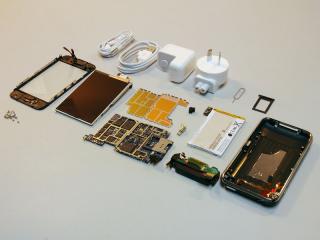
|
|
|
Jul 11 2008, 08:40 AM
|
|
Senior Member
11,305 posts Joined: Jan 2003
|
Dev Team has already unlocked the Firmware 2.0 build. Just a matter of time now, I want to play Super Monkey Ball!
|
|
|
Jul 11 2008, 08:49 AM
|

Junior Member
372 posts Joined: Dec 2007
|
QUOTE(stringfellow @ Jul 11 2008, 08:40 AM) Dev Team has already unlocked the Firmware 2.0 build. Just a matter of time now, I want to play Super Monkey Ball! haha, i already downloaded some free apps on my itunes....now waiting for 2.0 to be hacked only. |
|
|
Jul 11 2008, 08:51 AM
|

Senior Member
5,172 posts Joined: Jan 2003 From: Equine Park
|
QUOTE(engadget) So we can't help but notice that Apple still hasn't officially released iPhone software 2.0 for first-gen iPhones, even though most self-respecting gadget freaks have pulled it from the direct download links that popped up earlier. Since the file was hosted and available on Apple's servers around the time it was expected for release, it seemed safe to assume that it was legit -- and indeed, it (for the most part) works fine and plays well with the newly-live App Store. But a few of us here have had persistent problems on our first-gen iPhones: interface lag, crashing apps, hard resets, you name it. On top of that, we're hearing whispers that the .ipsw in question was meant only for 3G phones and not first-gen units -- and bizarrely, the build number of what we've got is 5A347, while our launch iPhone 3G is running build 5A345 on them. So until Apple stops being, well, Apple, and clears this all up, we're putting it to you: how are things going? Any problems, or smooth sailing? Happy you took the early plunge? hmmm... seems we need to wait summore? This post has been edited by Seaedge: Jul 11 2008, 08:53 AM |
|
|
Jul 11 2008, 09:25 AM
|
|
Senior Member
4,249 posts Joined: Mar 2006
|
oo..no white mice..haha nvm nvm...i m sure there will be..
to 2.0 or or nt to  |
|
|
Jul 11 2008, 09:38 AM
|

Senior Member
1,149 posts Joined: Jan 2007
|
The GPS will be using the Google map we're using now, eh? Hmm, I really wanna know how much the speaker for music has improved. Apparently the call quality has improved by leaps and bounds!
This post has been edited by zc_squash: Jul 11 2008, 09:42 AM |
|
|
Jul 11 2008, 11:45 AM
|

Senior Member
560 posts Joined: Jul 2007 From: Pew Pew
|
apparently the gps is assisted type so it means that it is using cell towers to identify our position and not using satelite like every other gps device?
|
|
|
|
|
|
Jul 11 2008, 11:57 AM
|

Junior Member
43 posts Joined: Feb 2006
|
OMG, I have update to 2.0... and now im stuck with it. my phone no longer working
 (... (...Dear Member, How should i do?? i cant downgrade to 1.1.4 ( |
|
|
Jul 11 2008, 12:01 PM
|
|
Senior Member
5,172 posts Joined: Jan 2003 From: Equine Park
|
you r the 1st to update to 2.0firmware when unlock is not available yet
well.. i guess you hav to wait for the devs to provide unlocking method or way to downgrade it to 1.1.4 |
|
|
Jul 11 2008, 12:13 PM
|
|
Junior Member
372 posts Joined: Dec 2007
|
QUOTE(dizz_my @ Jul 11 2008, 11:57 AM) OMG, I have update to 2.0... and now im stuck with it. my phone no longer working why upgrade so fast....wait for jailbreak first mah. (...Dear Member, How should i do?? i cant downgrade to 1.1.4 ( |
|
|
Jul 11 2008, 12:23 PM
|

Junior Member
388 posts Joined: Mar 2008 From: ☐ Singapork ☐ Tongsan ☐ Indon ☑ Malingsia 
|
QUOTE(dizz_my @ Jul 11 2008, 11:57 AM) OMG, I have update to 2.0... and now im stuck with it. my phone no longer working LOL can't wait to upgrade izzit? Just chill till everything is confirm safe before upgrading ma.(...Dear Member, How should i do?? i cant downgrade to 1.1.4 ( |
|
|
Jul 11 2008, 12:25 PM
|
|
Junior Member
43 posts Joined: Feb 2006
|
QUOTE(Dante18 @ Jul 11 2008, 12:13 PM) why upgrade so fast....wait for jailbreak first mah. Accidently done it.. btw, we learn from mistake. and here is the guide to downgrade back - for other who have upgrade...Ok, so you updated to iTunes 7.7 and then installed 2.0 and you’re stuck. Here are the steps to downgrade to 1.1.4. Note that the result of this guide will be that you will be back to 1.1.4 version of firmware with baseband of 2.0 (4.05.04_G). 1) The first problem in your downgrade is that you probably are getting error 20 in restore mode and error 160x in DFU mode. This is due to iTunes 7.7. So, you now you need to uninstall iTunes 7.7 and install iTunes 7.5. Make sure after your iTunes 7.7 uninstall you reboot your pc as it requests you to. **OSX users, see note at bottom of page to downgrade your iTunes. 2) Now that you have iTunes 7.5, you will still have the DFU driver for 7.7. This is good and will allow the process to work. Put your phone into DFU mode using the DFU steps. 3) Restore using iTunes 7.5. You will get an error like 1011, 1013, 1015. This is normal and expected. An error 1601, 1602, 1600 or anything else is not ok. 4) Once you get error above, leave iTunes open and kick your phone out of restore mode. I recommend just loading winpwn(PC) or pwnage(MAC) and pwning the device at this point. If pwnage fails to work, you need to restore your phone again. You should be able to use normal restore mode, however. Other ways to kick out of restore mode may be ibrickr, jailbreak 1.1.2 (boot phone), iLiberty+. 5) Once completed, you have a pwned device with baseband 4.05.04_G from firmware v2.0. 6) To get back to 04.04.05_G (1.1.4 baseband) load bootneuter. If you don’t have this, install it from installer. Run bootneuter with Neuter, 4.6, and unlock. When it’s done, you will have an unlocked 04.04.05_G right back where you started. Note: If you are on OSX and want to attempt to downgrade your iTunes, you can try these steps: Load up Terminal and type the following: killall iTunesHelper rm -r /Applications/iTunes.app rm -r /Library/Receipts/iTunesX.pkg rm ~/Library/Preferences/com.apple.iTunes* rm -r /Applications/iTunes.app rm -r /Library/Receipts/iTunesX.pkg rm ~/Library/Preferences/com.apple.iTunes* Added on July 11, 2008, 12:26 pm QUOTE(Dante18 @ Jul 11 2008, 12:13 PM) why upgrade so fast....wait for jailbreak first mah. Accidently done it.. btw, we learn from mistake. and here is the guide to downgrade back - for other who have upgrade...Ok, so you updated to iTunes 7.7 and then installed 2.0 and you’re stuck. Here are the steps to downgrade to 1.1.4. Note that the result of this guide will be that you will be back to 1.1.4 version of firmware with baseband of 2.0 (4.05.04_G). 1) The first problem in your downgrade is that you probably are getting error 20 in restore mode and error 160x in DFU mode. This is due to iTunes 7.7. So, you now you need to uninstall iTunes 7.7 and install iTunes 7.5. Make sure after your iTunes 7.7 uninstall you reboot your pc as it requests you to. **OSX users, see note at bottom of page to downgrade your iTunes. 2) Now that you have iTunes 7.5, you will still have the DFU driver for 7.7. This is good and will allow the process to work. Put your phone into DFU mode using the DFU steps. 3) Restore using iTunes 7.5. You will get an error like 1011, 1013, 1015. This is normal and expected. An error 1601, 1602, 1600 or anything else is not ok. 4) Once you get error above, leave iTunes open and kick your phone out of restore mode. I recommend just loading winpwn(PC) or pwnage(MAC) and pwning the device at this point. If pwnage fails to work, you need to restore your phone again. You should be able to use normal restore mode, however. Other ways to kick out of restore mode may be ibrickr, jailbreak 1.1.2 (boot phone), iLiberty+. 5) Once completed, you have a pwned device with baseband 4.05.04_G from firmware v2.0. 6) To get back to 04.04.05_G (1.1.4 baseband) load bootneuter. If you don’t have this, install it from installer. Run bootneuter with Neuter, 4.6, and unlock. When it’s done, you will have an unlocked 04.04.05_G right back where you started. Note: If you are on OSX and want to attempt to downgrade your iTunes, you can try these steps: Load up Terminal and type the following: killall iTunesHelper rm -r /Applications/iTunes.app rm -r /Library/Receipts/iTunesX.pkg rm ~/Library/Preferences/com.apple.iTunes* rm -r /Applications/iTunes.app rm -r /Library/Receipts/iTunesX.pkg rm ~/Library/Preferences/com.apple.iTunes* This post has been edited by dizz_my: Jul 11 2008, 12:26 PM |
|
|
Jul 11 2008, 12:36 PM
|
|
Senior Member
4,249 posts Joined: Mar 2006
|
whoa...good find
 This post has been edited by d3vilzzzz: Jul 11 2008, 12:37 PM |
|
|
Jul 11 2008, 01:32 PM
|
|
Senior Member
5,172 posts Joined: Jan 2003 From: Equine Park
|
good 2 hear that you can downgrade back to 1.1.4 and use...
wait for the devs next time... |
|
Topic ClosedOptions
|
| Change to: |  0.0282sec 0.0282sec
 0.70 0.70
 6 queries 6 queries
 GZIP Disabled GZIP Disabled
Time is now: 11th December 2025 - 08:55 AM |
 Quote
Quote