Welcome Guest ( Log In | Register )

Bump Topic Topic Closed RSS Feed
100 Pages « < 60 61 62 63 64 > » Bottom

Outline · [ Standard ] · Linear+

 AMDŽ Socket-AM2/AM2+ Overclocking thread (V5), FTW...

views
     
dblooi
post Feb 8 2008, 01:24 AM

......
******
Senior Member
1,404 posts

Joined: Apr 2006
From: ......


QUOTE(awh85 @ Feb 8 2008, 01:19 AM)
hi, my current setup is as follows:

AMD Athlon64 X2 3600+ AM2 Brisbane with stock cooler.
Biostar T-Force TA690G AM2 (bios is 06/05/08)
2GB Kingston Value RAM DDRII 667 (Dual Channel) both hynix HP-Y5
CoolerMaster eXtreme Power 430W
» Click to show Spoiler - click again to hide... «

cpu-z with my systemps

im trying to overclock my cpu to 2.5-2.7 level from 1.9. Previously i was using the V12 setting on the Auto Overclock System giving me 240x9.5 = 2280 and it also increases my cpu voltage to 1.312.
now with my own manual overclock using stock cpu voltage (1.280 or something), erm...all the other ht, mem, nb voltage all default la (din play with any voltage). memory i changed to 533, the timings CAS and etc all i left default (auto) the npt fid (divider) i also left default.

basically i din change anything much except the bus (do u call it that for amd) and memory. i cant seem to get it over 245 and duno what the problem is. i dont think its the voltage as it doesnt do much after increase as well. i din manage to get it around 250 but not stable and sometimes didnt POST.

i think it should have something to do with the divider, ht frequency, etc right?

can anyone share some tips on how to get my system higher? (2.5 will do, coz i just wanna beat my friend with a x2 4000+, yea, im kiasu). if can, i dont wanna up the vcore higher than 1.35.

thanks a lot for reading (and helping out if u choose to)  notworthy.gif
*
hi there,
i couldn't zoom in the screenshot that you uploaded
Mind to upload again? You may use the attachments function when you post reply icon_rolleyes.gif
awh85
post Feb 8 2008, 01:47 AM

Look at all my stars!!
*******
Senior Member
2,156 posts

Joined: Apr 2005
ok. i see. here u go. thanks

Attached Image
dblooi
post Feb 8 2008, 02:07 AM

......
******
Senior Member
1,404 posts

Joined: Apr 2006
From: ......


QUOTE(awh85 @ Feb 8 2008, 01:47 AM)
ok. i see. here u go. thanks

Attached Image
*
hmm...something wrong with the cpu-z reading.
impossible can get /7 divider for 9.5 multiplier hmm.gif
i realized that you are using a very old version cpu-z
try to use cpu-z 1.43 icon_rolleyes.gif
link: http://www.cpuid.com/download/cpu-z-143.zip

From the SS, i think you can try this
1) change command rate to 2T
2) ram timings change to 5-5-5-15 instead of using 4-4-4-12

btw, you bought your ram recently?
can check the ram chipset ?
issit hynix FP-Y5 ? brows.gif

This post has been edited by dblooi: Feb 8 2008, 02:13 AM
awh85
post Feb 8 2008, 02:13 AM

Look at all my stars!!
*******
Senior Member
2,156 posts

Joined: Apr 2005
QUOTE(dblooi @ Feb 8 2008, 02:07 AM)
hmm...something wrong with the cpu-z reading.
impossible can get /7 divider for 9.5 multiplier  hmm.gif
i realized that you are using a very old version cpu-z
try to use cpu-z 1.43 and see  icon_rolleyes.gif
link: http://www.cpuid.com/download/cpu-z-143.zip

From the SS, i think you can try this
1) change command rate to 2T
2) ram timings change to 5-5-5-15 instead of using 4-4-4-12

try again with this settings icon_rolleyes.gif
btw, you ram is newly bought?
check the ram chipset and see,
issit hynix FP-Y5 ?  brows.gif
*
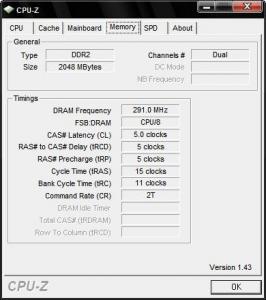
indeed there is something wrong with the cpu-z reading. its /8 divider. here is the updated mem tab for cpu-z

the first stick of ram is bought quite long ago and the 2nd stick i got it recently, erm. 2 months ago maybe. both are fp-y5, just now i type wrong to hp-y5 instead.

now i try ur settings and get back to u. thanks a lot. notworthy.gif

edit - forgot to attach ss

[attachmentid=395198]


This post has been edited by awh85: Feb 8 2008, 02:14 AM


Attached thumbnail(s)
Attached Image
dblooi
post Feb 8 2008, 02:18 AM

......
******
Senior Member
1,404 posts

Joined: Apr 2006
From: ......


QUOTE(awh85 @ Feb 8 2008, 02:13 AM)
indeed there is something wrong with the cpu-z reading. its /8 divider. here is the updated mem tab for cpu-z

the first stick of ram is bought quite long ago and the 2nd stick i got it recently, erm. 2 months ago maybe. both are fp-y5, just now i type wrong to hp-y5 instead.

now i try ur settings and get back to u. thanks a lot.  notworthy.gif

edit - forgot to attach ss

[attachmentid=395198]
*
hmm ic... hmm.gif
dont forget to change the trfc to 195nS and Maximum Asynchronous Latency to 9ns when you oc your ram icon_rolleyes.gif
you can find both of them in sub timings option notworthy.gif

edited: trc can be tighten to 11 for better memory performance icon_rolleyes.gif

p/s: these settings not applicable to D9GMH/ D9GKX users laugh.gif

This post has been edited by dblooi: Feb 8 2008, 02:24 AM
awh85
post Feb 8 2008, 02:46 AM

Look at all my stars!!
*******
Senior Member
2,156 posts

Joined: Apr 2005
QUOTE(dblooi @ Feb 8 2008, 02:18 AM)
hmm ic... hmm.gif
dont forget to change the trfc to 195nS and Maximum Asynchronous Latency to 9ns when you oc your ram  icon_rolleyes.gif
you can find both of them in sub timings option  notworthy.gif

edited: trc can be tighten to 11 for better memory performance  icon_rolleyes.gif

p/s: these settings not applicable to D9GMH/ D9GKX users  laugh.gif
*
hi. i have changed the following as told

cl - 5
trcd -5
trp - 5
tras - 15
trc - 11
cr - 2t

Maximum Asynchronous Latency - 9ns

but for the trfc, there are trfc0, trfc1, tfc2, and trfc3. which one do i change to 195? all?

Attached Image

latest mem tab for cpu-z

btw, i didnt change the trfc to 195 ns and tried to boot with 247 bus but it wouldnt post. change back to 245 ok, can.

btw, dont i need to increase my memory voltage if i wanna oc? as of now, all my voltages are stock. thanks.

added, i thought it might help if i post my ram details here as well. btw, the ram is still set as 533

Attached Image

This post has been edited by awh85: Feb 8 2008, 02:51 AM
dblooi
post Feb 8 2008, 02:53 AM

......
******
Senior Member
1,404 posts

Joined: Apr 2006
From: ......


QUOTE(awh85 @ Feb 8 2008, 02:46 AM)
hi. i have changed the following as told

cl - 5
trcd -5
trp - 5
tras - 15
trc - 11
cr - 2t

Maximum Asynchronous Latency - 9ns

but for the trfc, there are trfc0, trfc1, tfc2, and trfc3. which one do i change to 195? all?

Attached Image

latest mem tab for cpu-z

btw, i didnt change the trfc to 195 ns and tried to boot with 247 bus but it wouldnt post. change back to 245 ok, can.

btw, dont i need to increase my memory voltage if i wanna oc? as of now, all my voltages are stock. thanks.
*
ya trfc change all. icon_rolleyes.gif
you don't have to add memory voltage for now because your ram speed still under its default speed
now you wanna oc your proc higher 1st right?
for safety, try this

1) drop the memory divider to 400
2) change the HT multiplier to 4x ( in TA690G bios, it's define as 800MHz)

try to push again icon_rolleyes.gif
btw, wanna ask something about your 3600+
issit it made in malaysia? or china?
you can find it out on the IHS of the proc notworthy.gif
awh85
post Feb 8 2008, 03:01 AM

Look at all my stars!!
*******
Senior Member
2,156 posts

Joined: Apr 2005
QUOTE(dblooi @ Feb 8 2008, 02:53 AM)
ya trfc change all.  icon_rolleyes.gif
you don't have to add memory voltage for now because your ram speed still under its default speed
now you wanna oc your proc higher 1st right?
for safety, try this

1) drop the memory divider to 400
2) change the HT multiplier to 4x ( in TA690G bios, it's define as 800MHz)

try to push again  icon_rolleyes.gif
btw, wanna ask something about your 3600+
issit it made in malaysia? or china?
you can find it out on the IHS of the proc  notworthy.gif
*
ok will try that now.

cant really remember and dun wanna go thru the trouble of taking of the hsf but if i remember correctly, i think its made in malaysia (not confirm). brisbane chips oc-ability got limit depending on china/msia batch? hope can do around 2.6 lo. thanks ya notworthy.gif
Najmods
post Feb 8 2008, 03:11 AM

*mutter mutter mutter mutter*
*******
Senior Member
5,211 posts

Joined: Feb 2005
From: Konohana


QUOTE(dblooi @ Feb 8 2008, 02:18 AM)
hmm ic... hmm.gif
dont forget to change the trfc to 195nS and Maximum Asynchronous Latency to 9ns when you oc your ram  icon_rolleyes.gif
you can find both of them in sub timings option  notworthy.gif

edited: trc can be tighten to 11 for better memory performance  icon_rolleyes.gif

p/s: these settings not applicable to D9GMH/ D9GKX users  laugh.gif
*
That's the setting I been looking for! Now it rock stable at 800MHz. Thanks bro thumbup.gif
awh85
post Feb 8 2008, 03:29 AM

Look at all my stars!!
*******
Senior Member
2,156 posts

Joined: Apr 2005
i dropped the mem divider to 400 and the ht multi to 4x and rebooted. couldnt post, no beeb, press everything/anything also kenot.

so i reset the bios with the jumper. i think ill continue my quest anther day. today too tired and gotta balik kampung tomorrow, thanks a lot anyway dblooi.

=D
dblooi
post Feb 8 2008, 03:33 AM

......
******
Senior Member
1,404 posts

Joined: Apr 2006
From: ......


QUOTE(awh85 @ Feb 8 2008, 03:01 AM)
ok will try that now.

cant really remember and dun wanna go thru the trouble of taking of the hsf but if i remember correctly, i think its made in malaysia (not confirm). brisbane chips oc-ability got limit depending on china/msia batch? hope can do around 2.6 lo. thanks ya  notworthy.gif
*
ya, malaysia chips are known to be more ocable most of the time. brows.gif
especially come to brisby icon_rolleyes.gif

QUOTE(Najmods @ Feb 8 2008, 03:11 AM)
That's the setting I been looking for! Now it rock stable at 800MHz. Thanks bro thumbup.gif
*
haha welcome. Glad that i can help you laugh.gif

QUOTE(awh85 @ Feb 8 2008, 03:29 AM)
i dropped the mem divider to 400 and the ht multi to 4x and rebooted. couldnt post, no beeb, press everything/anything also kenot.

so i reset the bios with the jumper. i think ill continue my quest anther day. today too tired and gotta balik kampung tomorrow, thanks a lot anyway dblooi.

=D
*
hmm.. ic
maybe is time to add some vcore
okie good night ya icon_rolleyes.gif
SUSjoe_star
post Feb 8 2008, 09:49 AM

Serving the Servants
******
Senior Member
1,810 posts

Joined: Mar 2007
@awh85

Increase your NB voltage a lil. I had the same prob with an x2 3600+ and a T560 A2+. Initially it wouldnt go above 2.4ghz but after increasing the NB voltage by 1 increment, it went up to 2.7ghz without needing to add cpu vcore.
awh85
post Feb 8 2008, 11:09 AM

Look at all my stars!!
*******
Senior Member
2,156 posts

Joined: Apr 2005
ok thanks for the tip, will try it after i get back.
xixo_12
post Feb 8 2008, 11:13 AM

i!Retired!i
*******
Senior Member
7,318 posts

Joined: Nov 2006
From: Pulau Sipadan

have the good mobo.. appreciate it

User_Xp
post Feb 8 2008, 11:16 AM

Enthusiast
*****
Senior Member
973 posts

Joined: Oct 2004
From: CarJunk


QUOTE(dblooi @ Feb 8 2008, 03:33 AM)
ya, malaysia chips are known to be more ocable most of the time. brows.gif
especially come to brisby icon_rolleyes.gif
amd made in malaysia chip are better than made in china chip? rclxub.gif


Najmods
post Feb 8 2008, 11:27 AM

*mutter mutter mutter mutter*
*******
Senior Member
5,211 posts

Joined: Feb 2005
From: Konohana


QUOTE(joe_star @ Feb 8 2008, 09:49 AM)
@awh85

Increase your NB voltage a lil. I had the same prob with an x2 3600+ and a T560 A2+. Initially it wouldnt go above 2.4ghz but after increasing the NB voltage by 1 increment, it went up to 2.7ghz without needing to add cpu vcore.
*
Thanks for the tip, and it worked for me, I got extra 100MHz on the core. But then my stock heatsink with 120mm fan can't handle the heat, 52C idle sweat.gif
QUOTE(User_Xp @ Feb 8 2008, 11:16 AM)
amd made in malaysia chip are better than made in china chip?  rclxub.gif
*
Yup Malaysian chips are better than other countries, when it comes to overclocking smile.gif
User_Xp
post Feb 8 2008, 11:51 AM

Enthusiast
*****
Senior Member
973 posts

Joined: Oct 2004
From: CarJunk


QUOTE(Najmods @ Feb 8 2008, 11:27 AM)


Yup Malaysian chips are better than other countries, when it comes to overclocking smile.gif
*
lol..not weird la if my proc was suck when getting above 2.5Ghz... sweat.gif
made in china doh.gif doh.gif doh.gif
CV6149
post Feb 8 2008, 04:30 PM

La Furia Roja!!
******
Senior Member
1,347 posts

Joined: Jan 2003


QUOTE(User_Xp @ Feb 8 2008, 11:51 AM)
lol..not weird la if my proc was suck when getting above 2.5Ghz... sweat.gif
made in china doh.gif  doh.gif  doh.gif
*
just need more voltage compare to others...
alive88
post Feb 8 2008, 04:37 PM

Pata Pata Pon! Pon Pon Pata Pon!!
******
Senior Member
1,406 posts

Joined: Jun 2007


lots of new people in here..dblooi dun celebrate CNY ar?
anggajaya
post Feb 8 2008, 04:47 PM

Getting Started
**
Junior Member
250 posts

Joined: Jan 2006


guys i wanna ask something, jus want to ensure,

so far my overclocking result is rocking stable, but i was jus wondering about the SB and NB things, I set the multiplier both of them to 3x and also the pci frequency I set to 100 mhz for both SB and Nb, I jus wanna ask whether this is the right procedure or not, or perhaps I jus can only set one of them? buy FYI, my result is stable where I can orthos in 13 hours... ur replies are much apprecitaed guys..he2, sorry for my noobness..

100 Pages « < 60 61 62 63 64 > » Top
Topic ClosedOptions
 

Change to:
| Lo-Fi Version
0.0282sec    0.06    6 queries    GZIP Disabled
Time is now: 6th December 2025 - 03:32 PM