Welcome Guest ( Log In | Register )

Bump Topic Topic Closed RSS Feed

Outline · [ Standard ] · Linear+

 AMDŽ Socket-AM2/AM2+ Overclocking thread (V5), FTW...

views
     
awh85
post Feb 8 2008, 01:19 AM

Look at all my stars!!
*******
Senior Member
2,156 posts

Joined: Apr 2005
hi, my current setup is as follows:

AMD Athlon64 X2 3600+ AM2 Brisbane with stock cooler.
Biostar T-Force TA690G AM2 (bios is 06/05/07) lol just now i accidently typed 2008. doh.gif
2GB Kingston Value RAM DDRII 667 (Dual Channel) both hynix HP-Y5
CoolerMaster eXtreme Power 430W

user posted image
cpu-z with my systemps

im trying to overclock my cpu to 2.5-2.7 level from 1.9. Previously i was using the V12 setting on the Auto Overclock System giving me 240x9.5 = 2280 and it also increases my cpu voltage to 1.312.
now with my own manual overclock using stock cpu voltage (1.280 or something), erm...all the other ht, mem, nb voltage all default la (din play with any voltage). memory i changed to 533, the timings CAS and etc all i left default (auto) the npt fid (divider) i also left default.

basically i din change anything much except the bus (do u call it that for amd) and memory. i cant seem to get it over 245 and duno what the problem is. i dont think its the voltage as it doesnt do much after increase as well. i did manage to get it around 250 but not stable and sometimes didnt POST.

i think it should have something to do with the divider, ht frequency, etc right?

can anyone share some tips on how to get my system higher? (2.5 will do, coz i just wanna beat my friend with a x2 4000+, yea, im kiasu). if can, i dont wanna up the vcore higher than 1.35.

thanks a lot for reading (and helping out if u choose to) notworthy.gif

This post has been edited by awh85: Feb 8 2008, 01:52 AM
awh85
post Feb 8 2008, 01:47 AM

Look at all my stars!!
*******
Senior Member
2,156 posts

Joined: Apr 2005
ok. i see. here u go. thanks

Attached Image
awh85
post Feb 8 2008, 02:13 AM

Look at all my stars!!
*******
Senior Member
2,156 posts

Joined: Apr 2005
QUOTE(dblooi @ Feb 8 2008, 02:07 AM)
hmm...something wrong with the cpu-z reading.
impossible can get /7 divider for 9.5 multiplier  hmm.gif
i realized that you are using a very old version cpu-z
try to use cpu-z 1.43 and see  icon_rolleyes.gif
link: http://www.cpuid.com/download/cpu-z-143.zip

From the SS, i think you can try this
1) change command rate to 2T
2) ram timings change to 5-5-5-15 instead of using 4-4-4-12

try again with this settings icon_rolleyes.gif
btw, you ram is newly bought?
check the ram chipset and see,
issit hynix FP-Y5 ?  brows.gif
*
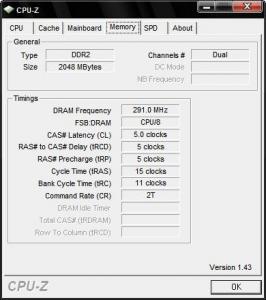
indeed there is something wrong with the cpu-z reading. its /8 divider. here is the updated mem tab for cpu-z

the first stick of ram is bought quite long ago and the 2nd stick i got it recently, erm. 2 months ago maybe. both are fp-y5, just now i type wrong to hp-y5 instead.

now i try ur settings and get back to u. thanks a lot. notworthy.gif

edit - forgot to attach ss

[attachmentid=395198]


This post has been edited by awh85: Feb 8 2008, 02:14 AM


Attached thumbnail(s)
Attached Image
awh85
post Feb 8 2008, 02:46 AM

Look at all my stars!!
*******
Senior Member
2,156 posts

Joined: Apr 2005
QUOTE(dblooi @ Feb 8 2008, 02:18 AM)
hmm ic... hmm.gif
dont forget to change the trfc to 195nS and Maximum Asynchronous Latency to 9ns when you oc your ram  icon_rolleyes.gif
you can find both of them in sub timings option  notworthy.gif

edited: trc can be tighten to 11 for better memory performance  icon_rolleyes.gif

p/s: these settings not applicable to D9GMH/ D9GKX users  laugh.gif
*
hi. i have changed the following as told

cl - 5
trcd -5
trp - 5
tras - 15
trc - 11
cr - 2t

Maximum Asynchronous Latency - 9ns

but for the trfc, there are trfc0, trfc1, tfc2, and trfc3. which one do i change to 195? all?

Attached Image

latest mem tab for cpu-z

btw, i didnt change the trfc to 195 ns and tried to boot with 247 bus but it wouldnt post. change back to 245 ok, can.

btw, dont i need to increase my memory voltage if i wanna oc? as of now, all my voltages are stock. thanks.

added, i thought it might help if i post my ram details here as well. btw, the ram is still set as 533

Attached Image

This post has been edited by awh85: Feb 8 2008, 02:51 AM
awh85
post Feb 8 2008, 03:01 AM

Look at all my stars!!
*******
Senior Member
2,156 posts

Joined: Apr 2005
QUOTE(dblooi @ Feb 8 2008, 02:53 AM)
ya trfc change all.  icon_rolleyes.gif
you don't have to add memory voltage for now because your ram speed still under its default speed
now you wanna oc your proc higher 1st right?
for safety, try this

1) drop the memory divider to 400
2) change the HT multiplier to 4x ( in TA690G bios, it's define as 800MHz)

try to push again  icon_rolleyes.gif
btw, wanna ask something about your 3600+
issit it made in malaysia? or china?
you can find it out on the IHS of the proc  notworthy.gif
*
ok will try that now.

cant really remember and dun wanna go thru the trouble of taking of the hsf but if i remember correctly, i think its made in malaysia (not confirm). brisbane chips oc-ability got limit depending on china/msia batch? hope can do around 2.6 lo. thanks ya notworthy.gif
awh85
post Feb 8 2008, 03:29 AM

Look at all my stars!!
*******
Senior Member
2,156 posts

Joined: Apr 2005
i dropped the mem divider to 400 and the ht multi to 4x and rebooted. couldnt post, no beeb, press everything/anything also kenot.

so i reset the bios with the jumper. i think ill continue my quest anther day. today too tired and gotta balik kampung tomorrow, thanks a lot anyway dblooi.

=D
awh85
post Feb 8 2008, 11:09 AM

Look at all my stars!!
*******
Senior Member
2,156 posts

Joined: Apr 2005
ok thanks for the tip, will try it after i get back.
awh85
post Feb 10 2008, 05:33 AM

Look at all my stars!!
*******
Senior Member
2,156 posts

Joined: Apr 2005
here is what i have been up to so far

initially i tried 295x9.5 but my pc rebooted when running 3dmark06. so i settled for 285x9.5=2707.7 instead. didnt have to raise any voltage except for the nb voltage by just a bit. my settings are as follows.

do i need to be worried about my load temperatures now? my cpu is reaching 55degC on load but if thats the max, i dont really mind, coz most of the time i wont be using it on load anyway.

as mentioned earlier, my setup

AMD Athlon64 X2 3600+ AM2 Brisbane with stock cooler.
Biostar T-Force TA690G AM2 (bios is 06/05/07)
2GB Kingston Value RAM DDRII 667 (Dual Channel) both hynix FP-Y5
CoolerMaster eXtreme Power 430W

Attached Image

will let orthos run until tomorrow to stress the cpu now for some game time benchmarks =D

btw, thanks to everyone who helped me out. (ill be back if i find out my OC is not stable or maybe i wanna try hit 3.0GHz later when im free. notworthy.gif
awh85
post Feb 10 2008, 01:02 PM

Look at all my stars!!
*******
Senior Member
2,156 posts

Joined: Apr 2005
QUOTE(afosz @ Feb 10 2008, 08:11 AM)
great OC you got there. some more didn't raise any vcore as you mentioned, but it shows 1.264v. isn't it stock for TA690G is 1.216v ? and you didn't decrease HT multiplier, will it be stable ?
*
hmm. now im getting confused with the stock vcore. all along i thought it was 1.28 or 1.3v or somewhere around there while AMD's webby says is 1.25/1.35 (no idea what that means)
i just know i didnt change the voltage for the cpu but just the nb. anyway, can anyone help to confirm the stock vcore for this proc? could there be a problem with my vcore reading?

btw, i have been running orthos for around 8-9hrs now so i think it should be stable. it finished 3dmark06, superpi, and short gaming session of COD4 so i think its ok. any other way to stress the CPU more? thanks. notworthy.gif

Attached Image
awh85
post Feb 10 2008, 01:25 PM

Look at all my stars!!
*******
Senior Member
2,156 posts

Joined: Apr 2005
thanks. trying it out now. =D

overdrive doesnt work on 690G chipsets T_T

core temp is giving me a 1.3000v reading for VID which i assume is vcore right? compared to cpu-z which is giving me weird readings. erm...which one is more accurate?

This post has been edited by awh85: Feb 10 2008, 01:54 PM
awh85
post Feb 10 2008, 02:12 PM

Look at all my stars!!
*******
Senior Member
2,156 posts

Joined: Apr 2005
im using the latest cpu-z. overdrive doesnt support non 7xx chipset boards like the 690G so i cant even run it, let alone post ss of the sys info.
awh85
post Feb 10 2008, 06:33 PM

Look at all my stars!!
*******
Senior Member
2,156 posts

Joined: Apr 2005
i think the default vcore range from 1.25-1.3 of the brisbane depends on the motherboard used perhaps.

my vcore reading in everest ult. is same as the cpu-z reading too so i guess it should be correct.

so far been running orthos for 14 hours so i guess its safe to say that my OC is stable izzit?

my ss

Attached Image


Added on February 10, 2008, 6:34 pmbtw, the oc results on page 1 are updated every version izzit? if so, ill try to get a nicer OC before this thread ends =D

This post has been edited by awh85: Feb 10 2008, 06:34 PM
awh85
post Feb 11 2008, 12:50 AM

Look at all my stars!!
*******
Senior Member
2,156 posts

Joined: Apr 2005
hi guys, can i know what are the requirements to join the brisby 3600+ 3GHz club? how many hours of orthos or what other programs must i run stability to be considered a successful OC, despite not being stable enough for normal usage. got it to 3GHz now but failed orthos in 1+minute lolz.


Added on February 11, 2008, 12:53 ambtw, any tips for getting a stable OC around 3GHz?

This post has been edited by awh85: Feb 11 2008, 12:53 AM
awh85
post Feb 11 2008, 01:26 AM

Look at all my stars!!
*******
Senior Member
2,156 posts

Joined: Apr 2005
ok, i show my cpu-z first

Attached Image

btw, if my pc reboot a few seconds after starting super pi 32m what does that indicate? i duno so i just keep trying pumping vcore or any other voltages i can find =.=''
awh85
post Feb 11 2008, 01:49 AM

Look at all my stars!!
*******
Senior Member
2,156 posts

Joined: Apr 2005
erm, if i lower my HTT, it wont be enuff for 3GHz already haha. what other TRC timing would u suggest me using? 17? if can i dun wanna use other multiplier as well.
awh85
post Feb 11 2008, 03:43 AM

Look at all my stars!!
*******
Senior Member
2,156 posts

Joined: Apr 2005
QUOTE(joe_star @ Feb 11 2008, 03:30 AM)
@bro awh85

I think our procs are quite similar coz I also have a G1 3600+. Looking at your 3.0ghz oc and the fact that u say ur comp reboots in superpi32M, I say you need to pump vcore more. I had to up mine to 1.55V to get it 12 hours prime stable. After vdroop on load the voltage was arnd 1.52V. For superpi 32M i tink 1.53V wud be enuff for 3Ghz. Good luck bro. Anyway, heres my screenie icon_rolleyes.gif

user posted image
*
hey thanks a lot man, ill try it out now, just now was thinking of settling for 300x9.5=2850. will post results later, tomorrow maybe. thanks notworthy.gif
awh85
post Feb 11 2008, 09:32 AM

Look at all my stars!!
*******
Senior Member
2,156 posts

Joined: Apr 2005
QUOTE(joe_star @ Feb 11 2008, 09:05 AM)
Yeah man I also eventually settled for 2.9ghz @ 1.45V. Just 100mhz extra needs extra 0.1v to be stable, not worth it la rclxub.gif Anyways my max oc with clear results, plz add me bro -pws- and my sempron on page 55 oso icon_rolleyes.gif

Processor: AMD Athlon X2 3600+ Brisbane G1 @3012Mhz
Nick: joe_star
Mobo Model: Biostar TF560 A2+
RAM: 2x1GB Team DDR2 667 Value ram
RAM Speed: 602Mhz
Timings: 4-4-4-12-16 1T
Cooler Model: Tuniq Tower

user posted image
*
still fail to get it 3.0GHz stable so i think ill try again when i have time. now im on 300x9.5 and so far i can tell its stable but then again, ill have to do more stress tests to confirm this. will post some results later when i get home. anyway thanks for ur help man. notworthy.gif notworthy.gif

btw, anyone else ever achieve 3GHz with value rams and stock cooler before this? was it stable enough for everyday use? or is it just good enough for "show"? hmm.gif
awh85
post Feb 11 2008, 06:58 PM

Look at all my stars!!
*******
Senior Member
2,156 posts

Joined: Apr 2005
ok guys, here is my latest stable overclock. i suspect that i dont require so much voltage so i might be lowering it later on bit by bit. still a long way to 3.0GHz though.

Attached Image
awh85
post Feb 12 2008, 05:21 PM

Look at all my stars!!
*******
Senior Member
2,156 posts

Joined: Apr 2005
QUOTE(Amedion @ Feb 12 2008, 02:48 PM)
No need buy new PSU lar.. Sell off ur 3800 and buy 4000 brisbane.. Can run 2.7Ghz stock vcore.. No need pump.. LOL
*
QUOTE(za_az @ Feb 12 2008, 03:12 PM)
Haha, either way is oso good laugh.gif
*
my 3600+ can also get 2.7 with stock vcore too.

http://forum.lowyat.net/index.php?act=Atta...=post&id=395936

kalakatu selling his x2 3600+ brisbane in garage sales too. maybe u can have a look.


Added on February 12, 2008, 5:23 pmadded : not to mention im using the same psu as u now. =D

This post has been edited by awh85: Feb 12 2008, 05:23 PM
awh85
post Feb 16 2008, 04:40 PM

Look at all my stars!!
*******
Senior Member
2,156 posts

Joined: Apr 2005
QUOTE(-pWs- @ Feb 16 2008, 11:12 AM)
Haha..so sorry.
Will get it updated by today wink.gif
Sick during CNY...no mood edit.  sweat.gif  sweat.gif

-pWs-
*
pls update my result too bro. my updated specs are on my siggie. =D

btw, my vcore i + 0.1v is that ok? anything less and its not sable. =.=''

but my 2.7 can get default vcore tho.

whats the average most ppl can get for my processor on stock voltage ah?


Attached thumbnail(s)
Attached Image

2 Pages  1 2 >Top
Topic ClosedOptions
 

Change to:
| Lo-Fi Version
0.0236sec    0.47    7 queries    GZIP Disabled
Time is now: 4th December 2025 - 04:42 AM