Welcome Guest ( Log In | Register )

Bump Topic Topic Closed RSS Feed
9 Pages « < 2 3 4 5 6 > » Bottom

Outline · [ Standard ] · Linear+

Unifi Official TM UniFi High Speed Broadband Thread V42, READ 1ST PAGE FOR RELEVANT WIFI INFO!

views
     
blacktubi
post Aug 13 2024, 11:52 PM

-
Group Icon
Elite
8,421 posts

Joined: Jul 2008

QUOTE(Verblassen @ Aug 13 2024, 10:11 PM)
I've given up already, even MCMC couldn't help.

Since upgraded to a 2gbps plan to make my equipment "worth the hassle". Will downgrade after the contract finishes if need be.

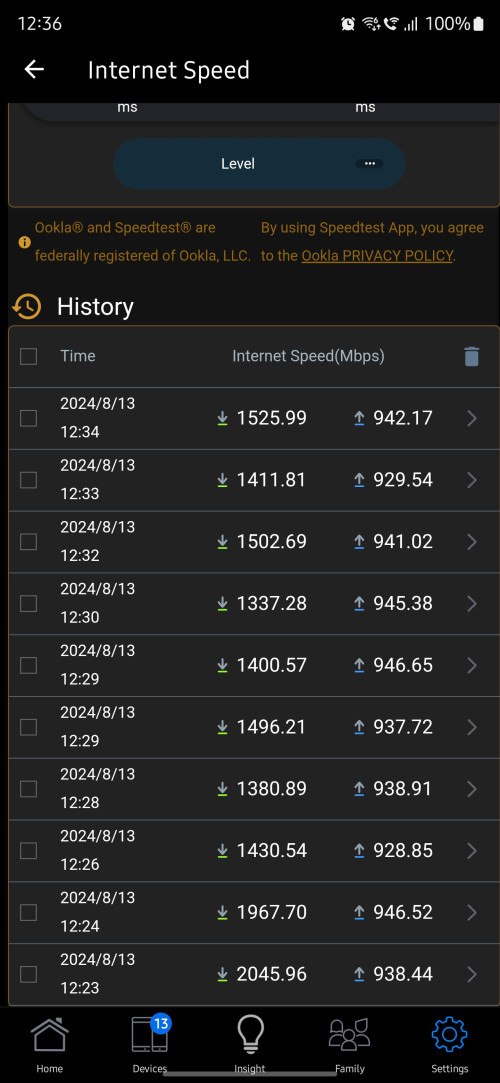
I noticed something new now. Seems like I cannot always get the full 2gpbs under bridge mode although I have a 2gbe wan.

» Click to show Spoiler - click again to hide... «

Out of 40 speedtests only 1-2 managed to hit 2gbps. These readings are taken directly from the router.
No issues when the black box is operating as a GPON router. Wondering if anyone can share some insights.

» Click to show Spoiler - click again to hide... «
*
What reply do you get from MCMC though?

IMO I think the D-Link is just buggy at this point.
blacktubi
post Aug 15 2024, 01:14 PM

-
Group Icon
Elite
8,421 posts

Joined: Jul 2008

QUOTE(zhihao4456 @ Aug 15 2024, 11:33 AM)
Just an update for users with 2Gbps plan, having the black box and having speed drop while in bridge mode. I have sent report to Unifi and they sent technician to my place to rectify issue.

Talked with the technician, they at the moment the solution they did some coding and adjustment with their in house software to troubleshoot the problem at the moment as the firmware for it is still in R&D stage.

However, after they did their thing for my black box and they went back. 1 day after, the speed dropped again and contacted to come again next week.

During troubleshoot time they have a problem because it was conflicting with the ATA as I have another small black box was used for having 2 phone line. If it wasn't the ATA issue, they could have done it in 10-15minutes as they previously solve the problem of drop speed for other users as well. Only my case is because I use ATA so is first time for them and abit troublesome.

I shall update you guys again next week when they come over to troubleshoot again.

Furthermore, I overheard the technician complaining all the combo box from TM has problem to their team. There is another bug where their combo box can only only support up to 64 devices only, anything more than that the box itself with freeze or restart itself.
*
64 devices per wireless band is the typical specs of entry level WiFi chip

If that's true, then it's a hardware limitation that cannot be solved via software

However, using it on bridge mode wouldn't subject to the same limit
blacktubi
post Aug 19 2024, 09:46 AM

-
Group Icon
Elite
8,421 posts

Joined: Jul 2008

QUOTE(petrofsky77 @ Aug 19 2024, 09:10 AM)
So I take it that the speed throttle for Unifi Ultra plan is still happening regardless white or black D-Link box, as long as it's on Bridge mode. Anyone actually reported this to MCMC? I'm thinking of reporting it to MCMC already, since this issue is heavily impacting my office users.
*
There's not really a solution for this. You can try to use your old ONU but that unit doesn't support 2Gbps.

You can try to contact Anime4000 for a custom 2.5G ONU which should be much better
blacktubi
post Aug 19 2024, 10:31 AM

-
Group Icon
Elite
8,421 posts

Joined: Jul 2008

QUOTE(petrofsky77 @ Aug 19 2024, 10:06 AM)
So if I plug in back my old ONU (white Fibrehome), it will revert back to 800MBps? Since that was the package my office was using before the free upgrade.
*
You will get 940Mbps if you are using 1Gbps plan
blacktubi
post Aug 21 2024, 09:07 PM

-
Group Icon
Elite
8,421 posts

Joined: Jul 2008

QUOTE(wanfauzan @ Aug 21 2024, 09:02 PM)
Just ported from maxis to unifi 300mbps. Got 6 months free.

Old configuration was Huawei ONU + TPlink AX73.

Unifi provided Skyworth Combobox GN630V. I asked the installer to configure the combobox as bridge but he said cannot. I told him that I want to use back the AX73 because of the higher performance compared to the unifi combobox.

He then told me that all wifi 6 the same. 2nd floor cannot get reception. If I really want to use the AX73, he asked me to make it as an AP and connect the LAN1 from combobox to WAN AX73. I followed that and I can use the AX73 router.

My question, should i then change the combobox to become a bridge and configure the ppoe login in my AX73? What is the advantage of this setting compared to the AP?

Thanks.
*
The CPU on your AX73 is way, way faster than GN630V

It means smoother connection and lower loaded latency

In practical terms, smoother WiFi calls, things load faster like spam scrolling TikTok, less buffering on Youtube if you keep jumping around sections on videos

I included a guide on how to change it to bridge mode previously in this thread, you can look around
blacktubi
post Aug 27 2024, 11:01 AM

-
Group Icon
Elite
8,421 posts

Joined: Jul 2008

QUOTE(danielyeap @ Aug 27 2024, 10:53 AM)
Done the 1Gbps upgrade yesterday!
Received the Skyworth ComboBox (facepalm!).
Decided to switch back to my old and trusty Huawei (in bridge mode) and it works right away (the TM guys were very nice to stay back to verify with me lol).

No plan to upgrade my home LAN to 2.5/10G just yet, so happy to get the 100Mbps less than ideal speed smile.gif
*
Wait, they are giving Skyworth for 1Gbps users now?

1Gbps users should be getting the D-Link with 2.5G LAN port.
blacktubi
post Aug 27 2024, 01:30 PM

-
Group Icon
Elite
8,421 posts

Joined: Jul 2008

QUOTE(OKLY @ Aug 27 2024, 01:23 PM)
So far my black D-Link ONR bridged with my ASUS RT-AX86U is going fine. The ONR has been up/connected for 72 hours now, still hitting above 900mbps. Total data transfer has been about 300GB during this time.

Hope I don’t jinx it, will need to continuously monitor.
*
What's the model of your modem previously?

Currently, the speed drop seems to only affect areas with Fiberhome OLT.

If you have a Huawei modem previously, your location is almost always 100% on a Huawei OLT. The D-Link combo ONR works well with Huawei modem.
blacktubi
post Aug 27 2024, 01:40 PM

-
Group Icon
Elite
8,421 posts

Joined: Jul 2008

QUOTE(OKLY @ Aug 27 2024, 01:33 PM)
I see, this probably explains it. Yes was given/using Huawei HG8240w previously.
*
The issue with TM-Huawei infra is the speed seems to be capped at around 940Mbps for most 1Gbps users.

Which means, despite having 2.5G port on the the D-Link ONR, it offers no additional benefits over your old Huawei modem.

In fact, the Huawei HG8240 modem might be better with slightly lower latency and lower heat.
blacktubi
post Aug 27 2024, 02:02 PM

-
Group Icon
Elite
8,421 posts

Joined: Jul 2008

QUOTE(OKLY @ Aug 27 2024, 01:52 PM)
I know it doesn’t happen often realistically, but what I’m thinking is that if there is concurrent DL and UL of say 700mbps and 400mbps respectively, then the 1GBe port on the Huawei modem will be a bottleneck, am I right to say this?

Either way, let’s see how long this D-Link ONR can go without any issues. laugh.gif
*
It's actually a very valid concern.

The Gigabit Ethernet port on the Huawei is full duplex which means it can transmit 1Gbps up and down at the same time. Same goes to most Gigabit devices in the market.

Do report back if you face any issues on the D-Link. biggrin.gif


blacktubi
post Sep 1 2024, 07:31 PM

-
Group Icon
Elite
8,421 posts

Joined: Jul 2008

Anyone on the DPN-FX3060V can check if you can obtain the PLOAM / OLT password directly from the webUI?

Thanks in advance
blacktubi
post Sep 2 2024, 05:37 PM

-
Group Icon
Elite
8,421 posts

Joined: Jul 2008

QUOTE(zhihao4456 @ Sep 2 2024, 04:24 PM)
Latest Update:
* For those who is facing drop of internet speed using bridge mode

TM technician has came to my premise to do some configuration to the BLACK BOX. Technician laptop was connected to it then ANYDESK was used for their other technician to access to do some command patching and programming stuff and uses some problem tool.

Now my 2Gbps does not have drop speed issue for a week. I reported my case through the online chat from their website mentioning my problem and requiring their highest professional team to settle the issue.

Hope this helps everyone out there.
*
Do you have any idea what they did?

It's super hard to get the proper TM technician to come, usually they will send the contractors which are kinda bad
blacktubi
post Sep 2 2024, 07:37 PM

-
Group Icon
Elite
8,421 posts

Joined: Jul 2008

QUOTE(Anime4000 @ Sep 2 2024, 06:07 PM)
many facing same issue even highest technicion come to configure, not all is same place, lastly using my PON Stick solve the issue,
I suspect speed drop due to T-CONT not match and/or dead T-CONT
*
I am using a third party ONU and it's working flawlessly on TM Infra as well. But too bad they got no interest to sell it to the public.

I just find it ridiculous that this isssue is still not solved by TM or D-Link after so long.

The worst part is all the companies with this D-Link ONR are affected without a proper solution as well.

On the bright side, my source told me that the Skyworth combo box with 2.5G port is coming soon and I heard it's going to be AX6000.
blacktubi
post Sep 4 2024, 02:58 PM

-
Group Icon
Elite
8,421 posts

Joined: Jul 2008

For those with resources to setup their own DNS resolver or those sysadmin here.

Can anyone verify if ISP is hijacking private DNS resolver as well?

Cause it seems fine on my end. I am trying to avoid DoH and DoT due to performance impact.
blacktubi
post Sep 4 2024, 03:11 PM

-
Group Icon
Elite
8,421 posts

Joined: Jul 2008

QUOTE(waja7968 @ Sep 4 2024, 03:04 PM)
Try --> https://www.olevod.tv/ (website to watch most recent movies) to verify.

If your browser just spining and timeout then 100% it is block. Use DoH also no help on some DNS resolvers
, need to find those resolvers  not so well known and might have the chance to bypass the block.

Most mobile operators block it and Unifi fiber block it starting today
*
You cannot access this site even via DoH with public resolver e.g. Google DNS now?
blacktubi
post Sep 4 2024, 03:37 PM

-
Group Icon
Elite
8,421 posts

Joined: Jul 2008

QUOTE(zerorating @ Sep 4 2024, 03:26 PM)
fine with me. (dns server on my sig)
*
Beware of DNS amplification attack tongue.gif

I have a similar configuration but with ACL for AS4788 and AS9534 only

Edit: I wonder if Unifi Biz affective by this as well. But I guess any decent corp or MNC have their own internal DNS already anyways.

This post has been edited by blacktubi: Sep 4 2024, 03:39 PM
blacktubi
post Sep 4 2024, 04:50 PM

-
Group Icon
Elite
8,421 posts

Joined: Jul 2008

QUOTE(jasontanky @ Sep 4 2024, 04:45 PM)
Ps: Most Singapore and China ISPs/DNS providers, and few Malaysia data centers DNS still working fine.

Hopefully this is what they'll do the most. Blocking all possible DNS servers nearby don't seems to be friendly among those ''elite users''

Those who want to bypass the wall will still bypass it anyway
*
I am fine with blocking adult content and gambling sites. But they should publish their framework for transparency.

Blocking iherb.com is ridiculous. doh.gif
blacktubi
post Sep 4 2024, 05:24 PM

-
Group Icon
Elite
8,421 posts

Joined: Jul 2008

QUOTE(soonwai @ Sep 4 2024, 05:14 PM)
Google cannot because Google's 8.8.8.8 & 8.8.4.4 are no longer going to Google. I think going to Brickfields now.
*
The mechanism is similar to how our Indon neighbour is doing it now.

https://github.com/net4people/bbs/issues/316


blacktubi
post Sep 4 2024, 08:30 PM

-
Group Icon
Elite
8,421 posts

Joined: Jul 2008

k-rolll
Thanks for the detailed report!

On the bright side it's not a blanket block so you can use a less well-known DNS resolver or just host your own DNS server to forward the request to another public DNS provider.
blacktubi
post Sep 5 2024, 12:09 PM

-
Group Icon
Elite
8,421 posts

Joined: Jul 2008

QUOTE(ycs @ Sep 5 2024, 11:52 AM)
if host own DNS server, can that forward request to public DNS be blocked? i've just setup Bind9 in home server, seems to be working
*
You should setup Bind9 at somewhere that's not subjected to government's jurisdiction or at a local DC where the regulators won't touch

Just make sure to secure it and have ACL to prevent abuse
blacktubi
post Sep 5 2024, 06:12 PM

-
Group Icon
Elite
8,421 posts

Joined: Jul 2008

I will just leave this here. It works for now and performance is better than DoT / DoH.

NTT
129.250.35.250
129.250.35.251

Singtel
165.21.83.88
165.21.100.88

L3
4.2.2.1
4.2.2.2
4.2.2.3
4.2.2.4
4.2.2.5
4.2.2.6

9 Pages « < 2 3 4 5 6 > » Top
Topic ClosedOptions
 

Change to:
| Lo-Fi Version
0.0645sec    0.58    7 queries    GZIP Disabled
Time is now: 22nd December 2025 - 10:21 AM