QUOTE(jiaen0509 @ Jun 11 2024, 05:33 PM)
I just check the channel my iPhone connected with. It is 80Mhz. So my prediction 160mhz doesn’t affect the performance.
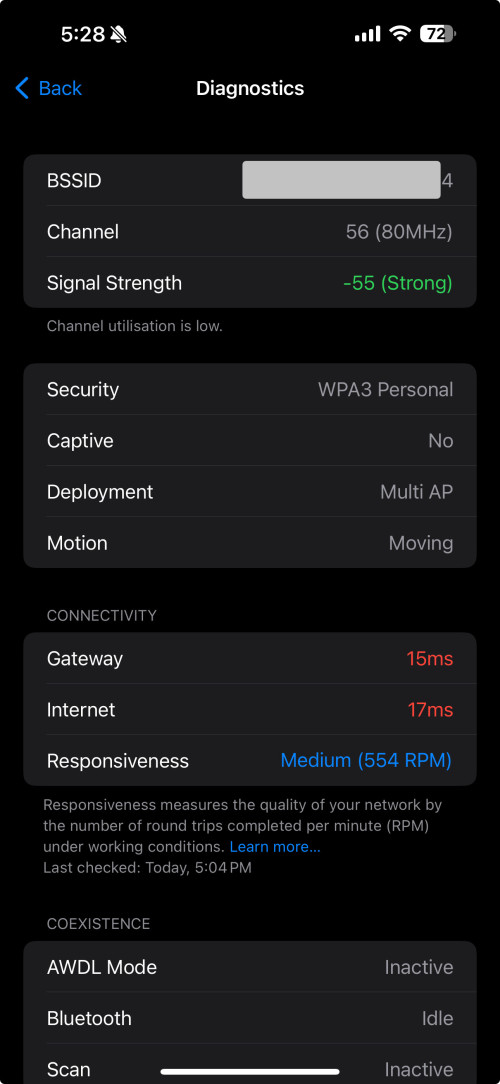

What app is this?Unifi Official TM UniFi High Speed Broadband Thread V42, READ 1ST PAGE FOR RELEVANT WIFI INFO!
|
|
 Jun 11 2024, 05:36 PM Jun 11 2024, 05:36 PM
Return to original view | Post
#21
|
 
Elite
8,421 posts Joined: Jul 2008  
|
QUOTE(jiaen0509 @ Jun 11 2024, 05:33 PM) I just check the channel my iPhone connected with. It is 80Mhz. So my prediction 160mhz doesn’t affect the performance. What app is this? |
|
|
|
|
|
Jun 12 2024, 12:15 AM
Return to original view | Post
#22
|
|
Elite
8,421 posts Joined: Jul 2008
|
QUOTE(karenzayn @ Jun 11 2024, 09:44 PM) Did poke around the new combo box from Skyworth GN630V Lack of bridge mode is a disaster.> No bridge mode > Build in Ookla Speedtest with TM servers > Quite not bad interface > Wifi performance is not bad Might useful for homestay/Airbnb/Rented unit/perfer one box solution but not for me since i need more control over my network, just my 2 cents. The router will choke on a busier network even when you add another router. |
|
|
Jun 12 2024, 12:25 PM
Return to original view | Post
#23
|
|
Elite
8,421 posts Joined: Jul 2008
|
QUOTE(Yluxion @ Jun 12 2024, 11:53 AM) There is Bridge mode for Skyworth GN630V Try if this router can tag VLAN 500 on bridge mode so you don't need VLAN config on router anymore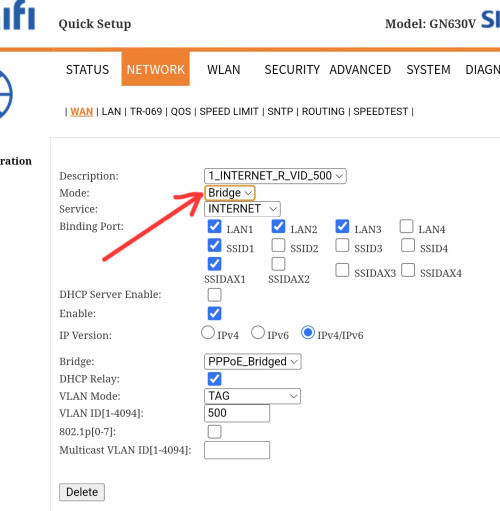 Looks possible based on the UI |
|
|
Jun 14 2024, 12:31 PM
Return to original view | Post
#24
|
|
Elite
8,421 posts Joined: Jul 2008
|
QUOTE(neekun @ Jun 14 2024, 04:41 AM) After a week of upgrade to 1gbps, the connection had been stable, no disconnection or speed drop. In fact prior to upgrade my connection also stable with no issue, it can remain connected for weeks until I manually reboot Asus router one a while just to refresh the connection. What is your speedtest result? Do you manage to get 1Gbps+ ? |
|
|
Jun 15 2024, 11:26 AM
Return to original view | Post
#25
|
|
Elite
8,421 posts Joined: Jul 2008
|
QUOTE(NagaK @ Jun 15 2024, 11:04 AM) After month with combo box. Now I had a issue. All combo box will be warmer than a pure ONU, it's expected since they are a proper routerWhen I did speed test my speed limit to 300mbps download and 70mbps upload most of times. I suspect my router had issue but no. But combo box is culprit after turn off and on combo box now speed is up 940mbps. This happens about 1am. Now morning about 10.40am I tried speed test again still issues presist after restart combo box again speed up again. Don't know does combo box throttle while warm or just bug for port side. But feel warm bit compared to Fiberhome ONU to be honest NagaK liked this post
|
|
|
Jun 16 2024, 10:29 PM
Return to original view | IPv6 | Post
#26
|
|
Elite
8,421 posts Joined: Jul 2008
|
QUOTE(TubeNRibbon @ Jun 16 2024, 07:43 PM) Again the speed from 1Gbps down to 11Mbps! If you are not facing this issue previously, sounds like an equipment issue to meSeem like a problem either the modem or their port! Report this case with TM and try change to old modem to test the speed |
|
|
|
|
|
Jun 19 2024, 07:18 PM
Return to original view | IPv6 | Post
#27
|
|
Elite
8,421 posts Joined: Jul 2008
|
QUOTE(kwss @ Jun 19 2024, 07:04 PM) People, if you go to: The number of hops is probably just a simple traceroute from their server and got nothing to do with routing https://browserleaks.com/ It clearly says: "BrowserLeaks is a suite of tools that offers a range of tests to evaluate the security and privacy of your web browser. These tests focus on identifying ways in which websites may leak your real IP address, collect information about your device, and perform a browser fingerprinting." It is not a tool to test routing, never one to begin with. Always research what you read online, especially in LYN, including information given by me. I might just bullshit you one day you know. I notice in LYN people tend to post half truth, truth but wrong context, or total misinformation without anybody calling the poster out.  Routing, peering, transit and bgp is so complex these days and it's hard to determine from a simple test |
|
|
Jun 25 2024, 05:49 PM
Return to original view | Post
#28
|
|
Elite
8,421 posts Joined: Jul 2008
|
QUOTE(lamusiqa @ Jun 25 2024, 05:46 PM) Recently upgraded last weekend to 1Gbps with black Dlink combo modem+router. Now its on bridge mode and connected to my TP-Link AX73 router. Bandwidth speed went down to 300mbps just a day after and had it restored to 1Gbps after getting a cust service agent reset the port. That fix didn't last more than 2 days before going down to 300mbps again. Should I call Unifi again and have a technician look at the provided modem+router combo? You can try to add a fan but from what I know, it's not a thermal issue.I'm actually suspecting it's a thermal throttling issue because it runs at 1Gbps again after restarting the modem+router. |
|
|
Jul 1 2024, 06:41 PM
Return to original view | IPv6 | Post
#29
|
|
Elite
8,421 posts Joined: Jul 2008
|
QUOTE(wcnew @ Jul 1 2024, 05:48 PM) It seems that my cat7 cable cannect to btu faulty, change back to my old cat6 cable now fine liao..lol.. Many CAT7 cable on the market are crap, those come from the router box are usually 24AWG and 26AWGThose CAT7 cables on Shopee Lazada are usually 30AWG, that's why they are so cheap |
|
|
Jul 2 2024, 03:10 PM
Return to original view | IPv6 | Post
#30
|
|
Elite
8,421 posts Joined: Jul 2008
|
QUOTE(xjoshualaw29 @ Jul 2 2024, 02:37 PM) Yes, on TM Infra. What's the max speed you can get on Maxis 1GbpsRM159 1Gbps/mth since i got hotlink postpaid 60 but Sarawak edition as there is RM20/mth rebate for postpaid plan. Paid extra RM10/mth for Public IP but still bearable since Unifi International routing is quite bad every night. High chance it's less than 900Mbps as reported by several users |
|
|
Jul 2 2024, 03:43 PM
Return to original view | IPv6 | Post
#31
|
|
Elite
8,421 posts Joined: Jul 2008
|
QUOTE(xjoshualaw29 @ Jul 2 2024, 03:41 PM) Currently average around 894Mbps on most servers. TM is capping the connection. I requested for the 2.5Gbps ONU to remove the current ONU bottleneck but if TM is really capping. I also a bit concerned but routing wise is more bearable than Unifi routing. Same, only manage to get 9xxMbps on the first day then it's always less than 900Mbps after that.On the day of Installation , I got around 920Mbps with my Asus AX4200. Check out my complain here. https://forum.lowyat.net/topic/5463322 I am on the Skyworth 2.5G ONU |
|
|
Jul 4 2024, 05:50 PM
Return to original view | IPv6 | Post
#32
|
|
Elite
8,421 posts Joined: Jul 2008
|
QUOTE(bugipunch @ Jul 4 2024, 05:45 PM) celcom also have this issue? The recent downtime from tm all lights working just ppoe error. All telco on TM infra using TM PPPOE server |
|
|
Jul 11 2024, 07:14 PM
Return to original view | IPv6 | Post
#33
|
|
Elite
8,421 posts Joined: Jul 2008
|
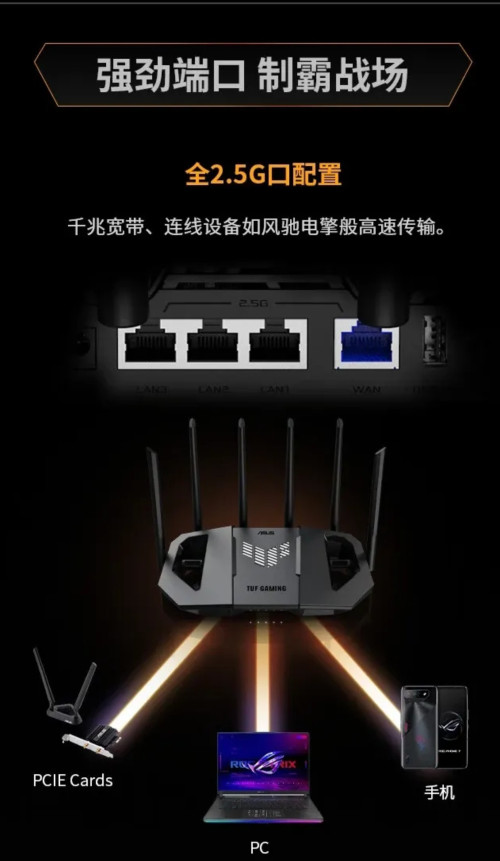
QUOTE(Verblassen @ Jul 11 2024, 07:07 PM) Hi all, quick question: For certain location, 1Gbps plan got capped at 940Mbps by the OLT infra vendor1. I have the D-link Black box set to bridge mode. Cat 8 cable (Vention - if this helps) from the 2.5Gbe port to my router's WAN (2.5Gbe as well). Router is an Asus TUF BE6500 (launched in China only), got it from Shopee and setup accordingly. I've had AC86u's in the past from Taobao as well so setup was quite seamless. This router has 4 2.5Gbe ports per spec sheet. However, I'm only getting 940mbps download (seemed capped as though I was using a gigabit port). I have yet to move into my house so limited to phones so far. Tested with an iPhone 14 pro max, Samsung s24 ultra and Samsung note 10+ Any ideas? 🥲 » Click to show Spoiler - click again to hide... « 2. *After* setting the Dlink black box into bridge mode, is there any way to "access" it's setup page? 🤭🤭 Thank you in advance!!! You can test your luck to fight with TM but good luck |
|
|
|
|
|
Jul 11 2024, 09:36 PM
Return to original view | IPv6 | Post
#34
|
|
Elite
8,421 posts Joined: Jul 2008
|
QUOTE(Verblassen @ Jul 11 2024, 07:27 PM) Does this only apply to only wifi clients? When the installer came to setup he was able to get 1.2gbps on Fast.com with his Macbook. Fast.com can be inaccurate on default settingsI'm based in Old Klang road if anyone is facing something similar. Speedtest.net is the most accurate speedtest out there QUOTE(Mazda9 @ Jul 11 2024, 07:32 PM) Hi, A bit of backstory on TM equipmentI’m on 1Gbps Unifi plan. The issue is when I’m using the 2.5gb Unifi black combo box paired with my Asus rtac5300 router or with my tp-link ge800 router as bridge, my download speed will drop after few days from 950mbps to 300-450mbps after few days. I’ll call Unifi technical support, they will eventually reset the port and the issue will be solved for few days then back to square one again. TM engineer came to give me spare fiberhome white box to test and see but surprisingly the issue doesn’t happen with white fiberhome ONU box. Any idea what’s wrong? Back then, the ONU model given will depends on the OLT model at your location. So, if it's Fiberhome OLT, you will get Fiberhome ONU. Similarly, if it's ZTE OLT then you will get ZTE ONU. In simple layman terms, the OLT is like a router or server at your nearest TM exchange that connect to every users. Then, TM start to roll out universal ONU and it seems like the compatibility is not great with certain OLT model. There's other forumers reporting this issue and you are certainly not alone. |
|
|
Jul 12 2024, 12:03 AM
Return to original view | IPv6 | Post
#35
|
|
Elite
8,421 posts Joined: Jul 2008
|
QUOTE(evilhomura89 @ Jul 11 2024, 11:49 PM) Shopee mobile can't load smoothly every night - TM's fault or shopee fault? Can you post your MTR result cause your smokeping to Equinix SG is fine. Shopee hosted in Equinix SG btwhttps://smokeping.mywebping.com/smokeping/?...erceMY-Shopee-4 See the 10/30 days graph, notice the spike on a nightly basis Can confirm this issue is not happening on Maxis QUOTE(cpt7 @ Jul 11 2024, 11:55 PM) I'm having the same symptom, 2gbps package. You get 9xx up? That's really screwed up but a good one.Dlink combo Black, bridge mode: -after few hours the speed seems 'throttled' to 200-300mbps download & 100mbps upload. -once reset (by calling 100 or off-on modem) speed back to normal but only last for few hours. given old fiberhome onu by TM tech to test: -no issue so far. -speed stabe at 9xx down/9xx up for more than 3 days. now am waiting for solution from them  . . OLT is fiberhome (checked with nijika fw). This post has been edited by blacktubi: Jul 12 2024, 12:03 AM |
|
|
Jul 12 2024, 12:36 AM
Return to original view | IPv6 | Post
#36
|
|
Elite
8,421 posts Joined: Jul 2008
|
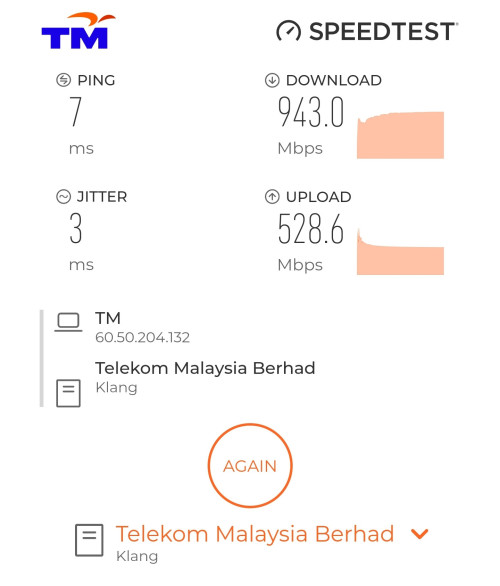
QUOTE(Verblassen @ Jul 11 2024, 11:40 PM) 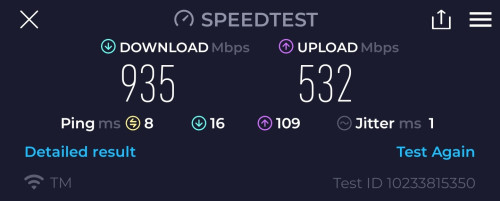 Still okay on my end. Except my potentially stewpid 940mbps cap as what Blacktubi mentioned earlier. 🥲  Look at my speed, similar to what you're getting although I am on a different ISP  From what I'm told, this is how it's configured by that one particular OLT vendor for 1Gbps users on TM Infra Let me know if you manage to get your full 1Gbps speed eventually  |
|
|
Jul 15 2024, 11:41 AM
Return to original view | IPv6 | Post
#37
|
|
Elite
8,421 posts Joined: Jul 2008
|
QUOTE(TubeNRibbon @ Jul 15 2024, 11:39 AM) You can't change the ONR unless you look Anime for GPON stick. You can use your old fiberhome modem if you still have it.I wish to throw away the ONR! That unit can deliver 920Mbps consistently. enduser liked this post
|
|
|
Jul 18 2024, 06:09 PM
Return to original view | IPv6 | Post
#38
|
|
Elite
8,421 posts Joined: Jul 2008
|
QUOTE(izhamsatria @ Jul 18 2024, 01:05 PM) You're wasting their time and your money Actually, there's an OLT level cap and it's known as DBA. The DBA profile can be misconfigured at some OLT.Nowadays, they do not cap at OLT/ONU. Only cap at pppoe profile. Regarding fast.com result, its not accurate Huawei OLT is really strict on DBA profile. It wouldn't let you to allocate more bandwidth than the available bandwidth. I will give you an example how it can be misconfigured. Huawei OLT will round down the DBA bandwidth into a multiple of 64. If the DBA profile is set to 1000, it will round down to 960Mbps (64*15). However, I agree that it's wasting time cause only very senior engineer can understand this and it really can't be fixed easily. I have the exact same issue on Maxis-TM infra.  bezitagt and cHiLdHo0drEaMz liked this post
|
|
|
Jul 18 2024, 09:50 PM
Return to original view | IPv6 | Post
#39
|
|
Elite
8,421 posts Joined: Jul 2008
|
QUOTE(failed.hashcheck @ Jul 18 2024, 08:08 PM) If im using ZTE ONU, thats a good indicator that im on ZTE OLT as well right? More likely to be ZTE but not 100% sure. Could be Huawei as well.Or these thing could work with whatever pairing? |
|
|
Jul 18 2024, 10:28 PM
Return to original view | IPv6 | Post
#40
|
|
Elite
8,421 posts Joined: Jul 2008
|
For those who got the Skyworth GN630V combo router, it's super easy to turn that thing into bridge mode and still use PPPOE at your own router.
You should definitely do that as any decent third party router should have a much faster CPU than the GN630V. My settings below:  Note: VLAN tagging / IPTV Profile / VLAN profile not needed on your router with this configuration! Remember to switch off the WiFi function once that's done. |
|
Topic ClosedOptions
|
| Change to: |  0.2283sec 0.2283sec
 1.36 1.36
 7 queries 7 queries
 GZIP Disabled GZIP Disabled
Time is now: 19th December 2025 - 10:04 AM |
 Quote
Quote