Welcome Guest ( Log In | Register )

Bump Topic Topic Closed RSS Feed
9 Pages « < 3 4 5 6 7 > » Bottom

Outline · [ Standard ] · Linear+

Unifi Official TM UniFi High Speed Broadband Thread V42, READ 1ST PAGE FOR RELEVANT WIFI INFO!

views
     
blacktubi
post Sep 5 2024, 10:48 PM

-
Group Icon
Elite
8,421 posts

Joined: Jul 2008

QUOTE(OKLY @ Sep 5 2024, 07:22 PM)
Not sure if it's just me but when I turn on DoT on my router, the lookup is really slow. Changing to plain text DNS makes it normal again. Is this TM's doing? hmm.gif sweat.gif
*
DoT is much slower especially for those request that's not cached on your router

TLS handshake process is just slow
blacktubi
post Sep 5 2024, 11:11 PM

-
Group Icon
Elite
8,421 posts

Joined: Jul 2008

QUOTE(yakumo @ Sep 5 2024, 11:09 PM)
I feel like regret upgrading to 1GBps, line very unstable, speed test fast but update steam game like 4MBps.., before 60-100
*
If you’re using the D-Link ONT

You should remove it and use your old fiber modem
blacktubi
post Sep 6 2024, 01:31 AM

-
Group Icon
Elite
8,421 posts

Joined: Jul 2008

QUOTE(Anime4000 @ Sep 5 2024, 11:57 PM)
kwss blacktubi PRSXFENG soonwai

user posted image

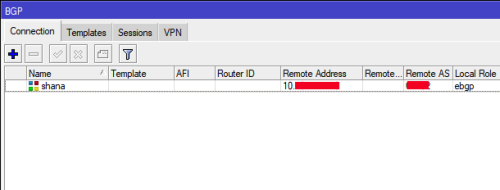
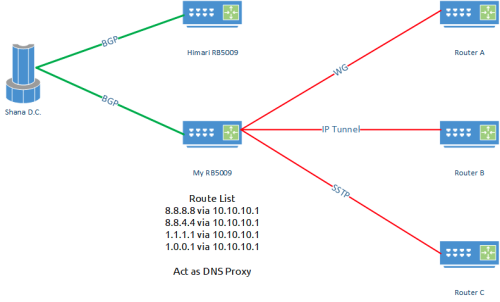
I forgot that My Mikrotik connected to friend BGP Data Centre,
I could just play with Route instead

8.8.8.8 via 10.10.10.1
8.8.4.4 via 10.10.10.1
1.1.1.1 via 10.10.10.1
1.0.0.1 via 10.10.10.1

of course BGP I connected via VPN tunnel

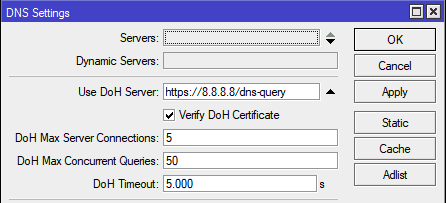
so far I tried act as DNS Proxy via VPN like this:
user posted image

dirty method so far

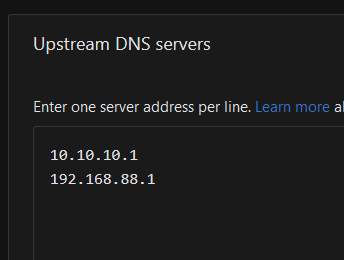
of course I have AdGuard, I been setup this way
user posted image
user posted image

Shana BGP <- RB5009 <- AdGuard
user posted image
user posted image

I do this because AdGuard Home cannot set SRV
user posted image
*
This is a great solution as it doesn't involve DNS forwarding as long as your latency to the VPN host is good.

I am running bind at a cloud instance to forward my DNS request to a public resolver so I can literally use it everywhere. Only downside is I am counting on my firewall and config to prevent DNS amplification attack.

Btw check out what the guys at Indon did https://github.com/bebasid/bebasdns

This post has been edited by blacktubi: Sep 6 2024, 01:35 AM
blacktubi
post Sep 6 2024, 02:05 AM

-
Group Icon
Elite
8,421 posts

Joined: Jul 2008

PSA: Expect your Internet to be slower

Since all DNS query is hijacked now, it means additional load to an already slow DNS server
blacktubi
post Sep 6 2024, 02:13 AM

-
Group Icon
Elite
8,421 posts

Joined: Jul 2008

Can anyone help to test if my previous list still working?

Not in MY currently

NTT
129.250.35.250
129.250.35.251

Singtel
165.21.83.88
165.21.100.88

L3
4.2.2.1
4.2.2.2
4.2.2.3
4.2.2.4
4.2.2.5
4.2.2.6
blacktubi
post Sep 6 2024, 02:24 AM

-
Group Icon
Elite
8,421 posts

Joined: Jul 2008

QUOTE(soonwai @ Sep 6 2024, 02:16 AM)
Just change to unaffected DNS. Like from list above. Dun know how long those will last. Or your own secret one but dun share here. Just normal plain DNS port 53 until TM decides to redirect port 53.

Save the advanced stuff for later.
*
It doesn't matter as the ISP got full visibility on port 53

They can't redirect entire port 53 either as it will break many things

In fact, them messing with 1.1.1.1 already cause issues with companies that use Cloudflare Zero Trust doh.gif
blacktubi
post Sep 6 2024, 10:00 AM

-
Group Icon
Elite
8,421 posts

Joined: Jul 2008

QUOTE(karenzayn @ Sep 6 2024, 09:38 AM)
https://dash.cloudflare.com/ can masuk on Unifi, but main website kennot, lmao
*
I have sympathy on all sysadmin that come into work today, might as well just EL laugh.gif

Cloudflare zero trust stops working

And infra maintainer can't login into their cloudflare portal
blacktubi
post Sep 6 2024, 10:13 AM

-
Group Icon
Elite
8,421 posts

Joined: Jul 2008

I just tested and confirm that these are still working properly on Unifi biggrin.gif

NTT
129.250.35.250
129.250.35.251

Singtel
165.21.83.88
165.21.100.88

L3
4.2.2.1
4.2.2.2
4.2.2.3
4.2.2.4
4.2.2.5
4.2.2.6

blacktubi
post Sep 6 2024, 10:17 AM

-
Group Icon
Elite
8,421 posts

Joined: Jul 2008

QUOTE(kingkingyyk @ Sep 6 2024, 10:14 AM)
Assume you do DoH to 8.8.8.8, your router sends out the packet, then on TM side they just route the packet to their server.
So practically you are sending the request to their server, not the destination you expect.
*
Good thing with DoH is they cannot hijack it and serve other sites like unencrypted DNS request, at least for now

The device that's trying to resolve will just stop resolving as the certificate is invalid
blacktubi
post Sep 6 2024, 10:22 AM

-
Group Icon
Elite
8,421 posts

Joined: Jul 2008

QUOTE(soonwai @ Sep 6 2024, 10:17 AM)
no no, TM stole 8.8.8.8, 1.1.1.1, 9.9.9.9 and a few others. All those IPs now go to a TM box, I think in Brickfields. No more Google, just google™, cloudflare™ and quad9™
*
It goes to a ibusawat TM near you

TM is not that incompetent, they are nice enough to implement Anycast DNS with DNS server throughout the nation to reduce latency

Imagine those living in Sabah/Sarawak need to endure high latency to KL TM DNS server, that's not great

That's why the DNS blocking implementation is done by location tongue.gif

This post has been edited by blacktubi: Sep 6 2024, 10:23 AM
blacktubi
post Sep 6 2024, 04:02 PM

-
Group Icon
Elite
8,421 posts

Joined: Jul 2008

QUOTE(yenchenje @ Sep 6 2024, 03:58 PM)
Currently TM's BGP has fully blocked those?

So no matter what DNS I use currently I can't access any of these, only way to access it is to let BGP route my traffic via non TM's gateway/IP correct?
*
DNS job is to just resolve domain name into IP.

dns.google resolves to 8.8.8.8 and 8.8.4.4

Both IP addresses are hijacked on BGP level.

Just VPN, it's easier.
blacktubi
post Sep 6 2024, 04:07 PM

-
Group Icon
Elite
8,421 posts

Joined: Jul 2008

QUOTE(kingkingyyk @ Sep 6 2024, 04:04 PM)
It works. wink.gif They are just sending your requests that are meant to reach well known DNS server (identified by IP address) to their server instead.

In AWS you will get dynamic IP address and they will not be able to ban since you can easily switch to different IP and life continues as usual, but this is just not practical to do for personal service.
*
No, that AWS trick is just sorting out the DNS resolve part.

But, the IP itself is hijacked on BGP now.

You can't bypass that without the use of a VPN.
blacktubi
post Sep 6 2024, 04:47 PM

-
Group Icon
Elite
8,421 posts

Joined: Jul 2008

QUOTE(Oltromen Ripot @ Sep 6 2024, 04:34 PM)
VPN drains battery.
Insufficient time to ternak pawn in tub.
*
Run VPN on your router then

Even a mid spec router can support 900+ Mbps on Wireguard now
blacktubi
post Sep 6 2024, 05:12 PM

-
Group Icon
Elite
8,421 posts

Joined: Jul 2008

QUOTE(isr25 @ Sep 6 2024, 05:03 PM)
I didn’t know Nord offers Wireguard?
*
Their so-called NordLynx is basically rebranded Wireguard


blacktubi
post Sep 7 2024, 06:22 PM

-
Group Icon
Elite
8,421 posts

Joined: Jul 2008

QUOTE(kwss @ Sep 7 2024, 07:28 AM)
He just admitted to the whole world there is no due process in website blocking in Malaysia.
Everything ikut suka aku.
I wonder how many of those charged under MCMC Act is actually found guilty in the end.

From his statement alone, all the existing blocking should be removed be rendered illegal government interference.

If I am ISP with big legal team, I will definitely bring this to court.
*
For transparency purpose, they should publish the list of blocked pages and why it's blocked.

If they want to go through with this, there should be a proper framework and not just a random surprise.

Imagine someone managing the blocklist decided to block a random website cause his/her kids are spending too much time. Or, if someone decided to block a certain e-commerce website which compete with his/her own family business.

And, it should be subjected to external review and independent audit of the whole procedure as well.
blacktubi
post Sep 7 2024, 06:46 PM

-
Group Icon
Elite
8,421 posts

Joined: Jul 2008

QUOTE(faizyunus @ Sep 7 2024, 06:32 PM)
Not only they need to provide justification as to why its blocked but they also need to disclose the entity/ministry who requested for that site to be blocked in the first place

And that list needs to be updated regularly like every quarter and publicly accessible.
*
That's right, the officer in charge might abuse power to simply block something without a proper framework in place.

And, there should be an early notice to the owner of the website before a block. Basically MCMC is acting like a gatekeeper without giving website owner a chance to remediate. Without a framework, any website might be blocked, even forum.lowyat.net.

Even in the context of law, there should be a cease and desist procedure and only proceed with the block. At least give the website owner a chance to remove the harmful content or to comply with local regulations.

This whole thing feels like a sham without proper regulatory framework, lack of transparency and communication to the general public.

This would discourage foreign firms to invest in Malaysia especially for tech or Web 3.0.

blacktubi
post Sep 8 2024, 03:29 PM

-
Group Icon
Elite
8,421 posts

Joined: Jul 2008

QUOTE(Khan92 @ Sep 8 2024, 03:09 PM)
Sorry iklan kejap.

Anyone know which TM Point got stock for gaming laptop if decide to purchase the add on?

Kl/Selangor area
*
I think it will be fulfilled by their partner even if you order from TM Point, don't think they keep stocks for gaming laptop

You may try KLCC Unifi store which should be the biggest now
blacktubi
post Sep 10 2024, 10:47 PM

-
Group Icon
Elite
8,421 posts

Joined: Jul 2008

QUOTE(blackbox14 @ Sep 10 2024, 10:30 PM)
Do let me know how your testing goes. AX59U was one of the models I was looking at because I have limited space where my network equipment is placed. Standing also helps dissipate heat better there.
Yeah I understand.

If they had a local rep I would be willing to try them out. But without easy way to get a replacement, I had to think twice.
*
I actually bought their AX6000 router, thought of reviewing it.

Well I would say, it's buggy and the firmware QA not on par with the mainstream networking OEMs. Support is non-existent as well.

Need to constantly check their forum then I just gave up on them
https://forum.gl-inet.com/t/flint-2-gl-mt60...ve-thread/35608
blacktubi
post Sep 10 2024, 11:39 PM

-
Group Icon
Elite
8,421 posts

Joined: Jul 2008

QUOTE(dev/numb @ Sep 10 2024, 11:08 PM)
I had their AX1800 model (Flint 1) and liked it, but would not recommend it. I got it early when its firmware still didn’t have GUI for PPPoE, so had to SSH into it in order to get it connected. Then it had some  connectivity issues with Apple devices and I had to lock the wifi to 80Hz in order to mitigate it. AdGuard home built-in was great, but it would stop all blocking every other week and required a reboot (nightmare for Unifi users because we need to play the IP pool lottery). Firmware updates did fix many bugs, but introduced new ones as well. Last firmware update gave me this weird issue where latency started increasing with distance from the router. At that point I considered flashing stock OpenWRT on it, but got lazy and just went back to my Asus AX86u with Merlin+amtm for the reliability. I like what GL.iNet do, but they need to do it better.
*
Yup, they can fix the software feature bugs easily. But whenever the WiFi radio gets involved, it took them forever to fix it if they can even fix that.

I like what they’re doing with the firmware too but it seems that they have no idea how to optimize the WiFi radio to be really robust and problem free.
blacktubi
post Sep 11 2024, 10:15 AM

-
Group Icon
Elite
8,421 posts

Joined: Jul 2008

QUOTE(petrofsky77 @ Sep 11 2024, 10:06 AM)
I keep seeing a lot of peeps asking about max speed when speedtesting Unifi Ultra 1GBps and 2GBps.

TL:DR, if you're on Unifi Ultra, and the LAN port you have right now is only Gigabit (10/100/1000MBps), then you'll only be seeing a max of 940MBps down. This is normal due to the limit of the port itself. for upload, a max of 940MBps (for 2GBps line) and 500MBps (for 1GBps line).

In order to see down speed of at least 1000MBps for 1GBps line, you'll need at least a 2.5GBe ethernet port on both ends to be able to see the speed.
*
It will be 960Mbps for most 1Gbps users even with a 2.5GBe ONU and 2.5GBe devices.

Unless you're lucky with a properly configured speed cap profile, else it will be 960Mbps.

9 Pages « < 3 4 5 6 7 > » Top
Topic ClosedOptions
 

Change to:
| Lo-Fi Version
0.1037sec    0.51    7 queries    GZIP Disabled
Time is now: 20th December 2025 - 03:45 PM