Welcome Guest ( Log In | Register )

Bump Topic Topic Closed RSS Feed
9 Pages « < 4 5 6 7 8 > » Bottom

Outline · [ Standard ] · Linear+

Unifi Official TM UniFi High Speed Broadband Thread V42, READ 1ST PAGE FOR RELEVANT WIFI INFO!

views
     
blacktubi
post Sep 11 2024, 11:25 AM

-
Group Icon
Elite
8,427 posts

Joined: Jul 2008

QUOTE(boombaamboom @ Sep 11 2024, 10:12 AM)
Just got my free upgrade (800mbps-1gbps)on 3rd sept 2024
Got the D-Link Model no : DPN-FX3060V  (black) old firmware v1
Cat7 + 2.5port on dlink connected to my 2.5 lan motherboard(auto nego with 2.5gbps) = 940-950mbps only
make a report and 1st lvl technician came on 5sept but failed to fix the issue reported which cant get >1000mbps
technician filed report for EC team (higher lvl)
Ec team (unifi elite)came on 9sept and do diagnose which is changing router / open higher OLT / upgrade firmware
Problem fixed

Got constant speed >1000mbps ( average 1040-1060mbps) now with the free router DLINK DPN-FX3060V (Firmware ver:DPN-FX3060V_V2.0.3)
Based on the technician need to use the v3 firmware and some configuration on cabinet side
My area using Huawei Infra

user posted image
user posted image
*
You are super lucky that they are willing to layan you

All my friends got the 90% speed achieved respond from their contractor

Didn't even get TM's own technical team to come and visit
blacktubi
post Sep 13 2024, 05:47 PM

-
Group Icon
Elite
8,427 posts

Joined: Jul 2008

QUOTE(saffron @ Sep 13 2024, 05:45 PM)
Anyone face this issue before with 'PAP authentication failed' or incorrect pppoe username password?

Unifi crew came over but unable to fix it & they need to make a phone call to HQ to fix it. The problem is that, the same problem again on the 2nd day
*
Are you trying to use your PPPOE username and password at 2 places? tongue.gif

Anyways, try to ask them to reset your PPPOE username and password
blacktubi
post Sep 17 2024, 10:17 AM

-
Group Icon
Elite
8,427 posts

Joined: Jul 2008

QUOTE(kwss @ Sep 17 2024, 10:09 AM)
This is why I find it weird they do not offload to MyIX.
There's only port fee of RM6k per month for 100Gbps.
All the big tech are there.

Foreign IXP like Equinix and SGIX only charge a fixed price port fee too.

Yet TM will offload traffic to their upstream which is billed at 95th percentile. Something very shitty must be going behind the scene.

Don't say I accuse some of their executive got wined and dined by their upstream.
*
Just speculation, don't quote me on this

MyIX is located in AIMS, AIMS largest shareholder is TIME

Now guess who doesn't like to work with TIME
blacktubi
post Sep 17 2024, 08:55 PM

-
Group Icon
Elite
8,427 posts

Joined: Jul 2008

QUOTE(tzarain @ Sep 17 2024, 08:11 PM)
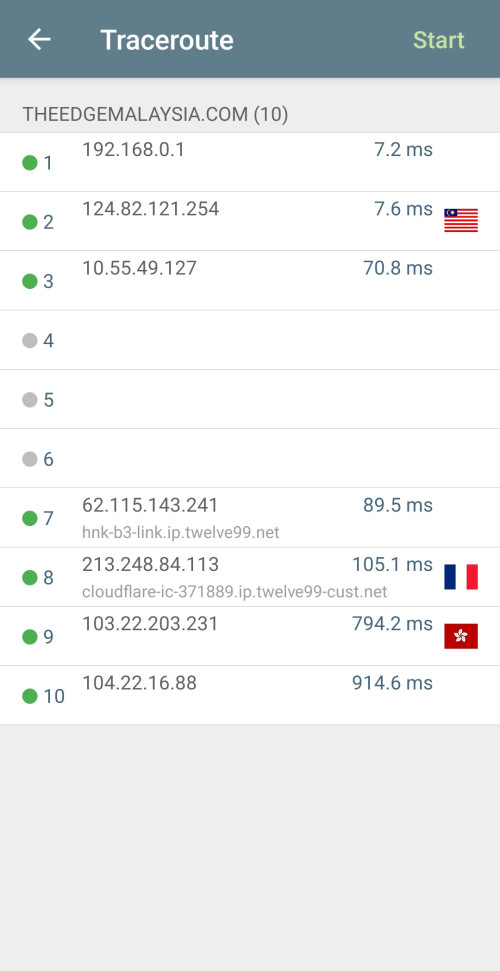
Weird. Why are some websites on cloudflare routed to EU? No wonder loading some popular websites so laggy.

user posted image
*
https://www.cloudflarestatus.com/

CF KL is partially rerouted currently
blacktubi
post Sep 23 2024, 11:41 AM

-
Group Icon
Elite
8,427 posts

Joined: Jul 2008

QUOTE(cpmlml @ Sep 23 2024, 11:38 AM)
Any good modem and router combo from Asus or Tplink or Dlink that we can use for Unifi? I check ASUS website seem don't have one.
*
Technically TM doesn't allow the use of third party fiber modem.

And, fibre modems are ridiculously complicated, each ISP have their own technical implementation.

That's why you dont see third party fibre ONU sold directly to average home consumers out there.
blacktubi
post Oct 3 2024, 10:16 AM

-
Group Icon
Elite
8,427 posts

Joined: Jul 2008

QUOTE(Kelvynlim @ Oct 3 2024, 09:48 AM)
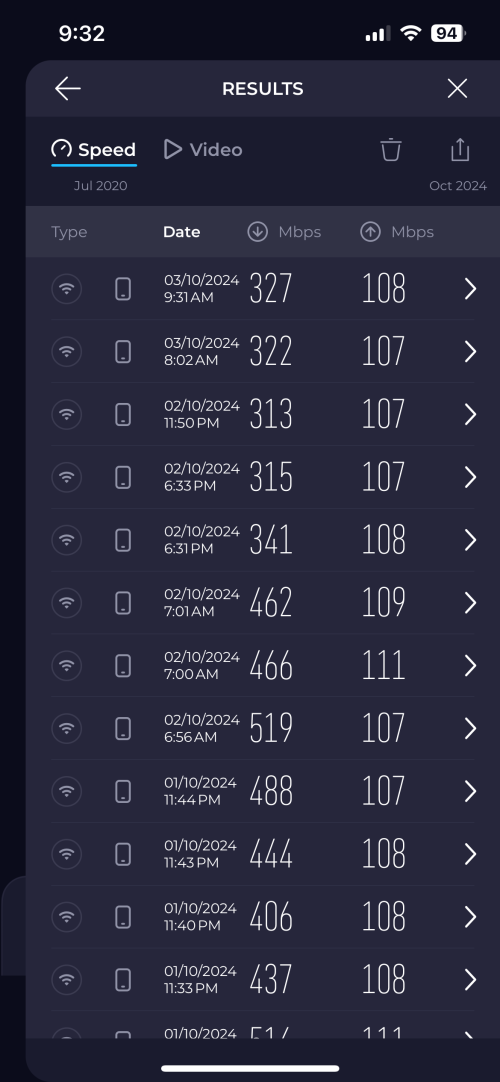
I was on swu4.0 with 500mbps, however after the first and second day of installation, I couldn’t get my 500 mbps speed at all. In fact, the speed was consistently stay at 300-400.

I am using iPhone 14 to do the speed test. I was using sky worth mod with my asus router then I switch to ONU huawei modem second day onwards.

I wonder if sifu can pinpoint whats wrong with my connection.

user posted image
*
Try to test using LAN cable to isolate the problem
blacktubi
post Oct 8 2024, 10:22 PM

-
Group Icon
Elite
8,427 posts

Joined: Jul 2008

QUOTE(kcl2006ch @ Oct 8 2024, 10:17 PM)
i got see TM also have 2.5G ONU from fiberhome which for other ISP users like Maxis
*
What's the model of the fiberhome ONU?

Currently Maxis 1/2Gbps users will get Skyworth 2.5G ONU
blacktubi
post Oct 14 2024, 04:30 PM

-
Group Icon
Elite
8,427 posts

Joined: Jul 2008

QUOTE(iamyourdaddy27 @ Oct 14 2024, 04:27 PM)
TM guys coming to install new router and modem this Thursday

I am currently using UniFi- Huawei Modem since 2018 and a WiFi 7 Router TP Link Archer BE550 (Future proofing) as my main router and a Asus WiFi 5 as access point.

TM guy said they will provide a new WiFi 6 router and a new modem. He said something about a black D-Link router or modem not sure which he was referring to.

My question is since I have WiFi 7 router as the main, should I/ Could I replace UniFi new Router WiFi 6 with my Asus WiFi 5 router which is an access point? Do TM allow that or the UniFi Router WiFi 6 router has to be the main router?

Any advise on how I could improve my configuration?

Currently my configuration is:

user posted image
*
Let them install the new router

Once they are gone, put back your old Huawei modem and your existing setup

It's Huawei modem is much better and more reliable than the new combo box solution which is just horrible.
blacktubi
post Oct 14 2024, 05:57 PM

-
Group Icon
Elite
8,427 posts

Joined: Jul 2008

QUOTE(vapanel @ Oct 14 2024, 05:06 PM)
I think the new dlink combo not bad. It definitely faster and more responsive than the old modem maybe because I upgraded my speed.

Is Huawei HG8240H better than dlink DPN-FX3060V_V2.0.2 as a modem for 1gbps? Maybe I will try to swap and try. It
*
QUOTE(vapanel @ Oct 14 2024, 08:28 AM)
Mine is DPN-FX3060V_V2.0.2

Then don't configure into bridge mode.

Just turn off WiFi

Still getting 1gbps after 1 week

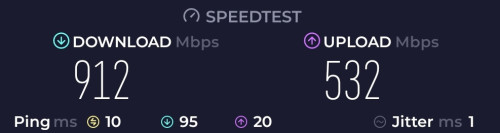
This is my wifi speed with wifi router connect to dlink combo using cat6 cable

user posted image
*
If you are coming from an older router, the DPN-FX3060V will be an upgrade.

However, if you have a good router, you have nothing to gain from the DPN-FX3060V unless your fiber line one of the fewer ones with true 1000Mbps speed. The Huawei modem is perfectly capable for up to 940Mbps.

In fact, using that thing on bridge mode is prone to slow down issues like many reported here.

Looking at your speedtest result, I would say your bufferbloat is horrible. 95ms download loaded latency on a fiber line is just bad.
blacktubi
post Oct 14 2024, 06:14 PM

-
Group Icon
Elite
8,427 posts

Joined: Jul 2008

QUOTE(vapanel @ Oct 14 2024, 06:12 PM)
I am using Asus AX4200 recommended by you. The 95ms is probably because it's WiFi? And other people is using the internet also?

Also DPN-FX3060V I didn't configured anything. I just turn off the WiFi on the DPN-FX3060V and plug my Asus ROG AX4200 to the 2.5gbE port and configured as AP.

How long I wait until DPN-FX3060V reduce speed? I am still getting the almost 1gbps speed for 1 week. Does it degrade after 1 month or something?
*
Speed reduction issue will only happen if you're using bridge mode on the DPN-FX3060V. Won't happen if DPN-FX3060V is the one handling the PPPOE.

I will prefer to use the TUF-AX4200 as the main router as the 2.0GHz Quad Core CPU is much faster than the DPN-FX3060V.

Using it on AP mode is just wasting all the hardware.

This post has been edited by blacktubi: Oct 14 2024, 06:15 PM
blacktubi
post Oct 15 2024, 10:11 PM

-
Group Icon
Elite
8,427 posts

Joined: Jul 2008

QUOTE(x5_416 @ Oct 15 2024, 09:59 PM)
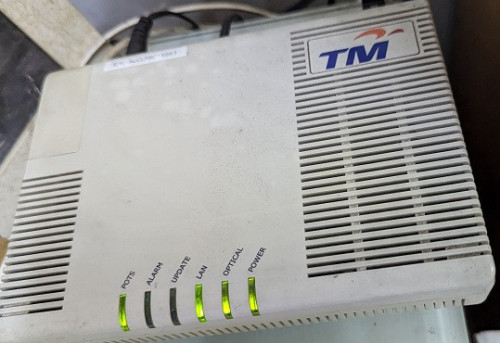
Hi guys, would like to ask about that D-Link DPN-FX3060V. I got the 1GB upgrade recently, my house is still using the box as shown below, is it better to use the D-Link DPN-FX3060V or keep this one with my tplink wifi router?  hmm.gif

user posted image
*
Your modem is way too old

Use the DPN-FX3060V, change it to bridge mode if you have a good router that's AX3000 and above

If not, just use th DPN-FX3060V
blacktubi
post Oct 18 2024, 01:05 PM

-
Group Icon
Elite
8,427 posts

Joined: Jul 2008

QUOTE(afif92 @ Oct 18 2024, 12:22 PM)
Nice.. When I free I want to try if new firmware still same like old or not.. For now, in bridged mode and current firmware ( dont know because didnt check) , the speed does not drop after change MTU to 1492 after connecting to Wireguard..
*
Curious to know you changed the MTU on your router or at the modem
blacktubi
post Oct 24 2024, 10:50 PM

-
Group Icon
Elite
8,427 posts

Joined: Jul 2008

QUOTE(shdin271 @ Oct 24 2024, 09:39 PM)
Hi guys need advice. Recently subscribed unifi 300mbps landed house. Tm gave the fiberhome router.

Issue is im getting bad signal at 2nd floor. I have wired backhaul to family area up stairs which ive hooked up dlink dir 850l from my old house.

Even so, my phone isnt auto roaming to the dlink.. i need to forget & rejoin the ssid.

Any advise on what to do? Should i get a mesh or AP?
Im expecting seamless autoroaming & good wifi speed (im getting 260mbps when connected to dlink - which im satisfied)
*
For roaming to work properly, usually you need to buy something that at least comes with 802.11k/v

TP-Link Deco series
TP-Link Archer with EasyMesh
ASUS AiMesh
blacktubi
post Oct 25 2024, 10:09 AM

-
Group Icon
Elite
8,427 posts

Joined: Jul 2008

QUOTE(BenYeeHua @ Oct 25 2024, 09:50 AM)
Better get yourself Mi one, MiPush + MiHome is battery friendly to your smartphone, they will push ASAP when detect any movement, unless you are not using XiaoMi/Hyper OS ROM smartphone la.

It is very good when you going outstation. thumbsup.gif

For other brand smartphone and CCTV, they need to run at background for notification push, but if you tech enough, sure you can seek those standard protocal and make a Telegram or Discord bot push to your phone via GMS, and the data sure process on your local only.
And well, as nowadays latest phone is 6000MaH battery with 45W+ quick charge, so it is really not a battery life issues anymore lol. tongue.gif
*
Tapo uses GMS and camera stream loads faster than Xiaomi. Stream delay is lesser as well. laugh.gif

Another fun fact, Tapo is currently hosted in Amazon AWS. And, it uses SG region for users here.

The last time I checked, Xiaomi is hosted in China. If your ISP have messed up routing to China then you gonna face issues with Xiaomi smart home ecosystem mainly on delay in actions.
blacktubi
post Oct 26 2024, 11:42 AM

-
Group Icon
Elite
8,427 posts

Joined: Jul 2008

QUOTE(loui @ Oct 26 2024, 11:27 AM)
In May 2024, I went to downgrade my unifi package and resign two years contract go get a cheaper rate

From June to October, unifi is charging me free

Is this some sort of promotion?

The staff who help me to downgrade never tell me anything
*
I guess they signed you up for the SWU package which comes with 6 months free subscription

You may call 100 for clarification
blacktubi
post Oct 28 2024, 10:40 AM

-
Group Icon
Elite
8,427 posts

Joined: Jul 2008

QUOTE(AVFAN @ Oct 28 2024, 10:37 AM)
i m a little confused with, kindly clarify for me if u know... thanks.

.. i m on 800mbps, no contract.
.. recd call a month ago, said will upgrade to 1gbps... no news after that.

.. recd call today... said upgrade to 1gbps.
.. then something like "3 months waiver", "4th month onwards, same old price as before", 24m contract.
.. "sim card rm39, bundle...?"
.. no written document on this campaign, no email, just talk on phone only...??
what is this new plan, what hidden conditions, why no written info on any website?

anyone who has gone thru this, please comment with some relevant details as i m not sure if i heard everything right.

thank you very much!
*
Just walk in to a real TM point (not agent/authorized store) and ask about SWU plans. Their deal is usually better than their telemarketing team.
blacktubi
post Nov 1 2024, 09:19 PM

-
Group Icon
Elite
8,427 posts

Joined: Jul 2008

QUOTE(foongchinboon @ Nov 1 2024, 09:58 AM)
Hi All,
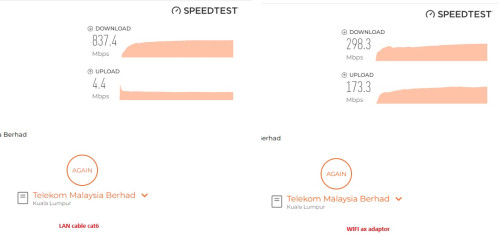
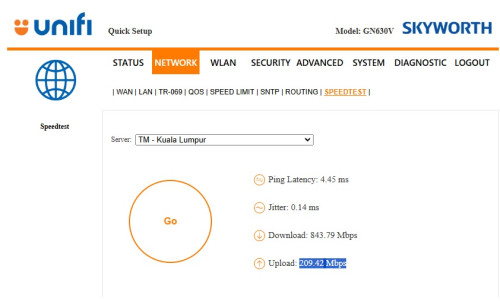
i have some upload speed issue here that need for advice.
my unifi package "800Mbps Hebat Deal"
Router given by Unifi Skyworth GN630V
when i connected LAN cable to my PC and perform speed test seem like my upload speed capped at 5Mbps, then i switch to WIFI (without restart any device or router) and seem become back to normal upload speed as picture below. Is that something that i needed to configure on LAN connection setting? tried use internal router speed test looks good upload speed >200Mbps. thanks in advance.  notworthy.gif
user posted image
user posted image
*
Do you still have your old modem

Use that instead, it's better than those combo modem router
blacktubi
post Nov 9 2024, 01:14 PM

-
Group Icon
Elite
8,427 posts

Joined: Jul 2008

QUOTE(ahboy99 @ Nov 9 2024, 01:09 PM)
how do you optimize speed through MTU tho? using unifi provided router skyworth gn630v and asus rt-ac86u(merlinwrt) instead

or is they any tips and tricks around it?
*
GN630V run it on bridge mode

Use PPPOE on ASUS router, stick to default MTU 1492 unless you are facing issues

1492 is the highest possible MTU on Unifi
blacktubi
post Nov 9 2024, 11:47 PM

-
Group Icon
Elite
8,427 posts

Joined: Jul 2008

QUOTE(StuartLee2015 @ Nov 9 2024, 10:50 PM)
Currently using Fiberhome SR1041F AX3000 router. Plan was 800Mbps.  Desktop using AXE5400 Tp-link PCIE Wifi card ( Wifi 6e )

Single storey house. Router roughly at the center of the house. My pc is in my room and the router is at dining hall TV table. My room and dining hall is just side by side. Signal strength around 77% .
Is the D-link DIR-X3000Z ( non unifi ) better and more stable wifi signal strength or just the same?
*
With a good router you can get around 600-700Mbps for that kind of distance.

The DIR-X3000Z is just a cheap basic router. Don't expect a huge improvement.

I would suggest get something a little higher end like TP-Link Archer AX73 or ASUS TUF-AX4200 then you will see a huge jump in performance.

Of course, if you have even higher budget, getting the full 1Gbps is possible with WiFi 7 routers.
blacktubi
post Nov 10 2024, 12:12 AM

-
Group Icon
Elite
8,427 posts

Joined: Jul 2008

QUOTE(jasontanky @ Nov 9 2024, 11:54 PM)
Sorry for hijacking the reply, I am currently on MR80X but experiencing speed around 450Mbps with 2 bar on 160MHz and plan to upgrade router. May I know if Asus AX4200 or TPLINK AX73, BE230 or MR90X will be a better choice? The phone is iPhone 15. Thank you
*
450Mbps over a short distance or over a wall? if 450Mbps over a wall then that's pretty good already.

Anyways, the Archer AX73 will probably give you a 15-25% boost. Up to you to decide whether that's worth it since you already got the MR80X now.

9 Pages « < 4 5 6 7 8 > » Top
Topic ClosedOptions
 

Change to:
| Lo-Fi Version
0.0390sec    1.22    7 queries    GZIP Disabled
Time is now: 23rd December 2025 - 08:58 PM