Welcome Guest ( Log In | Register )

Bump Topic Topic Closed RSS Feed
495 Pages « < 255 256 257 258 259 > » Bottom

Outline · [ Standard ] · Linear+

Unifi Official TM UniFi High Speed Broadband Thread V42, READ 1ST PAGE FOR RELEVANT WIFI INFO!

views
     
soonwai
post Sep 4 2024, 12:24 AM


********
All Stars
11,459 posts

Joined: Oct 2007
From: KL


QUOTE(karenzayn @ Sep 4 2024, 12:11 AM)
Uh, quick question
Do i run dig on a DoH or non-DoH enviroment?
*
Doesn't really matter, both also can.

If dig @8.8.8.8, it's going to query the legit 8.8.8.8 or TM's 8.8.8.8 if you're affected by TM's shenanigans.

If just dig, it will use whatever you have already setup, DoH or not, whether it's on your PC, router or your DNS server like Adguard Home or Pihole.
karenzayn
post Sep 4 2024, 12:35 AM

Getting Started
**
Junior Member
98 posts

Joined: Sep 2019
From: Kuching
Kuching w/ CF DoH
Active AC name: ibse01.kch


user posted image
soonwai
post Sep 4 2024, 12:48 AM


********
All Stars
11,459 posts

Joined: Oct 2007
From: KL


Here's a porn site: www.porno hammer.com (remove space, don't click, for research purposes only)

• that is blocked by the legit Cleanbrowsing-Adult (185.228.168.11)
• but enabled by TM's hijacked Cleanbrowsing-Adult (185.228.168.10).

So if you're using Cleanbrowsing-adult, TM just gave your kids a free porn site.

*Now to explain to my wife why I'm browsing porn sites in the middle of the night.
kwss
post Sep 4 2024, 12:48 AM

Regular
******
Senior Member
1,208 posts

Joined: Aug 2018
QUOTE(karenzayn @ Sep 4 2024, 12:11 AM)
Uh, quick question
Do i run dig on a DoH or non-DoH enviroment?
*
dig doesn't care what or how you configure your DNS

To use DoT with dig, just "+tls"
eg:
dig @9.9.9.9 +tls pornhub.com

To use DoH with dig, just "+https=xxx"
eg 1:
dig @9.9.9.9 +https="/dns-query" pornhub.com

eg 2:
dig @freedns.controld.com +https="/p2" pornhub.com

Note that dig don't verify certificate.

QUOTE(blackbox14 @ Sep 4 2024, 12:18 AM)
So given what they are doing blocks even DoH, will that Amazon AWS wall climbing method still work even when using cloudflare-dns.com or dns.google as the origin?
*
The day this method stop working is when AWS pack up and leave Malaysia. It cannot be blocked.

Or, they learn from AWS China where you must show Amazon your ICP license before you can use CloudFront. Not gonna happen here. If it does happen, just move your account elsewhere. My AWS account is not under Malaysia so won't affect me either way.

Just to add, for my usage, it is USD $0.01 per month. Your mileage may vary but I don't see how anyone should ever exceed USD $0.60 per month

This post has been edited by kwss: Sep 4 2024, 12:53 AM

blackbox14
post Sep 4 2024, 12:55 AM

Casual
***
Junior Member
349 posts

Joined: Jul 2012
QUOTE(kwss @ Sep 4 2024, 12:48 AM)
The day this method stop working is when AWS pack up and leave Malaysia. It cannot be blocked.

Or, they learn from AWS China where you must show Amazon your ICP license before you can use CloudFront. Not gonna happen here. If it does happen, just move your account elsewhere. My AWS account is not under Malaysia so won't affect me either way.
*
So that method works with any public DNS provider including quad9, right? Are there any limitations besides the 1TB data transfer and 10mil requests that I should know about?

I'm guessing I shouldn't be using it on OS level since I watch a lot of streams and Steam games need to patch sometimes.
soonwai
post Sep 4 2024, 12:56 AM


********
All Stars
11,459 posts

Joined: Oct 2007
From: KL


QUOTE(karenzayn @ Sep 4 2024, 12:35 AM)
Kuching w/ CF DoH
Active AC name: ibse01.kch
user posted image
*
Kuching looks OK
kwss
post Sep 4 2024, 01:00 AM

Regular
******
Senior Member
1,208 posts

Joined: Aug 2018
QUOTE(blackbox14 @ Sep 4 2024, 12:55 AM)
So that method works with any public DNS provider including quad9, right? Are there any limitations besides the 1TB data transfer and 10mil requests that I should know about?

I'm guessing I shouldn't be using it on OS level since I watch a lot of streams and Steam games need to patch sometimes.
*
There is no limitation. AWS is not like Cloudflare where there is different tier. Every account is full featured account.

I use it for the whole house (in Mikrotik) and my mobile phone with the Intra app.
I also use it on my laptop in browser and with dnscrypt-proxy system wide.

Still USD $0.01 per month.

You don't have to worry about stream and patching. They just query DNS once and load data. Your OS also has its own DNS cache.

10 million request per month is a lot!

Yes it works with any DoH provider

This post has been edited by kwss: Sep 4 2024, 01:00 AM
blackbox14
post Sep 4 2024, 01:06 AM

Casual
***
Junior Member
349 posts

Joined: Jul 2012
QUOTE(kwss @ Sep 4 2024, 01:00 AM)
There is no limitation. AWS is not like Cloudflare where there is different tier. Every account is full featured account.

I use it for the whole house (in Mikrotik) and my mobile phone with the Intra app.
I also use it on my laptop in browser and with dnscrypt-proxy system wide.

Still USD $0.01 per month.

You don't have to worry about stream and patching. They just query DNS once and load data. Your OS also has its own DNS cache.

10 million request per month is a lot!

Yes it works with any DoH provider
*
What would be the best way to verify that it is working properly after I've set it up? Other than trying to load blocked sites, of course.
olivur
post Sep 4 2024, 01:06 AM

ollie ollie oxen free
******
Senior Member
1,283 posts

Joined: Jul 2011
QUOTE(soonwai @ Sep 3 2024, 11:58 PM)
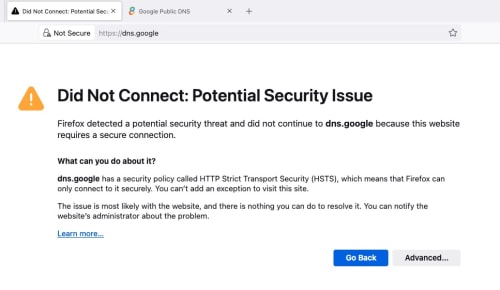
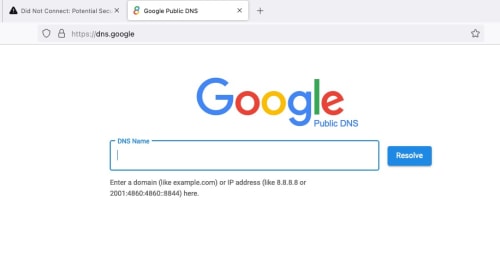
Another way to check is to go to https://dns.google. Nothing to do with DNS queries here.

If All your 8888s are belongs to TM, you'll see this:
user posted image
You can also click Advanced to look at the SSL cert.

If A-OK then:
user posted image

*Using Firefox.
*
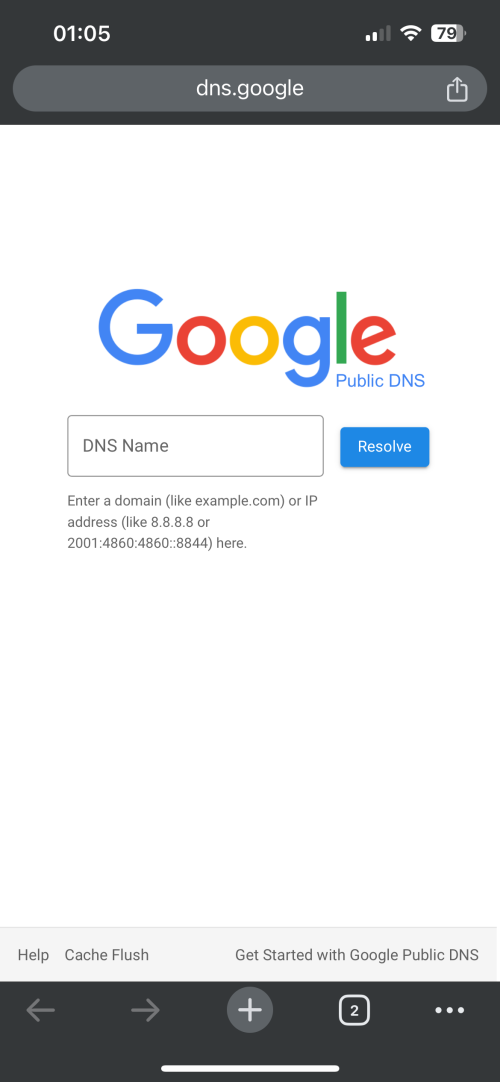
loads for now

pj klang valley

user posted image
kwss
post Sep 4 2024, 01:09 AM

Regular
******
Senior Member
1,208 posts

Joined: Aug 2018
QUOTE(blackbox14 @ Sep 4 2024, 01:06 AM)
What would be the best way to verify that it is working properly after I've set it up? Other than trying to load blocked sites, of course.
*
You can view your telemetry in the CloudFront dashboard. It should show your URL and how many requests are made.
You can also use DNS checker to see if your configured DoH provider is used.
HayateAyakasi8
post Sep 4 2024, 01:09 AM

On my way
****
Junior Member
651 posts

Joined: Jun 2014


Am on SWU 3.0, using Fiberhome modem (not combo).
Public IP. Checked DNS leak test and working as expected. Went to https://one.one.one.one/help/ and tested to see DoT and DNS working
DoT on ASUS router via Cloudflare and Google DNS working fine, checked those restricted websites and also seems to be working fine so far.

Seremban, Negeri Sembilan

This post has been edited by HayateAyakasi8: Sep 4 2024, 01:12 AM
blackbox14
post Sep 4 2024, 01:15 AM

Casual
***
Junior Member
349 posts

Joined: Jul 2012
QUOTE(kwss @ Sep 4 2024, 01:09 AM)
You can view your telemetry in the CloudFront dashboard. It should show your URL and how many requests are made.
You can also use DNS checker to see if your configured DoH provider is used.
*
Thanks for answering. It's very helpful. I'll consider trying it out if they start targeting other DNS providers as well.
soonwai
post Sep 4 2024, 01:23 AM


********
All Stars
11,459 posts

Joined: Oct 2007
From: KL


QUOTE(olivur @ Sep 4 2024, 01:06 AM)
loads for now

pj klang valley

...
*
QUOTE(HayateAyakasi8 @ Sep 4 2024, 01:09 AM)
Am on SWU 3.0, using Fiberhome modem (not combo).
Public IP. Checked DNS leak test and working as expected. Went to https://one.one.one.one/help/ and tested to see DoT and DNS working
DoT on ASUS router via Cloudflare and Google DNS working fine, checked those restricted websites and also seems to be working fine so far.

Seremban, Negeri Sembilan
*
PJ ok, Seremban OK.

So far only me & raynman in Kajang kena. Maybe because TM need to demo to Anwar at his house in Sg Long.

Kajang ❌❌
Kuching ✅
Penang ✅
PJ ✅✅✅
Seremban ✅
Anime4000
post Sep 4 2024, 02:54 AM

Look at all my stars!!
*******
Senior Member
2,400 posts

Joined: Jul 2009
From: /dev/null


I have checked DNS Tunnel (iodine) to 1.9.1.9 seem get filtered.

Any random subdomain (playload) didn't reached to iodined for TXT base64 results.

before with Parallel DNS Tunnel can give around 5mbps of speed, I guess TM also filtering it...

I just thought to make silly DNS query via DNS Tunnel 🤣
ntw
post Sep 4 2024, 03:18 AM

One Each At A Time
******
Senior Member
1,432 posts

Joined: Aug 2010
From: Ipoh mali~~~


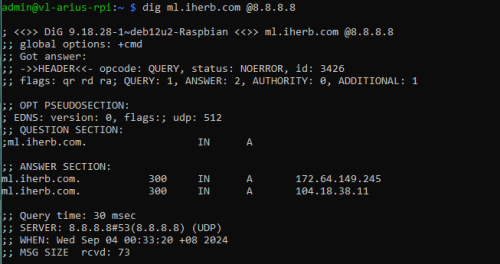
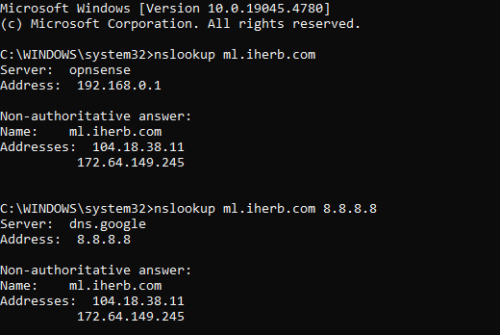
cannot access https://dns.google but nslookup seems to be showing the correct ip for ml.iherb.com. How do I know whether my DNS queries are not hijacked?

user posted image
BladeRider88
post Sep 4 2024, 03:43 AM

On my way
****
Junior Member
554 posts

Joined: Nov 2006


QUOTE(soonwai @ Sep 3 2024, 09:59 PM)
See got any other Penang ppl affected yet. Pls report in. Those affected so far, are you all in Klang Valley?
*
Penang user reporting. So far i am using Time & Unifi with DoH and i am not affected

QUOTE(dev/numb @ Sep 3 2024, 10:35 PM)
Heads up for anyone using free NextDNS accounts for ad/tracker blocking. Remember to tick the 3 boxes in the Performance sub-section under the Settings tab. Especially the Cache Boost option, because without that you will likely reach your 300k query limit sooner than you realize. Also, the anexia-kul and premiumdrp-kul are (historically) the best local servers for us wrt latency.
Pharmianaga cartel. Go check the prices of your basic vitamin supplements on iHerb and compare with the daylight robbery you’re charged at your local pharmacy. Of course, their excuse “for your safety”. Just like how all this DNS blocking/redirecting is “for your safety. Topkek, first time you hear that bareback DNS is safer. Next they’ll ask you to fuck without condoms.
*
I thought those settings were enabled by default? But i did enabled it anyway, thanks

This post has been edited by BladeRider88: Sep 4 2024, 03:50 AM
kwss
post Sep 4 2024, 03:46 AM

Regular
******
Senior Member
1,208 posts

Joined: Aug 2018
QUOTE(ntw @ Sep 4 2024, 03:18 AM)
cannot access https://dns.google but nslookup seems to be showing the correct ip for ml.iherb.com. How do I know whether my DNS queries are not hijacked?

user posted image
*
You can check the querying DNS server using any of the tools:
https://www.dnscheck.tools/
https://browserleaks.com/dns
ntw
post Sep 4 2024, 04:03 AM

One Each At A Time
******
Senior Member
1,432 posts

Joined: Aug 2010
From: Ipoh mali~~~


QUOTE(kwss @ Sep 4 2024, 03:46 AM)
You can check the querying DNS server using any of the tools:
https://www.dnscheck.tools/
https://browserleaks.com/dns
*
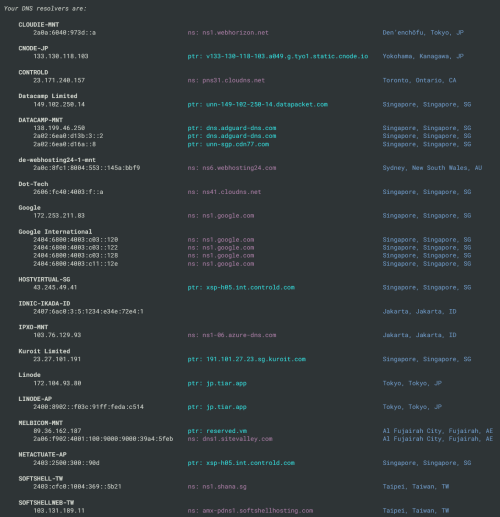
Thanks! Configured dnscrypt-proxy to use dnscrypt and doh servers. TM's server doesn't appear in the list

user posted image
SUSraynman
post Sep 4 2024, 06:04 AM

Look at all my stars!!
*******
Senior Member
4,333 posts

Joined: Jan 2003


QUOTE(soonwai @ Sep 4 2024, 01:23 AM)
PJ ok, Seremban OK.

So far only me & raynman in Kajang kena. Maybe because TM need to demo to Anwar at his house in Sg Long.

Kajang ❌❌
Kuching ✅
Penang ✅
PJ ✅✅✅
Seremban ✅
*
With Cloudflare WARP deactivated, cannot access torrent site https://eztv.tf


user posted image

user posted image


With Cloudflare WARP activated


user posted image

user posted image


cool2.gif
SUSraynman
post Sep 4 2024, 06:17 AM

Look at all my stars!!
*******
Senior Member
4,333 posts

Joined: Jan 2003


QUOTE(Pip_X @ Sep 3 2024, 09:54 PM)
Seems dns over https set on chrome / edge dont work too.
I guess the easiest free way is now with Cloudflare Warp VPN.
*
Correct. DNS-over-HTTPS (DoH) on Chrome and Edge doesn't work anymore.

I am using Cloudflare's WARP to circumvent Unifi's transparent DNS proxy.

But other VPNs (like ProtonVPN) works too

495 Pages « < 255 256 257 258 259 > » Top
Topic ClosedOptions
 

Change to:
| Lo-Fi Version
0.0191sec    0.90    6 queries    GZIP Disabled
Time is now: 22nd December 2025 - 05:43 PM