Welcome Guest ( Log In | Register )

Bump Topic Topic Closed RSS Feed
10 Pages < 1 2 3 4 5 > » Bottom

Outline · [ Standard ] · Linear+

Unifi Official TM UniFi High Speed Broadband Thread V42, READ 1ST PAGE FOR RELEVANT WIFI INFO!

views
     
PRSXFENG
post Jun 29 2024, 09:15 AM

Look at all my stars!!
*******
Senior Member
2,611 posts

Joined: Nov 2020


QUOTE(Maxieos @ Jun 29 2024, 06:21 AM)
RM15 2 location windscribe build a plan? saw LTT said IPA ,check got 3+ years but need to pay rm372 divided around rm10 per month.
Anyone using IPA ?
*
I myself don't like committing to long multi year subscriptions. and I tend to avoid any sponsored recommendations
PRSXFENG
post Jul 1 2024, 07:17 AM

Look at all my stars!!
*******
Senior Member
2,611 posts

Joined: Nov 2020


QUOTE(Edlois @ Jul 1 2024, 01:47 AM)
user posted image
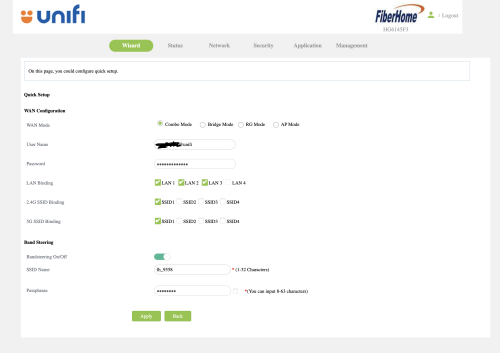
Tm unifi just upgraded my plan to 800mbps. and gave me this Fiberhome HG6145F3.

I had an existing DECO M5 mesh wifi.

But the problem comes when. I change the combo mode -> Bridge mode. I reset my DECO mesh and authenticate the PPPOE service credentials with proper VLAN profile. it's not working.
Okay nvm then I change back the ONU/combo box to combo mode again.

suddenly. the internet led start blinking. meaning I can't access to the internet.
I had the correct PPPOE service credentials
then I didn't touch anything, other than toggling between "Combo Mode" and "Bridge Mode"

I can't find any other people who got this "HG6145F3" on the forum. so.... help...... bangwall.gif  bye.gif  bye.gif
*
try setting up with NO VLAN on the deco
PRSXFENG
post Jul 3 2024, 10:41 AM

Look at all my stars!!
*******
Senior Member
2,611 posts

Joined: Nov 2020


QUOTE(jaya7 @ Jul 3 2024, 10:24 AM)
Hi All,

i recently upgrade to Unifi 2gbps and using their default router+modem. What's the best way to get full 2gbps on a single lan port? i know it has been discussed few times. appreciate if you can direct me to posts related to it. Soon, ill be moving to new home and will be running router + network splitter setup to enable multiple lan ports at home. So, looking at a modem router that will bypass unifi default 1gbps segregated speed limit for future use.

thank you.
*
looks like you are looking for a solution, so I will direct you to Anime4000

https://forum.lowyat.net/index.php?showtopic=4925452
PRSXFENG
post Jul 5 2024, 03:24 PM

Look at all my stars!!
*******
Senior Member
2,611 posts

Joined: Nov 2020


QUOTE(plumberly @ Jul 5 2024, 01:01 PM)
a. Like to have some feedback from those who are using Unifi Air 5G router.

Worth upgrading?

b. How can I set it up with Unifi Plus to my TV AND also my AVR?

Normal viewing is just Unifi Plus to TV. If good movies or music, then to AVR.

What are the 2 USB for on the side of Unifi Plus?

Thanks.
*
the usb ports can be used for usb keyboard and mouse
or usb pendrive to play local files
PRSXFENG
post Jul 9 2024, 04:31 PM

Look at all my stars!!
*******
Senior Member
2,611 posts

Joined: Nov 2020


QUOTE(hazairi @ Jul 9 2024, 03:36 PM)
anyway guys, if the ISP doesn't provide Public IP, what are the things that I can't do?
*
some games like gta may complain about it
torrenting is slightly affected
cant port forward for stuff like self hosted game servers (eg, Minecraft), VPN, CCTV, etc
PRSXFENG
post Jul 20 2024, 08:54 PM

Look at all my stars!!
*******
Senior Member
2,611 posts

Joined: Nov 2020


QUOTE(Jeffreynsx @ Jul 20 2024, 04:53 PM)
I tried to setup as a bridge mode based on the screenshot provided earlier. However, I cannot connect it to my Asus Router. May I know any area need to setup to establish the connection?
*
selected PPPoE in the asus and entered the username and password?
PRSXFENG
post Jul 21 2024, 11:48 AM

Look at all my stars!!
*******
Senior Member
2,611 posts

Joined: Nov 2020


QUOTE(Jeffreynsx @ Jul 21 2024, 09:49 AM)
If the ISP Profile set to None in LAN > IPTV from Asus Router. The VOIP will it work if I set the stock TM router to Bridge Mode?
*
because in this case, the vlan is handled by the skyworth, not the asus
its just how these combo ones work

the voip ports on the skyworth should still work
PRSXFENG
post Jul 27 2024, 06:35 PM

Look at all my stars!!
*******
Senior Member
2,611 posts

Joined: Nov 2020


QUOTE(Kadaj @ Jul 27 2024, 06:34 PM)
The Gov looks very eager to surveillance and censorship.
With recent DNS poisoning incidents, is it a coincidence?
*
Are we following the footsteps of Indonesia... sad.gif
PRSXFENG
post Jul 27 2024, 06:57 PM

Look at all my stars!!
*******
Senior Member
2,611 posts

Joined: Nov 2020


EDIT: Delete
reply wrong thread somehow

This post has been edited by PRSXFENG: Jul 27 2024, 06:57 PM
PRSXFENG
post Jul 29 2024, 11:03 PM

Look at all my stars!!
*******
Senior Member
2,611 posts

Joined: Nov 2020


QUOTE(ckthang10 @ Jul 29 2024, 09:57 PM)
Currently im using Dlink AX3060 Unifi router in living room. I have linked with Dlink AX3000 as mesh in master bedroom. However, the signal is very weak in bedroom 3, located in between the two devices.
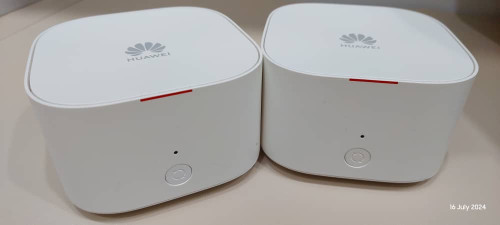
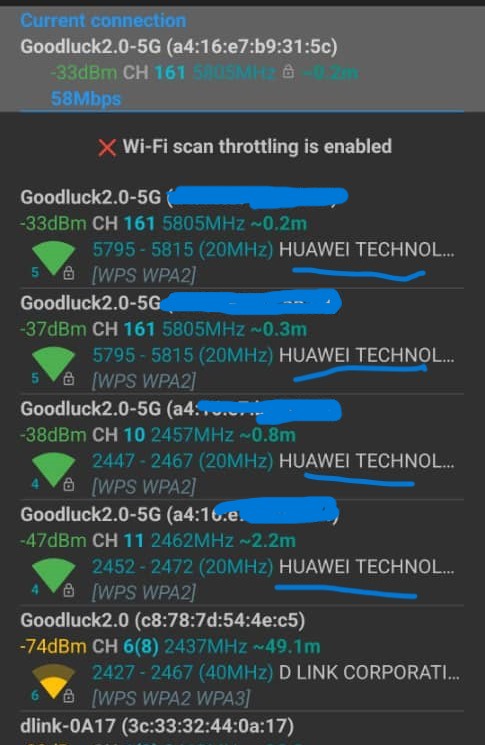
I do have 2 units Huawei Echolife WA8021V5 mesh from TIME.com, I did the setup as mesh, both signals appears in the WifiAnalyser app (refer to the attached photo) but it does not connected. The mesh indicator shows as RED.
Kindly assist, what went wrong as im new in set up mesh. TQ

user posted image

user posted image
*
Incompatible, it's not possible to mesh different brand mesh together

(unless they support WiFi Alliance EasyMesh, which they dont)

you will need to get more of those dlink routers
PRSXFENG
post Jul 30 2024, 05:31 PM

Look at all my stars!!
*******
Senior Member
2,611 posts

Joined: Nov 2020


QUOTE(Verblassen @ Jul 30 2024, 05:09 PM)
Quote
Dear xxxxxxx,

No issue at network as speedtest achieved above 90%.

Please manage user accordingly.
Unquote

Sent by "someone" in TM to my technician's supervisor.

This is with regards to a potential OLT situation limiting unifi 1gbps users to 930/940mbps.

Guess who's going to MCMC now 😇
*
The truth is, I doubt MCMC can do much

blacktubi had their experience fighting with them regarding Maxis 1Gbps

Though, 940Mbps is the limit for Gigabit Ethernet
So, if you're not using 2.5Gbps Ethernet, 940Mbps is expected


PRSXFENG
post Jul 30 2024, 09:11 PM

Look at all my stars!!
*******
Senior Member
2,611 posts

Joined: Nov 2020


QUOTE(Moogle Stiltzkin @ Jul 30 2024, 07:59 PM)
Wouldn't using a VPN solve this? If before people weren't sure, now is more sure that is what you have to do going onwards sweat.gif
*
Most of the general public (that aren't on this forum) wouldn't know how to do that
And they cost money for the good ones
And they could implement attempts at blocking VPN usage
It is also a bit of a hassle as some apps will refuse to work behind a VPN

PRSXFENG
post Jul 30 2024, 11:07 PM

Look at all my stars!!
*******
Senior Member
2,611 posts

Joined: Nov 2020


QUOTE(NagaK @ Jul 30 2024, 10:36 PM)
How to test like this ah teach me? If this CMD right?
*
That's speedtest cli

https://www.speedtest.net/apps/cli
PRSXFENG
post Aug 6 2024, 07:09 PM

Look at all my stars!!
*******
Senior Member
2,611 posts

Joined: Nov 2020


QUOTE(issac99289928 @ Aug 6 2024, 07:05 PM)
use other DNS servers . so many to choose from.
*
So far yes, other severs are not affected
But it might not last for long

Better solution is to move to encrypted DNS, like DNS Over HTTPS, DNS Over TLS, or DNSCrypt
PRSXFENG
post Aug 6 2024, 11:46 PM

Look at all my stars!!
*******
Senior Member
2,611 posts

Joined: Nov 2020


QUOTE(yongtjunkit @ Aug 6 2024, 08:27 PM)
hmm.gif would using DNSSEC help? sweat.gif

I’m using pihole (which doesn’t seem to support DOH/DOT out of the box) sweat.gif
*
no, it doesnt really, you need DoH/DoT/DNSCrypt
However, past posts here suggest they are looking into DoH hijacking as well

you can use dnscrypt-proxy, there's a guide on their github for setup with pihole
i setup mine with quad9 dnscrypt

This post has been edited by PRSXFENG: Aug 6 2024, 11:47 PM
PRSXFENG
post Aug 7 2024, 08:32 AM

Look at all my stars!!
*******
Senior Member
2,611 posts

Joined: Nov 2020


QUOTE(tng55 @ Aug 7 2024, 12:39 AM)
asus router can do that support DNS over TLS. This will apply to all devices
*
True, but if they want to, DoT can be very easily blocked with just one click, blocking port 853

For those who uses AsusWRT-Merlin supported routers, there are probably 3rd party.packages that can help

Otherwise, a raspberry pi with like Adguard Home can do it, or stuff like Cloudflared, DNSCrypt-proxy
PRSXFENG
post Aug 7 2024, 08:34 AM

Look at all my stars!!
*******
Senior Member
2,611 posts

Joined: Nov 2020


QUOTE(yongtjunkit @ Aug 7 2024, 07:23 AM)
Cool, just installed and switched over to dns-crypt proxy

Btw is 1.1.1.1/help the only way to verify DOH?
*
I don't think there's much ways to check, since it's basically requesting DNS like it is a webpage

Nextdns does have their one at http://test.nextdns.io/

But both of these only check for themselves
PRSXFENG
post Aug 9 2024, 12:06 PM

Look at all my stars!!
*******
Senior Member
2,611 posts

Joined: Nov 2020


QUOTE(A183RT0 @ Aug 9 2024, 11:54 AM)
the TM provide Huawei Echolife HG8240H

but can we change to our own bought BTU or do not touch them at all??
*
not supposed to, if it breaks you just ask tm to replace it, lifetime warranty

for advanced users, you could if you know what you're doing
PRSXFENG
post Aug 10 2024, 08:49 AM

Look at all my stars!!
*******
Senior Member
2,611 posts

Joined: Nov 2020


QUOTE(kcl2006ch @ Aug 10 2024, 08:11 AM)
ASUS ZenWiFi AX need to be reset become connect using dynamic ip or set the dlink combo box to bridge mode, make sure u get the all needed username & password from the installer
*
not recommended to dynamic ip it, it will cause double NAT

bridge mode is the way to go

PRSXFENG
post Aug 10 2024, 08:52 AM

Look at all my stars!!
*******
Senior Member
2,611 posts

Joined: Nov 2020


QUOTE(kwss @ Aug 10 2024, 03:14 AM)
Sorry people I misunderstand the documentation. The following statements is not true. I'm Lulu.


excl.gif  excl.gif TM deployed kill switch for Firefox DoH and Apple Private Relay excl.gif  excl.gif

Mozilla and Apple has a DNS controlled kill switch that allows organization to prevent their usage. This is so that whatever DPI or DLP system will function properly.

Mozilla kill switch:
use-application-dns.net

Apple Private Relay kill switch:
mask.icloud.com
mask-h2.icloud.com

Firefox DoH kill switch is enabled:
CODE

dig use-application-dns.net @1.9.1.9

; <<>> DiG 9.18.28 <<>> use-application-dns.net @1.9.1.9
;; global options: +cmd
;; Got answer:
;; ->>HEADER<<- opcode: QUERY, status: NOERROR, id: 21955
;; flags: qr rd ra; QUERY: 1, ANSWER: 1, AUTHORITY: 0, ADDITIONAL: 1

;; OPT PSEUDOSECTION:
; EDNS: version: 0, flags:; udp: 512
;; QUESTION SECTION:
;use-application-dns.net. IN A

;; ANSWER SECTION:
use-application-dns.net. 70 IN A 35.190.14.201

;; Query time: 15 msec
;; SERVER: 1.9.1.9#53(1.9.1.9) (UDP)
;; WHEN: Sat Aug 10 03:04:46 +08 2024
;; MSG SIZE  rcvd: 68


Both Apple Private Relay kill switches are enabled:
CODE

dig mask.icloud.com @1.9.1.9

; <<>> DiG 9.18.28 <<>> mask.icloud.com @1.9.1.9
;; global options: +cmd
;; Got answer:
;; ->>HEADER<<- opcode: QUERY, status: NOERROR, id: 32464
;; flags: qr rd ra; QUERY: 1, ANSWER: 7, AUTHORITY: 0, ADDITIONAL: 1

;; OPT PSEUDOSECTION:
; EDNS: version: 0, flags:; udp: 512
;; QUESTION SECTION:
;mask.icloud.com.  IN A

;; ANSWER SECTION:
mask.icloud.com. 42078 IN CNAME mask.apple-dns.net.
mask.apple-dns.net. 33 IN A 104.30.128.79
mask.apple-dns.net. 33 IN A 104.30.128.76
mask.apple-dns.net. 33 IN A 104.30.128.78
mask.apple-dns.net. 33 IN A 104.30.128.77
mask.apple-dns.net. 33 IN A 104.30.128.74
mask.apple-dns.net. 33 IN A 104.30.128.75

;; Query time: 15 msec
;; SERVER: 1.9.1.9#53(1.9.1.9) (UDP)
;; WHEN: Sat Aug 10 03:05:24 +08 2024
;; MSG SIZE  rcvd: 172


CODE

dig mask-h2.icloud.com @1.9.1.9

; <<>> DiG 9.18.28 <<>> mask-h2.icloud.com @1.9.1.9
;; global options: +cmd
;; Got answer:
;; ->>HEADER<<- opcode: QUERY, status: NOERROR, id: 59548
;; flags: qr rd ra; QUERY: 1, ANSWER: 7, AUTHORITY: 0, ADDITIONAL: 1

;; OPT PSEUDOSECTION:
; EDNS: version: 0, flags:; udp: 512
;; QUESTION SECTION:
;mask-h2.icloud.com.  IN A

;; ANSWER SECTION:
mask-h2.icloud.com. 734 IN CNAME mask.apple-dns.net.
mask.apple-dns.net. 34 IN A 104.30.128.75
mask.apple-dns.net. 34 IN A 104.30.128.77
mask.apple-dns.net. 34 IN A 104.30.128.79
mask.apple-dns.net. 34 IN A 104.30.128.78
mask.apple-dns.net. 34 IN A 104.30.128.76
mask.apple-dns.net. 34 IN A 104.30.128.74

;; Query time: 19 msec
;; SERVER: 1.9.1.9#53(1.9.1.9) (UDP)
;; WHEN: Sat Aug 10 03:05:38 +08 2024
;; MSG SIZE  rcvd: 175

*
the mozilla killswitch only prevents automatic doh for happening (eg, default doh is on auto from fresh install of the browser)
if you manually configure doh in settings, firefox will ignore that dns request's results

as for apple icloud, it seems like it will warn the user... based on
https://developer.apple.com/icloud/prepare-...-private-relay/

Also, as you realized, those respond with something, so, no, it's not actually blocked, if NXDOMAIN, yes then it's blocked

This post has been edited by PRSXFENG: Aug 10 2024, 08:53 AM

10 Pages < 1 2 3 4 5 > » Top
Topic ClosedOptions
 

Change to:
| Lo-Fi Version
0.0362sec    0.25    7 queries    GZIP Disabled
Time is now: 15th December 2025 - 08:59 PM