

QUOTE(bugipunch @ Feb 29 2024, 07:41 PM)
for 1gbps plan are there any guide to use our own router?

refer to https://forum.lowyat.net/topic/4925452 by Anime4000Unifi Official TM UniFi High Speed Broadband Thread V42, READ 1ST PAGE FOR RELEVANT WIFI INFO!
|
|
 Feb 29 2024, 10:44 PM Feb 29 2024, 10:44 PM
Return to original view | IPv6 | Post
#21
|
 
Senior Member
2,611 posts Joined: Nov 2020  
|
QUOTE(bugipunch @ Feb 29 2024, 07:41 PM) for 1gbps plan are there any guide to use our own router? refer to https://forum.lowyat.net/topic/4925452 by Anime4000 Anime4000 liked this post
|
|
|
|
|
|
Mar 12 2024, 09:56 PM
Return to original view | IPv6 | Post
#22
|
|
Senior Member
2,611 posts Joined: Nov 2020
|
QUOTE(Qash-M @ Mar 11 2024, 10:39 PM) 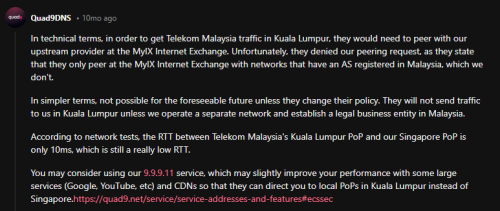 Still waiting.. TM and TIME route to Singapore Not sure about other ISPs Qash-M liked this post
|
|
|
Mar 24 2024, 04:49 PM
Return to original view | IPv6 | Post
#23
|
|
Senior Member
2,611 posts Joined: Nov 2020
|
QUOTE(soonwai @ Mar 22 2024, 07:47 PM) This one quite good from MyUnifi rewards. For Mar/Apr. Last year Nov also got, not sure if posted here. Just got a notification for one from BOOST No need to redeem, generic code: UNIFI https://www.uob.com.my/personal/promotions/...artnership.page tl;dr: invest RM6k for 1 mth, get reward RM388. 77.6% pa return. New UOB CASA customers only. https://www.uob.com.my/personal/promotions/...r6:na:na&vid=na RM2k for 80,000 boost stars Which converts to RM80........... Not as good as a deal |
|
|
Mar 30 2024, 02:25 PM
Return to original view | IPv6 | Post
#24
|
|
Senior Member
2,611 posts Joined: Nov 2020
|
QUOTE(neekun @ Mar 29 2024, 09:04 PM) Got a call from TM telling me my upgrade from 800mbps to 1gbps is ready. Was informed they will give me a new dlink router. When I asked it’s a router or modem plus router combo, she said it’s a router. My current modem maintained as it supports 1gbps. Btw my modem is the white Huawei tm modem. If this is the case I can just reuse my current Asus ax110000 router. Note that due to Gigabit Ethernet port limits, if you decide to connect up your own router you will only ever see 940Mbps at mostHowever, if they give me a Dlink router and modem combo, what setting should I set on the Dlink so I can use its modem function only but not the wifi router function? Thanks. |
|
|
Apr 21 2024, 09:44 PM
Return to original view | IPv6 | Post
#25
|
|
Senior Member
2,611 posts Joined: Nov 2020
|
QUOTE(sp6068 @ Apr 21 2024, 12:22 AM) Unifi is still fucked as of 12am 21/4 Not just Unifi, TIME also affectedEU sites all taking forever to load. Reminiscences of the stupid slowness in Feb |
|
|
Apr 25 2024, 01:44 PM
Return to original view | Post
#26
|
|
Senior Member
2,611 posts Joined: Nov 2020
|
QUOTE(ikengkai @ Apr 25 2024, 12:24 AM) Hi Sifu-sifu, cloudflare (without blocking malware) may be slightly faster than the one that blocks malwareWant to ask what the fastest free DNS to use? I been with Google dns all the time, and CloudFlare seem attractive as it's block malicious sites. Anyway, did test with ping and benchname Google, both seem point to Google DNS 10 - 20% faster. Even though Google DNS some query hit the 3.5s timeout, it still faster. The CloudFlare may slower for the fastest time, but it's seem consistent and no query that hit timeout. Would like hear from sifu and learn more on this topic. Thanks. for me I noticed that Cloudflare, Quad9 has MY servers Google and Cisco OpenDNS's nearest servers are in SG I recommend using this utility to benchmark as ping is not an accurate result https://www.grc.com/dns/benchmark.htm |
|
|
|
|
|
May 2 2024, 12:34 PM
Return to original view | Post
#27
|
|
Senior Member
2,611 posts Joined: Nov 2020
|
QUOTE(failed.hashcheck @ May 1 2024, 06:45 PM) Do tm lock your account to specific router? was the correct VLAN selected?My Asus router going kaput, so I swap to my backup TM provided Fiberhome (SR1041F) router. All settings checked. But my pppoe keep dialing into this internal ip 172.20.*.* that have no internet connection. Today the technician come, they also can't explain what happen. so they request pppoe reset. Now my internet worked on this fiberhome router. When the technician leave, I tried to swap the router to slightly decent TPlink router from Celcom. The problem returns. pppoe dialed into 172.20.*.* ip again. Tried spoof the MAC from original previous Fiberhome router, also no go. Now I suspicious already. So I swap yet again to yet another TM fiberhome router (SR1041Y), also same problem. I give up, swap back to the original Fiberhome SR1041F, it worked?!?!! Do I need to call TM to reset my account every time I change ruter or what? |
|
|
May 12 2024, 06:03 PM
Return to original view | IPv6 | Post
#28
|
|
Senior Member
2,611 posts Joined: Nov 2020
|
QUOTE(shykull @ May 12 2024, 05:53 PM) Hi guys, You are behind GCNAT, you can't port forwardJust a quick question, I am setting up a webserver at home, I have open up port 443 for ssl connection on my router and setup duckdns. But I cant seem to be able to connect to my server via my duckdns address. Do I need to request the port to be open on the ISP side? im on the 300mbps package btw. cheers You need to ask em for a public IP, with good reasoning It is not recommended to do this tbh, consider hosting on a proper web hosting service |
|
|
May 14 2024, 11:58 PM
Return to original view | Post
#29
|
|
Senior Member
2,611 posts Joined: Nov 2020
|
QUOTE(poh880 @ May 14 2024, 11:16 PM) Anyone recently installed Unifi? Do you get VLAN 600 (dedicated 10Mbps) for Unifi TV? Or new subscribers only have access with shared bandwidth? Not a Unifi customer but I think the newer boxes are "hybrid" in which if it's on WiFi it will use your WiFi but if you connect up an ethernet cable to Lan 4 it will use the VLAN |
|
|
May 28 2024, 08:10 AM
Return to original view | IPv6 | Post
#30
|
|
Senior Member
2,611 posts Joined: Nov 2020
|
QUOTE(may_day @ May 28 2024, 07:52 AM) May I ask, is it TM lock the LAN port for the new WiFi 6 router? I think it is reserved for the UnifiTV BoxMy brother have applied SWU 4.0 , he got new router last week but 4 LAN Port all can't working depending on the router, you might be able to change it over to be a normal LAN port or if there are profiles, changing it from Unifi Home to Unifi Business should do it |
|
|
May 29 2024, 10:48 AM
Return to original view | Post
#31
|
|
Senior Member
2,611 posts Joined: Nov 2020
|
QUOTE(surrodox2001 @ May 28 2024, 11:22 PM) Not using google and cloudflare in my DoH setups, no problems yet... Perhaps get your VPNs ready? (It's like that right now if you wanna get stable speed for online gaming and such?) I wonder if using more niche dns protocols might help, personally I use Quad9 over DNSCrypt in my home setup |
|
|
May 29 2024, 11:14 PM
Return to original view | IPv6 | Post
#32
|
|
Senior Member
2,611 posts Joined: Nov 2020
|
QUOTE(sHawTY @ Feb 23 2024, 11:11 AM)  Source: https://unifi.com.my/customer FAQ: https://unifi.com.my/sites/default/files/pa...%20Campaign.pdf Based solely on the image of tv with the blue flower used in the promo pic, it could be this https://my.sharp/products/tvav/65-inch-4k-u...tc65fj1x?v=1605 |
|
|
May 30 2024, 12:57 AM
Return to original view | IPv6 | Post
#33
|
|
Senior Member
2,611 posts Joined: Nov 2020
|
QUOTE(kwss @ May 30 2024, 12:15 AM) What port does your DNSCrypt use? A quick googling says it is port 443 so I guess all they need to do is add the IP address or port to their list. Honestly, I'm not too sure eitherA holistic way to think about censorship is they have banks analyze card and account transaction data to see who is "non-compliant". With the age of AI, I think this is doable. Anything that screams VPN or crypto exchange will stand out. Some old V1 docs suggests port 8443 But mine is running on V2 Still, my hope is just it being a lesser heard of niche DNS server and protocol helps a bit Otherwise... There's always the self host option with Unbound  |
|
|
|
|
|
Jun 10 2024, 05:37 PM
Return to original view | IPv6 | Post
#34
|
|
Senior Member
2,611 posts Joined: Nov 2020
|
QUOTE(Oltromen Ripot @ Jun 10 2024, 05:01 PM) eh? you didn't receive notification? It think it was a smart home security bundle they already sent message sometime december/january to select which "token of appreciation" you want. either a 1mth fibre rebate, or something else whcih i have forgotten what. they even asked to fill in form to submit. Like a few WiFi security cameras |
|
|
Jun 13 2024, 08:35 AM
Return to original view | IPv6 | Post
#35
|
|
Senior Member
2,611 posts Joined: Nov 2020
|
QUOTE(choongy @ Jun 13 2024, 05:10 AM) Hi guys, I have been a Unifi user for years and I was first given a DIR 850 router. Fast forward many years, TM upgraded my 100mbps plan to a 300mbps plan for free last week. However, a speed test with my CAT6 Lan cable connected to my PC shows 100 Mb/s, and the speed test with wifi through my phone shows around 100 Mb/s as well. What should I do to get a more optimal speed? hmm, both being 100Mbps is kinda odd1. Downgrade my plan to 100mbps since I don't see the difference atm 2. Buy a wifi 6 router, but I'm not sure which to get 3. Try to request a new router from TM and refresh the 2 years contract Kindly help me out all the sifus here. Thank you very much in advance what network card is in your pc? does it say FE Ethernet or GbE Ethernet as well as what phone is it and that you are peforming tests with the 5Ghz band and not 2.4Ghz right? |
|
|
Jun 17 2024, 04:19 PM
Return to original view | IPv6 | Post
#36
|
|
Senior Member
2,611 posts Joined: Nov 2020
|
QUOTE(NagaK @ Jun 17 2024, 02:48 PM) Someone share shoppee link? I'm not fan of rack fans just another mess Just search for "router fan" and you'll find plenty |
|
|
Jun 20 2024, 11:54 PM
Return to original view | IPv6 | Post
#37
|
|
Senior Member
2,611 posts Joined: Nov 2020
|
QUOTE(Azims @ Jun 20 2024, 09:58 PM) Xiaomi AX3000T looks really good right now; it supports OpenWrt, has a fast CPU (MediaTek Filogic) Another considerationReview: https://www.acwifi.net/25657.html Redmi AX6s/ Xiaomi AX3200 supported by OpenWRT as well https://openwrt.org/toh/xiaomi/ax3200 and the best part? head down to CeX and it's yours for RM85 (2nd hand shop) https://my.webuy.com/product-detail?id=6934177754951 Azims liked this post
|
|
|
Jun 24 2024, 10:55 PM
Return to original view | IPv6 | Post
#38
|
|
Senior Member
2,611 posts Joined: Nov 2020
|
QUOTE(hyperwavedrift @ Jun 24 2024, 06:44 PM) any good vpn without forking out money? the only 2 free ones that I may trust is ProtonVPN and Windscribebut of course being free, you are limited otherwise, cloudflare warp might help, its not exactly a vpn, but it may help |
|
|
Jun 25 2024, 12:49 PM
Return to original view | Post
#39
|
|
Senior Member
2,611 posts Joined: Nov 2020
|
QUOTE(raizer99 @ Jun 25 2024, 08:31 AM) My unifi speed is 500mbps (SWU3.0 300mbps with free upgrade), but recently it left only around 100mbps download when downloading/run speedtest, while the upload speed is normal which is 100mbps(for 500mbps package). Restarting router does not fix it and QOS is not enabled on router. Last time is able to reach 500mbps just recently drop to 100mbps.Any idea how to solve this issue? 94Mbps or beyond? like 100 to 110mbpsif its 94Mbps then you are limited by 10/100 ethernet, check cables, disconnect and reconnect em if beyond 94Mbps, then maybe they accidentally capped you, contact them and complain |
|
|
Jun 28 2024, 11:00 PM
Return to original view | IPv6 | Post
#40
|
|
Senior Member
2,611 posts Joined: Nov 2020
|
QUOTE(Maxieos @ Jun 28 2024, 08:21 PM) Again and again , waiting for unifi CS like 100 queue.Everything start to get slow at 8pm. Cheapest I've seen is windscribe build a plan, 2 locations unlimitedAnyone ? been asking what is the cheapest VPN rm10 a month ? Select 2 locations + unlimited, $3, roughly RM15, they accept our ewallets even But don't pick Malaysia server, it's slow, like less than 100Mbps, for me, Japan gives me good experience |
|
Topic ClosedOptions
|
| Change to: |  0.0492sec 0.0492sec
 0.37 0.37
 7 queries 7 queries
 GZIP Disabled GZIP Disabled
Time is now: 15th December 2025 - 12:51 AM |
 Quote
Quote