Welcome Guest ( Log In | Register )

Bump Topic Topic Closed RSS Feed
10 Pages « < 2 3 4 5 6 > » Bottom

Outline · [ Standard ] · Linear+

Unifi Official TM UniFi High Speed Broadband Thread V42, READ 1ST PAGE FOR RELEVANT WIFI INFO!

views
     
PRSXFENG
post Aug 10 2024, 10:24 AM

Look at all my stars!!
*******
Senior Member
2,611 posts

Joined: Nov 2020


QUOTE(Jeffreynsx @ Aug 10 2024, 09:46 AM)
May I know the reason why I use stock Skyworth router, the upload latency only 1ms and if I change to Asus Router, the upload latency went up to 100ms++? The download latency is fine for both but upload latency is huge different. Any Asus router settings need to adjust to lower down the latency for upload?
*
How are you configuring the Asus? PPPoE or Dynamic IP?
PRSXFENG
post Aug 11 2024, 06:37 PM

Look at all my stars!!
*******
Senior Member
2,611 posts

Joined: Nov 2020


QUOTE(SomeoneElse @ Aug 11 2024, 06:29 PM)
I suspected one (or both) of the hardware is limiting my speed as well, contacted TM as well but agent assured me it's capable of handling 300mbps speed, and after some google search, on paper it seem to be able to handle the speed, well I'll get in touch with them again on this. I believe the HG850a has been with for over a decade..

Since the router is limiting me as well, will proceed to change it, better to change my own than get one from TM, correct?
*
Both are problematic
firstly, the Huawei is 100Mbps max, push em to replace it
2nd, the old Asus, while it does have Gigabit Etherent ports, it's old and only N Wireless, no chance of getting close to 300Mbps over wifi

get tm to replace the huawei, and purchase your own router
if you liked Asus, can consider their modern day AX offerings
PRSXFENG
post Aug 14 2024, 08:52 PM

Look at all my stars!!
*******
Senior Member
2,611 posts

Joined: Nov 2020


QUOTE(foxstertail @ Aug 14 2024, 07:35 PM)
300 - 400. Can go higher too.
What I'm looking for is a router that can do the following on my home network:

The following network components must be unblocked:

Multicast address 224.0.0.200
UDP port 2000
TCP port 18888

Ok so the PoE switch needs to be connected to the router not modem right?
*
I think you may have confused some stuff

Firstly, what service is this that required these ports

2nd, a PoE switch is just a switch that also supplies PoE Power
So that say, you can connect 16 Cameras to it and then to your router, and the cameras get powered by your switch

Don't connect it to the modem

I wouldn't worry too much about the multicast address? Just forward those ports

EDIT: I found the source

https://support.hp.com/sg-en/document/ish_9047541-7890382-16

They mention disabling IGMP Snooping
I believe this is on by default on TM routers, so look into that

This post has been edited by PRSXFENG: Aug 14 2024, 08:54 PM
PRSXFENG
post Aug 15 2024, 08:57 AM

Look at all my stars!!
*******
Senior Member
2,611 posts

Joined: Nov 2020


QUOTE(Cavino @ Aug 15 2024, 08:41 AM)
I have a Asus GT-AX11000 on 800mbps plan and will be upgraded to 1GB plan soon by TM.

So it is better to use the new ONR as a router or convert the new ONR to bridge?

Question asked was becoz I heard if use bridging, the ONR might limit the download speed to 940MB, what about upload, any limit?

Not sure if this is still the case with the ONR bridging.
*
Personally I'm willing to give up the ~60Mbps to have a way more powerful and feature rich router
PRSXFENG
post Aug 17 2024, 05:06 PM

Look at all my stars!!
*******
Senior Member
2,611 posts

Joined: Nov 2020


QUOTE(cHiLdHo0drEaMz @ Aug 16 2024, 09:41 PM)
Any information on the stated ZTE model ?
*
QUOTE(aniq8676 @ Aug 16 2024, 11:07 PM)
Still unknown

user posted image
*
If I had to guess, maybe ZTE ZXHN F6600P

https://www.zte.com.cn/global/home_and_ente...xhn_f6600p.html
https://www.zte.com.cn/global/product_index...xhn-f6600p.html


PRSXFENG
post Aug 18 2024, 11:04 PM

Look at all my stars!!
*******
Senior Member
2,611 posts

Joined: Nov 2020


QUOTE(kwss @ Aug 18 2024, 10:47 PM)
Not only PJ. Everything is broken right now.
TM is really penipu speedtest.
Ookla Speedtest: 831 Mbps
Cloudflare Speedtest: 14.4 Mbps
*
Speed test is really just a test between you and their servers
Or, other servers if you pick so
But usually it defaults to ISP server

Fast.com is to test connection to netflix servers

Cloudflare speed test is more unique, it's downloading a bunch of slowly increasing in size files to gauge it, it's not the most accurate thing but it does reflect the real world experience of you actually trying to load stuff
PRSXFENG
post Aug 19 2024, 09:03 PM

Look at all my stars!!
*******
Senior Member
2,611 posts

Joined: Nov 2020


QUOTE(kwss @ Aug 19 2024, 07:42 PM)
The AliOS Things service don't need public IP to phone home. It connect back as part of the boot process instead of listening to a port.
In the news source, Skyworth is implicated as well so I don't trust them either.

The question:
Is Huawei or ZTE that expensive? They are making ONU for the whole world. If they really plant malware in their device, rest assure all those cyber security company from the West will be writing about it. They have been writing about a bunch of router / firewall implants.

What is the true reason for moving to some custom, unknown brand?
D-Link is not known to make ONU but Huawei and ZTE is.
Who wanted the D-Link backdoor-ed? TM? Government?
*
I still wonder who is actually the OEM behind this so called "D-Link" ONR
Cause the design of it, really makes it feel like a generic product and not a D-Link product

remember the "AZ-TECH" DS244WSGV?

it was a generic router with a local company "AZ-TECH" brand throw onto it , not to be confused with Aztech of the past from Singapore
It was also a horrible router and quickly swept away and replaced by wifi6 stuff

PRSXFENG
post Aug 19 2024, 09:53 PM

Look at all my stars!!
*******
Senior Member
2,611 posts

Joined: Nov 2020


QUOTE(kwss @ Aug 19 2024, 09:44 PM)
I don't quite get the reason why D-Link want to help them with such a low volume product. It's only for 1 and 2 Gbps customers. I am sure D-Link get some OEM to do the work since they don't have a PON portfolio, except some dodgy ONR for the Russian market but at least that one is listed on their .ru site. This TM ONR is not listed anywhere.
*
D-Link RU is almost like a seperate team

I had a DAP-1360 repeater
for global, that's all it does, just a repeater

but RU firmware? it is a fully featured router

not sure why did they lock that behind RU and I didn't try to cross flash
PRSXFENG
post Aug 19 2024, 10:17 PM

Look at all my stars!!
*******
Senior Member
2,611 posts

Joined: Nov 2020


QUOTE(kwss @ Aug 19 2024, 10:07 PM)
A lot of these TW / CN companies did a lot of weird thing. There was a time when TP-Link have a modern UI for certain region while the rest gets a classic UI. I suspect they are all

*
TP-LINK CN is also like a completely different team and products compared to global
then there's their subbrand, Mercusys

some of them literally have modern TP-Link UI with a red color theme instead
while some have ancient 2014 ui
PRSXFENG
post Aug 21 2024, 01:01 PM

Look at all my stars!!
*******
Senior Member
2,611 posts

Joined: Nov 2020


QUOTE(Anime4000 @ Aug 21 2024, 12:48 PM)
U mobile fiber, I wonder what network they are on?

user posted image
*
TIME and Allo I think

https://www.u.com.my/en/about-us/newsroom/p...fering--to-high

https://www.u.com.my/en/about-us/newsroom/p...nd-service-reac

PRSXFENG
post Aug 26 2024, 01:10 PM

Look at all my stars!!
*******
Senior Member
2,611 posts

Joined: Nov 2020


QUOTE(Cavino @ Aug 26 2024, 11:32 AM)
DPN-FX3060V

Unfortunately when tested the ONR as router, it is 1052mbps but when do bridging, it maxed out at 923mps using Ookla Speedtest between 1pm to 3pm Saturday.
So the 940 might be true but the upload can achieve 500Mbps++.

So sacrificing abt 100Mbps to allow usage of my own Asus router with its more powerful features and reach is worth it tho. Upload speed to double up.

Anyway sunday 10pm did another test...can hit 300+download and 100+ upload only. Will try test again at midnight to see if non-peak hour can achieve back 900+.
Hopefully it is not issue that some face, dropping to 300+ at all times regardless of peak hour.

Anyway, you can do just like what I did, ask the TM Tech to setup ONR as router, then save the ONR setting up in case you ever what to use it as router mode during emergency case. Then switch it to bridge permanently as use as primary modem. Keep the old Huawei as backup modem in case ONR bridging is not stable.

As for 2.5GBe, i think I might as make mistake here, I saw 2.5Gbe written somewhere..but now comes to think about it, it might or might not be the Dlink ONR.. sweat.gif coz my black Asus router also got 2.5GBe port...I have to go back to take a look, maybe my memory got mixed up.

*
Black D-Link has 2.5Gbe port

The 300+Mbps is a known issue of this D-Link
It's mentioned in some other thread
Reboot and you'll get your speed back

If replaced with 3rd party onu, the speed is always stable
PRSXFENG
post Aug 26 2024, 01:44 PM

Look at all my stars!!
*******
Senior Member
2,611 posts

Joined: Nov 2020


QUOTE(syahpian @ Aug 26 2024, 01:22 PM)
like this one?  hmm.gif

it used through

user posted image
*
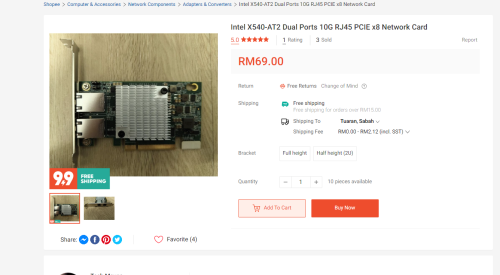
its a pretty old card, from 2012
its not power efficient either

the realtek is fine... sure the realtek "crab" cards have a reputation but its cheap and good enough


PRSXFENG
post Aug 26 2024, 01:48 PM

Look at all my stars!!
*******
Senior Member
2,611 posts

Joined: Nov 2020


QUOTE(jackchoong0110 @ Aug 26 2024, 01:06 PM)
Today my home finally receive the free 1gbps free upgrade. The technician changed my separate modem & router into single D-link AX3000 combo box (black). I just wonder is that normal my LAN speeds only around 940mbps? Tested on ookla speedtest app.

user posted image
*
Completely expected for 1Gbps speed, because of Gigabit Ethernet Limitations, the max speed you will ever see is 940Mbps due to overhead

only if you have the 2Gbps plan that gives a router with 2.5Gbe port and your pc also has 2.5Gbe port, then you can get over that speed

PRSXFENG
post Aug 26 2024, 01:51 PM

Look at all my stars!!
*******
Senior Member
2,611 posts

Joined: Nov 2020


QUOTE(Cavino @ Aug 26 2024, 01:16 PM)
Like that cialiat, if consistent 300Mbp (i will check repeated for few days), coz rebooting every day is too troublesome for long term instead of the fire and forget using Huawei ONU.
I might have to switch back to Huawei ONU.

Can get 3rd party ONU?  How about the config to make ONU work?
*
you probably could reuse the old huawei if you copy over the config details

otherwise Anime4000 has their solution for sale, which is a SFP ONU Stick
PRSXFENG
post Aug 28 2024, 08:31 PM

Look at all my stars!!
*******
Senior Member
2,611 posts

Joined: Nov 2020


QUOTE(emy_xvidia @ Aug 28 2024, 08:18 PM)
just got upgraded today. the technician only brought the Skyworth ONR for me  dry.gif

Huawei best speed is 940Mbps as well via LAN so far, via 2 switches to my laptop. Wish could see it reach 1000 man just for the satisfaction purpose  tongue.gif
*
940Mbps is expected for Gigabit Ethernet, you won't get any higher

You need 2.5Gbe ONT and Router for beyond that
PRSXFENG
post Aug 30 2024, 07:39 AM

Look at all my stars!!
*******
Senior Member
2,611 posts

Joined: Nov 2020


QUOTE(Epic_winner091 @ Aug 29 2024, 05:34 PM)
If we bridge the ONR, does VoIP still work and do we need to set up the VLANs on the router?
*
I belive voip still works and stays on the onr, vlans... not sure, it might be handled by onr already
PRSXFENG
post Aug 30 2024, 10:06 PM

Look at all my stars!!
*******
Senior Member
2,611 posts

Joined: Nov 2020


QUOTE(kenny79 @ Aug 30 2024, 06:44 PM)
Need some help here I’m on 300mbps plan and my pc with tplink 727n only manage to get 60mbps download which WiFi adapter to recommend to get 300mbps .. low budget thank you for advixe
*
60Mbps is already pretty good for N150

You need to upgrade to newer WiFi

If you can install a PCIe Card, any name brand WIFI6 card will do, roughly RM100, will most likely have an Intel AX200 inside

Otherwise, any USB AX1800 card, but of course performance is less

USB AC1200 should probably be able to get 300Mbps as well for a cheaper alternative
PRSXFENG
post Aug 30 2024, 10:09 PM

Look at all my stars!!
*******
Senior Member
2,611 posts

Joined: Nov 2020


QUOTE(countingcrows @ Aug 30 2024, 07:28 PM)
Perhaps, something like the RT-BE88U would be better albeit heaps more expensive?
If the bridging issue crops up, you can buy and plug in and GPON SFP into it like this guy?

https://www.snbforums.com/threads/rt-be88u-...-control.90689/
I like the solution. Simple.
Will it work in MY/Unifi? Not 100% sure. 😁
*
Well, you can refer to this thread https://forum.lowyat.net/topic/4925452 if you want to get a pre configured SFP GPON ONT that works with Malaysian networks
PRSXFENG
post Aug 31 2024, 11:03 AM

Look at all my stars!!
*******
Senior Member
2,611 posts

Joined: Nov 2020


QUOTE(kenny79 @ Aug 31 2024, 06:20 AM)
PCI-e card? Can pcix1 card slot can install?any advice on which brand if can do give a purchase link thank you for you kindness  rolleyes.gif
*
Yeah X1 slot is enough for it

Something like this will be good
Check out ASUS PCE-AX3000 DUAL BAND WIFI 6 PCI-E WIRELESS / BLUETOOTH 5.0 ADAPTER (BULK) at 28% off! RM108.00 only. Get it on Shopee now! https://my.shp.ee/8DEvFbt

You will also need to connect 1x USB cable from the card to a free USB2.0 Header on your motherboard, this is used for the onboard Bluetooth that the card also has

So, you can also remove any USB BT Adapters you have
PRSXFENG
post Aug 31 2024, 11:16 PM

Look at all my stars!!
*******
Senior Member
2,611 posts

Joined: Nov 2020


QUOTE(kwss @ Aug 31 2024, 10:48 PM)
AS16509 definitely use TM-Equinix, even if the traffic is meant for AWS Malaysia.
The problem with the developer suggestion is that they don't apply if the link is congested.
TM really need send more traffic to MyIX and save TM-Equinix for traffic that really needs it.
Or they add additional port for Equinix.
*
TM absolutely refuses to peer with anyone at MyIX unless if they have a local company presence, such as Quad9 KUL hosted by PCH, or even Quad9 KUL hosted by Global Transit Communications (TIME) doesn't get used

TM would rather send EVERYTHING to SG

I assume the same is happening with Amazon

10 Pages « < 2 3 4 5 6 > » Top
Topic ClosedOptions
 

Change to:
| Lo-Fi Version
0.0289sec    0.38    7 queries    GZIP Disabled
Time is now: 15th December 2025 - 09:04 PM