Welcome Guest ( Log In | Register )

Bump Topic Topic Closed RSS Feed
10 Pages « < 3 4 5 6 7 > » Bottom

Outline · [ Standard ] · Linear+

Unifi Official TM UniFi High Speed Broadband Thread V42, READ 1ST PAGE FOR RELEVANT WIFI INFO!

views
     
PRSXFENG
post Sep 2 2024, 10:30 PM

Look at all my stars!!
*******
Senior Member
2,611 posts

Joined: Nov 2020


For anyone who host their own DNS Server on a raspberry pi or other Linux box, and has TM actively hijacking their DNS

May I request that you try out a specific niche protocol to see if they block it or not

Use, DNSCrypt-proxy, and connect to Quad9 over DNSCrypt
It's a lesser known and lesser heard of protocol
PRSXFENG
post Sep 3 2024, 10:27 PM

Look at all my stars!!
*******
Senior Member
2,611 posts

Joined: Nov 2020


QUOTE(soonwai @ Sep 3 2024, 10:01 PM)
DoH in Chrome/Edge with which server?

Update:
LOL, TM hijacked cleanbrowsing DNS also. Looks like when they needed a guide on what to hijack, they looked at Chrome's Settings. hahaha

Chrome has Google, OpenDNS, Cloudflare and CleanBrowsing as predefined options for DoH.
*
So that's how Quad9 got by unaffected tongue.gif
PRSXFENG
post Sep 4 2024, 08:46 AM

Look at all my stars!!
*******
Senior Member
2,611 posts

Joined: Nov 2020


for those in areas where there is active blocking, can you try digging for the mozilla test domain, use-application-dns.net

https://support.mozilla.org/en-US/kb/canary...lication-dnsnet

this domain should respond a NOERROR/ IP Addresses
if it's NXDOMAIN/ no IP Addresses, then it means the network has requested Firefox to disable Auto DoH

it only affects those who have never touched DoH settings before
if you manually adjusted DoH settings then firefox ignores this
PRSXFENG
post Sep 4 2024, 10:13 AM

Look at all my stars!!
*******
Senior Member
2,611 posts

Joined: Nov 2020


QUOTE(The.Lucas.DaY @ Sep 4 2024, 09:50 AM)
Nextdns setup and UI is simple, i set diff profile for each device, can check the logs in each device, btw i registered 2 accounts so i can have 600k queries whistling.gif

Edit: enable "cache boost" in setting - NextDNS cache boost
*
I used to use nextdns, then change to adguard dns (not the public one, not the self hosted one, the managed one similar to nextdns) when nextdns runs out tongue.gif
PRSXFENG
post Sep 4 2024, 04:52 PM

Look at all my stars!!
*******
Senior Member
2,611 posts

Joined: Nov 2020


QUOTE(soonwai @ Sep 4 2024, 04:50 PM)
Confirm that. All the 9.9.9.9 now belongs to TMz.
All PRSXFENG's fault.  mad.gif

Sorry TM, I bluff bluff only. Not actually using Quad9 here.  biggrin.gif
*
sorry cry.gif
PRSXFENG
post Sep 4 2024, 07:21 PM

Look at all my stars!!
*******
Senior Member
2,611 posts

Joined: Nov 2020


QUOTE(soonwai @ Sep 4 2024, 07:13 PM)
TM has caused BGP routing issues before in the past (2015) tongue.gif

https://news.ycombinator.com/item?id=9704952
https://www.cloudflarestatus.com/incidents/bzknm1t91kjq

PRSXFENG
post Sep 4 2024, 09:55 PM

Look at all my stars!!
*******
Senior Member
2,611 posts

Joined: Nov 2020


QUOTE(QuantumEdge @ Sep 4 2024, 09:48 PM)
user posted image
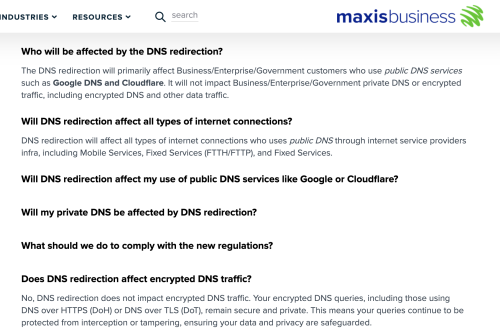
https://www.business.maxis.com.my/en/faq/da...ns-redirection/

Congrats TM
According to this, Maxis is not going to touch DoT DoH
They even push users to use encrypted DNS, Lmao
*
I wonder what's TIME's opinion on this...
Waiting for their message
PRSXFENG
post Sep 4 2024, 10:06 PM

Look at all my stars!!
*******
Senior Member
2,611 posts

Joined: Nov 2020


QUOTE(samftrmd @ Sep 4 2024, 10:02 PM)
Any recommend on replacement router?
*
The Netis doesn't support encrypted DNS

Some very specific TP-Link models support DoH/DoT
Check before you buy

Most Asus models support DoT

Otherwise run your own server on a raspberry pi
Or get any router that is supported by OpenWRT and that will work too
PRSXFENG
post Sep 4 2024, 10:07 PM

Look at all my stars!!
*******
Senior Member
2,611 posts

Joined: Nov 2020


QUOTE(blackbox14 @ Sep 4 2024, 10:02 PM)
That's for business customers right? Not Maxis home users.
*
It's on the business site but it probably covers everyone

Considering
> The DNS redirection action affects all internet service providers offering Mobile Services, Fixed Services (FTTH/FTTP), and Fixed Services of internet services.


PRSXFENG
post Sep 4 2024, 10:20 PM

Look at all my stars!!
*******
Senior Member
2,611 posts

Joined: Nov 2020


QUOTE(blackbox14 @ Sep 4 2024, 10:15 PM)
Strange to think that TM going this far with the inclusion of DoT and DoH blocking is their own doing. But at the same time I can see a situation where TM is more subjected to Gov mandate than the other ISPs with their large market share.

If so, might be time to switch over.
*
TM has always been the one to "go a step further"

Back in the past,
Most ISPs here block prawn sites by just blocking them in DNS, change DNS and you're good to go

TM blocks by IP as well, which did have the unintended side effect of them blocking Cloudflare once... Good job.

I hope other ISPs also take a laid back approach like Maxis tongue.gif
Just doing the bare minimum of redirecting plain old DNS, and not touching DoH/DoT
PRSXFENG
post Sep 4 2024, 10:27 PM

Look at all my stars!!
*******
Senior Member
2,611 posts

Joined: Nov 2020


QUOTE(samftrmd @ Sep 4 2024, 10:22 PM)
https://www.tp-link.com/my/home-networking/...#specifications

This one can?
I look through a few of the models, none of them mention anything about DoH
*
I believe so far the only 100% confirmed have this feature model is AX55
PRSXFENG
post Sep 5 2024, 09:45 AM

Look at all my stars!!
*******
Senior Member
2,611 posts

Joined: Nov 2020


QUOTE(wearwolf @ Sep 5 2024, 09:29 AM)
Gawdamnit! I replaced my old ASUS RT-AC87U with a new RT-AX88U early this year. Then only a few weeks ago; Unifi upgraded my line from 800Mbps to 1Gbps. but to do the line upgrade; they changed my modem from the old Huawei HG8240W to some new Dlink DPN-FX3060V  that's supposed to be some kinda all in one MESH/etc. Screw my years of AC88/AX88U fine tuning and settings. now this DNS crap.

I dont think there's a replacement yet for any Router with fibre modem? I know ASUS got some new BE- models with fibre connectors... but those are for SWITCH use rather than fibre MODEM use..?.. am i correct in this? Or can i plug back the old huawei HG8240 if it can still support the speeds?
*
Options:
if they didn't take away your Huawei, you can reuse it, max speed 940Mbps because of Gigabit Ethernet Limitations (I would be willing to sacrifice ~60Mbps to use own powerful Asus router)

or, bridge the dlink and connect your asus up

however, the dlink is buggy and will randomly drop and get stuck at 300Mbps
it also has security problems
so, just reuse the Huawei

otherwise, we have forum members here selling SFP mini Fiber ONT

PRSXFENG
post Sep 5 2024, 04:53 PM

Look at all my stars!!
*******
Senior Member
2,611 posts

Joined: Nov 2020


I wonder if DNS Providers that run on other ports (not 53/443/853) could be used....
PRSXFENG
post Sep 5 2024, 06:04 PM

Look at all my stars!!
*******
Senior Member
2,611 posts

Joined: Nov 2020


QUOTE(win44 @ Sep 5 2024, 05:55 PM)
Yeah, i havent been active.

Anyway...

Any workaround?
*
Use lesser known DNS Providers
Use DNS Over HTTPS or DNS Over TLS, also using lesser known providers
PRSXFENG
post Sep 5 2024, 06:22 PM

Look at all my stars!!
*******
Senior Member
2,611 posts

Joined: Nov 2020


QUOTE(blacktubi @ Sep 5 2024, 06:12 PM)
I will just leave this here. It works for now and performance is better than DoT / DoH.

NTT
129.250.35.250
129.250.35.251

Singtel
165.21.83.88
165.21.100.88

L3
4.2.2.1
4.2.2.2
4.2.2.3
4.2.2.4
4.2.2.5
4.2.2.6
*
Wonder how long until added to blocklist whistling.gif

Anyways, Quad9/PCH noticed
https://x.com/woodyatpch/status/1821685879020323156
PRSXFENG
post Sep 5 2024, 07:25 PM

Look at all my stars!!
*******
Senior Member
2,611 posts

Joined: Nov 2020


QUOTE(annoymous1234 @ Sep 5 2024, 07:13 PM)
anyone use windscribe VPN? how is it?
*
WS user here, it's fine...
Their Malaysian server is quite slow, like ~30Mbps
Use other nearby servers like Singapore instead

Sometimes there are sales, I would wait for those
PRSXFENG
post Sep 5 2024, 10:10 PM

Look at all my stars!!
*******
Senior Member
2,611 posts

Joined: Nov 2020


QUOTE(dev/numb @ Sep 5 2024, 10:01 PM)
Their servers are slow, but don’t suffer (at least not as often) from the usual packet loss and latency spikes Unifi users experience with many other VPN provider’s servers after 9pm. Fastest seems to be their SG-SMRT node, but it’s still relatively slow. Of you want to try them, don’t bother with the usual subscriptions. Go to their website and choose the “Build a Plan” option. Choose Singapore, Malaysia and Japan for USD3/month. It’s non-renewing so just try it out for a month to see if you’re satisfied.
*
I rather drop Malaysia (it's like 30Mbps max) and get UNLIMITED Quota for $1 to meet the $3 minimum
also their payment gateway surprisingly accepts local stuff like tng ewallet
PRSXFENG
post Sep 5 2024, 10:31 PM

Look at all my stars!!
*******
Senior Member
2,611 posts

Joined: Nov 2020


QUOTE(Anime4000 @ Sep 5 2024, 10:11 PM)
maybe use DoH instead?
*
Those look like China DNS Providers
not sure who I trust less, TM or China rclxub.gif

also worried about latency
PRSXFENG
post Sep 5 2024, 11:03 PM

Look at all my stars!!
*******
Senior Member
2,611 posts

Joined: Nov 2020


QUOTE(wearwolf @ Sep 5 2024, 10:56 PM)
You know.. i jsut did that. Plug in back the old Huawei and reset my AX88U. Guess what? Didnt work. Couldnt login at all. Either the login password have been changed behind my back.. or there's something inside the old HUAWEI settings that's now lost... Like you said.. would rather sacrifice the 60mbps for more control on the ASUS. But looks like i got no luck. have to grin and bear with it for now and find work arounds of my own using VPN. The bridge mode also got its own problems for some unknown reason... have to connect my server directly to the TM DLink to work properly else cannot access the internet. But being connected direct to the Dlink means "our dear ISP friend" can read its traffic more clearly... shocking.gif  shakehead.gif

Cross fingers.. maybe its time the ASUS/TPlink guys start making ONT Modem Routers for consumers as well liao...
*
then your area's olt probably "forgot" about your old Huawei and only has the dlink configured
might be worth trying

go into the dlink, pay attention to PLOAM details and also serial number

copy to huawei

see if the huawei can connect up
PRSXFENG
post Sep 5 2024, 11:06 PM

Look at all my stars!!
*******
Senior Member
2,611 posts

Joined: Nov 2020


QUOTE(Oltromen Ripot @ Sep 5 2024, 11:00 PM)
DEY! WHY YOU LIST THEM IP ADDRESSES DOWN? MAHU KENA BLOCK?
*
its all china dns providers anyways so eh, nothing of value was lost

10 Pages « < 3 4 5 6 7 > » Top
Topic ClosedOptions
 

Change to:
| Lo-Fi Version
0.0309sec    0.85    7 queries    GZIP Disabled
Time is now: 16th December 2025 - 05:35 PM