

Recovered at 12.31am already.
This post has been edited by go626201: Feb 5 2024, 12:48 AM
Unifi Official TM UniFi High Speed Broadband Thread V42, READ 1ST PAGE FOR RELEVANT WIFI INFO!
Unifi Official TM UniFi High Speed Broadband Thread V42, READ 1ST PAGE FOR RELEVANT WIFI INFO!
|
|
 Feb 5 2024, 12:48 AM Feb 5 2024, 12:48 AM
Return to original view | Post
#21
|
 
Senior Member
1,882 posts Joined: Sep 2017 
|
Recovered at 12.31am already. This post has been edited by go626201: Feb 5 2024, 12:48 AM SwarmTroll, cHiLdHo0drEaMz, and 1 other liked this post
|
|
|
|
|
|
Feb 5 2024, 11:57 AM
Return to original view | Post
#22
|
|
Senior Member
1,882 posts Joined: Sep 2017
|
QUOTE(BenYeeHua @ Feb 5 2024, 07:41 AM) Always like this, trigger QoS as more people browsing at 10 AM morning, sometimes kill China traffic at 12 PM, getting higher and higher QoS over time, then boom at night 7 PM where everyone at home, as they start not using data(during office time) but UniFi/WiFi. Aiya...Dont speculate too much.It should be someone doing mistake or something wrong at some place.Get reset after a lot of people going rest during 1 AM, now moving earlier as the quota of this QoS is getting lower. or I should said, easy to trigger as more people getting 100M high speed, compare with 30M. Before that just applied to Google local ISP(yes, 480KBps, until Google having some deals with TM) + China traffic, then after famous of CloudFlare, moving to whole SG traffic as well. This rule applied since Streamyx era, then went away for UniFi(only UniFi customer get benefit) showing up, after the famous of free speed upgrade, the effect of QoS came back to UniFi, as Streamyx user start moving to UniFi. The slowness of IPv6(mostly for upload) for Google also observed during that time(MEGA drive get the most hit, last for years), which is why got the famous "disable IPv6 to speed up the internet" showing up in Lowyat forum. ----- If you wanna me guess why it trigger heavy yesterday? There is 1 thing I know might trigger, 1 famous activity happen during night yesterday, bilibili livestream about the HSR's CNY Festival, the video server is at Amazon SG, only it use Maxis MY CDN if you doing something, which already having high latency by going local, but at least stable than Amazon...  As it is Sunday, the traffic should be local Chinese + Student + Oversea Chinese(SG? also those oversea Chinese getting the traffic wrongly and going to Amazon SG via MY) watching live stream, taking it down heavy. https://www.bilibili.com/festival/honkaistarrail2024spring But it might also be DDoS traffic la, not like MY don't have a lot of computer infected as BOT, going to printer shop, then going back, see your Pendrive got worm infected or not...  Yesterday confirm incident, normally u will just feel slow,and still usable. |
|
|
Feb 6 2024, 03:35 PM
Return to original view | Post
#23
|
|
Senior Member
1,882 posts Joined: Sep 2017
|
Unifi network boom again toward to same specific network.
This post has been edited by go626201: Feb 6 2024, 03:42 PM |
|
|
Feb 6 2024, 03:44 PM
Return to original view | Post
#24
|
|
Senior Member
1,882 posts Joined: Sep 2017
|
I guess either something wrong with the core network device or human error.
|
|
|
Feb 6 2024, 03:50 PM
Return to original view | Post
#25
|
|
Senior Member
1,882 posts Joined: Sep 2017
|
Looks like TM has change the routing with the fix.
My connection to LeaseWeb SG has back to below 20ms just now. Previously it was 40ms for few months. 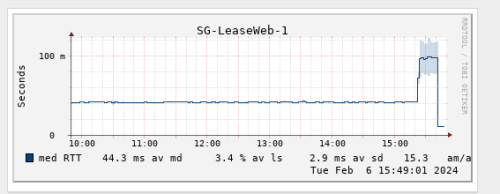 And my connection to specific JP Server is high to 200+ms after routing change.  And what the fxxk is this..  Higher and higher latency. 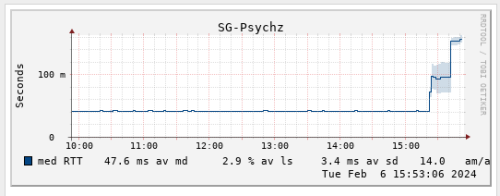 This post has been edited by go626201: Feb 6 2024, 03:54 PM |
|
|
Feb 8 2024, 12:37 AM
Return to original view | Post
#26
|
|
Senior Member
1,882 posts Joined: Sep 2017
|
APG S4 estimated fix complete date:2024-02-12.
|
|
|
|
|
|
Feb 16 2024, 02:07 AM
Return to original view | Post
#27
|
|
Senior Member
1,882 posts Joined: Sep 2017
|
QUOTE(yolldddd @ Feb 16 2024, 01:19 AM) I'm on contract bro since I renew with swu 1.0 300mbps Get a vpn and use it when you are having connection issue. That is your current easiest way to mitigate the issue. yolldddd liked this post
|
|
|
Feb 16 2024, 02:10 PM
Return to original view | Post
#28
|
|
Senior Member
1,882 posts Joined: Sep 2017
|
Most people will stuck with the same/multiple specific IP range. TM had changed the ip distribution way from 2-3 years ago,so u might not be able to change to favorite IP range with keep rebooting router/disconnecting from pppoe. What i observe,TM had distributed specific IP range for different region. Example: Most unifi user in Johor is getting 147.158.X.X range. (My guessing: It might be depends of the core region exchange centre) i haven't saw other ip range on my router in past 2-3 years. (I am located at Johor) This post has been edited by go626201: Feb 16 2024, 02:11 PM Singh93 liked this post
|
|
|
Feb 18 2024, 07:07 PM
Return to original view | IPv6 | Post
#29
|
|
Senior Member
1,882 posts Joined: Sep 2017
|
QUOTE(westlife @ Feb 18 2024, 05:53 PM) yes, wireless backhaul is likely will suit most ppl unless one really build all the wired network ports in the different locations that can be used with wired backhaul for their wifi mesh (e.g. new house renovation). FTTR without hacking wall also workable, since the invisible fiber is almost unseeable if you done in perfect way. (Maybe the cost cheaper than hacking wall,but need invest some time to do)but make sure it is tri-band, dun waste time with dual-band. Fibre-To-The-Room (FTTR) is the perfect solution, becos one can get super super low latency as their main node everyhere in house as they wish, but seriously the solution maybe too ex for most ppl. but it is worthwhile to invest on it actually. for rm1800 or rm2160 it is good enough to cover a 2 bedroom or 3 bedroom apartments units to ensure one has low latency internet anywhere in the house. to be fair, a super good wifi 6 or 6E mesh system now is also not cheap to be frank. but for those who do not want to invest this like me (becos i am renting an apartment), i can only use wireless backhaul mesh. but not too bad, i can get very good connection for unit now with 3 x linksys MR8300 mesh nodes. 1 parent node placed at living and 2 x child nodes (one at study room and one at yard) which gives me decent latency that allows me to play my mobile game anywhere in the house and has the maximum download speed of at least 300Mbps and above for my 500Mbps plan. hacking walls are tough if one is already staying in the unit, hacking walls will cause tremendous amount of dusts which is crazy.. .  but agreed that the cost of it is lower than FTTR for sure. but agreed that the cost of it is lower than FTTR for sure.But still need to figure out the path for sticking the invisible fiber to the side edge of wall. This post has been edited by go626201: Feb 18 2024, 07:07 PM |
|
|
Feb 18 2024, 09:18 PM
Return to original view | IPv6 | Post
#30
|
|
Senior Member
1,882 posts Joined: Sep 2017
|
QUOTE(Epic_winner091 @ Feb 18 2024, 09:11 PM) Can TM's infra do FTTR? Looks like a good solution for larger homes. You just need the device to do it.If fully FTTR,u just need converter for the Router Lan to other room-fiber device. |
|
|
Feb 26 2024, 09:29 PM
Return to original view | IPv6 | Post
#31
|
|
Senior Member
1,882 posts Joined: Sep 2017
|
Not sure news accurate or not.
AAE-1 submarine cable might be down? Houthis knock out underwater cables linking Europe to Asia - report The successful targeting of the four cables, which are believed to belong to the AAE-1, Seacom, EIG, and TGN systems, marks a serious disruption of communications between Europe and Asia. https://www.jpost.com/middle-east/article-788888 |
|
|
Feb 28 2024, 05:02 PM
Return to original view | IPv6 | Post
#32
|
|
Senior Member
1,882 posts Joined: Sep 2017
|
QUOTE(bugipunch @ Feb 28 2024, 04:47 PM) 300 mbps private ip? I thought only 100 and below get private. Last year free upgrade for unifi,and those 100mbps was free upgraded to 300mbps,thats why TM uplift the Private IPv4 CGNAT setting for 300mbps. |
|
|
Mar 12 2024, 08:44 PM
Return to original view | IPv6 | Post
#33
|
|
Senior Member
1,882 posts Joined: Sep 2017
|
QUOTE(ken120 @ Mar 12 2024, 11:49 AM) Finally my 800mbps get FSU to 1gbps Can take a photo on the new BTU or ONR? Package name also changed from 800mbps to 1gbps - pro upgrade |
|
|
|
|
|
Mar 13 2024, 02:42 AM
Return to original view | IPv6 | Post
#34
|
|
Senior Member
1,882 posts Joined: Sep 2017
|
QUOTE(ken120 @ Mar 13 2024, 01:50 AM) Yea Dlink, DPN-FX3060V   |
|
|
Mar 13 2024, 06:17 PM
Return to original view | IPv6 | Post
#35
|
|
Senior Member
1,882 posts Joined: Sep 2017
|
Anyone FSU to 1Gbps might going on custom GPON ONU? Since 940mbps vs 1030mbps is still a 10% difference. (And that Dlink,i dont really trust it is stable enough for 24/7 fully usage) But the downside for using custom GPON ONU... -No home line phone without using ATA adapter or utilize the same Dlink ONR -Need one more device for Fibre to 2.5G Ethernet adapter (And higher power consumption) -Configuration needed for custom GPON ONU -LAST- need additional money budget for those thing... I really hope TM should provide a new way or selection for 1/2gpbs user by providing a better ONU/ONR/BTU for additional one-time fee or subscription or monthly add-on. EDIT: I will be waiting for the free upgrade 1st,and see how is going on. Another more 100mbps DL speed is still attractive for heavy user. This post has been edited by go626201: Mar 13 2024, 06:19 PM enduser liked this post
|
|
|
Mar 13 2024, 10:09 PM
Return to original view | IPv6 | Post
#36
|
|
Senior Member
1,882 posts Joined: Sep 2017
|
QUOTE(yenchenje @ Mar 13 2024, 07:46 PM) I was on ALCL back at my old place, now at my new place in Huawei and max I get is only 950Mbps instead of 1030-1040Mbps. I dont get what u mean the 950mbps?My nightmare of a setup to originally fully utilize 1Gbps but now can’t even get over 1G consistently. U mean the total bandwidth with multiple device or port can only hit 950mbps max? Or 1G lan port can only hit 950mbps? Because if anyhow u cant hit 990mbps in total ,u should complain to Unifi,since the plan is call 1Gbps. The theoretical max speed u should get should be 1000+mbps with no device bottleneck. (I mean between ONR to END Device all are capable run more than 1G) This post has been edited by go626201: Mar 13 2024, 10:11 PM |
|
|
Mar 24 2024, 02:59 PM
Return to original view | IPv6 | Post
#37
|
|
Senior Member
1,882 posts Joined: Sep 2017
|
QUOTE(sHawTY @ Mar 24 2024, 10:02 AM) I'm thinking UniFi will soon remove Disney+ Hotstar from their free offering after the huge price hike Most people that get the free 2 years D+ Hotstar subscription will be expiring in around next 6 months. https://amanz.my/2024446357/ If i remember correctly, Mine would be expires in May this year. (But i dont really use it,since it didn't have enough movies or drama compare to Disney+(With SG VPN) ) chungf1 liked this post
|
|
|
Mar 27 2024, 10:17 PM
Return to original view | Post
#38
|
|
Senior Member
1,882 posts Joined: Sep 2017
|
QUOTE(soonwai @ Mar 27 2024, 10:13 PM) Sad. Yeah, mine is 99 + 60 (UnifiTV) for 800Mbps. Sad...  But RM168.55 still cheaper than most people. |
|
|
Apr 1 2024, 01:10 PM
Return to original view | IPv6 | Post
#39
|
|
Senior Member
1,882 posts Joined: Sep 2017
|
QUOTE(zeronehza @ Apr 1 2024, 12:38 PM) anyone using this for unifi ultra ? Anime4000 said before - it is not 100% compatible with unifi. (Due to something conflict?)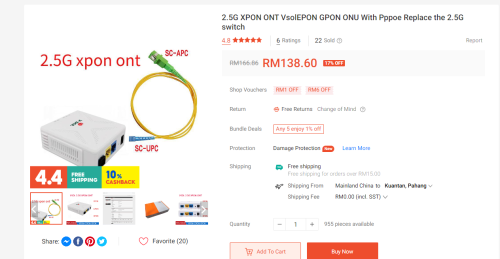 |
|
|
Apr 6 2024, 11:51 AM
Return to original view | Post
#40
|
|
Senior Member
1,882 posts Joined: Sep 2017
|
QUOTE(surianti @ Apr 6 2024, 07:49 AM) May I know, for uploading to clouds such as IceDrive or Mega.nz, I cannot get full upload speed as the Unifi spec, Google Drive is possible but they have a certain periodic pauses 0MB/s before resuming. Is this a routing issue or is this a issue with the cloud providers? Normal.Because the server is hosted in Europe.For google drive,it is also normal,Google Drive and Onedrive have similar working method for uploading data. |
|
Topic ClosedOptions
|
| Change to: |  0.1547sec 0.1547sec
 0.67 0.67
 7 queries 7 queries
 GZIP Disabled GZIP Disabled
Time is now: 11th December 2025 - 10:10 AM |
 Quote
Quote