Welcome Guest ( Log In | Register )

Bump Topic Topic Closed RSS Feed
11 Pages « < 2 3 4 5 6 > » Bottom

Outline · [ Standard ] · Linear+

Unifi Official TM UniFi High Speed Broadband Thread V42, READ 1ST PAGE FOR RELEVANT WIFI INFO!

views
     
go626201
post Jul 12 2024, 12:17 AM

Regular
******
Senior Member
1,882 posts

Joined: Sep 2017
QUOTE(blacktubi @ Jul 12 2024, 12:03 AM)
Can you post your MTR result cause your smokeping to Equinix SG is fine. Shopee hosted in Equinix SG btw
Can confirm this issue is not happening on Maxis
Target Name: server-18-155-68-62.sin52.r.cloudfront.net
IP: 18.155.68.62
Date/Time: 11/07/2024 11:45:30 pm - 12/07/2024 12:15:30 am

Hop Sent PL% Min Max Avg Host Name / [IP]
1 69 0 0.07 0.94 0.29 192.168.88.1 [192.168.88.1]
2 69 0 2.27 12.20 5.21 147.158.255.254 [147.158.255.254]
3 69 0 11.47 74.47 24.28 10.55.106.9 [10.55.106.9]
4 69 0 9.88 17.64 12.20 10.55.100.84 [10.55.100.84]
5 69 0 9.70 16.95 11.99 10.55.208.91 [10.55.208.91]
6 68 6 11.41 34.26 14.30 10.55.208.122 [10.55.208.122]
7 68 49 11.77 61.65 20.46 16509.sgw.equinix.com [27.111.228.87]
8 69 0 11.80 41.47 17.44 52.93.10.174 [52.93.10.174]
9 69 0 10.85 26.45 13.40 52.93.8.23 [52.93.8.23]
10 68 100 0 0 0 [-]
11 68 100 0 0 0 [-]
12 68 100 0 0 0 [-]
13 68 100 0 0 0 [-]
14 68 100 0 0 0 [-]
15 69 0 12.24 17.46 14.16 15.230.200.4 [15.230.200.4]
16 69 0 10.48 14.35 12.24 server-18-155-68-62.sin52.r.cloudfront.net [18.155.68.62]

Target Name: server-18-67-181-112.kul50.r.cloudfront.net
IP: 18.67.181.112
Date/Time: 11/07/2024 11:45:37 pm - 12/07/2024 12:15:37 am

Hop Sent PL% Min Max Avg Host Name / [IP]
1 62 0 0.00 0.65 0.28 192.168.88.1 [192.168.88.1]
2 62 0 2.17 21.03 4.93 147.158.255.254 [147.158.255.254]
3 62 0 6.66 38.71 10.90 10.55.106.9 [10.55.106.9]
4 62 0 6.77 48.64 17.19 10.55.50.110 [10.55.50.110]
5 62 0 6.81 12.62 8.90 10.55.41.0 [10.55.41.0]
6 62 0 6.65 13.24 8.79 10.55.48.86 [10.55.48.86]
7 62 0 7.18 11.80 9.09 72.21.221.148 [72.21.221.148]
8 61 100 0 0 0 [-]
9 61 100 0 0 0 [-]
10 61 100 0 0 0 [-]
11 61 100 0 0 0 [-]
12 61 100 0 0 0 [-]
13 62 0 7.65 11.52 9.62 server-18-67-181-112.kul50.r.cloudfront.net [18.67.181.112]

Target Name: server-18-161-180-106.kul50.r.cloudfront.net
IP: 18.161.180.106
Date/Time: 11/07/2024 11:45:44 pm - 12/07/2024 12:15:44 am

Hop Sent PL% Min Max Avg Host Name / [IP]
1 53 0 0.00 0.38 0.28 192.168.88.1 [192.168.88.1]
2 53 0 2.43 10.24 4.97 147.158.255.254 [147.158.255.254]
3 53 0 6.65 43.71 12.71 10.55.106.9 [10.55.106.9]
4 53 0 6.75 41.28 13.84 10.55.50.110 [10.55.50.110]
5 53 0 6.87 12.23 8.74 10.55.41.0 [10.55.41.0]
6 53 0 6.69 20.11 9.03 10.55.48.86 [10.55.48.86]
7 53 0 7.18 11.82 9.00 72.21.221.148 [72.21.221.148]
8 53 100 0 0 0 [-]
9 53 100 0 0 0 [-]
10 53 100 0 0 0 [-]
11 53 100 0 0 0 [-]
12 53 100 0 0 0 [-]
13 53 0 7.52 11.21 9.42 server-18-161-180-106.kul50.r.cloudfront.net [18.161.180.106]

The last one ip is the same with google dns resolver. (18.161.180.X)
go626201
post Jul 31 2024, 08:14 PM

Regular
******
Senior Member
1,882 posts

Joined: Sep 2017
QUOTE(soonwai @ Jul 31 2024, 01:21 PM)
Can't say much about efficiency but they're certainly punctual. Right on the last day of July.

Finally got my FSU +100Mbps free download speed upgrade.
user posted image

DPN-FX3060V 2.5Gbps still in box. Use back old Huawei for now.

Update: Just noticed package name updated to "Unifi Home 1Gbps - Pro Upgrade"
*
QUOTE(soonwai @ Jul 31 2024, 07:53 PM)
This is why TM is the bestest ISP in town. Always keep promise.
user posted image
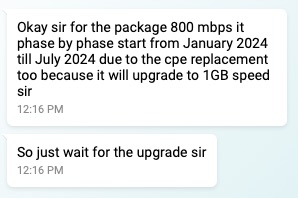
Chat on Jan 8. OK I wait.

Today, last day of July, got the free speed upgrade. LOL
*
Improved customer service,but service quality worst... sweat.gif
Haven't get the free 1G speed upgrade yet...
Will ask TM again after 2weeks when i complete resign from my current job. whistling.gif
go626201
post Jul 31 2024, 10:08 PM

Regular
******
Senior Member
1,882 posts

Joined: Sep 2017
QUOTE(Micky78 @ Jul 31 2024, 09:50 PM)
how much u paying for the 800mbps plan?
*
Same with Soonwai.
go626201
post Aug 3 2024, 01:23 PM

Regular
******
Senior Member
1,882 posts

Joined: Sep 2017
QUOTE(cyclone2 @ Aug 3 2024, 12:21 PM)
Hi,

Anyone from JB which using 800Mbps got free upgrade to 1Gbps?

Mine one until now no one contacted me for upgrading.... thinking to lodge complaint to MCMC.
*
You might try to livechat TM and ask for the FSU.
They will make a report and call you after few days for the confirmation.
go626201
post Aug 18 2024, 11:47 PM

Regular
******
Senior Member
1,882 posts

Joined: Sep 2017
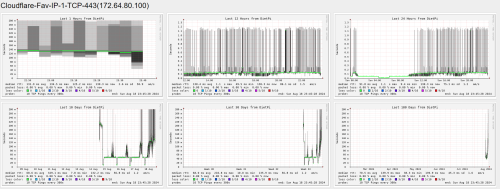
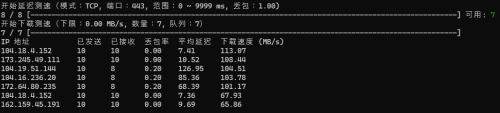
Started from this week some unifi ipv4 block to specific Cloudflare network having issue especially heavy at night.(TCP protocol)
And If you try to "ICMP" ping the same ip,it will show low ping/latency.

user posted image

So the easily mitigate way is enable IPv6 for cloudflare usage.

Edited:
Packet Lost and High Latency.
user posted image

This post has been edited by go626201: Aug 18 2024, 11:55 PM
go626201
post Aug 27 2024, 11:56 PM

Regular
******
Senior Member
1,882 posts

Joined: Sep 2017
I not sure why my DNS resolving to Google DNS tonight is broken.
Anyone else having similar issue? (With Google DNS)

It looks like some dns records is not served on Google DNS?
I mean most site is resolving by Google DNS,but some specific domain will just answer request timed out.

Edited:
After rebooting router,issue gone.
Looks like my previous unifi ip was banned by Google DNS. (Might be due to high queries with adguard/smartdns and smokeping)

This post has been edited by go626201: Aug 28 2024, 12:14 AM
go626201
post Aug 30 2024, 02:11 PM

Regular
******
Senior Member
1,882 posts

Joined: Sep 2017
QUOTE(OKLY @ Aug 30 2024, 01:39 PM)
Guys, usually which speedtest.net server you guys use to test a 1-2gbps connection?

My 1gbps usually hitting around 870-880mbps on most servers. Only off peak and certain hours I will see it above 900mbps closer to my 1GBe limitation.
*
You may try with U Mobile server.(But i not sure their speedtest server on speedtest.net is 10G or not,they have 10G speedtest server on nperf.com)
And some singapore server also got 10G.

Attached Image
go626201
post Aug 30 2024, 04:00 PM

Regular
******
Senior Member
1,882 posts

Joined: Sep 2017
Just livechat with Unifi for asking the FSU.
And they seems like still controlling the speed for upgrading 800mbps users because of the ONR issue.
I was asking for the upgrade,but the CS didn't said will escalate the request like June,and just ask me to wait until end of the year for the CPE/ONR changes.
go626201
post Sep 2 2024, 10:27 AM

Regular
******
Senior Member
1,882 posts

Joined: Sep 2017
QUOTE(Orpheus1120 @ Sep 2 2024, 10:14 AM)
Ping to Quad9 timed out 99%. Changed my dns to cloudflare for the time being.

Update: back to normal.
*
My End still not working.
user posted image

Edited:
Back to services.

This post has been edited by go626201: Sep 2 2024, 10:29 AM
go626201
post Sep 2 2024, 05:16 PM

Regular
******
Senior Member
1,882 posts

Joined: Sep 2017
Looks like currently still not all area are under DNS hijacking/poisoning.
My end still looks goods with those dns servers.

This post has been edited by go626201: Sep 2 2024, 05:16 PM
go626201
post Sep 2 2024, 05:20 PM

Regular
******
Senior Member
1,882 posts

Joined: Sep 2017
QUOTE(Jeffreynsx @ Sep 2 2024, 05:17 PM)
They will implement it in batch by batch.
*
Nevermind,i already implement DoH and DoT on my personal dns server(smartdns+adguard). bruce.gif
go626201
post Sep 3 2024, 01:47 AM

Regular
******
Senior Member
1,882 posts

Joined: Sep 2017
QUOTE(kwss @ Sep 3 2024, 12:15 AM)
For people who has their DNS blocked, do you all mind to install nmap and run the following command?
CODE

nmap -sCV -Pn -p 53,443,853 <IP address of DNS server>

eg 1:
nmap -sCV -Pn -p 53,443,853 dns.google

eg 2:
nmap -sCV -Pn -p 53,443,853 9.9.9.9


Share your output here.
*
Nmap scan report for dns.google (8.8.8.8)
Other addresses for dns.google (not scanned): 2001:4860:4860::8888 2001:4860:4860::8844 8.8.4.4

PORT STATE SERVICE VERSION
53/tcp filtered domain
443/tcp filtered https
853/tcp filtered domain-s

Nmap scan report for dns9.quad9.net (9.9.9.9)

PORT STATE SERVICE VERSION
53/tcp filtered domain
443/tcp filtered https
853/tcp filtered domain-s

FYI-I am currently not having dns poisoning.

This post has been edited by go626201: Sep 3 2024, 01:48 AM
go626201
post Sep 3 2024, 02:03 AM

Regular
******
Senior Member
1,882 posts

Joined: Sep 2017
QUOTE(kwss @ Sep 3 2024, 01:58 AM)
How come all the ports are filtered? Did you have some firewall rule to prevent your network from leaking DNS?
*
Emm i dont think so,my firewall filter rule is the original that came with mikrotik.
Attached Image
Attached Image
go626201
post Sep 3 2024, 11:22 AM

Regular
******
Senior Member
1,882 posts

Joined: Sep 2017
QUOTE(kwss @ Sep 3 2024, 02:20 AM)
Based on your nmap output, Google and Quad9 DNS is totally blocked.
Can you double check again if they are working as intended and not hijacked?
*
From what i observed and check and test.
It is still working without any hijacking.

Just tried to use google dns only,and dns leak test show the correct Google server in Singapore.
go626201
post Sep 3 2024, 03:08 PM

Regular
******
Senior Member
1,882 posts

Joined: Sep 2017
QUOTE(Jeffreynsx @ Sep 3 2024, 12:43 PM)
I noticed if you did not connect to VPN, the DNS will redirect to TM DNS. If you connect to VPN, regardless of which DNS you configured, it will redirect to Google DNS. Not sure will our ISP collect our personal data information from Google? Or else why only Google DNS is being shown while not Cloudflare, OpenDNS and etc?
*
The DNS while connected to VPN is depends of your VPN settings,some VPN providers have their own DNS server(some said SecureDNS).

And you still can replace the DNS setting by changing the dns setting for the vpn network adapter. (On PC only) (for phone i dont think so with commercial vpn, but wireguard or your own vpn server is changeable)
go626201
post Sep 4 2024, 09:17 PM

Regular
******
Senior Member
1,882 posts

Joined: Sep 2017
I think some days later all port 53 will be redirect to their dns server.
They might still doing test on the blocking.

So the best way to mitigate the blocking or dns poisoning should be DoH or DNS over VPN(which is not doable for most consumer router).

The worst case might be they will block all the access to those 3rd party DNS provider or resolver,which is not common use by 95% of users.
go626201
post Sep 5 2024, 01:04 AM

Regular
******
Senior Member
1,882 posts

Joined: Sep 2017
The CF warp actually also depending on domain at some point,so if TM block the warp endpoint,it will suddenly not working.
Although warp have many endpoints,but if TM spend time to organize,it is easy to block 90% of warp ip.(It is also anycast IP,so u cant bypass at the time they blocking CF Warp)

And also there was a period happens in few years ago,some unifi range is totally cant connect to Warp services without VPN/routing changes. (But i think it was Cloudflare end issue,not TM block at the time)

This post has been edited by go626201: Sep 5 2024, 01:05 AM
go626201
post Sep 5 2024, 01:20 AM

Regular
******
Senior Member
1,882 posts

Joined: Sep 2017
QUOTE(kwss @ Sep 5 2024, 01:09 AM)
Cloudflare makes WARP blockable
https://community.cloudflare.com/t/how-to-block-warp/420359

Not their Anycast CDN
*
That ip range is not fully included the endpoint ips that used for CF warp.
Got other ipv4 blocks for CF warp.

And i wrote Anycast is because it is depends on the routing not by specific ips endpoints for specific country.
go626201
post Sep 5 2024, 11:36 AM

Regular
******
Senior Member
1,882 posts

Joined: Sep 2017
QUOTE(xxboxx @ Sep 5 2024, 10:01 AM)
EDIT: I noticed the Speed Test, I'm connected to MY server now. Yesterday night connected to SG server. Doesn't seem to have the option to change the server.
*
It is depends of your routing and dns resolver.
If dns resolver reply an anycast IP route to MY(KUL or JHB),then u are connected to MY CF CDN server.
And if dns resolver reply an anycast IP route to SG(SIN),then u are connected to SG CF CDN server.

So whoever using oversea DNS server,it is a chance that it will not reply an anycast IP that route to MY or SG.
Although half of the CF anycast ip actually having the same routing,but as i said before some DNS server does reply other IPs that not route optimized.

And i want to mention something about CF Warp,it is possible that CF Warp might be having reroute Warp service to HKG(Most likely) or other Northeast Asia server due to routing changes or maintenance.
It happens in time to time in past.

CF warp is speed limited at some point-if i am not wrong,the speed mostly can only hit for 300+mbps in 90% of time.

And Last- While enabling Warp,your actual unifi/ISP ip will be show to any sites that using Cloudflare. But for sites that not using CF,it will show as CF warp IP as your visit IP.
go626201
post Sep 5 2024, 11:55 AM

Regular
******
Senior Member
1,882 posts

Joined: Sep 2017
QUOTE(ycs @ Sep 5 2024, 11:52 AM)
if host own DNS server, can that forward request to public DNS be blocked? i've just setup Bind9 in home server, seems to be working
*
Yes it is possible to be dns poisoning/redirecting with plaintext dns request or DOT.

11 Pages « < 2 3 4 5 6 > » Top
Topic ClosedOptions
 

Change to:
| Lo-Fi Version
0.0346sec    0.60    7 queries    GZIP Disabled
Time is now: 12th December 2025 - 06:35 PM