Welcome Guest ( Log In | Register )

Bump Topic Topic Closed RSS Feed

Outline · [ Standard ] · Linear+

Unifi Official TM UniFi High Speed Broadband Thread V42, READ 1ST PAGE FOR RELEVANT WIFI INFO!

views
     
go626201
post Feb 16 2025, 04:36 PM

Regular
******
Senior Member
1,882 posts

Joined: Sep 2017
QUOTE(blacktubi @ Jul 18 2024, 10:28 PM)
For those who got the Skyworth GN630V combo router, it's super easy to turn that thing into bridge mode and still use PPPOE at your own router.

You should definitely do that as any decent third party router should have a much faster CPU than the GN630V.

My settings below:
user posted image

Note: VLAN tagging / IPTV Profile / VLAN profile not needed on your router with this configuration!

Remember to switch off the WiFi function once that's done.
*
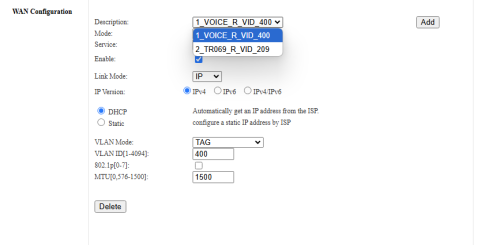
Just take a look on this picture.
Mine didn't have this default setup in my GN630V 2.5G.

user posted image

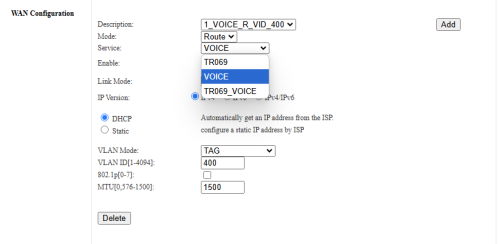
user posted image
And mode didn't have other selection,cannot change.

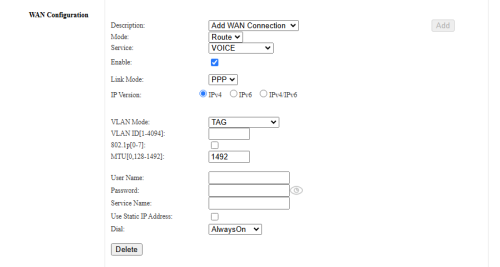
user posted image
Click add and this page also mode unable to change. doh.gif

GN630V
Hardware Version: CW2.0
Software Version: V2.0.0.2

This post has been edited by go626201: Feb 16 2025, 04:43 PM
go626201
post Feb 16 2025, 08:13 PM

Regular
******
Senior Member
1,882 posts

Joined: Sep 2017
QUOTE(Anime4000 @ Feb 16 2025, 07:52 PM)
I have checked these Skyworth 2.5G ONR, someone hire me to fix it innocent.gif

first, Skyworth 2.5G ONR using MediaTek, still use ancient binary blobs, example: ancient `boa` just like D-Link
second, Skyworth 2.5G ONR can't Bridge if OLT says NO, their firmware fully respect OLT, unlike D-Link
third, many late Unifi deployment, high chance FHTT OLT is there, thus 2G performance is vary:
PLOAM start with 001xxxxxxx (new customer = issue)
PLOAM start with 0001xxxxxx (old customer = no problem)

then...

1. I disable TR069 and VLAN209 on ONR
2. Call 100, report internet problem
3. Customer Support proceed to reboot ONR
4. ONR rebooted
5. ??? rclxub.gif

With ISP management like TR069 disabled, TM still have full control of ONR ranting.gif

For me, I against ONR, I would much prefer ONT + Router, so far only Maxis and Allo provide ONT + Router.
*
Oh...So is that mean mine upload problem high latency issue actually partial due to this Skyworth ONU?
My PLOAM start with 0004XXXX.
I had facing random disconnection few days ago,but starting from yesterday midnight no more disconnection until now.
But high latency with utilize more than a few mbps(XX-XXXmbps) upload speed will starting high latency spikes(400ms to 2k ms) or fully packet lost. (But fully packet lost is mitigate-able with queue)

I am also willing to pay you if you can fix my problem. tongue.gif
Although i already report to TM,but they did close up my report yesterday,but i am going to livechat to reopen the report again.

Or waiting for your future ONU+ATA adapter all in one ONU. drool.gif

QUOTE(PRSXFENG @ Feb 16 2025, 07:09 PM)
I think your one might be the 2nd revision one with the 2.5Gbps port?
*
Yes... bangwall.gif

This post has been edited by go626201: Feb 16 2025, 08:19 PM
go626201
post Feb 18 2025, 01:44 PM

Regular
******
Senior Member
1,882 posts

Joined: Sep 2017
QUOTE(lukemanz @ Feb 18 2025, 01:37 PM)
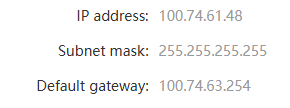
After complete name change to portal and bill 1+year after FSU, TMshit force me get private ip

user posted image

Now, their ipv6 settings also bricked

user posted image

Useless TMshit  ranting.gif
*
Try reboot your router 1st and reboot your PC and devices.
IPv6 should not be affect with CGNAT.
go626201
post Feb 19 2025, 10:45 AM

Regular
******
Senior Member
1,882 posts

Joined: Sep 2017
QUOTE(watermineral @ Feb 19 2025, 09:38 AM)
user posted image

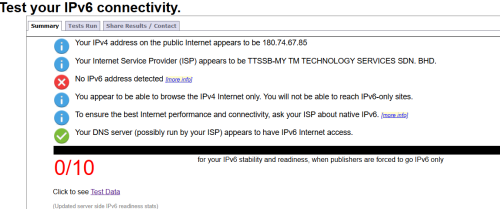
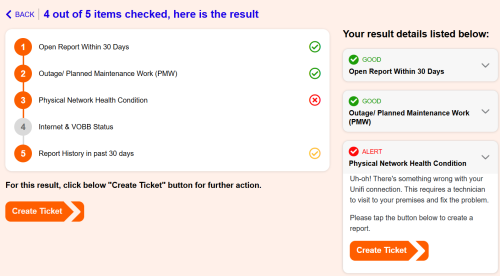
hello there, I've been experiencing constant ping spikes while gaming. I initially thought it was an issue with Maxis, having been with them for two years. However, I recently switched to Unifi, and the problem persists. When I used TMnet's EasyFix tool, it indicated a hardware issue.

I contacted TM, and they reset my port last night, but I haven had the chance to test if it resolved the ping spikes. Even after the reset, the TM EasyFix tool still detects this supposed hardware issue.

I'm using Wi-Fi, and I've tried two setups:

TM's own  combo router AX3000 in combo mode
TM combo router AX3000 bridge mode pair with TPlink AX5400

Despite these changes, the ping spikes continue. I've tested both the 2.4GHz and 5GHz bands, but no difference.

Does anyone have any opinions on this?
*
Can you try to ping 8.8.8.8 with ethernet cable connected?
As long as u are using wifi,u cant get 100% full time low ping even to local network.
go626201
post Feb 21 2025, 07:29 PM

Regular
******
Senior Member
1,882 posts

Joined: Sep 2017
QUOTE(soonwai @ Feb 21 2025, 07:00 PM)
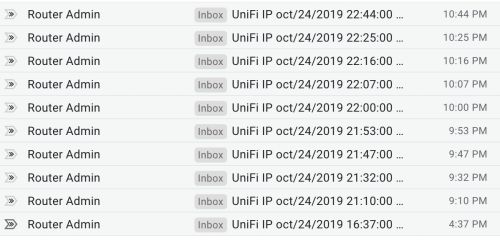
You still having the pppoe disconnect problem? Way back in 2019, I had this prob too. iirc, it was like this for the whole week but I was busy so didn't bother about it. Then the problem went away the next week.

user posted image
Sometimes minutes and sometimes hours between the disconnections. iirc I get a PADT for all(?) the disconnections.

https://forum.lowyat.net/index.php?showtopi...post&p=96183145
*
Ah no,TM fixed already.
Almost 99% similar to your case.
Tinkering with it for 3days,and thinking maybe my RB5009 rosak or not... bangwall.gif (I almost give up and ready to order a new mikrotik router again)
Fortunately TM fixed it at the day they send technician came,and help me to report back to KL HQ about my upload high ping issue.

This post has been edited by go626201: Feb 21 2025, 07:29 PM
go626201
post Feb 21 2025, 11:45 PM

Regular
******
Senior Member
1,882 posts

Joined: Sep 2017
QUOTE(coolguy_0925 @ Feb 21 2025, 10:50 PM)
Just for knowledge, may I know

What was the issue leading to your previous frequent dc and what TM tech actually did to fix the issue? TQ!
*
I have no idea what causing the issue...
That day TM technician came just tell me the disconnection is their system problem.
And for the upload high latency issue-dont know reason,after saturday technician came,and after that Monday i try to test again and no more upload high latency issue occurs anymore..

But the only thing i can said is both issue is not causing by own device,1000% TM faults.

Secondly, I can give TM credit for being quite responsive with their technical support.
They dispatch a technician within 24 hours and provide an accurate appointment time for on-site support. (I report with livechat,and livechat make the next day appointment for me)
Although the technician didn't came with the time that agreed but he did came at the day(About 2hours later after the appointment time)

This post has been edited by go626201: Feb 21 2025, 11:45 PM
go626201
post Feb 24 2025, 11:28 AM

Regular
******
Senior Member
1,882 posts

Joined: Sep 2017
QUOTE(blacktubi @ Feb 24 2025, 11:21 AM)
Edit: Seems like they stopped giving PLOAM password
*
But i think still can login the ONR to get the password ourself.
go626201
post Feb 24 2025, 01:11 PM

Regular
******
Senior Member
1,882 posts

Joined: Sep 2017
QUOTE(blacktubi @ Feb 24 2025, 12:40 PM)
Not visible in plain text on every ONU / ONR model
*
Ya but GN630V can get the password with F12 type=text.
go626201
post Feb 25 2025, 08:47 PM

Regular
******
Senior Member
1,882 posts

Joined: Sep 2017
QUOTE(derict @ Feb 25 2025, 07:43 PM)
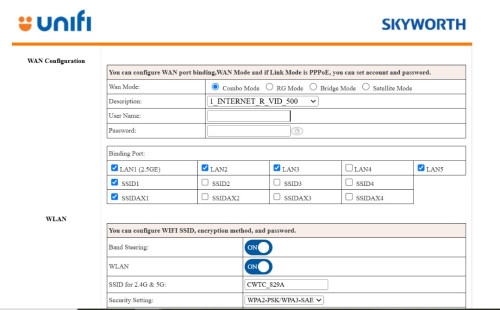
user posted image

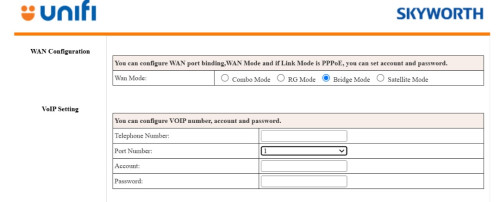
The new firmware sort of changed the interface (or because i am login using tmadmin and not actual admin)? No longer have the option to just choose bridge mode, instead now need to be selected under WAN mode (top level).

user posted image

After set to bridge mode, which port should i connect to? The 2.5 or the 1st WAN/LAN 1? I tried both, not working.

Also, anyone can advise if the fiber plugged in and its fine, is the PON light suppose to keep blinking or permanent?
*
Waa..which firmware version running on the GN630V? (2.5G model?)
go626201
post Feb 27 2025, 06:29 PM

Regular
******
Senior Member
1,882 posts

Joined: Sep 2017
QUOTE(christina1 @ Feb 27 2025, 06:27 PM)
300Mbps speed is it private ip?
*
Should be private ip. some people said they are on 300mbps,and after reboot the ip changes to private ip.
go626201
post Feb 27 2025, 09:28 PM

Regular
******
Senior Member
1,882 posts

Joined: Sep 2017
QUOTE(christina1 @ Feb 27 2025, 06:32 PM)
What are the advantage of private ip ?
*
No one can hack you through the private ip.Since your network will be Double NAT by unifi network.
And no more advantage compare to public ip.
Only disadvantage for private ip.

And i also ask Chatgpt after i wrote the word above.

QUOTE
For regular users, the benefits of having your Internet connection run through CGNAT (using private IP addresses) are mainly about efficiency and cost:

Better Use of Limited IPs: Your ISP can share a single public IP address among many customers. This smart use of addresses means they can keep providing service even when public IPs are in short supply.

Cost Savings: Because fewer public IP addresses need to be managed or purchased, your ISP can offer reliable internet at lower costs, which often means more affordable service for you.

Added Basic Security: Your personal device's private IP isn’t directly exposed to the public internet. This extra “shield” can help reduce the risk of unsolicited attacks on your home network.

Overall, while CGNAT might sometimes affect things like hosting your own server or port forwarding, for most home users it makes your connection reliable, cost-effective, and a bit more secure.

So conclusion no advantage for using private ip.

Edited:
Advantage for using ISP Public IP (Anwser by ChatGPT)
QUOTE
Using a public IP address instead of a private IP (CGNAT) has several advantages, especially for users who need more control over their internet connection. Here’s how public IPs compare:

Advantages of Public IP Over Private IP (CGNAT)

Direct Access to Your Devices
With a public IP, your devices can be accessed directly from the internet, making it easier to host services like websites, game servers, remote desktop connections, or CCTV cameras without extra workarounds.
With CGNAT, inbound connections are blocked unless the ISP provides a way to forward ports.

No Issues with Port Forwarding
Public IPs allow full control over port forwarding, letting you set up services like VPNs, home servers, or custom applications.
CGNAT usually blocks this functionality because multiple users share the same public IP.
Better Online Gaming Experience

Some online multiplayer games require NAT Type 1 or 2 for optimal connections. CGNAT often forces a strict NAT Type 3, which can cause connection issues, longer matchmaking times, or even prevent online play.
With a public IP, gaming consoles and PCs can connect directly to other players, improving performance.
Improved Peer-to-Peer (P2P) Performance

Services like torrenting, file sharing, and decentralized applications work better with a public IP because they rely on direct peer connections.
Under CGNAT, these services might experience slow speeds or connection failures.

Avoid Shared IP Restrictions
Many websites and services block or impose limits on users from CGNAT networks because multiple people share the same IP.
If someone on the same CGNAT IP is banned from a website or flagged for suspicious activity, you might also get blocked.

Easier Remote Access & IoT Device Management
Public IPs allow direct control of smart home devices (e.g., security cameras, smart thermostats, and automation systems) from anywhere without relying on third-party cloud services.
CGNAT makes this more complicated and sometimes impossible.

When is CGNAT Acceptable?
If you only browse the web, watch videos, or use social media, CGNAT won’t make a noticeable difference.
If your ISP offers IPv6, many of these limitations disappear since IPv6 allows every device to have a unique address.

Final Thoughts
If you need remote access, better gaming, P2P performance, or hosting services, a public IP is the better option. If your ISP only provides CGNAT, you might have to request a static or dynamic public IP as an add-on service.


Last Edit:
So far i see some people under CGNAT private ip will get lower qos connection compare to public ip,as sometimes CGNAT gateway might have congestion or else issue.

This post has been edited by go626201: Feb 27 2025, 09:34 PM

go626201
post Feb 27 2025, 11:15 PM

Regular
******
Senior Member
1,882 posts

Joined: Sep 2017
QUOTE(yenchenje @ Feb 27 2025, 11:01 PM)
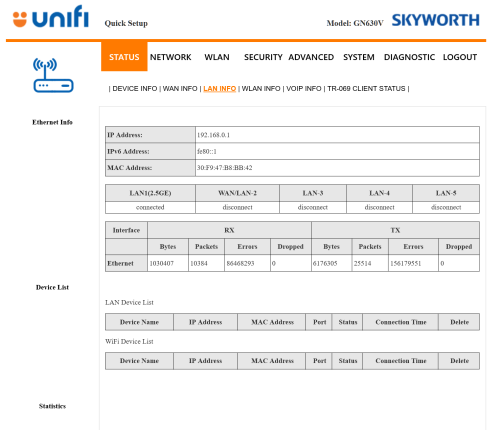
Anyone here with a GN630V able to help confirm something?

user posted image

Do any of you have as much errors as shown in the screenshot above?

Swapped out to my other ONU unit, changed LAN cables, went from SFP+ to RJ45 to just pure RJ45

Starting to suspect might be fiber issue and not my equipment, gonna lodge a report if this is not normal behavior

TIA
*
Yes,same. You can check my replies-i got upload one picture about this error about 1-2 weeks ago on this unifi thread or mikrotik thread.

You may report to tm for check,but i dont think they going to give any further reply about this,since i dont having issue with those error.

This post has been edited by go626201: Feb 27 2025, 11:18 PM
go626201
post Mar 4 2025, 12:10 PM

Regular
******
Senior Member
1,882 posts

Joined: Sep 2017
QUOTE(aspire2oo6 @ Mar 4 2025, 11:10 AM)
happen to me after 12 hours no internet, technician came reset everything then all works smooth. They told there some hidden admin you need change combo to modem . He didnt want give me the password
*
Ahh..That why i cant setup the new 2.5G GN630V ONU to combo mode.

11 Pages « < 9 10 11Top
Topic ClosedOptions
 

Change to:
| Lo-Fi Version
0.0640sec    0.61    7 queries    GZIP Disabled
Time is now: 12th December 2025 - 06:34 PM