Welcome Guest ( Log In | Register )

6 Pages < 1 2 3 4 > » Bottom

Outline · [ Standard ] · Linear+

 DLink DIR-X3060Z Router Speedtests & Tips, Oh. So. Free.

views
     
wc_how
post Oct 23 2023, 11:36 AM

Regular
******
Senior Member
1,187 posts

Joined: Oct 2009
QUOTE(Maknusia @ Oct 23 2023, 11:33 AM)
I dont have problem at my home switching for my Deco M4 when I walk from ground floor to 1st floor room, it automatically switches and yes both has the same SSID.
*
I mean 2 diff range of routers, not mesh unit with same ssid. Or what i mean is, 2 individual APs.
Maknusia
post Oct 23 2023, 11:47 AM

Enthusiast
*****
Junior Member
997 posts

Joined: Apr 2009


QUOTE(wc_how @ Oct 23 2023, 11:36 AM)
I mean 2 diff range of routers, not mesh unit with same ssid. Or what i mean is, 2 individual APs.
*
I see...got it! yeah those are leceh. Sorry misunderstood earlier.
wc_how
post Oct 23 2023, 11:48 AM

Regular
******
Senior Member
1,187 posts

Joined: Oct 2009
QUOTE(Maknusia @ Oct 23 2023, 11:47 AM)
I see...got it! yeah those are leceh. Sorry misunderstood earlier.
*
Ya that was my meaning i never go back after using tplink deco series.
TSsoonwai
post Oct 23 2023, 02:56 PM


********
All Stars
11,456 posts

Joined: Oct 2007
From: KL


QUOTE(PJng @ Oct 23 2023, 01:03 AM)
i got try set same SSID, but seem sometime phone does not auto switch, and i cannot know which router is connected to, so i just add extra 1 number on SSID, easy to see connected to which router.

and some more AP also got LAN port for PC use
*
True also. Even with mesh systems, - more accurately 802.11[r,k,v]. WiFi Mesh nowadays is more a marketing term - ultimately it's still up to the device whether it wants to switch or not.

For sure your house will have spots where the signal is the same but one AP is faster than the other. And dunno why the phone always connects to the one that is slower. bangwall.gif

My master toilet is one such place. No matter what I'm using, Deco M4, M9 Plus, X20, Mikrotik hAP ac, ac2, ax3 and now DLink X3060Z, the same thing happens.

Another one is the camera in my front door, for some strange reason, it always connect to the AP at the back of the house instead of the one 10ft away from it. confused.gif This can be solved by using separate SSIDs like what you do. Since I prefer a single SSID, I solve this by blocking that camera from the back AP but I can only do this when using Mikrotik APs.

Another thing is power, I never use 100%. Too much overlap in the signal. TPLink Deco team knows this so their products all have conservative power settings. Buy more Decos instead of increasing power. smile.gif

This post has been edited by soonwai: Oct 23 2023, 03:11 PM

TSsoonwai
post Oct 23 2023, 03:32 PM


********
All Stars
11,456 posts

Joined: Oct 2007
From: KL


QUOTE(Aspick @ Oct 23 2023, 08:34 AM)
If I pull cable from ground floor to 1st floor, it will be messy and I don't like to see exposed cable running along the walls. That is why I using repeater for now. But repeater also give half the speed of my main unit.

Was hoping getting another similar X3060z and set up as wireless mesh will give full speed. Guess will have to reconsider other options.
*
Looks like it has be tri-band then. M9 Plus is really cheap now but Wifi5 only. The current Wifi6 Deco tribands are too expensive.

You'll also need to see if you have a good place to put the unit where it's family approved, has a power point and good signal from the main unit. Harder than it sounds.

Or hack the walls and conceal a cable. smile.gif

This post has been edited by soonwai: Oct 23 2023, 03:33 PM
pokchik
post Oct 23 2023, 09:31 PM

I'm getting too old for this sh*t
******
Senior Member
1,304 posts

Joined: Mar 2010


QUOTE(soonwai @ Oct 23 2023, 03:32 PM)
Or hack the walls and conceal a cable. smile.gif
*
I wonder if we can do our own FTTR using Huawei solution..
fuadfadz
post Oct 23 2023, 09:51 PM

Enthusiast
*****
Senior Member
795 posts

Joined: Jun 2009

i sold my dlink dir-x3060z. i like fiberhome sr1041f more
BOTAK_WAI
post Oct 23 2023, 09:53 PM

Blow Water First Class
*******
Senior Member
4,148 posts

Joined: Jan 2003
From: Cheras, KL


QUOTE(pokchik @ Oct 23 2023, 09:31 PM)
I wonder if we can do our own FTTR using Huawei solution..
*
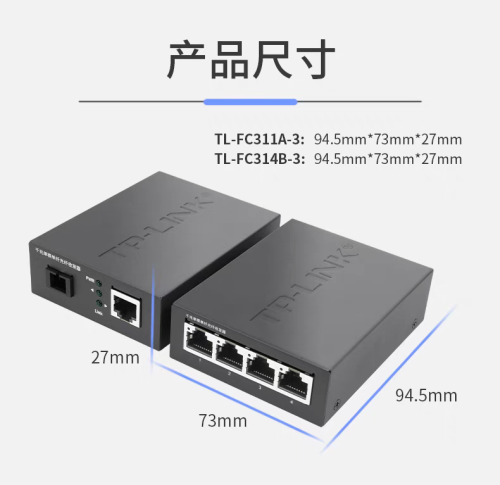
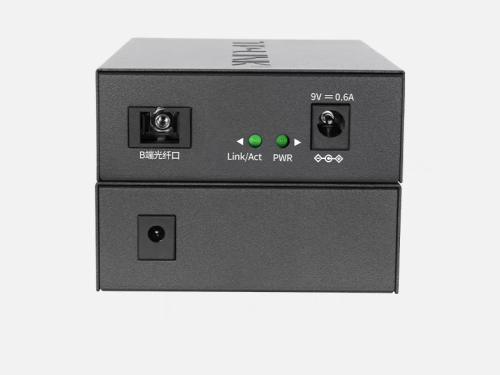
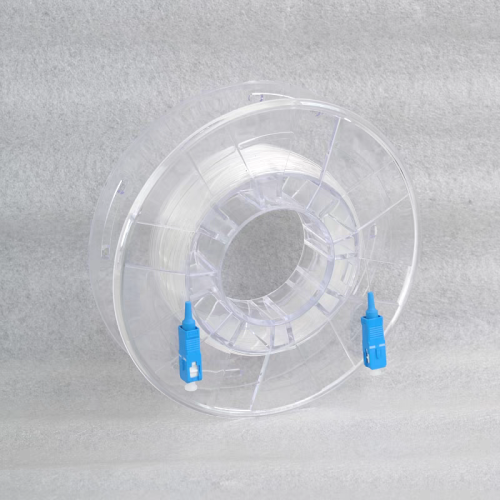
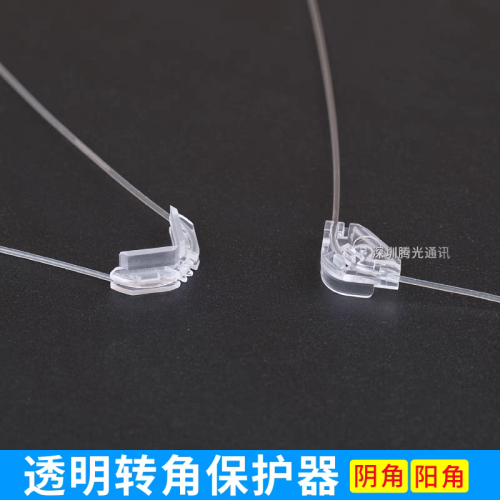
why not use tplink cheaper solution
user posted image

user posted image

user posted image

user posted image

user posted image

This post has been edited by BOTAK_WAI: Oct 23 2023, 10:07 PM
TSsoonwai
post Oct 24 2023, 05:05 AM


********
All Stars
11,456 posts

Joined: Oct 2007
From: KL


QUOTE(fuadfadz @ Oct 23 2023, 09:51 PM)
i sold my dlink dir-x3060z. i like fiberhome sr1041f more
*
Any reasons why? Colour? Design?
MyProLife
post Oct 24 2023, 10:16 AM

I bully wumao & MPKL
*******
Senior Member
2,074 posts

Joined: Sep 2021
From: nowhere

QUOTE(soonwai @ Oct 24 2023, 05:05 AM)
Any reasons why? Colour? Design?
*
I feel like fiberhome wifi 6 stability is better from my brief experience with sr1041y model. Just than features wise its lacking only. Almost close to tp link archer level
TSsoonwai
post Oct 24 2023, 10:36 AM


********
All Stars
11,456 posts

Joined: Oct 2007
From: KL


QUOTE(MyProLife @ Oct 24 2023, 10:16 AM)
I feel like fiberhome wifi 6 stability is better from my brief experience with sr1041y model. Just than features wise its lacking only. Almost close to tp link archer level
*
Stability compared to X3060Z? Stability in what way?
MyProLife
post Oct 24 2023, 11:02 AM

I bully wumao & MPKL
*******
Senior Member
2,074 posts

Joined: Sep 2021
From: nowhere

QUOTE(soonwai @ Oct 24 2023, 10:36 AM)
Stability compared to X3060Z? Stability in what way?
*
No experience yet with x3060z. Actually at that time because got upgraded from dir842 to sr1041y maybe as part of recontract. Feels like sr1041y is better than dir842 in terms of ping, packet lose and range as well as the speed that can more easily to reach 300mbps
apalexar
post Oct 25 2023, 07:59 PM

apalexar
******
Senior Member
1,383 posts

Joined: Sep 2012


Since TS provide good test result for the router, anyone interested to get one unit? Got 1 unit for sell here brows.gif
fuadfadz
post Oct 25 2023, 09:12 PM

Enthusiast
*****
Senior Member
795 posts

Joined: Jun 2009

QUOTE(soonwai @ Oct 24 2023, 05:05 AM)
Any reasons why? Colour? Design?
*
Fiberhome sr1041f give better speed when connected to mesh via wifi.

I can easily get 200mbps+ when i’m in room upstairs. Dlink struggle to give 100-150mbps.

Coverage wise both dlink dir x3060z and fiberhome sr1041f works really well.
Sky.Live
post Oct 27 2023, 04:26 PM

Proctected Species
*******
Senior Member
4,390 posts

Joined: Oct 2004
From: Cheras, Malaysia


when use the mesh as bridge mode, after disable dhcp.. the router die die cant connect.. what setting did i set wrongly?
TSsoonwai
post Oct 27 2023, 06:08 PM


********
All Stars
11,456 posts

Joined: Oct 2007
From: KL


QUOTE(Sky.Live @ Oct 27 2023, 04:26 PM)
when use the mesh as bridge mode, after disable dhcp.. the router die die cant connect.. what setting did i set wrongly?
*
No idea what you did but just set Bridge mode. No need to disable DHCP, it should be done automatically.
Sky.Live
post Oct 27 2023, 10:30 PM

Proctected Species
*******
Senior Member
4,390 posts

Joined: Oct 2004
From: Cheras, Malaysia


QUOTE(soonwai @ Oct 27 2023, 06:08 PM)
No idea what you did but just set Bridge mode. No need to disable DHCP, it should be done automatically.
*
Set to bridge mode ok, but i want my main router to assign ip to rest of my devices
TSsoonwai
post Oct 27 2023, 11:30 PM


********
All Stars
11,456 posts

Joined: Oct 2007
From: KL


QUOTE(Sky.Live @ Oct 27 2023, 10:30 PM)
Set to bridge mode ok, but i want my main router to assign ip to rest of my devices
*
That's what I do on mine.

Main router is Mikrotik RB5009.

X3060Z-#1
• Set bridge mode
• Connect WAN port to Mikrotik
• DLink will get IP address from Mikrotik
• No need to disable DHCP or set IP address
• Configure EasyMesh

X3060Z-#2
• No need to set anything
• Just connect WAN port to LAN switch
• DLink will get IP address from Mikrotik
• EasyMesh will auto configure

Device connected to DLink #1 or #2 wifi will get IP address from Mikrotik.
Sky.Live
post Oct 29 2023, 04:53 PM

Proctected Species
*******
Senior Member
4,390 posts

Joined: Oct 2004
From: Cheras, Malaysia


QUOTE(soonwai @ Oct 27 2023, 11:30 PM)
That's what I do on mine.

Main router is Mikrotik RB5009.

X3060Z-#1
• Set bridge mode
• Connect WAN port to Mikrotik
• DLink will get IP address from Mikrotik
• No need to disable DHCP or set IP address
• Configure EasyMesh

X3060Z-#2
• No need to set anything
• Just connect WAN port to LAN switch
• DLink will get IP address from Mikrotik
• EasyMesh will auto configure

Device connected to DLink #1 or #2 wifi will get IP address from Mikrotik.
*
Device 2 wan port connect to lan port of device 1 or your Mikrotik?
TSsoonwai
post Oct 30 2023, 12:22 AM


********
All Stars
11,456 posts

Joined: Oct 2007
From: KL


QUOTE(Sky.Live @ Oct 29 2023, 04:53 PM)
Device 2  wan port connect to lan port of device 1 or your Mikrotik?
*
Device 2 connects to a switch which is connected to my Mikrotik RB5009.

6 Pages < 1 2 3 4 > » Top
 

Change to:
| Lo-Fi Version
0.0232sec    0.49    5 queries    GZIP Disabled
Time is now: 6th December 2025 - 07:28 AM