Welcome Guest ( Log In | Register )

Outline · [ Standard ] · Linear+

 DLink DIR-X3060Z Router Speedtests & Tips, Oh. So. Free.

views
     
Jjuggler
post May 28 2025, 08:25 AM

Narcissistic Genius
******
Senior Member
1,341 posts

Joined: Dec 2016
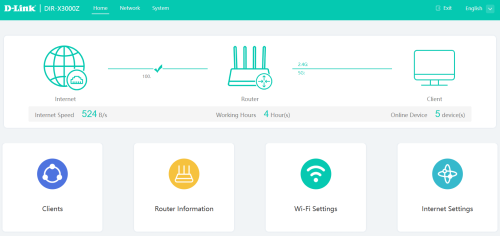
I am currently using retail version of D-LINK DIR-X3000Z. The functionality is extremely limited, but worth for the price you paid. The retail version has new UI, which I consider amateurish, and its like a FYP UI/UX project.

Dashboard
user posted image

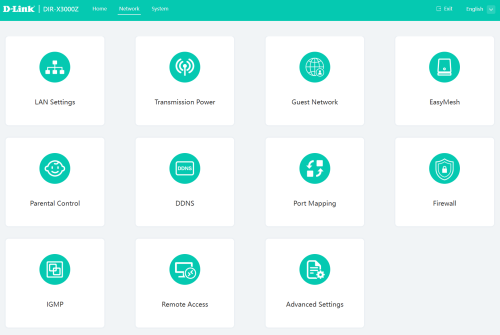
Network options
user posted image

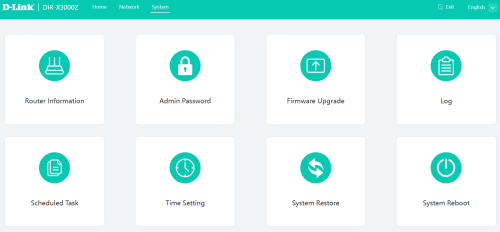
System options
user posted image

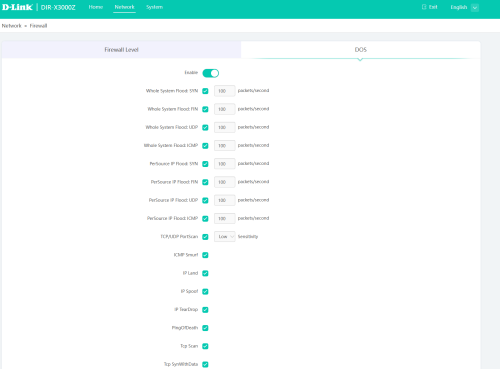
Firewall
user posted image

Currently, I am utilizing almost 70% features that comes with this router, except for DDNS since I am behind NAT44, and some other features such as UPNP, and DMZ. The downside of this router is, after solid 14 days, you need to reboot the router, memory leaks probably or suffered kernel panic. Hence I set the router to be rebooted on daily basis.


songokujames
post Jun 17 2025, 11:19 PM

Casual
***
Junior Member
414 posts

Joined: Oct 2008
recently buying the DIR-X3000Z from D-Link official store at Lazada for mesh with my Unifi dir-x3060z via cable. Speedtest is ok and can up to 800mbps, but when I downloading heavily with lot of connection , it will randomly disconnect and reboot. Tot it was individual faulty product and request return/refund. After refund, buying back the same product from the same store again and the same problem occur. Is this product cannot use for downloading? Previously I using tenda to link with unifi dir-3060z at downstairs, I have no problem with downloading ,just it can't mesh so have 2 different ssid which is not so convenient and tenda is ax1200 only which has lower speed. I try also downloading with the original tm dir-x3060z, it has no problem with downloading heavily also and can achieve 800mbps with wifi. So, only the retail version of D-Link dir-x3000z has problem of disconnecting and reboot when downloading heavily that is really suck.

This post has been edited by songokujames: Jun 17 2025, 11:20 PM
hsbb
post Jun 18 2025, 01:40 AM

Casual
***
Junior Member
447 posts

Joined: Aug 2009


QUOTE(songokujames @ Jun 17 2025, 11:19 PM)
recently buying the DIR-X3000Z from D-Link official store at Lazada for mesh with my Unifi dir-x3060z via cable. Speedtest is ok and can up to 800mbps, but when I downloading heavily with lot of connection , it will randomly disconnect and reboot. Tot it was individual faulty product and request return/refund. After refund, buying back the same product from the same store again and the same problem occur. Is this product cannot use for downloading? Previously I using tenda to link with unifi dir-3060z at downstairs, I have no problem with downloading ,just it can't mesh so have 2 different ssid which is not so convenient and tenda is ax1200 only which has lower speed. I try also downloading with the original tm dir-x3060z, it has no problem with downloading heavily also and can achieve 800mbps with wifi. So, only the retail version of D-Link dir-x3000z has problem of disconnecting and reboot when downloading heavily that is really suck.
*
Did try the retail version as controller & tm version as client?
songokujames
post Jun 18 2025, 09:14 AM

Casual
***
Junior Member
414 posts

Joined: Oct 2008
QUOTE(hsbb @ Jun 18 2025, 01:40 AM)
Did try the retail version as controller & tm version as client?
*
no, cause I forgot my tm unifi password
wahedenator
post Jul 5 2025, 09:31 AM

New Member
*
Newbie
5 posts

Joined: Sep 2010


QUOTE(JimbeamofNRT @ Apr 27 2025, 09:46 PM)
I must say that this stock d-link DIR3060Z router degrade quite fast. was helping my neighbor last week, the router is only 1 year plus, got frequent wifi disconnect especially at night. I kasi borrow him my old asus AC68u, which apparently works well ( even though the router is almost 10 years already ) for 2 days, after that I suggest him to get a better asus router.

for those who think can save money by using this free stock router, forget it, save your sanity, ditch the router cheap cheap in carousell or fb, get a better router instead.
*
What would you suggest for a better router? Asus RT AX57?

I’m having drop issue with Dlink DIR3060Z in non-mesh mode. Wifi frequently drop and need to power cycle for no reason. Upon checking with TM, since the warranty already lapse, they asked to review contract then only can get new router.


JimbeamofNRT
post Jul 5 2025, 11:50 AM

the Original Lanji@_ Chicken Rice Shop Since 2002
******
Senior Member
1,902 posts

Joined: Sep 2012

QUOTE(wahedenator @ Jul 5 2025, 09:31 AM)
What would you suggest for a better router? Asus RT AX57?

I’m having drop issue with Dlink DIR3060Z in non-mesh mode. Wifi frequently drop and need to power cycle for no reason. Upon checking with TM, since the warranty already lapse, they asked to review contract then only can get new router.
*


Asus RT AX57 is a good replacement

ASUS Router Wi-Fi 6 Wireless Dual Band AiMesh Router RT-AX57


2.4GHz 2x2 antenna
5GHz 2x2 antenna
1.7GHz quad-core processor
128 MB Flash
256 MB RAM

OFDMA
Beamforming
1024-QAM high data rate
20/40/80/160 MHz bandwidth
AiMesh

-----------

that darn 3060z always have that kind of problem, the internet logo button will gone on and off for no reason
quality of the board gone the drain, we do know that these electronic stuff are being used daily and it deteriorate over time but seriously? only after a year????

This post has been edited by JimbeamofNRT: Jul 5 2025, 11:52 AM
JimbeamofNRT
post Jul 5 2025, 11:53 AM

the Original Lanji@_ Chicken Rice Shop Since 2002
******
Senior Member
1,902 posts

Joined: Sep 2012

QUOTE(songokujames @ Jun 18 2025, 09:14 AM)
no, cause I forgot my tm unifi password
*
which u can obtain easily via tm helpline
JON97
post Aug 19 2025, 02:47 PM

Casual
***
Junior Member
341 posts

Joined: Nov 2016
Randomly decided to check my DIR-X3060Z (AX3000) logs and came across my public IP is open on 80 and 443.

Remote management - disabled
Port Forwarding - None
Remote ManageMent Status
- Onu Inform to ITMS - Unreported(Terminal is starting)
- ITMS Access to Onu - CPE Connection Uninitialized
Firmware - DIR-X3060Z_220522_1.0.2
user posted image

Here is the error log:
QUOTE
accept errno=[24:Too many open files]
open file error Too many open files
ProcAcceptEvent ... newfd[-1] ...
msgq-0 is full!


QUOTE
check user info failed! ret = -842


Does anyone know how to fix this? Or the only way is to get a better router since this is TM locked?
kwss
post Aug 19 2025, 09:03 PM

Regular
******
Senior Member
1,207 posts

Joined: Aug 2018
QUOTE(JON97 @ Aug 19 2025, 02:47 PM)
Randomly decided to check my DIR-X3060Z (AX3000) logs and came across my public IP is open on 80 and 443.

Remote management - disabled
Port Forwarding - None
Remote ManageMent Status
- Onu Inform to ITMS - Unreported(Terminal is starting)
- ITMS Access to Onu - CPE Connection Uninitialized
Firmware - DIR-X3060Z_220522_1.0.2

user posted image

Here is the error log:
Does anyone know how to fix this? Or the only way is to get a better router since this is TM locked?
*
Telltale sign your router is now part of a botnet:
Management interface still accessible from internet when remote management is disabled.
You ran out of file descriptor. Either too many open file or socket. I suspect it's the latter since that's what botnet mostly do.

Unless you have the firmware, which you don't because no ISP publish firmware for their rubbish...

Scrap this device and buy a new one.

EDIT:
You test and open the web UI from another telco like mobile data right?

This post has been edited by kwss: Aug 19 2025, 09:08 PM

JON97
post Aug 19 2025, 11:10 PM

Casual
***
Junior Member
341 posts

Joined: Nov 2016
QUOTE(kwss @ Aug 19 2025, 09:03 PM)
Telltale sign your router is now part of a botnet:
Management interface still accessible from internet when remote management is disabled.
You ran out of file descriptor. Either too many open file or socket. I suspect it's the latter since that's what botnet mostly do.

Unless you have the firmware, which you don't because no ISP publish firmware for their rubbish...

Scrap this device and buy a new one.

EDIT:
You test and open the web UI from another telco like mobile data right?
*
You test and open the web UI from another telco like mobile data right?
- Yes correct.

Yea that's the thing. I doubt they will even want to give me the firmware to update it. Will try with a second router in the mean time.

kwss
post Aug 19 2025, 11:21 PM

Regular
******
Senior Member
1,207 posts

Joined: Aug 2018
QUOTE(JON97 @ Aug 19 2025, 11:10 PM)
You test and open the web UI from another telco like mobile data right?
- Yes correct.

Yea that's the thing. I doubt they will even want to give me the firmware to update it. Will try with a second router in the mean time.
*
Then I can say with certainty your router is a bot.
You need to keep your router firmware updated.
Disable all remote management.
Change all default password.

The thing with TM router is that even if you disable TR069, VLAN 209 is still terminated in both the ONU and the router. So technically your device is still discoverable remotely.

To make matter worst, the TM firmware will allow ACS unrestricted access, meaning it's possible for VLAN 209 to jump into your LAN.
JON97
post Aug 20 2025, 12:46 AM

Casual
***
Junior Member
341 posts

Joined: Nov 2016
QUOTE(kwss @ Aug 19 2025, 11:21 PM)
Then I can say with certainty your router is a bot.
You need to keep your router firmware updated.
Disable all remote management.
Change all default password.

The thing with TM router is that even if you disable TR069, VLAN 209 is still terminated in both the ONU and the router. So technically your device is still discoverable remotely.

To make matter worst, the TM firmware will allow ACS unrestricted access, meaning it's possible for VLAN 209 to jump into your LAN.
*
The thing with TM router is that even if you disable TR069, VLAN 209 is still terminated in both the ONU and the router. So technically your device is still discoverable remotely.

To make matter worst, the TM firmware will allow ACS unrestricted access, meaning it's possible for VLAN 209 to jump into your LAN.


- Looks like I missed out on this. It seems so, this is the case. I tired with my other mesh router (Which I didn't use) and its the same issue. Public IP exposed.

Unifi won't give the firmware, and dont see anyone share any recent firmware. So looks like a new router it is.

Update: Not sure if DIR-X3060 supports OpenWrt

This post has been edited by JON97: Aug 20 2025, 12:51 AM
kwss
post Aug 20 2025, 12:56 AM

Regular
******
Senior Member
1,207 posts

Joined: Aug 2018
QUOTE(JON97 @ Aug 20 2025, 12:46 AM)
The thing with TM router is that even if you disable TR069, VLAN 209 is still terminated in both the ONU and the router. So technically your device is still discoverable remotely.

To make matter worst, the TM firmware will allow ACS unrestricted access, meaning it's possible for VLAN 209 to jump into your LAN.


- Looks like I missed out on this. It seems so, this is the case. I tired with my other mesh router (Which I didn't use) and its the same issue. Public IP exposed.

Unifi won't give the firmware, and dont see anyone share any recent firmware. So looks like a new router it is.

Update: Not sure if DIR-X3060 supports OpenWrt
*
I want to be very clear: No amount of firmware update will help if you are using TM hardware.

The boa web server is forever vulnerable. The ACS and VLAN209 is forever there.

Most importantly, their new firmware don't fix security issue or what not. They only fix compatibility issue.

If security is a concern, do not plug in anything from TM into your network.
tumira
post Aug 23 2025, 09:15 AM

Getting Started
**
Junior Member
75 posts

Joined: Jan 2007
Can we update the DIR-X3060Z firmware's with DIR-X3000Z firmware from the Dlink website ?

https://www.dlink.com.my/dir-x3000z/#firmware
PRSXFENG
post Aug 23 2025, 10:27 AM

Look at all my stars!!
*******
Senior Member
2,608 posts

Joined: Nov 2020


QUOTE(JON97 @ Aug 20 2025, 12:46 AM)
Update: Not sure if DIR-X3060 supports OpenWrt
*
Unlikely to ever be supported due to ZTE SoC
JON97
post Aug 23 2025, 08:40 PM

Casual
***
Junior Member
341 posts

Joined: Nov 2016
QUOTE(tumira @ Aug 23 2025, 09:15 AM)
Can we update the DIR-X3060Z firmware's with DIR-X3000Z firmware from the Dlink website ?

https://www.dlink.com.my/dir-x3000z/#firmware
*
I checked with D-Link they mention it is not supported. Also if you flash it and it doesn't work the Roter will be a siting stock unless someone has the TM firmware

Marcus95
post Aug 26 2025, 01:13 AM

ᴄᴏɴɴᴏɪꜱꜱᴇᴜr
****
Junior Member
631 posts

Joined: Nov 2006


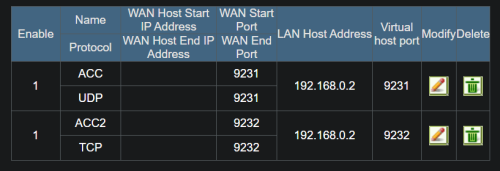
Anyone have tried port forwarding with the 3060? i think i set it up right but when i tested the port https://www.canyouseeme.org/ there is no reponse

Need help

user posted image
user posted image


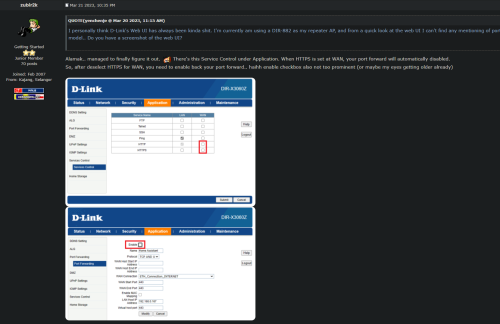
I have also tried this guys step but still didnt manage to make it to work

user posted image

This post has been edited by Marcus95: Aug 26 2025, 01:18 AM
marshpertt P
post Oct 8 2025, 05:28 PM

New Member
*
Probation
10 posts

Joined: Feb 2023
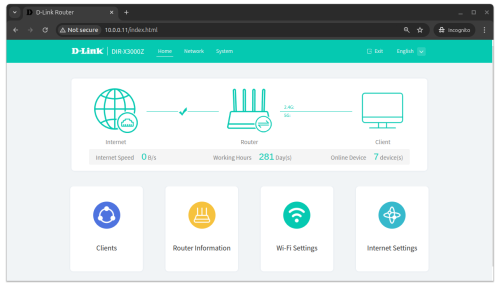
Been using the DIR-X3000Z as access point for the past 10 months, haven't rebooted since 31 Dec 2024. I access local network heavily over Wi-Fi, never had disconnection issue or any speed drop. Housemates play mobile games a lot and I don't get any complaints either.

My home network is essentially set and forget, just found time today to clean off the dust and checked the uptime before shutting everything off.

For this price, it's totally worth it. I found it cheap on Lazada (RM140+) and bought a few units.

user posted image

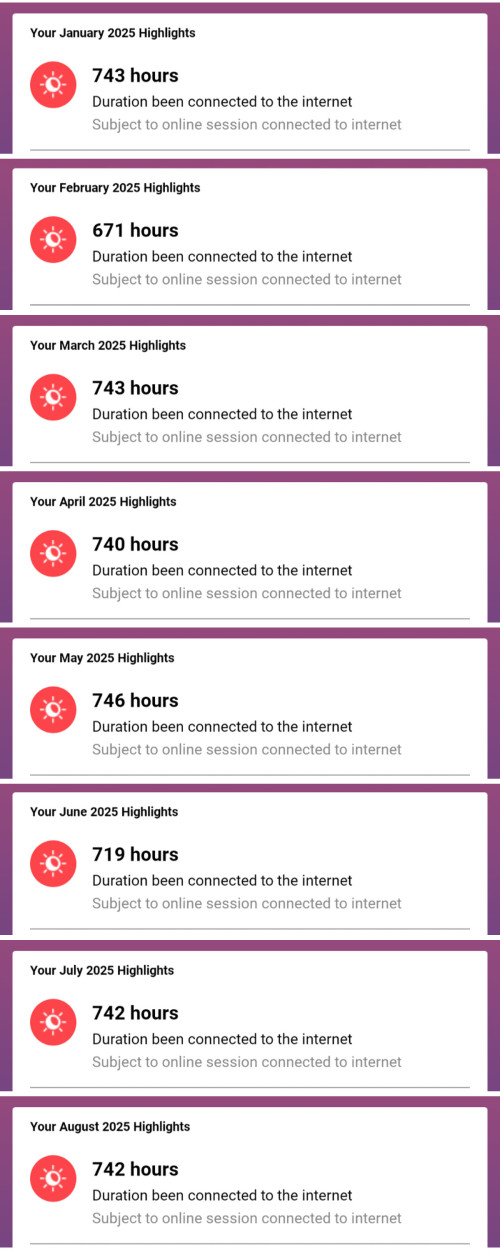
Also, my Unifi connection has been really good this year with zero issues. biggrin.gif

user posted image

P/S: YMMV - this is just my personal review. My house has near zero Wi-Fi interference, all the neighbors' Wi-Fi are quite far to reach. House is fairly small, around 1500+ sq ft, so the Wi-Fi covers everywhere. Cheap router is good if your environment is ideal.

6 Pages « < 4 5 6Top
 

Change to:
| Lo-Fi Version
0.0138sec    0.77    5 queries    GZIP Disabled
Time is now: 5th December 2025 - 10:28 PM