


 Oct 22 2023, 04:08 PM, updated 3y ago


Oh. So. Free.
The X3060Z is one model of wifi routers that TM provides. Though lacking in features, it's not too shabby when it comes to wifi performace. It supports EasyMesh which allows APs from different manufacturers to mesh together.
If you're looking for speedtests, they're are in the 2nd post.
Closest model on DLink's website: DIR-X3000Z (https://www.dlink.com.my/product/ax3000-mesh-gigabit-wireless-router)
Manual: cannot find
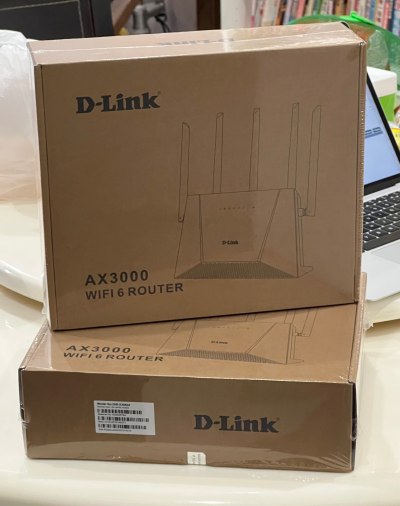
TM's X3060Z brown box packaging.
App
DLink has a WiFi Connect app for the router but it's not working on IOS. I think Android is OK. (20231022)
IOS: https://apps.apple.com/my/app/d-link-wi-fi-...ct/id1613473017
Android: TBD
tl;dr Specs
SoC: ZTE ZX279128R (1Ghz Arm9 Dual Core)
Gigabit WAN Port x1
Gigabit LAN Ports x3
USB: None
RAM: 256MB
Flash: Unknown
WiFi6 802.11ax AX3000 (2x2 40Mhz & 160Mhz)
Antennas: 5 external
Antenna Gain: Unknown
Power: DC 12v 1.5A
CODE
tmadmin@zxic:/proc # cat cpuinfo
processor : 0
model name : ARMv7 Processor rev 1 (v7l)
BogoMIPS : 1987.37
Features : half thumb fastmult edsp tls
CPU implementer : 0x41
CPU architecture: 7
CPU variant : 0x4
CPU part : 0xc09
CPU revision : 1
processor : 1
model name : ARMv7 Processor rev 1 (v7l)
BogoMIPS : 1993.93
Features : half thumb fastmult edsp tls
CPU implementer : 0x41
CPU architecture: 7
CPU variant : 0x4
CPU part : 0xc09
CPU revision : 1
Hardware : ZTE ZX279128R (Device Tree)
Revision : 0000
Serial : 0000000000000000
processor : 0
model name : ARMv7 Processor rev 1 (v7l)
BogoMIPS : 1987.37
Features : half thumb fastmult edsp tls
CPU implementer : 0x41
CPU architecture: 7
CPU variant : 0x4
CPU part : 0xc09
CPU revision : 1
processor : 1
model name : ARMv7 Processor rev 1 (v7l)
BogoMIPS : 1993.93
Features : half thumb fastmult edsp tls
CPU implementer : 0x41
CPU architecture: 7
CPU variant : 0x4
CPU part : 0xc09
CPU revision : 1
Hardware : ZTE ZX279128R (Device Tree)
Revision : 0000
Serial : 0000000000000000
Open Ports
| 21/tcp | ftp |
| 22/tcp | ssh |
| 23/tcp | telnet |
| 80/tcp | http |
| 443/tcp | https |
| 3517/tcp | 802-11-iapp |
Defaults
Refer to label on the bottom.
| IP | 192.168.0.1 |
| username | tmadmin |
| password | Adm@XXXX (XXXX = last 4 digits of MAC address) |
| wifi | password |
Setup Guides
Normally TM's technician would have set it up for you but just in case, they didn't or if you had to reset.
I suggest that you start from default configuration. You can reset to defaults by using the reset button or from Administration/System Management - Factory Reset
How to Setup the DLink DIR-X3060Z as a Router
- Connect WAN port to your modem.
- Status/Quick Configuration - Working Mode: Routing patterns
- & WAN access mode: PPPoE
- Enter unifi credentials
- Enter WiFi SSID and password.
- The Internet Explorer LED (2nd from left) should become steady.
- Status/Quick Configuration - Working Mode: The bridge model
- Connect WAN port to your network.
- Reboot.
- Check connectivity. The X3060Z should get an IP address from your main router.
- The Internet Explorer LED (2nd from left) should become steady.
This is optional. You can leave both settings on Auto.
- /Network/WLAN/EasyMesh - Setting Device Roles: The main
- & Wireless Networking link: Only 5G
I couldn't get this to work. They wouldn't connect. Recommend setup with cable.
- Press WPS button on main X3060Z.
- Press WPS button on secondary X3060Z
- 3rd from left LED on both X3060Zs should flash quickly.
- Wait until the LED is steady.
- Connect WAN port to LAN. (doesn’t have to be the main DLink)
- Wait until the 69 LED (3rd from left) is steady. Takes a few mins for both DLinks to connect.
- Check status on EasyMesh page.
- Retain cable for Wired Mesh.
- Or remove cable for Wireless Mesh. Takes a few mins for both DLinks to reconnect.
- Remember not to place it too far away.
This post has been edited by soonwai: Oct 22 2023, 07:05 PM
 Quote
Quote






 0.0196sec
 1.01
1.01
 5 queries
 GZIP Disabled