
Welcome Guest ( Log In | Register )

Outline · [ Standard ] · Linear+

 DLink DIR-X3060Z Router Speedtests & Tips, Oh. So. Free.

views
     
TSsoonwai
post Oct 22 2023, 04:08 PM, updated 3y ago


********
All Stars
11,456 posts

Joined: Oct 2007
From: KL


DLink DIR-X3060Z
Oh. So. Free.

The X3060Z is one model of wifi routers that TM provides. Though lacking in features, it's not too shabby when it comes to wifi performace. It supports EasyMesh which allows APs from different manufacturers to mesh together.

If you're looking for speedtests, they're are in the 2nd post.

Closest model on DLink's website: DIR-X3000Z (https://www.dlink.com.my/product/ax3000-mesh-gigabit-wireless-router)
Manual: cannot find
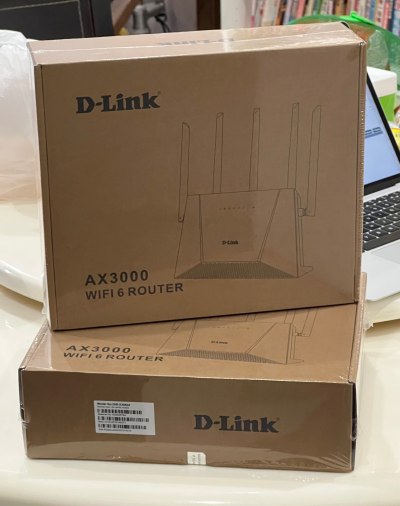
user posted image
TM's X3060Z brown box packaging.

App
DLink has a WiFi Connect app for the router but it's not working on IOS. I think Android is OK. (20231022)
IOS: https://apps.apple.com/my/app/d-link-wi-fi-...ct/id1613473017
Android: TBD

tl;dr Specs
SoC: ZTE ZX279128R (1Ghz Arm9 Dual Core)
Gigabit WAN Port x1
Gigabit LAN Ports x3
USB: None
RAM: 256MB
Flash: Unknown
WiFi6 802.11ax AX3000 (2x2 40Mhz & 160Mhz)
Antennas: 5 external
Antenna Gain: Unknown
Power: DC 12v 1.5A

CODE
tmadmin@zxic:/proc # cat cpuinfo
processor : 0
model name : ARMv7 Processor rev 1 (v7l)
BogoMIPS : 1987.37
Features : half thumb fastmult edsp tls
CPU implementer : 0x41
CPU architecture: 7
CPU variant : 0x4
CPU part : 0xc09
CPU revision : 1

processor : 1
model name : ARMv7 Processor rev 1 (v7l)
BogoMIPS : 1993.93
Features : half thumb fastmult edsp tls
CPU implementer : 0x41
CPU architecture: 7
CPU variant : 0x4
CPU part : 0xc09
CPU revision : 1

Hardware : ZTE ZX279128R (Device Tree)
Revision : 0000
Serial  : 0000000000000000


Open Ports
21/tcp ftp
22/tcp ssh
23/tcp telnet
80/tcp http
443/tcp https
3517/tcp802-11-iapp

Defaults
Refer to label on the bottom.
IP 192.168.0.1
username tmadmin
password Adm@XXXX (XXXX = last 4 digits of MAC address)
wifi password

Setup Guides
Normally TM's technician would have set it up for you but just in case, they didn't or if you had to reset.

I suggest that you start from default configuration. You can reset to defaults by using the reset button or from Administration/System Management - Factory Reset

How to Setup the DLink DIR-X3060Z as a Router
  1. Connect WAN port to your modem.
  2. Status/Quick Configuration - Working Mode: Routing patterns
  3. & WAN access mode: PPPoE
  4. Enter unifi credentials
  5. Enter WiFi SSID and password.
  6. The Internet Explorer LED (2nd from left) should become steady.
How to Setup the DLink DIR-X3060Z as an Access Point
  1. Status/Quick Configuration - Working Mode: The bridge model
  2. Connect WAN port to your network.
  3. Reboot.
  4. Check connectivity. The X3060Z should get an IP address from your main router.
  5. The Internet Explorer LED (2nd from left) should become steady.
How to Prepare the main DLink DIR-X3060Z for EasyMesh (Optional)
This is optional. You can leave both settings on Auto.
  1. /Network/WLAN/EasyMesh - Setting Device Roles: The main
  2. & Wireless Networking link: Only 5G
How to Setup EasyMesh on child DLink DIR-X3060Z (WPS)
I couldn't get this to work. They wouldn't connect. Recommend setup with cable.
  1. Press WPS button on main X3060Z.
  2. Press WPS button on secondary X3060Z
  3. 3rd from left LED on both X3060Zs should flash quickly.
  4. Wait until the LED is steady.
How to Setup EasyMesh on child DLink DIR-X3060Z (Cable)
  1. Connect WAN port to LAN. (doesn’t have to be the main DLink)
  2. Wait until the 69 LED (3rd from left) is steady. Takes a few mins for both DLinks to connect.
  3. Check status on EasyMesh page.
  4. Retain cable for Wired Mesh.
  5. Or remove cable for Wireless Mesh. Takes a few mins for both DLinks to reconnect.
  6. Remember not to place it too far away.


This post has been edited by soonwai: Oct 22 2023, 07:05 PM
TSsoonwai
post Oct 22 2023, 04:08 PM


********
All Stars
11,456 posts

Joined: Oct 2007
From: KL


Speedtests
Speedtests for the DLink DIR-X3060Z as a single Access Point (AP), Wireless Mesh and Wired Mesh.
  • I used my existing router, Mikrotik RB5009UG+S+IN as the main router.
  • The X3060Zs are configured as APs in Bridge mode.
  • I'm using the default 100% transmission power for both bands.
  • 2.4Ghz is set to 20Mhz and 5Ghz to 80Mhz.
  • Unifi is 800/200.
  • The Mikrotik router is located in my office room on the 1st floor towards the right & back of the house.
  • For all tests, the main X3060Z is in the same office room on the 1st floor.
  • For wireless mesh tests, the 2nd X3060Z is located downstairs in the living room at the foot of the stairs which is to the right of the house. This spot has a power point and good signal from the main X3060Z.
  • For wired mesh tests, the 2nd X3060Z is located downstairs in the living room to the front & left of the house. Because the network point & switch are here.
  • House is 24'x80' Bult-up not sure, 55"?. Maybe I draw a plan later.
|Location|Single AP (1st)|Wireless Mesh|Wired Mesh|
Office Room (1st)761/214--
Dining Room (G)478/210372/217807/213 (flaps)
Living Room (G)389/217353/216813/212 (flaps)
MacBook Air M1 Wifi6 2x2 80Mhz

LocationSingle AP (1st)Wireless MeshWired Mesh
Office (1st)739/242--
Dining Room (G)332/220377/232723/261
Living Room (G)340/228387/213747/257
Porch Door (G)51/52337/233638/232
Porch Gate (G)No signal279/232630/271
Master Room (1st)509/236280/214519/245
Master Toilet (1st)219/207240/187 (flaps)411/227 (flaps)
iPhone 13 Pro Wifi6 2x2 80Mhz

*(flaps) means the device cannot decide which mesh to connect to because it sees the same signal strength so it keeps changing and half the time, it connects to the slower one. It's probably because I left the transmission power at 100%.


This post has been edited by soonwai: Oct 25 2023, 09:45 PM
TSsoonwai
post Oct 22 2023, 06:16 PM


********
All Stars
11,456 posts

Joined: Oct 2007
From: KL


QUOTE(PRSXFENG @ Oct 22 2023, 05:48 PM)
This should help you fill out the specs
https://www.netcore.cn/en/product-center/fa...outer/2576.html

Or, possibly
https://www.netcore.cn/en/product-center/fa...outer/2600.html

Also, you wrote AC3000 instead of AX3000
*
Thanks, corrected to AX3000. That's a wealth of info there.
TSsoonwai
post Oct 22 2023, 06:20 PM


********
All Stars
11,456 posts

Joined: Oct 2007
From: KL


QUOTE(pokchik @ Oct 22 2023, 05:52 PM)
I find that the performance drops within 1 week of using.. devices disconnected, my online conference keeps disconnecting.. etc..

It doesn't happen overnight - I feel like the performance degraded after 3-4 days of usage.

Changed back to my ASUS RT-AC86U which has been solid for my usage.
*
Memory leaks probably. Was afraid of things like that. Will keep an eye out for it. Doubt we're gonna get too many updates for this router. I wonder if can use official firmware from DLink but even then they don't have any new firmware yet for X3000Z.
TSsoonwai
post Oct 22 2023, 11:47 PM


********
All Stars
11,456 posts

Joined: Oct 2007
From: KL


QUOTE(Aspick @ Oct 22 2023, 11:02 PM)
[email=soonwai]soonwai[/email] how come the download speed for wireless mesh is about half of the download speed from single AP or Wired Mesh? However upload speed seems consistent for all 3 configuration types.

And when you test using MacBook, I am curious why the download speed when connected to Wired Mesh is even better than when it is connected to the Single AP.
*
Wireless mesh throughput is halved because the mesh node only has one 5Ghz transceiver (radio.) It uses that single radio to alternate sending/receiving from the main mesh and sending/receiving to the device. Wifi is half-duplex, it can't send/receive simultaneously. So double duty for it and therefore about 50% effective throughput.

I think the mesh can handle about 800Mbps so 400+400 for sending and receiving. Unifi upload is only 200Mbps so no problem there.

This is why the more expensive tri-band mesh systems have 2 x 5Ghz radios. One dedicated to the main mesh and one to the devices.

As for the MacBook, I think that's because the office room is a much smaller space with walls on all sides and the radio waves are bouncing off the walls and interfering with themselves. Also because the MacBook was much closer, about 3ft away from the x3060z. Too close also no good. Another thing is that I left the power of the x3060z in the office room at 100%. Probably a bit too much for that room.

The living and dining room are much bigger spaces and I'm about 8ft away during the tests.

This post has been edited by soonwai: Oct 23 2023, 12:37 AM
TSsoonwai
post Oct 23 2023, 12:59 AM


********
All Stars
11,456 posts

Joined: Oct 2007
From: KL


QUOTE(PJng @ Oct 23 2023, 12:43 AM)
i no pening2 setup mesh la what
buy cheap wifi 6 router as AP, pull long cable, set wifi name is same just add 1 number behide, same wifi password
both also can get full speed
*
Yes can also. I was using like that except with just one SSID for all APs. Mikrotik hAP ac2 + hAP ac. Got centralized management (Mikrotik calls it Capsman) but no fast roaming. Of course, cable.

The newer hAP ax3 which I've been testing for a few months now supports both management & fast roaming. Once happy, I'll probably get another hAP ax3 or a cheaper ax2.

Mesh main benefits:
1. Centralized Management but not so important if just 2 units.
2. Fast Roaming when going from AP to another.
3. Controller can give the device a list of recommended APs to connect to. Again not so important for 2 units.

This post has been edited by soonwai: Oct 23 2023, 12:59 AM
TSsoonwai
post Oct 23 2023, 02:56 PM


********
All Stars
11,456 posts

Joined: Oct 2007
From: KL


QUOTE(PJng @ Oct 23 2023, 01:03 AM)
i got try set same SSID, but seem sometime phone does not auto switch, and i cannot know which router is connected to, so i just add extra 1 number on SSID, easy to see connected to which router.

and some more AP also got LAN port for PC use
*
True also. Even with mesh systems, - more accurately 802.11[r,k,v]. WiFi Mesh nowadays is more a marketing term - ultimately it's still up to the device whether it wants to switch or not.

For sure your house will have spots where the signal is the same but one AP is faster than the other. And dunno why the phone always connects to the one that is slower. bangwall.gif

My master toilet is one such place. No matter what I'm using, Deco M4, M9 Plus, X20, Mikrotik hAP ac, ac2, ax3 and now DLink X3060Z, the same thing happens.

Another one is the camera in my front door, for some strange reason, it always connect to the AP at the back of the house instead of the one 10ft away from it. confused.gif This can be solved by using separate SSIDs like what you do. Since I prefer a single SSID, I solve this by blocking that camera from the back AP but I can only do this when using Mikrotik APs.

Another thing is power, I never use 100%. Too much overlap in the signal. TPLink Deco team knows this so their products all have conservative power settings. Buy more Decos instead of increasing power. smile.gif

This post has been edited by soonwai: Oct 23 2023, 03:11 PM
TSsoonwai
post Oct 23 2023, 03:32 PM


********
All Stars
11,456 posts

Joined: Oct 2007
From: KL


QUOTE(Aspick @ Oct 23 2023, 08:34 AM)
If I pull cable from ground floor to 1st floor, it will be messy and I don't like to see exposed cable running along the walls. That is why I using repeater for now. But repeater also give half the speed of my main unit.

Was hoping getting another similar X3060z and set up as wireless mesh will give full speed. Guess will have to reconsider other options.
*
Looks like it has be tri-band then. M9 Plus is really cheap now but Wifi5 only. The current Wifi6 Deco tribands are too expensive.

You'll also need to see if you have a good place to put the unit where it's family approved, has a power point and good signal from the main unit. Harder than it sounds.

Or hack the walls and conceal a cable. smile.gif

This post has been edited by soonwai: Oct 23 2023, 03:33 PM
TSsoonwai
post Oct 24 2023, 05:05 AM


********
All Stars
11,456 posts

Joined: Oct 2007
From: KL


QUOTE(fuadfadz @ Oct 23 2023, 09:51 PM)
i sold my dlink dir-x3060z. i like fiberhome sr1041f more
*
Any reasons why? Colour? Design?
TSsoonwai
post Oct 24 2023, 10:36 AM


********
All Stars
11,456 posts

Joined: Oct 2007
From: KL


QUOTE(MyProLife @ Oct 24 2023, 10:16 AM)
I feel like fiberhome wifi 6 stability is better from my brief experience with sr1041y model. Just than features wise its lacking only. Almost close to tp link archer level
*
Stability compared to X3060Z? Stability in what way?
TSsoonwai
post Oct 27 2023, 06:08 PM


********
All Stars
11,456 posts

Joined: Oct 2007
From: KL


QUOTE(Sky.Live @ Oct 27 2023, 04:26 PM)
when use the mesh as bridge mode, after disable dhcp.. the router die die cant connect.. what setting did i set wrongly?
*
No idea what you did but just set Bridge mode. No need to disable DHCP, it should be done automatically.
TSsoonwai
post Oct 27 2023, 11:30 PM


********
All Stars
11,456 posts

Joined: Oct 2007
From: KL


QUOTE(Sky.Live @ Oct 27 2023, 10:30 PM)
Set to bridge mode ok, but i want my main router to assign ip to rest of my devices
*
That's what I do on mine.

Main router is Mikrotik RB5009.

X3060Z-#1
• Set bridge mode
• Connect WAN port to Mikrotik
• DLink will get IP address from Mikrotik
• No need to disable DHCP or set IP address
• Configure EasyMesh

X3060Z-#2
• No need to set anything
• Just connect WAN port to LAN switch
• DLink will get IP address from Mikrotik
• EasyMesh will auto configure

Device connected to DLink #1 or #2 wifi will get IP address from Mikrotik.
TSsoonwai
post Oct 30 2023, 12:22 AM


********
All Stars
11,456 posts

Joined: Oct 2007
From: KL


QUOTE(Sky.Live @ Oct 29 2023, 04:53 PM)
Device 2  wan port connect to lan port of device 1 or your Mikrotik?
*
Device 2 connects to a switch which is connected to my Mikrotik RB5009.


Change to:
| Lo-Fi Version
0.0155sec    0.25    6 queries    GZIP Disabled
Time is now: 6th December 2025 - 10:39 AM