Welcome Guest ( Log In | Register )

Bump Topic Topic Closed RSS Feed
456 Pages « < 432 433 434 435 436 > » Bottom

Outline · [ Standard ] · Linear+

Unifi Official TM UniFi High Speed Broadband Thread V41, READ 1ST PAGE FOR RELEVANT WIFI INFO

views
     
YoungMan
post Nov 17 2023, 08:53 PM

Look at all my stars!!
*******
Senior Member
6,806 posts

Joined: Oct 2008
From: Kuala Lumpur


QUOTE(Wolgie @ Nov 17 2023, 03:20 PM)
Wan to ask. my place office got register 500mps.
they give a modem D-Link AX1860Z, which when test, can upto <300
Problem is that modem, seem very lousy wifi, even my downstair cannot connect it
some function also not same as TPlink

When i use back my old TPlinkAC1200, the speedtest drop to <100.
i got a lot wifi printer setting and config on AC1200.

Do i must use D-Link modem to get 500mps?
i also got a TPlinkAX1500. If i set this as router, will i get the <300 speedtest?

I more LIKE setting on TPLink then the Dlink
*
Buy a new router. What's the use of 500mbps if you can only utilise 100+mbps?

QUOTE(mikey8811 @ Nov 17 2023, 06:40 PM)
Actually, I realise I do not need to do that. The AC 86u has a speedtest function and my download speed to local servers exceed the 500 Mbps like you say. Upload is 114.42.

So I guess the issue is with my settings.

How to troubleshoot and see what is wrong?
*
If really cannot find out what might have cost the problem, just reset the router and reconfigure back.
BenYeeHua
post Nov 17 2023, 08:55 PM

Regular
******
Senior Member
1,873 posts

Joined: Nov 2010


QUOTE(YoungMan @ Nov 17 2023, 08:53 PM)
Buy a new router. What's the use of 500mbps if you can only utilise 100+mbps?
If really cannot find out what might have cost the problem, just reset the router and reconfigure back.
*
Yup, normally I do is export config file, then factory reset, setup again. tongue.gif
mikey8811
post Nov 17 2023, 09:21 PM

Getting Started
**
Junior Member
125 posts

Joined: Jul 2008


QUOTE(mikey8811 @ Nov 17 2023, 06:56 PM)
wifi protocol is AC - at least that is what my Mac says.

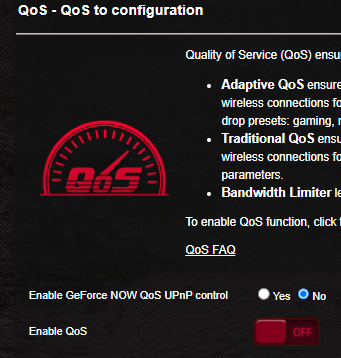
QoS is not enabled - do I enable it and what settings should I put?
*
An update: I stood next to the router with my iPhone 13 and did a speedtest, could only get download speed of 137 Mbps.

So I guess something is wrong with the Wi Fi transmission.

Any more ideas on how to troubleshoot what the issue is with my settings?
shinjite
post Nov 17 2023, 09:22 PM

�ŞħĬΩĵΐŦ��
********
All Stars
19,321 posts

Joined: Jan 2003
From: Klang


Anyone facing high latency today? I even ping Telekom's own server and getting over 200ms 😂
BenYeeHua
post Nov 17 2023, 09:25 PM

Regular
******
Senior Member
1,873 posts

Joined: Nov 2010


QUOTE(mikey8811 @ Nov 17 2023, 09:21 PM)
An update: I stood next to the router with my iPhone 13 and did a speedtest, could only get download speed of 137 Mbps.

So I guess something is wrong with the Wi Fi transmission.

Any more ideas on how to troubleshoot what the issue is with my settings?
*
Yes, check the wifi speed on ur phone, and is it 80 MHz or not.
Then change ur 5GHz channel la.

QUOTE(shinjite @ Nov 17 2023, 09:22 PM)
Anyone facing high latency today? I even ping Telekom's own server and getting over 200ms 😂
*
Since 11.1, the traffic not recovered from double 11 sale somehow, lol.
Maybe got quota and they fully used it up.


laytiong
post Nov 17 2023, 09:32 PM

p3wns noobies for bfast, lunch and dinner
*****
Senior Member
787 posts

Joined: Jan 2003
QUOTE(mikey8811 @ Nov 17 2023, 09:21 PM)
An update: I stood next to the router with my iPhone 13 and did a speedtest, could only get download speed of 137 Mbps.

So I guess something is wrong with the Wi Fi transmission.

Any more ideas on how to troubleshoot what the issue is with my settings?
*
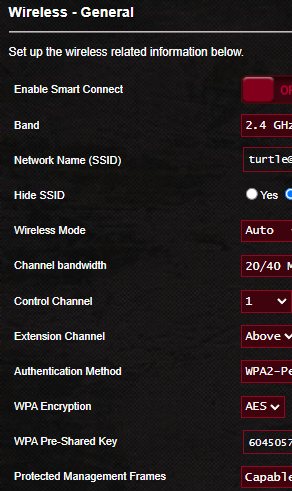
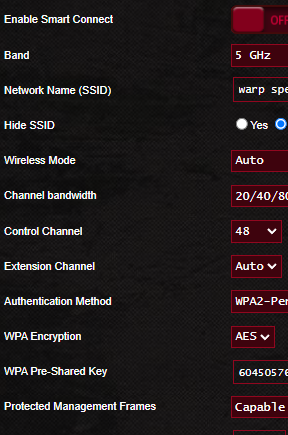
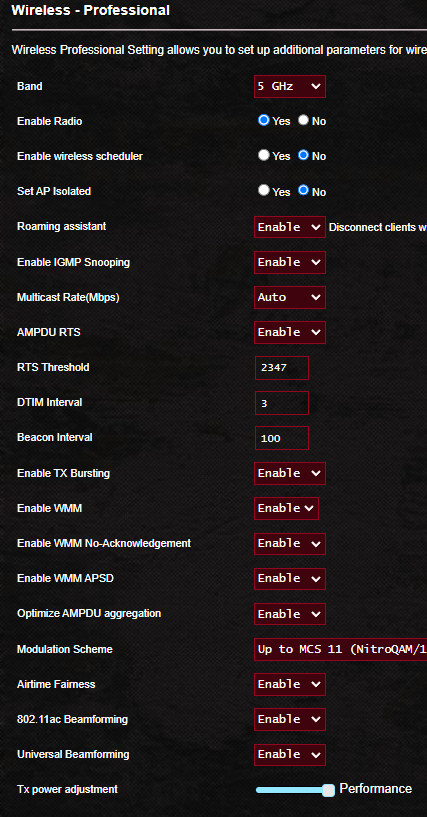
user posted image
user posted image
user posted image
user posted image
user posted image
user posted image
mikey8811
post Nov 17 2023, 10:09 PM

Getting Started
**
Junior Member
125 posts

Joined: Jul 2008


QUOTE(BenYeeHua @ Nov 17 2023, 09:25 PM)
Yes, check the wifi speed on ur phone, and is it 80 MHz or not.
Then change ur 5GHz channel la.

*
My setting is 20/40/80 MHz - do I change that to 80 MHz? How do I tell which frequency I am using?
Zaryl
post Nov 17 2023, 10:24 PM

Hardcore Casual Gamer
******
Senior Member
1,709 posts

Joined: Jan 2003
From: Kedah Khap Khoun Khap (4K)


My ASUS RT-AX82U not getting ~800mbps download speed after i got the free auto upgrade from 500mbps to 800mbps few weeks ago.

Can only get ~650mbps tops but that is on using WIFI6 devices such as ipad pro M1 and iphone 13.
Didn’t test on using LAN cable though.

I thought Asus RT-AX82U is a powderful router already? doh.gif
simmarjit
post Nov 17 2023, 10:37 PM

Enthusiast
*****
Junior Member
980 posts

Joined: Dec 2011


QUOTE(Zaryl @ Nov 17 2023, 10:24 PM)
My ASUS RT-AX82U not getting ~800mbps download speed after i got the free auto upgrade from 500mbps to 800mbps few weeks ago.

Can only get ~650mbps tops but that is on using WIFI6 devices such as ipad pro M1 and iphone 13.
Didn’t test on using LAN cable though.

I thought Asus RT-AX82U is a powderful router already?  doh.gif
*
LOL ...
shinjite
post Nov 17 2023, 11:02 PM

�ŞħĬΩĵΐŦ��
********
All Stars
19,321 posts

Joined: Jan 2003
From: Klang


QUOTE(Zaryl @ Nov 17 2023, 10:24 PM)
My ASUS RT-AX82U not getting ~800mbps download speed after i got the free auto upgrade from 500mbps to 800mbps few weeks ago.

Can only get ~650mbps tops but that is on using WIFI6 devices such as ipad pro M1 and iphone 13.
Didn’t test on using LAN cable though.

I thought Asus RT-AX82U is a powderful router already?  doh.gif
*
Wifi 6 get 650mbps also I happy d bro. LAN sure can hit 800 la 😂
olivur
post Nov 17 2023, 11:08 PM

ollie ollie oxen free
******
Senior Member
1,277 posts

Joined: Jul 2011
QUOTE(firdausbhari @ Nov 17 2023, 08:01 PM)
Im still using mesh 5 haha.

7 years old AC88U + 2x Blue Cave AiMesh. Speed result still managed to get full 500mbps on wifi.
*
ac88u gang gang

you planning on upgrading any time soon?
olivur
post Nov 17 2023, 11:13 PM

ollie ollie oxen free
******
Senior Member
1,277 posts

Joined: Jul 2011
QUOTE(Zaryl @ Nov 17 2023, 10:24 PM)
My ASUS RT-AX82U not getting ~800mbps download speed after i got the free auto upgrade from 500mbps to 800mbps few weeks ago.

Can only get ~650mbps tops but that is on using WIFI6 devices such as ipad pro M1 and iphone 13.
Didn’t test on using LAN cable though.

I thought Asus RT-AX82U is a powderful router already?  doh.gif
*
don't go chasing waterfalls bro

.. is what I told myself after the free upgrade 😔

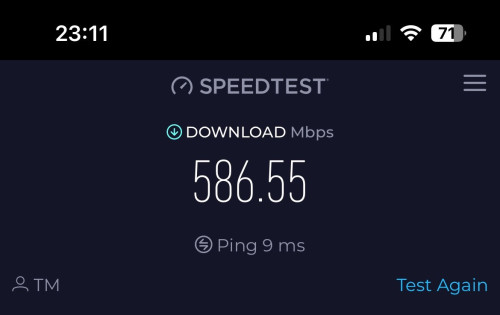
user posted image
mikey8811
post Nov 17 2023, 11:34 PM

Getting Started
**
Junior Member
125 posts

Joined: Jul 2008


QUOTE(laytiong @ Nov 17 2023, 09:32 PM)
user posted image
user posted image
user posted image
user posted image
user posted image
user posted image
*
Thanks so much for that - very helpful.

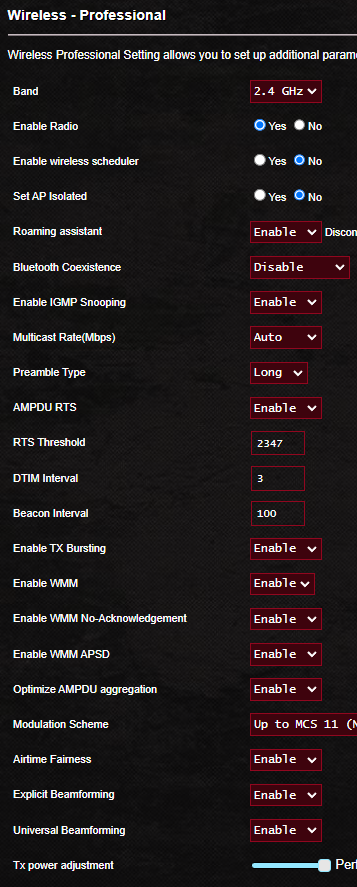
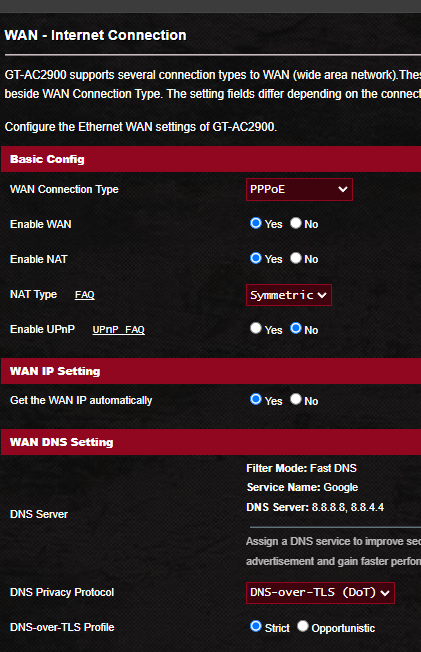
It was the channel for the 5GHz band.

I changed it to the same as yours and am now getting low to mid 300 Mbps download speeds and close to 100 Mbps upload speed for local servers. In one instance, probably a fluke I got a download speed of 481 Mbps. Foreign servers in the 50 Mbps download speed range.

I tried several channels using the InSSIDer app but ended back with yours as that was still the best one for my environment.

Not near the 500 Mbps but OK. My Mac says the Tx rate is 780 Mbps. I have seen it as high as 877 Mbps so I guess that is probably the best I can do for now.

iPhone speed also improved commensurately but not as much as the Mac.

Thanks again

This post has been edited by mikey8811: Nov 17 2023, 11:41 PM
olivur
post Nov 18 2023, 12:11 AM

ollie ollie oxen free
******
Senior Member
1,277 posts

Joined: Jul 2011
QUOTE(mikey8811 @ Nov 17 2023, 11:34 PM)
Thanks so much for that - very helpful.

It was the channel for the 5GHz band.

I changed it to the same as yours and am now getting low to mid 300 Mbps download speeds and close to 100 Mbps upload speed for local servers. In one instance, probably a fluke I got a download speed of 481 Mbps. Foreign servers in the 50 Mbps download speed range.

I tried several channels using the InSSIDer app but ended back with yours as that was still the best one for my environment.

Not near the 500 Mbps but OK. My Mac says the Tx rate is 780 Mbps. I have seen it as high as 877 Mbps so I guess that is probably the best I can do for now.

iPhone speed also improved commensurately but not as much as the Mac.

Thanks again
*
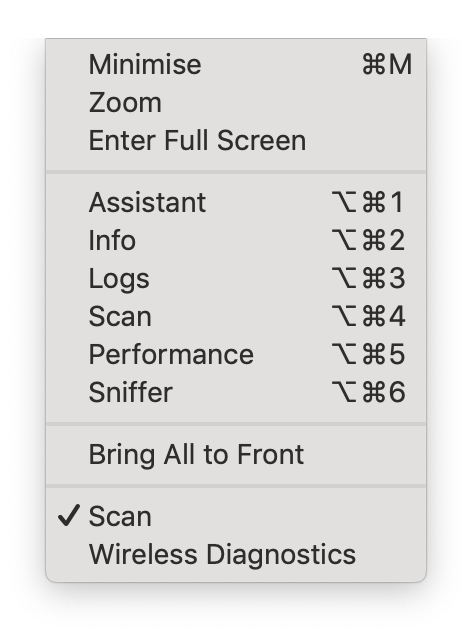
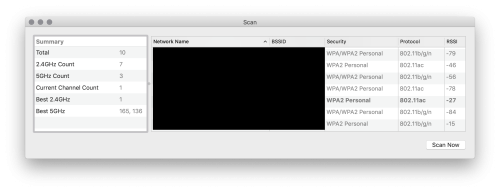
or since you're on your mac, open up wireless diagnotics app, ignore the main window, and open "scan" from window menu

user posted image


and you'll see the least debauched channels for your home

user posted image


that is, if you've not already done this


This post has been edited by olivur: Nov 18 2023, 12:12 AM
tng55
post Nov 18 2023, 12:21 AM

Regular
******
Senior Member
1,443 posts

Joined: Sep 2021


QUOTE(MyProLife @ Nov 17 2023, 01:36 PM)
Some of these listed channels were once on unifi TV, but has since removed

Now remaining below channels

Color Cineplex
Color Tamil HD
Zee thirai
Sony YAY!

Nothing else, so you cannot potong asstrol sadly
*
hmm too bad okey i will keep astro no need unifi iptv
XeactorZ
post Nov 18 2023, 12:37 AM

♥ PandaDog ♥
*********
All Stars
31,608 posts

Joined: Aug 2010
QUOTE(shinjite @ Nov 17 2023, 09:22 PM)
Anyone facing high latency today? I even ping Telekom's own server and getting over 200ms 😂
*
twitter hardly load image sweat.gif

connect to vpn also not much help
firdausbhari
post Nov 18 2023, 12:40 AM

Look at all my stars!!
*******
Senior Member
2,281 posts

Joined: Feb 2012


QUOTE(olivur @ Nov 17 2023, 11:08 PM)
ac88u gang gang

you planning on upgrading any time soon?
*
As for now, no. And dont think im not gonna even use TM new equipment also haha
maxiscool
post Nov 18 2023, 01:07 AM

Casual
***
Junior Member
379 posts

Joined: Jan 2003
QUOTE(tng55 @ Nov 6 2023, 11:43 PM)
i hope i will be public ip i am swu 3.0 RM119 i get 500Mbps meaing i be public ip address
i will ask installer very imported me public ip address
*
Did you get public IP address with this?
mikey8811
post Nov 18 2023, 01:43 AM

Getting Started
**
Junior Member
125 posts

Joined: Jul 2008


QUOTE(olivur @ Nov 18 2023, 12:11 AM)
or since you're on your mac, open up wireless diagnotics app, ignore the main window, and open "scan" from window menu

user posted image
and you'll see the least debauched channels for your home

user posted image
that is, if you've not already done this
*
Thanks. I had forgotten about this. I used it when I used an older Airport Extreme.

I just ran it. Strangely, it suggested 165 and 128 as the best 5GHz channels. I had previously used 165 and got the poor test results. I can't select 128 as it isn't in the dropdown box

I think I must have set up the ASUS router using this as well.

My RSSI is -55 - that is the best I can do, a long way from your -27.

Thanks again
mikey8811
post Nov 18 2023, 01:46 AM

Getting Started
**
Junior Member
125 posts

Joined: Jul 2008


QUOTE(maxiscool @ Nov 18 2023, 01:07 AM)
Did you get public IP address with this?
*
Hi

What is the public IP address you guys are referring to and what are the advantages? Is it the WAN IP?

456 Pages « < 432 433 434 435 436 > » Top
Topic ClosedOptions
 

Change to:
| Lo-Fi Version
0.0380sec    0.58    6 queries    GZIP Disabled
Time is now: 11th December 2025 - 01:25 PM