Welcome Guest ( Log In | Register )

Bump Topic Topic Closed RSS Feed

Outline · [ Standard ] · Linear+

Unifi Official TM UniFi High Speed Broadband Thread V41, READ 1ST PAGE FOR RELEVANT WIFI INFO

views
     
laytiong
post Sep 20 2023, 05:02 PM

p3wns noobies for bfast, lunch and dinner
*****
Senior Member
787 posts

Joined: Jan 2003
QUOTE(chaics85 @ Sep 20 2023, 11:50 AM)
Same thing happened to me last week. cs told me mobile plan must be included in SWU3.0 as directed by their boss and said can cancel it after a month. At first I insist not to have the mobile plan, then i just comply la, try for a month and cancel it as said by the cs. Then the cs walk off and came back inform me the boss say i dont have to take their mobile line. Just stick with the SWU3.0 Rm119 package. Weird.
Question:
1. The technician installed fiberhome SR1041F AX3000 router for me with a mesh router, i tried speed test on both mobile and pc, both hit around 350Mbps only. Do you guys get 500Mbps after they upgrade the package? My SWU3.0 same as others include foc 500Mbps upgrade for a year.

2. Some of my older phones cannot connect to this fiberhome wifi. I have this redmi note 5 that i use to watch youtube on wifi, both cannot connect. Tried restarting both phones and router, still not able to connect. Is there any settings inside the router that i need to set?
*
1. yes, my cousin kena this stupid new requirement. me and my friends all SWU3.0 without such nonsense. maybe diff TM point diff policy or new policy.

yes even on my wifi5 AC mesh I can get over 500mbps but not always as peak periods i get 300+ mbps only. I was given dlink mesh and i sold it off via carousell. didnt bother to set it up, i told the installer change the port speed and u can belah. rest of the stuff dont need to setup

2. maybe WPA3 is enabled, older devices dont support this and also some compatiblity settings may need to be changed. i cant help cause i use Asus mesh.


laytiong
post Sep 21 2023, 10:23 AM

p3wns noobies for bfast, lunch and dinner
*****
Senior Member
787 posts

Joined: Jan 2003
QUOTE(steventan85 @ Sep 20 2023, 05:12 PM)
how much u sold ? RM100 ?
*
240 for the pair of dlinks inc shipment
laytiong
post Sep 21 2023, 10:28 AM

p3wns noobies for bfast, lunch and dinner
*****
Senior Member
787 posts

Joined: Jan 2003
QUOTE(jasontanky @ Sep 20 2023, 08:21 PM)
Anyone experienced an initial speed burst on Unifi right now which previously wasn't the case? My friends and I started to experience such speed burst behavior since these few days.

The speedtest app will burst to like 700Mbps before back to around 300Mbps after a few seconds
*
dah lama like this behaviour, my prev 100mbps line it shoots up to 200+ initially for first 2 seconds and slowly drop to 105mbps as the final download speed, same applies for upload it shoots high then settles normally 5%above the package speed.

i hope on to SWU3.0 not for the speed but the price savings. i dont need 300mbps line at home. if i continue on i would need to pay 129x24 on 100mbps plan. now i pay 119x18 for 300mbps plan.

to me the 500mbps for the 1st year is jz a bonus which i'll never use.
laytiong
post Oct 2 2023, 10:10 AM

p3wns noobies for bfast, lunch and dinner
*****
Senior Member
787 posts

Joined: Jan 2003
QUOTE(Max2006 @ Oct 2 2023, 09:57 AM)
Just gave a livechat with TM customer service one more time. My case is still under investigation. What a dissappointment. From streamyx to unifi, TM is never cease to amaze me on their imcompetent performance.

I asked what's my order status? She said the order is not yet created. I said I applied on wednesday, why took so long to create? She answered it needs 7 working days. I told her that many people got their service installed within 24 hours. She said she will push the investigation team to work on my case faster. I also asked her since the order is not yet created, that means the problem lies within that TM point I visited. She said they are trying to contact that TM point and seek for answer.

Tired on those bullshits. I will wait until tomorrow. If still nothing, I have no choice but to visit that TM point Pandan indah branch again.
*
quite similar to my case, went to TM point, did fingerprint, lady said need HQ approval bla3. After 1wk still no new order, no one called, no email nothing. Went back after 1wk and complained to another lady sitting at the counter and got it approved on the spot. No bullshit, no upsell. Order number can be seen after a few hours and finally installer came to change port speed after 3 days.

means very likely the first person in your case is like mine. didnt key in any application at all.
laytiong
post Nov 17 2023, 05:09 PM

p3wns noobies for bfast, lunch and dinner
*****
Senior Member
787 posts

Joined: Jan 2003
QUOTE(mikey8811 @ Nov 17 2023, 03:09 PM)
Huh? My network cables are Blue Jeans Cable CAT6.

It's really strange. To the Digital Nasional Server, the results are download 76.39 Mbps, upload 86.36 Mbps

https://www.speedtest.net/result/15518755940.png

TM server gives 134.26 Mbps download, 94.92 Mbps upload

My Mac says the Tx rate is 260 Mbps on the 5GHz spectrum. The Asus router page says WAN is capable of 1 Gbps.

Any ideas if my router settings are wrong?
*
run speedtest from your AC86 directly to confirm actual internet speed.
AC86u can easily support 500mbps Wifi.

If you are getting 500mbps when u do speedtest in your router, but NOT ANY your devices, the problem lies in the router settings.

If some devices itself is unable but others can. Then problem might be with the router settings or the device is just unable to hit 500mbps due to some other factors.

i was previously using AC86u as main mesh router on 500mbps, now that unit is being used as mesh node.
Main router is now GT AC2900.
laytiong
post Nov 17 2023, 09:32 PM

p3wns noobies for bfast, lunch and dinner
*****
Senior Member
787 posts

Joined: Jan 2003
QUOTE(mikey8811 @ Nov 17 2023, 09:21 PM)
An update: I stood next to the router with my iPhone 13 and did a speedtest, could only get download speed of 137 Mbps.

So I guess something is wrong with the Wi Fi transmission.

Any more ideas on how to troubleshoot what the issue is with my settings?
*
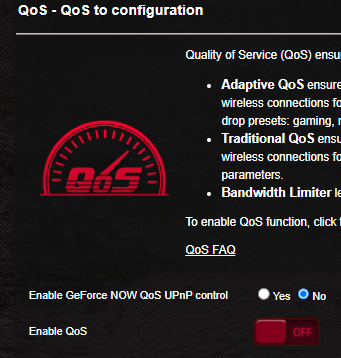
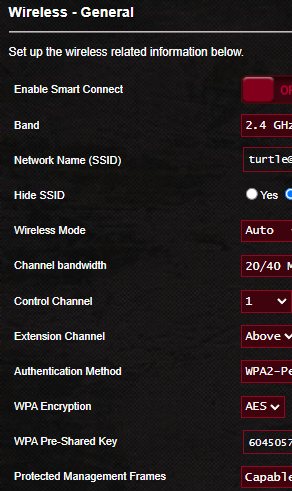
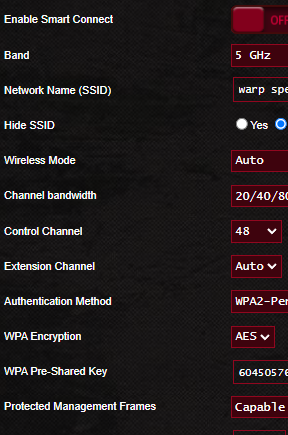
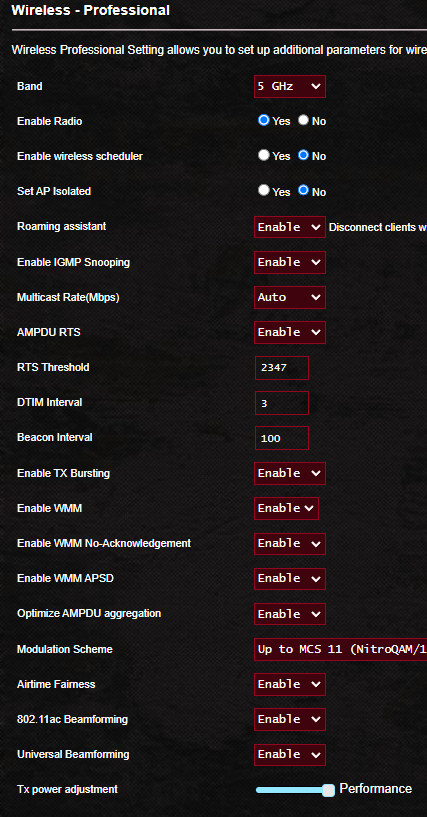
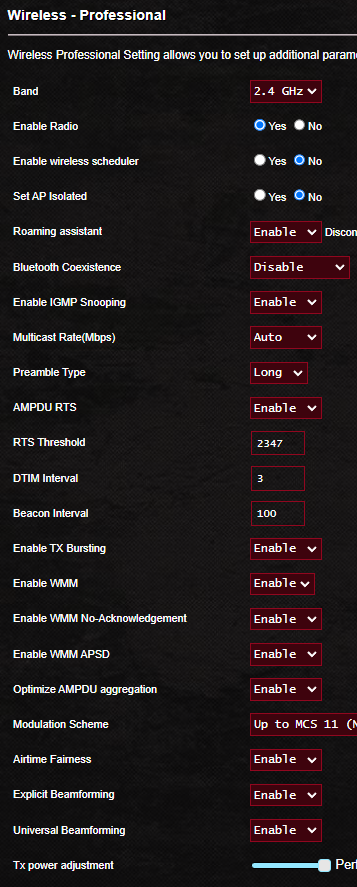
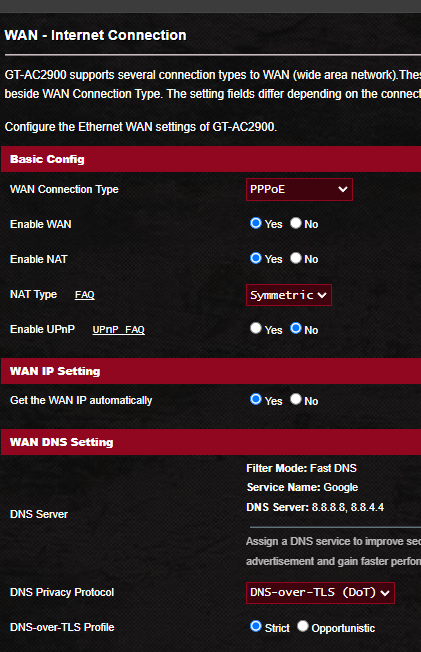
user posted image
user posted image
user posted image
user posted image
user posted image
user posted image
laytiong
post Nov 30 2023, 11:15 AM

p3wns noobies for bfast, lunch and dinner
*****
Senior Member
787 posts

Joined: Jan 2003
QUOTE(schrodinger_cat @ Nov 30 2023, 08:53 AM)
Guys, need your opinion.

I'm a Unifi 500mbps user and received the free 800 Mbps upgrade recently as well. Upon running speed tests across multiple devices (phone, laptop, and desktop PC), the WiFi speed is consistently topping at 200+ Mbps.

The TM technicians came to my house and checked after I phoned to TM for assistance. They commented that the Deco M5 mesh router and satellite may not be up to to task to reach higher speed so they suggested upgrading the router instead, say something like a new WiFi 6 router.

The router used to be able to hit 300-400 Mbps when it was bought new but not sure why it couldn't reach higher speed anymore. Is router deterioration a thing? (Edit: I tried rebooting and resetting the whole damn thing, problem remains the same)

My main concern is that the internet DL speed could still be low after changing to a new mesh router. Do you guys think new router is warranted? This is because I don't feel it's fair that I'm paying for a 800 Mbps service but only getting 30% of the internet speed I paid for. Might as well downgrade to 300 Mbps instead if I'm only getting 200 Mbps consistently?

I'm also looking at Deco X60 mesh router packs. What do you guys think about it? I'm living in a 2-storey house. If you have any other suggestions, please let me know as well.
*
1. use android phone install Net Analyzer, see how many networks are now overlapping your signal, routers can dynamically change the band if set on AUTO. Too many networks on the same band will result in interference and lower speed. Change to different band and try it out.

2. ALL devices at home speedtest to main node maxes at 200+mbps?

3. The thing is your phone, tablets dont need 800mbps at all, maybe for desktop / laptop doing downloads of huge files. By changing your line to 300mbps u r capping your entire house to 300mbps, every one shares that limit. If u keep 800mbps more devices can get 300mbps by themselves, more bandwidth to share. if u get what i mean

4. i do not know because i use Asus mesh setup and they are consistent even after 3 yrs, I can still get 500mbps on a cheapo AC RT66u.
laytiong
post Nov 30 2023, 02:08 PM

p3wns noobies for bfast, lunch and dinner
*****
Senior Member
787 posts

Joined: Jan 2003
QUOTE(schrodinger_cat @ Nov 30 2023, 01:14 PM)
1. I installed Network Analyzer already. How do i know which one is overlapping network? I'm looking at Wi-Fi signal and I saw there are 12 networks including mine and most likely, neighbors.

2. Yes. All of them showing 180-220 mbps on Speed Test. All connected through WiFi with only the desktop connecting via LAN to the Deco M5 satelite.

3. Understood. There are times when I'm streaming and gaming, other members would be on their phones and netflix. So yeah, more bandwidth will be good.
*
1. Locate your Wifi name and see the graph chart, see how many networks are overlapping your network channel, is there any channels which are lesser overlaps, maybe can manually switch to that channel via your router config page.

Topic ClosedOptions
 

Change to:
| Lo-Fi Version
0.3179sec    1.00    7 queries    GZIP Disabled
Time is now: 9th December 2025 - 11:48 AM