Outline ·
[ Standard ] ·
Linear+
Maxis The Official Maxis Wireless Broadband Thread, OMG PORT FORWARDING KRACKED !
|
JWCheah
|
 Nov 20 2007, 12:39 PM Nov 20 2007, 12:39 PM
|
Getting Started


|
QUOTE(llhm87 @ Nov 20 2007, 11:58 AM) Can I know what is the software you using? The one at the background is the Firmware for Maxis USB. The overlapping is IDM v5.11 which somehow works great for me. I've tried FlashGet and a few others but somehow ftp d/l seems unstable, maybe wrong version. |
|
|
|
|
|
JWCheah
|
Nov 21 2007, 09:28 AM
|
Getting Started
|
QUOTE(moonshine @ Nov 20 2007, 10:27 PM) i was in KLCC changing my ZTE to USBJWCheah, How come Maxis allow u switch ur ZTE to USB?? I called to customer service line, the operator told me that it is not allowed. Any other way to do it?? Teach me ya. 10s. Well it depends on how long you've been using the ZTE. In my case, 22 days, I went to KLCC and they too refuse, but when I "claimed" that the guy who sold the product to me promise me that I can upgrade once the USB it out, they have no choice but to give in. You must understand that Maxis has contract out the sales to agents/resellers [found out abt this thru LYN threads  ] but my claim is that they are wearing Maxis T-shirt with MAxis banners so they represent Maxis, that's all I care about... the manager had no choice but to give in. U may try but remember to go to the counter and that at the USB booth as that is owned by the agents. This post has been edited by JWCheah: Nov 21 2007, 09:29 AM |
|
|
|
|
|
JWCheah
|
Nov 21 2007, 09:23 PM
|
Getting Started
|
To all those USB users with poor indoor signal, you may want to consider doing this:    I also got the 5m usb cable extension solution from this site [ Thread: Click here] Even I'm on HSDPA 5-full-bar, I'm considering this as recently i tested my usb at Ground floor vs my 19th Floor, the signal at G is almost constant at 1.2mbps whereas my unit at 19th floor can only achieve 700kbps constant with spike not more than 1mbps...  [hope this can help, for those who has tested this please share your findings, thanks in advance] |
|
|
|
|
|
JWCheah
|
Nov 23 2007, 07:17 AM
|
Getting Started
|
QUOTE(Noobimus @ Nov 23 2007, 12:04 AM) I'm no tech-savvy (downright n00b) but, would you be so kind to explain to me how you're able to achieve that constant speed with that high-gain antenna? And where can you get an antenna like that in Malaysia? If I'm using it at ground level, will I be able to maximise my bps? In layman's term, the parabolic dish helps to focus the signal to a central focal point to increase the signal (using square shape will be easier to construct;  http://www.freeantennas.com/projects/template/index.html http://www.freeantennas.com/projects/template/index.htmlI've not seen any astro-like dish in the market but it can be homemade as the theory is the same, follow the shape using reflector material. Actually, because the signal is from base-station, ground level should have the best reception compared to high-ground. Please read post #1 by PRASYS!!! Very useful link. Recently due to the wet weather, I've been using a net-like parabolic in front of my E220 and I manage to add +100kbps, no more than that. No signal-bar gain as I'm already at 5-bar HSDPA. |
|
|
|
|
|
JWCheah
|
Nov 23 2007, 01:54 PM
|
Getting Started
|
QUOTE(prasys @ Nov 23 2007, 12:07 PM) You can use a second foil. It shouldn't be a problem. Technically its possible. Again , its all about trial and error method. I'll try to get the right calculations for the parabolic dish ! Hmmm..... not worthwhile as there are too many factors affecting the actual signal itself. By using the RSSI as a guide but not reliable. Just my tots... I'm on the other hand trying to figure out if i can build a (f) 3G Generic adapter cable and connecting it to a parabolic dish mounting it at the balcony... currently I'm actually hanging out the E220 at the balcony railing which worries me when its raining  .... |
|
|
|
|
|
JWCheah
|
Nov 24 2007, 01:28 AM
|
Getting Started
|
I think the firmware is for the 1st Gen ZTE users... u know.... the one without the RSSI values and stuff.
[Prasys] : I was just wondering if you can crack it rite.... why not get the Vodafone firmware off their website and do script modifications? I'm not sure how but they are some doing it as we speak. I found out that some in SA has managed to crack the IBURST [Izzi] card by removing the BW capped and throttling.
This post has been edited by JWCheah: Nov 24 2007, 01:50 AM
|
|
|
|
|
|
JWCheah
|
Nov 24 2007, 06:14 PM
|
Getting Started
|
Maxis WBB USB Performance @ Sri Hartamas: 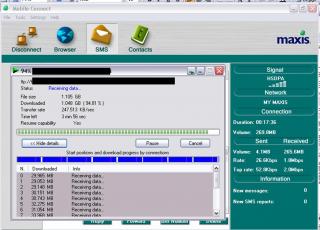
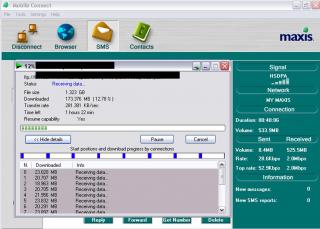
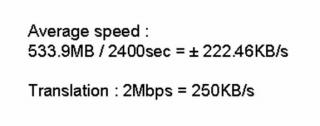
Hmmm....  The FTP d/l speed is always above 200kBps! I can actually spot the base station over the "Nam Heong" chicken rice shop less than 100m on-sight. 
On another note, I realized that the USB firmware speed measurement only measured maxed at 2.0Mbps... caused at 351.48KBps is equivalent to 2.81Mbps. somehow now sure why cannot perform speedtest.net; |
|
|
|
|
|
JWCheah
|
Nov 25 2007, 12:39 PM
|
Getting Started
|
QUOTE(wedjohn57 @ Nov 25 2007, 11:26 AM) RSSI and RSCP also same nearer to zero better? coz i need to a best place to put my modem. Do some scouting and try to locate your base station direction and then then direct a home-made parabolic on to it. I realized that while we are complaining abt the speed performance, there are some that manage to capture GREAT SPEED (>1Mbps) as I myself have found these few location in PJ/Damansara (PJ Uptown/Sri hartamas/mont kiara/damansara heights)
Added on November 25, 2007, 3:32 pmDue to today's mass activities at KLCC, i guess the internet traffic is extremely high causing slow speed.... i'm only getting about 300kbps... This post has been edited by JWCheah: Nov 25 2007, 03:32 PM |
|
|
|
|
|
JWCheah
|
Nov 25 2007, 07:12 PM
|
Getting Started
|
 hmmm... kinda of recovers i guess... latency is below 200ms which is good enuff. QUOTE What are the 'mass activities' in KLCC? U know, the mass gathering on the HINDRAF issue... all the local media sites are experiencing high traffic, even Malaysiakini.com changed their webpage to simple text to allow this high traffic. |
|
|
|
|
|
JWCheah
|
Nov 26 2007, 01:36 PM
|
Getting Started
|
QUOTE(bulibulizaimon @ Nov 26 2007, 06:10 AM) How to check that network type, RSSI, Ec/Io value? which system are you using; ZTE or USB E220? If ZTE and u can't view the values means you're on the 1st Gen firmware which requires update. If you are on USB huawei E220 then the firmware does not show the RSSI value, all you have is the signal bar indicator. However, there is a tool you can use to measure the signal ( Download link) in -dBm, i'm using it to indicate the best location at my place.
p.s: prasys, mind putting this link to your front page... this is the second time i'm posting this...  This post has been edited by JWCheah: Nov 26 2007, 01:38 PM This post has been edited by JWCheah: Nov 26 2007, 01:38 PM |
|
|
|
|
|
JWCheah
|
Nov 26 2007, 06:58 PM
|
Getting Started
|
QUOTE(wedjohn57 @ Nov 26 2007, 06:15 PM)  on 26/11/07 6.14pm speed test fast~but download slow~ Are you referring to Btorrent d/l or http/ftp d/l? With that speed you probably reaching 250kB/s on http/ftp. But for BT, u need to use ubuntu to test the speed as others really depended on the seed/peer ratio. My speed is at 600kbps and i'm doing 76kB/s on ftp... good enuff for me...  |
|
|
|
|
|
JWCheah
|
Nov 26 2007, 11:04 PM
|
Getting Started
|
QUOTE(rheza02 @ Nov 26 2007, 10:03 PM) how to update firmware... ?, i only can download @50KBps.. Firmware is for 1st gen ZTE model. But you can key in the serial to verift if you need upgrade. As for your 50KBps speed, it depends on type of d/l, location and RSSI signal strength. Read post 1 if unsure. |
|
|
|
|
|
JWCheah
|
Nov 27 2007, 08:52 PM
|
Getting Started
|
Below is a screenshot of the E620/220 tool firmware which is an alternative to connect to Maxis. Using this version, you can actually locate the best signal location at your home. The best I could achieve is at -61dBm. But I conclude that anything below -65dBm is good enuff as is almost equivalent to the location's best speed +/- 10%. Please note that you need to wait for about a 30 seconds or so in order for it to display the actual signal strength before moving the E220 to another location for test. 
I think we can now officially praise Maxis for the good performance lately.
Added on November 27, 2007, 8:54 pmQUOTE(owikh84 @ Nov 27 2007, 08:45 PM) I was just wondering why everyone cares about the speed result tested at speedtest.net instead of the actual download speed. right on. I've stop using speedtest as well as all we wanted is how fast the d/l speed is for our torrent, http or ftp. This post has been edited by JWCheah: Nov 27 2007, 08:54 PM |
|
|
|
|
|
JWCheah
|
Nov 28 2007, 09:23 AM
|
Getting Started
|
QUOTE(aiman04 @ Nov 28 2007, 08:51 AM) How do you guys could get the RSSI so low? My modem is mounted outside my window, I only get 75 - 85. And how to look for the location of the base station/cell tower? I'm at Bandar Menjalara, Kepong, anyone from there? Do you know? I'm there too, the base station should be the one next to the sunway SPK Villa Manja construction site. Opposite the Telekom building. LOL.... "ZTE mounted outside the window" !!! Wow...  This post has been edited by JWCheah: Nov 28 2007, 11:08 AM This post has been edited by JWCheah: Nov 28 2007, 11:08 AM |
|
|
|
|
|
JWCheah
|
Nov 28 2007, 01:51 PM
|
Getting Started
|
to aiman04: Using parabolic? U need to get below -70dBm for fast and stable connection. I've seen some complaining about getting discon from MSN and stuff but to be honest, i've not experiencing it at all. ----------------------------------------------------------------------------------------------------------------------------------------------- Last night when i was testing my newly made parabolic (made out of pringles tube), i manage to get -56dBm and the speed boosted from 750kbps to 1.6Mbps (i'll swallow my own quote below for being wrong  ). Unfortunately it didn't last for more than 5 minutes. Maybe it is due to my current antenna design which is a bit doggy and requires to more work. I'm thinking of buying one off the shelf. Anyone can recommend where i can get this? Izzit available at LY plaza? I've seen it b4 but not for the HSDPA signal. QUOTE Below is a screenshot of the E620/220 tool firmware which is an alternative to connect to Maxis.
Using this version, you can actually locate the best signal location at your home. The best I could achieve is at -61dBm. But I conclude that anything below -65dBm is good enuff as is almost equivalent to the location's best speed +/- 10%. Please note that you need to wait for about a 30 seconds or so in order for it to display the actual signal strength before moving the E220 to another location for test. I withdrew the statement above. |
|
|
|
|
|
JWCheah
|
Nov 28 2007, 02:15 PM
|
Getting Started
|
QUOTE(wedjohn57 @ Nov 28 2007, 01:58 PM) hey bro, take some photo of ur parabolic show to us~thx hard to do or not?
Added on November 28, 2007, 2:01 pmhow come every time when my zte modem is idle, it will HSDPA -> UTMS , but later when i continue using my modem wont go back to HSDPA? Maybe because your HSDPA slot has been occupied. I read some threads that you can have some background program running on auto-ping every 1 minute to avoid idle state but not sure if it works. I'm currently outstation but will post some pics once i'm back. |
|
|
|
|
|
JWCheah
|
Nov 29 2007, 09:17 PM
|
Getting Started
|
QUOTE(prasys @ Nov 29 2007, 08:49 PM) Same goes here. I dont know its not that stable. It shows I am connected but then there is no Internet throughput I think we can confirm that there must be some maintenance/downtime/"upgrade"  [yeah rite] going on bcoz we were all having decent speed just 2 nites ago. I didn't bother to contact them to ask... because my ftp is still running at 70kBps but will drop to 10kBps for abt 20 seconds before going back up and this will go on every 3 minutes or so.... i tot it was the ftp server but since u guys also facing the same... so.... just got to wait it out. |
|
|
|
|
|
JWCheah
|
Nov 30 2007, 12:48 AM
|
Getting Started
|
QUOTE(doinkz_gaara @ Nov 30 2007, 12:28 AM) Omg; can anyone connect to msn? I can't sign in, once I signed in, it automatically signed out by itself. *Blooooodyyyyyyyy frustrating* ...... that's funny, as i'm chatting on msn whole night and is running fine. Maybe it is just affecting the ZTE users only. |
|
|
|
|
|
JWCheah
|
Nov 30 2007, 02:33 PM
|
Getting Started
|
QUOTE(aiman04 @ Nov 30 2007, 11:01 AM) I got that problem last weekend.
I called customer care, talk to a guy named Fazli. Guided me to a few step and I never get "connected but no internet" problem again.
Here are the steps:
1. Go to the ZTE homepage.
2. Click on "Network Connection", select manual connecting, select "disconnect" and submit (you'll be disconnected).
3. Go to "Network Selection" and select "WCDMA Only", submit.
4. Go back to "Network Connection", select back "auto-connecting" and submit.
5. Repeat the steps above, but this time select "WCDMA Preferred".
6. You should be able to get internet again. hmmm.... ..... looks like what you actually doing is changing it to 3G preferred mode which allows the modem to switch to a lower signal mode if fail to get UTMS/HSDPA.... did your connection drop to EDGE and then return back to HSDPA? If yes, then all it does is allow data to go thru either way regardless of which connection type.... i maybe wrong as i only used the ZTE not more than 3 weeks  This post has been edited by JWCheah: Nov 30 2007, 02:34 PM This post has been edited by JWCheah: Nov 30 2007, 02:34 PM |
|
|
|
|
|
JWCheah
|
Dec 2 2007, 09:14 PM
|
Getting Started
|
Strange discovery..... I got this #1 speedtest when i setup my modem outside the balcony (19th floor) situated about 1metre off the ground :  Then I was not happy and shifted it to about 2 meters off by hanging it on to side railing.... and then :  I repeated the experiment and still the same phenomenon happen.... any communication engineers out there care to share why is this happening? but any how.... now my ftp download speed is well above 100kBps  ..... 
so to those USB users with the 5m extension cord.... try playing around with the height... u might get lucky....  This post has been edited by JWCheah: Dec 2 2007, 09:21 PM Attached thumbnail(s) This post has been edited by JWCheah: Dec 2 2007, 09:21 PM Attached thumbnail(s)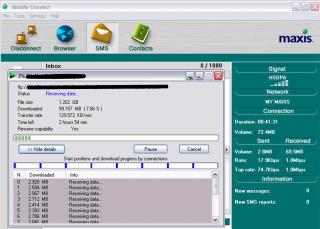
|
|
|
|
|



 Quote
Quote
 0.0418sec
 0.40
0.40
 7 queries
 GZIP Disabled