Welcome Guest ( Log In | Register )

Bump Topic Topic Closed RSS Feed
11 Pages « < 2 3 4 5 6 > » Bottom

Outline · [ Standard ] · Linear+

Maxis The Official Maxis Wireless Broadband Thread, OMG PORT FORWARDING KRACKED !

views
     
JWCheah
post Nov 5 2007, 09:47 PM

Getting Started
**
Junior Member
251 posts

Joined: Sep 2007


I'm the one staying on the 19th floor using USB WBB 3.6Mbps shakehead.gif ... and i can actually spot the base station from my balcony... abt 1km sight distant. i've tested it on the ground floor and also in front of the base station (curious) and concluded that if the signal is bad... then u will not get HSDPA 5-bar. Everything else above this... well is not that significant as i even measure them in -dBm.... little impact....

what does impact is HOW many users are on it, all queue up according to priorities something like 3G phone users then Internet2Go then maybe USB then only ZTE (this is a non-proven priority list). When i was at Hartamas the line was blazing constant above 1.5M but not in Mont Kiara, different base station i guess. But in short.... if poor signal, it will show at the firmware... i'm actually doing 50KBps on ftp d/l now....

JWCheah
post Nov 6 2007, 07:30 AM

Getting Started
**
Junior Member
251 posts

Joined: Sep 2007


QUOTE(cantdecide @ Nov 5 2007, 11:08 PM)
How do you guys see how many signal bars do you have?  I can't seem to locate a function to show this in the ZTE modem.  Is there an additional software?

Ya, if you are connected to a different cell / base station, the performance is very different.  Over at me area, I noticed there are 3 cells where there is no HSDPA in 1 cell.  It is very slow if I am connected to that cell.
*
As for ZTE model, u need to look at RSSI value. why dun u post your firmware frontpage and let the ppl here to comment. Might be able to determine the root cause. Juz a tot..... biggrin.gif
JWCheah
post Nov 6 2007, 09:48 AM

Getting Started
**
Junior Member
251 posts

Joined: Sep 2007


QUOTE(cloudstrife07 @ Nov 6 2007, 08:10 AM)
i gave up torrent using maxis wbb. too much hassle. and wasting time downloading 1 whole day just for some mere 20~50mb+ if the torrent has matured, need to beg for reseed etc etc..

im now into IRC.easier.it's consider direct download.and faster too.
*
why not try using webui.... at least u will get 60~150KB/s on ftp d/l.... i'm actually doing 220KB/s via IDM ftp as we speak...
JWCheah
post Nov 6 2007, 11:06 AM

Getting Started
**
Junior Member
251 posts

Joined: Sep 2007


QUOTE(fire_chrome @ Nov 6 2007, 11:02 AM)
eh juz little small curious question. suppose when u all connected to internet. that rssi suppose to be blink issit? why mine is not. except when it connected to gprs, yes it blink.

my modem is old version. can some give advise ~_~
*
blink means shakehead.gif NO GOOD.... it suppose to light up and stay until u discon.

JWCheah
post Nov 6 2007, 03:23 PM

Getting Started
**
Junior Member
251 posts

Joined: Sep 2007


QUOTE(cloudstrife07 @ Nov 6 2007, 03:14 PM)
but in my condition:

blinking = good but download speed a lil bit slow, around 40~50
not blinking = not good, download speed fast, but frequently disconnects
*
Blinking uh? Interesting hmm.gif .... care to share ur normal average RSSI value (screenshot if possible).... on UTMS or HSDPA?

JWCheah
post Nov 7 2007, 01:14 AM

Getting Started
**
Junior Member
251 posts

Joined: Sep 2007


hmmm..... hmm.gif .... i was using ZTE for two weeks before upgrading to USB. I''m not sure if ur UTMS is due to ur package or ur lack of 3.5G signal strength. i was on power package which means it should show HSDPA. If i'm not mistaken RSSI value is best when is closer to zero... meaning -65dBm is better than -85dBm... need others to confirm this. Search around ur house to see where can it provide u with the best RSSI value. While i was using the ZTE, i actually leave the modem at the balcony via a power extention and a long RJ45 cross cable.... then add on the home-made parabolic antenna (refer to page 1, and read the intro thread which was carefully compiled by prasys, great guide nod.gif ).... only then i could achieve -70dBM which helps to get around 200kbps... i think the speed should have improve significantly since then (2 months ago).
JWCheah
post Nov 9 2007, 08:21 AM

Getting Started
**
Junior Member
251 posts

Joined: Sep 2007


QUOTE(cloudstrife07 @ Nov 9 2007, 01:50 AM)
just now around 8~10 the connection is around 3~5kBps.now back to normal.
*
hmm.gif hmmm...... it seems like ZTE and USB E220 users no longer share the same issues. I notice this after reading the previous days thread. My E220 is now running very constantly at 250Kbps to 400Kbps with occasion burst to 1Mbps. While this is a more consistent performance but I can no longer enjoy the 800Kbps to 1.5Mbps during 1:00am ~ 6:00am. No difference. However no improvement in latency (>350ms) with 12% packet losses (too lazy to post ping results as it is all the same... yawn.gif )

edited due to typo


This post has been edited by JWCheah: Nov 9 2007, 08:29 AM
JWCheah
post Nov 9 2007, 09:51 PM

Getting Started
**
Junior Member
251 posts

Joined: Sep 2007


QUOTE(cantdecide @ Nov 9 2007, 02:48 PM)
Based on your conclusion, which on is better?

BTW, if you are using the USB thingy, how can you connect it to a wireless AP?  There is a way to connect it to the ZTE modem but I have not found any article on using the USB thingy.  Does anyone know how?
*
I'm not sure if USB is better than ZTE as some ZTE users are enjoying better gaming performance but not P2P.

For your info, I'm not using a router. But from what I've read from the threads, you need a pc with the router to become the host server for the rest of the pc to connect. But if there's anybody manage to it with a pc, please share.

---------------------------------------------------------------------------------------------------------------------

On a different note, for the first time I'm happy with Maxis for the past 10 days ( touch wood tongue.gif). The USB performance has been constantly hovering around 250kbps to 400kbps. But occasionally after 9:00pm, I see a drastic boost going up to 1Mbps, although this is not a daily routine but it has started more rampant. However, speed will return to normal after 1:00am (maybe it is the un-throttling of the other line causing a spike in total BW usage, hmm.gif ). But still in comparison with the previous weeks, this is a good improvement. Any other USB users experienced similar condition or is it an improvement at my area only?

edited: add screenshot

This post has been edited by JWCheah: Nov 9 2007, 10:01 PM


Attached thumbnail(s)
Attached Image
JWCheah
post Nov 11 2007, 02:15 AM

Getting Started
**
Junior Member
251 posts

Joined: Sep 2007


QUOTE(lotus_man @ Nov 11 2007, 01:28 AM)
hey guys..
i jst got the USB 3mbps package today
n its damm laggy wei!
my torrent moves so slow
n when my torrent is downloading..my internet moves slow like a turtle :S
*
mind sharing your location?speedtest results? latency?

JWCheah
post Nov 11 2007, 01:48 PM

Getting Started
**
Junior Member
251 posts

Joined: Sep 2007


Screenshot taken on 1:38pm:
Attached Image

Attached Image

Quite happy with the upload speed no longer capped at 50kbps. Somehow, i'm wondering if the weekend speed is better that the weekdays. I can't confirm as i seldom use it during weekdays Daytime...

USB WBB user RM138 net (no additional charges)
Area : DesaParkCity, Kepong [19th floor]


This post has been edited by JWCheah: Nov 11 2007, 01:50 PM
JWCheah
post Nov 11 2007, 06:30 PM

Getting Started
**
Junior Member
251 posts

Joined: Sep 2007


nope. that's the speed with a small b (bits)... meaning it is only 20% of the promised 3.6Mbps.... download will range from 60KBps to 100Kbps.
JWCheah
post Nov 12 2007, 12:12 AM

Getting Started
**
Junior Member
251 posts

Joined: Sep 2007


QUOTE(lotus_man @ Nov 11 2007, 11:14 PM)
care to elaborate more on that ?
i don understand... sorry:blush:
& 1 more thing!
whoever who's using Maxis USB..u would realise there is 2 different USB port rite?
wats the difference?
y 1 has only 1 usb point while the other has 2?
*
rclxub.gif hmmmm...... hmm.gif
Ok, in short, the average speedtest results = 600kb/s ~ 1.4Mb/s [that is bits]
If u do ftp/http download the speed should be around 75kB/s to 175kB/s.
Today i've completed 2GByte ftp d/l in less than 5 hours.

...???.... what do u mean there's 2 ports... if u mean the usb cable, then the other end with 2 heads only one will work for your connection, the other is a power assistance used for power charging.
JWCheah
post Nov 12 2007, 11:56 AM

Getting Started
**
Junior Member
251 posts

Joined: Sep 2007


Last nite around 1 am.. i got discon. Well, it is like u are still log-on but there's no data coming in... as if u r in idle mode. after a minute of so.... dc. Am i alone on this or i've officially over-stress my usb modem... been running non stop for more than 60 hours straight. The whole unit was burning hot...
JWCheah
post Nov 12 2007, 07:52 PM

Getting Started
**
Junior Member
251 posts

Joined: Sep 2007


hmmm.... my modem is still alive... i guess there must be something wrong at the ISP end... todays. speed is excellent.... 1.1Mbps to 1.4Mbps.... i'm on ftp download.... constant for 2 hours... earlier i;ve tried playing CS-source, china server...latency = 200ms.... ok-lah.... can only 2 occasion where i got lagging badly. hope maxis keep this up and worked towards the promised 3.6Mbps.
JWCheah
post Nov 12 2007, 11:52 PM

Getting Started
**
Junior Member
251 posts

Joined: Sep 2007


lol..... i'm not that greedy... i'll settle for a constant 1.5Mbps with burst up to 2.0Mbps... that's all i'm asking for.... wink.gif
JWCheah
post Nov 15 2007, 09:38 AM

Getting Started
**
Junior Member
251 posts

Joined: Sep 2007


QUOTE(ymcross @ Nov 15 2007, 01:52 AM)
this is tested as at 1.44am today lol
http://www.speedtest.net/result/202156670.png

err i do not experience any msn or hotmail browsing problems..and the surfing speed is above average for me..but when i on my torrents it turned god damn slow =(
i am also getting constant download speed at torrents..like 20kbps-30kbps or even 50++kbps at daytime(ya my bitcomet can work during daytime) but my speed remains the same and mayb slower at night(20-30kbps,sumtimes even 10kbps =.=)
i tot at night the download speed will be "flying high" wan???
coz i see alot of u guys saying that u get 100++ kps or more at torrents lol..
oh btw i'm staying at taman mayang jaya,sumwhere near damansara jaya =)

p/s i'm using the so called "3.6mbps power package(dissapointed =X)
*
Well i guess Maxis is still fiddling around as the speed is not that consistent. Here's the daily average speed i've been getting:
(it is just average speed based on my daily ftp download and Maxis firmware records; data is in Kbps)

15NOV : D/L 250 U/L 40
14NOV : D/L 420 U/L 60
13NOV : D/L 1200 U/L 220
12NOV : D/L 1100 U/L 180
11NOV : D/L 1050 U/L 180
10NOV : D/L 950 U/L 100
09NOV : D/L 750 U/L 140
08NOV : D/L 600 U/L 65
07NOV : D/L 550 U/L 70
06NOV : D/L 600 U/L 80

The recent 2 nights I'm not sure if it is because of Maxis or just bad weather. I've not been able to see a Burst above 1.5Mbps b4 but i've heard some [apisgogo] has seen 2Mbps. I do believe the population of users in a particular area (using the same base station) plays an important factor.


JWCheah
post Nov 15 2007, 04:37 PM

Getting Started
**
Junior Member
251 posts

Joined: Sep 2007


QUOTE(llhm87 @ Nov 15 2007, 03:55 PM)
This is my speedtest at 3.55pm

user posted image
*
drool.gif rclxms.gif

good on u! I think if i can get that consistently, I'll be rclxm9.gif ..... sigh blush.gif


Added on November 16, 2007, 12:54 pmHmmm... Maxis cannot accept praises-leh... i tot their service was improving but the last two days record shows otherwise... but still get 350kbps constant... not happy sad.gif

Izzit just @ Kepong or overall, any1 can confirm?

This post has been edited by JWCheah: Nov 16 2007, 12:54 PM
JWCheah
post Nov 19 2007, 12:30 PM

Getting Started
**
Junior Member
251 posts

Joined: Sep 2007


I've been reading the other ISP threads (Digi and Sialcom) and I realised that Maxis is actually on top in terms of speed (>800Kbps) and stability. I cannot remember the last time i got discon. Btw, to everyone surprise, the latency is actually improving as i've been gaming for the past 3 days with <150ms UK server. Finger-cross that this will not be a one-off thingy.
JWCheah
post Nov 19 2007, 04:30 PM

Getting Started
**
Junior Member
251 posts

Joined: Sep 2007


QUOTE(aiman04 @ Nov 19 2007, 04:12 PM)
A Maxis girl called me just now. She said it's caused by the router, not the modem, so if I want someone to come and check, I have to pay for it. I rather not. Guess I'll just let it be that way.

And the thing about the personal account, they will look into it. Thanks again for your help.
*
U can always bring the modem to their center to try it out there, and if they can't fix it, they are suppose to change a new one for you. I actually witness this from a customer when i was in KLCC changing my ZTE to USB. No kidding.
JWCheah
post Nov 20 2007, 11:45 AM

Getting Started
**
Junior Member
251 posts

Joined: Sep 2007


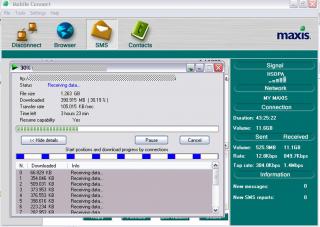
ohmy.gif I'm in PJ uptown and has been connected with 2Mbps speed for the last 20 minutes.... I'm so ENVY for those who are staying here... the ftp download stays above 300KBps constant. Hmmm... maybe i should shift to this area... hmm.gif

Attached Image

This post has been edited by JWCheah: Nov 20 2007, 11:48 AM

11 Pages « < 2 3 4 5 6 > » Top
Topic ClosedOptions
 

Change to:
| Lo-Fi Version
0.0221sec    0.68    7 queries    GZIP Disabled
Time is now: 8th December 2025 - 05:58 PM