Outline ·
[ Standard ] ·
Linear+
Maxis The Official Maxis Wireless Broadband Thread, OMG PORT FORWARDING KRACKED !
|
JWCheah
|
 Dec 3 2007, 02:48 AM Dec 3 2007, 02:48 AM
|
Getting Started


|
QUOTE(wedjohn57 @ Dec 3 2007, 01:30 AM) which ftp site u always go for download~mind to share with us?i wan to try and c how fast i could get~ eeerrrr.... sry, it is an uTorrent WebUI (GetByte) account i used for torrent. For testing u could try http d/l from Microsoft site, dun hav any url but you can try. |
|
|
|
|
|
JWCheah
|
Dec 3 2007, 08:37 AM
|
Getting Started
|
I've just heard from my cousin in Penang that they are offering Maxis USB WBB @ RM118 per month!!!!!  (RM20X18mths=RM360) with that I can probably get a cheap aircard off lelong.com .............. speechless...... |
|
|
|
|
|
JWCheah
|
Dec 3 2007, 06:59 PM
|
Getting Started
|
QUOTE(wedjohn57 @ Dec 3 2007, 05:55 PM) i test aldy download ubuntu from korea ftp server~highest i could get 271kB/s, average i could get 200kB/s +-  if the capital "B" is not a typo, then by-gosh your speed is impressive then. I'm already happy when I turn on my IDM 5 minutes ago and able to achieve 150kB/s (abt +1.1Mbps) constant.  |
|
|
|
|
|
JWCheah
|
Dec 4 2007, 03:16 AM
|
Getting Started
|
QUOTE(Petre @ Dec 4 2007, 02:27 AM) mind elaborate a bit ah?  LOL.... that's the true speed for his Maxis.... using ftp d/l.... similar to http d/l. |
|
|
|
|
|
JWCheah
|
Dec 4 2007, 12:00 PM
|
Getting Started
|
QUOTE(TokBatin @ Dec 4 2007, 11:14 AM) i ive been using usb wireless bb for a month now,, all i can say is im paying rm138 permonth for nothing,,maxis bb is stupid,,including all maxis gay engineers, im getting a full bar line of hsdp line in my house at cheras, but the download speed is only about 90-100 kbps.....i really think maxis has to reconsider their policy about canceling an account.....what for ask people to pay for something u cant provide.......
Added on December 4, 2007, 11:18 ambtw is there any where i can complain this,,i mean like persatuan pengguna,, tv3,, ntv7 tv1 etc,,,, is this possible???????? i really hate to paying for something that is useless In that case, you should try calling to the customer services and tell them that you are connected to HSDPA 5-bar but the data is not coming thru, dun complain about the speed because you will be consider as a P2P user which deny your consumer rights as you are a BW hogger. Just tell them like you can't d/l your email attachment or something. Most of the users at this thread went thru worse time than you, but now, most of us are enjoying more than 700kbps constant. I do believe that there are a lot of Cheras WBB users facing the same issue as I heard it b4... overcrowded. Hopefully they will plan for upgrades if there's enough complaint emails bombing them. Juz my tots  p.s: regarding the consumer user hotline.... sorry to say that I think they themselves also not doing too good, slow response, non-action, sleeping organization. I too wanted to complain, not to them but against them..... |
|
|
|
|
|
JWCheah
|
Dec 4 2007, 02:04 PM
|
Getting Started
|
QUOTE(bulibulizaimon @ Dec 4 2007, 12:52 PM) Going to dump this fatty maxis wbb and change to stramyx which i hope im not screamyx after this  I have a good and bad day with this maxis wbb... my conclution is this bb is quite good expecially for the heavy downloder users. I manage to get 120+ KB/s constant download with this bb. If for normal usage, its perfect for you and sumore it is wireless which you can easly bring it anywhere you go and enjoy internet connection anywhere. What are the bad about this bb? of course.. DC!. And sometimes, when we are idle.. netwrk connection will auto change to UMTS/EDGE which will give you a lowwwww speed of internet connection. How to prevent this? by downloading 24/7  U will enjoy constant HSDPA network  Just want to share some good time with maxis wbb Just want to share some good time with maxis wbbtips: either use some auto-ping software (not tested) or just open some auto-reload webpage : http://home.nc.rr.com/emulroy/moneyr.htm(not tested) > auto-refresh every minute, not sure if your system will return to UTMS in less than a minute. I usually d/l all the time and when idle..... errr....  ...... seldom idle.... |
|
|
|
|
|
JWCheah
|
Dec 4 2007, 11:36 PM
|
Getting Started
|
QUOTE(wedjohn57 @ Dec 4 2007, 11:29 PM) i using the auto ping now~i wont kick to UMTS~ I think some auto-ping program only offers minimum time to ping every 5 minutes or so which is too long as I tested juz now, it takes about 3 minutes of idle and it will drop to UTMS mode. WEDJOHN: care to share which program you are using? I've tested the www.livescores.com or teamtalk.com live scores and it worked to retain it at HSDPA, where it will request for refresh every minute but you need to have an active football game in-place for it to update the scores, work best over the weekends  . |
|
|
|
|
|
JWCheah
|
Dec 6 2007, 01:01 PM
|
Getting Started
|
I'm an USB user and the speed is stable. The only thing u need to verify is your location availablity. Speed should range from 700kbps to 1.3mbps, some are experiencing more than 2mbps (Uptown/TTDI/Kelana)...  ---------------------------------------------------------- + Read post#1 and browse thru the full threads.... lots of tips and helpful info... This post has been edited by JWCheah: Dec 6 2007, 02:27 PM |
|
|
|
|
|
JWCheah
|
 Dec 6 2007, 05:53 PM Dec 6 2007, 05:53 PM
|
Getting Started
|
QUOTE(kanelkc @ Dec 6 2007, 04:49 PM) may i know what is yr average and max torrent speed at nite time from 12 am to 6 am ? I'm torrenting via WebUI services so my speed is max out using ftp/http download... if the speed is at 1.0mbps, then i should be doing 125kB/s. |
|
|
|
|
|
JWCheah
|
Dec 7 2007, 12:02 AM
|
Getting Started
|
QUOTE(cantdecide @ Dec 6 2007, 10:38 PM) Gosh!!! Today is possibly the best connection speed I have had since I gotten my MaxisBB. The strange thing is that today is a rainy night where I normally thought my MaxisBB will be terribly ridiculous. I hope it is due to some fine-tuning Maxis has done and I can maintain at this good connection speed. I start to believe that the rain is no longer a factor. QUOTE(wedjohn57 @ Dec 6 2007, 07:40 PM) u r using web xunlei isnt?my torrent at night also very slow~ Nope. utorrent WebUI... go check out this thread and you will understand what's all the buzz is about.... < Click Here...>(not appropriate to discuss this here) _______________________________________________________________________________________________________________________ Someone requested me to post up my crappy ugly but effective antenna so here goes : 
I've tried adding a piece of aluminum foil to the parabolic but it weakens the signal, hence, speed drop about 20%.... not meant to be........ Looking at this you will get the basic idea how it helps.... but i've not given up hope to get a commercial version but can't find one that boost the 2100Mhz freq that it requires.  |
|
|
|
|
|
JWCheah
|
Dec 7 2007, 04:15 AM
|
Getting Started
|
QUOTE(wedjohn57 @ Dec 7 2007, 12:52 AM) cool man ur stuff~~ buti got a question, seem u like using the maxis bb in a fixed place only, y u apply the usb modem 1? apply zte can save RM40 per month Not really, normally outstation like KB, Ipoh and Penang... i've tried the ZTE, no good... quickly return it for a E220. |
|
|
|
|
|
JWCheah
|
Dec 7 2007, 11:36 AM
|
Getting Started
|
QUOTE(kanelkc @ Dec 7 2007, 10:07 AM) What is the connection speed u had in ipoh with ZTE modem ? can surf net ? and also anyone know the maxis bb promotion details in KL PC fair ? Ipoh - mainly EDGE/GPRS = can do about 100kbps K Bharu - UTMS = strong 600kbps (town centre) Penang - UTMS = +300kbps (USM area) btw, i'm on USB. Heard pc fair promotion usb only RM118/mth.... not sure, will know by lunch time as i planned to drop by. |
|
|
|
|
|
JWCheah
|
Dec 7 2007, 03:21 PM
|
Getting Started
|
QUOTE(kanelkc @ Dec 7 2007, 11:53 AM) is there any performance difference between usb and zte modem in terms of speed and conn stability ? For one, both are having diff IPclass and ZTE is going thru "firewalled" route system (192.168.0.1) whereas USB connects direct. But I guess the ZTE would be easier to obtain the signal with the antenna whereas usb e220's antenna is build in without an external option. Of course there is price diff in the monthly payment, you should calculate the diff to see if you can get a HSDPA Sierra Aircard with the savings. btw; if you wanna go for USB... pc fair is offering it at 115/month    !!!!!! 3-days only promo.... sad for the old users.... p.s: Maxis is going full-assault on the usb with booth set up at every corner at every hall, there must be like more than 15 booths on it and there are all over the place... I hope they dun oversell the BW quota and burdens the entire system !!!! Funny thing is CELCOM did not participate at all This post has been edited by JWCheah: Dec 7 2007, 03:24 PM |
|
|
|
|
|
JWCheah
|
Dec 7 2007, 04:04 PM
|
Getting Started
|
QUOTE(kanelkc @ Dec 7 2007, 03:53 PM) ZTE is going thru "firewalled" route system (192.168.0.1) whereas USB connects direct.. > Do you mean all ports on USB user connection is not blocked on daytime ? I know ZTE user connection is blocked on most of the ports during the daytime. Maxis open it only during 1 am - 6 am. Correct me if i am wrong thanks. There are still not open, but sometimes if you perform an advance port search you can actually see some ports open but not always. I'm not good at this so i didn't bother, still cannot perform direct port forwarding. |
|
|
|
|
|
JWCheah
|
Dec 8 2007, 12:04 AM
|
Getting Started
|
QUOTE(wedjohn57 @ Dec 7 2007, 11:01 PM) huh~u always go kb?? thr is my hometown yeah, got some on-going projects there... i guess there is not much of users there so if you can get UTMS, it is quite stable. I'm just wondering how's the speed down South in JB, will be having a few trips there in the coming months.... |
|
|
|
|
|
JWCheah
|
Dec 8 2007, 10:32 AM
|
Getting Started
|
QUOTE(kanelkc @ Dec 8 2007, 03:49 AM) ok just tested my maxis wireless bb at 3 am today(i susbcribed at pc fair ). Most ports is blocked all the time. Day and night the ports is blocked. this mean Torrent users will get slow speed during 1 am to 6 am too. Some users get good speed, it might due to they are using http tunneling service when they doing torrent. Can some one changed information posted on the first post at the FAQ section of this tHread ?? >> A : Yes , you are allowed to torrent from 1 am to 6 am. The ports are opened during that time and you can get sky rocket speed.cuz its misleading and its not true. all ports are blocked all the time. Torrent users will get slow speed. Unless you use http tunnelling service when torrenting, which you usually need to pay to use this tunneling service. I think i will give back the modem to Maxis before 7 days testing period ends since all port is blocked at all time. Torrent users got to avoid this maxis Wireless BB. Its only for normal user who like to surf net and download email. and you dun need a 3.6 Mbps connection for this . Just get one package 384Kbps enough. But you cannot argue that at the moment in terms of wireless BB, Maxis offers the best stable speed. Of course for torrent users you can use either VPN, HTTP tunnelling or WebUI via ftp to d/l. Yes they are paid services but it is worth it to be able to d/l at 150kB/s for something as low as RM30/mth..... btw, are you on usb (RM118/mth ), i've used Advanced Port Scanner 1.3 and here's the results: 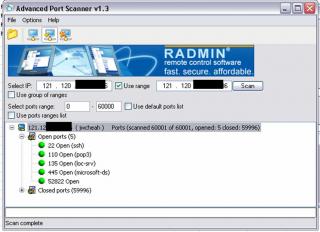
the problem is that it is not always 52822 open. |
|
|
|
|
|
JWCheah
|
Dec 8 2007, 07:16 PM
|
Getting Started
|
 Nope.... Maxis has been real generous this weekend. Just then, when I came back my d/l was flying at 2mbps (255kB/s) for awhile b4 returning to a good constant 1.2mbps....
Added on December 8, 2007, 7:19 pmBtw, the latency for my usb has been great for the last 1 week, between 200ms to 80ms, i've been CSing for awhile now seems no prob with US/China/Indo/HK server. This post has been edited by JWCheah: Dec 8 2007, 07:19 PM |
|
|
|
|
|
JWCheah
|
Dec 9 2007, 05:13 PM
|
Getting Started
|
QUOTE(otherwise @ Dec 9 2007, 03:06 PM) What should i do to unsubscribe the maxis wireless broadband? Do i need to pay extra charges since the contract is 18 months? How long have you had it for? More than 1 month then no luck for you... go start a thread asking for interested party to take it up, the transfer will cost RM50. If not, Maxis expect you to pay the remaining months of the contract which makes no sense why one would give back the modem and the service and pay full of all the remaining months for what..... QUOTE(otherwise @ Dec 9 2007, 02:30 PM) Probably for you to put on top of the modem since you probably need to hang out the entire unit outdoor to get a decent signal.... |
|
|
|
|
|
JWCheah
|
Dec 9 2007, 10:38 PM
|
Getting Started
|
QUOTE(cantdecide @ Dec 9 2007, 10:28 PM) After seeing so many complaints from those who have just subscribed to Maxis BB, I think Maxis really have to work harder to explain to everyone how it works to get a HSDPA connection or a better connection. After using Maxis BB for more than 5 months (wow! Time flies), I realised that getting less disruption around the modem is very important. Now I am placing my modem on my balconi . Many forumers here have actually shared and advised us to put the modem as close to window as possible but I guess many of us missed that out. The other thing is that somehow we have to learn to live with slow connection during weekends or peak hours. For this, I am of the idea that Maxis should always be upgrading to support their growing subscribers. Just my 2cents. that is why the usb e220 needs the 5m extension.... you can try by just waving your hand around it and you can see the speed fluctuates. I think it is the same for ZTE... you can still find an extension cable.... i think it is a cross version... not sure. QUOTE(ubuntu @ Dec 9 2007, 10:30 PM) Is it true that maxis only limits user only can download up to 3GB data per month? Congrats, you are probably the 1,678,912th person who has ask that question, the answer is like all the rest... no limit now, no extra charges now and if they charge... probably 1,678,913 ppl will get it including yourself....  |
|
|
|
|
|
JWCheah
|
Dec 10 2007, 03:48 AM
|
Getting Started
|
QUOTE(llhm87 @ Dec 10 2007, 02:36 AM) JWCheah... You are so funny with your statement. For you to hang it outdoor. I like it. LOL. I can't stop myself from laughing now. No, I'm serious........................ The speed tonight is so not stable ranging from 300kbps to 1300kbps so i really hung it out.... and guess what.... it was raining while i was out dining ..... but those huawei modem really made out of "weather-proff", it was wet but still running like normal. .... maybe it was design as an outdoor modem .......... |
|
|
|
|



 Quote
Quote
 0.0507sec
 0.75
0.75
 7 queries
 GZIP Disabled