Outline ·
[ Standard ] ·
Linear+
Maxis The Official Maxis Wireless Broadband Thread, OMG PORT FORWARDING KRACKED !
|
JWCheah
|
 Oct 22 2007, 12:58 PM Oct 22 2007, 12:58 PM
|
Getting Started


|
Finger crossed.... but I was on the ZTE for 2 weeks b4 I move into USB, the problem with ZTE is that he signal is so inconsistence with high rise condo (like myself on the 19th floor) it almost made me jump off the buliding trying to get a decent connection. But even at that time, torrent in the daytime is still possible, around 10-15Kbps, but need to adjust the parabolic direction once a while when the speed starts dropping, really annoying.
|
|
|
|
|
|
JWCheah
|
Oct 22 2007, 03:46 PM
|
Getting Started
|
I strongly believe that the location and the number of users connected at that particular base station plays an important role. No matter how strong (in dBm) the signal is, if it is a highly populated surfer/voicecall user, you are likely to be given low priority usage as compared to a less signal but also less populated location. I think the question of the day is that can anyone provide a clue on the IP string (121.X.X.X, 58.X.X.X or 192.X.X.X) matching the base core system used to power them.
|
|
|
|
|
|
JWCheah
|
Oct 22 2007, 04:28 PM
|
Getting Started
|
QUOTE(prasys @ Oct 22 2007, 04:17 PM) But if you notice , some guy whos using the Maxis Internet2Go package can get higher speeds. I am not sure if that is the RM 99 package or the RM 120 (Unlimited Data package). I can confirm this as I've tried the Internet2go RM120 package..... VERY stable and fast. I do think that maybe the information given out is not that accurate as I also heard a rumor that the USB wireless sales is not doing good, maybe more promo to win new user and upset the old ones like us  Bottomline is that the speed on the 121.120.X.X really varies. I've witness a 1800KBps/700KBps connection using the USB in Hartamas. prasys... u mention abt "tool in my Trinity" can helps to locate the basestation, any recommended tools for WinXP? Really find that interesting. |
|
|
|
|
|
JWCheah
|
Oct 23 2007, 08:55 AM
|
Getting Started
|
 Results @ Plaza Mont Kiara. 9:00am also can torrent more than 25KB/s.... must move here to get faster torrent..... |
|
|
|
|
|
JWCheah
|
Oct 23 2007, 11:04 AM
|
Getting Started
|
QUOTE(zipitup @ Oct 23 2007, 10:53 AM) JWCheah: with maxisbb or Internet2GO? MaxisBB USB RM138 per month. Starngely during my surfing at the Mont Plaza, as I was torrenting @ 40+KBps... a friend of mine turn on his Maxis 3G and starting reading the KLSE and all of the sudden my connection drops deep down and torrenting only @ 10KBps.... Therefore, I asked him to discon to confirm the factors and it the line resume as before (+40KBps) just after 5 second he discon his.... hmmmm |
|
|
|
|
|
JWCheah
|
Oct 24 2007, 02:04 AM
|
Getting Started
|
QUOTE(chemnz @ Oct 23 2007, 09:16 PM) google proximitron... havent tried TOR yet but i reckon it does a similar job... i paired it up with deluge (utorrent and azureus dont work at all) after reading this thread... thanks to all of u who mentioned deluge... care to share some torrent results?  |
|
|
|
|
|
JWCheah
|
Oct 24 2007, 12:22 PM
|
Getting Started
|
QUOTE(chemnz @ Oct 24 2007, 10:07 AM) righto...this a screen shot taken a few minutes ago..as u can see its 9.51AM and yes..it works..speed is about 10-30KB/s.. sometimes slower than that..but hey.. it definitely works...  Hmmm..... not bad if it is free. Anyway, I'm using VPN and it is running at 60~120KBps.... even faster than night time. |
|
|
|
|
|
JWCheah
|
Oct 24 2007, 03:22 PM
|
Getting Started
|
QUOTE(sui @ Oct 24 2007, 02:09 PM) yup
usually i get my peak speed after midnight to morning
afternoon onwards can be as slow as 20 - 50kb/s though
downloading popular game like Neverwinter Nights gives me good speed, single file 100-150kb/s
CAn see that you are using Tor and Privoxy.... hmmm....... This post has been edited by JWCheah: Oct 24 2007, 03:22 PM |
|
|
|
|
|
JWCheah
|
Oct 24 2007, 04:20 PM
|
Getting Started
|
QUOTE(cinbao @ Oct 24 2007, 03:59 PM) Crazy  , u get constant DL speed ? I am using ZTE modem with power package (auto upgrade from 768Kbps to 3.6Mbps) at 17/2 , PJ. using utorrent is piss me off for sure. Maybe I should try bitcomet 0.90 like urs. Do u set anything to the bitcomet? using what anti virus ? firewall ? TOR ? DULGE? My result on download speed is 1 - 200KBps , nah, I wont get constant 200KBps , mostly is 1-20 KBps , average 11KBps, 200KBps maybe u can get once a month and in a few seconds. 
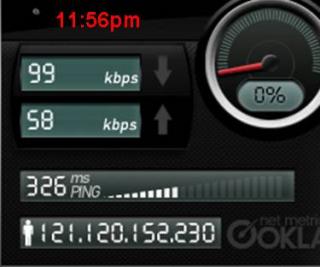
Added on October 24, 2007, 4:07 pmCrazy , u get constant DL speed ? I am using ZTE modem with power package (auto upgrade from 768Kbps to 3.6Mbps) at 17/2 , PJ. using utorrent is piss me off for sure. Maybe I should try bitcomet 0.90 like urs. Do u set anything to the bitcomet? using what anti virus ? firewall ? TOR ? DULGE? My result on download speed is 1 - 200KBps , nah, I wont get constant 200KBps , mostly is 1-20 KBps , average 11KBps, 200KBps maybe u can get once a month and in a few seconds. Jus wanna ask, how was your connection last night btw 11:00pm till 1:00am? I logon at 9:00pm and the speed was poor. But all of a sudden, I could not log on and got error message from Maxis. Called to the centre and MAKE NOISE then finally they resolve to resetting my connection. Then the unexpecteded happened. The speed reaches more than 1.2MBps (really happy as it has proven that E220 has the capability not just manual figures) but the torrent didnot show much as I was on some 0:5 seed/peer torrent. Just wanna to know if this is a one time only event or maybe resetting the connection helps.....  This post has been edited by JWCheah: Oct 24 2007, 04:21 PM Attached image(s) This post has been edited by JWCheah: Oct 24 2007, 04:21 PM Attached image(s) |
|
|
|
|
|
JWCheah
|
Oct 24 2007, 04:45 PM
|
Getting Started
|
QUOTE(sui @ Oct 24 2007, 04:28 PM) i do port forward since im using router, norton anti virus + norton internet security, using TOR while im downloading multiple BT files at 100kb/s right now, my web browsing speed is extremely slow though my modem is ZTE as well is it ur 1st time to reach 1.2MBps as a POWER subscriber? what was ur max speed before this? First time on the E220 3.6MBps, before this I've only seen this kind of performance on Internet2go. Where's your location? Speed test result to share? |
|
|
|
|
|
JWCheah
|
Oct 24 2007, 05:58 PM
|
Getting Started
|
QUOTE(prasys @ Oct 24 2007, 05:49 PM) Dude Port Forward HAS ZERO IMPACT. I've tried it. It does nothing. Your ZTE is already a router. What you are doing is well just waste of time and resources. I dont port forward at all , cause its the same .But if you use Internet2Go , then yes all ports are UNBLOCKED. When I say UNBLOCKED , you are free ! So in short, are you suggesting that the BEST Wireless BB at the moment can only be achieved by: 1) Get someone to takeover the account...  2) PURCHASE an AIRCARD 3) GET INTERNET2GO or CELCOM HSDPA Forget about VPN as since there is no BLOCKING... then P2P should be an open highway.....  |
|
|
|
|
|
JWCheah
|
Oct 24 2007, 09:25 PM
|
Getting Started
|
QUOTE(multiplexer @ Oct 24 2007, 08:34 PM) guys, i just received my E220 with unlimited package. im staying at desa tasik, bandar tasik selatan. but this is what i got...  even not up to 384kb... any comments? You're on UTMS 2bar signal.... no good, sometimes, even EDGE could be much faster and stable than what you are having. Perform speedtest to verify. If it is confirm that your area is not cover in the 3.5G area, I suggest that you return the package while you are still on the trial period, else, you probably end up surfing and downloading in some open "taman".  |
|
|
|
|
|
JWCheah
|
Oct 24 2007, 09:38 PM
|
Getting Started
|
Hmmm... bandar tasik selatan? Condo? Well still the same advice, confirm the coverage fast, I think they only allow 7 days trial. Good luck! By the way, I'm now in SS24 sitting in a car online and speed was not good 4 the first 15 minutes but now seems ok...  Manage to torrent more than 25KBps (w VPN)...  This post has been edited by JWCheah: Oct 24 2007, 09:41 PM Attached thumbnail(s) This post has been edited by JWCheah: Oct 24 2007, 09:41 PM Attached thumbnail(s)
|
|
|
|
|
|
JWCheah
|
Oct 24 2007, 10:44 PM
|
Getting Started
|
QUOTE(multiplexer @ Oct 24 2007, 10:23 PM) im sitting at near windows and found out i got 3 bars of HSDPA.. this is the results of speedtest.net  i also check maxis websites and yup.. my area is supported for hspda. but i live at 8th floor. could that be the caused? im thinking of getting downstairs and try the speedtest again.. anyway, how many bar should i get in order to get a 1.8mbps? thanks... I'm always with 5bar HSDPA and I've not seen anything above 1.5MBps. As we all been in discussion here (read all previous thread), there are still too many factors involved in understanding why we are paying for 3.6MBps when we can only get avg 500Kbps.... :shakehead:
Added on October 24, 2007, 10:48 pmby the way, cannot view your speed, mind spelling it out in plain text. This post has been edited by JWCheah: Oct 24 2007, 10:48 PM |
|
|
|
|
|
JWCheah
|
Oct 24 2007, 11:26 PM
|
Getting Started
|
QUOTE(llhm87 @ Oct 24 2007, 10:57 PM) Finally Maxis pissed me off today. I go outside watching TV and when I go back to my room, I found that my monitor got those flickering. I quickly check my network type and it drops to EDGE. I call Maxis customer service and spoke to 1 of the people there. They ask me try to place my modem to another location and shut down my modem for 20 minutes then try to on it back again after 20 minutes. This is sick, every time I call the customer service that is the solution they give me. "Sir, you shut down your modem for 20 minutes and restart it back, I will do a location reset for you." I think this is kind of insulting, they treat me like I'm those retard. Worst come to worst, I'll just walk in to KLCC this friday and terminate the service. I know we got 18 months contract thing but how you can stand for it. You paying so much for them and they giving so much problem. We as consumer have our rights to claim that. Anyone else having the same problem? Do share the outcome, if u manage to do so... i'll definately follow suit... |
|
|
|
|
|
JWCheah
|
Oct 25 2007, 03:17 PM
|
Getting Started
|
QUOTE(prasys @ Oct 25 2007, 03:08 PM) Ah ha , I've found out the cause. Today , went out during lunch hour (ack studies after this again) with a friend of mine who brought another friend of his (hes from Maxis). So I asked him couple of questions and he admitted that Maxis is using QoS. Its like this , they check your connection. Too much torrenting , bam your speed goes down. They know , once you restart modem you'll get back the original speed. So they just 'drop' your speed back to sucky speed and force you to restart modem few times. At the end , they know that you'll lose. How many times you want to restart the modem and wait for it to hook a signal....It seems that these days they are limiting the surfing speed as well. So you'll face sucky surfing speeds during afternoon and night. Their reason , 'upgrading'. Pretty much the ZTE Modem has QoS in it and it does that all the time. Dont worry. For the USB Modem , they are using a special 'customised' version that does this exactly as well. Even if you bypass , the chances are very slim. If you get hold of a ZTE Test Unit...You'll see the difference..Its huge !  What about Internet2Go.... izzit affected? Technically it shouldn't but need confirmation. If what you say is true, then even using VPN only allows you to bypass the system for awhile then when they detect your high bandwidth connection, they shut you down???  Hmmm...  your statement kinda of explain my "restarting connection with certain IP" theory, the factor is not in the IP but in getting a new IP after achieving certain speed/download limit..... what is there left to do.....  This post has been edited by JWCheah: Oct 25 2007, 03:19 PM This post has been edited by JWCheah: Oct 25 2007, 03:19 PM |
|
|
|
|
|
JWCheah
|
Oct 25 2007, 03:42 PM
|
Getting Started
|
Sounds like a plan... I'll read more on Huawei's E220 to search for similar approach (btw I've seen them selling "flashed/unlocked" E220 on ebay). In a meantime, I've just send the "Terms and Conditions" of the 18-months contract to a lawyer fren of mine and explain the current situation... dun think you can get them on breach of service as it covers them on this ground... best bet is to promote bad publicity for them to allow "mutual termination" with special conditions... not an easy battle but willing to explore....
|
|
|
|
|



 Quote
Quote




 0.0203sec
 0.43
0.43
 7 queries
 GZIP Disabled