Welcome Guest ( Log In | Register )

Bump Topic Topic Closed RSS Feed
14 Pages « < 3 4 5 6 7 > » Bottom

Outline · [ Standard ] · Linear+

Unifi Official TM UniFi High Speed Broadband Thread V40, READ 1ST PAGE FOR RELEVANT WIFI INFO

views
     
soonwai
post Aug 3 2022, 01:18 PM


********
All Stars
11,458 posts

Joined: Oct 2007
From: KL


QUOTE(josh5671 @ Aug 3 2022, 09:42 AM)
Wanna to ask.

All unifi fiber package upload speed follow unifi website.
or Half of Download Speed, or 100mbps fixed.

because my area fiber coming soon and visited 2 agent (they set up moving store roadside) one claim half of download speed, one claim 800-500-300-100 all same 100mbps upload.
*
So far I know is:
800-200
500-100
300-50 (but I heard some ppl getting 100 up)
100-50

Got forumer who are agents also. Can check with nyunyu. Maybe he can get you some free gift.
soonwai
post Aug 3 2022, 08:40 PM


********
All Stars
11,458 posts

Joined: Oct 2007
From: KL


QUOTE(nicklim17 @ Aug 1 2022, 07:18 PM)
Got this dlink dir-x1860z only 1 wan 3 LAN port.

So I assume zycel also 3 LAN port also as replied above?
*
Ya, the Zyxel EX3220-T0 is 1+3 ports.

Oops, didn't see Westlife's photo before I replied.

This post has been edited by soonwai: Aug 3 2022, 08:44 PM
soonwai
post Aug 3 2022, 08:43 PM


********
All Stars
11,458 posts

Joined: Oct 2007
From: KL


QUOTE(darkearth @ Aug 3 2022, 01:45 PM)
Hi ,

Need advise

I recently upgraded to unifi fibre 800. The installer came and install the equipment DIR-X1860Z . But they are unable to get 800mbps. The highest was around 500. Is this normal? Any ideas what I should do? Already called them to reset port and tested again multiple devices LAN and wireless but cannot get even close.
*
Just to clarify, the 500Mbps you're getting is on LAN?
soonwai
post Aug 9 2022, 12:01 AM


********
All Stars
11,458 posts

Joined: Oct 2007
From: KL


QUOTE(Hitman190 @ Aug 8 2022, 09:46 PM)
user posted image

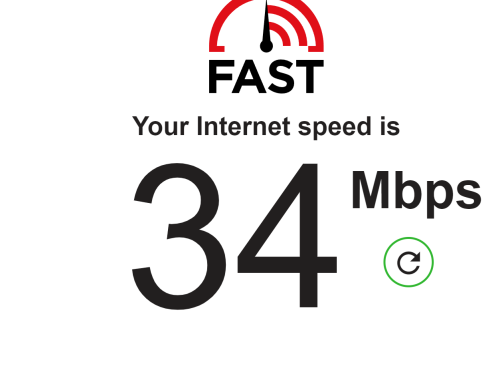
Anyone else suffering from slow speeds? I am in the Melawati area.
*
Here Kajang OK. Upload seems a bit slow.
user posted image
soonwai
post Aug 9 2022, 11:04 AM


********
All Stars
11,458 posts

Joined: Oct 2007
From: KL


QUOTE(westlife @ Aug 9 2022, 08:11 AM)
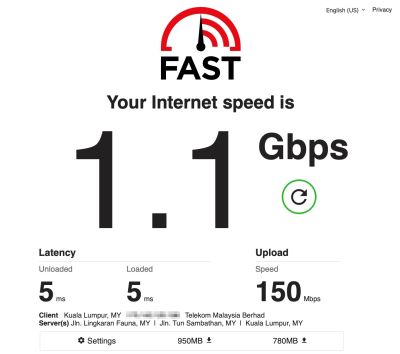
it is becos of wired backhaul of ur mesh thus u can get such high speed with such low latency rite?  tongue.gif
*
Nah, it's fast.com. I love it when ppl ask about speeds using fast.com and I reply in like. I always get gigabit speeds with it. Even more than my gigabit port can handle.

Latency is about right. My computer is wired straight to router so not influenced by the Deco X20. I can get even better, about 3ms, if I test from my Uncle's office in Bangsar. I guess bcos it's closer to wherever the test server is located.

This post has been edited by soonwai: Aug 9 2022, 11:27 AM
soonwai
post Aug 9 2022, 11:15 AM


********
All Stars
11,458 posts

Joined: Oct 2007
From: KL


QUOTE(zombie24 @ Aug 9 2022, 01:40 AM)
Nowadays I'm stuck on 175 ip...if reconnect or restart can't get any other ip....is this fair?
*
I kinda like the 175 range. Causing u probs?
soonwai
post Aug 9 2022, 01:48 PM


********
All Stars
11,458 posts

Joined: Oct 2007
From: KL


QUOTE(westlife @ Aug 9 2022, 12:10 PM)
U are using unifi 800Mbps but u can get this result? Same for speedtest.com?
*
Ya, but it's not really 1Gbps. I dunno how fast.com calculate it. It always gives very high numbers. TM Speedtest or Speedtest.net or my router gives a more correct 800-830Mbps result.
soonwai
post Aug 9 2022, 08:04 PM


********
All Stars
11,458 posts

Joined: Oct 2007
From: KL


QUOTE(zombie24 @ Aug 9 2022, 05:04 PM)
Are you using Google dns?
*
Yup 8.8.8.8 n 8.8.4.4. I usually also have both of Cloudflare’s. You just helped me realize that I forgotten to add them in after my recent router upgrade.
soonwai
post Aug 16 2022, 12:43 PM


********
All Stars
11,458 posts

Joined: Oct 2007
From: KL


QUOTE(kayroll @ Aug 16 2022, 08:36 AM)
Is it possible to attach 2 router from 1 modem. Mine was old fiberhome onu and got extra old dlink 850 cylinder router. Sorry not an it person ya  biggrin.gif
*
Can but only if you have a 2nd subscription from Unifi or Maxis etc... eg: Modem port 1 to router 1 using Unifi and modem port 2 to router 2 using Maxis.

This post has been edited by soonwai: Aug 16 2022, 12:44 PM
soonwai
post Aug 21 2022, 02:34 PM


********
All Stars
11,458 posts

Joined: Oct 2007
From: KL


QUOTE(Anime4000 @ Aug 14 2022, 04:20 PM)
Yesterday project, Unifi Biz when using 2.5Gb XPON ONU SFP:
user posted image
*
Wow that speed! Is this a bespoke plan from TM or a consequence of using your XPON SFP?
soonwai
post Aug 25 2022, 08:50 PM


********
All Stars
11,458 posts

Joined: Oct 2007
From: KL


QUOTE(azrin_kiko @ Aug 25 2022, 08:32 PM)
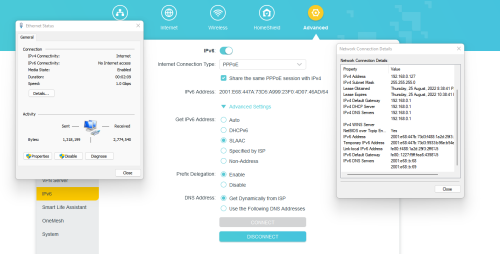
Hello guys, I just want to confirm with other Unifi Fibre users. Can you access websites using ipv6? My Unifi fibre connection can't access ipv6 now, previously can so configuration isn't the problem. I called TM and they have no idea what ipv6 is, proceeds to reset the port and nothing changed. Then they call me and claim that ipv6 is not supported and giving me option to charge me RM53 for the technician to come over to my house.

user posted image
*
IPv6 here ok.
Restart PC can or not? The prefix shown on your router ::447A:73D5 is different from the PC ::447B:73D3

This post has been edited by soonwai: Aug 25 2022, 08:57 PM
soonwai
post Aug 25 2022, 09:25 PM


********
All Stars
11,458 posts

Joined: Oct 2007
From: KL


QUOTE(azrin_kiko @ Aug 25 2022, 09:06 PM)
...

After restart still the same. Test using iphone also cannot, test using neighbour's unifi line (with permission) also cannot.
*
So weird, macam your router not advertising its 2001:E68:447A:73D5:: prefix.

Turn off router, turn off iPhone wifi, on router and connect back iPhone wifi, see what you get.

Most important the prefix in your router must be the same as the prefix that your iPhone gets. Then only will you have connectivity.
*the prefix is the first 4 groups of numbers. eg: from your router screenshot: 2001:E68:447A:73D5::
This will change when you restart the router.

Your router is TPLink?

Any TPLink sifus here? Is Prefix Delegation supposed to on or off? I feel that it should be off since the router isn't delegating prefixes. Or maybe it means something else in a TPLink. Maybe you can try disabling this.

This post has been edited by soonwai: Aug 25 2022, 09:50 PM
soonwai
post Aug 25 2022, 10:31 PM


********
All Stars
11,458 posts

Joined: Oct 2007
From: KL


QUOTE(azrin_kiko @ Aug 25 2022, 10:06 PM)
Still same ipv6 address.
*
Still same on your phone or still same on your router?
soonwai
post Aug 25 2022, 10:50 PM


********
All Stars
11,458 posts

Joined: Oct 2007
From: KL


QUOTE(kcl2006ch @ Aug 25 2022, 10:00 PM)
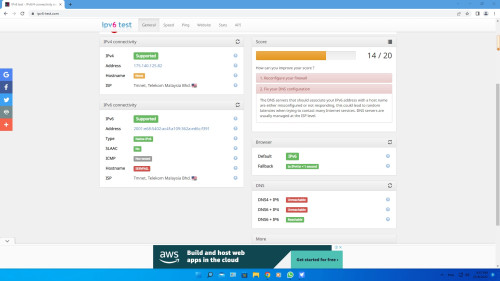
wired, my unifi can support ipv6 ,but it show so many error but no issue
user posted image
*
This website seems not too reliable. First time I tried it, fail all the ipv4 test. sweat.gif

Try refreshing the page.

I get 18/20 with the 2 hostname tests failing.
soonwai
post Aug 26 2022, 12:55 AM


********
All Stars
11,458 posts

Joined: Oct 2007
From: KL


QUOTE(reddevils500 @ Aug 26 2022, 12:44 AM)
My internet suddenly not working.

IP is now 172.21.xx.xx

Formerly 40.xx.xx.xx

Something went wrong with Unifi

It now says "your login id is invalid and will not be able to access your internet service at the moment"
*
172.21.x.x is TM's walled garden. You get this when your username/password can't be authenticated. Can be caused by:
1. Suspended account
2. Wrong username/password
3. Problem with TM's authentication server

Also one will only get the Walled Garden page if one is using TM's DNS.

Seems like you're not the only person facing this. There's another person in /k with the same problem. https://forum.lowyat.net/topic/5303731

This post has been edited by soonwai: Aug 26 2022, 01:34 AM
soonwai
post Aug 26 2022, 01:19 AM


********
All Stars
11,458 posts

Joined: Oct 2007
From: KL


QUOTE(reddevils500 @ Aug 26 2022, 01:02 AM)
My username/password is authenticated. But no internet coverage.
*
Try changing one character in your username and/or password to make them wrong. Do you get the same result?

This post has been edited by soonwai: Aug 26 2022, 01:19 AM
soonwai
post Aug 26 2022, 01:39 AM


********
All Stars
11,458 posts

Joined: Oct 2007
From: KL


QUOTE(firdausbhari @ Aug 26 2022, 01:26 AM)
got same issue. turns out my acc was suspended. straight away make payment. all back to normal.
*
Just curious, how long from due date was your acc suspended? I think TM's automated all that now so reinstatement is also very fast.
soonwai
post Aug 26 2022, 10:39 AM


********
All Stars
11,458 posts

Joined: Oct 2007
From: KL


QUOTE(azrin_kiko @ Aug 26 2022, 10:35 AM)
Yes, no ipv6 internet access on all my devices.
*
I mean the ipv6 address. Still the same address on your phone? What is it now? And what is the ipv6 address on the router?

Did you try disabling prefix delegation?
soonwai
post Aug 26 2022, 11:06 AM


********
All Stars
11,458 posts

Joined: Oct 2007
From: KL


QUOTE(azrin_kiko @ Aug 26 2022, 10:43 AM)
...
Prefix delegation disabled

...
Prefix delegation enabled
*
Prefix delegation: Enabled is the correct setting.

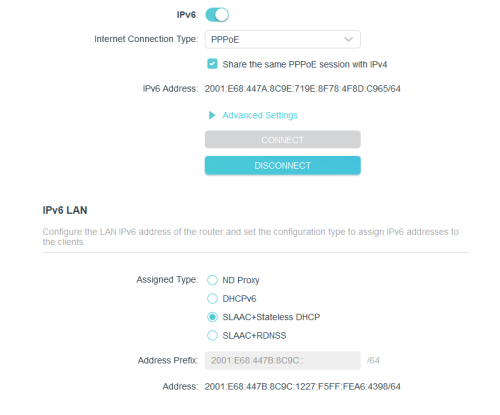
See the IPv6 LAN address? The first 4 groups of numbers ending in 8AD4 is the IPv6 prefix. Your phones and PCs should also have the same prefix. They get it from the router. Your previous screenshots showed that they had a different prefix which is why you don't IPv6 connectivity.

What is the IPv6 address on your phone now?

Change Get IPv6 Address to Auto or DHCPv6. Maybe someone with a TPLink router can confirm this.

This post has been edited by soonwai: Aug 26 2022, 11:11 AM
soonwai
post Aug 26 2022, 12:32 PM


********
All Stars
11,458 posts

Joined: Oct 2007
From: KL


QUOTE(azrin_kiko @ Aug 26 2022, 11:47 AM)
The ipv6 prefix still different.

user posted image

My devices got the 447B ipv6 address. Rather than 447A. I think TM messed up with the configuration because before this all working well.
*
Weird, like your router is getting a /56 from TM. Your's is business account or residential?

What's your setting for Advanced:Get IPv6 Address for the above screenshot? Try Auto and/or DHCPv6. On my Mikrotik router, I use DHCPv6 to get the prefix from TM.

This post has been edited by soonwai: Aug 26 2022, 12:45 PM

14 Pages « < 3 4 5 6 7 > » Top
Topic ClosedOptions
 

Change to:
| Lo-Fi Version
0.2737sec    1.44    7 queries    GZIP Disabled
Time is now: 13th December 2025 - 07:39 PM